
Discman D-125 - CD-Player SONY - Kostenlose Bedienungsanleitung
Finden Sie kostenlos die Bedienungsanleitung des Geräts Discman D-125 SONY als PDF.
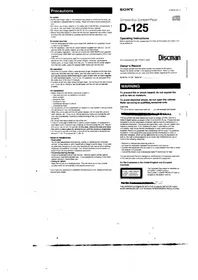


| Produkttyp | Tragbarer CD-Player |
| Abmessungen (ca.) | 127 x 28 x 130 mm |
| Gewicht (ca.) | 300 g (ohne Batterien) |
| Stromversorgung | 3 V Gleichspannung; 2x AA-Batterien oder optionaler Netzadapter |
| Hauptfunktionen | CD-Wiedergabe, Zufallswiedergabe, Wiederholfunktion, Anti-Shock-System |
| Kopfhörerausgang | 3,5 mm Klinkenstecker |
| Reinigung und Pflege | Linsenreinigung mit weichem, fusselfreiem Tuch; Gehäuse mit mildem Reinigungsmittel |
| Sicherheitshinweise | Laserprodukt Klasse 1; nicht in direktem Sonnenlicht lagern; Reparatur nur durch Fachpersonal |
| Ersatzteile und Reparatur | Ersatzteile über autorisierte Sony-Servicezentren; Eigenreparatur nicht empfohlen |
| Allgemeine Informationen | Farbe: Silber/Schwarz; Betriebstemperatur: 5–35 °C |
Häufig gestellte Fragen - Discman D-125 SONY
Benutzerfragen zu Discman D-125 SONY
0 Frage zu diesem Gerät. Beantworten Sie die, die Sie kennen, oder stellen Sie Ihre eigene.
Eine neue Frage zu diesem Gerät stellen
Laden Sie die Anleitung für Ihr CD-Player kostenlos im PDF-Format! Finden Sie Ihr Handbuch Discman D-125 - SONY und nehmen Sie Ihr elektronisches Gerät wieder in die Hand. Auf dieser Seite sind alle Dokumente veröffentlicht, die für die Verwendung Ihres Geräts notwendig sind. Discman D-125 von der Marke SONY.
BEDIENUNGSANLEITUNG Discman D-125 SONY
Vorsichtsmaßnahmen
Zur Sicherheit
- Da der in diesem CD-Player verwendete Laserstrahl für die Augen schädlich ist, versuchen Sie nicht, das Gehäuse zu zerlegen. Überlassen Sie Wartungsarbeiten nur qualifiziertem Personal.
- Legen Sie keine Fremdkörper in den Sicherheitsschlitz im Disc-Fach. Wenn Sie dies tun, kann der Laserstrahl beim Öffnen des Deckels austreten.
- Stecken Sie keine Fremdkörper in die DC IN 4,5 V (externer Stromanschluss) Buchse.
- Falls feste Gegenstände oder Flüssigkeiten in das Gerät gelangen, trennen Sie die Stromversorgung und lassen Sie das Gerät von qualifiziertem Personal überprüfen, bevor Sie es weiter verwenden.
Zu den Stromquellen
- Verwenden Sie den wiederaufladbaren Akku (mitgeliefert), Batterien (nicht mitgeliefert), Haushaltsstrom oder eine Autobatterie.
- Für Wechselstrombetrieb: Verwenden Sie das mit diesem Gerät gelieferte Netzteil. Verwenden Sie kein anderes Netzteil, da dies zu Fehlfunktionen führen kann.
- Für Autobatteriebetrieb: Verwenden Sie den Auto-Halterungsarm CPM-300PK (nicht mitgeliefert) oder die Halterungsplatte CPM-300P (nicht mitgeliefert) und das Auto-Anschluss-Set CPA-4 (nicht mitgeliefert).
- Wenn das Gerät längere Zeit nicht verwendet wird, trennen Sie unbedingt die Stromversorgung (Netzteil, Batterien, wiederaufladbarer Akku oder Halterungsplatte) vom Gerät. Um das Netzteil aus der Steckdose zu ziehen, fassen Sie das Netzteil selbst an; ziehen Sie niemals am Kabel.
Zum Betrieb
- Da das CD-System einen großen Dynamikbereich bietet, werden die Spitzen der hochpegeligen Eingänge mit hoher Wiedergabetreue aufgezeichnet, und der Rauschpegel ist sehr niedrig. Drehen Sie die Lautstärke nicht auf, während Sie einen Teil einer Disc ohne Audiosignale oder mit sehr niedrigen Eingangspegeln hören. Wenn Sie dies tun, können die Lautsprecher beschädigt werden, wenn der Spitzenpegel des Klangs abgespielt wird.
- Die Linse auf dem Disc-Tisch sollte sauber gehalten werden. Berühren Sie die Linse nicht und pusten Sie nicht darauf. Wenn Sie dies tun, kann die Linse beschädigt werden und das Gerät funktioniert nicht ordnungsgemäß.
Zur Installation
- Installieren Sie das Gerät niemals an Orten, an denen es folgenden Bedingungen ausgesetzt wäre:
- Wärmequellen wie Heizkörpern oder Luftkanälen.
- direktem Sonnenlicht.
- übermäßigem Staub.
- Feuchtigkeit oder Regen.
- mechanischen Vibrationen oder Stößen.
- einer unebenen Oberfläche.
- Stellen Sie das Gerät nicht auf ein Armaturenbrett und lassen Sie es nicht in einem in der Sonne geparkten Auto liegen, da die Temperatur übermäßig ansteigen kann.
- Wenn das Gerät mit dem Netzteil verwendet wird, wickeln Sie es nicht in ein Tuch, eine Decke usw. Wenn Sie dies tun, kann die Temperatur im Inneren und Äußeren des Geräts erheblich ansteigen, was zu Fehlfunktionen des Geräts oder schweren Unfällen führen kann.
- Legen Sie keine schweren Gegenstände auf das Gerät.
- Wenn das Gerät direkt von einem kalten an einen warmen Ort gebracht wird oder in einem sehr feuchten Raum aufgestellt wird, kann Feuchtigkeit auf der Linse im Inneren des Geräts kondensieren. Sollte dies auftreten, funktioniert das Gerät nicht. In diesem Fall entfernen Sie die Disc und lassen Sie das Gerät mehrere Stunden an einem warmen Ort, bis die Feuchtigkeit verdunstet ist.
- Für einen optimalen Betrieb sollte das Gerät keinen Temperaturen unter 5 °C (41 °F) oder über 35 °C (95 °F) ausgesetzt werden.
Hinweise zu Kopfhörern
- Verkehrssicherheit
Verwenden Sie Kopfhörer nicht beim Autofahren, Radfahren oder beim Bedienen eines motorisierten Fahrzeugs. Dies kann eine Verkehrsgefahr darstellen und ist in einigen Gebieten illegal. Es kann auch potenziell gefährlich sein, Ihre Kopfhörer beim Gehen mit hoher Lautstärke zu verwenden, insbesondere an Fußgängerüberwegen. Sie sollten äußerste Vorsicht walten lassen oder die Verwendung in potenziell gefährlichen Situationen einstellen.
• Verhinderung von Gehörschäden
Vermeiden Sie die Verwendung von Kopfhörern bei hoher Lautstärke. Hörexperten raten von kontinuierlichem, lauten und längerem Spielen ab. Wenn Sie ein Klingeln in den Ohren bemerken, reduzieren Sie die Lautstärke oder stellen Sie die Verwendung ein.
• Rücksicht auf andere
Halten Sie die Lautstärke auf einem moderaten Niveau. So können Sie Umgebungsgeräusche hören und Rücksicht auf die Menschen in Ihrer Umgebung nehmen.
Wenn Sie Fragen oder Probleme mit Ihrem Gerät haben, wenden Sie sich bitte an Ihren nächsten Sony-Händler.
SONY.
Compact Disc Compact Player

D-125
Bedienungsanleitung
Bitte lesen Sie diese Anleitung vor der Inbetriebnahme des Geräts vollständig durch und bewahren Sie sie für späteres Nachschlagen auf.
Sony Corporation © 1993 Gedruckt in Japan
Discman
Besitzerregistrierung
Die Modellnummer und die Seriennummer befinden sich auf der Unterseite. Notieren Sie die Seriennummer im unten vorgesehenen Feld. Beziehen Sie sich auf diese Nummern, wenn Sie sich wegen dieses Produkts an Ihren Sony-Händler wenden.
Modell-Nr. D-125 Serien-Nr.
WARNUNG
Um Brand- oder Stromschlaggefahr zu vermeiden, setzen Sie das Gerät nicht Regen oder Feuchtigkeit aus.
Um einen elektrischen Schlag zu vermeiden, öffnen Sie nicht das Gehäuse. Überlassen Sie Wartungsarbeiten nur qualifiziertem Personal.
VORSICHT
Die Verwendung optischer Instrumente mit diesem Produkt erhöht die Gefahr für die Augen.
Dieses Gerät wurde getestet und entspricht den Grenzwerten für ein digitales Gerät der Klasse B gemäß Teil 15 der FCC-Bestimmungen. Diese Grenzwerte sollen einen angemessenen Schutz gegen schädliche Störungen in einer Wohnanlage bieten. Dieses Gerät erzeugt, verwendet und kann Hochfrequenzenergie ausstrahlen und kann, wenn es nicht gemäß den Anweisungen installiert und verwendet wird, schädliche Störungen des Funkverkehrs verursachen. Es gibt jedoch keine Garantie, dass in einer bestimmten Installation keine Störungen auftreten. Wenn dieses Gerät schädliche Störungen des Radio- oder Fernsehempfangs verursacht, was durch Ein- und Ausschalten des Geräts festgestellt werden kann, wird der Benutzer aufgefordert, die Störungen durch eine oder mehrere der folgenden Maßnahmen zu beheben:
- Richten Sie die Empfangsantenne neu aus oder stellen Sie sie an einen anderen Ort.
- Vergrößern Sie den Abstand zwischen dem Gerät und dem Empfänger.
- Schließen Sie das Gerät an eine Steckdose an, die zu einem anderen Stromkreis gehört als der des Empfängers.
- Wenden Sie sich an den Händler oder einen erfahrenen Radio-/Fernsehtechniker.
Beachten Sie, dass Änderungen oder Modifikationen, die nicht ausdrücklich in dieser Anleitung genehmigt sind, Ihre Berechtigung zum Betrieb dieses Geräts aufheben können.
Für Kunden im Vereinigten Königreich und in europäischen Ländern
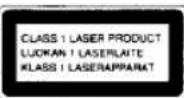
Dieser CD-Player ist als LASERPRODUKT DER KLASSE 1 klassifiziert. Das Etikett "LASERPRODUKT DER KLASSE 1" befindet sich auf der Unterseite des Geräts.
Für Kunden in Kanada
DIESES GERÄT ENTSPRICHT DEN GRENZWERTEN DER KLASSE B FÜR FUNKSTÖRAUSSENDUNGEN GEMÄSS DEN FUNKSTÖRVORSCHRIFTEN.
Wartung
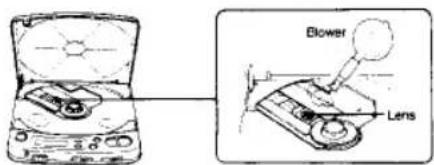
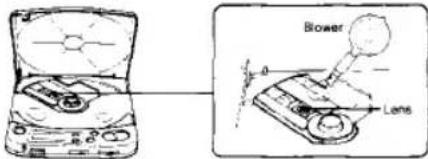
Wenn Sie versehentlich die Linse mit schmutzigen Fingern berührt haben oder wenn Staub auf der Linse den ordnungsgemäßen Betrieb verhindert, öffnen Sie den Deckel des Disc-Fachs und reinigen Sie die Linse mit einem Linsenreinigungsset (KK-9, nicht im Lieferumfang enthalten).
Reinigen des Kopfhörersteckers

Halten Sie den Stecker Ihrer Kopfhörer sauber, um einen optimalen Klang zu erzielen. Wischen Sie ihn mit einem trockenen, weichen Tuch ab.
Reinigen des Gehäuses

Reinigen Sie das Gehäuse mit einem weichen Tuch, das leicht mit Wasser oder einer milden Reinigungslösung angefeuchtet ist. Verwenden Sie keine Scheuermittel, Scheuerpulver oder Lösungsmittel wie Alkohol oder Benzin, da diese die Oberfläche des Gehäuses beschädigen können.
Hinweise zu Compact Discs
- Reinigen Sie die Disc vor dem Abspielen mit einem Reinigungstuch. Wischen Sie die Disc von der Mitte nach außen.
- Verwenden Sie keine Lösungsmittel wie Benzin, Verdünner, handelsübliche Reiniger oder Antistatiksprays, die für analoge Schallplatten bestimmt sind.
- Setzen Sie die Disc nicht direktem Sonnenlicht oder Wärmequellen wie heißen Luftkanälen aus, und lassen Sie sie nicht in einem Auto liegen, das in direktem Sonnenlicht geparkt ist, da die Temperatur im Auto erheblich ansteigen kann. Bewahren Sie die Disc nach dem Abspielen in ihrer Hülle auf.
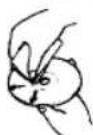
Wenn die Disc Kratzer, Schmutz oder Fingerabdrücke aufweist, kann dies zu Spurfehlern führen.

Halten Sie die Disc am Rand.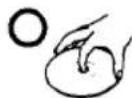
Berühren Sie die Oberfläche nicht.
Kleben Sie kein Papier oder Klebeband auf und schreiben Sie nichts auf die Oberfläche.
Lage und Funktion der Bedienelemente
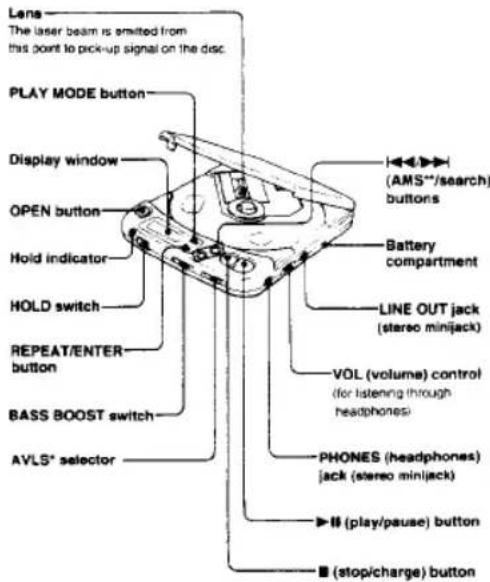
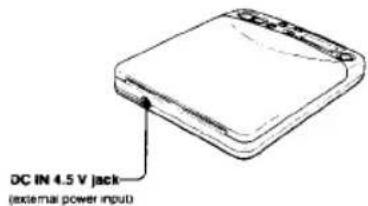
AVLS Automatisches Lautstärke-Begrenzungssystem AMS Automatischer Musik-Sensor
Allgemeines
Stromversorgung
Mitgeliefert
• DC 2,4 V aufladbarer Akku - DC IN 4,5 V Buchse akzeptiert das Sony Netzteil für den Betrieb mit:
| Where purchased | Operating voltage |
| European countries | 220 - 230 V AC, 50 Hz |
| U.S.A., Canada | 120 V AC, 60 Hz |
| United Kingdom | 240 V AC, 50 Hz |
| Other countries | 100 - 240 V AC, 50/60 Hz |
Nicht mitgeliefert:
- DC IN 4,5 V akzeptiert die Sony CPM-300P Montageplatte und den CPM-300PK Montagearm für den Betrieb mit Autobatterie.
- DC 3 V zwei AA (LR6) Alkaline-Batterien Ca. 132 x 30,2 x 155 mm (5 ½ x 1 ½ x 6 ½ Zoll) (Breite) inkl. vorstehender Teile und Bedienelemente Ca. 350 g (12,4 oz.) inkl. Akku Netzteil (1) Akku (1) Verbindungskabel (Klinkenstecker × 2 ↔ Stereo-Miniklinke Stereo-Kopfhörer (1))
Nicht mitgeliefertes Zubehör
Plattenarm CPM-300A Montageplatte CFM-300P Montagearm CPM-300PK Montagesatz CPM-300PC Montagesatz CPM-300CK Auto-Anschlussset CPA-4 Autobatteriekabel DCC-E145L Aktivlautsprechersystem SRS-58 Akku BP-DM10
Ihr Händler führt möglicherweise nicht alle oben aufgeführten Zubehörteile. Bitte fragen Sie den Händler nach detaillierten Informationen über das Zubehör in Ihrem Land.
Hinweis
Dieses Gerät entspricht der EG-Richtlinie 87/308/EWG bezüglich der Störunterdrückung.
Design und technische Daten können ohne Vorankündigung geändert werden.
Stromquellen

Das wiederaufladbare Akkupack wird mit dem D-125 geliefert.
Laden Sie den Akku beim ersten Gebrauch unbedingt 3 Stunden lang auf.
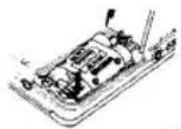
Anbringen des Akkus
Öffnen Sie den Deckel und setzen Sie den Akku wie in der Abbildung neben dem Batteriefach gezeigt ein.
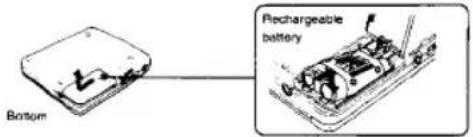
Entfernen des Akkus
Drücken Sie den Akku wie abgebildet.
Laden des Akkus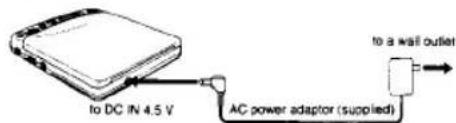
1 Schließen Sie das mitgelieferte Netzteil an, wenn sich das Gerät im Stopp-Modus befindet. 2 Drücken Sie die Taste ■ (Stopp/Laden), um den Ladevorgang zu starten. "CHG" erscheint im Display. Es ist kostenlos, wenn der Ladevorgang abgeschlossen ist. 3 Trennen Sie das Netzteil.
Hinweise zum Akku (Ni-Cd-Akku)
- Denken Sie daran, den Akku nach jedem Gebrauch aufzuladen. Wenn der Akku entladen bleibt, kann sich seine Lebensdauer verkürzen.
- Beim ersten Laden oder nach längerer Zeit kann sich die Spielzeit verkürzen. In diesem Fall laden und entladen Sie den Akku mehrmals. • Werfen Sie den Akku niemals ins Feuer.
- Kurzschließen Sie niemals die Akkuklemmen.
- Zerlegen Sie den Akku nicht. Wenn der Elektrolyt im Inneren des Akkus mit Kleidung oder Haut in Kontakt kommt, waschen Sie die betroffenen Stellen sofort mit Wasser.
Lebensdauer des Akkus
Ladezeit
CD-Wiedergabe
(Wenn das Gerät auf einer
3 Stunden (vollständig geladen)
ca. 3 Stunden
ebenen und stabilen Fläche verwendet wird.)
Wann der Akku ausgetauscht werden sollte
Wenn die Betriebszeit auch nach vollständigem Aufladen auf etwa die Hälfte reduziert ist, ersetzen Sie den Akku durch einen neuen BP-DM10 (nicht im Lieferumfang enthalten). Sie können den Akku BP-DM1 (nicht im Lieferumfang enthalten) nicht verwenden.
Verwendung mit Batterien
Legen Sie zwei AA-Alkalibatterien (LR6) gemäß den Markierungen und im Batteriefach ein.
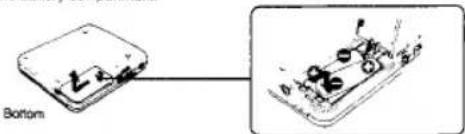
Zum Entnehmen der Batterien drücken Sie eine Batterie auf die gleiche Weise wie beim Entfernen des Akkus.
Hinweise zu Batterien
- Legen Sie Batterien mit korrekter Polarität ein.
- Verwenden Sie keine alten Batterien zusammen mit neuen oder verschiedene Batterietypen zusammen.
- Falls Elektrolyt aus der Batterie austreten sollte, wischen Sie die kontaminierten Stellen im Batteriefach mit einem Tuch ab und ersetzen Sie die alten Batterien durch neue. • Laden Sie die Batterien nicht auf.
- Wenn das Gerät längere Zeit nicht benutzt wird, entfernen Sie die Batterien.
Lebensdauer der Alkalibatterien
Wenn das Gerät auf einer ebenen und stabilen Fläche verwendet wird, ist eine kontinuierliche Wiedergabe von ca. 8 Stunden möglich.
Wenn die Anzeige □ aufleuchtet
Wenn die Batterien erschöpft sind, stoppt das Gerät seinen Betrieb. Wenn diese Anzeige aufleuchtet, laden Sie den Akku auf oder ersetzen Sie die Batterien durch neue.
Verwendung mit Netzstrom
Schließen Sie den mitgelieferten Netzadapter auf die gleiche Weise an wie beim Laden des Akkus.
Wenn das Gerät nicht benutzt wird, trennen Sie unbedingt den Netzadapter.
Für Kunden, deren Gerät mit einem Steckadapter geliefert wird: Verwenden Sie den Steckadapter, wenn der Netzadapter nicht in die Steckdose passt.
Hinweis zum Netzadapter
Verwenden Sie nur den mitgelieferten Netzadapter. Verwenden Sie niemals andere Adapter von Sony, da die Polarität des mitgelieferten Adapters entgegengesetzt zu herkömmlichen Adaptern ist. Verwenden Sie weder den mit anderen "Discman"-CD-Playern mitgelieferten Netzadapter noch den optionalen Netzadapter wie den AC-D6M.
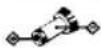
Polarität des Steckers (Einheitliche Polarität)
Verschiedene Verwendungsmöglichkeiten: Weitere Einzelheiten finden Sie in der Bedienungsanleitung der jeweiligen Geräte.
Hören im Auto
Sie können die Disc über ein Auto-Kassettendeck mit den folgenden Geräten hören.
- Montagearm CPM-300PK (CPM-300P + CPM-300A) • Plattenarm CPM-300A
- Montageplatte CPM-300P • Auto-Verbindungsset CPA-4 • Montageset CPM-300PC (CPM-300P + CPA-4)
- Montageset CPM-300CK (CPM-300A + CPM-300P + CPA-4)
Ihr Händler führt möglicherweise nicht alle oben aufgeführten Zubehörteile. Bitte fragen Sie den Händler nach detaillierten Informationen über das Zubehör in Ihrem Land.
Wenn Sie die Montageplatte CPM-300P verwenden
Befestigen Sie den mitgelieferten Auto-Montageadapter an der CPM-300P, bevor Sie den CD-Player installieren.
Wenn Sie den Motor ausschalten
Auch wenn die wiederaufladbare Batterie oder Alkaline-Batterien in das Gerät eingelegt sind, stoppt das Gerät den Betrieb, wenn Sie den Motor des Autos ausschalten. (Zündungsabhängige Funktion) Diese Funktion ist nicht bei jedem Automodell verfügbar. Falls nicht, drücken Sie ■, um den Betrieb zu stoppen.
Hinweis
Jede andere Verbindung als die mit dem CPA-4 kann Rauschen verursachen.
Anschluss an andere Geräte
• zur Überwachung des Tons über Lautsprecher • zur Aufnahme
![graph TD A["Amplifier\nCassette deck\nRadio cassette-recorder"] -->|to LINE IN| B["Switch"] C["• for recording\nCassette-recorder"] -->|to MIC| D["Switch"] B -->|to LINE OUT| E["Switch"] style A fill:#f9f,stroke:#333 style C fill:#f9f,stroke:#333 style B fill:#ccf,stroke:#333 style D fill:#ccf,strok…](/content/2026/05/805583/images/f49b52ed14325631dc24d6da9a12d9263d62f68886a8b954ef75d1be745f9d22.jpg)
Hinweise zum Anschluss
• Schalten Sie jedes Gerät aus, bevor Sie Verbindungen herstellen. - Stecken Sie den weißen Stecker in die L-Buchse (linker Kanal) und den roten Stecker in die R-Buchse (rechter Kanal) - Verbinden Sie den Ausgang von LINE OUT nicht mit den PHONO-Eingängen des Verstärkers - Stellen Sie sicher, dass die Stecker des Kabels fest in die Buchsen eingesteckt sind. Eine lose Verbindung kann ein Brummen verursachen. - Wenn das Gerät Störungen beim Radio- oder Fernsehempfang verursacht, schalten Sie das Gerät aus oder entfernen Sie es vom Empfänger.
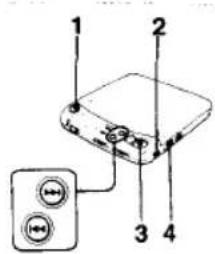
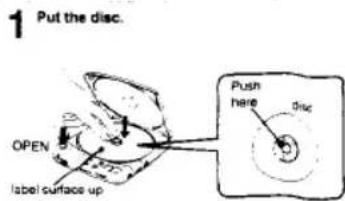
Drücken Sie die Disc vorsichtig, bis sie einrastet, sodass sie in die Halterung passt. Schließen Sie nach dem Einlegen der Disc den Deckel des Geräts.
2 Schließen Sie die mitgelieferten Kopfhörer an.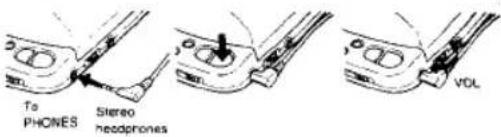
Weitere Bedienungsvorgänge
| Operation | Press |
| To pause | ▶II |
| To release pause | ▶II |
| To stop | ■Disc playing stops and the power is turned off automatically. |
| To locate the beginning of the current selection/previous selections—AMS | ▶▶ lightly/repeatedly |
| To locate the beginning of the next selection/selections—AMS | ▶▶ Highly/repeatedly |
| To go back at high speed (search) | Keep ▶▶ depressed |
| To go ahead at high speed (search) | Keep ▶▶ depressed |
- Das Gerät pausiert am Anfang des gewählten Titels, wenn Sie im Pausenmodus kurz ◀◀◀ oder ▶▶◀ drücken.
- Während der Programmwiedergabe arbeitet die AMS-Funktion in der programmierten Reihenfolge.
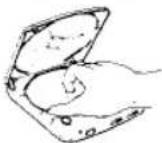
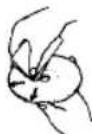
Entfernen der CD
Nehmen Sie die CD am Rand, während Sie den Drehpunkt vorsichtig wie abgebildet drücken.
Wiedergabe einer 8-cm-CD (3 Zoll)
Sie können sie ohne Adapter abspielen.
Für kräftigeren Bass
Stellen Sie BASS BOOST auf die gewünschte Position. Sie können dann einen kräftigen, bassverstärkten Klang genießen.
NORM MD MAX BASS BOOST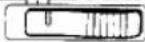
Hinweise
- Die Wirkung der BASS-BOOST-Funktion kann je nach Position des Lautstärkereglers oder dem Aufnahmepegel der CD abnehmen.
- Der Klang kann verzerrt oder verzerrt sein, wenn Sie die Lautstärke zu hoch einstellen. In diesem Fall drehen Sie die Lautstärke herunter.
Begrenzung der Lautstärke auf ein moderates Niveau
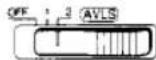
Der AVLS-Wahlschalter (Automatic Volume Limiter System) ermöglicht es Ihnen, die maximale Lautstärke Ihres Geräts zu begrenzen. - Wenn der AVLS-Wahlschalter auf Position 1 oder 2 steht, wird die Lautstärke auf einem moderaten Niveau gehalten, selbst wenn Sie versuchen, die Lautstärke höher zu drehen. - Wenn der AVLS-Wahlschalter auf Position 1 oder 2 steht, kann der Wiedergabeklang je nach Musik (insbesondere bei bassbetonten Passagen) verzerrt oder instabil sein. Wenn dies auftritt, drehen Sie die Lautstärke herunter. - Wenn der AVLS-Wahlschalter ausgeschaltet ist, können Sie die volle Lautstärke Ihres Geräts nutzen.
Verschiedene Wiedergabemodi
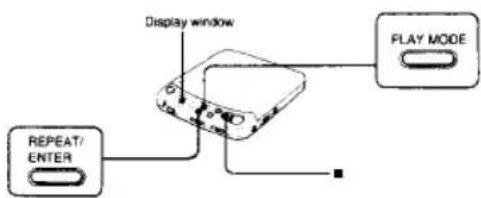
Dieses Gerät verfügt über 10 Wiedergabemodi: Intro-Wiedergabe, Einzelauswahl-Wiedergabe, Zufallswiedergabe (Shuffle), RMS* (Programm)-Wiedergabe, normale Wiedergabe und Wiederholungswiedergabe für jeden Modus. * RMS = Random Music Sensor
So ändern Sie den Modus
Drücken Sie während der Wiedergabe PLAY MODE. Der aktuelle Modus erscheint im Display.
Für wiederholte Wiedergabe (REPEAT-Wiedergabe)
Drücken Sie REPEAT/ENTER. "REPEAT" erscheint im Display. Drücken Sie erneut, um die Wiederholungswiedergabe abzubrechen.
So stoppen Sie die Disc
Drücken Sie ■.
Wiedergabe der gesamten Disc – Normale Wiedergabe
Es erscheint keine Anzeige im Display. Um die gesamte Disc zu wiederholen, drücken Sie REPEAT/ENTER.
Wiedergabe der ersten etwa zehn Sekunden aller Titel – Intro-Wiedergabe
1. Drücken Sie während der Wiedergabe PLAY MODE, bis "INTRO" im Display blinkt.
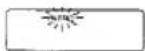
2. Drücken Sie ▶II. "INTRO" hört auf zu blinken und die Wiedergabe beginnt.
Um die Intro-Wiedergabe zu wiederholen, drücken Sie REPEAT/ENTER.
Um die Auswahl zu beenden, die während der INTRO-Wiedergabe ertönt, drücken Sie ▶II erneut bei der gewünschten Auswahl.
Nur eine Auswahl abspielen
Drücken Sie während der Wiedergabe PLAY MODE, bis "1" im Display erscheint.
Das Gerät spielt nur eine Auswahl ab und stoppt am Ende der Auswahl.
Um nur eine Auswahl wiederholt abzuspielen, drücken Sie REPEAT/ENTER.
Wiedergabe der Auswahlen in zufälliger Reihenfolge – Shuffle-Wiedergabe
Drücken Sie PLAY MODE, bis "SHUFFLE" im Display erscheint.
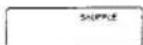
Die Wiedergabe beginnt mit der nächsten Auswahl. Um die Auswahlen in zufälliger Reihenfolge wiederholt abzuspielen, drücken Sie REPEAT/ENTER. Nachdem jede Auswahl in zufälliger Reihenfolge abgespielt wurde, werden sie neu gemischt und in einer anderen Reihenfolge wiederholt abgespielt.
Fehlerbehebung
Sollte nach den folgenden Überprüfungen weiterhin ein Problem bestehen, wenden Sie sich an Ihre nächste Sony-Serviceeinrichtung.
| Symptom | Cause and/or solution |
| Disc play does not start. | The disc is inserted upside down or incorrectlyInsert the disc correctly with the label surface up.Dusty or defective discDirty or dusty lensThe disc compartment lid is not closed.Moisture condensationLeave the unit in a warm place until the moisture evaporates.The AC power adaptor is not plugged into the wall pullet.The mount plate is not firmly connected to a cigarette lighter socket.The disc is not placed on a level surface.The HOLD switch is set to the direction of the arrow.When the 12 cm CD which contains many selections is replaced with a disc with a few selections (such as CD single or CDV, etc.), it may take more than 10 seconds before play starts.Weak rechargeable battery or alkaline batteries |
| No sound from the headphones | The headphones plug is not firmly connected to the PHONES jackAdjust the VOL control.Dirty plug. |
| No sound from the connected speakers | Check the connections.The amplifier is not turned on. |
| Skipping of sound | Dirty or defective discDirty lensStrong vibration |
| Disc play does not stop when you turn off the engine of the car. | Press to stop operation. |
| The "no disc" indication appears in the display window. | Place the CD with the label surface up.Replace the CD if the CD is badly damaged. |
| The "Hi dc in" indication appears in the display window. | Use the supplied AC power adaptor. |
| When using with batteries, the battery life is short. | Manganese batteries are used.Use alkaline batteries. |
Wartung

Wenn Sie die Linse versehentlich mit schmutzigen Fingern berührt haben oder Staub auf der Linse den ordnungsgemäßen Betrieb des Geräts verhindert, öffnen Sie den Deckel des Disc-Fachs und reinigen Sie die Linse mit einem Linsenreinigungsset (KK-9, nicht im Lieferumfang enthalten).
Reinigen des Kopfhörersteckers
Halten Sie den Stecker Ihrer Kopfhörer sauber, um einen optimalen Klang zu erzielen. Wischen Sie ihn mit einem trockenen, weichen Tuch ab.



Reinigen Sie das Gehäuse mit einem weichen Tuch, das leicht mit Wasser oder einer milden Reinigungslösung angefeuchtet ist. Verwenden Sie keine Scheuerschwämme, Scheuerpulver oder Lösungsmittel wie Alkohol oder Benzin, da diese die Oberfläche des Gehäuses beschädigen können.
Hinweise zu Compact Discs, siehe oben.
- Reinigen Sie die Disc vor dem Abspielen mit einem Reinigungstuch. Wischen Sie die Disc von der Mitte nach außen.
- Verwenden Sie keine Lösungsmittel wie Benzin, Verdünner, handelsübliche Reiniger oder Antistatik-Sprays, die für analoge Schallplatten bestimmt sind.
- Setzen Sie die Disc keiner direkten Sonneneinstrahlung oder Wärmequellen wie Heißluftkanälen aus, und lassen Sie sie nicht in einem in der Sonne geparkten Auto liegen, da die Temperatur im Auto erheblich ansteigen kann. - Bewahren Sie die Disc nach dem Abspielen in ihrer Hülle auf.
Wenn die Disc Kratzer, Schmutz oder Fingerabdrücke aufweist, kann dies zu Tracking-Fehlern führen.
Handhabung der Discs
Halten Sie die Disc am Rand.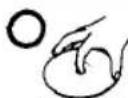
Nicht so: Berühren Sie die Oberfläche nicht.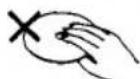
Nicht so: Kleben Sie kein Papier oder Klebeband auf und schreiben Sie nichts auf die Oberfläche.
Technische Daten
| System | Compact disc digital audio system |
| Laser diode properties | Material: GaAlAsWavelength: 4 x790 nmEmission duration: ContinuousLaser output: Less than 44.6 μW(This output is the value measured at a distance of 200 mm from the objective lens surface on the Optical Pick-up Block.) |
| Error correction | Sony Super Strategy Cross Interleave Read Solomon Code |
| O-A conversion | 1-ol quartz time-axis control |
| Frequency /response | 20 - 20,000 Hz; dB(measured by EIAJ CP-307) |
| Output (at 4.5 V input level) | Line output (stereo minjack)Output level 0.8 V rms at 50 kilohmsLoad impedance over 10 kilohmsHeadphones (stereo minjack)15 mW + 15 mW at 16 Ω |
Allgemein
Stromversorgung
Mitgeliefert:
• DC 2,4 V Akkupack
- DC IN 4,5 V Buchse akzeptiert den Sony Netzteil für den Betrieb mit:
| Where purchased | Operating voltage |
| European countries | 220 - 230 V AC, 50 Hz |
| U.S.A. Canada | 120 V AC, 60 Hz |
| United Kingdom | 240 V AC, 50 Hz |
| Other countries | 100 - 240 V AC, 50/60 Hz |
Abmessungen
Masse
Mitgeliefertes Zubehör
Nicht mitgeliefert
- DC IN 4,5 V akzeptiert die Sony CPM-300P Halterung und den CPM-300PK Haltearm für die Verwendung mit einer Autobatterie
• DC 3 V zwei AA (LR6) Alkalibatterien
Ca. 132 × 30,2 × 155 mm (B/H/T) inkl. vorstehender Teile und Bedienelemente
Ca. 350 g inkl. Akku
Netzteil (1)
Akku (1)
Verbindungskabel (Klinkenstecker × 2 → Stereoklinkenstecker) (1) Stereo-Kopfhörer (1)
Änderungen an Design und technischen Daten vorbehalten
- VORSICHTSMASSNAHMEN
- ZUR SICHERHEIT
- ZU DEN STROMQUELLEN
- ZUM BETRIEB
- ZUR INSTALLATION
- HINWEISE ZU KOPFHÖRERN
- VERKEHRSSICHERHEIT
- VERHINDERUNG VON GEHÖRSCHÄDEN
- RÜCKSICHT AUF ANDERE
- SONY
- D
- BEDIENUNGSANLEITUNG
- DISCMAN
- BESITZERREGISTRIERUNG
- WARNUNG
- VORSICHT
- FÜR KUNDEN IM VEREINIGTEN KÖNIGREICH UND IN EUROPÄISCHEN LÄNDERN
- FÜR KUNDEN IN KANADA
- WARTUNG
- REINIGEN DES KOPFHÖRERSTECKERS
- REINIGEN DES GEHÄUSES
- HINWEISE ZU COMPACT DISCS
- LAGE UND FUNKTION DER BEDIENELEMENTE
- ALLGEMEINES
- MITGELIEFERT
- NICHT MITGELIEFERT
- NICHT MITGELIEFERTES ZUBEHÖR
- HINWEIS
- STROMQUELLEN
- ANBRINGEN DES AKKUS
- HINWEISE ZUM AKKU (NI-CD-AKKU)
- LEBENSDAUER DES AKKUS
- WANN DER AKKU AUSGETAUSCHT WERDEN SOLLTE
- VERWENDUNG MIT BATTERIEN
- HINWEISE ZU BATTERIEN
- LEBENSDAUER DER ALKALIBATTERIEN
- WENN DIE ANZEIGE □ AUFLEUCHTET
- VERWENDUNG MIT NETZSTROM
- FÜR KUNDEN, DEREN GERÄT MIT EINEM STECKADAPTER GELIEFERT WIRD: VERWENDEN SIE DEN STECKADAPTER, WENN DER NETZADAPTER NICHT IN DIE STECKDOSE PASST
- HINWEIS ZUM NETZADAPTER
- VERSCHIEDENE VERWENDUNGSMÖGLICHKEITEN: WEITERE EINZELHEITEN FINDEN SIE IN DER BEDIENUNGSANLEITUNG DER JEWEILIGEN GERÄTE
- HÖREN IM AUTO
- WENN SIE DIE MONTAGEPLATTE CPM-300P VERWENDEN
- WENN SIE DEN MOTOR AUSSCHALTEN
- ANSCHLUSS AN ANDERE GERÄTE
- HINWEISE ZUM ANSCHLUSS
- ENTFERNEN DER CD
- WIEDERGABE EINER 8-CM-CD (3 ZOLL)
- FÜR KRÄFTIGEREN BASS
- HINWEISE
- BEGRENZUNG DER LAUTSTÄRKE AUF EIN MODERATES NIVEAU
- VERSCHIEDENE WIEDERGABEMODI
- SO ÄNDERN SIE DEN MODUS
- FÜR WIEDERHOLTE WIEDERGABE (REPEAT-WIEDERGABE)
- SO STOPPEN SIE DIE DISC
- WIEDERGABE DER GESAMTEN DISC – NORMALE WIEDERGABE
- WIEDERGABE DER ERSTEN ETWA ZEHN SEKUNDEN ALLER TITEL – INTRO-WIEDERGABE
- NUR EINE AUSWAHL ABSPIELEN
- WIEDERGABE DER AUSWAHLEN IN ZUFÄLLIGER REIHENFOLGE – SHUFFLE-WIEDERGABE
- FEHLERBEHEBUNG
- HINWEISE ZU COMPACT DISCS, SIEHE OBEN
- HANDHABUNG DER DISCS
- TECHNISCHE DATEN
- ALLGEMEIN
- ABMESSUNGEN
Marke : SONY
Modell : Discman D-125
Kategorie : CD-Player