
Discman D-321 - CD-Player SONY - Kostenlose Bedienungsanleitung
Finden Sie kostenlos die Bedienungsanleitung des Geräts Discman D-321 SONY als PDF.


| Produkttyp | CD-Player (Discman) |
| Modell | SONY Discman D-321 |
| Abmessungen (B x H x T) | ca. 132,5 x 25,9 x 155,3 mm (mit vorstehenden Teilen) |
| Gewicht | ca. 340 g (inkl. Akku) |
| Stromversorgung | Akku (mitgeliefert), 2x Mignon (AA/LR6) Alkaline, Netzteil (4,5 V Gleichstrom) |
| Akku-Typ | wiederaufladbarer Ni-Cd-Akku (BP-DM10, nicht im Lieferumfang) |
| Spielzeit (Akku) | ca. 2,5 h (ESP aus) / ca. 2 h (ESP an) |
| Spielzeit (2x Alkaline) | ca. 6 h (ESP aus) / ca. 4 h (ESP an) |
| Spielzeit (Akku + Batteriefach) | ca. 8,5 h (ESP aus) / ca. 6 h (ESP an) |
| Wiedergabemodi | Normal, INTRO PGM, Einzeltitel, SHUFFLE, RMS (Programm), 5 Wiederholmodi |
| ESP (Electronic Shock Protection) | ja, speichert ca. 3 Sekunden Musik zur Vermeidung von Aussetzern |
| DSP (Digital Signal Processing) | BASS, BASS, VOCAL, CAR (umschaltbar) |
| AVLS (Automatic Volume Limiter System) | ja, zwei Stufen zur Begrenzung der Lautstärke |
| Kopfhörerausgang | Stereoklinke (Ω REMOTE), 4 mW + 4 mW an 16 Ω |
| Line-Ausgang | Stereoklinke (OPTICAL (DIGITAL)/LINE OUT), 0,85 V eff. an 50 kΩ |
| Optischer Digitalausgang | ja (OPTICAL (DIGITAL)/LINE OUT), Wellenlänge 630–690 nm |
| Frequenzgang | 20–20.000 Hz (gemessen nach EIAJ CP-307) |
| HOLD-Schalter | ja, verhindert versehentliche Tastendrücke |
| RESUME-Funktion | ja (Schalter), setzt Wiedergabe an der zuletzt gestoppten Stelle fort |
| Linsenreinigung | mit Reinigungsset (KK-DM1, nicht im Lieferumfang) |
| Mitgeliefertes Zubehör | Netzteil, Akku, Batteriefach, Verbindungskabel, Stereo-Kopfhörer, Tragetasche |
| Sicherheitshinweise | Nicht öffnen, vor Feuchtigkeit schützen, nur qualifiziertes Personal |
Häufig gestellte Fragen - Discman D-321 SONY
Benutzerfragen zu Discman D-321 SONY
0 Frage zu diesem Gerät. Beantworten Sie die, die Sie kennen, oder stellen Sie Ihre eigene.
Eine neue Frage zu diesem Gerät stellen
Laden Sie die Anleitung für Ihr CD-Player kostenlos im PDF-Format! Finden Sie Ihr Handbuch Discman D-321 - SONY und nehmen Sie Ihr elektronisches Gerät wieder in die Hand. Auf dieser Seite sind alle Dokumente veröffentlicht, die für die Verwendung Ihres Geräts notwendig sind. Discman D-321 von der Marke SONY.
BEDIENUNGSANLEITUNG Discman D-321 SONY
D-321
Bedienungsanleitung
Bitte lesen Sie diese Anleitung vor der Inbetriebnahme des Geräts sorgfältig durch und bewahren Sie sie für späteres Nachschlagen auf.
Sony Corporation © 1993 Gedruckt in Japan
Discman
Besitzer-Notiz
Die Modellnummer und die Seriennummer befinden sich an der Unterseite.
Notieren Sie die Seriennummer im dafür vorgesehenen Feld unten. Beziehen Sie sich auf diese Nummern, wenn Sie Ihren Sony-Händler zu diesem Produkt kontaktieren.
Modell-Nr. D-321 Serien-Nr.
WARNUNG
Um Brand- oder Stromschlaggefahr zu vermeiden, setzen Sie das Gerät nicht Regen oder Feuchtigkeit aus.
Um einen elektrischen Schlag zu vermeiden, öffnen Sie nicht das Gehäuse. Überlassen Sie Wartungsarbeiten nur qualifiziertem Personal.
VORSICHT
Die Verwendung optischer Instrumente mit diesem Produkt erhöht die Gefahr von Augenschäden.

Dieses Gerät wurde getestet und entspricht den Grenzwerten für ein digitales Gerät der Klasse B gemäß Teil 15 der FCC-Bestimmungen. Diese Grenzwerte sollen einen angemessenen Schutz vor schädlichen Störungen in einer Wohnanlage bieten. Dieses Gerät erzeugt, verwendet und kann Hochfrequenzenergie ausstrahlen und kann, wenn es nicht gemäß den Anweisungen installiert und verwendet wird, schädliche Störungen des Funkverkehrs verursachen. Es gibt jedoch keine Garantie, dass in einer bestimmten Installation keine Störungen auftreten. Wenn dieses Gerät schädliche Störungen des Radio- oder Fernsehempfangs verursacht, was durch Ein- und Ausschalten des Geräts festgestellt werden kann, wird der Benutzer ermutigt, die Störungen durch eine oder mehrere der folgenden Maßnahmen zu beheben:
- Richten Sie die Empfangsantenne neu aus oder stellen Sie sie an einen anderen Ort.
- Vergrößern Sie den Abstand zwischen dem Gerät und dem Empfänger.
- Schließen Sie das Gerät an eine Steckdose an, die sich an einem anderen Stromkreis befindet als der, an den der Empfänger angeschlossen ist.
- Wenden Sie sich an den Händler oder einen erfahrenen Radio-/Fernsehtechniker um Hilfe.
Beachten Sie, dass Änderungen oder Modifikationen, die nicht ausdrücklich in dieser Anleitung genehmigt sind, Ihre Berechtigung zum Betrieb dieses Geräts aufheben können.
Für Kunden im Vereinigten Königreich
Dieser CD-Player ist als LASERPRODUKT DER KLASSE 1 klassifiziert. Das Etikett "LASERPRODUKT DER KLASSE 1" befindet sich an der Unterseite des Geräts.
Für Kunden in Kanada
DIESES GERÄT ENTSPRICHT DEN GRENZWERTEN DER KLASSE B FÜR FUNKSTÖRAUSSENDUNGEN GEMÄSS DEN FUNKSTÖRVORSCHRIFTEN.
Stromquellen

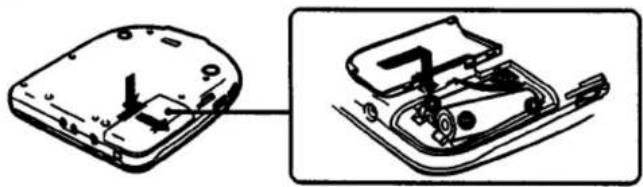
Wenn Sie den wiederaufladbaren Akku (mitgeliefert) zum ersten Mal verwenden, laden Sie ihn unbedingt auf. Öffnen Sie den Deckel des Batteriefachs und legen Sie den wiederaufladbaren Akku wie neben dem Batteriefach abgebildet ein.
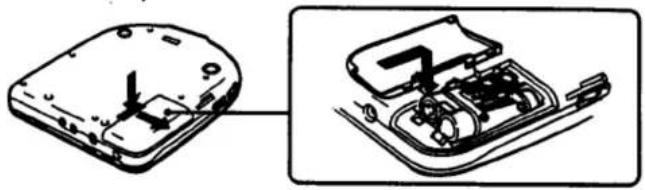
Laden des wiederaufladbaren Akkus
Legen Sie den wiederaufladbaren Akku ein und schließen Sie den mitgelieferten Netzadapter an, wenn sich das Gerät im Stoppmodus befindet. Der Ladevorgang beginnt.
Die Anzeige "CHG" erscheint im Display und die Segmente der Anzeige 0000 leuchten nacheinander auf. Sie erlöschen, wenn der Ladevorgang abgeschlossen ist. Trennen Sie den Netzadapter vom Gerät und von der Steckdose.
Wann der wiederaufladbare Akku ersetzt werden sollte
Wenn die Betriebsdauer auch nach vollständigem Aufladen um etwa die Hälfte abnimmt, ersetzen Sie den Akku durch einen neuen BP-DM10 (nicht im Lieferumfang enthalten). Sie können den Akku BP-DM1 (nicht im Lieferumfang enthalten) nicht verwenden.
Hinweise zum Akku (Ni-Cd-Akku)
- Verwenden Sie unbedingt den mitgelieferten Netzadapter.
- Denken Sie daran, den Akku nach jedem Gebrauch aufzuladen. Wenn der Akku entladen bleibt, kann sich seine Lebensdauer verkürzen.
- Beim ersten Aufladen oder nach längerer Zeit kann sich die Spielzeit verkürzen. In diesem Fall laden und entladen Sie den Akku mehrmals.
- Lagern Sie den Akku bei einer Temperatur zwischen 5 °C (41 °F) und 35 °C (95 °F), damit er optimal funktioniert.
- Werfen Sie den Akku niemals ins Feuer.
- Wenn ein Metallgegenstand den Metallteil des Akkus berührt, kann übermäßige Hitze entstehen, was gefährlich ist. Tragen Sie den Akku nicht in einer Tasche zusammen mit Metallgegenständen wie z. B. einem Schlüsselbund.
- Zerlegen Sie den Akku nicht. Wenn das Elektrolyt im Inneren des Akkus mit Kleidung oder Haut in Kontakt kommt, waschen Sie die betroffenen Gegenstände sofort mit Wasser.
Das Gerät kann warm werden
Die Unterseite des Geräts kann während des Betriebs warm werden, was normal ist. Wenn es ungewöhnlich warm wird, trennen Sie den Netzadapter und wenden Sie sich an Ihren Sony-Händler.

Legen Sie zwei AA-Batterien (LR6) in das Batteriefach ein.
Verwendung des Batteriegehäuses (im Lieferumfang enthalten)
Befestigen Sie das Batteriegehäuse am Gerät und legen Sie zwei AA-Batterien (LR6) ein.
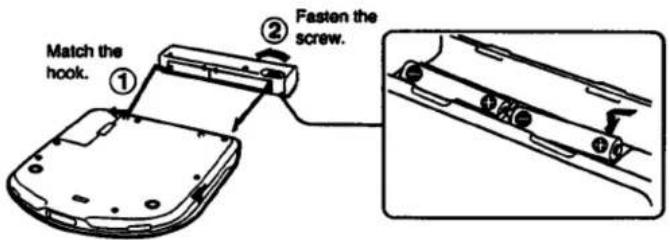
Sie können das Gerät länger verwenden, indem Sie das Batteriegehäuse zusätzlich zu den Akkus im Batteriefach des Geräts verwenden. Die Batterien im Batteriegehäuse und die Akkus im Batteriefach werden gemeinsam entladen.
Hinweise zu Batterien
- Legen Sie die Batterien mit korrekter Polarität ein.
- Verwenden Sie nicht alte Batterien zusammen mit neuen oder verschiedene Batterietypen zusammen.
- Falls Elektrolyt aus der Batterie austreten sollte, wischen Sie die betroffenen Stellen im Batteriefach mit einem Tuch ab und ersetzen Sie die alten Batterien durch neue.
- Laden Sie die Batterien nicht auf.
- Wenn das Gerät längere Zeit nicht benutzt wird, entfernen Sie die Batterien.
Hinweis zur Anzeige 0001
Wenn die Batterie schwach wird, erlöschen die Segmente der Anzeige 000 nacheinander von links. Wenn das letzte Segment aufleuchtet, betrachten Sie dies als Kriterium, wann Sie den Akku aufladen oder die Batterien ersetzen sollten.
Wenn die Batterie erschöpft ist, erscheint die Anzeige "Lo batt" im Display. Drücken Sie nicht wiederholt auf ▶, wenn diese Anzeige leuchtet, da das Gerät sonst möglicherweise falsch funktioniert. Laden Sie den Akku auf oder ersetzen Sie die Batterien.
Wenn Sie das Batteriefach verwenden, ersetzen Sie die Batterien darin, wenn Sie den Akku aufladen oder die Batterien im Gerät ersetzen.
Lebensdauer des Akkus oder der Alkalibatterien
| CD playing | ||
| ESP: not active | ESP: active | |
| Rechargeable battery(charged for 2 hours maximum*) | approx. 2.5 hours | approx. 2 hours |
| Two alkaline batteries orBattery case (two alkaline batteries) | approx. 6 hours | approx. 4 hours |
| Rechargeable battery +Battery case (two alkaline batteries) | approx. 8.5 hours | approx. 6 hours |
| Two alkaline batteries +Battery case (two alkaline batteries) | approx. 16 hours | approx. 11 hours |
(Wenn das Gerät auf einer ebenen und stabilen Oberfläche verwendet wird.)
* Die Ladezeit variiert je nach Verwendung des Akkus.
Die Batterielebensdauer verkürzt sich, wenn das digitale Verbindungskabel an die OPTICAL (DIGITAL)/LINE OUT-Buchse angeschlossen ist. Wenn Sie das digitale Verbindungskabel nicht verwenden, trennen Sie es von der Buchse.

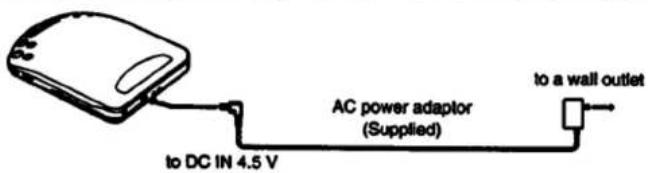
Schließen Sie das mitgelieferte Netzteil zum Laden des Akkus wie abgebildet an.
Wenn das Gerät nicht verwendet wird, trennen Sie unbedingt den Netzadapter.
Für Kunden, deren Gerät mit einem Steckeradapter geliefert wird
Verwenden Sie den Steckeradapter, wenn der Netzadapter nicht in die Steckdose passt.
Hinweis zum Netzadapter
Verwenden Sie nur den mitgelieferten Netzadapter (für DC 4,5 V, einheitliche Polarität). Wenn Sie andere Netzadapter verwenden, kann das Gerät beschädigt werden. Verwenden Sie nicht den Netzadapter, der mit anderen
"Discman"-CD-Playern mit DC-IN 6V- oder 9V-Buchse geliefert wurde, noch einen optionalen Netzadapter für DC 6V oder 9V.
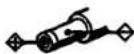
Polarität des Steckers (Einheitliche Polarität)
Verschiedene Wiedergabemodi
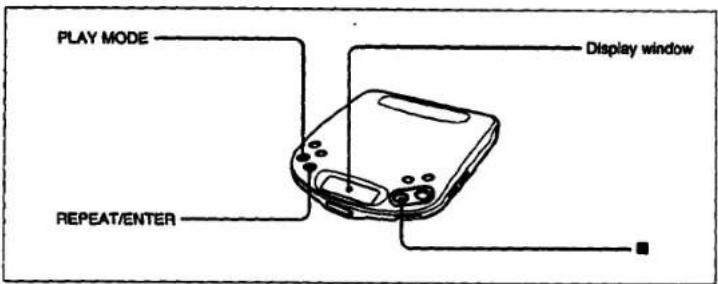
Dieses Gerät verfügt über 10 Wiedergabemodi: normale Wiedergabe, INTRO-PGM-Wiedergabe, Einzeltitelwiedergabe, SHUFFLE-Wiedergabe, RMS*-Programmwiedergabe und 5 Wiederholungswiedergaben für jeden Modus.
* RMS: Random Music Sensor
So ändern Sie den Modus
Drücken Sie während der Wiedergabe PLAY MODE. Der aktuelle Modus erscheint im Display.
Für wiederholte Wiedergabe (REPEAT-Wiedergabe)
Drücken Sie REPEAT/ENTER. / erscheint im Display. Drücken Sie die Taste erneut, um die Wiederholungswiedergabe abzubrechen.
So stoppen Sie die Disc
Drücken Sie ■.
Hinweis
Die Taste PLAY MODE oder REPEAT/ENTER funktioniert möglicherweise erst 3 Sekunden vor Ende des Titels, wenn das ESP-System aktiv ist.
Abspielen der gesamten Disc — Normalwiedergabe
Im Displayfenster wird kein Wiedergabemodus angezeigt.
Um die gesamte Disc zu wiederholen, drücken Sie REPEAT/ENTER.
Disc-Wiedergabe
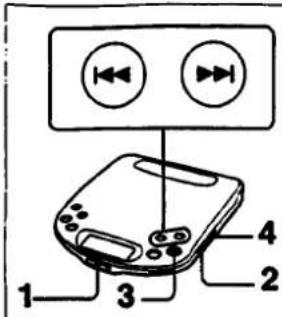
1 Öffnen Sie den Deckel und legen Sie die Disc ein.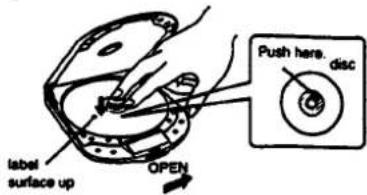
Drücken Sie die Disc vorsichtig, bis sie einrastet, sodass sie in die Halterung passt. Schließen Sie nach dem Einlegen der Disc den Deckel des Geräts.
2 Schließen Sie die mitgelieferten Kopfhörer an.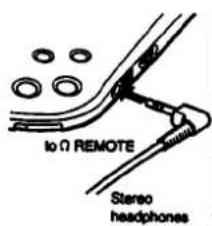
3 Drücken Sie ▶II.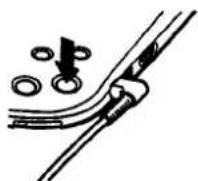
4 Stellen Sie die Lautstärke ein.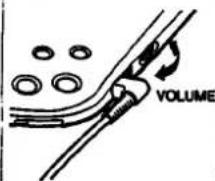
Weitere Bedienvorgänge
| Operations | Press | The following sound is heard. |
| To pause | ▶▶ | Very shirt beep sound is repeated until the pause is released. |
| To release pause | ▶▶ | Very shirt beep sound is heard once. |
| To stop | ▶ | Long beep sound is heard. Disc playing stops and the power is turnec off automatically. |
| To locate the beginning of the current track/previous tracks — AMS | ▶▶▶ lightly/repeatedly | Very shirt beep sound is heard three times. |
| To locate the beginning of the next track/tracks — AMS | ▶▶▶ lightly/repeatedly | Very short beep sound is heard twice. |
| To go back at high speed (search) | Keep ▶▶▶ depressed. | No sound is heard. |
| To go ahead at high speed (search) | Keep ▶▶▶ depressed. | No sound is heard. |
- Das Gerät pausiert am Anfang des gefundenen Titels, wenn Sie im Pausenmodus leicht ◀◀◀ oder ▶▶◀ drücken.
- Während der Programm-Wiedergabe arbeitet der AMS in der programmierten Reihenfolge.
- Jedes Mal, wenn Sie I◄◄ drücken, sucht der Player den vorherigen Titel. Jedes Mal, wenn Sie ►►► drücken, sucht der Player den nächsten Titel und stoppt beim letzten Titel.
Um den Piepton zu deaktivieren
Schließen Sie keine Stromquelle an. Halten Sie ■ gedrückt und schließen Sie die Stromquelle an (den Akku, die Alkaline-Batterien oder eine externe Stromquelle).
Der Piepton ist nun deaktiviert und dieser Zustand bleibt bestehen, solange die Stromquelle angeschlossen ist.
Der Piepton wird nicht über die OPTICAL (DIGITAL)/LINE OUT-Buchse ausgegeben.
So entfernen Sie die Disc
Heben Sie die Disc an der Kante an, während Sie den Drehpunkt vorsichtig drücken, wie abgebildet.
So spielen Sie eine 8-cm-Disc (3 Zoll) ab: Sie können sie ohne Adapter abspielen.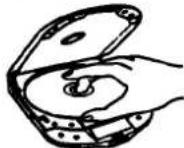
So begrenzen Sie die Lautstärke auf ein moderates Niveau
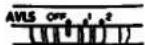
Mit dem AVLS-Wahlschalter (Automatic Volume Limiter System) können Sie die maximale Lautstärke Ihres Geräts begrenzen. - Wenn der AVLS-Wahlschalter auf Position 1 oder 2 steht, wird die Lautstärke auf einem moderaten Niveau gehalten, auch wenn Sie versuchen, die Lautstärke zu erhöhen. - Wenn der AVLS-Wahlschalter auf Position 1 oder 2 steht, kann der Wiedergabeklang je nach Musik (insbesondere bei bassbetonten Teilen) verzerrt oder instabil sein. Wenn dies passiert, reduzieren Sie die Lautstärke. - Wenn der AVLS-Wahlschalter ausgeschaltet ist, können Sie die volle Lautstärke Ihres Geräts genießen.
Beleuchtung des Displayfensters
Wenn Sie das Gerät mit dem Netzteil oder der Autobatterie verwenden, ist das Displayfenster immer beleuchtet. (Das Licht des Displayfensters erlischt, wenn ■ gedrückt wird und die Disc stoppt.) Wenn Sie das Gerät mit dem Akku oder Alkaline-Batterien verwenden, wird das Displayfenster für ca. 5 Sekunden beleuchtet, wenn Sie eine Bedientaste drücken. Wenn Sie nicht möchten, dass das Displayfenster beleuchtet wird, gehen Sie wie folgt vor: Trennen Sie die Stromquellen. Halten Sie PLAY MODE gedrückt und setzen Sie den Akku oder die Alkaline-Batterien ein. Die Beleuchtungseinstellung bleibt bestehen, solange der Akku oder die Alkaline-Batterien nicht ausgetauscht werden.
Wiedergabe der gewünschten Titel nach dem Anhören des Anfangs aller Titel – INTRO PGM-Wiedergabe.
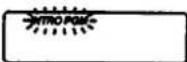
1 Drücken Sie während der Wiedergabe PLAY MODE, bis "INTRO PGM" langsam im Displayfenster blinkt.
2 Drücken Sie ▶II.
"INTRO PGM" blinkt schnell und das Gerät beginnt, die ersten ca. 15 Sekunden jedes Titels ab dem ersten Titel abzuspielen.
3 Während der 15 Sekunden Wiedergabe drücken Sie REPEAT/ENTER, wenn es der gewünschte Titel ist. Wenn es nicht der gewünschte Titel ist, drücken Sie während der 15 Sekunden Wiedergabe keine Taste oder drücken Sie ▶▶▶, um den Titel zu überspringen. Wählen Sie auf diese Weise Ihre gewünschten Titel. Nachdem der Anfang des letzten Titels abgespielt wurde, hört "INTRO PGM" auf zu blinken und die ausgewählten Titel werden automatisch in der Reihenfolge der Titelnummern der Disc abgespielt.
Um die Programmierung zu beenden, bevor Sie die Disc anhören
Drücken Sie ▶III. Die ausgewählten Titel werden abgespielt.
Um die Programmierung erneut zu versuchen
Drücken Sie ◀◀, um während der Programmierung zurückzugehen. Da die Programmierung der zurückgegangenen Titel abgebrochen wird, wählen Sie die gewünschten Titel ab diesem Punkt aus.
Um die programmierten Titel zu wiederholen
Drücken Sie REPEAT/ENTER, während sie abgespielt werden.
Um den Anfang aller Titel zu wiederholen
Drücken Sie zuerst REPEAT/ENTER und dann PLAY MODE, bis "INTRO PGM" blinkt. Drücken Sie dann ▶II. Wenn Sie keine Titel in das Programm eingegeben haben, wird der Anfang aller Titel wiederholt.
NUR AUF EINEM TITEL BLEIBEN
Drücken Sie während der Wiedergabe PLAY MODE, bis "1" im Anzeigefenster erscheint.
Das Gerät spielt nur einen Titel ab und stoppt am Ende des Titels.
Um nur einen Titel wiederholt abzuspielen, drücken Sie REPEAT/ENTER.
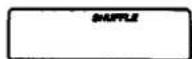
Titel in zufälliger Reihenfolge abspielen – Shuffle Play
Drücken Sie während der Wiedergabe PLAY MODE, bis "SHUFFLE" im Display erscheint. Die Wiedergabe beginnt mit dem nächsten Titel.
Um die Titel in zufälliger Reihenfolge wiederholt abzuspielen
Drücken Sie REPEAT/ENTER. Nachdem alle Titel in zufälliger Reihenfolge abgespielt wurden, werden sie erneut gemischt und in einer anderen Reihenfolge wiederholt abgespielt.
Während der Zufallswiedergabe
Um den Anfang der folgenden Titel zu finden, drücken Sie wiederholt ▶▶▶.
Um den Anfang des aktuellen Titels zu finden, drücken Sie ◀◀. Auch wenn Sie ◀◀ weiterhin drücken, geht der Player nicht zum vorherigen Titel zurück. Die Wiedergabe beginnt am Anfang des aktuellen Titels.
Im Display
Wenn Sie ▶III drücken (wenn RESUME auf OFF gesetzt ist)
Die Gesamtzahl der Titel auf der Disc und die Gesamtspielzeit erscheinen für 2 Sekunden.
Während der Wiedergabe
Die Titelnummer und die abgelaufene Spielzeit des aktuellen Titels erscheinen.
Während der Pause
Die abgelaufene Spielzeit des aktuellen Punktes blinkt.
Zwischen den Titeln
Die Zeit bis zum Beginn des nächsten Titels erscheint.
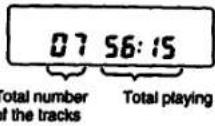
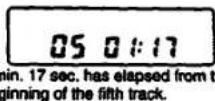
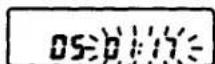
Pausenmodus an Punkt 1 Min. 17 Sek. ab Beginn des fünften Titels
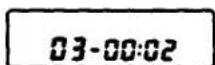
2 Sek. bis zum Beginn des 3. Titels
Verwendung von DOP
Drücken Sie, um die DSP-Funktion entsprechend dem Inhalt Ihrer Disc oder dem Verwendungsort des Geräts auszuwählen.
BASS ■ BASS: Der Bassklang wird kräftiger verstärkt.
BASS ist effektiver als BASS.
Wenn Sie die Lautstärke zu hoch einstellen, kann der Klang verzerrt oder verzerrt werden. Wenn dies passiert, drehen Sie die Lautstärke herunter.
VOCAL: Der Klang im mittleren Frequenzbereich wird betont und die menschliche Stimme wird besser hörbar.
CAR: Nicht hörbarer Klang wird für eine bessere Hörbarkeit verstärkt. Dies ist nützlich, wenn Sie an lauten Orten hören.
• DSP: Digitale Signalverarbeitung
Hinweise
- Der Bass-Boost oder CAR-Effekt kann je nach Ausgangspegel des aufgenommenen Klangs verringert werden.
- Bei der Wiedergabe von Titeln mit schnellem Tempo oder mit schmalem Dynamikbereich kann die CAR-Position möglicherweise keinen effizienten Effekt erzielen.
- DSP wirkt auch auf den Leitungsausgang der OPTISCHEN (DIGITALEN)/LINE OUT-Buchse. Daher ist die Anpassung von DSP auch beim Hören über externe Lautsprecher oder beim Aufnehmen auf den Kassettenrekorder möglich. DSP wirkt nicht auf den optischen Digitalausgang der OPTISCHEN (DIGITALEN)/LINE OUT-Buchse.
- DSP bleibt erhalten, solange die Stromversorgung angeschlossen ist.
Die Anzeige ändert sich wie folgt.
![graph LR A["BASS"] --> B["BASS"] B --> C["VOCAL"] C --> D["CAR"] D --> E["no indication"]](/content/2026/05/805581/images/1d77702b8a8729923656426a50f3f05853c7eb28b7ae7d1d24ff8f9c8d2ffcf4.jpg)

1 Drücken Sie während der Wiedergabe PLAY MODE, bis "RMS" im Display blinkt. 2 Drücken Sie ◀◀ oder ▶▶, um den gewünschten Titel auszuwählen. Sie können die Titel in beliebiger Reihenfolge programmieren, unabhängig von ihrer Titelnummer. 3 Drücken Sie REPEAT/ENTER*.
4 Wiederholen Sie die Schritte 2 und 3 (bis zu 22 Auswahlen).
Wenn nach dem Speichern von 22 Titeln ein weiterer Titel gespeichert wird, wird der erste Titel gelöscht und der neue an seiner Stelle gespeichert.
5 Drücken Sie ▶II.
"RMS" hört auf zu blinken und die Wiedergabe beginnt.
Um die Programmwiedergabe zu wiederholen, drücken Sie REPEAT/ENTER.
Drücken Sie erneut PLAY MODE, um zur normalen Wiedergabe zurückzukehren.
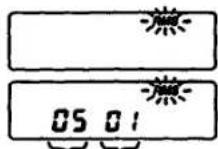
Gewünschte Titelnummer Die erste Auswahl
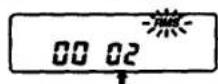
Die 2. (nächste) Auswahl
* Wenn die Taste REPEAT/ENTER länger als 1 Sekunde gedrückt wird, erscheinen die Gesamtzahl und die Gesamtzeit der programmierten Titel im Display, solange die Taste REPEAT/ENTER gedrückt ist. Wenn eine Disc 32 oder mehr Titel enthält und Sie den 32. Titel oder einen späteren Titel programmieren möchten, oder wenn die Gesamtspielzeit 100 Minuten überschreitet, wird die Gesamtspielzeit des Programms nicht angezeigt. (Stattdessen erscheint die Anzeige "···"). Es ist jedoch möglich, solche Titel zu programmieren.
ESP (Electronic Shock Protection) Lautsprecher von Kindern und von Arbeit fernhalten
Dieses Gerät enthält eine spezielle elektronische Schaltung, die Tonaussetzer durch Stöße oder Erschütterungen verhindert. Dieses System speichert ständig die nächsten 3 Sekunden des abzuspielenden Tons. Wenn das Gerät einen physischen Stoß erhält, der verhindert, dass der Laser-Pickup die CD "liest", startet dieses System sofort die Wiedergabe des im Speicher abgelegten Tons und fährt fort, bis sich der Laser-Pickup erholt hat.
Wenn Sie beim Gehen zuhören oder das Gerät im Auto verwenden, sollten Sie ESP drücken, um Tonaussetzer zu vermeiden.
Wenn das Gerät ständig erschüttert wird, wird der gespeicherte Ton vollständig abgespielt, was zu einer Unterbrechung des CD-Klangs führt. Wenn die Erschütterung endet, wird die Wiedergabe ab diesem Punkt neu gestartet. Während der gespeicherte Ton abgespielt wird, wird die verbleibende Menge des gespeicherten Tons als blinkende Tropfen angezeigt.
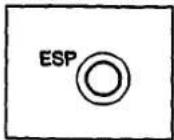
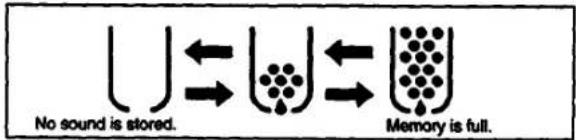
Bei Verwendung des ESP-Systems im INTRO PGM-, Shuffle- oder Program-Wiedergabemodus können Sie die Wiedergabe mit weniger Leerzeichen zwischen den Titeln genießen.
Beim Aufnehmen auf eine Kassette
Drücken Sie ESP erneut, um das ESP-System zu deaktivieren, da die Leersuche eines Kassettenrekorders bei aktivem ESP möglicherweise nicht funktioniert.
Hinweise
- Beim ESP-System wird die Akkulaufzeit kürzer, da sich die Disc schneller als normal dreht und der Speicherschaltkreis aktiv ist, und das Geräusch der sich drehenden Disc wird lauter.
- Sie können ESP während der Wiedergabe drücken, aber da sich die Drehgeschwindigkeit der Disc ändern kann, kann der Ton kurzzeitig unterbrochen werden.
- In den folgenden Fällen können Rauschen oder Tonaussetzer auftreten. — wenn die Disc verschmutzt oder zerkratzt ist.
— wenn die Disc bestimmte Signale enthält.
— wenn das Gerät einer bestimmten Art von Erschütterung ausgesetzt ist.
In diesen Fällen versuchen Sie, das ESP-System zu deaktivieren.

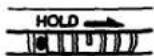
Schieben Sie den HOLD-Schalter in Pfeilrichtung, um versehentliches Drücken der Tasten zu vermeiden. Wenn der HOLD-Schalter in Pfeilrichtung gestellt ist, erscheint "Hold" im Display, wenn Sie eine Taste drücken.
So überprüfen Sie den Inhalt des Programms während der Programmierung
Drücken Sie während der Programmierung vor dem Drücken von ▶II leicht REPEAT/ENTER. Jedes Mal, wenn Sie REPEAT/ENTER drücken, erscheinen die Titelnummer und die programmierte Reihenfolge im Display.
Beispiel: Die Titelnummern 2, 4 und 6 sind in dieser Reihenfolge programmiert.
![graph LR A["02 01"] --> B["04 02"] B --> C["06 03"] C --> D["00 04"] E["track number programmed order"] --> A](/content/2026/05/805581/images/556e6e36bbff24057fceac92ba8d53200af8d726f53e229c11f61ba3e9ea65d4.jpg)
Wiedergabe ab der zuletzt gestoppten Stelle – Wiedergabefunktion
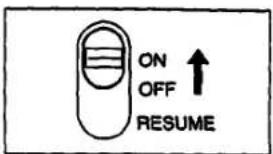
Stellen Sie den RESUME-Schalter auf ON. Wenn Sie ▶ drücken, beginnt die Wiedergabe an der Stelle, an der Sie ■ gedrückt haben.
Hinweise
* Wenn Sie nach dem Drücken von ■ den Deckel öffnen, wird die Speicherung der Position, an der Sie ■ gedrückt haben, gelöscht, wodurch die Resume-Funktion aufgehoben wird, obwohl der RESUME-Schalter weiterhin auf ON steht. Die Wiedergabe beginnt dann mit dem ersten Titel. Die Resume-Wiedergabe kann an einem Punkt beginnen, der etwa 30 Sekunden hinter oder vor der Stelle liegt, an der Sie ■ gedrückt haben, wenn Sie die Batterien oder den Akku entfernen.
Verschiedene Verwendungsmöglichkeiten
Weitere Einzelheiten finden Sie in der Bedienungsanleitung der jeweiligen Geräte.
Die folgende Tabelle enthält die grundlegenden Informationen und den Inhalt von
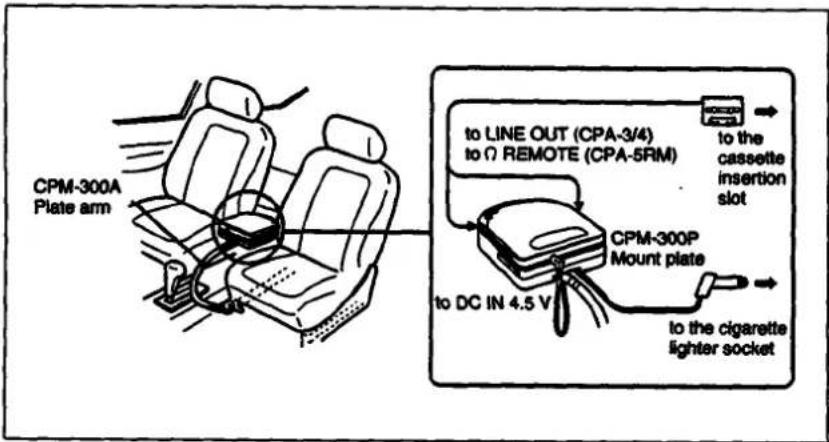
Sie können die Disc über ein Auto-Kassettendeck mit den folgenden Geräten anhören.
- Montagearm CPM-300PK (CPM-300A + CPM-300)
- Plattenarm CPM-300A
- Montageplatte CPM-300P • Auto-Verbindungsset CPA-3, CPA-4, CPA-5RM
- Montageset CPM-300PC (CPM-300P + CPA-4)
- Montageset CPM-300CK (CPM-300A + CPM-300P + CPA-4)
Bei Verwendung der Montageplatte CPM-300P
Befestigen Sie zuerst den mit CPM-300P gelieferten Auto-Montageadapter an der Montageplatte und installieren Sie dann den CD-Player.
Wenn Sie den Motor ausschalten Auch wenn die Alkalibatterien in das Gerät eingelegt sind, stoppt das Gerät den Betrieb, wenn Sie den Motor des Autos ausschalten. (Zündungsabhängige Funktion) Diese Funktion ist nicht bei jedem Automodell verfügbar. Falls nicht, drücken Sie ■, um den Betrieb zu stoppen.
Hinweis
Jede andere Verbindung als mit einem Sony Car Connecting Pack kann Rauschen verursachen.
![graph TD A["Speaker"] -->|Supplied connecting cord or RK-G129 (not supplied)| B["RK-G134 (not supplied)"] C["Microcontroller"] -->|Supplied connecting cord or RK-G129 (not supplied)| D["RK-G134 (not supplied)"] E["Digital Signal"] -->|Supplied connecting cord or RK-G129 (not supplied)| F["RK-G134 (n…](/content/2026/05/805581/images/fb8629dca5da1a6f3346d2a8fbb35437986685dedc491b1bc0cda9a91e2b0167.jpg)
* Wenn Sie ein Gerät mit der rechteckigen optischen Buchse verwenden, verwenden Sie das digitale Verbindungskabel POC-MZ1 (nicht im Lieferumfang enthalten), und wenn Sie ein Gerät mit der optischen Minibuchse verwenden, verwenden Sie das digitale Verbindungskabel POC-MZ2 (nicht im Lieferumfang enthalten).
Hinweise zum Anschluss
- Die Batterielebensdauer verkürzt sich, wenn das digitale Verbindungskabel an die OPTICAL (DIGITAL)/LINE OUT-Buchse angeschlossen ist. Wenn Sie das digitale Verbindungskabel nicht verwenden, trennen Sie es von der Buchse. • Das optische digitale Signal wird nicht ausgegeben, wenn das ESP-System aktiv ist. • Schalten Sie jedes Gerät aus, bevor Sie Verbindungen herstellen.
- Stecken Sie den weißen Stecker in die L-Buchse (linker Kanal) und den roten Stecker in die R-Buchse (rechter Kanal).
- Schließen Sie den Ausgang von LINE OUT nicht an die PHONO-Buchsen des Verstärkers an.
- Achten Sie darauf, die Stecker des Kabels fest in die Buchsen zu stecken. Eine lose Verbindung kann ein Brummen verursachen.
- Wenn das Gerät Störungen beim Radio- oder Fernsehempfang verursacht, schalten Sie das Gerät aus oder entfernen Sie es vom Empfänger.
Fehlerbehebung
Sollte ein Problem nach den folgenden Überprüfungen weiterhin bestehen, wenden Sie sich an Ihre nächste Sony-Serviceeinrichtung.
| Symptom | Cause and/or solution |
| Disc play does not start. | The HOLD switch is set to the direction of arrow.The disc is inserted upside down or incorrectly.→ Insert the disc correctly with the label surface up.Dusty or defective discDirty or dusty lensThe battery compartment lid is not closed firmly.Moisture condensation → Leave the unit in a warm place until the moisture evaporates.The AC power adaptor is not plugged into the wall outlet.The unit is not placed on a level surface.Weak rechargeable battery or alkaline batteries |
| No sound from the headphones | The headphones plug is not firmly connected to the Ω REMOTE jack.Adjust the VOLUME control.Dirty plug |
| No sound from the connected speakers | Check the connections.The amplifier is not turned on. |
| Skipping of sound | Dirty or defective discDirty lensStrong vibration |
| The “no disc” indication appears in the display window. | Place the CD with the label surface up.Replace the CD if the CD is badly damaged. |
| The “HI dc in” Indication appears in the display window. | Use the supplied AC power adaptor. |
| “Hold” appears when you press a button on the unit. | The HOLD switch is set to the direction of arrow. |
| When using with batteries, the battery life is short. | Manganese batteries are used. → Use alkaline batteries.Digital connecting cable is connected. → Disconnect it when it is not in use. |
| Optical digital signal is not output. | The ESP system is active. → Press ESP again to release it. |
Technische Daten
System
Eigenschaften der Laserdiode
Compact Disc Digital Audio System
Material: GaAlAs
Wellenlänge: λ = 780 nm
Emissionsdauer: Kontinuierlich
Laserleistung: Weniger als 44,6 μW
(Dieser Wert wird in einem Abstand von 200 mm von der
Objektivlinse des optischen Abtastblocks gemessen.)
Sony Super Strategy Cross Interleave Reed-Solomon-Code
1-Bit-Quarz-Zeitachsensteuerung
20-20.000 Hz dB
(gemessen nach EIAJ CP-307)
Line-Ausgang (Stereo-Klinkenstecker)
Ausgangspegel 0,85 V effektiv bei 50 Kilohm
Lastimpedanz über 10 Kilohm
Optischer Digitalausgang (optischer Ausgangsanschluss)
Ausgangspegel: -21 — -15 dBm
Wellenlänge: 630 — 690 nm bei Spitzenpegel
Kopfhörer (Stereo-Miniklinke)
4 mW + 4 mW an 16 Ohm
Allgemeines
Stromversorgung
Mitgeliefert:
• Wiederaufladbarer Akku
- Batteriefach für die Verwendung von zwei Alkaline-Batterien (nicht mitgeliefert)
• DC IN 4,5-V-Buchse akzeptiert das Sony-Netzteil für den Betrieb an:
| Where purchased | Operating voltage |
| European and Asian countries | 220 – 230 V AC, 50 Hz |
| U.S.A., Canada, Central and South America | 120 V AC, 60 Hz |
| Middle East | 110 – 240 V AC, 50/60 Hz |
| United Kingdom, Australia | 240 V AC, 50 Hz |
| Other countries | 100 – 240 V AC, 50/60 Hz |
Nicht mitgeliefert:
• DC IN 4,5 V akzeptiert den Sony CPM-300PK-Montagearm für den Betrieb an der Autobatterie
• DC 3 V, zwei AA-Batterien (LR6) (Alkaline)
Wartung
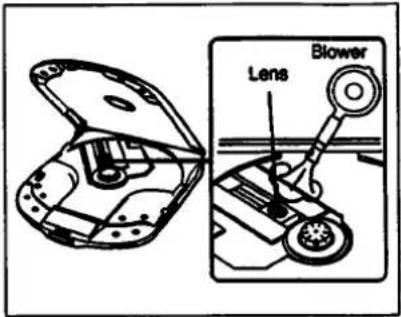
Wenn Sie versehentlich die Linse mit schmutzigen Fingern berührt haben oder wenn Staub auf der Linse den ordnungsgemäßen Betrieb verhindert, öffnen Sie den Deckel des Disc-Fachs und reinigen Sie die Linse mit einem Linsenreinigungsset (KK-DM1, nicht mitgeliefert).
1. 1. Januar 2017
Halten Sie den Stecker Ihrer Kopfhörer sauber, um eine optimale Klangqualität zu erzielen. Wischen Sie ihn mit einem trockenen, weichen Tuch ab.
Reinigen Sie das Gehäuse mit einem weichen Tuch, das leicht mit Wasser oder einer milden Reinigungslösung angefeuchtet ist. Verwenden Sie keine Scheuermittel, Scheuerpulver oder Lösungsmittel wie Alkohol oder Benzin, da diese die Oberfläche des Gehäuses beschädigen können.
- Reinigen Sie die Disc vor dem Abspielen mit einem Reinigungstuch. Wischen Sie die Disc von der Mitte nach außen.
- Verwenden Sie keine Lösungsmittel wie Benzin, Verdünner, handelsübliche Reiniger oder Antistatik-Sprays, die für analoge Schallplatten bestimmt sind.
- Setzen Sie die Disc keiner direkten Sonneneinstrahlung oder Wärmequellen wie Heißluftkanälen aus, und lassen Sie sie nicht in einem in der Sonne geparkten Auto liegen, da die Temperatur im Auto erheblich ansteigen kann. • Bewahren Sie die Disc nach dem Abspielen in ihrer Hülle auf.
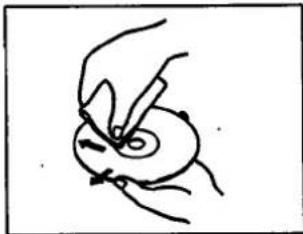
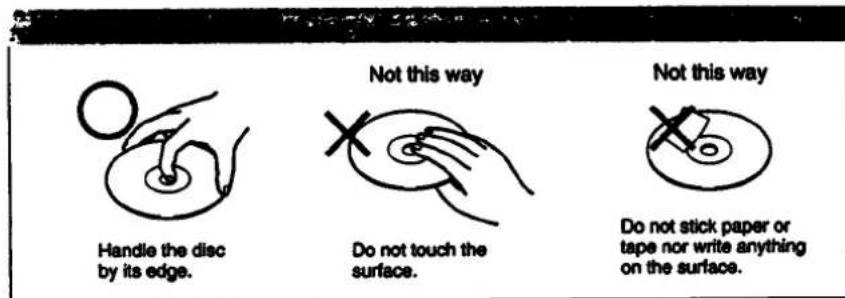
Kratzer, Schmutz oder Fingerabdrücke auf der Disc können zu Tracking-Fehlern führen.
Abmessungen: Ca. 132,5 × 25,9 × 155,3 mm (B/H/T) inkl. hervorstehender Teile und Bedienelemente
Gewicht: Ca. 340 g inkl. Akku Mitgeliefertes Zubehör: Netzteil (1) Akku (1) Batteriefach (1) Verbindungskabel (Klinkenstecker x 2 ↔ Miniklinke) (1) Stereo-Kopfhörer (1) Tragekoffer (1)
Design und technische Daten können ohne Vorankündigung geändert werden.
Hinweis
Dieses Gerät entspricht der EG-Richtlinie 87/308/EWG zur Unterdrückung von Störungen.
Zubehör nicht im Lieferumfang enthalten
Montagearm CPM-300PK
Autoverbindungsset CPA-3, CPA-4, CPA-5RM
Autobatteriekabel DCC-E145L
Aktives Lautsprechersystem SRS-58
Wiederaufladbarer Akku BP-DM10
Ihr Händler führt möglicherweise nicht alle oben aufgeführten Zubehörteile. Bitte fragen Sie den Händler nach ausführlichen Informationen über das Zubehör in Ihrem Land.
Position und Funktion der Bedienelemente
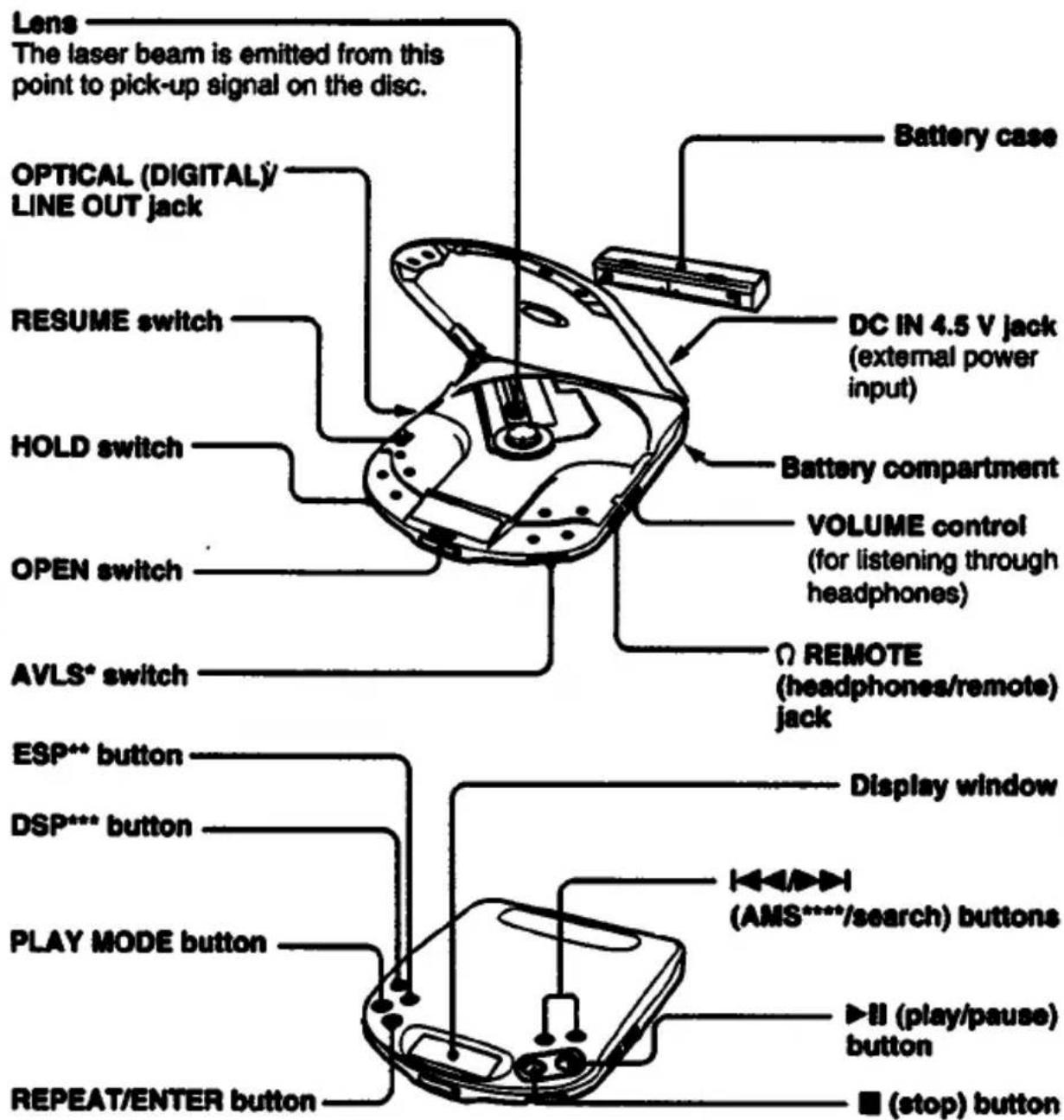
*AVLS: Automatic Volume Limiter System (automatische Lautstärkebegrenzung)
**ESP: Electronic Shock Protection (elektronischer Stoßschutz)
***DSP: Digital Signal Processing (digitale Signalverarbeitung)
****AMS: Automatic Music Sensor (automatischer Musiksensor)
Sicherheitshinweise
Zur Sicherheit
- Da der Laserstrahl in diesem CD-Player für die Augen schädlich ist, versuchen Sie nicht, das Gehäuse zu zerlegen. Überlassen Sie Wartungsarbeiten nur qualifiziertem Personal.
- Legen Sie keine Fremdkörper in den Sicherheitsschlitz im Disc-Fach. Wenn Sie dies tun, kann der Laserstrahl beim Öffnen des Deckels austreten.
- Stecken Sie keine Fremdkörper in die DC IN 4,5 V-Buchse (externer Stromanschluss).
- Falls feste Gegenstände oder Flüssigkeiten in das Gerät gelangen, trennen Sie es von der Stromversorgung und lassen Sie es von qualifiziertem Personal überprüfen, bevor Sie es weiter verwenden.
Stromquellen
- Verwenden Sie den Akku (mitgeliefert), Batterien (nicht mitgeliefert) oder Haushaltsstrom.
- Für Netzbetrieb: Verwenden Sie das mitgelieferte Netzteil. Verwenden Sie kein anderes Netzteil, da dies zu Fehlfunktionen führen kann.
- Für Autobatteriebetrieb: Verwenden Sie den Autohalter CPM-300PK (nicht mitgeliefert) oder die Montageplatte CPM-300P (nicht mitgeliefert) und das Auto-Anschluss-Set CPA-3, CPA-4, CPA-5RM (nicht mitgeliefert).
- Wenn das Gerät längere Zeit nicht verwendet wird, trennen Sie es unbedingt von der Stromversorgung (Netzteil, Akku, Batterien oder Montageplatte). Um das Netzteil aus der Steckdose zu ziehen, fassen Sie das Netzteil selbst an, ziehen Sie niemals am Kabel.
- Das Typenschild mit Betriebsspannung, Leistungsaufnahme usw. befindet sich auf der Unterseite des Geräts. (Nur für Netzteil für den Nahen Osten.)
Betrieb
- Da das CD-System einen großen Dynamikbereich bietet, werden die Spitzen der hochpegeligen Eingänge mit hoher Wiedergabetreue aufgezeichnet, und der Rauschabstand ist sehr gering. Drehen Sie die Lautstärke nicht auf, während Sie einen Teil einer Disc ohne Audiosignale oder mit sehr niedrigen Eingangspegeln hören. Wenn Sie dies tun, können die Lautsprecher beschädigt werden, wenn der Spitzenpegel des Klangs wiedergegeben wird.
- Die Linse auf dem Disc-Tisch sollte sauber gehalten werden. Berühren Sie die Linse nicht und stochern Sie nicht darauf herum. Wenn Sie dies tun, kann die Linse beschädigt werden und das Gerät funktioniert nicht ordnungsgemäß.
Installation
- Installieren Sie das Gerät niemals an Orten, an denen es folgenden Bedingungen ausgesetzt wäre:
- Wärmequellen wie Heizkörper oder Luftkanäle.
- direkte Sonneneinstrahlung.
- übermäßiger Staub.
- Feuchtigkeit oder Regen.
- mechanische Vibrationen oder Stöße.
- unebene Oberfläche.
- Stellen Sie das Gerät nicht auf ein Armaturenbrett und lassen Sie es nicht in einem in der Sonne geparkten Auto liegen, da die Temperatur übermäßig ansteigen kann.
- Wenn das Gerät mit dem Netzteil verwendet wird, wickeln Sie es nicht in ein Tuch, eine Decke usw. Wenn Sie dies tun, kann die Temperatur im Inneren und Äußeren des Geräts erheblich ansteigen, was zu Fehlfunktionen des Geräts oder schweren Unfällen führen kann.
- Legen Sie keine schweren Gegenstände auf das Gerät. Das Gerät und die Disc können beschädigt werden.
- Wenn das Gerät direkt von einem kalten an einen warmen Ort gebracht wird oder in einem sehr feuchten Raum aufgestellt wird, kann sich Feuchtigkeit auf der Linse im Inneren des Geräts kondensieren. In diesem Fall funktioniert das Gerät nicht. Entfernen Sie in diesem Fall die Disc und lassen Sie das Gerät mehrere Stunden an einem warmen Ort, bis die Feuchtigkeit verdunstet ist.
- Für einen optimalen Betrieb sollte das Gerät keinen Temperaturen unter 5°C (41°F) oder über 35°C (95°F) ausgesetzt werden.
Hinweise zu Kopfhörern
- Verkehrssicherheit
Verwenden Sie Kopfhörer nicht beim Fahren, Radfahren oder beim Bedienen eines motorisierten Fahrzeugs. Dies kann eine Verkehrsgefahr darstellen und ist in einigen Gebieten illegal. Es kann auch potenziell gefährlich sein, Ihre Kopfhörer beim Gehen mit hoher Lautstärke zu verwenden, insbesondere an Fußgängerüberwegen. Seien Sie äußerst vorsichtig oder stellen Sie die Verwendung in potenziell gefährlichen Situationen ein.
• Vermeidung von Hörschäden
Vermeiden Sie die Verwendung von Kopfhörern bei hoher Lautstärke. Hörexperten raten von kontinuierlichem, lautem und langem Hören ab. Wenn Sie ein Klingeln in den Ohren bemerken, reduzieren Sie die Lautstärke oder stellen Sie die Verwendung ein.
• Rücksicht auf andere
Halten Sie die Lautstärke auf einem moderaten Niveau. So können Sie Umgebungsgeräusche wahrnehmen und Rücksicht auf die Menschen in Ihrer Umgebung nehmen.
Wenn Sie Fragen oder Probleme bezüglich Ihres Geräts haben, wenden Sie sich bitte an Ihren nächsten Sony-Händler.
- D
- BEDIENUNGSANLEITUNG
- DISCMAN
- BESITZER-NOTIZ
- WARNUNG
- VORSICHT
- FÜR KUNDEN IM VEREINIGTEN KÖNIGREICH
- FÜR KUNDEN IN KANADA
- STROMQUELLEN
- LADEN DES WIEDERAUFLADBAREN AKKUS
- WANN DER WIEDERAUFLADBARE AKKU ERSETZT WERDEN SOLLTE
- HINWEISE ZUM AKKU (NI-CD-AKKU)
- DAS GERÄT KANN WARM WERDEN
- VERWENDUNG DES BATTERIEGEHÄUSES (IM LIEFERUMFANG ENTHALTEN)
- HINWEISE ZU BATTERIEN
- HINWEIS ZUR ANZEIGE
- VERSCHIEDENE WIEDERGABEMODI
- ABSPIELEN DER GESAMTEN DISC — NORMALWIEDERGABE
- DISC-WIEDERGABE
- UM DEN PIEPTON ZU DEAKTIVIEREN
- SO ENTFERNEN SIE DIE DISC
- SO BEGRENZEN SIE DIE LAUTSTÄRKE AUF EIN MODERATES NIVEAU
- BELEUCHTUNG DES DISPLAYFENSTERS
- WIEDERGABE DER GEWÜNSCHTEN TITEL NACH DEM ANHÖREN DES ANFANGS ALLER TITEL – INTRO PGM-WIEDERGABE
- DRÜCKEN SIE ▶II
- UM DIE PROGRAMMIERUNG ZU BEENDEN, BEVOR SIE DIE DISC ANHÖREN
- UM DIE PROGRAMMIERUNG ERNEUT ZU VERSUCHEN
- UM DIE PROGRAMMIERTEN TITEL ZU WIEDERHOLEN
- UM DEN ANFANG ALLER TITEL ZU WIEDERHOLEN
- NUR AUF EINEM TITEL BLEIBEN
- TITEL IN ZUFÄLLIGER REIHENFOLGE ABSPIELEN – SHUFFLE PLAY
- UM DIE TITEL IN ZUFÄLLIGER REIHENFOLGE WIEDERHOLT ABZUSPIELEN
- WÄHREND DER ZUFALLSWIEDERGABE
- IM DISPLAY
- WÄHREND DER WIEDERGABE
- WÄHREND DER PAUSE
- ZWISCHEN DEN TITELN
- VERWENDUNG VON DOP
- HINWEISE
- ESP (ELECTRONIC SHOCK PROTECTION) LAUTSPRECHER VON KINDERN UND VON ARBEIT FERNHALTEN
- BEIM AUFNEHMEN AUF EINE KASSETTE
- SO ÜBERPRÜFEN SIE DEN INHALT DES PROGRAMMS WÄHREND DER PROGRAMMIERUNG
- WIEDERGABE AB DER ZULETZT GESTOPPTEN STELLE – WIEDERGABEFUNKTION
- VERSCHIEDENE VERWENDUNGSMÖGLICHKEITEN
- DIE FOLGENDE TABELLE ENTHÄLT DIE GRUNDLEGENDEN INFORMATIONEN UND DEN INHALT VON
- HINWEIS
- HINWEISE ZUM ANSCHLUSS
- FEHLERBEHEBUNG
- TECHNISCHE DATEN
- WARTUNG
- JANUAR
- POSITION UND FUNKTION DER BEDIENELEMENTE
- SICHERHEITSHINWEISE
- ZUR SICHERHEIT
- BETRIEB
- INSTALLATION
- HINWEISE ZU KOPFHÖRERN
Marke : SONY
Modell : Discman D-321
Kategorie : CD-Player