
Discman D-808K - CD-Player SONY - Kostenlose Bedienungsanleitung
Finden Sie kostenlos die Bedienungsanleitung des Geräts Discman D-808K SONY als PDF.
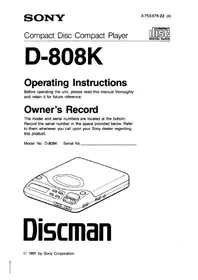


| Produkttyp | Portabler CD-Player (Discman) |
| Modell | Discman D-808K |
| Marke | Sony |
| Abmessungen (B × H × T) | ca. 139 × 31,5 × 159,9 mm (inkl. vorstehender Teile) |
| Gewicht | ca. 315 g (ohne Batterie) |
| Stromversorgung | DC 6 V (Netzadapter), 2,4 V Akku BP-DM1, 2 × AA Alkali-Batterien |
| Leistungsaufnahme | 2,5 W DC (bei eingeschalteter Hintergrundbeleuchtung) |
| Frequenzgang | 20 – 20.000 Hz ±1 dB |
| D/A-Wandlung | 1-Bit Quarz-Zeitachsensteuerung |
| Laserdiode | GaAlAs, Wellenlänge 780 nm, Dauerstrich, <44,6 μW |
| Kopfhörerausgang | 9 mW + 9 mW an 16 Ω (Stereo-Miniklinke) |
| Line-Ausgang | 0,55 V rms an 50 kΩ (Stereo-Miniklinke) |
| Wiedergabemodi | Normal, Intro, Einzeltitel, Programm, Zufallswiedergabe (Shuffle), Wiederholung |
| Klangfunktionen | Bass Boost, DDS (Digital Dynamic Sound) |
| Suchfunktionen | AMS (Automatic Music Sensor), Vor-/Rückwärtssuche |
| Resume-Funktion | Ja (Fortsetzung ab letzter Position) |
| Hold-Schalter | Ja (Tastensperre) |
| Beleuchtung | Umschaltbar grün/bernstein |
| Reinigung der Linse | Mit Linsenreinigungsset KK-9 (nicht im Lieferumfang) |
| Sicherheitshinweis | Laserprodukt der Klasse 1; Gehäuse nicht öffnen; nur qualifiziertes Personal |
| Mitgeliefertes Zubehör | Netzadapter, Autohalterung, Autoverbindungsset, Verbindungskabel |
| Optionales Zubehör | Akku BP-DM1, Funkfernbedienungsset, Kopfhörer mit Fernbedienung, Aktivlautsprecher SRS-57 |
Häufig gestellte Fragen - Discman D-808K SONY
Benutzerfragen zu Discman D-808K SONY
0 Frage zu diesem Gerät. Beantworten Sie die, die Sie kennen, oder stellen Sie Ihre eigene.
Eine neue Frage zu diesem Gerät stellen
Laden Sie die Anleitung für Ihr CD-Player kostenlos im PDF-Format! Finden Sie Ihr Handbuch Discman D-808K - SONY und nehmen Sie Ihr elektronisches Gerät wieder in die Hand. Auf dieser Seite sind alle Dokumente veröffentlicht, die für die Verwendung Ihres Geräts notwendig sind. Discman D-808K von der Marke SONY.
BEDIENUNGSANLEITUNG Discman D-808K SONY
D-808K
Bedienungsanleitung
Bevor Sie das Gerät in Betrieb nehmen, lesen Sie bitte diese Anleitung sorgfältig durch und bewahren Sie sie für späteres Nachschlagen auf.
Eigentümer-Notiz
Die Modell- und Seriennummern befinden sich an der Unterseite. Notieren Sie die Seriennummer im unten vorgesehenen Feld. Beziehen Sie sich darauf, wenn Sie Ihren Sony-Händler bezüglich dieses Produkts kontaktieren.
Modell-Nr. D-808K Serien-Nr.
Discman
WARNUNG
Um Brand- oder Stromschlaggefahr zu vermeiden, setzen Sie das Gerät nicht Regen oder Feuchtigkeit aus.
Um einen elektrischen Schlag zu vermeiden, öffnen Sie nicht das Gehäuse. Überlassen Sie Wartungsarbeiten nur qualifiziertem Personal.
INFORMATION (Für Kunden in den USA)
Dieses Gerät erzeugt und verwendet Hochfrequenzenergie und kann, wenn es nicht ordnungsgemäß installiert und verwendet wird, dh in strikter Übereinstimmung mit den Anweisungen des Herstellers, Störungen des Radio- und Fernsehempfangs verursachen. Es wurde typgeprüft und entspricht den Grenzwerten für ein Computergerät der Klasse B gemäß den Spezifikationen in Unterabschnitt J von Teil 15 der FCC-Bestimmungen, die einen angemessenen Schutz gegen solche Störungen in einer Wohnanlage bieten sollen. Es gibt jedoch keine Garantie, dass Störungen in einer bestimmten Installation nicht auftreten. Wenn dieses Gerät Störungen des Radio- oder Fernsehempfangs verursacht, was durch Ein- und Ausschalten des Geräts festgestellt werden kann, wird der Benutzer aufgefordert, die Störung durch eine oder mehrere der folgenden Maßnahmen zu beheben: Richten Sie die Empfangsantenne neu aus Stellen Sie das Gerät relativ zum Empfänger neu auf Bewegen Sie das Gerät vom Empfänger weg Schließen Sie das Gerät an eine andere Steckdose an, sodass Gerät und Empfänger an verschiedenen Stromkreisen liegen. Bei Bedarf sollte der Benutzer den Händler oder einen erfahrenen Radio-/Fernsehtechniker um weitere Vorschläge bitten. Der Benutzer kann die folgende Broschüre der Federal Communications Commission als hilfreich empfinden: "So identifizieren und beheben Sie Radio-TV-Störprobleme". Diese Broschüre ist beim US Government Printing Office, Washington, DC 20402, Bestellnr. 004-000-00345-4 erhältlich.
VORSICHT
Die Verwendung optischer Instrumente mit diesem Produkt erhöht die Augengefahr.
Für Kunden im Vereinigten Königreich
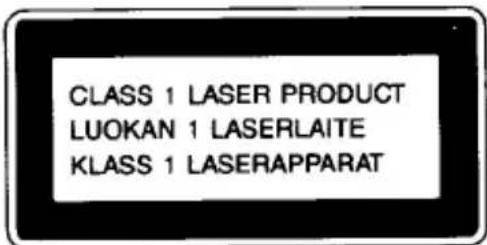
Dieses Compact-Disc-Gerät ist als LASER-PRODUKT DER KLASSE 1 klassifiziert. Das Etikett "LASER-PRODUKT DER KLASSE 1" befindet sich auf der Unterseite des Geräts.
Inhaltsverzeichnis
Sicherheitshinweise 4
Lage und Funktion der Bedienelemente 6
Vorbereitungen
Stromquellen 8
Verwendung im Auto 11
Bedienung
Disc-Wiedergabe 18
Auffinden eines bestimmten Titels oder Abschnitts einer Disc 21
Verschiedene Wiedergabemodi 22
Wiedergabe des Anfangs aller Titel 22
Wiedergabe nur eines Titels 22
Wiedergabe der Titel in gewünschter Reihenfolge 24
Wiedergabe der Titel in zufälliger Reihenfolge 24
Anschluss an andere Geräte 28
Wartung 29
Technische Daten 31
Fehlerbehebung hintere Umschlagseite
Für Kunden im Vereinigten Königreich
Wichtig
Die Adern in diesem Netzkabel sind gemäß dem folgenden Code gefärbt:
Blau: Nullleiter
Braun: Außenleiter
Da die Farben der Adern im Netzkabel dieses Geräts möglicherweise nicht mit den farbigen Markierungen übereinstimmen, die die Anschlüsse in Ihrem Stecker kennzeichnen, gehen Sie wie folgt vor:
Die blau gefärbte Ader muss an den Anschluss angeschlossen werden, der
mit dem Buchstaben N oder schwarz gekennzeichnet ist. Die braun gefärbte Ader muss an den Anschluss angeschlossen werden, der mit dem Buchstaben L oder rot gekennzeichnet ist.
Schließen Sie keine der Adern an den Erdungsanschluss im Stecker an, der mit dem Buchstaben E oder durch das Schutzsymbol 1/2 oder grün oder grün-gelb gekennzeichnet ist.
Vorsichtsmaßnahmen
Zur Sicherheit
- Da der in diesem CD-Player verwendete Laserstrahl für die Augen schädlich ist, versuchen Sie nicht, das Gehäuse zu zerlegen. Überlassen Sie Wartungsarbeiten nur qualifiziertem Personal.
- Legen Sie keine Fremdkörper in den Sicherheitsschlitz im Disc-Fach. Wenn Sie dies tun, kann der Laserstrahl beim Öffnen des Deckels austreten.
- Legen Sie keine Fremdkörper in die DC IN 6 V (externer Stromanschluss) Buchse.
- Falls feste Gegenstände oder Flüssigkeiten in das Gerät gelangen, trennen Sie die Stromversorgung und lassen Sie das Gerät vor weiterem Betrieb von qualifiziertem Personal überprüfen.
Stromquellen
- Verwenden Sie den wiederaufladbaren Akku (nicht im Lieferumfang enthalten), Batterien (nicht im Lieferumfang enthalten) oder Haushaltsstrom.
- Für den Betrieb mit Wechselstrom verwenden Sie das mitgelieferte Netzteil. Verwenden Sie kein anderes Netzteil, da dies zu Fehlfunktionen führen kann. Für den Betrieb mit Autobatterie verwenden Sie die mitgelieferte Montageplatte und das mitgelieferte Auto-Anschlusskabel.
- Wenn das Gerät längere Zeit nicht verwendet wird, trennen Sie unbedingt die Stromversorgung (Netzteil, Batterien, Akku oder Montageplatte) vom Gerät. Um das Netzteil aus der Steckdose zu ziehen, fassen Sie das Netzteil selbst an; ziehen Sie niemals am Kabel.
Zum Betrieb
- Da das CD-System einen großen Dynamikbereich bietet, werden die Spitzen der hochpegeligen Eingänge mit hoher Wiedergabetreue aufgezeichnet und der Rauschpegel ist sehr niedrig. Drehen Sie die Lautstärke nicht auf, während Sie einen Teil der Disc ohne Audiosignale oder mit sehr niedrigem Eingangspegel hören.
Wenn Sie dies tun, können die Lautsprecher beschädigt werden, wenn der Spitzenpegel des Tons wiedergegeben wird.
- Die Linse auf dem Disc-Tisch sollte sauber gehalten werden. Berühren Sie die Linse nicht und stochern Sie nicht darauf herum. Wenn Sie dies tun, kann die Linse beschädigt werden und das Gerät funktioniert nicht ordnungsgemäß.
Zur Installation
- Installieren Sie das Gerät niemals an Orten, an denen es folgenden Bedingungen ausgesetzt wäre:
— Wärmequellen wie Heizkörper oder Luftkanäle.
— direkte Sonneneinstrahlung.
— übermäßiger Staub.
— Feuchtigkeit oder Regen.
— mechanische Vibrationen oder Stöße.
— unebene Oberfläche.
- Wenn das Gerät mit dem Netzteil verwendet wird, wickeln Sie es nicht in ein Tuch, eine Decke usw. Wenn Sie dies tun, kann die Temperatur im Inneren und Äußeren des Geräts erheblich ansteigen, was zu Fehlfunktionen des Geräts oder schweren Unfällen führen kann.
- Wenn das Gerät direkt von einem kalten an einen warmen Ort gebracht wird oder in einem sehr feuchten Raum aufgestellt wird, kann Feuchtigkeit an der Linse im Inneren des Geräts kondensieren. Sollte dies auftreten, funktioniert das Gerät nicht. In diesem Fall entfernen Sie die Disc und lassen Sie das Gerät mehrere Stunden an einem warmen Ort, bis die Feuchtigkeit verdunstet ist.
- Für einen optimalen Betrieb sollte das Gerät keinen Temperaturen unter 5 °C (41 °F) oder über 35 °C (95 °F) ausgesetzt werden.
Über die Kopfhörer
- Verkehrssicherheit
Verwenden Sie Kopfhörer niemals beim Autofahren oder Radfahren usw. Es kann gefährlich sein, die Lautstärke zu stark aufzudrehen, selbst beim Gehen. Dies kann Ihr Gehör beeinträchtigen und insbesondere an Bahnübergängen oder Fußgängerüberwegen gefährlich sein.
• Vermeidung von Hörschäden
Vermeiden Sie es, Kopfhörer über einen längeren Zeitraum mit hoher Lautstärke zu verwenden. Dies kann Ihr Gehör schädigen. Es ist ratsam, die Lautstärke jederzeit auf einem moderaten Niveau zu halten.
• Rücksicht auf andere
Denken Sie daran, andere Menschen in Ihrer Umgebung nicht durch den Klang zu stören, der aus Ihren Kopfhörern dringt.
Halten Sie die Lautstärke auch an lauten Orten in einem moderaten Bereich, damit Sie andere Personen hören können, wenn sie mit Ihnen sprechen.
Wenn Sie Fragen oder Probleme mit Ihrem Gerät haben, wenden Sie sich bitte an Ihren nächsten Sony-Händler.
Lage und Funktion der Bedienelemente
Siehe die Seiten mit ● für weitere Details.
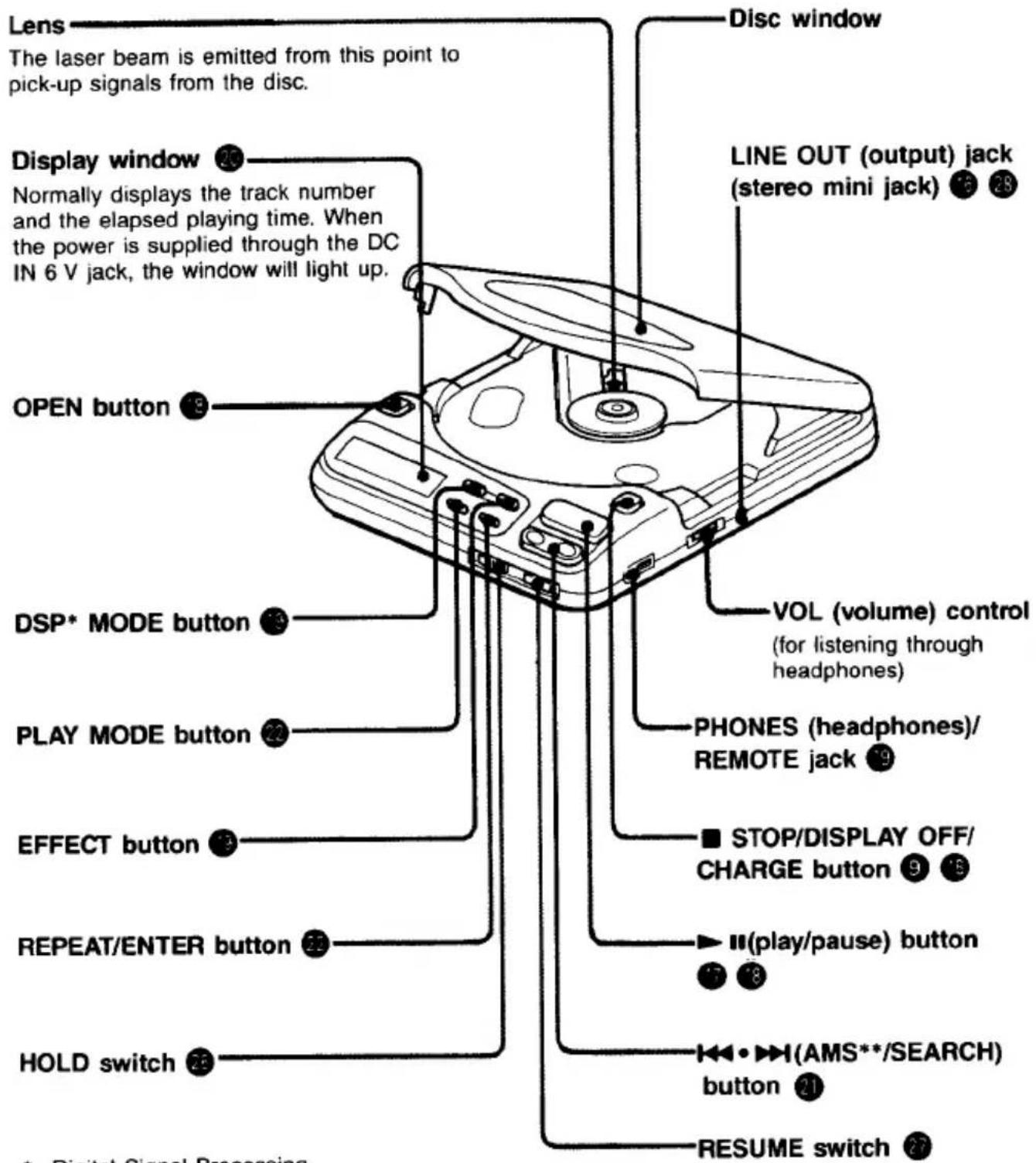
* Digital Signal Processing ** Automatischer Musik-Sensor
REMOTE-Buchse
Schließen Sie die optionale Fernbedienung an.
LOCK-Schalter
Stellen Sie den Schalter in Pfeilrichtung, um ein versehentliches Öffnen des Disc-Fachs zu verhindern.
ILLUMINATION-Schalter
Batteriefachdeckel
DC IN 6 V (externer Stromanschluss) Buchse 9
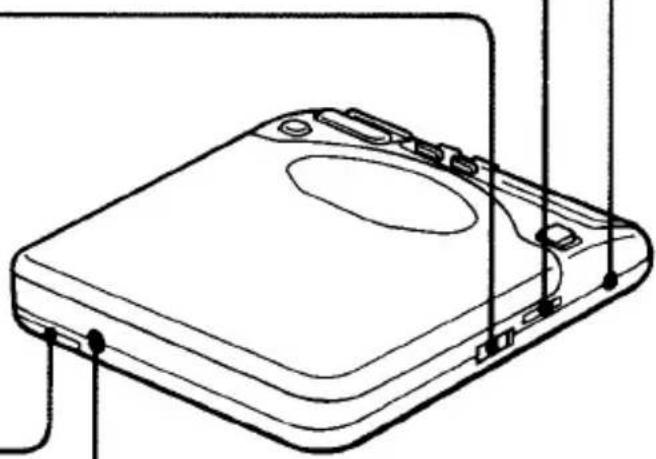
So ändern Sie die Beleuchtungsfarben
Schieben Sie den ILLUMINATION-Schalter auf GRÜN oder AMBER.
Wenn "BASS BOOST" oder
Die Anzeige "DDS***" erscheint im Displayfenster, und die DSP-MODE-Taste leuchtet in einer anderen Farbe als die übrigen Tasten.
| DSP MODE button | Other buttons |
| amber | green |
| green | amber |
*** Digital Dynamic Sound
Stromquellen
Verwendung mit Batterien (nicht im Lieferumfang enthalten)
Legen Sie zwei AA-Batterien (LR6) (Alkaline) entsprechend der - und -Markierung im Batteriefach ein.
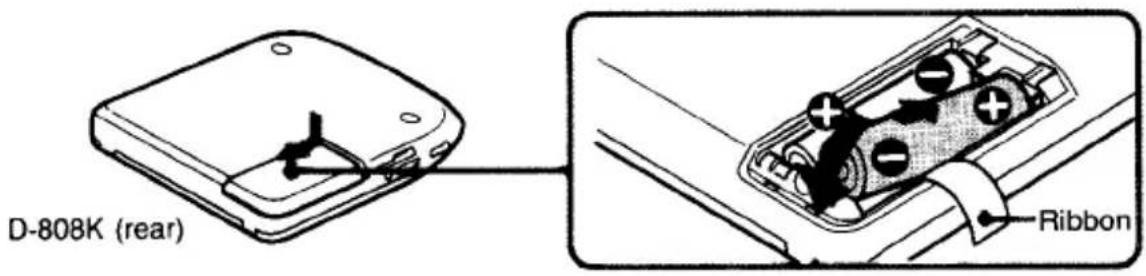
Hinweis
Achten Sie darauf, das Band herauszuziehen, wenn Sie den Akku (nicht im Lieferumfang enthalten) oder die Batterien (nicht im Lieferumfang enthalten) in das Gerät einlegen.
Lebensdauer der Alkaline-Batterien
Mit zwei AA-Batterien (LR6) (Alkaline) sind ca. 2,5 Stunden Wiedergabe möglich. (Wenn das Gerät auf einer ebenen und stabilen Oberfläche verwendet wird.)
Hinweise zu Batterien
- Legen Sie die Batterien mit korrekter Polarität ein.
- Verwenden Sie nicht alte und neue Batterien zusammen oder verschiedene Batterietypen gemischt.
- Falls Elektrolyt aus der Batterie austreten sollte, wischen Sie den kontaminierten Bereich des Batteriefachs mit einem Tuch ab und ersetzen Sie die alten Batterien durch neue.
- Versuchen Sie nicht, die Batterien aufzuladen.
- Wenn das Gerät längere Zeit nicht verwendet wird, entfernen Sie die Batterien.
Wenn die Batterie schwach oder leer ist Die Disc dreht sich möglicherweise schnell, aber Sie können keinen Ton hören. In diesem Fall ersetzen Sie die Batterie durch eine neue.
Verwendung mit wiederaufladbarem Akkupack (nicht im Lieferumfang enthalten)
Wenn Sie den wiederaufladbaren Akkupack (nicht im Lieferumfang enthalten) zum ersten Mal verwenden, laden Sie ihn unbedingt 3 Stunden lang auf.
Installieren des wiederaufladbaren Akkupacks
Installieren Sie den wiederaufladbaren Akkupack (nicht im Lieferumfang enthalten) mit dem "Discman"-Logo nach oben und gemäß den ⊕- und ⊖-Markierungen des Batteriefachs.
Setzen Sie den eingekerbten Teil des wiederaufladbaren Akkupacks auf den vorstehenden Teil des Geräts.
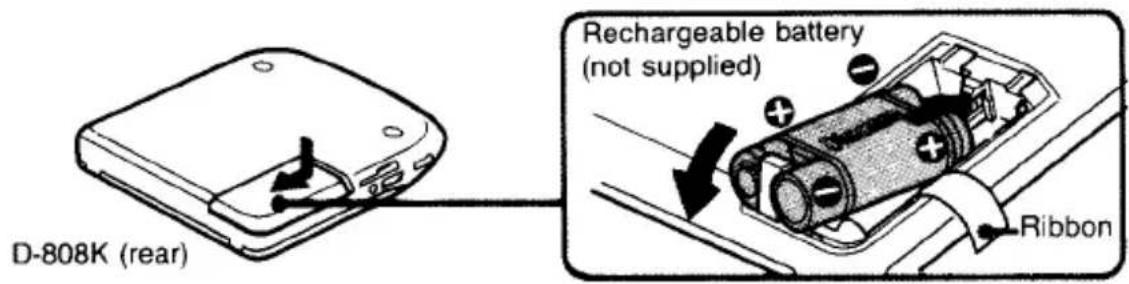
So laden Sie den Akkupack auf
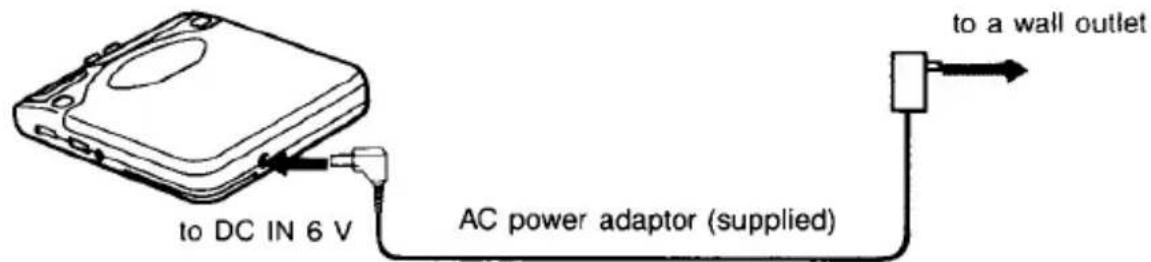
1 Schließen Sie das Netzkabel (im Lieferumfang enthalten) an, wenn sich das Gerät im Stoppmodus befindet und Display und Hintergrundbeleuchtung ausgeschaltet sind.
2 Drücken Sie die ■-Taste.
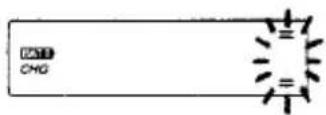
Die Anzeige BATT CHG erscheint im Displayfenster, und die Anzeigebalken des Pegelmessers bewegen sich während des Ladevorgangs auf und ab. Die Anzeige verschwindet, wenn der Ladevorgang abgeschlossen ist.
3 Trennen Sie das Netzkabel.
Das Laden mit der mitgelieferten Halterungsplatte ist ebenfalls möglich.
Lebensdauer des wiederaufladbaren Akkupacks
| Charging time | Playing time |
| 3 hours (full charge) | approx. 1.5 hours |
(Wenn das Gerät auf einer ebenen und stabilen Oberfläche verwendet wird.)
Wann der wiederaufladbare Akkupack (nicht im Lieferumfang enthalten) ersetzt werden sollte
Wenn die Betriebszeit des Geräts auch bei vollständig geladenem Akku um die Hälfte reduziert ist, ersetzen Sie ihn durch einen neuen (BP-DM1, nicht im Lieferumfang enthalten).
Hinweise zum Akku (Ni-Cd-Akku)
- Verwenden Sie unbedingt das mitgelieferte Netzteil.
- Denken Sie daran, den Akku nach jedem Gebrauch aufzuladen. Wenn er nicht aufgeladen wird, kann sich seine Lebensdauer verkürzen.
- Wenn Sie ihn zum ersten Mal oder nach längerer Zeit aufladen, kann die Spielzeit kürzer sein. In einem solchen Fall laden und entladen Sie ihn mehrmals vollständig.
- Lagern Sie den Akku bei einer Temperatur zwischen 5 °C und 35 °C, um eine optimale Leistung zu gewährleisten.
- Werfen Sie den Akku niemals ins Feuer.
- Kurzschließen Sie niemals die Anschlüsse des Akkus.
- Zerlegen Sie den Akku nicht. Wenn das Elektrolyt im Inneren des Akkus mit Kleidung oder Haut in Kontakt kommt, waschen Sie die betroffenen Stellen sofort mit Wasser.
Verwendung mit Haushaltsstrom
Schließen Sie das mitgelieferte Netzteil auf die gleiche Weise an wie beim Laden des Akkus.
Wenn das Gerät nicht verwendet wird, trennen Sie das Netzteil unbedingt vom Stromnetz.
Hinweis zum Netzteil
Verwenden Sie nur das mitgelieferte Netzteil. Verwenden Sie niemals andere Adapter von Sony, da die Polarität des mitgelieferten Adapters entgegengesetzt zu herkömmlichen Adaptern ist. Verwenden Sie das mitgelieferte Netzteil oder das optionale Netzteil wie das AC-D6M nicht an anderen "Discman"-CD-Playern mit DC-IN-9-V-Buchse.
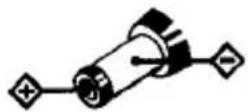
Polarität des Steckers (Einheitspolarität)
Verwendung im Auto
Sie können dieses Gerät mit einem Kassetten-Autoradio verwenden, indem Sie es mit der mitgelieferten Montageplatte, dem Auto-Montageadapter und dem Auto-Anschlussset verbinden.
Vorsichtsmaßnahmen
- Installieren Sie das Gerät nicht an einem Ort, der: — Ihre Fahrt behindert. — für Passagiere gefährlich sein kann. — das Öffnen des Handschuhfachs oder des Aschenbechers behindert. — in der Nähe einer Wärmequelle liegt. — direkter Sonneneinstrahlung, übermäßigem Staub oder Feuchtigkeit ausgesetzt ist.
Bitte beachten Sie, dass wir keine Verpflichtungen für Probleme übernehmen, die durch unsachgemäße Installation verursacht werden.
Installieren Sie das Gerät nicht auf dem Armaturenbrett eines Autos: Vermeiden Sie direkte Sonneneinstrahlung.
- Die Montageplatte, der Auto-Montageadapter und das Auto-Anschlussset sind nur für 12-V-Gleichstrom mit negativer Masse ausgelegt und können nicht in Autos mit 24-V-Elektriksystemen verwendet werden.
- Für Polarität und Spannung Ihrer Autobatterie wenden Sie sich an Ihren Autohändler. • Diese mitgelieferten Zubehörteile sind möglicherweise nicht mit einigen Autotypen kompatibel.
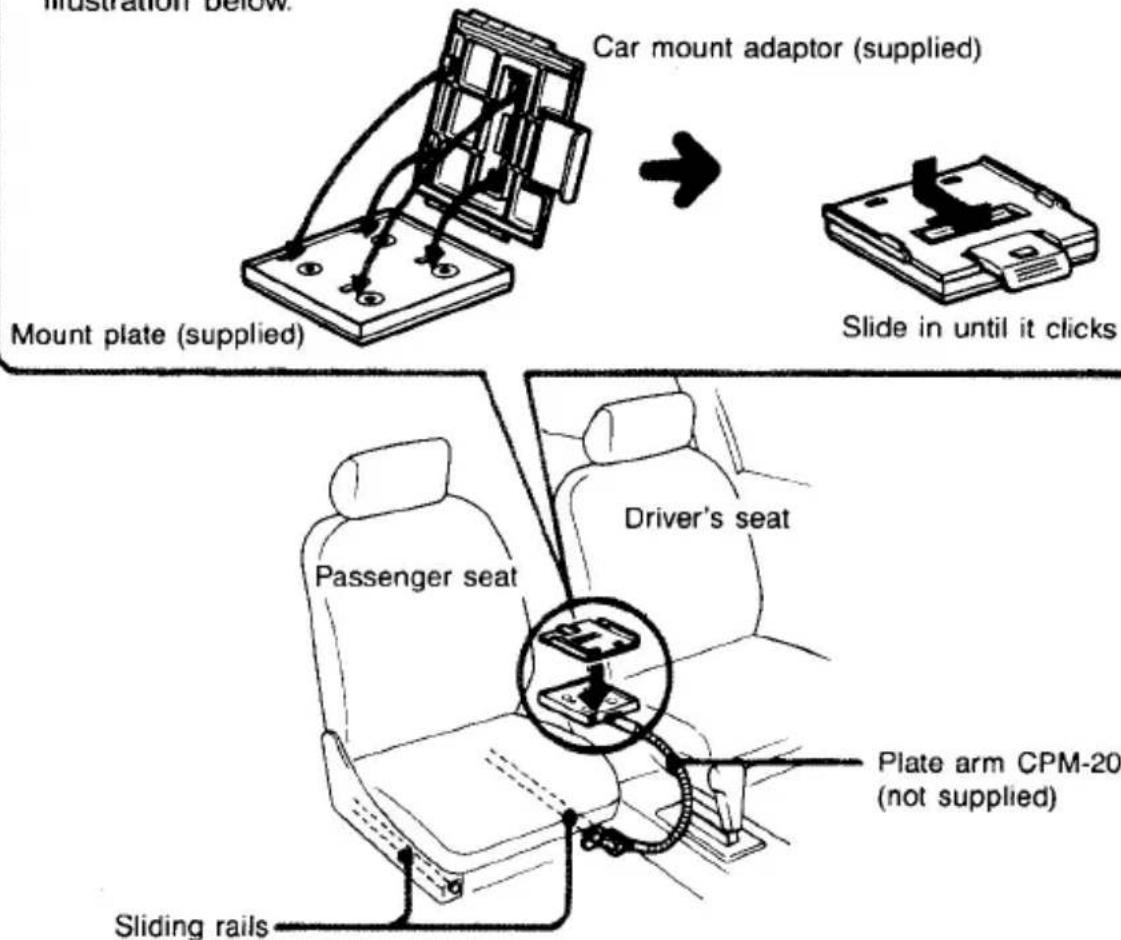
Teileidentifikation von Montageplatte und Auto-Anschlussset
Montageplatte
Der Gleichstromausgangsstecker versorgt den CD-Player mit Strom.
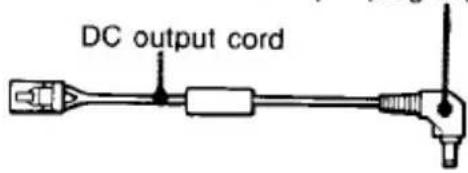
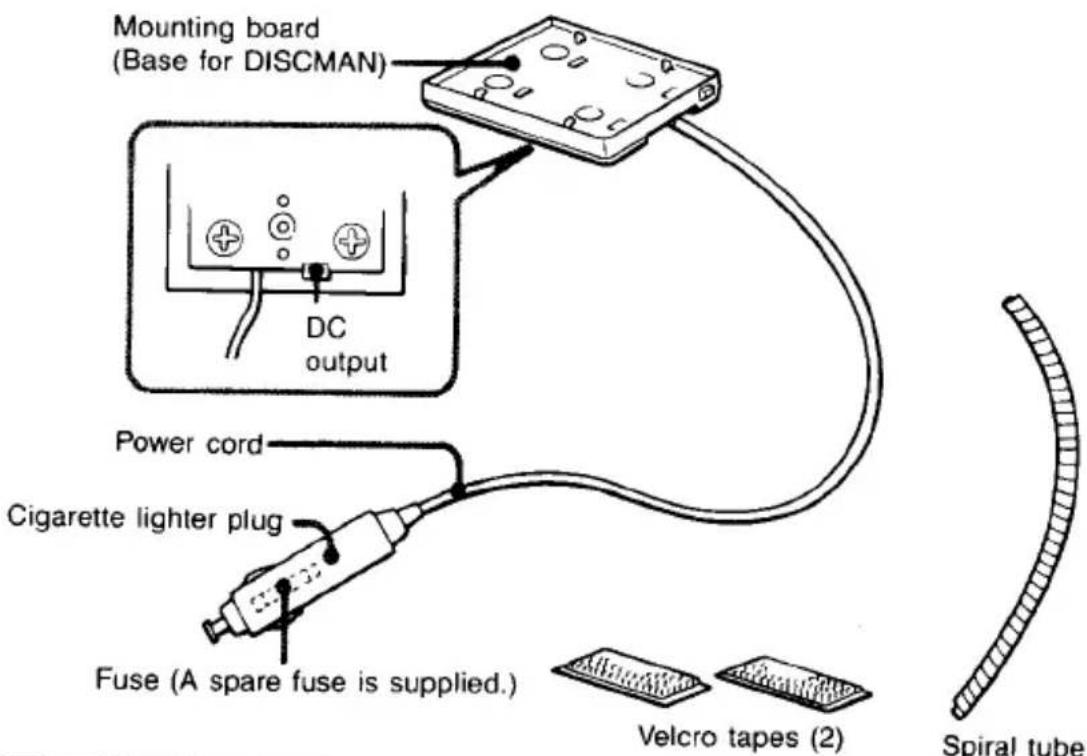
Auto-Anschlussset
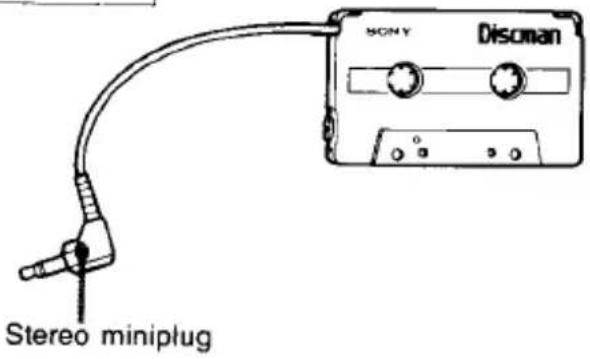
Installation
Befestigen Sie den Auto-Montageadapter (mitgeliefert) gemäß der folgenden Abbildung an der Montageplatte.
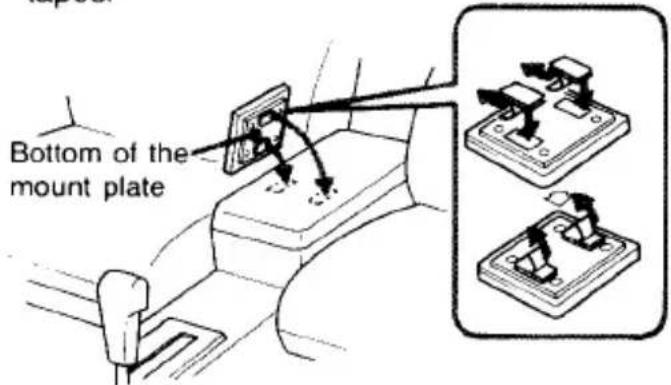
Zur Installation mit Klettbändern
Die Montageplatte kann mit den mitgelieferten Klettbändern direkt auf einer ebenen Fläche angebracht werden.
Hinweise
- Wenn Sie Ihr Auto für längere Zeit parken möchten, entfernen Sie die Montageplatte von den Klettbändern, damit der CD-Player nicht direktem Sonnenlicht ausgesetzt ist.
- Montieren Sie die Montageplatte nicht an einem instabilen Ort oder an einem Ort, an dem Gegenstände in der Umgebung sie behindern könnten.
- Montieren Sie die Montageplatte nicht auf dem Armaturenbrett.
Über das Auto-Anschlusspaket
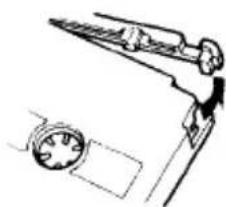
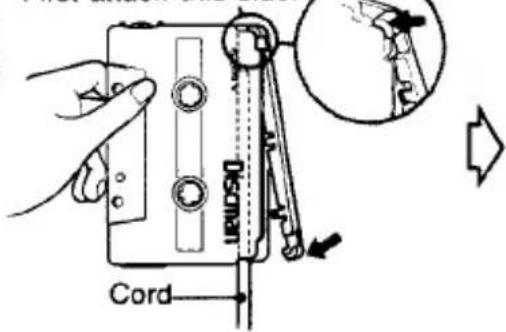
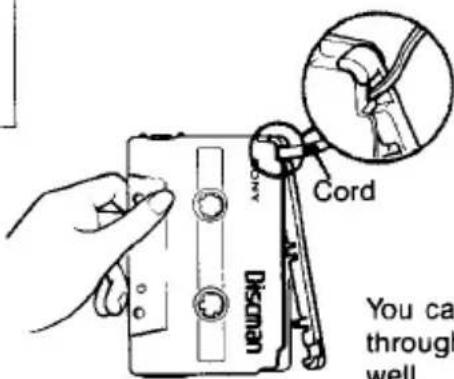
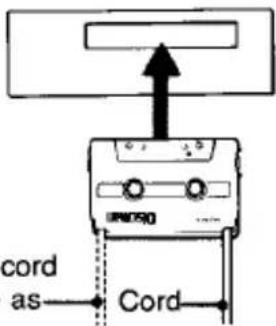
Wenn Sie ein Kassettentonbandgerät mit Tonkopf auf der rechten Seite haben, können Sie das Auto-Anschlusspaket direkt verwenden. In anderen Fällen müssen Sie die Seite ändern, an der das Kabel austritt.
1
Entfernen Sie die Kabelabdeckung.
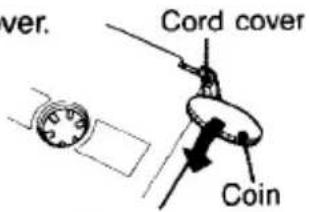

2
Ändern Sie das Kabel auf die passende Seite gemäß Ihrem Kassettentonbandgerät und setzen Sie die Abdeckung wieder auf.
Kassettentonbandgerät mit Tonkopf auf der linken Seite
Befestigen Sie zuerst diese Seite.
Kassettentonbandgerät mit Tonkopf innen

Hinweise
- Wenn Sie die entfernte Kabelabdeckung ersetzen, stellen Sie sicher, dass sie fest sitzt.
- Das Kabel sollte so verlegt werden, dass es das Fahren nicht behindert.
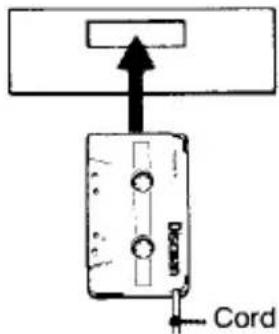
- Führen Sie niemals das Kabelende des Auto-Anschlusspakets in den Kassetten-schacht ein. Andernfalls kann das Kabel brechen oder das Kassetten-Autoradio beschädigt werden.
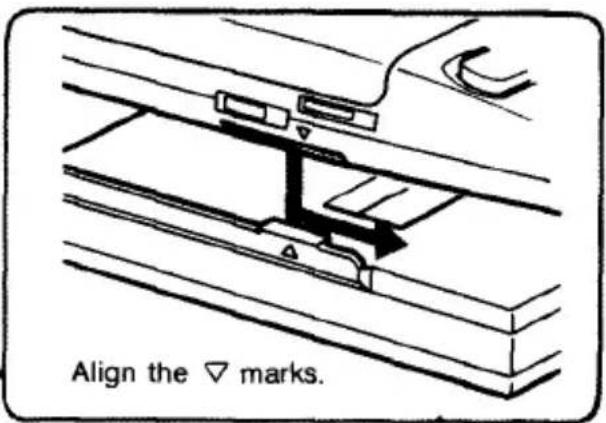
Installation des Geräts auf der Montageplatte
Installieren Sie das Gerät auf dem Auto-Montageadapter, der an der Montageplatte befestigt ist.
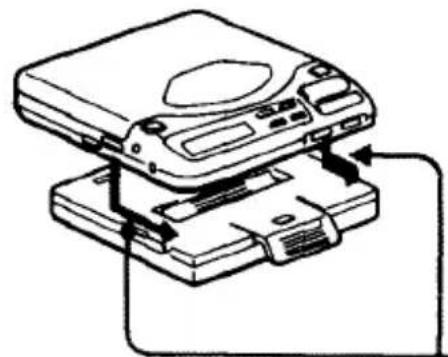
Montageplatte mit dem Auto-Montageadapter
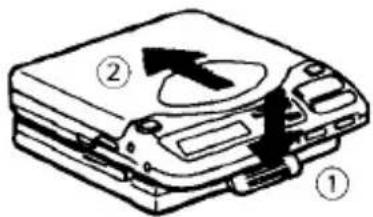
Entfernen des Geräts
Schieben Sie das Gerät in Pfeilrichtung ②, während Sie die Verriegelung ① lösen.
Anschluss
Um den CD-Player über das Kassetten-Autoradio zu hören, stellen Sie die Verbindungen wie unten gezeigt her. Verbinden Sie die entsprechenden Stromkabel mit dem Kassetten-Autoradio und dem CD-Player.
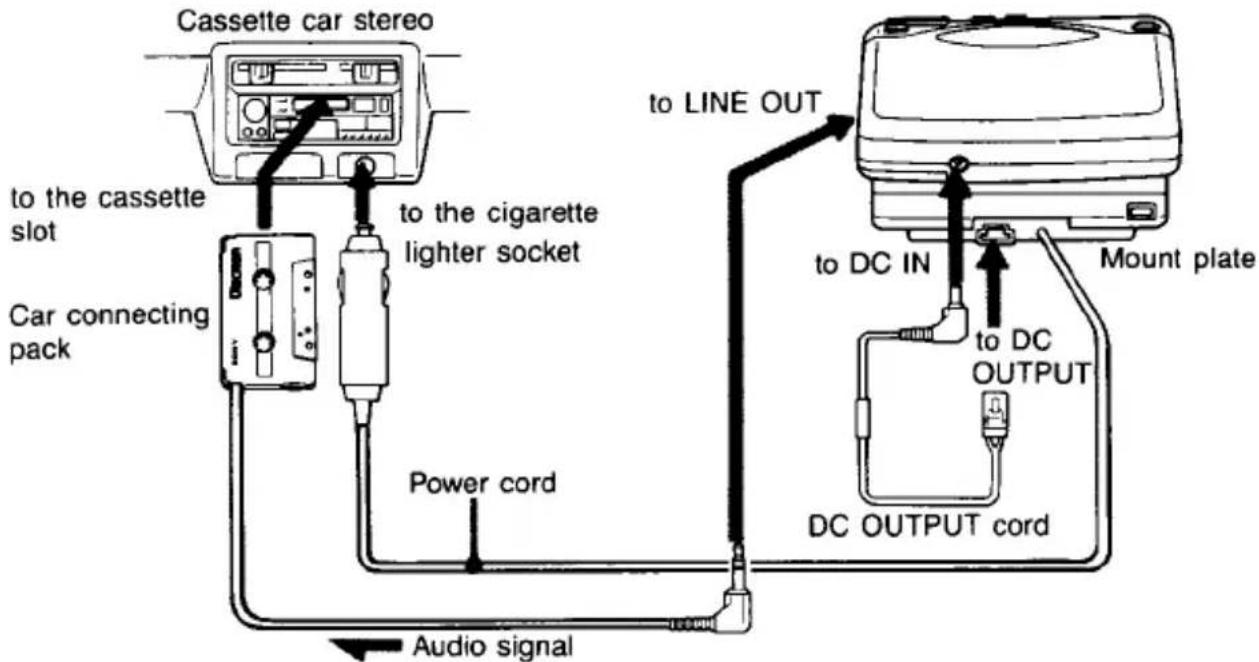
Hinweise
- Verlegen Sie die Kabel mit dem mitgelieferten Spiralschlauch, damit sie das Fahren nicht beeinträchtigen. • Um das Kabel vom CD-Player zu trennen, ziehen Sie es am Stecker heraus. Ziehen Sie niemals am Kabel, um den Stecker zu entfernen.
Die Verwendung des Auto-Anschlusspakets ist möglicherweise nicht für bestimmte Arten von Kassetten-Autoradios geeignet.
Betrieb
1 Führen Sie das Auto-Anschlusspaket in den Kassetten-schacht Ihres Kassetten-Autoradios ein. 2 Stellen Sie den Bandwahlschalter auf Normal (Typ I) und den DOLBY-NR-Schalter auf Aus, falls Ihr Auto damit ausgestattet ist. 3 Starten Sie die Wiedergabe.
Wenn das Kassettendeck Ihres Kassetten-Autoradios einen umschaltbaren Wiedergabekopf hat, stellen Sie sicher, dass es in der normalen (Vorwärts-)Richtung eingestellt ist.
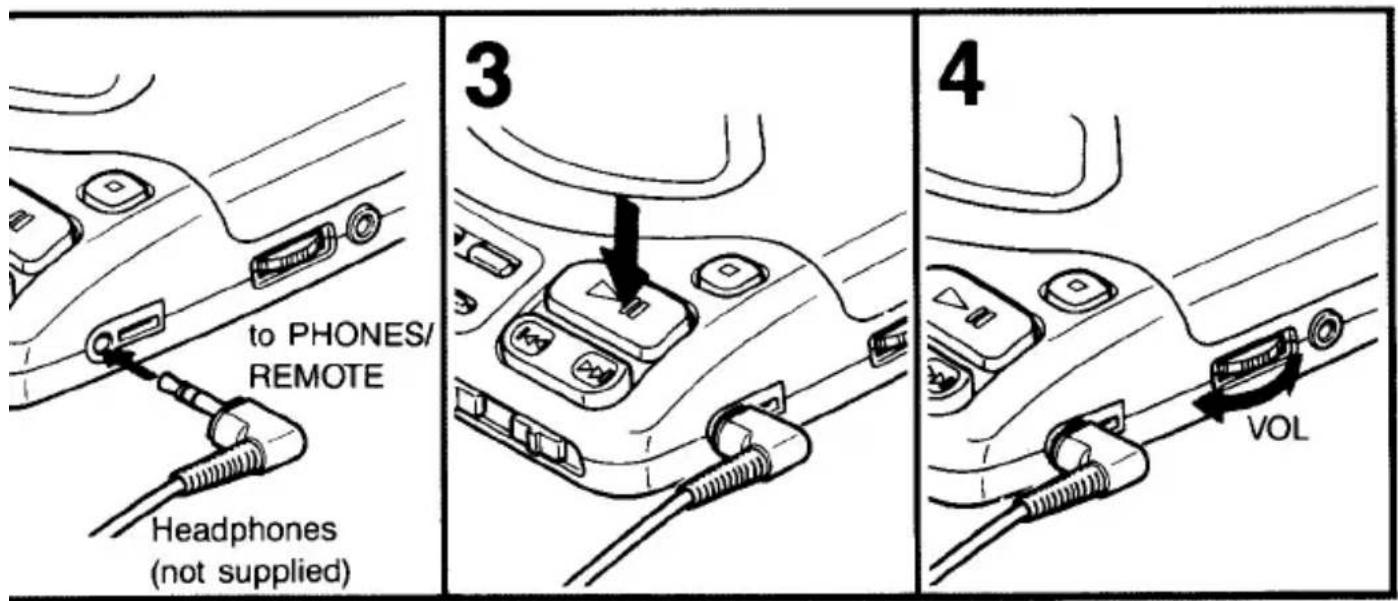
4 Drücken Sie die Taste ▶ am Discman, um die CD-Wiedergabe zu starten.
Stellen Sie die Lautstärke mit Ihrem Kassetten-Autoradio ein.
Wenn kein Ton zu hören ist, ändern Sie die Wiedergaberichtung am Kassettendeck des Kassetten-Autoradios.
Hinweis
Um das Auto-Anschlussgerät zu entfernen, drücken Sie die Taste ▲ (Auswurf) des Kassetten-Autoradios.
Wenn Sie den Motor ausschalten
Auch wenn der Akku oder die Alkaline-Batterien in das Gerät eingelegt sind, stoppt das Gerät, wenn Sie den Motor des Autos ausschalten (Zündungsfunktion). Diese Funktion ist nicht bei jedem Automodell verfügbar. In einem solchen Fall drücken Sie die Taste, um den Betrieb zu stoppen.
Zubehör für die Verwendung im Auto (nicht im Lieferumfang enthalten)
Plattenarm CPM-200A
Hinweise
- Ziehen Sie das Gerät aus der Zigarettenanzünderbuchse, wenn es nicht verwendet wird. Andernfalls kann es die Autobatterie entladen.
- Legen Sie das Gerät nicht auf ein Armaturenbrett und lassen Sie es nicht in einem Auto liegen, das in direktem Sonnenlicht geparkt ist, da die Temperatur übermäßig ansteigen kann.
- Wenn das Gerät mit einem anderen als dem optionalen Auto-Anschlussgerät an das Kassetten-Autoradio angeschlossen ist, können während der Wiedergabe Störgeräusche auftreten.
CD-Wiedergabe
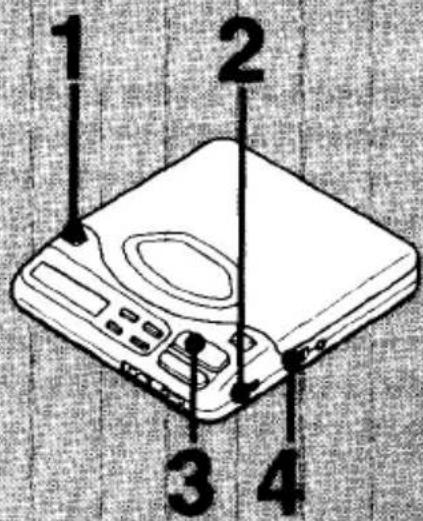
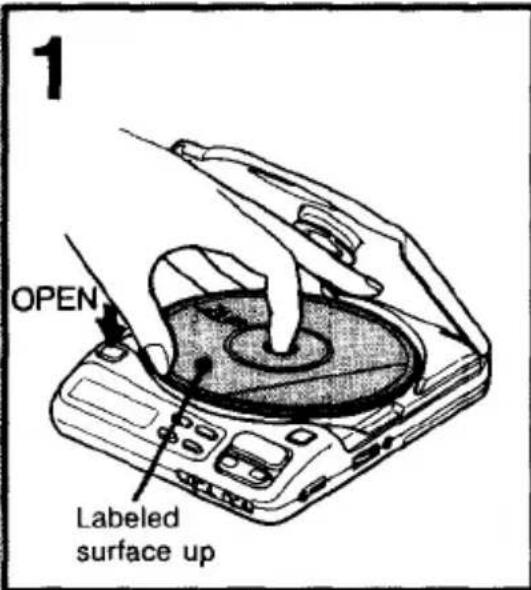
2
Weitere Bedienungsvorgänge
| Operation | Button to be pressed |
| To pause | ▶II |
| To release the pause mode | ▶II |
| To stop | ■ |
Wenn Sie die ■-Taste drücken, stoppt die Disc-Wiedergabe und das Gerät schaltet sich automatisch aus.
Die Anzahl der Titel der Disc, die Gesamtspielzeit und die Hintergrundbeleuchtung werden etwa eine Minute lang angezeigt. Wenn Sie die Anzeige und die Hintergrundbeleuchtung direkt nach dem Drücken der ■-Taste ausschalten möchten, drücken Sie sie erneut.
Zum Abspielen einer 8-cm-Disc (3 Zoll)
Sie können sie ohne Adapter abspielen.
Zum Kopfhörer
Sie können dieses Gerät mit Stereo-Kopfhörern mit Stereo-Ministecker oder mit Stereo-Kopfhörern mit Fernbedienung (nicht im Lieferumfang enthalten) verwenden.
Hinweise
- Wenn Sie die ▶-Taste drücken, während die Disc verkehrt herum eingelegt ist oder keine Disc eingelegt ist, erscheint die Anzeige "00 cc" im Display und es ist kein Ton zu hören. Drücken Sie die ■-Taste, um die Disc-Wiedergabe zu stoppen, und legen Sie die Disc erneut mit der beschrifteten Seite nach oben ein.
- Wenn auf eine 12-cm-Disc mit vielen Titeln eine Disc mit wenigen Titeln folgt (z. B. CD-Single oder CDV usw.), kann es mehr als 10 Sekunden dauern, bis die Wiedergabe beginnt.
| Emphasizing the bass sound*Press the DSP MODE button to get the “BASS BOOST” indication on the display window. Then adjust the bass sound with the EFFECT button. The bass sound will be boosted more powerfully. | 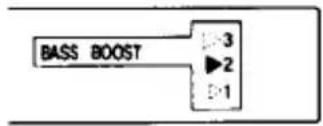 |
| Emphasizing the small and inaudible sound**Press the DSP MODE button to get the “DDS” indication on the display window when listening to small sound. Then adjust the level of DDS with the EFFECT button. The sound will be boosted for better audibility. | 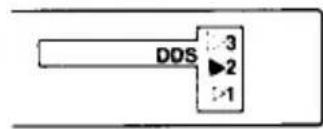 |
* Der Bass-Boost-Effekt kann je nach Ausgangspegel des aufgenommenen Tons abnehmen. ** Bei der Wiedergabe von harten und starken Klängen kann der DDS möglicherweise keine effiziente Wirkung erzielen.
| On the Display Window | ||
| Time counter | When you the press the▶■button The number of the selections on the disc and the total playing time will appear for 2 seconds. | Example 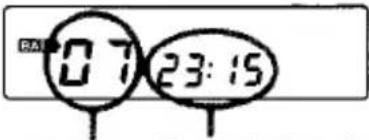 Number of the selections Total playing time Number of the selections Total playing time |
| During the playback The track number and the elapsed playing time of the currently played selection will appear. | 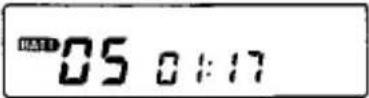 1 min. 17 sec. has elapsed from the beginning of the fifth selection. 1 min. 17 sec. has elapsed from the beginning of the fifth selection. | |
| During the pause The elapsed playing time of the current point flashes. | 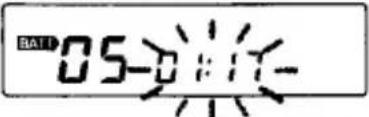 Pause mode at the point 1 min. 17 sec. from the beginning of the fifth selection Pause mode at the point 1 min. 17 sec. from the beginning of the fifth selection | |
| Between the selections The time to the beginning of the next selection will appear. | 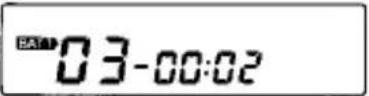 2 sec. to the beginning of the 3rd selection 2 sec. to the beginning of the 3rd selection | |
| Level meter | During the playback, the level meter appears like the illustration on the right. | 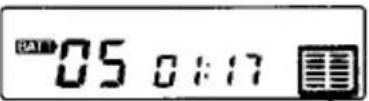 Level meter Level meter |
Zur BATT-Anzeige
Die BATT-Anzeige erscheint im Display, wenn das Gerät entweder mit dem wiederaufladbaren Akku oder mit Alkaline-Batterien betrieben wird. Die Anzeige blinkt, wenn die Batterien schwach werden. Wenn die Batterien vollständig entladen sind, erlischt die Anzeige und der Betrieb wird automatisch gestoppt.
Laden Sie in diesem Fall den wiederaufladbaren Akku auf oder ersetzen Sie alle Alkaline-Batterien durch neue.
Auffinden einer bestimmten Auswahl oder eines Teils einer Disc
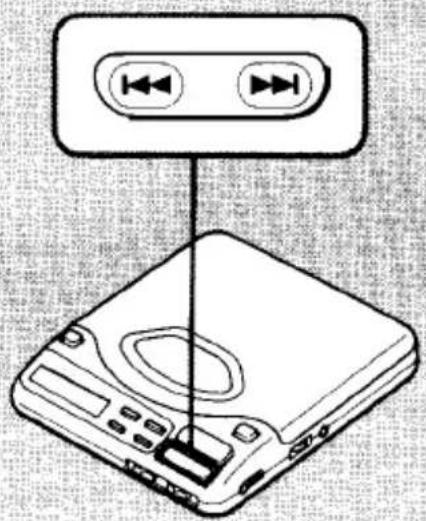
| Locating a Particular Selection —AMS | |
| To locate the beginning of the current or a preceding selection | Press the ◀ button lightly and repeatedly. |
| To locate the beginning of a succeeding selection | Press the ► button lightly and repeatedly. |
| Locating a Particular Part of Selection —SEARCH | |
| To go back at high speed | Keep the ◀ button pressed. |
| To go ahead at high speed | Keep the ► button pressed. |
Zur AMS-Funktion
- Jedes Mal, wenn Sie die Taste ◀ drücken, sucht das Gerät die aktuelle und die vorherige Auswahl. Jedes Mal, wenn Sie die Taste ▶ drücken, sucht das Gerät die nächste Auswahl. Das Gerät stoppt bei der letzten Auswahl.
- Wenn Sie während der Pause die Taste ◀◀ oder ▶▶ drücken, pausiert das Gerät am Anfang der gewünschten Auswahl.
Verschiedene Wiedergabemodi
PLAY MODE
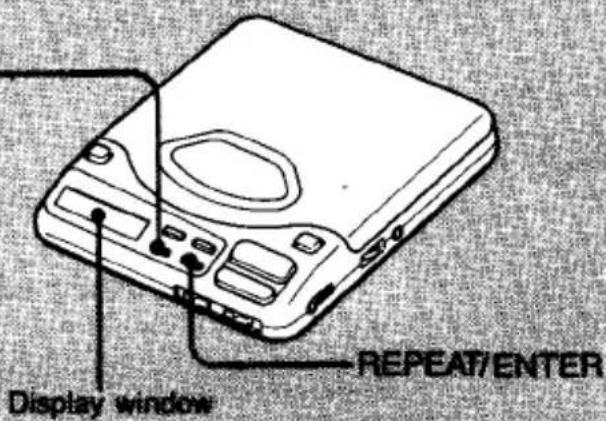
| Playing the first part of all the selections—Intro-play | Press 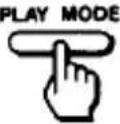 (during playback) (during playback)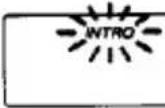 The “INTRO” indication appears on the display window and will flash. The “INTRO” indication appears on the display window and will flash. |
| Playing only one selection—Single play | Press 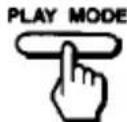 (during playback) (during playback)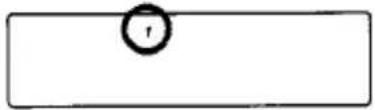 |
Dieses Gerät verfügt über 10 verschiedene Wiedergabemodi.
So ändern Sie den Wiedergabemodus
Drücken Sie während der Wiedergabe die Taste PLAY MODE.
Jedes Mal, wenn Sie die Taste PLAY MODE drücken, wechselt der Wiedergabemodus zyklisch und die Anzeigen für jeden Modus erscheinen wie folgt im Display:
![graph LR A["INTRO"] --> B["1"] B --> C["RMS"] C --> D["SHUFFLE"] D --> E["display off\n(normal play mode)"]](/content/2026/05/805582/images/2e65a2e7652460dddd9aaaf86a08517712866ae8a83317c03600a09cc098c448.jpg)
So wiederholen Sie die Wiedergabe
Drücken Sie während der Wiedergabe die Taste REPEAT/ENTER.
Die Anzeige "REPEAT" erscheint im Display.
Wenn sich das Gerät im normalen Wiedergabemodus befindet, wird die gesamte Disc wiederholt abgespielt. Wenn die letzte Auswahl der Disc beendet ist, kehrt es zum Anfang der ersten Auswahl zurück und startet die Wiedergabe erneut.
Drücken Sie erneut, um die Wiederholung abzubrechen.
| REPEAT/ENTER button is pressed | |
| Press the▶■button.The indication stops flashing and the first ten seconds of all selections will be played in order.Press the▶■button again to cancel this function.The currently played selection can be listened to the end. | 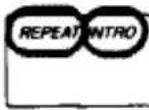 The first ten seconds of all selections in order repeatedly.When the▶■button is pressed again to cancel the intro-play function, the playing mode will change to that of normal repeat play. The first ten seconds of all selections in order repeatedly.When the▶■button is pressed again to cancel the intro-play function, the playing mode will change to that of normal repeat play. |
| Playback will stop when the currently played selection is finished. | 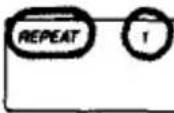 After the currently played selection is finished, the same selection will be played repeatedly. After the currently played selection is finished, the same selection will be played repeatedly. |
Verschiedene Wiedergabemodi
| Playing the selections in the desired order - Program play (RMS*) | Press (during playback) | |
| 1 Choose the selection with the or button. Desired selection number | 2 Press the REPEAT/ ENTER button.** The next selection | |
| * Random Music Sensor | ||
| Playing the selections in a random order - Shuffle play | Press (during playback) | |
Drücken Sie die Taste PLAY MODE erneut, um zum normalen Wiedergabemodus zurückzukehren.
Um die Wiedergabe zu stoppen, drücken Sie die Taste ■.
**Wenn die Taste REPEAT/ENTER länger als 2 Sekunden gedrückt gehalten wird, anstatt sie kurz zu drücken, erscheint die Gesamtzeit der programmierten Titel im Display.
Wenn eine Disc mehr als 24 Titel enthält und Sie den 24. Titel oder einen Titel nach dem 24. programmieren möchten, wird die Gesamtspielzeit des Programms nicht angezeigt.
(Stattdessen erscheint die Anzeige "--:--".) Es ist jedoch möglich, solche Titel zu programmieren.
Während der Zufallswiedergabe
Um den Anfang des aktuell wiedergegebenen Titels zu finden, drücken Sie die Taste ◀◀.
Um den nächsten Titel zu finden, drücken Sie die Taste ▶.
Sie können keinen vorherigen Titel ansteuern, auch wenn Sie die Taste ◀ gedrückt halten.
| The “RMS” indication appears on the display window and will flash. | 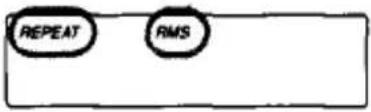 The selections will be played in the programmed order repeatedly. The selections will be played in the programmed order repeatedly. | |
| 3Repeat the steps 1 and 2.(Up to 22 selections) | 4Press the ▶■button.The “RMS” indication stops flashing and playback will start. | |
| Plays every selection in a random order. |  After the every selection has been played in random order, they will be reshuffled and played repeatedly in a different order each time. After the every selection has been played in random order, they will be reshuffled and played repeatedly in a different order each time. | |
Während der Zufalls- oder Programmwiedergabe
Zwischen den Titeln wird automatisch eine Pause von ca. 3 Sekunden eingefügt.
Wenn nach dem Speichern aller 22 Titel ein weiterer Titel hinzugefügt werden soll.
Der erste Titel wird gelöscht und der neue Titel wird an seiner Stelle gespeichert.
So überprüfen Sie den Inhalt des Programms während der Programmierung
Um die programmierte Wiedergabereihenfolge zu überprüfen
Drücken Sie während der Programmierung leicht die Taste REPEAT/ENTER.
Beispiel: Die Titelnummern 2, 4 und 6 sind in dieser Reihenfolge programmiert.
![graph LR A["02"] --> B["04"] B --> C["06"] C --> D["00"]](/content/2026/05/805582/images/bdc6a415a3d3f4406867db3524f295f029c4f9cfb491fcdec827b18579ce1f01.jpg)
Titelnummer Wiedergabereihenfolge
Sperren der Tasten
Wenn Sie den HOLD-Schalter in Pfeilrichtung stellen, werden alle Tasten gesperrt, um ein versehentliches Drücken zu verhindern.
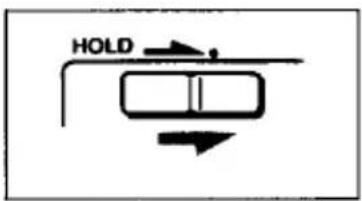
Wenn sich das Gerät im Stoppmodus befindet, können Sie es wie folgt bedienen, wenn die Anzeige im Display erscheint.
| When the RESUME switch is in the OFF position | When the RESUME switch is in the ON position | ||
| You can operate the DSP MODE button and adjust the level with the EFFECT button.10 47:53 | Number of the selections and total playing time | You can operate the PLAY MODE, REPEAT/ENTER, DSP MODE, ▶▶ and▶▶buttons.04 02:34 | The selection number played last time and elapsed time when the■ button is pressed |
Sie können die Anzeige mit dem RESUME-Schalter ändern, auch wenn sich das Gerät im Stoppmodus befindet.
Verwendung der Resume-Wiedergabefunktion
Wenn Sie die Taste ▶ bei eingeschaltetem RESUME-Schalter drücken, können Sie die Disc-Wiedergabe im gleichen Wiedergabemodus und ab dem Punkt fortsetzen, an dem Sie zuletzt die Taste ■ gedrückt haben.
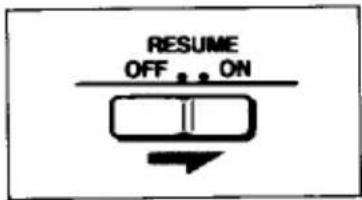
Anzeige im Display
Wenn Sie die Wiedergabe erneut starten, ändert sich die Anzeige im Display wie folgt:

Während die Restzeit-Anzeige im Stoppmodus erscheint.

Wenn der RESUME-Schalter auf ON steht
Beispiel: Wenn Sie die Wiedergabe bei 2 Minuten und 34 Sekunden des 4. Titels stoppen.
![graph TD A["The selection number and elapsed time when the ■ button is pressed."] --> B["Press ▶"] B --> C["The selection number played last time"] C --> D["04"] D --> E["Playback starts"] F["04 02:34"] --> G["→"]](/content/2026/05/805582/images/fe8da257c21b6d9cfc2d21e39171f3d0bc0758deac856202a33fdd0fea7ab412.jpg)
Hinweise
- Diese Funktion kann nicht verwendet werden, wenn der Deckel geöffnet wurde, während das Gerät an die Stromversorgung angeschlossen ist.
- Die Funktionen BASS BOOST und DDS werden unabhängig von der Stellung des RESUME-Schalters immer gespeichert, sofern die Stromversorgung nicht unterbrochen wird.
- Die Wiederaufnahme der Wiedergabe kann etwa 30 Sekunden hinter oder vor dem Stopppunkt beginnen, wenn der Netzadapter oder das Autobatteriekabel abgetrennt oder die Batterien entfernt werden. Die Speicherungen des DSP-Modus, des Wiedergabemodus und des Wiederholungsmodus werden jedoch gelöscht.
Anschluss an andere Geräte
Um den CD-Klang über Lautsprecher zu hören![graph LR A["Amplifier"] -->|to LINE IN jack| B["Two resistors"] B --> C[" supplied connecting cord or RK-G129 (not supplied) "] C --> D[" to LINE OUT jack "] D --> E[" finally hard disk"]](/content/2026/05/805582/images/17e4cc65912cdc5f27d8c70e4f7b3c058823d751147df4ad271397e5fdd425d9.jpg)
Um den CD-Klang mit einem Stereo-Kassettenrekorder mit LINE-IN-Buchse aufzunehmen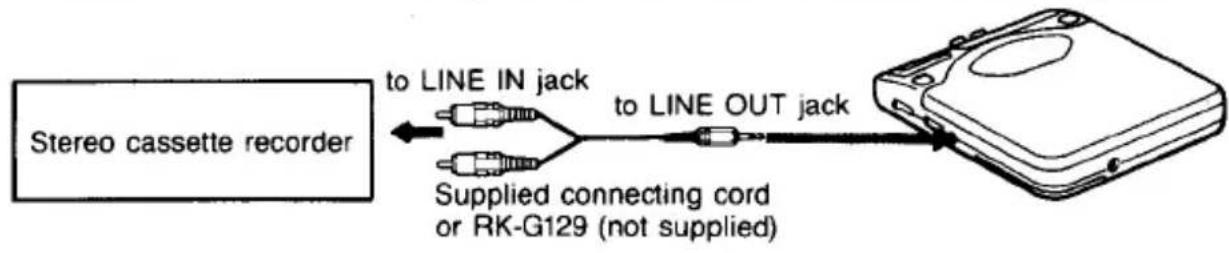
Um den CD-Klang mit einem Kassettenrekorder mit MIC-Buchse aufzunehmen![graph LR A["Cassette recorder"] -->|to MIC jack| B["RK-G134 (not supplied)"] B -->|to LINE OUT jack| C["Internal RAM module"]](/content/2026/05/805582/images/c7d0fe975ab96bde3af236c6b69d85c334de8e4153f5abedd7fa35297c28b0cc.jpg)
Hinweise zum Anschluss
- Schalten Sie alle Geräte aus, bevor Sie Verbindungen herstellen.
- Stecken Sie den weißen Stecker in die L-Buchse (linker Kanal) und den roten Stecker in die R-Buchse (rechter Kanal).
- Schließen Sie den Ausgang von LINE OUT nicht an die PHONO-Buchsen des Verstärkers an.
- Achten Sie darauf, die Stecker des Kabels fest in die Buchsen zu stecken. Eine lose Verbindung kann ein Brummen verursachen.
- Wenn das Gerät Störungen im Radio- oder Fernsehempfang verursacht, schalten Sie das Gerät aus oder entfernen Sie es vom Empfänger.
Wartung
Reinigen der Linse
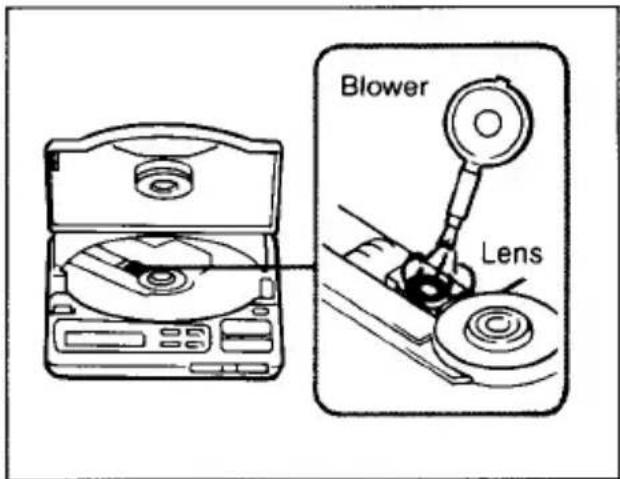
Wenn Sie die Linse versehentlich mit den Fingern berührt haben oder wenn Staub auf der Linse den ordnungsgemäßen Betrieb verhindert, öffnen Sie den Deckel des Disc-Fachs und reinigen Sie die Linse mit dem Linsenreinigungsset KK-9 (nicht im Lieferumfang enthalten).
Reinigen des Kopfhörersteckers
Halten Sie den Stecker Ihrer Kopfhörer sauber, um einen optimalen Klang zu erzielen. Wischen Sie ihn mit einem trockenen, weichen Tuch ab.
Reinigen des Gehäuses
Reinigen Sie das Gehäuse mit einem weichen Tuch, das leicht mit Wasser oder einer milden Reinigungslösung angefeuchtet ist. Verwenden Sie keine Scheuerschwämme, Scheuerpulver oder Lösungsmittel wie Alkohol oder Benzin, da diese die Oberfläche des Gehäuses beschädigen können.
Hinweise zu Compact Discs
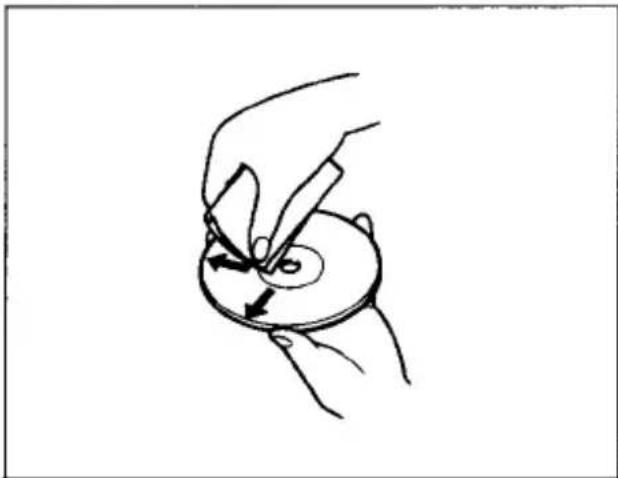
- Reinigen Sie die Disc vor der Wiedergabe mit einem Reinigungstuch. Wischen Sie die Disc von der Mitte nach außen.
- Verwenden Sie keine Lösungsmittel wie Benzin, Verdünner, handelsübliche Reinigungsmittel oder Antistatik-Sprays, die für analoge Schallplatten bestimmt sind.
- Setzen Sie die Disc keiner direkten Sonneneinstrahlung oder Wärmequellen wie Heißluftkanälen aus, und lassen Sie sie nicht in einem in der Sonne geparkten Auto liegen, da die Temperatur im Auto erheblich ansteigen kann. • Bewahren Sie die Disc nach der Wiedergabe in ihrer Hülle auf.
Wenn sich Kratzer, Schmutz oder Fingerabdrücke auf der Disc befinden, kann dies zu einem Spurfehler führen.
Handhabung der Disc
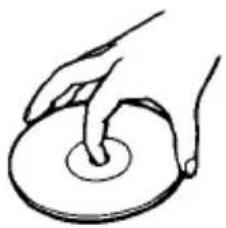
Halten Sie die Disc am Rand fest.
Nicht auf diese Weise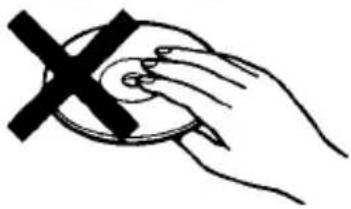
Berühren Sie die Oberfläche nicht.
Nicht auf diese Weise
Kleben Sie kein Papier oder Klebeband auf die Oberfläche und schreiben Sie nichts darauf.
Sicherungswechsel
Wenn das Gerät nicht funktioniert, überprüfen Sie die Sicherung und ersetzen Sie sie bei Durchbrennen wie folgt:
1 Schalten Sie das Gerät aus und ziehen Sie den Zigarettenanzünderstecker aus der Zigarettenanzünderbuchse. 2 Entfernen Sie das Steckerende, indem Sie es gegen den Uhrzeigersinn drehen. 3 Entfernen Sie die Sicherung aus dem Stecker. 4 Setzen Sie die mitgelieferte Ersatzsicherung in den Stecker ein. 5 Befestigen Sie das Steckerende, indem Sie es im Uhrzeigersinn drehen.
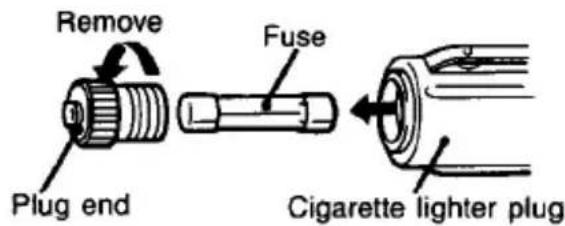
Hinweise zum Sicherungswechsel
- Verwenden Sie unbedingt die mitgelieferte Ersatzsicherung.
- Wenn die Sicherung nach dem Austausch erneut durchbrennt, wenden Sie sich an Ihren nächsten Sony-Händler.
Technische Daten
| System | Compact disc digital audio system |
| Laser diode properties | Material: GaAlAsWavelength: λ = 780 nmEmission duration: ContinuousLaser output: Less than 44.6 μW(This output is the value measured at a distance of 200 mm from the objective lens surface on the Optical Pick-up Block.) |
| Error correction | Sony Super Strategy Cross Interleave Reed Solomon Code |
| D-A conversion | 1 bit quarz time-axis control |
| Frequency response | 20 - 20,000 Hz ±1 dB(measured by EIAJ CP-307) |
| Output (at 6 V input level) | Line output (stereo minijack)Output level 0.55 V rms at 50 kilohmsLoad impedance over 10 kilohmsHeadphones (stereo minijack)9 mW + 9 mW at 16Ω |
Allgemein
Stromversorgung
Mitgeliefert:
• DC IN 6 V Buchse akzeptiert: den Sony Netzadapter für 120 V Wechselstrom, 60 Hz in den USA, 240 V Wechselstrom, 50 Hz in Großbritannien/Australien die Montageplatte für den Einsatz mit 12 V Autobatterie
Nicht mitgeliefert:
• DC 2,4 V Akku-Pack BP-DM1
• DC 3 V zwei AA (LR6) Alkaline-Batterien
2,5 W Gleichstrom (bei eingeschalteter Hintergrundbeleuchtung)
Stromverbrauch
Ca. 139 × 31,5 × 159,9 mm (51/2 × 11/4 × 63/8 Zoll)
Abmessungen
(B/H/T) inkl. hervorstehender Teile und Bedienelemente
Gewicht
Ca. 315 g (11,1 oz.) ohne Batterie
Mitgeliefertes Zubehör
Netzteil (1)
Haltevorrichtung fürs Auto (1)
Verbindungskabel (1)
Montageplatte (1)
(Telefonstecker × 2 ↔ Stereoklinkenstecker)
Auto-Anschlussset (1)
Änderungen von Design und technischen Daten ohne Vorankündigung vorbehalten.
Optionales Zubehör
Akkubatterie BP-DM1
Funkempfänger-Set MDR-FM101K
Funkfernbedienungs-Set RM-DM5K
Stereo-Kopfhörer mit Fernbedienung
Kabelgebundene Fernbedienung RM-DM2
MDR-A21DM1, MDR-A21DM2
Plattenarm CPM-200A
Aktives Lautsprechersystem SRS-57
Ihr Händler führt möglicherweise nicht alle oben aufgeführten Zubehörteile. Bitte fragen Sie Ihren Händler nach weiteren Informationen.
Hinweis
Dieses Gerät entspricht der EG-Richtlinie 87/308/EWG bezüglich der Störunterdrückung.
Fehlerbehebungsanleitung
Sollte nach Durchführung der folgenden Überprüfungen weiterhin ein Problem bestehen, wenden Sie sich an Ihre nächste Sony-Kundendienststelle.
| Symptom | Cause and/or solution |
| Disc play does not start. | The disc is inserted upside down or incorrectly.→ Insert the disc correctly with the labeled surface up.Dusty or defective disc. (See page 29.)Dirty or dusty lens. (See page 29.)The disc compartment lid is not closed.Moisture condensation. → Leave the player in a warm place until the moisture evaporates.The AC power adaptor is not plugged into the wall outlet.The mount plate is not firmly connected to a cigarette lighter socket.The unit is not placed on a level surface.The HOLD switch is set to the direction of the arrow.Weak rechargeable battery (See pages 9 and 20.)Weak alkaline batteries (See pages 8 and 20.)The ribbon is caught between the battery/ rechargeable battery and the battery terminal. |
| No sound from the headphones | The headphones plug is not firmly connected to the PHONES/REMOTE jack.Adjust the VOL control.Dirty plug. |
| No sound from the connected speakers | Check the connections.The amplifier is not turned on. |
| No sound from the connected car stereo | When the car connecting pack is used, change the playback direction of the tape deck. |
| Skipping of sound | Dirty or defective disc.Dirty lens.Strong vibration. |
| Charging is not possible. | Check if the ribbon is caught between the battery and the battery terminal. |
- D-808K
- BEDIENUNGSANLEITUNG
- EIGENTÜMER-NOTIZ
- DISCMAN
- WARNUNG
- INFORMATION (FÜR KUNDEN IN DEN USA)
- VORSICHT
- FÜR KUNDEN IM VEREINIGTEN KÖNIGREICH
- INHALTSVERZEICHNIS
- VORBEREITUNGEN
- BEDIENUNG
- WICHTIG
- VORSICHTSMASSNAHMEN
- ZUR SICHERHEIT
- STROMQUELLEN
- ZUM BETRIEB
- ZUR INSTALLATION
- ÜBER DIE KOPFHÖRER
- VERKEHRSSICHERHEIT
- VERMEIDUNG VON HÖRSCHÄDEN
- RÜCKSICHT AUF ANDERE
- LAGE UND FUNKTION DER BEDIENELEMENTE
- REMOTE-BUCHSE
- LOCK-SCHALTER
- ILLUMINATION-SCHALTER
- SO ÄNDERN SIE DIE BELEUCHTUNGSFARBEN
- VERWENDUNG MIT BATTERIEN (NICHT IM LIEFERUMFANG ENTHALTEN)
- HINWEIS
- LEBENSDAUER DER ALKALINE-BATTERIEN
- HINWEISE ZU BATTERIEN
- VERWENDUNG MIT WIEDERAUFLADBAREM AKKUPACK (NICHT IM LIEFERUMFANG ENTHALTEN)
- INSTALLIEREN DES WIEDERAUFLADBAREN AKKUPACKS
- SO LADEN SIE DEN AKKUPACK AUF
- WANN DER WIEDERAUFLADBARE AKKUPACK (NICHT IM LIEFERUMFANG ENTHALTEN) ERSETZT WERDEN SOLLTE
- HINWEISE ZUM AKKU (NI-CD-AKKU)
- VERWENDUNG MIT HAUSHALTSSTROM
- HINWEIS ZUM NETZTEIL
- VERWENDUNG IM AUTO
- TEILEIDENTIFIKATION VON MONTAGEPLATTE UND AUTO-ANSCHLUSSSET
- MONTAGEPLATTE
- AUTO-ANSCHLUSSSET
- INSTALLATION
- ZUR INSTALLATION MIT KLETTBÄNDERN
- HINWEISE
- ÜBER DAS AUTO-ANSCHLUSSPAKET
- INSTALLATION DES GERÄTS AUF DER MONTAGEPLATTE
- ENTFERNEN DES GERÄTS
- ANSCHLUSS
- BETRIEB
- WENN SIE DEN MOTOR AUSSCHALTEN
- ZUBEHÖR FÜR DIE VERWENDUNG IM AUTO (NICHT IM LIEFERUMFANG ENTHALTEN)
- CD-WIEDERGABE
- ZUM ABSPIELEN EINER 8-CM-DISC (3 ZOLL)
- ZUM KOPFHÖRER
- ZUR BATT-ANZEIGE
- AUFFINDEN EINER BESTIMMTEN AUSWAHL ODER EINES TEILS EINER DISC
- ZUR AMS-FUNKTION
- VERSCHIEDENE WIEDERGABEMODI
- DIESES GERÄT VERFÜGT ÜBER 10 VERSCHIEDENE WIEDERGABEMODI
- SO ÄNDERN SIE DEN WIEDERGABEMODUS
- SO WIEDERHOLEN SIE DIE WIEDERGABE
- WÄHREND DER ZUFALLSWIEDERGABE
- WÄHREND DER ZUFALLS- ODER PROGRAMMWIEDERGABE
- WENN NACH DEM SPEICHERN ALLER 22 TITEL EIN WEITERER TITEL HINZUGEFÜGT WERDEN SOLL
- SO ÜBERPRÜFEN SIE DEN INHALT DES PROGRAMMS WÄHREND DER PROGRAMMIERUNG
- SPERREN DER TASTEN
- VERWENDUNG DER RESUME-WIEDERGABEFUNKTION
- ANZEIGE IM DISPLAY
- WÄHREND DIE RESTZEIT-ANZEIGE IM STOPPMODUS ERSCHEINT
- WENN DER RESUME-SCHALTER AUF ON STEHT
- ANSCHLUSS AN ANDERE GERÄTE
- HINWEISE ZUM ANSCHLUSS
- WARTUNG
- REINIGEN DER LINSE
- REINIGEN DES KOPFHÖRERSTECKERS
- REINIGEN DES GEHÄUSES
- HINWEISE ZU COMPACT DISCS
- HANDHABUNG DER DISC
- SICHERUNGSWECHSEL
- HINWEISE ZUM SICHERUNGSWECHSEL
- TECHNISCHE DATEN
- ALLGEMEIN
- MITGELIEFERT
- NICHT MITGELIEFERT
- MITGELIEFERTES ZUBEHÖR
- OPTIONALES ZUBEHÖR
- FEHLERBEHEBUNGSANLEITUNG
Marke : SONY
Modell : Discman D-808K
Kategorie : CD-Player