
Discman D-777 - CD-Player SONY - Kostenlose Bedienungsanleitung
Finden Sie kostenlos die Bedienungsanleitung des Geräts Discman D-777 SONY als PDF.


| Produkttyp | CD-Player (tragbar) |
| Modell | Discman D-777 |
| Marke | SONY |
| Abmessungen (B/H/T) | ca. 131 x 19,8 x 131,7 mm |
| Gewicht (mit Akkus) | ca. 225 g |
| Stromversorgung | Netzadapter (DC IN 4,5 V) oder zwei LR6-Batterien oder wiederaufladbare Batterien |
| Kopfhörerausgang | 10 mW + 10 mW an 16 Ω (Stereo-Miniklinke) |
| Line-Ausgang | 0,7 V rms an 47 kΩ (Stereo-Miniklinke) |
| Frequenzgang | 20 - 20.000 Hz ±1 dB |
| D/A-Wandlung | 1-Bit-Quarz-Zeitachsensteuerung |
| Fehlerkorrektur | Sony Super Strategy Cross Interleave Reed-Solomon-Code |
| Wiedergabefunktionen | Wiederholen, Intro-Programm-Wiedergabe, Zufallswiedergabe |
| ESP (Antisprungspeicher) | Pufferspeicher für ca. 10 Sekunden |
| AVLS (Lautstärkebegrenzung) | Schützt das Gehör durch Begrenzung der maximalen Lautstärke |
| Batterielaufzeit (Akkus) | ca. 5 h (ESP aus) / ca. 4 h (ESP ein) |
| Batterielaufzeit (Trockenbatterien) | ca. 9 h (ESP aus) / ca. 7 h (ESP ein) |
| Ladezeit | ca. 3 Stunden maximal |
| Reinigung der Linse | Mit Linsenreinigungsset KK-DM1 |
| Sicherheitsklasse | Laser Klasse 1 |
| Lieferumfang | Netzadapter, zwei wiederaufladbare Batterien, Anschlusskabel, Stereo-Kopfhörer mit Fernbedienung, Batteriefach, Tragetasche |
| Empfohlenes Zubehör | Car-Kit CPA-85U, Aktivlautsprecher SRS-A50, Akku NH-9WM, Anschlusskabel RK-G129, Netzadapter AC-E45HG |
Häufig gestellte Fragen - Discman D-777 SONY
Benutzerfragen zu Discman D-777 SONY
0 Frage zu diesem Gerät. Beantworten Sie die, die Sie kennen, oder stellen Sie Ihre eigene.
Eine neue Frage zu diesem Gerät stellen
Laden Sie die Anleitung für Ihr CD-Player kostenlos im PDF-Format! Finden Sie Ihr Handbuch Discman D-777 - SONY und nehmen Sie Ihr elektronisches Gerät wieder in die Hand. Auf dieser Seite sind alle Dokumente veröffentlicht, die für die Verwendung Ihres Geräts notwendig sind. Discman D-777 von der Marke SONY.
BEDIENUNGSANLEITUNG Discman D-777 SONY
Compact Disc Compact Player
Bedienungsanleitung
Discman

D-777
Sony Corporation ©1995 Gedruckt in Japan
Willkommen!
Vielen Dank, dass Sie sich für den Sony D-777 Compact Disc Compact Player entschieden haben. Bevor Sie Ihren Discman in Betrieb nehmen, lesen Sie bitte diese Anleitung und bewahren Sie sie für späteres Nachschlagen auf.
Besitzer-Notiz
Die Modell- und Seriennummern befinden sich an der Unterseite. Notieren Sie die Seriennummer im unten vorgesehenen Feld. Beziehen Sie sich auf diese Nummern, wenn Sie Ihren Sony-Händler bezüglich dieses Produkts kontaktieren.
Modell-Nr. D-777
Serien-Nr. ____
WARNUNG
Um Brand- oder Stromschlaggefahr zu vermeiden, setzen Sie das Gerät nicht Regen oder Feuchtigkeit aus.
Um einen elektrischen Schlag zu vermeiden, öffnen Sie nicht das Gehäuse. Überlassen Sie Wartungsarbeiten nur qualifiziertem Personal.
VORSICHT
Die Verwendung optischer Instrumente mit diesem Produkt erhöht die Augengefahr.
INFORMATION
Für Kunden in den USA
Dieses Gerät wurde getestet und entspricht den Grenzwerten für ein digitales Gerät der Klasse B gemäß Teil 15 der FCC-Bestimmungen. Diese Grenzwerte sollen einen angemessenen Schutz gegen schädliche Störungen in einer Wohnanlage bieten. Dieses Gerät
erzeugt, verwendet und kann Hochfrequenzenergie ausstrahlen und kann, wenn es nicht gemäß den Anweisungen installiert und verwendet wird, schädliche Störungen des Funkverkehrs verursachen. Es gibt jedoch keine Garantie, dass in einer bestimmten Installation keine Störungen auftreten. Wenn dieses Gerät schädliche Störungen des Radio- oder Fernsehempfangs verursacht, was durch Ein- und Ausschalten des Geräts festgestellt werden kann, wird der Benutzer aufgefordert, die Störungen durch eine oder mehrere der folgenden Maßnahmen zu beheben:
- Die Empfangsantenne neu ausrichten oder neu positionieren.
- Den Abstand zwischen Gerät und Empfänger vergrößern.
- Das Gerät an eine Steckdose anschließen, die sich an einem anderen Stromkreis befindet als der des Empfängers.
- Wenden Sie sich an den Händler oder einen erfahrenen Radio-/Fernsehtechniker.
Es wird darauf hingewiesen, dass Änderungen oder Modifikationen, die nicht ausdrücklich in diesem Handbuch genehmigt sind, Ihre Berechtigung zum Betrieb dieses Geräts aufheben können.
Für Kunden in Großbritannien
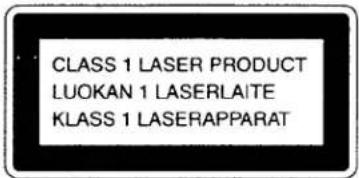
Dieser CD-Player ist als LASERPRODUKT DER KLASSE 1 eingestuft. Das Etikett „LASERPRODUKT DER KLASSE 1“ befindet sich an der Unterseite des Geräts.
Für Kunden in Australien
Das Netzkabel des Netzadapters kann nicht ersetzt werden; wenn das Kabel beschädigt ist, sollte der Netzadapter entsorgt werden.
CD sofort abspielen!
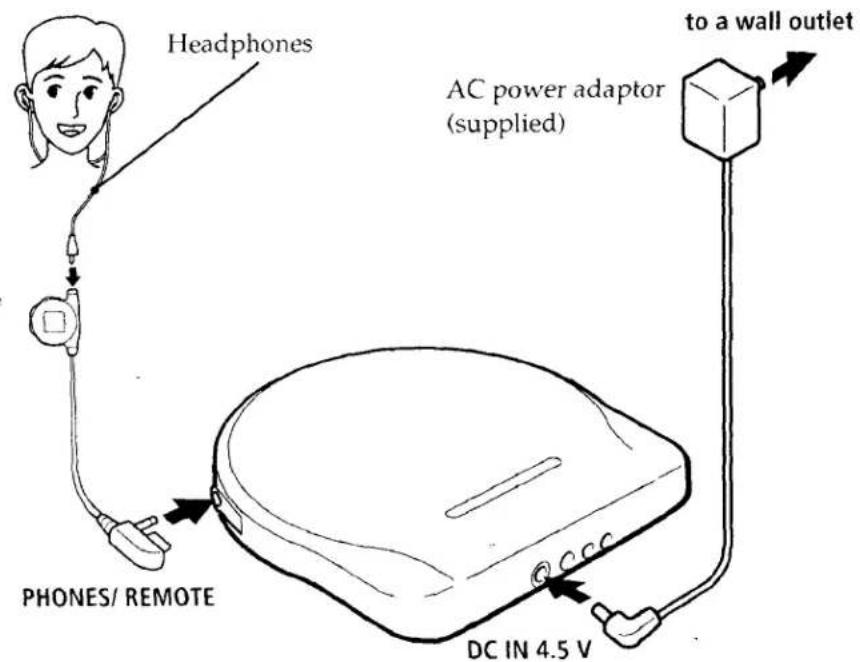
Wenn Sie sofort eine CD abspielen möchten, verwenden Sie Ihren Discman am Hausstrom. Weitere Optionen sind: Akkus und Trockenbatterien (siehe "Stromquellen" auf der Rückseite).
Anschließen
Für Modelle mit Netzadapter-Stecker
Falls der Netzadapter nicht in die Steckdose passt, verwenden Sie den Netzadapter-Stecker.
Hinweise
- Die Abbildung der Kopfhörer kann von Ihren Kopfhörern abweichen.
- Schließen Sie die Kopfhörer fest an die Fernbedienung an. Eine lockere Verbindung kann während der Wiedergabe Rauschen verursachen.
CD einlegen
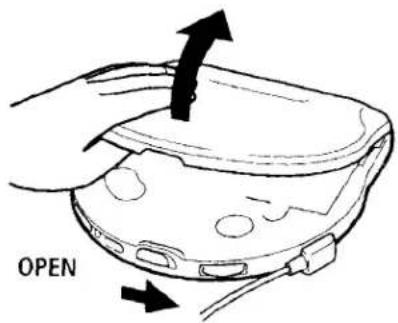
① Schieben Sie OPEN und öffnen Sie den Deckel.
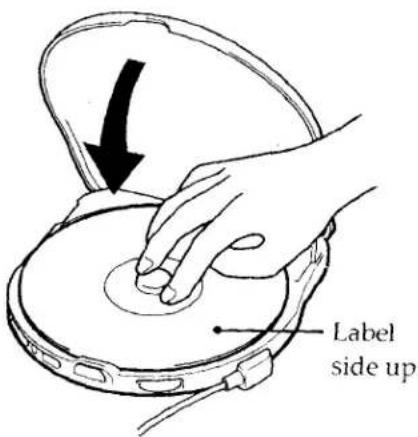
② Legen Sie die CD auf die Spindel.
Wiedergabe
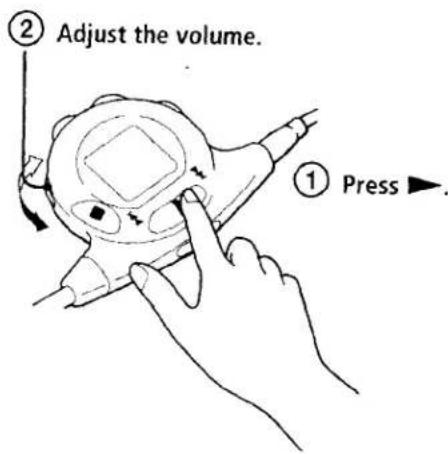
Zum Stoppen der Wiedergabe drücken Sie ■.
Verwendung des Hauptgeräts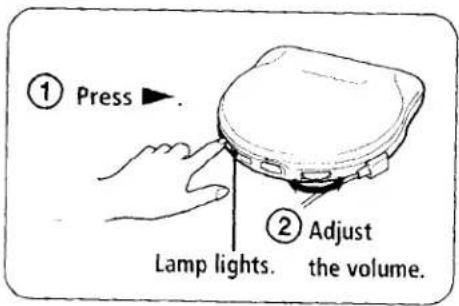
| To | Press |
| Find the beginning of the current track (AMS*) | ◀◀ side of ▶ once |
| Find the beginning of previous tracks (AMS) | ◀◀ side repeatedly |
| Find the beginning of the next track (AMS) | ▶◀I side once |
| Find the beginning of succeeding tracks (AMS) | ▶◀I side repeatedly |
| Go forward quickly | Hold down ▶◀I side |
| Go backwards quickly | Hold down ◀◀ side |
*AMS = Automatic Music Sensor
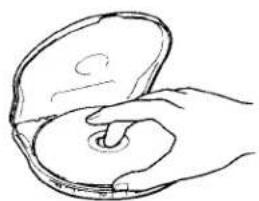
CD entfernen
Entfernen Sie die CD, während Sie den Drehpunkt drücken.
Hinweise zur Anzeige auf der Fernbedienung
- Wenn Sie ▶ drücken (wenn RESUME auf OFF eingestellt ist), erscheinen die Gesamtzahl der Titel der CD und die Gesamtspielzeit für 2 Sekunden.
- Während der Wiedergabe erscheinen die Titelnummer und die abgelaufene Spielzeit des aktuellen Titels.
- Zwischen den Titeln erscheint die Zeit bis zum Beginn des nächsten Titels mit dem Minuszeichen "-".
Hinweis zur Lautstärkeregelung mit der Fernbedienung
Stellen Sie den Lautstärkeregler an der Fernbedienung auf MAX. Stellen Sie dann die Lautstärke am Discman auf den Pegel ein, der für die Lautstärkeregelung mit der Fernbedienung maximal sein soll.
Hinweise zur Handhabung von CDs
▶Weitere Bedienvorgänge
Wiederholtes Abspielen von Titeln (Repeat Play)
Sie können Titel im Normal-, INTRO-PGM- und Shuffle-Modus wiederholt abspielen. Wiederholen Sie alle Titel oder nur einen Titel.
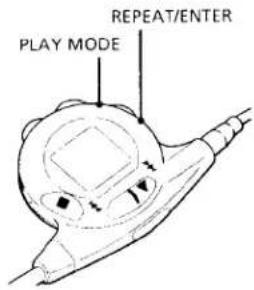
Um alle Titel zu wiederholen
Drücken Sie während der Wiedergabe REPEAT/ENTER. Die Anzeige "←" erscheint.
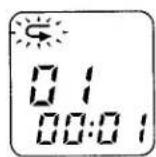
Zum Abbrechen der Wiederholung drücken Sie erneut REPEAT/ENTER.
Um einen einzelnen Titel zu wiederholen
1 Drücken Sie REPEAT/ENTER, während der Titel, den Sie wiederholen möchten, abgespielt wird. Die Anzeige „←“ erscheint.
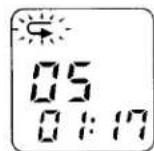
2 Drücken Sie PLAY MODE wiederholt, bis „1“ erscheint.
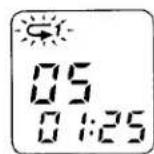
Um einen anderen Titel zu wiederholen, drücken Sie die Seite ◀◀ oder ▶▶ von ▶.
Um die Wiederholung abzubrechen, drücken Sie erneut REPEAT/ENTER.
Hinweise zum Umgang mit CDs
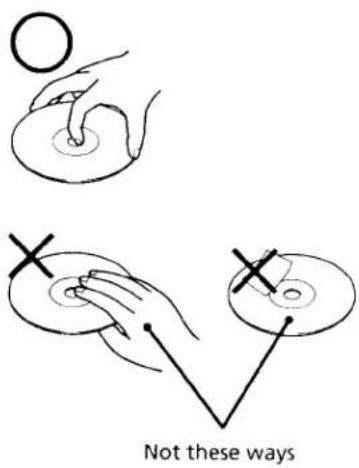
- Halten Sie die CD am Rand, um sie sauber zu halten. Berühren Sie nicht die Oberfläche.
- Kleben Sie kein Papier oder Klebeband auf die CD.
- Setzen Sie die CD nicht direktem Sonnenlicht oder Wärmequellen wie Heißluftkanälen aus. Lassen Sie die CD nicht in einem Auto liegen, das in direktem Sonnenlicht geparkt ist.
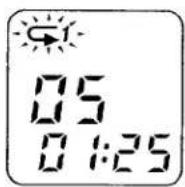
Um einen anderen Titel zu wiederholen, drücken Sie die Seite ◀◀ oder ▶▶▶ von ▶.
Um die Wiederholung abzubrechen, drücken Sie erneut REPEAT/ENTER.
Nur die gewünschten Titel abspielen (INTRO PGM-Wiedergabe)
Sie können Ihre Lieblingstitel auswählen und abspielen, indem Sie den Anfang jedes Titels auf einer CD durchsuchen.
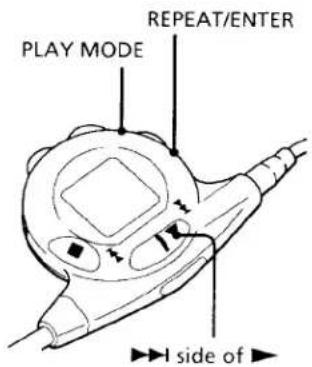
1 Drücken Sie während der Wiedergabe PLAY MODE wiederholt, bis „INTRO PGM“ blinkt.
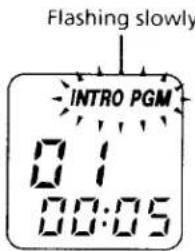
2 Drücken Sie REPEAT/ENTER, um das Durchsuchen zu starten. Der Discman spielt die ersten 15 Sekunden jedes Titels und „INTRO PGM“ blinkt schneller.
3 Drücken Sie REPEAT/ENTER, während der gewünschte Titel abgespielt wird. Um den Titel zu überspringen, drücken Sie die Seite ▶▶▶ von ▶ oder warten Sie einfach auf den nächsten Titel.
Wenn Sie die CD durchgehen, hört "INTRO PGM" auf zu blinken und die von Ihnen gewählten Titel werden automatisch abgespielt.
Um die INTRO-PGM-Wiedergabe abzubrechen, drücken Sie PLAY MODE, bis im Display kein Wiedergabemodus mehr angezeigt wird.
Titel in zufälliger Reihenfolge abspielen (Shuffle Play)
Sie können die Titel einer CD in zufälliger Reihenfolge abspielen.
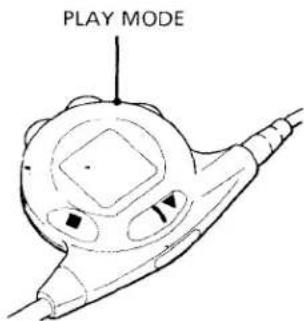
Drücken Sie während der Wiedergabe wiederholt PLAY MODE, bis "SHUF" erscheint. Die Titel werden in zufälliger Reihenfolge abgespielt.
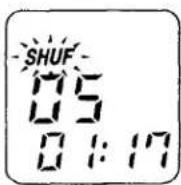
Um die Shuffle-Wiedergabe abzubrechen, drücken Sie wiederholt PLAY MODE, bis im Display kein Wiedergabemodus mehr angezeigt wird.
Hinweis
- Bei der Shuffle-Wiedergabe können Sie nicht zu vorherigen Titeln zurückkehren, indem Sie die ◀◀-Seite von ▶ drücken.
Um Tonaussetzer zu vermeiden
Die SUPER-ESP-Funktion (Super Electronic Shock Protection) verhindert Tonaussetzer, indem sie einen Pufferspeicher verwendet, der Musikdaten für etwa 10 Sekunden speichert. Verwenden Sie diese Funktion beim Hören während eines Spaziergangs oder im Auto.
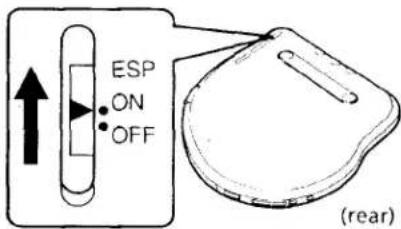
Setzen Sie ESP auf ON. Die ESP-Anzeige erscheint.
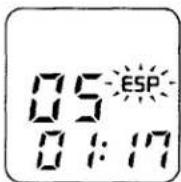
Hinweise
- Die Wiedergabe kann auch bei eingeschaltetem ESP stoppen, wenn der Discman einen starken Stoß erhält.
- Wenn Sie eine CD mit einem Kassettenrekorder mit Leersuchtfunktion auf Kassette aufnehmen, setzen Sie ESP auf OFF.
- Wenn Sie ein Geräusch oder Tonaussetzer hören, wenn:
- beim Abspielen einer verschmutzten oder zerkratzten CD,
- beim Abspielen einer Audio-Test-CD oder,
- der Discman ständigen Erschütterungen ausgesetzt ist, setzen Sie ESP auf OFF.
- Der Ton kann überspringen, wenn Sie ESP während der Wiedergabe auf ON setzen.
Zum Sperren der Tasten
Sie können Ihren Discman gegen versehentliche Bedienung sperren.
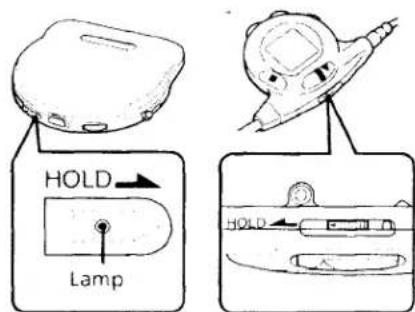
Um versehentliche Bedienung des Hauptgeräts zu vermeiden, schieben Sie HOLD am Hauptgerät in Pfeilrichtung. Wenn Sie eine Taste drücken, blinkt die HOLD-Lampe.
Verwendung anderer Funktionen
Für kräftigeren Bass
Sie können einen kräftigen, bassverstärkten Klang genießen.
BASS BOOST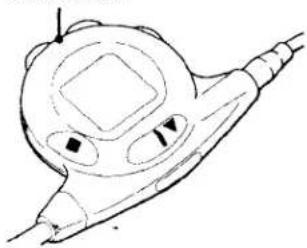
Drücken Sie BASS BOOST, um BASS ■ oder BASS ■■ auszuwählen. BASS ■■ ist effektiver.
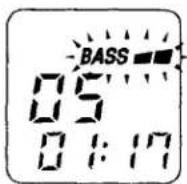
Hinweis
- Wenn der Klang bei Betonung des Basses verzerrt ist, drehen Sie die Lautstärke herunter.
Um versehentliche Bedienung der Fernbedienung zu vermeiden, schieben Sie HOLD an der Fernbedienung in Pfeilrichtung.
Wenn Sie eine beliebige Taste drücken, erscheint "Hoi d" im Display.
Zum Entsperren schieben Sie HOLD zurück.
Zum Schutz Ihres Gehörs (AVLS)
Die AVLS-Funktion (Automatic Volume Limiter System) begrenzt die maximale Lautstärke, um Ihre Ohren zu schützen.
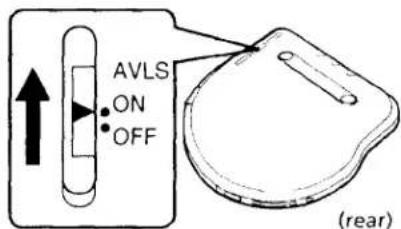
Setzen Sie AVLS auf ON.
Hinweis
- Wenn der Klang bei bassverstärkter Wiedergabe mit aktivierter AVLS-Funktion verzerrt ist, drehen Sie die Lautstärke herunter.
Fortsetzen der Wiedergabe ab der Stelle, an der Sie die CD gestoppt haben (Resume Play)
Normalerweise beginnt die Wiedergabe bei jedem Stopp und erneuten Start von Anfang an. Die Resume-Play-Funktion ermöglicht es Ihnen jedoch, ab der Stelle weiterzuhören, an der Sie den Discman zuletzt ausgeschaltet haben.
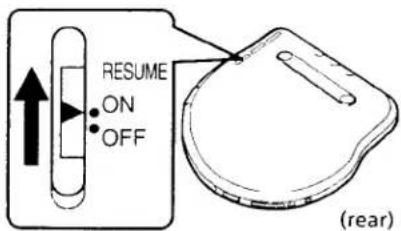
Setzen Sie RESUME auf ON.
Zum Abbrechen der Resume-Funktion setzen Sie RESUME auf OFF.
Hinweise
• Auch wenn RESUME auf ON gesetzt ist, beginnt die Wiedergabe von Anfang an, wenn Sie den Deckel öffnen. - Die Fortsetzungsposition kann um etwa 30 Sekunden ungenau sein.
Zum Ausschalten des Signaltons
Sie können den Signalton ausschalten, der bei der Bedienung Ihres Discmans ertönt.
Während Sie ■ gedrückt halten, schließen Sie die Stromquelle an.
▶Stromquellen
Verwendung von Akkus
Laden Sie die Akkus vor der ersten Verwendung auf.
1 Öffnen Sie den Deckel des Hauptgeräts und dann den Deckel des Batteriefachs.
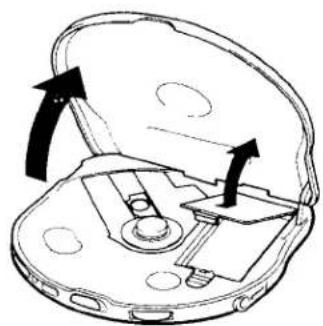
2 Legen Sie die Akkus wie in der Abbildung im Batteriefach gezeigt ein und schließen Sie den Deckel. (Achten Sie darauf, ihn fest zu schließen, da die CD sonst beschädigt werden kann.) Schließen Sie dann den Deckel des Hauptgeräts.
Anschluss an andere Stereoanlagen
Sie können die CD über andere Stereoanlagen hören oder eine CD auf ein Tonband aufnehmen. Einzelheiten finden Sie in der Bedienungsanleitung des anderen Geräts. Schalten Sie vor dem Anschließen alle Geräte aus.
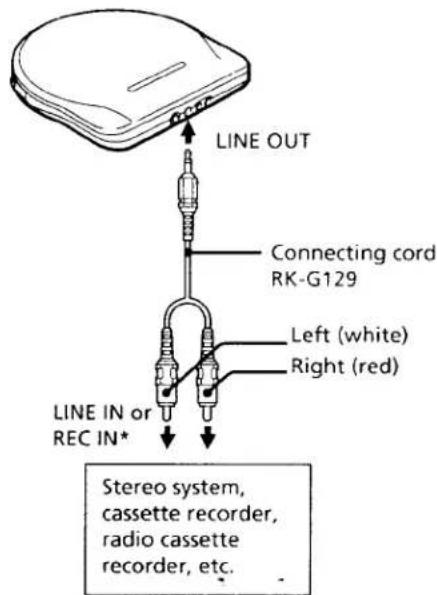
*Um ein Gerät ohne LINE IN- oder REC IN-Buchse anzuschließen, verwenden Sie das Verbindungskabel RK-G134 und schließen Sie es an die MIC-Buchse an.
Hinweis
- Bevor Sie die CD abspielen, verringern Sie die Lautstärke des angeschlossenen Geräts, um die angeschlossenen Lautsprecher nicht zu beschädigen.
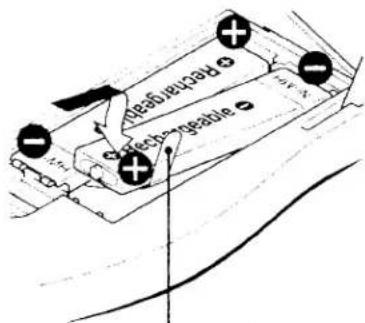
Legen Sie das Ende des Bandes hinein. (Zum Entfernen der Batterie ziehen Sie am Band.)
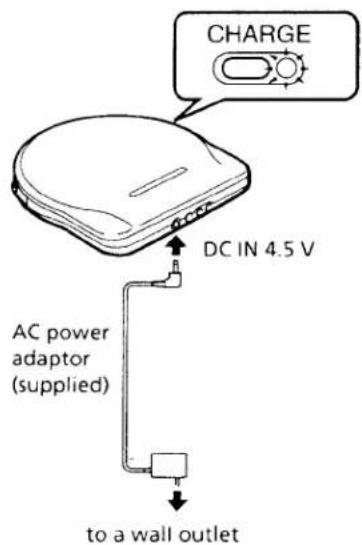
3 Schließen Sie den Netzadapter wie unten abgebildet an.
4 Drücken Sie CHARGE. Der Ladevorgang beginnt und die CHARGE-Lampe am Hauptgerät blinkt. Wenn die Akkus vollständig geladen sind, erlischt die CHARGE-Lampe. Der Ladevorgang dauert maximal etwa 3 Stunden.
5 Wenn der Ladevorgang abgeschlossen ist, trennen Sie den Netzadapter.
Wann die Akkus geladen werden sollten
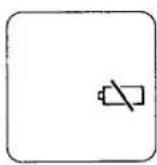
Wenn die Akkus schwach werden, blinkt in der Anzeige auf der Fernbedienung. Wenn die Akkus verbraucht sind, blinkt nicht mehr und leuchtet dauerhaft. Laden Sie die Akkus auf.
Akkulaufzeit (ca. Stunden)*
| When | Time |
| Playing with ESP off | 5 |
| Playing with ESP on | 4 |
*Wenn Sie den Discman auf einer ebenen und stabilen Oberfläche verwenden.
Hinweise
- Die Ladezeit variiert je nach Verwendung der Akkus.
- Wenn der Akku neu ist oder längere Zeit nicht verwendet wurde, kann es sein, dass er erst nach drei- oder viermaligem Laden und Entladen vollständig geladen ist.
- Wenn die Akkulaufzeit um etwa die Hälfte abnimmt, ersetzen Sie ihn durch den Sony NH-9WM Akku. Verwenden Sie keinen anderen Akku.
Für längere Nutzung
Legen Sie die Akkus ein und befestigen Sie zusätzlich das Batteriefach. Die Akkulaufzeit entnehmen Sie bitte der folgenden Tabelle.
Akkulaufzeit (ca. Stunden)*
| When using | ESP function | |
| off | on | |
| Two dry batteries | 9 | 7 |
| Rechargeable batteries and two dry batteries | 14 | 11 |
*Wenn Sie den Discman auf einer ebenen und stabilen Oberfläche mit Alkaline-Batterien verwenden.
Hinweise
- Laden Sie keine Trockenbatterien.
- Mischen Sie keine neuen Batterien mit alten.
- Verwenden Sie nicht verschiedene Batterietypen zusammen.
Verwendung von Trockenbatterien
1 Hängen Sie das Batteriefach an den Discman und ziehen Sie die Schraube fest.
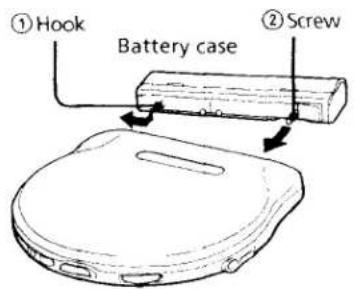
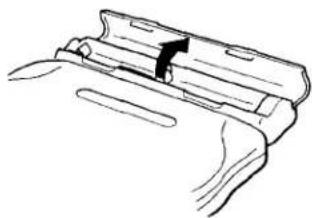
2 Öffnen Sie den Deckel des Batteriefachs.
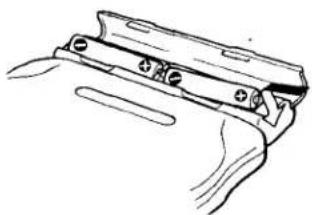
3 Legen Sie zwei LR6-Batterien (Größe AA) ein, indem Sie ⊕ und ⊖ mit der Abbildung im Batteriefach abgleichen, und schließen Sie den Deckel.
Wann die Trockenbatterien ersetzt werden sollten
Wenn die Batterien schwach werden, blinkt in der Anzeige der Fernbedienung. Wenn aufhört zu blinken und dauerhaft leuchtet, ersetzen Sie alle Batterien durch neue.
▶Zusätzliche Informationen
Vorsichtsmaßnahmen
Zur Sicherheit
- Falls feste Gegenstände oder Flüssigkeiten in das Gerät gelangen, ziehen Sie den Netzstecker und lassen Sie es von qualifiziertem Personal überprüfen, bevor Sie es weiter verwenden.
- Stecken Sie keine Fremdkörper in die DC IN 4,5 V (externer Stromanschluss) Buchse.
Zu den Stromquellen
- Wenn Sie das Gerät längere Zeit nicht verwenden, trennen Sie alle Stromquellen vom Gerät.
- Das Typenschild mit Betriebsspannung, Leistungsaufnahme usw. befindet sich auf der Unterseite. (Nur für den Netzadapter für den Nahen Osten.)
Zum Netzteil
Verwenden Sie nur das mitgelieferte Netzteil. Verwenden Sie kein anderes Netzteil.
Polarität des Steckers
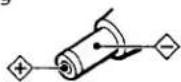
Ziehen Sie den Netzstecker aus der Steckdose, indem Sie das Netzteil selbst festhalten, nicht am Kabel ziehen.
Zu Trocken- und Akkubatterien
- Werfen Sie die Batterien nicht ins Feuer.
- Tragen Sie die Akkus nicht zusammen mit Münzen oder anderen metallischen Gegenständen. Es kann Wärme entstehen, wenn die positiven und negativen Pole der Batterien versehentlich durch einen metallischen Gegenstand kontaktiert werden.
- Reißen Sie die Folie auf dem Akku nicht ab.
Zum Gerät
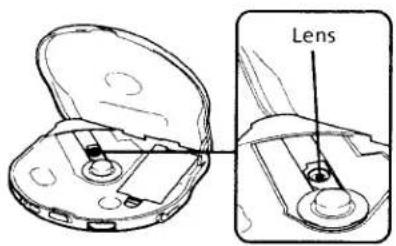
- Halten Sie die Linse des Geräts sauber und berühren Sie sie nicht. Wenn Sie dies tun, kann die Linse beschädigt werden und das Gerät funktioniert nicht ordnungsgemäß.
- Legen Sie keine schweren Gegenstände auf das Gerät. Das Gerät und die CD können beschädigt werden.
- Lassen Sie das Gerät nicht in der Nähe von Wärmequellen oder an Orten mit direkter Sonneneinstrahlung, übermäßigem Staub oder Sand, Feuchtigkeit, Regen, mechanischen Stößen, unebenen Oberflächen oder in einem Auto mit geschlossenen Fenstern liegen.
- Wenn das Gerät Störungen beim Radio- oder Fernsehempfang verursacht, schalten Sie das Gerät aus oder entfernen Sie es vom Radio oder Fernseher.
- Wickeln Sie das Gerät während des Gebrauchs nicht in ein Tuch oder eine Decke, da dies zu Fehlfunktionen oder schweren Unfällen führen kann.
Wartung
So reinigen Sie das Objektiv
Reinigen Sie das Objektiv mit einem Objektiv-Reinigungsset KK-DM1.
So reinigen Sie das Gehäuse
Verwenden Sie ein weiches Tuch, das leicht mit Wasser oder einer milden Reinigungslösung angefeuchtet ist. Verwenden Sie keinen Alkohol, kein Benzin und keinen Verdünner.
Zu den Kopfhörern
Straßenverkehrssicherheit
Verwenden Sie die Kopfhörer nicht beim Fahren, Radfahren oder beim Bedienen eines Kraftfahrzeugs. Dies kann eine Verkehrsgefahr darstellen und ist in einigen Gebieten illegal. Es kann auch potenziell gefährlich sein, die Kopfhörer beim Gehen mit hoher Lautstärke zu verwenden, insbesondere an Fußgängerüberwegen. Sie sollten äußerste Vorsicht walten lassen oder die Verwendung in potenziell gefährlichen Situationen einstellen.
Vermeidung von Hörschäden
Vermeiden Sie die Verwendung von Kopfhörern mit hoher Lautstärke. Hörexperten raten von kontinuierlichem, lautem und längerem Hören ab. Wenn Sie ein Klingeln in den Ohren bemerken, reduzieren Sie die Lautstärke oder stellen Sie die Verwendung ein.
Rücksicht auf andere
Halten Sie die Lautstärke auf einem moderaten Niveau. So können Sie Umgebungsgeräusche hören und Rücksicht auf die Menschen in Ihrer Umgebung nehmen.
Zur Fernbedienung
Verwenden Sie nur die mitgelieferte Fernbedienung. Sie können dieses Gerät nicht mit der Fernbedienung anderer Modelle bedienen.
Fehlerbehebung
Sollte ein Problem nach diesen Überprüfungen weiterhin bestehen, wenden Sie sich an Ihren nächsten Sony-Händler.
Die CD wird nicht abgespielt oder "no di SE" erscheint im Display, obwohl eine CD eingelegt ist.
→ Die CD ist verschmutzt oder defekt. → Legen Sie die CD mit der Etikettseite nach oben ein. → Es hat sich Feuchtigkeit kondensiert. Lassen Sie das Gerät mehrere Stunden stehen, bis die Feuchtigkeit verdunstet ist. → Die Linse ist verschmutzt. → Der Deckel des Batteriefachs oder der Deckel des Batteriekastens ist nicht fest geschlossen.
Kein Ton oder Rauschen ist zu hören.
→ Stecker sind nicht fest angeschlossen. → Schließen Sie die Kopfhörer fest an die Fernbedienung an. → Stecker sind verschmutzt. Reinigen Sie die Stecker regelmäßig mit einem trockenen, weichen Tuch.
"Hi dc In" erscheint im Display.
→ Der angeschlossene Netzadapter ist nicht der richtige.
Die HOLD-Lampe blinkt, wenn Sie eine Taste am Gerät drücken.
→ Die Tasten am Gerät sind gesperrt. Schieben Sie HOLD zurück.
"Hol d" erscheint im Display, wenn Sie eine Taste an der Fernbedienung drücken.
→ Die Tasten an der Fernbedienung sind gesperrt. Schieben Sie HOLD zurück.
Die Batterielebensdauer ist kurz.
→ Es werden Manganbatterien verwendet. Verwenden Sie Alkalibatterien. → Ersetzen Sie die Batterien durch neue.
Die Lautstärke ist auf einen bestimmten Pegel begrenzt, auch wenn Sie versuchen, sie zu erhöhen.
→ Der AVLS-Wahlschalter ist auf ON eingestellt. Stellen Sie ihn auf OFF.
Technische Daten
System
Compact-Disc-Digital-Audio-System
Eigenschaften der Laserdiode
Material: GaAlAs Wellenlänge: λ = 780 nm Emissionsdauer: Dauerbetrieb Laserleistung: Weniger als 44,6 μW (gemessen in 200 mm Entfernung von der Objektivlinse)
Fehlerkorrektur
Sony Super Strategy Cross Interleave Reed Solomon Code
D/A-Wandlung
1-Bit-Quarz-Zeitachsensteuerung
Frequenzgang
20 - 20.000 Hz · dB (gemessen nach EIAJ CP-307)
Ausgang (bei 4,5 V Eingangspegel)
Kopfhörer (Stereo-Miniklinke) 10 mW + 10 mW an 16 Ohm Line-Ausgang (Stereo-Miniklinke) Ausgangspegel 0,7 V eff. an 47 kOhm Empfohlene Lastimpedanz über 10 kOhm
Allgemeines
Stromversorgung
• Wiederaufladbare Batterien – Zwei LR6-Batterien (Größe AA): 3 V Gleichspannung – Netzteil (DC IN 4,5 V Buchse): 220 - 230 V, 50 Hz (europäisches und asiatisches Modell) 120 V, 60 Hz (USA-, Kanada-, Mittel- und Südamerika-Modell) 110 - 240 V, 50/60 Hz (Modell für den Nahen Osten) 240 V, 50 Hz (australisches Modell) 240 V, 50 Hz (britisches Modell) 100 - 240 V, 50/60 Hz (Modell für andere Länder)
Abmessungen (B/H/T) (inkl. hervorstehender Teile und Bedienelemente)
Ca. 131 x 19,8 x 131,7 mm (5 ¼ x 2½ x 5 ¼ Zoll)
Gewicht (inkl. Akkus)
Ca. 225 g (7,9 oz)
Betriebstemperatur
5°C - 35°C (41°F - 95°F)
Mitgeliefertes Zubehör
Netzteil (1)
Akku (2)
Verbindungskabel (Phonostecker × 2 ↔ Stereoklinkenstecker)* (1)
Stereo-Kopfhörer mit Fernbedienung (1) Batteriefach (1)
Tragetasche (1)
*Nicht im Lieferumfang des Weltmodells enthalten
Design und technische Daten können ohne Vorankündigung geändert werden.
Empfohlenes Zubehör
Autoverbindungsset CPA-85U
Aktivlautsprechersystem SRS-A50
Wiederaufladbarer Akku NH-9WM
Verbindungskabel RK-G129
Netzteil AC-E45HG
Ihr Händler führt möglicherweise nicht alle oben aufgeführten Zubehörteile. Bitte fragen Sie den Händler nach detaillierten Informationen zu den Zubehörteilen in Ihrem Land.
- COMPACT DISC COMPACT PLAYER
- WILLKOMMEN
- BESITZER-NOTIZ
- WARNUNG
- UM BRAND- ODER STROMSCHLAGGEFAHR ZU VERMEIDEN, SETZEN SIE DAS GERÄT NICHT REGEN ODER FEUCHTIGKEIT AUS
- UM EINEN ELEKTRISCHEN SCHLAG ZU VERMEIDEN, ÖFFNEN SIE NICHT DAS GEHÄUSE. ÜBERLASSEN SIE WARTUNGSARBEITEN NUR QUALIFIZIERTEM PERSONAL
- VORSICHT
- INFORMATION
- FÜR KUNDEN IN DEN USA
- FÜR KUNDEN IN GROSSBRITANNIEN
- FÜR KUNDEN IN AUSTRALIEN
- CD SOFORT ABSPIELEN
- ANSCHLIESSEN
- FÜR MODELLE MIT NETZADAPTER-STECKER
- HINWEISE
- CD EINLEGEN
- WIEDERGABE
- CD ENTFERNEN
- HINWEISE ZUR ANZEIGE AUF DER FERNBEDIENUNG
- HINWEIS ZUR LAUTSTÄRKEREGELUNG MIT DER FERNBEDIENUNG
- WEITERE BEDIENVORGÄNGE
- WIEDERHOLTES ABSPIELEN VON TITELN (REPEAT PLAY)
- UM ALLE TITEL ZU WIEDERHOLEN
- UM EINEN EINZELNEN TITEL ZU WIEDERHOLEN
- HINWEISE ZUM UMGANG MIT CDS
- NUR DIE GEWÜNSCHTEN TITEL ABSPIELEN (INTRO PGM-WIEDERGABE)
- TITEL IN ZUFÄLLIGER REIHENFOLGE ABSPIELEN (SHUFFLE PLAY)
- HINWEIS
- UM TONAUSSETZER ZU VERMEIDEN
- ZUM SPERREN DER TASTEN
- VERWENDUNG ANDERER FUNKTIONEN
- FÜR KRÄFTIGEREN BASS
- ZUM SCHUTZ IHRES GEHÖRS (AVLS)
- FORTSETZEN DER WIEDERGABE AB DER STELLE, AN DER SIE DIE CD GESTOPPT HABEN (RESUME PLAY)
- ZUM AUSSCHALTEN DES SIGNALTONS
- STROMQUELLEN
- VERWENDUNG VON AKKUS
- ANSCHLUSS AN ANDERE STEREOANLAGEN
- WANN DIE AKKUS GELADEN WERDEN SOLLTEN
- FÜR LÄNGERE NUTZUNG
- VERWENDUNG VON TROCKENBATTERIEN
- WANN DIE TROCKENBATTERIEN ERSETZT WERDEN SOLLTEN
- ZUSÄTZLICHE INFORMATIONEN
- VORSICHTSMASSNAHMEN
- ZUR SICHERHEIT
- ZU DEN STROMQUELLEN
- ZUM NETZTEIL
- ZU TROCKEN- UND AKKUBATTERIEN
- ZUM GERÄT
- WARTUNG
- SO REINIGEN SIE DAS OBJEKTIV
- SO REINIGEN SIE DAS GEHÄUSE
- ZU DEN KOPFHÖRERN
- STRASSENVERKEHRSSICHERHEIT
- VERMEIDUNG VON HÖRSCHÄDEN
- RÜCKSICHT AUF ANDERE
- ZUR FERNBEDIENUNG
- FEHLERBEHEBUNG
- DIE CD WIRD NICHT ABGESPIELT ODER "NO DI SE" ERSCHEINT IM DISPLAY, OBWOHL EINE CD EINGELEGT IST
- KEIN TON ODER RAUSCHEN IST ZU HÖREN
- DIE HOLD-LAMPE BLINKT, WENN SIE EINE TASTE AM GERÄT DRÜCKEN
- HOL D" ERSCHEINT IM DISPLAY, WENN SIE EINE TASTE AN DER FERNBEDIENUNG DRÜCKEN
- DIE BATTERIELEBENSDAUER IST KURZ
- DIE LAUTSTÄRKE IST AUF EINEN BESTIMMTEN PEGEL BEGRENZT, AUCH WENN SIE VERSUCHEN, SIE ZU ERHÖHEN
- TECHNISCHE DATEN
- SYSTEM
- EIGENSCHAFTEN DER LASERDIODE
- FEHLERKORREKTUR
- D/A-WANDLUNG
- FREQUENZGANG
- AUSGANG (BEI 4,5 V EINGANGSPEGEL)
- ALLGEMEINES
- STROMVERSORGUNG
- ABMESSUNGEN (B/H/T) (INKL. HERVORSTEHENDER TEILE UND BEDIENELEMENTE)
- GEWICHT (INKL. AKKUS)
- BETRIEBSTEMPERATUR
- MITGELIEFERTES ZUBEHÖR
- EMPFOHLENES ZUBEHÖR
Marke : SONY
Modell : Discman D-777
Kategorie : CD-Player