
Discman D-25 - CD-Player SONY - Kostenlose Bedienungsanleitung
Finden Sie kostenlos die Bedienungsanleitung des Geräts Discman D-25 SONY als PDF.


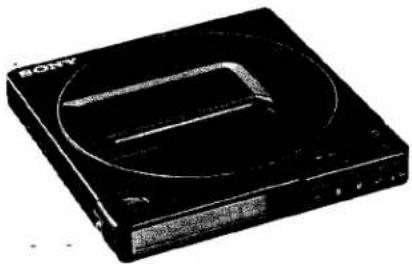
| Produkttyp | CD-Player (Discman) |
| Marke | Sony |
| Modell | D-25 |
| Abmessungen (ohne hervorstehende Teile) | ca. 125,8 × 20,8 × 134,6 mm (B/H/T) |
| Abmessungen (mit hervorstehenden Teilen) | ca. 127,3 × 24,1 × 136,2 mm (B/H/T) |
| Gewicht | ca. 380 g (ohne Akku), ca. 460 g (mit Akku) |
| Stromversorgung | Netzadapter (120 V AC, 60 Hz), aufladbarer Akku BP-2 (mitgeliefert) oder BP-100 (optional), Autobatterie (12 V) mit optionalem Kabel |
| Akkuladezeit | ca. 5 Stunden (vollständig), ca. 3 Stunden für Teilaufladung |
| Akkubetriebsdauer | ca. 2,5 Stunden nach 5-stündigem Laden, ca. 2 Stunden nach 3-stündigem Laden |
| Leistungsaufnahme | 1,9 W DC |
| Frequenzgang | 20–20.000 Hz ±1 dB |
| Dynamikbereich | > 90 dB |
| Signal-Rausch-Verhältnis | > 85 dB |
| Kopfhörerausgang | 9 mW + 9 mW an 32 Ohm (Stereo-Miniklinke) |
| Line-Ausgang | 0,7 V eff. an 50 kOhm (Stereo-Miniklinke) |
| Laserdiode | GaAlAs, Wellenlänge 780 nm, Dauerstrich, Ausgang < 44,6 μW |
| Fehlerkorrektur | Sony Super Strategy Cross Interleave Reed Solomon Code |
| D/A-Wandlung | 16-Bit linear, 4-fach digitaler Filter |
| Mitgeliefertes Zubehör | Netzadapter, Akkupack BP-2, Tragetasche, Anschlusskabel (Stereo-Miniklinke auf 2 Cinch) |
| Optionales Zubehör | Funkfernbedienung RM-DM1K, Kabelfernbedienung RM-DM2, Akku BP-100, Ladegerät BC-BP2, Autobatteriekabel DCC-120A, Autoverbindungsset CPA-2, Autohalterung CPM-100P, Montagearm CPM-100A, Aktivlautsprecher SRS-55 |
| Sicherheitshinweise | Nicht öffnen, Laserstrahl gefährlich; nur qualifiziertes Servicepersonal; Gerät vor Feuchtigkeit und Hitze schützen |
| Reinigung | Gehäuse mit weichem, leicht feuchtem Tuch reinigen; Linse mit Gebläse und weichem Pinsel reinigen |
Häufig gestellte Fragen - Discman D-25 SONY
Benutzerfragen zu Discman D-25 SONY
0 Frage zu diesem Gerät. Beantworten Sie die, die Sie kennen, oder stellen Sie Ihre eigene.
Eine neue Frage zu diesem Gerät stellen
Laden Sie die Anleitung für Ihr CD-Player kostenlos im PDF-Format! Finden Sie Ihr Handbuch Discman D-25 - SONY und nehmen Sie Ihr elektronisches Gerät wieder in die Hand. Auf dieser Seite sind alle Dokumente veröffentlicht, die für die Verwendung Ihres Geräts notwendig sind. Discman D-25 von der Marke SONY.
BEDIENUNGSANLEITUNG Discman D-25 SONY
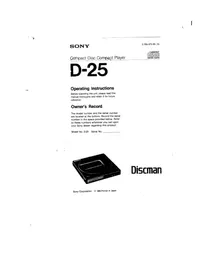
SONY
3-786-975-21 (4)
Compact Disc Compact Player

D-25
Bedienungsanleitung
Bitte lesen Sie diese Anleitung vor der Benutzung des Geräts sorgfältig durch und bewahren Sie sie für späteres Nachschlagen auf.
Besitzervermerk
Die Modellnummer und die Seriennummer befinden sich an der Unterseite. Notieren Sie die Seriennummer im unten vorgesehenen Feld. Beziehen Sie sich auf diese Nummern, wenn Sie Ihren Sony-Händler bezüglich dieses Produkts kontaktieren.
Modell Nr. D-25 Serien-Nr. ____
Discman
Sony Corporation © 1989 Gedruckt in Japan
WARNUNG
Um Brand- oder Stromschlaggefahr zu vermeiden, setzen Sie das Gerät nicht Regen oder Feuchtigkeit aus.
Um einen elektrischen Schlag zu vermeiden, öffnen Sie nicht das Gehäuse. Überlassen Sie Wartungsarbeiten nur qualifiziertem Personal.
INFORMATION
Dieses Gerät erzeugt und verwendet Hochfrequenzenergie und kann, wenn es nicht ordnungsgemäß und in strikter Übereinstimmung mit den Anweisungen des Herstellers installiert und verwendet wird, Störungen des Radio- und Fernsehempfangs verursachen. Es wurde typgeprüft und entspricht den Grenzwerten für ein digitales Gerät der Klasse B gemäß den Spezifikationen in Unterabschnitt J von Teil 15 der FCC-Bestimmungen, die einen angemessenen Schutz gegen solche Störungen in einer Wohnanlage bieten sollen. Es wird jedoch keine Garantie dafür übernommen, dass in einer bestimmten Installation keine Störungen auftreten. Wenn dieses Gerät Störungen des Radio- oder Fernsehempfangs verursacht, was durch Ein- und Ausschalten des Geräts festgestellt werden kann, wird der Benutzer aufgefordert, die Störungen durch eine oder mehrere der folgenden Maßnahmen zu beheben:
Die Empfangsantenne neu ausrichten.
Das Gerät relativ zum Empfänger neu positionieren.
Das Gerät vom Empfänger entfernen.
Das Gerät an eine andere Steckdose anschließen, sodass Gerät und Empfänger an unterschiedlichen Stromkreisen angeschlossen sind.
Bei Bedarf sollte der Benutzer den Händler oder einen erfahrenen Radio-/Fernsehtechniker um weitere Vorschläge bitten. Die folgende Broschüre, die von der Federal Communications Commission erstellt wurde, kann hilfreich sein:
"How to Identify and Resolve Radio-TV Interference Problems". Diese Broschüre ist erhältlich beim U.S. Government Printing Office, Washington, DC 20402, Bestellnummer 004-000-00345-4.
VORSICHT
Die Verwendung optischer Instrumente mit diesem Produkt erhöht die Gefahr von Augenschäden.
Für Kunden in Kanada
Dieses Gerät entspricht den Grenzwerten der Klasse B für Funkstörungen gemäß den Funkstörungsbestimmungen.
Vorsichtsmaßnahmen
Zur Sicherheit
- Da der in diesem CD-Player verwendete Laserstrahl für die Augen schädlich ist, versuchen Sie nicht, das Gehäuse zu zerlegen. Überlassen Sie Wartungsarbeiten nur qualifiziertem Personal.
- Legen Sie keine Gegenstände in den Sicherheitsschlitz im Disc-Fach. Wenn Sie dies tun, kann der Laserstrahl beim Öffnen des Deckels austreten. Stecken Sie keine Gegenstände in die DC IN 9V (externe Stromversorgung) Buchse.
- Die Linse auf dem Disc-Tisch sollte sauber gehalten werden. Berühren Sie die Linse nicht und stochern Sie nicht darin herum. Wenn Sie dies tun, kann die Linse beschädigt werden und das Gerät funktioniert nicht mehr ordnungsgemäß.
- Wickeln Sie das Gerät nicht in ein Tuch, eine Decke usw. Wenn Sie dies tun, kann die Temperatur im Inneren des Geräts ansteigen, was zu einer Fehlfunktion des Geräts führen kann.
- Falls ein fester Gegenstand oder eine Flüssigkeit in das Gerät fällt, trennen Sie die Stromquelle und lassen Sie das Gerät von qualifiziertem Personal überprüfen, bevor Sie es weiter verwenden.
- Wenn das Gerät längere Zeit nicht verwendet wird, trennen Sie unbedingt die Stromquelle (Netzteil, Akku, Autobatteriekabel oder Autohalterung) vom Gerät. Um das Netzteil aus der Steckdose zu ziehen, fassen Sie das Netzteil selbst an; ziehen Sie niemals am Kabel.
Zu den Stromquellen
Verwenden Sie den mitgelieferten Akku, Hausstrom oder eine Autobatterie. Für Wechselstrombetrieb: Verwenden Sie das mit diesem Player gelieferte Netzteil. Verwenden Sie kein anderes Netzteil, da dies zu Fehlfunktionen führen kann. Für Autobatteriebetrieb: Verwenden Sie ein für diesen Player empfohlenes Autobatteriekabel.
Zum Betrieb
Da das CD-System einen großen Dynamikbereich bietet, werden die Spitzen der hochpegeligen Eingänge mit hoher Wiedergabetreue aufgezeichnet und der Rauschpegel ist sehr niedrig. Drehen Sie die Lautstärke nicht auf, während Sie einen Teil ohne Audiosignale oder mit sehr niedrigem Eingangspegel hören. Wenn Sie dies tun, können die Lautsprecher beschädigt werden, wenn ein Teil mit Spitzenpegel abgespielt wird.
Zur Installation
- Stellen Sie das Gerät niemals auf: – in der Nähe von Wärmequellen wie Heizkörpern oder Luftkanälen. – in direktem Sonnenlicht. – Staub ausgesetzt. – Feuchtigkeit oder Regen ausgesetzt. – mechanischen Vibrationen oder Stößen ausgesetzt. – in geneigter Position.
- Wenn das Gerät direkt von einem kalten an einen warmen Ort gebracht wird oder in einem sehr feuchten Raum aufgestellt wird, kann Feuchtigkeit auf der Linse im Inneren des Geräts kondensieren. In diesem Fall funktioniert das Gerät nicht. Entfernen Sie in diesem Fall die Disc und lassen Sie das Gerät etwa eine Stunde an einem warmen Ort, bis die Feuchtigkeit verdunstet ist.
- Damit das Gerät optimal funktioniert, sollte es keinen Temperaturen unter 5 °C (41 °F) oder über 35 °C (95 °F) ausgesetzt werden.
Zu den Kopfhörern
- Vermeiden Sie das Hören mit Ihren Kopfhörern: — beim Autofahren, Radfahren usw. — über einen längeren Zeitraum mit lauter Lautstärke.
- Denken Sie daran, Personen in Ihrer Nähe nicht mit den Geräuschen Ihrer Kopfhörer zu stören.
Wenn Sie Fragen oder Probleme bezüglich Ihres Geräts haben, wenden Sie sich bitte an Ihren nächsten Sony-Händler.
Wartung
Reinigung des Gehäuses
Reinigen Sie das Gehäuse mit einem weichen Tuch, das leicht mit Wasser oder einer milden Reinigungslösung angefeuchtet ist. Verwenden Sie keine Scheuerschwämme, Scheuerpulver oder Lösungsmittel wie Alkohol oder Benzin, da diese die Oberfläche des Gehäuses beschädigen können.
Reinigung der Linse
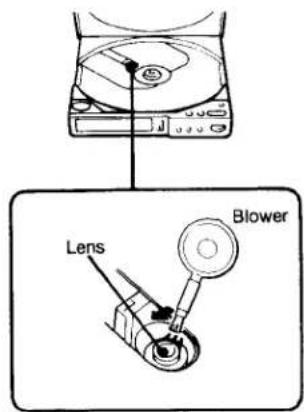
Wenn Sie die Linse versehentlich mit einem schmutzigen Finger berührt haben oder wenn Staub auf der Linse den ordnungsgemäßen Betrieb des Geräts verhindert, öffnen Sie den Deckel des Disc-Fachs und reinigen Sie die Linse.
Zum Entfernen von Staub
Blasen Sie die Linse einige Male mit einem handelsüblichen Gebläse an, bürsten Sie den Staub in Pfeilrichtung weg und blasen Sie dann erneut auf die Linse.
Wenn die Linse nach Befolgen der obigen Anweisungen immer noch verschmutzt ist und das Gerät weiterhin nicht ordnungsgemäß funktioniert, wenden Sie sich bitte an Ihren nächsten Sony-Händler.
Hinweise zu Compact Discs
Setzen Sie die Disc nicht direktem Sonnenlicht oder Wärmequellen wie Warmluftkanälen aus und lassen Sie sie nicht in einem in der prallen Sonne geparkten Auto liegen, da die Temperatur im Auto erheblich ansteigen kann.
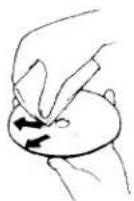
Reinigen Sie die Disc vor dem Abspielen mit dem optionalen Reinigungstuch. Wischen Sie die Disc von der Mitte nach außen.
Verwenden Sie keine Lösungsmittel wie Benzin, Verdünner, handelsübliche Reiniger oder Antistatik-Sprays, die für analoge Schallplatten bestimmt sind.
Nach dem Abspielen die Disc in ihrer Hülle aufbewahren.
Reinigen des Kopfhörersteckers
Halten Sie den Stecker Ihrer Kopfhörer sauber, um eine optimale Klangqualität zu erzielen. Wischen Sie ihn mit einem trockenen, weichen Tuch ab.
Stromquellen
Verwendung mit wiederaufladbarem Akku
Laden Sie den Akku vor der Verwendung ca. 5 Stunden lang auf.
Anbringen des Akkus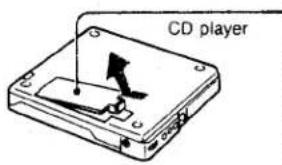
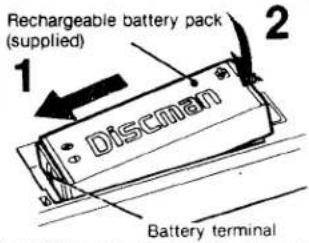
Laden des Akkus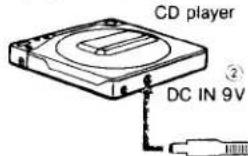
Schließen Sie das Netzteil in der Reihenfolge ①,② an. ① an eine Steckdose
Netzteil (mitgeliefert) - blinkt während des Ladevorgangs und erlischt, wenn der Ladevorgang beendet ist.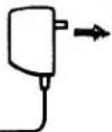
Verwendung mit Haushaltsstrom
Schließen Sie das mitgelieferte Netzteil auf die gleiche Weise an wie beim Laden des Akkus.
Wenn das Gerät nicht verwendet wird, trennen Sie unbedingt das Netzteil.
Akkulaufzeit
Bei einer Ladezeit von 5 Stunden sind ca. 2,5 Stunden ununterbrochene Wiedergabe möglich, bei einer Ladezeit von 3 Stunden ca. 2 Stunden.
Hinweise zum Laden
- Zum Laden nur das mitgelieferte Netzteil verwenden. Während der Wiedergabe kann der Akku nicht geladen werden.
- Nicht gleichzeitig den BP-100 (optional) und den BP-2 (mitgeliefert) anbringen.
- Das Gerät nicht länger als 24 Stunden laden.
- Denken Sie daran, den Akku nach jedem Gebrauch wieder aufzuladen. Wenn das Gerät entladen bleibt, kann dies die Lebensdauer verkürzen.
Hinweise zum wiederaufladbaren Akku
- Wenn der Akku längere Zeit nicht verwendet wird, laden Sie ihn alle sechs Monate wieder auf. Wenn Sie ihn wieder verwenden, laden Sie ihn zuerst etwa eine halbe Stunde lang.
- Lagern Sie den Akku bei einer Temperatur zwischen 5 °C und 35 °C (41 °F - 95 °F).
- Werfen Sie den Akku niemals ins Feuer.
- Kurzschließen Sie den Akkustecker niemals.
- Wenn der Elektrolyt im Akku mit Kleidung oder Haut in Kontakt kommt, waschen Sie die betroffenen Gegenstände sofort mit Wasser. Der Elektrolyt enthält Schwefelsäure.
Wann der wiederaufladbare Akku ersetzt werden sollte
Wiederholtes Laden des Akkus verkürzt die Betriebszeit.
Wenn die Betriebszeit des CD-Players nach vollständigem Laden des Akkus nur noch die Hälfte der ursprünglichen Zeit beträgt, ersetzen Sie ihn durch einen neuen (BP-2 optional).
Hinweise
- Verwenden Sie nur das mitgelieferte Netzteil oder das empfohlene Autobatteriekabel von Sony. Die Polarität der Stecker anderer Hersteller kann abweichen.
- Verwenden Sie nicht den Batteriekasten Sony EBP-380.
Polarität von Son
Position und Funktion der Bedienelemente
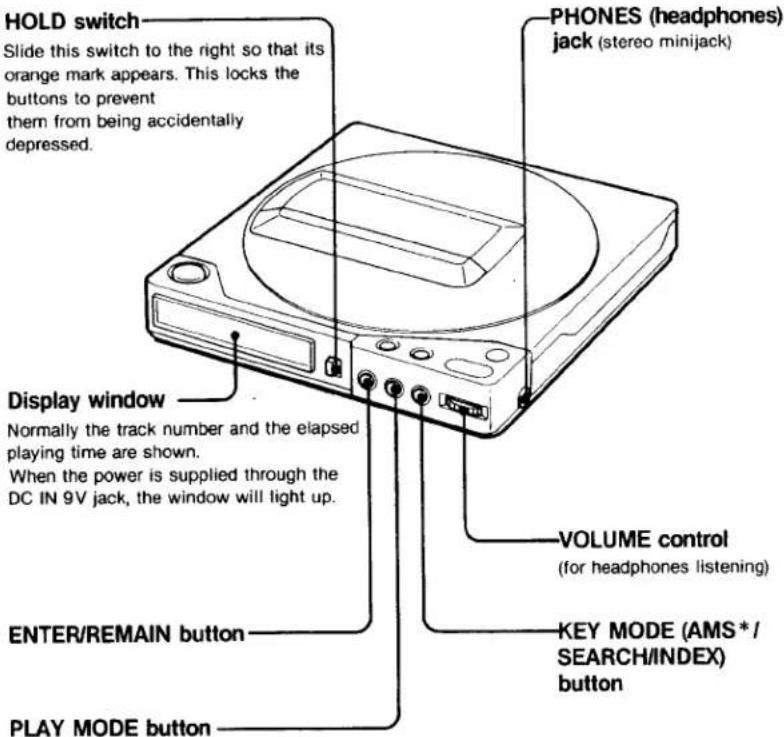
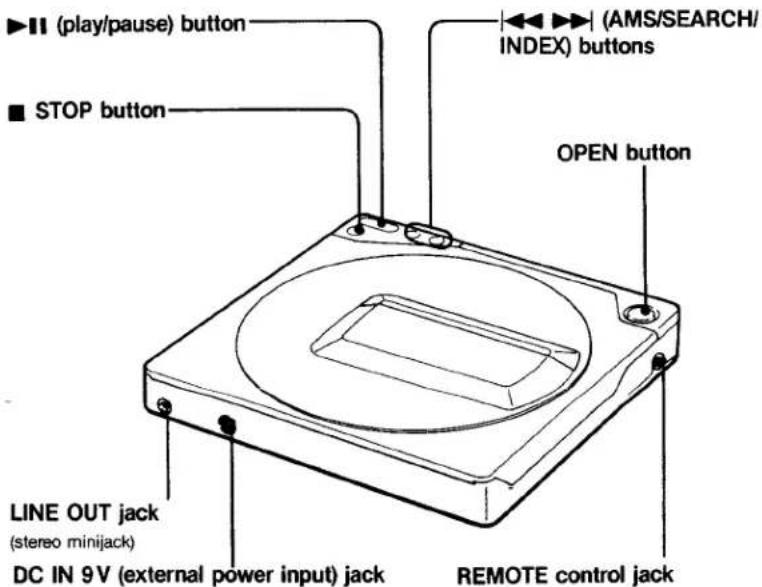
*AMS ist die Abkürzung für Automatic Music Sensor.
Verschiedene Verwendungsmöglichkeiten
Einzelheiten finden Sie in der Bedienungsanleitung des jeweiligen Produkts.
Hören im Auto
Verwenden Sie das folgende optionale Zubehör.
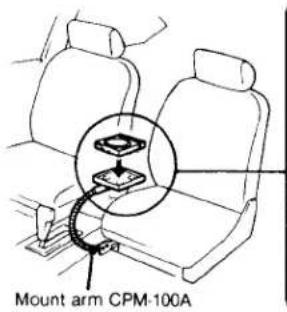
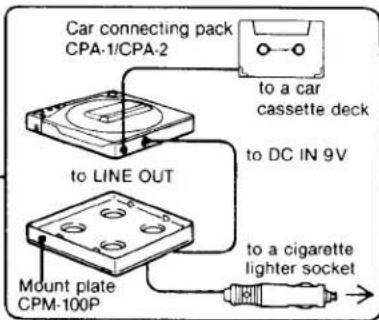
Die Stromversorgung erfolgt über den Zigarettenanzünder.
Hinweise
- Ziehen Sie das Gerät vom Zigarettenanzünder ab, wenn es nicht verwendet wird. Andernfalls kann die Autobatterie entladen werden.
- Jede andere Verbindung als mit dem CPA-2 kann Störgeräusche verursachen.
Legen Sie das Gerät nicht auf ein Armaturenbrett und lassen Sie es nicht in einem in der Sonne geparkten Auto liegen, da die Temperatur übermäßig ansteigen kann.
Anschluss an andere Geräte
Sie können den CD-Player über Lautsprecher hören oder seinen Klang aufnehmen.
Für die Überwachung über Lautsprecher und für Aufnahmen
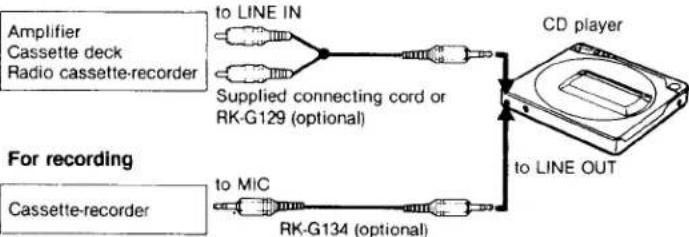
Hinweise zum Anschluss
- Schalten Sie den Verstärker aus, bevor Sie Verbindungen herstellen.
- Stecken Sie den weißen Stecker in die L-Buchse (linker Kanal) und den roten Stecker in die R-Buchse (rechter Kanal).
- Achten Sie darauf, die Kabelstecker fest in die Buchsen zu stecken. Lose Verbindungen können Brummen und Rauschen verursachen.
- Achten Sie darauf, den CD-Player nicht an die PHONO-Eingangsbuchse des Verstärkers anzuschließen.
- Wenn der CD-Player Störungen beim Radio- und Fernsehempfang verursacht, schalten Sie den Player aus oder entfernen Sie ihn vom Empfänger.
Verwendung einer Fernbedienung
Verwenden Sie das Sony RM-DM2 (kabelgebunden) oder RM-DM1K (drahtlos) Fernbedienungsset (optional). Achten Sie darauf, im Stoppmodus anzuschließen.
Hinweise
- Wenn der Akku eingelegt ist, kann der RM-DM1K nicht bedient werden.
- Entfernen Sie den Empfänger vom Gerät, wenn er nicht verwendet wird.
- Die Fernbedienung funktioniert auch, wenn die Tasten am Player mit dem HOLD-Schalter gesperrt sind.
So verwenden Sie den RM-DM2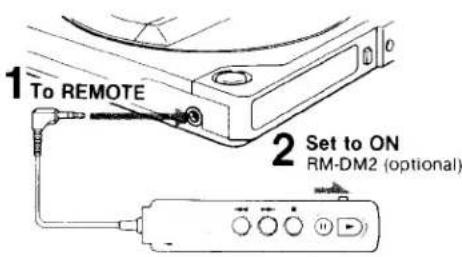
Nach dem Gebrauch des Geräts
Stellen Sie sicher, dass der REMOTE-Schalter wieder auf OFF steht, um Strom des CD-Compact-Players zu sparen.
Disc-Wiedergabe
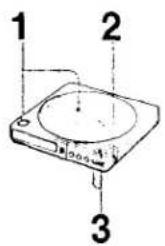
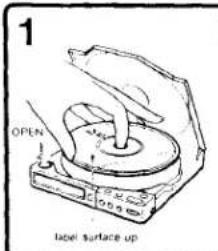
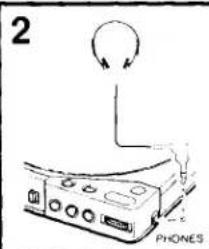
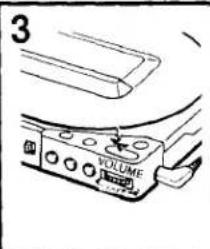
Zum Pausieren
Drücken Sie ▶ (Zum Abspielen erneut drücken)
Zum Stoppen
Drücken Sie
Was bedeutet diese Anzeige?
10000 zeigt die verbleibende Batterieleistung an. Wenn die Batterie schwach wird, erlöschen die Segmente nacheinander, beginnend mit dem linken Segment. Laden Sie die Batterie, wenn drei Segmente erloschen sind. Beachten Sie, dass die Anzeigen nur funktionieren, wenn der Batteriekasten Sony EBP 360 (optional) angebracht ist, und zwar nur, wenn die Batterien im Kasten sehr schwach werden.
Bei 3-Zoll-CD-Single
Eine 3-Zoll-CD-Single kann ohne Adapter in diesem Player abgespielt werden.
Hinweis
Wenn ▶ gedrückt wird, während die Disc mit der falschen Seite nach oben eingelegt ist, zeigt die TRACK-Anzeige '00' und der Player bleibt im Wiedergabemodus. Drücken Sie die OPEN-Taste, um den Deckel zu öffnen, und legen Sie die Disc mit der Etikettseite nach oben erneut ein.
Auffinden eines bestimmten Abschnitts: Jedes Mal, wenn die Taste KEY MODE während der Wiedergabe oder Pause gedrückt wird, ändert sich der Suchmodus wie folgt.
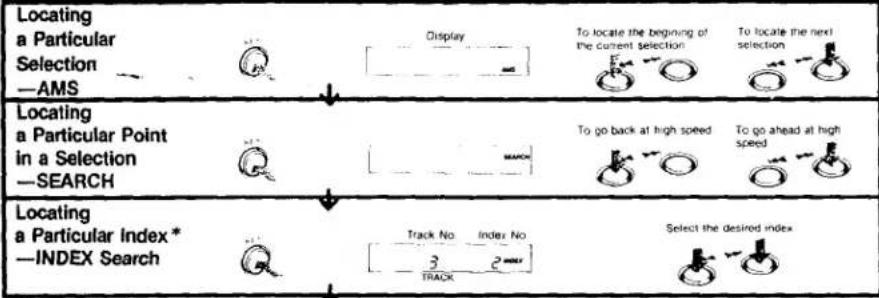
Hinweise zur AMS-Funktion
- Wenn Sie im Pausemodus die Taste ◀ oder ➞ drücken, pausiert der Player am Anfang des
gewählten Titels.
- Während der Programmwiedergabe arbeitet AMS in der gespeicherten Reihenfolge.
Was bedeutet diese Anzeige?
erscheint, wenn Sie am Ende der Disc die Taste ▶ gedrückt halten.
Um zur Titelanzeige zurückzukehren, drücken Sie die Taste.
Bei einer Disc ohne Indexe
Wenn Sie im INDEX-Suchmodus die Taste oder drücken, wird der Anfang des aktuellen Titels
abgespielt.
*Was ist ein Index?
Die Titel auf manchen Discs sind in Abschnitte unterteilt, wie die Sätze einer Sinfonie. Jedem Abschnitt ist eine Indexnummer zugeordnet, sodass ein bestimmter Abschnitt leicht gefunden werden kann.
Um zur AMS-Funktion zurückzukehren, drücken Sie KEY MODE.
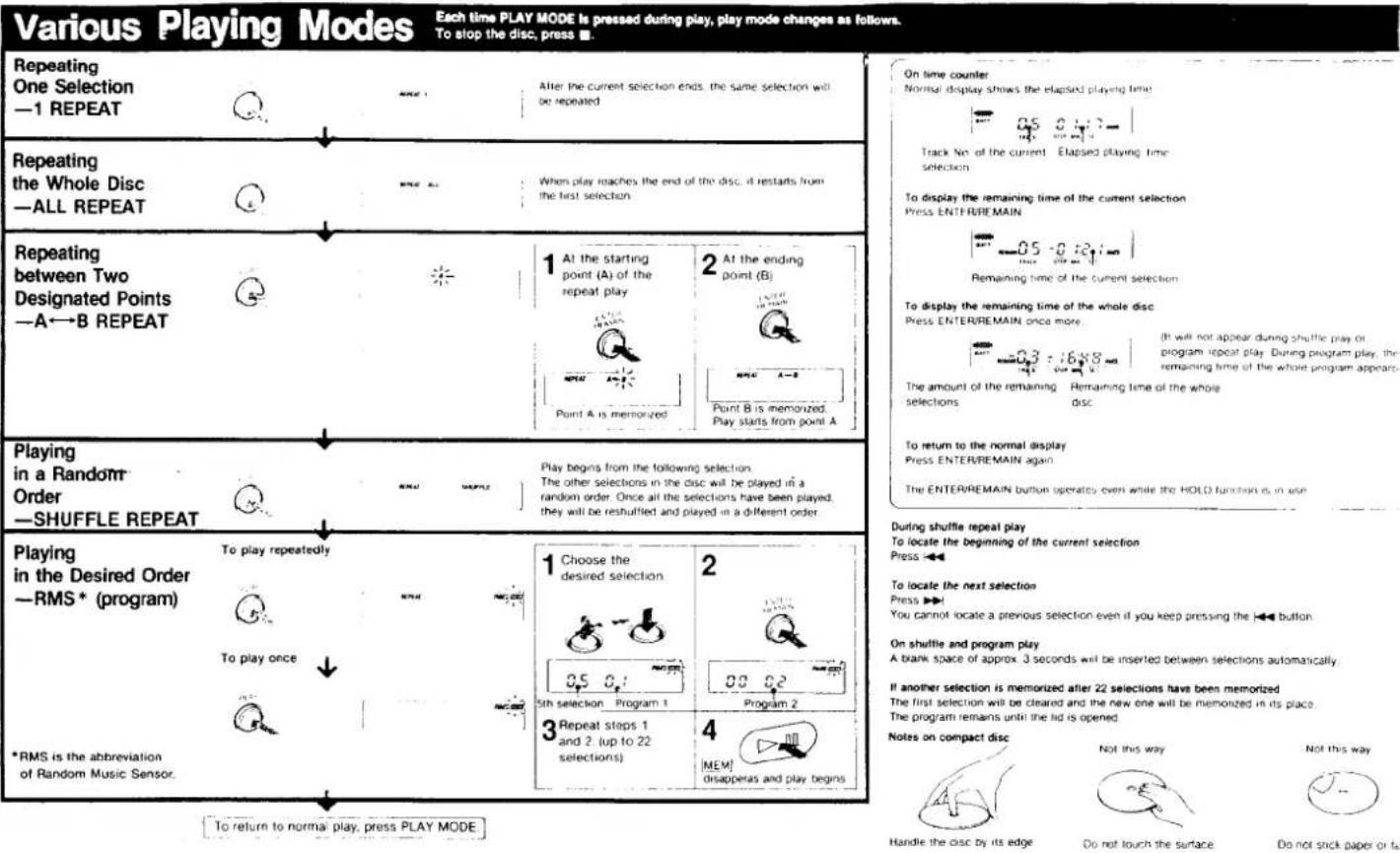
Fehlerbehebung
Sollte ein Problem nach den folgenden Überprüfungen weiterhin bestehen, wenden Sie sich an Ihre nächste Sony-Servicestelle.
| Symptom | Cause and/or remedy |
| Disc play does not start. | The disc is inserted upside down or incorrectly.Insert the disc correctly with the label surface up.Dusty or defective disc.Dirty or dusty lens.The disc compartment lid is not closed.Moisture condensation. Leave the player in a warm place until the moisture evaporates.The AC power adaptor is not plugged into the wall outlet.The car battey cord is not firmly connected.The unit is not placed on a level surface.The HOLD switch is slid to the right.Weak battery. |
| No sound from the headphones. | The headphones plug is not firmly connected to the PHONES jack.Adjust the VOLUME control.Dirty plug. |
| No sound from the connected speakers | Check the connections.The amplifier is not turned on. |
| Skipping of sound | Dirty or defective disc.Dirty lens.Strong vibration. |
Allgemeines
| Power requirements | Supplied rechargeable battery pack BP-2 or BP-100 (optional)DC IN 9V jack accepts:Supplied AC power adaptor for use on 120V AC, 60 HzSony CPM-100P car mount plate (optional) or SonyDCC-120A car battery cord (optional) for use on 12V car battery |
| Power consumption | 1.9W DC |
| Dimensions | Approx. 125.8 × 20.8 × 134.6 mm ( 5 × 27/32 × 51/8 in.) (w/h/d)not incl. inclined part (depth), projecting parts and controlsApprox. 127.3 × 24.1 × 136.2 mm ( 51/8 × 31/32 × 51/8 in.) (w/h/d)incl. projecting parts and controls |
| Weight | Approx. 380g (13.5 oz), not incl. rechargeable batteryApprox. 460g (1 lb) incl. rechargeable battery |
| Supplied accessories | AC power adaptor (1)Rechargeable battery pack (1)Carrying case (1)Connecting cord (1) (stereo miniplug ↔ two phono plugs) |
Design und Spezifikationen können ohne vorherige Ankündigung geändert werden.
Optionales Zubehör
Drahtlose Fernbedienung RM-DM1K
Kabelgebundene Fernbedienung RM-DM2
Wiederaufladbarer Akku BP-2, BP-100*
Ladegerät BC-BP2
Autobatteriekabel DCC-120A
Auto-Anschlussset CPA-2
Auto-Montageplatte CPM-100P
Montagearm CPM-100A
Aktiver Lautsprecher SRS-55
Ihr Händler führt möglicherweise nicht alle oben aufgeführten optionalen Zubehörteile. Bitte fragen Sie den Händler nach detaillierten Informationen zu den in Ihrem Land erhältlichen optionalen Zubehörteilen.
* Bei einer Ladezeit von 8 Stunden sind ca. 6 Stunden ununterbrochene Wiedergabe möglich.
Technische Daten
CD-Bereich
System
Eigenschaften der Laserdiode
Compact-Disc-Digital-Audiosystem
Material: GaAlAs
Wellenlänge: 780 nm
Emissionsdauer: Dauerbetrieb
Laserleistung: Weniger als 44,6 μW
* Dieser Wert wird in einem Abstand von etwa 200 mm von der Objektivlinse des optischen Abtastblocks gemessen.
Fehlerkorrektur
D/A-Wandlung
Frequenzgang
Dynamikbereich
Signal-Rausch-Verhältnis
Gleichlaufschwankungen
Ausgänge (bei 9 V Eingangsspannung)
Sony Super Strategy Cross Interleave Reed Solomon Code
16-Bit-linear, 4fs-Digitalfilter
20-20.000 Hz ±1 dB**
Mehr als 90 dB * *
Mehr als 85 dB
Unter der Messgrenze**
Line-Ausgang (Stereo-Miniklinke)
Ausgangspegel 0,7 V eff. bei 50 Kilohm
Lastimpedanz über 10 Kilohm
Kopfhörer (Stereo-Miniklinke)
9 mW + 9 mW bei 32 Ohm
**Gemessen nach EIAJ CP-307
- SONY
- D
- BEDIENUNGSANLEITUNG
- BESITZERVERMERK
- WARNUNG
- INFORMATION
- VORSICHT
- FÜR KUNDEN IN KANADA
- VORSICHTSMASSNAHMEN
- ZUR SICHERHEIT
- ZU DEN STROMQUELLEN
- ZUM BETRIEB
- ZUR INSTALLATION
- ZU DEN KOPFHÖRERN
- WARTUNG
- REINIGUNG DES GEHÄUSES
- REINIGUNG DER LINSE
- ZUM ENTFERNEN VON STAUB
- HINWEISE ZU COMPACT DISCS
- REINIGEN DES KOPFHÖRERSTECKERS
- STROMQUELLEN
- VERWENDUNG MIT WIEDERAUFLADBAREM AKKU
- VERWENDUNG MIT HAUSHALTSSTROM
- AKKULAUFZEIT
- HINWEISE ZUM LADEN
- HINWEISE ZUM WIEDERAUFLADBAREN AKKU
- WANN DER WIEDERAUFLADBARE AKKU ERSETZT WERDEN SOLLTE
- HINWEISE
- POSITION UND FUNKTION DER BEDIENELEMENTE
- VERSCHIEDENE VERWENDUNGSMÖGLICHKEITEN
- HÖREN IM AUTO
- DIE STROMVERSORGUNG ERFOLGT ÜBER DEN ZIGARETTENANZÜNDER
- ANSCHLUSS AN ANDERE GERÄTE
- HINWEISE ZUM ANSCHLUSS
- VERWENDUNG EINER FERNBEDIENUNG
- DISC-WIEDERGABE
- ZUM PAUSIEREN
- ZUM STOPPEN
- DRÜCKEN SIE
- BEI 3-ZOLL-CD-SINGLE
- HINWEIS
- AUFFINDEN EINES BESTIMMTEN ABSCHNITTS: JEDES MAL, WENN DIE TASTE KEY MODE WÄHREND DER WIEDERGABE ODER PAUSE GEDRÜCKT WIRD, ÄNDERT SICH DER SUCHMODUS WIE FOLGT
- HINWEISE ZUR AMS-FUNKTION
- WAS BEDEUTET DIESE ANZEIGE
- BEI EINER DISC OHNE INDEXE
- WAS IST EIN INDEX
- FEHLERBEHEBUNG
- OPTIONALES ZUBEHÖR
- TECHNISCHE DATEN
- CD-BEREICH
Marke : SONY
Modell : Discman D-25
Kategorie : CD-Player