
Discman D-9 - CD-Player SONY - Kostenlose Bedienungsanleitung
Finden Sie kostenlos die Bedienungsanleitung des Geräts Discman D-9 SONY als PDF.


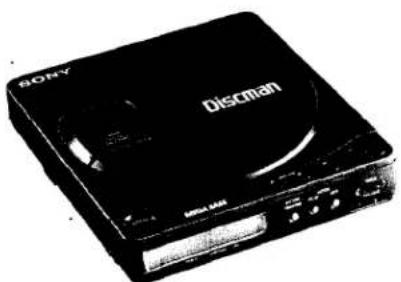
| Produkttyp | CD-Player (tragbar) |
| Marke | Sony |
| Modell | Discman D-9 |
| Abmessungen (ohne vorstehende Teile) | ca. 130,0 × 31,1 × 142,0 mm (B/H/T) |
| Abmessungen (mit vorstehenden Teilen) | ca. 131,0 × 31,9 × 142,7 mm |
| Gewicht (ohne Akku) | ca. 420 g |
| Gewicht (mit Akku) | ca. 500 g |
| Stromversorgung | DC 9 V über Netzteil, 2× AA-Batterien oder Akku BP-2 |
| Akkulaufzeit (BP-2, vollgeladen) | ca. 2 Stunden |
| Batterielaufzeit (AA-Alkaline) | ca. 3,5 Stunden |
| Wiedergabemedien | CD-DA (Standard-CDs, auch 3-Zoll-CDs) |
| Wiedergabefunktionen | Zufallswiedergabe (Shuffle), Programmierung (bis 22 Titel), Wiederholung (1 Titel, alle, A-B) |
| Bass-Boost | Ja, über BASS BOOST-Schalter |
| Kopfhörerausgang | Stereominiklinke, 9 mW + 9 mW an 32 Ohm |
| Line-Ausgang | Stereominiklinke, 0,7 V rms an 50 kOhm |
| Fernbedienung | Optional: kabelgebunden RM-DM2 oder kabellos RM-DM1K |
| Reinigung Gehäuse | Mit weichem, leicht feuchtem Tuch; keine Scheuermittel |
| Reinigung Linse | Mit Gebläse (Blower) vorsichtig abstauben |
| Sicherheitshinweis | Gehäuse nicht öffnen, Laserstrahl vermeiden; nur qualifizierte Reparatur |
| Zubehör (im Lieferumfang) | Netzteil, Batteriefach, Akku BP-2, Tragetasche, Verbindungskabel |
| Optionale Accessoires | Kopfhörer MDR-E282, Ladegerät BC-BP2, Autokabel DCC-120A, Befestigungsplatte CPM-100P |
Häufig gestellte Fragen - Discman D-9 SONY
Benutzerfragen zu Discman D-9 SONY
0 Frage zu diesem Gerät. Beantworten Sie die, die Sie kennen, oder stellen Sie Ihre eigene.
Eine neue Frage zu diesem Gerät stellen
Laden Sie die Anleitung für Ihr CD-Player kostenlos im PDF-Format! Finden Sie Ihr Handbuch Discman D-9 - SONY und nehmen Sie Ihr elektronisches Gerät wieder in die Hand. Auf dieser Seite sind alle Dokumente veröffentlicht, die für die Verwendung Ihres Geräts notwendig sind. Discman D-9 von der Marke SONY.
BEDIENUNGSANLEITUNG Discman D-9 SONY
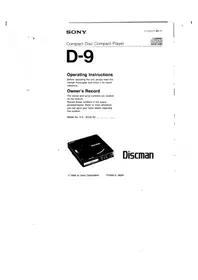
SONY.
3-750-077-23 (1)
Compact Disc Compact Player

D-9
Bedienungsanleitung
Bitte lesen Sie diese Anleitung vor der Inbetriebnahme des Geräts sorgfältig durch und bewahren Sie sie für späteres Nachschlagen auf.
Besitzer-Notiz
Die Modell- und Seriennummern befinden sich auf der Unterseite.
Notieren Sie diese Nummern im unten vorgesehenen Feld. Beziehen Sie sich darauf, wenn Sie Ihren Sony-Händler bezüglich dieses Produkts kontaktieren.
Modell-Nr. D-9 Serien-Nr.
Discman
© 1989 by Sony Corporation
Gedruckt in Japan
WARNUNG
Um Brand- oder Stromschlaggefahr zu vermeiden, setzen Sie das Gerät nicht Regen oder Feuchtigkeit aus.
Um einen elektrischen Schlag zu vermeiden, öffnen Sie nicht das Gehäuse. Überlassen Sie Wartungsarbeiten nur qualifiziertem Fachpersonal.
INFORMATION
Dieses Gerät erzeugt und verwendet Hochfrequenzenergie und kann, wenn es nicht ordnungsgemäß und streng nach den Anweisungen des Herstellers installiert und verwendet wird, Störungen des Radio- und Fernsehempfangs verursachen. Es wurde typgeprüft und entspricht den Grenzwerten für ein digitales Gerät der Klasse B gemäß den Spezifikationen in Unterabschnitt J von Teil 15 der FCC-Bestimmungen, die einen angemessenen Schutz gegen solche Störungen in einer Wohnanlage bieten sollen. Es gibt jedoch keine Garantie, dass in einer bestimmten Installation keine Störungen auftreten. Wenn dieses Gerät Störungen des Radio- oder Fernsehempfangs verursacht, was durch Ein- und Ausschalten des Geräts festgestellt werden kann, wird der Benutzer aufgefordert, die Störungen durch eine oder mehrere der folgenden Maßnahmen zu beheben:
Die Empfangsantenne neu ausrichten
Das Gerät relativ zum Empfänger neu positionieren
Das Gerät vom Empfänger entfernen
Das Gerät an eine andere Steckdose anschließen, sodass Gerät und Empfänger an verschiedenen Stromkreisen angeschlossen sind.
Falls erforderlich, sollte der Benutzer den Händler oder einen erfahrenen Radio-/Fernsehtechniker um weitere Vorschläge bitten. Der Benutzer kann die folgende Broschüre der Federal Communications Commission als hilfreich empfinden:
"So identifizieren und beheben Sie Radio-TV-Störungen". Diese Broschüre ist erhältlich beim U.S. Government Printing Office, Washington, DC 20402, Bestellnummer 004-000-00345-4.
VORSICHT
Die Verwendung optischer Instrumente mit diesem Produkt erhöht die Augengefahr.
Wartung
Reinigung des Gehäuses
Reinigen Sie das Gehäuse mit einem weichen Tuch, das leicht mit Wasser oder einer milden Reinigungslösung angefeuchtet ist. Verwenden Sie keine Scheuerschwämme, Scheuerpulver oder Lösungsmittel wie Alkohol oder Benzin.
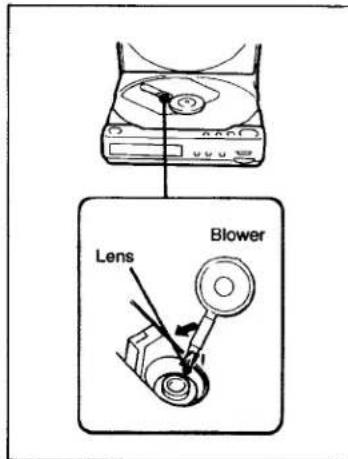
Reinigung der Linse
Falls Sie versehentlich die Linse mit einem schmutzigen Finger berührt haben oder Staub auf der Linse den ordnungsgemäßen Betrieb verhindert, öffnen Sie den Deckel des Disc-Fachs und reinigen Sie die Linse.
Zum Entfernen von Staub
Blasen Sie einige Male mit einem handelsüblichen Gebläse auf die Linse, bürsten Sie den Staub in Pfeilrichtung weg und blasen Sie dann erneut auf die Linse.
Wenn das Gerät weiterhin nicht ordnungsgemäß funktioniert, wenden Sie sich bitte an Ihren nächsten Sony-Händler.
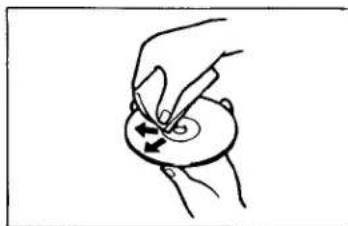
Hinweise zu Compact Discs
Setzen Sie die Disc keiner direkten Sonneneinstrahlung oder Wärmequellen wie heißen Luftkanälen aus, und lassen Sie sie nicht in einem Auto liegen, das in direktem Sonnenlicht geparkt ist, da die Temperatur im Auto erheblich ansteigen kann.
Reinigen Sie die Disc vor dem Abspielen mit dem optionalen Reinigungstuch.
Wischen Sie die Disc von der Mitte nach außen.
Verwenden Sie keine Lösungsmittel wie Benzin, Verdünner, handelsübliche Reiniger oder Antistatiksprays, die für analoge Schallplatten bestimmt sind.
Bewahren Sie die Disc nach dem Abspielen in ihrer Hülle auf.
Reinigen des Kopfhörersteckers
Halten Sie den Stecker Ihrer Kopfhörer sauber, um den optimalen Klang zu erzielen. Wischen Sie ihn mit einem trockenen, weichen Tuch ab.
Position und Funktion der Bedienelemente
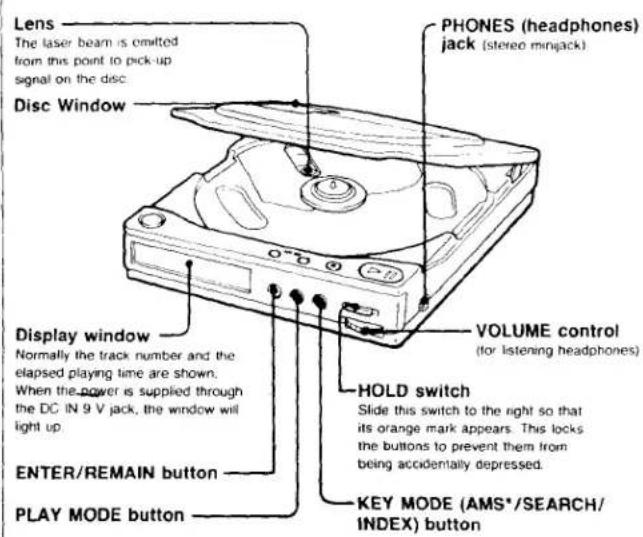
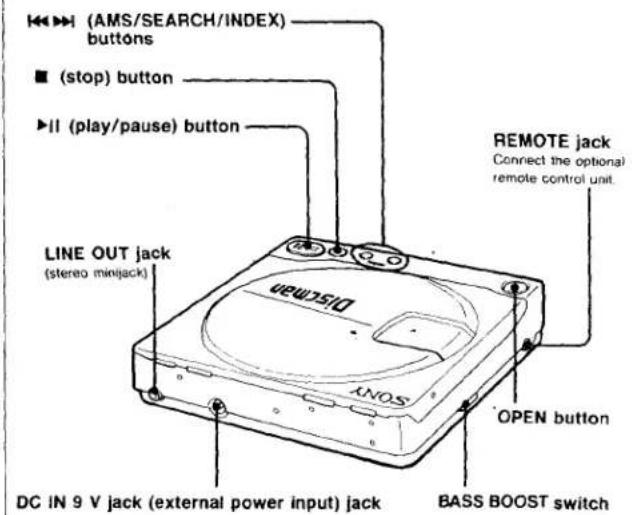
Vorsichtsmaßnahmen
Zur Sicherheit
- Da der in diesem CD-Player verwendete Laserstrahl für die Augen schädlich ist, versuchen Sie nicht, das Gehäuse zu zerlegen. Überlassen Sie Wartungsarbeiten nur qualifiziertem Personal.
- Legen Sie nichts in den Sicherheitsschlitz im Disc-Fach. Wenn Sie dies tun, kann der Laserstrahl beim Öffnen des Deckels austreten. Stecken Sie nichts in die DC IN 9V-Buchse (externer Stromanschluss).
- Die Linse auf dem Disc-Tisch sollte sauber gehalten werden. Berühren Sie die Linse nicht und stochern Sie nicht darauf herum. Wenn Sie dies tun, kann die Linse beschädigt werden und der Player funktioniert nicht ordnungsgemäß.
- Wickeln Sie den Player nicht in ein Tuch, eine Decke usw. Wenn Sie dies tun, kann die Temperatur im Inneren des Players ansteigen, was zu einer Fehlfunktion des Players führt.
- Falls ein fester Gegenstand oder eine Flüssigkeit in den Player fällt, trennen Sie die Stromquelle und lassen Sie den Player von qualifiziertem Personal überprüfen, bevor Sie ihn weiter verwenden.
Zu Stromquellen
- Verwenden Sie den mitgelieferten Akku, Batterien, Hausstrom oder eine Autobatterie.
- Für Wechselstrombetrieb: Verwenden Sie das mit diesem Player gelieferte Netzteil. Verwenden Sie kein anderes Netzteil, da dies zu Fehlfunktionen führen kann.
- Für Autobatteriebetrieb: Verwenden Sie ein für diesen Player empfohlenes Autobatteriekabel.
- Wenn das Gerät längere Zeit nicht verwendet wird, trennen Sie unbedingt die Stromquelle (Netzteil, Batterien, Autobatteriekabel oder Halterung) vom Gerät. Um das Netzteil aus der Steckdose zu ziehen, fassen Sie das Netzteil selbst an, ziehen Sie niemals am Kabel.
Zum Betrieb
Da das CD-System einen großen Dynamikbereich bietet, werden die Spitzen der hochpegeligen Eingänge mit hoher Wiedergabetreue aufgezeichnet, und der Rauschpegel ist sehr niedrig. Drehen Sie die Lautstärke nicht auf, während Sie einen Teil ohne Audiosignale oder mit sehr niedrigen Eingangspegeln hören. Wenn Sie dies tun, können die Lautsprecher beschädigt werden, wenn ein Teil mit Spitzenpegel abgespielt wird.
Zur Installation
- Stellen Sie das Gerät niemals:
— in der Nähe von Wärmequellen wie Heizkörpern oder Luftkanälen. — in direktem Sonnenlicht. — übermäßigem Staub ausgesetzt. — Feuchtigkeit oder Regen ausgesetzt. — mechanischen Vibrationen oder Stößen ausgesetzt. — in einer geneigten Position
- Wenn der Player direkt von einem kalten an einen warmen Ort gebracht wird oder in einem sehr feuchten Raum aufgestellt wird, kann sich Feuchtigkeit an der Linse im Inneren des Players niederschlagen. In diesem Fall funktioniert der Player nicht. Entfernen Sie in diesem Fall die Disc und lassen Sie den Player etwa eine Stunde lang an einem warmen Ort, bis die Feuchtigkeit verdunstet ist.
- Für einen optimalen Betrieb sollte das Gerät keinen Temperaturen unter 5 °C (41 °F) oder über 35 °C (95 °F) ausgesetzt werden.
Über die Kopfhörer
- Vermeiden Sie das Hören mit Ihren Kopfhörern: — beim Autofahren, Radfahren usw. — über einen längeren Zeitraum bei lauter Lautstärke.
- Denken Sie daran, Ihre Mitmenschen nicht mit den Geräuschen Ihrer Kopfhörer zu stören.
Stromquellen
Verwendung mit wiederaufladbarem Akku
Laden Sie den Akku vor der Verwendung ca. 3 Stunden lang. Anbringen des Akkus
Lassen Sie das Band nicht außen, wenn Sie die Batteriefachabdeckung schließen.
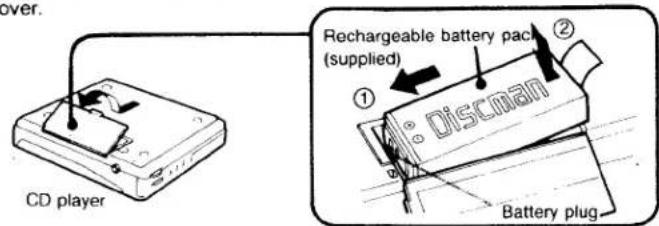
Wenn Sie den Akku einlegen, lassen Sie das Band außen. Andernfalls können Sie den Akku nicht leicht entfernen.
Laden des Akkus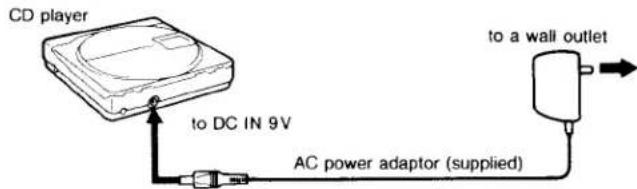
•0000 blinkt während des Ladevorgangs und erlischt, wenn der Ladevorgang endet.
Verwendung mit Batterien
Verwenden Sie zwei AA (LR6)-Alkalibatterien mit dem mitgelieferten Batteriehalter.
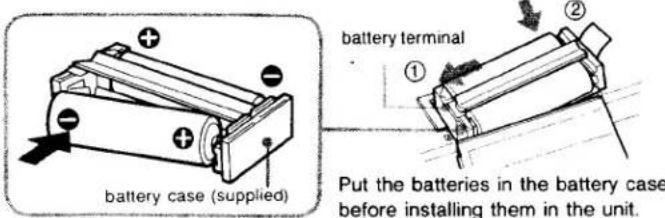
Legen Sie die Batterien in den Batteriehalter, bevor Sie sie in das Gerät einsetzen.
Verwendung am Hausstromnetz
Schließen Sie das mitgelieferte Netzteil auf die gleiche Weise an wie beim Laden des Akkus. Wenn das Gerät nicht verwendet wird, trennen Sie das Netzteil unbedingt vom Stromnetz.
Akkulaufzeit bei Verwendung des Akkupacks.
Bei vollständig geladenem Akku sind ca. 2 Stunden ununterbrochene Wiedergabe möglich.
Hinweise zum Laden
- Zum Laden verwenden Sie nur das mitgelieferte Netzteil oder das optionale AC-D6M.
- Laden Sie den Akku nicht länger als 24 Stunden.
- Denken Sie daran, den Akkupack nach jedem Gebrauch wieder aufzuladen. Wenn das Gerät entladen bleibt, kann dies die Lebensdauer verkürzen.
Hinweise zum Akkupack
- Wenn der Akkupack längere Zeit nicht verwendet wird, laden Sie ihn alle sechs Monate wieder auf.
- Lagern Sie den Akkupack bei einer Temperatur zwischen 5 °C und 35 °C (41 °F und 95 °F).
- Werfen Sie den Akkupack niemals ins Feuer.
- Kurzschließen Sie niemals den Akkustecker.
- Wenn der Elektrolyt im Akkupack mit Kleidung oder Haut in Kontakt kommt, waschen Sie die betroffenen Gegenstände sofort mit Wasser ab. Der Elektrolyt enthält Schwefelsäure.
Wann der Akkupack ausgetauscht werden sollte
Wenn die Betriebszeit des CD-Players nach dem vollständigen Aufladen des Akkus kürzer wird, ersetzen Sie ihn durch einen neuen (BP-2 optional).
Die Spielzeit mit AA-Alkalibatterien
Sie können ca. 3,5 Stunden ununterbrochen abspielen.
Um Schäden durch auslaufende und korrodierende Batterien zu vermeiden
- Wenn die Fernbedienung längere Zeit nicht verwendet wird, entfernen Sie die Batterien.
- Wenn die Batterien erschöpft sind, ersetzen Sie beide Batterien durch neue.
- Legen Sie die Batterien mit korrekter Polarität ein.
- Laden Sie die Batterien nicht auf.
- Mischen Sie keine neuen und alten Batterien.
Hinweise:
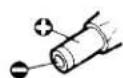
- Wenn ein Netzteil oder ein Autobatteriekabel verwendet wird, das nicht von Sony hergestellt wurde, muss die Polarität des Steckers wie abgebildet sein.
Verschiedene Verwendungsmöglichkeiten
Hören im Auto Verwenden Sie die folgende Ausrüstung. Die Stromversorgung erfolgt über den Zigarettenanzünder.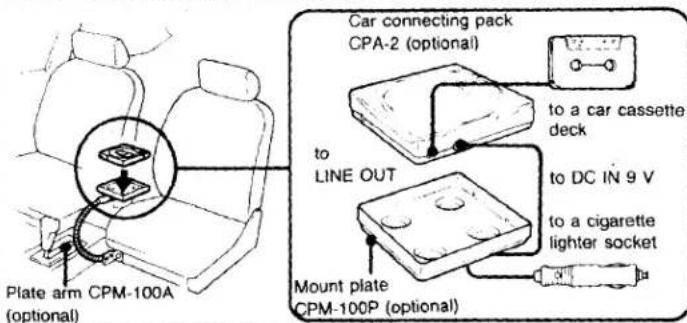
Legen Sie das Gerät nicht auf ein Armaturenbrett und lassen Sie es nicht in einem in der Sonne geparkten Auto liegen, da die Temperatur übermäßig ansteigen kann.
Einzelheiten finden Sie in der Bedienungsanleitung des jeweiligen Produkts.
Hinweise zum Anschluss an die Autobatterie.
- Trennen Sie das Gerät vom Zigarettenanzünder, wenn es nicht verwendet wird. Andernfalls kann die Autobatterie entladen werden.
- Jeder andere Anschluss als mit dem CPA-2 kann Störgeräusche verursachen.
Anschluss an andere Geräte
Sie können die CD über Lautsprecher hören oder ihren Klang aufnehmen.
Für die Wiedergabe über Lautsprecher und für Aufnahmen![graph TD A["Amplifier"] -->|to LINE IN| B["CD player"] C["Cassette deck"] -->| supplied connecting cord or RK-G129 (optional)| B D["Radio cassette-recorder"] -->| to MIC | E["RK-G134 (optional)"] F["For recording"] -->| to LINE OUT| B](/content/2026/05/805574/images/94932f5aff74e3224fadf0a1dc03da73cc21d91bb755089663b18c8ff49b8ac4.jpg)
Hinweise zum Anschluss
- Schalten Sie den Verstärker aus, bevor Sie Verbindungen herstellen.
- Stecken Sie den weißen Stecker in die L-Buchse (linker Kanal) und den roten Stecker in die R-Buchse (rechter Kanal).
- Achten Sie darauf, die Kabelstecker fest in die Buchsen zu stecken. Lockere Verbindungen können Brummen und Rauschen verursachen.
- Achten Sie darauf, den CD-Player nicht an den PHONO-Eingang des Verstärkers anzuschließen.
- Wenn der CD-Player Störungen beim Radio- und Fernsehempfang verursacht, schalten Sie den Player aus oder entfernen Sie ihn vom Empfänger.
Verwendung einer Fernbedienung
Verwenden Sie die Sony RM-DM1K (drahtlos) oder RM-DM2 (kabelgebunden) Fernbedienung (optional).
Schalten Sie den Player aus, bevor Sie ihn anschließen.
Hinweise
- Wenn der oder die Akkus eingelegt sind, kann der RM-DM1K nicht betrieben werden. Verwenden Sie das Netzteil.
- Entfernen Sie den Receiver vom Gerät, wenn er nicht verwendet wird.
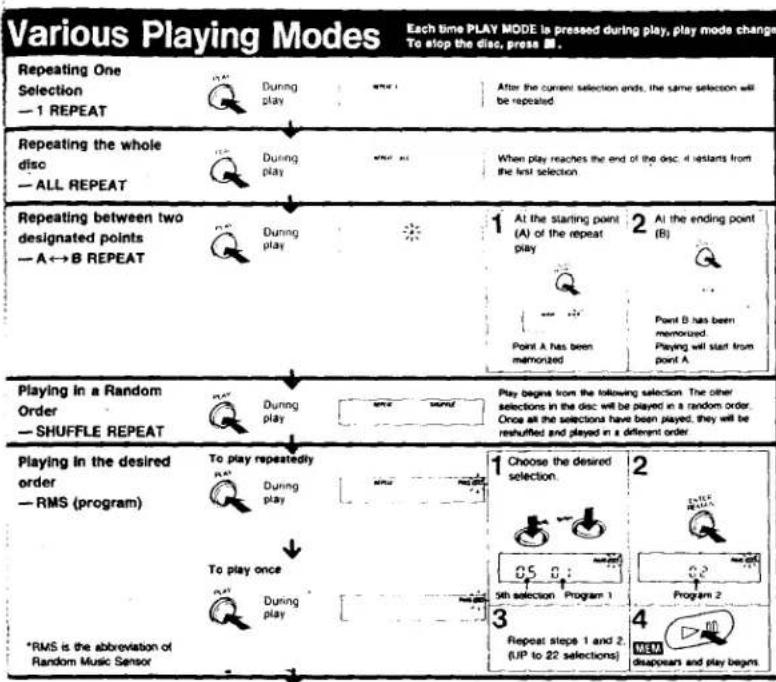
Um zur normalen Wiedergabe zurückzukehren, drücken Sie PLAY MODE.
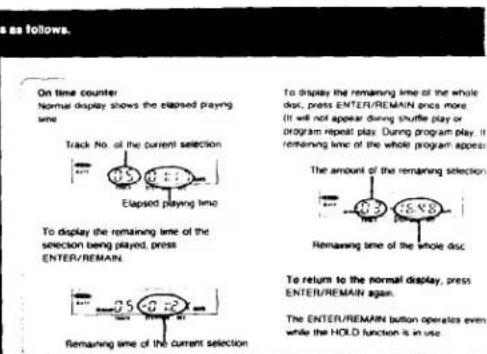
Während der Zufallswiedergabe (Shuffle) oder Programm-Wiedergabe wird automatisch eine Pause von ca. 3 Sekunden zwischen den Titeln eingefügt. Hinweise zum Inhalt. Hinweise zu CDs: Halten Sie die CD am Rand. Wenn die CD Kratzer, Fingerabdrücke oder Verschmutzungen aufweist, kann dies zu Tracking-Fehlern führen. Wenn die CD mit der beschrifteten Seite nach unten eingelegt wird, erscheint die Anzeige "90" und der Player bleibt im Wiedergabemodus. Drücken Sie die OPEN-Taste, um das Fach zu öffnen, und legen Sie die CD mit der beschrifteten Seite nach oben wieder ein.
CD-Wiedergabe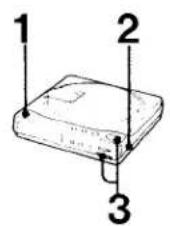
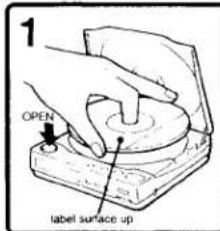
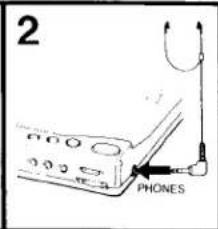

Zum Pausieren
Drücken Sie ▶ (Zum Fortsetzen erneut drücken)
Zum Stoppen
Drücken Sie
Was bedeutet diese Anzeige?
zeigt die verbleibende Akkuleistung an. Wenn der Akku schwach wird, erlöschen die Segmente nacheinander, beginnend mit dem linken Segment. Laden Sie den Akku, wenn drei Segmente erloschen sind.
Bei 3-Zoll-CDs
Eine 3-Zoll-CD kann ohne Adapter in diesem Player abgespielt werden.
Betonung des Bassklangs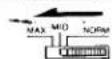
Der Bassklang kann mit dem BASS-BOOST-Schalter betont werden.
Zum Auffinden einer bestimmten Stelle: Jedes Mal, wenn Sie während der Wiedergabe oder Pause die Taste KEY MODE drücken, ändert sich der Suchmodus wie folgt.![graph TD A["Locating a particular selection — AMS"] --> B["During play or pause"] B --> C["Display"] C --> D["To locate the beginning of the current selection."] D --> E["To locate the next selection"] F["Locating a particular point in a selection — SEARCH"] --> G["During play or pause"] G --> H["To…](/content/2026/05/805574/images/a33e38da66e75c4d61c36d9191c084b8e4f8d9067bc987ff4c8646484f780fd7.jpg)
Um zur AMS-Funktion zurückzukehren, drücken Sie KEY MODE.
Hinweise zur AMS-Funktion
- Wenn Sie im Pausenmodus die Taste ◀◀ oder ▶▶ drücken, pausiert der Player am Anfang des
gefundenen Titels. • Während der Programmwiedergabe arbeitet AMS in der gespeicherten Reihenfolge.
Was bedeutet diese Anzeige?
J.1 erscheint, wenn Sie am Ende der Disc kontinuierlich die Taste ➕ drücken. Um zur Titelanzeige zurückzukehren, drücken Sie die Taste ➕.
Bei einer Disc ohne Indexe
Wenn Sie während des INDEX-Suchmodus 🐎 oder 🐎 drücken, wird der Anfang des aktuellen Titels abgespielt.
Was ist ein Index?
Die Titel einiger Discs sind in Abschnitte unterteilt, wie z. B. die Sätze einer Sinfonie. Jedem Abschnitt ist eine Indexnummer zugeordnet, sodass ein bestimmter Abschnitt leicht gefunden werden kann.
*AMS ist die Abkürzung für Automatic Music Sensor.
Technische Daten
| CD section | |||
| System | Compact disc digital audio system | Power consumption | 1.8 W DC |
| Laser diode properties | Material: GaAlAs | Dimensions | Approx. 130.0 × 31.1 × 142.0 mm(5 1/8 × 1 1/4 × 5 5/8 in.) (w/h/d) not incl. inclined part (depth), projecting parts and controls |
| Wavelength: 780 nm | Approx. 131.0 × 31.9 × 142.7 mm (5 1/4 × 1 5/16 × 5 5/8 in.) (w/h/d) incl. projecting parts and controls | ||
| Emission duration: Continuous | |||
| Laser output: Max. 44.6 μW* | |||
| *This output is the value measured at a distance of about 200 mm from the objective lens surface on the Optical Pick up Block. | Weight | Approx. 420 g (15 oz) not incl. rechargeable battery | |
| Approx. 500 g (1 lb 1 oz) incl. rechargeable battery | |||
| Supplied accessories | AC power adaptor (1) | ||
| Spindle speed | 500 r.p.m. to 200 r.p.m. (CLV) | Battery case (1) | |
| Scan velocity | 1.2-1.4 m/sec | Rechargeable battery pack (1) | |
| Error correction | Sony Super Strategy Cross Interleave Reed Solomon Code | Carrying case (1) | |
| D-A conversion | 16-bit linear 2 fs distal filter | Connecting cord (1) (stereo miniplug + two phono plugs) | |
| Frequency response | 20-20,000 Hz -1/3 dB | ||
| Wow and flutter | Below measurable limit* | Design and specifications subject to change without notice | |
| Outputs (at 9 V input level) | Line output (stereo minjack) | OPTIONAL ACCESSORIES | |
| Output level 0.7 V rms at 50 kiloohms | Headphones MDR-E282 | ||
| Load impedance over 10 kiloohms | Wired remote commander RM-DM2 | ||
| Headphones (stereo minjack) | Wireless remote control kit RM-DM1K | ||
| 9 mW + 9 mW at 32 ohms | Rechargeable battery pack BP-2 | ||
| *Measured by EIAJ CP-307 | Rechargeable battery pack BP-2 (supplied) | Battery charger (for BP-2) BC-BP2 | |
| General | Battery case EBP-2 (supplied) and two size AA alkaline batteries (optional) | Car battery cord DCC-120A | |
| Power requirements | Sony CPM-100P car mount plate, or Sony DCC-120A car battery cord for use on 12 V car battery (optional) | Car connecting pack CPA-2 | |
| Car mount plate CPM-100P | |||
| DC IN 9 V jack accepls: | Plate arm CPM-100A | ||
| Sony AC power adaptor (supplied). AC-D6M (optional) | Your dealer may not handle some of the above listed optional accessories. Please ask the dealer for detailed information about the optional accessories available in your country. | ||
- SONY
- D
- BEDIENUNGSANLEITUNG
- BESITZER-NOTIZ
- DISCMAN
- WARNUNG
- INFORMATION
- VORSICHT
- WARTUNG
- REINIGUNG DES GEHÄUSES
- REINIGUNG DER LINSE
- ZUM ENTFERNEN VON STAUB
- HINWEISE ZU COMPACT DISCS
- REINIGEN DES KOPFHÖRERSTECKERS
- POSITION UND FUNKTION DER BEDIENELEMENTE
- VORSICHTSMASSNAHMEN
- ZUR SICHERHEIT
- ZU STROMQUELLEN
- ZUM BETRIEB
- ZUR INSTALLATION
- ÜBER DIE KOPFHÖRER
- STROMQUELLEN
- VERWENDUNG MIT WIEDERAUFLADBAREM AKKU
- VERWENDUNG MIT BATTERIEN
- VERWENDUNG AM HAUSSTROMNETZ
- HINWEISE ZUM LADEN
- HINWEISE ZUM AKKUPACK
- WANN DER AKKUPACK AUSGETAUSCHT WERDEN SOLLTE
- DIE SPIELZEIT MIT AA-ALKALIBATTERIEN
- VERSCHIEDENE VERWENDUNGSMÖGLICHKEITEN
- HINWEISE ZUM ANSCHLUSS AN DIE AUTOBATTERIE
- ANSCHLUSS AN ANDERE GERÄTE
- HINWEISE ZUM ANSCHLUSS
- VERWENDUNG EINER FERNBEDIENUNG
- HINWEISE
Marke : SONY
Modell : Discman D-9
Kategorie : CD-Player