
Discman D-225CR - CD-Player SONY - Kostenlose Bedienungsanleitung
Finden Sie kostenlos die Bedienungsanleitung des Geräts Discman D-225CR SONY als PDF.


| Produkttyp | Tragbarer CD-Player (Discman) |
| Modell | D-225CR |
| Marke | Sony |
| Abmessungen (B x H x T) | Ca. 132 x 26,8 x 151 mm (inkl. vorstehender Teile) |
| Gewicht | Ca. 300 g (mit Akkupack) |
| Stromversorgung | Netzteil (DC 4,5 V), Akkupack (BP-DM10), 2× AA Alkaline-Batterien (LR6), Autobatterie (über CPM-300P/PK) |
| Akku-Ladezeit | Max. 2 Stunden |
| Akku-Spielzeit | Ca. 2 Stunden (Akku), ca. 5 Stunden (Alkaline) |
| Wiedergabemodi | Normal, Intro PGM, Einzeltitel, Zufallswiedergabe (Shuffle), Programmwiedergabe (RMS, bis 22 Titel), Wiederholung (Repeat) |
| Resume-Funktion | Ja (über RESUME-Schalter) |
| Klangverbesserung | BASS BOOST (NORM/MID/MAX), AVLS (Automatic Volume Limiter System, Stufen OFF/1/2) |
| Fernbedienung | Kartenfernbedienung (mit Lithiumbatterie CR2025, Reichweite ca. 5 m) |
| Ausgangsleistung (Kopfhörer) | 4 mW + 4 mW an 16 Ohm |
| Line-Ausgang | 0,8 V rms an 50 kOhm (Stereominiklinke) |
| Frequenzgang | 20 – 20.000 Hz ± 1 dB (nach EIAJ CP-307) |
| DA-Wandler | 1-Bit-Quarz-Zeitachsensteuerung |
| Fehlerkorrektur | Sony Super Strategy Cross Interleave Reed Solomon Code |
| Laser | Klasse 1; Material Ga/AlAs, Wellenlänge 780 nm, Dauerstrich, Ausgang < 44,6 μW |
| Gehäusereinigung | Weiches, leicht feuchtes Tuch; keine Scheuermittel oder Lösungsmittel |
| Linsenreinigung | Mit Reinigungsset KK-9 (nicht mitgeliefert) |
| Zubehör im Lieferumfang | Netzteil, Akkupack (BP-DM10), Anschlusskabel, Stereo-Kopfhörer, Kartenfernbedienung, CR2025 Lithiumbatterie |
| Reparaturfreundlichkeit | Nur durch qualifiziertes Fachpersonal; keine vom Benutzer zu wartenden Teile im Inneren |
Häufig gestellte Fragen - Discman D-225CR SONY
Benutzerfragen zu Discman D-225CR SONY
0 Frage zu diesem Gerät. Beantworten Sie die, die Sie kennen, oder stellen Sie Ihre eigene.
Eine neue Frage zu diesem Gerät stellen
Laden Sie die Anleitung für Ihr CD-Player kostenlos im PDF-Format! Finden Sie Ihr Handbuch Discman D-225CR - SONY und nehmen Sie Ihr elektronisches Gerät wieder in die Hand. Auf dieser Seite sind alle Dokumente veröffentlicht, die für die Verwendung Ihres Geräts notwendig sind. Discman D-225CR von der Marke SONY.
BEDIENUNGSANLEITUNG Discman D-225CR SONY
D-225CR
Bedienungsanleitung
Bitte lesen Sie diese Anleitung vor der Inbetriebnahme des Geräts vollständig durch und bewahren Sie sie zum späteren Nachschlagen auf.
Sony Corporation © 1993 Gedruckt in Japan
Discman
Besitzeraufzeichnung
Die Modellnummer und die Seriennummer befinden sich auf der Unterseite. Notieren Sie die Seriennummer im unten vorgesehenen Feld. Bitte geben Sie diese Nummern an, wenn Sie sich wegen dieses Produkts an Ihren Sony-Händler wenden.
Modell-Nr. D-225CR Serien-Nr. ____
WARNUNG
Um Brand- oder Stromschlaggefahr zu vermeiden, setzen Sie das Gerät nicht Regen oder Feuchtigkeit aus.
Um einen elektrischen Schlag zu vermeiden, öffnen Sie nicht das Gehäuse. Überlassen Sie Wartungsarbeiten nur qualifiziertem Personal.
VORSICHT
Die Verwendung optischer Instrumente mit diesem Produkt erhöht die Gefahr von Augenschäden.
INFORMATION (Für Kunden in den USA)
Dieses Gerät wurde getestet und entspricht den Grenzwerten für ein digitales Gerät der Klasse B gemäß Teil 15 der FCC-Bestimmungen. Diese Grenzwerte sollen einen angemessenen Schutz gegen schädliche Störungen in einer Wohnanlage bieten. Dieses Gerät erzeugt, verwendet und kann Hochfrequenzenergie ausstrahlen. Wenn es nicht gemäß den Anweisungen installiert und verwendet wird, kann es schädliche Störungen des Funkverkehrs verursachen. Es gibt jedoch keine Garantie, dass in einer bestimmten Installation keine Störungen auftreten. Wenn dieses Gerät schädliche Störungen des Radio- oder Fernsehempfangs verursacht, was durch Ein- und Ausschalten des Geräts festgestellt werden kann, wird der Benutzer aufgefordert, die Störungen durch eine oder mehrere der folgenden Maßnahmen zu beheben:
- Richten Sie die Empfangsantenne neu aus oder stellen Sie sie an einen anderen Ort.
- Vergrößern Sie den Abstand zwischen dem Gerät und dem Empfänger.
- Schließen Sie das Gerät an eine Steckdose an, die zu einem anderen Stromkreis gehört als der, an den der Empfänger angeschlossen ist.
- Wenden Sie sich an den Händler oder einen erfahrenen Radio-/Fernsehtechniker.
Beachten Sie, dass Änderungen oder Modifikationen, die nicht ausdrücklich in dieser Anleitung genehmigt wurden, Ihre Berechtigung zum Betrieb dieses Geräts aufheben können.
Für Kunden im Vereinigten Königreich
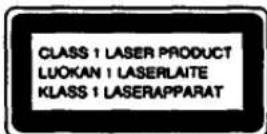
Dieser Compact-Disc-Player ist als LASERPRODUKT DER KLASSE 1 klassifiziert. Das Etikett „LASERPRODUKT DER KLASSE 1“ befindet sich an der Unterseite des Geräts.
Für Kunden in Kanada
DIESES GERÄT ENTSPRICHT DEN GRENZWERTEN DER KLASSE B FÜR FUNKSTÖRAUSSENDUNGEN GEMÄSS DEN FUNKSTÖRVORSCHRIFTEN.
Stromquellen
Verwendung mit dem Akku
Wenn Sie den mitgelieferten Akku zum ersten Mal verwenden, laden Sie ihn unbedingt auf.
Laden des Akkus
1 Legen Sie den Akku mit der Seite, die mit „Sony Discman“ beschriftet ist, nach oben ein, wie in der Abbildung neben dem Batteriefach gezeigt.
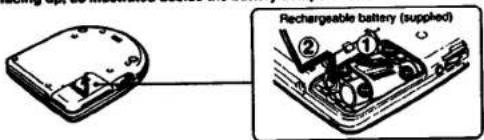
2 Stellen Sie das Gerät in den Stopp-Modus und schließen Sie den mitgelieferten Netzadapter an.
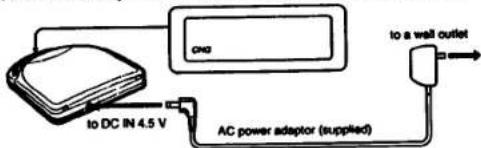
"CHG" erscheint im Display. Es verschwindet, wenn der Ladevorgang abgeschlossen ist.
3 Trennen Sie das Netzteil vom Netz.
Lebensdauer des Akkus
| Charging time | CD playing |
| Max. 2 hours* | Approx. 2 hours |
(Wenn das Gerät auf einer ebenen und stabilen Oberfläche verwendet wird.)
* Die Ladezeit variiert je nach Verwendung des Akkus.
Wann der Akku ausgetauscht werden sollte
Wenn die Betriebszeit nach vollständigem Aufladen um etwa die Hälfte abnimmt, ersetzen Sie den Akku durch einen neuen BP-DM10 (nicht im Lieferumfang enthalten). Sie können den Akku BP-DM1 nicht verwenden.
Hinweise zum Akku (Ni-Cd-Akku)
- Verwenden Sie unbedingt das mitgelieferte Netzteil.
- Denken Sie daran, den Akku nach jedem Gebrauch aufzuladen. Wenn der Akku entladen bleibt, kann dies seine Lebensdauer verkürzen.
- Wenn der Akku zum ersten Mal oder nach längerer Nichtbenutzung aufgeladen wird, kann sich die Spielzeit verkürzen. In diesem Fall laden und entladen Sie ihn mehrmals.
- Lagern Sie den Akku bei einer Temperatur zwischen 5 °C und 35 °C, um eine optimale Leistung zu gewährleisten. Werfen Sie den Akku niemals ins Feuer.
- Kurzschließen Sie niemals die Akkuklemmen.
- Zerlegen Sie den Akku nicht. Wenn der Elektrolyt im Inneren des Akkus mit Kleidung oder Haut in Kontakt kommt, waschen Sie die betroffenen Gegenstände sofort mit Wasser.
Zur Anzeige
Das Symbol ☐ erscheint im Display, um anzuzeigen, dass die Batterie verbraucht ist, wenn das Gerät entweder mit dem Akku oder mit den Alkaline-Batterien betrieben wird. Die Anzeige blinkt, wenn die Batterie schwach wird, und der Betrieb stoppt automatisch. Danach bleibt die Anzeige dauerhaft an. In diesem Fall laden Sie den Akku auf oder ersetzen Sie alle Alkaline-Batterien durch neue.
Verwendung mit Alkaline-Batterien
Legen Sie zwei AA-Batterien (LR6) gemäß den ⊕- und ⊖-Markierungen im Batteriefach ein.
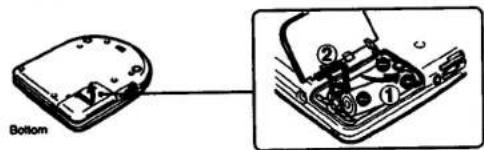
Hinweise zu Batterien
- Legen Sie die Batterien mit korrekter Polarität ein.
- Verwenden Sie keine alten Batterien zusammen mit neuen oder verschiedene Batterietypen zusammen.
- Falls Elektrolyt aus der Batterie austritt, wischen Sie die kontaminierten Stellen im Batteriefach mit einem Tuch ab und ersetzen Sie die alten Batterien durch neue. • Laden Sie die Batterien nicht auf.
- Wenn das Gerät längere Zeit nicht verwendet wird, entfernen Sie die Batterien.
Lebensdauer der Alkaline-Batterien
Wenn das Gerät auf einer ebenen und stabilen Oberfläche verwendet wird, sind ca. 5 Stunden ununterbrochene Wiedergabe möglich.
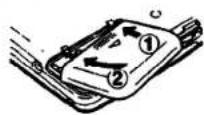
Wenn der Batteriefachdeckel abgeht
Der Deckel kann entfernt werden, wenn er mit Gewalt gezogen wird. Falls dies passiert, befestigen Sie den Deckel wie abgebildet.
Verwendung mit Netzstrom
Schließen Sie das mitgelieferte Netzteil auf die gleiche Weise an wie beim Laden des Akkus.
Wenn das Gerät nicht verwendet wird, trennen Sie unbedingt das Netzteil.
Für Kunden, deren Gerät mit einem Netzstecker-Adapter geliefert wird
Verwenden Sie den Netzstecker-Adapter, wenn der Netzadapter nicht in die Steckdose passt.
Hinweis zum Netzadapter Verwenden Sie nur den mitgelieferten Netzadapter (für Gleichstrom 4,5 V, einheitliche Polarität). Wenn Sie andere Netzadapter verwenden, kann das Gerät beschädigt werden. Verwenden Sie nicht den Netzadapter, der mit anderen "Discman"-CD-Playern mit Gleichstrom-Eingang 6 V oder 9 V geliefert wurde, noch einen optionalen Netzadapter für Gleichstrom 6 V oder 9 V.
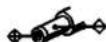
Polarität des Steckers (einheitliche Polarität)
Verschiedene Verwendungsmöglichkeiten
Weitere Einzelheiten finden Sie in der Bedienungsanleitung der jeweiligen Geräte.
Hören im Auto
Sie können die CD über ein Auto-Kassettendeck mit folgendem Zubehör (nicht im Lieferumfang enthalten) hören.
• Montagearm CPM-300PK (CPM-300A + CPM-300P) - Plattenarm CPM-300A - Montageplatte CPM-300P • Auto-Verbindungsset CPA-3, CPA-4 - Montageset CPM-300PC (CPM-300P + CPA-4) - Montageset CPM-300CK (CPM-300A + CPM-300P + CPA-4)
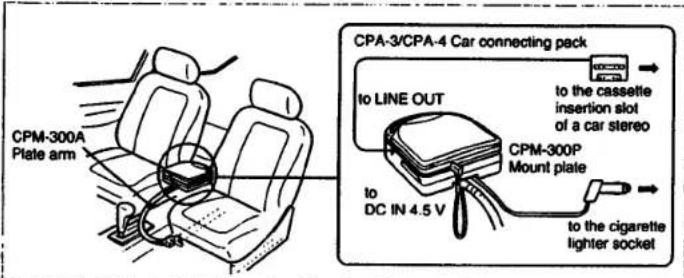
Ihr Händler führt möglicherweise nicht alle oben aufgeführten Zubehörteile. Bitte fragen Sie den Händler nach detaillierten Informationen zu den Zubehörteilen in Ihrem Land.
Wenn Sie die Montageplatte (CPM-300P) verwenden
Befestigen Sie zuerst den mit CPM-300P gelieferten Auto-Montageadapter an der Montageplatte und installieren Sie dann den CD-Player.
Wenn Sie den Motor ausschalten
Auch wenn der Akku oder die Alkaline-Batterien eingelegt sind, stoppt das Gerät den Betrieb, wenn Sie den Motor des Autos ausschalten. (Zündungs-Schaltfunktion) Diese Funktion ist nicht bei jedem Automodell verfügbar. Wenn nicht, drücken Sie ■, um den Betrieb zu stoppen.
Hinweis
Jede andere Verbindung als das Sony-Autoverbindungsset kann Rauschen verursachen.
Anschluss an andere Geräte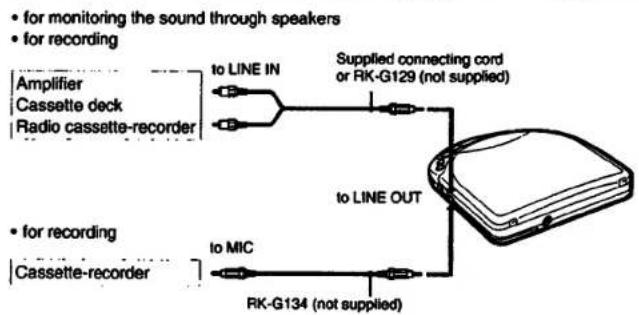
Hinweise zum Anschluss
- Schalten Sie jedes Gerät aus, bevor Sie Verbindungen herstellen.
- Stecken Sie den weißen Stecker in die L-Buchse (linker Kanal) und den roten Stecker in die R-Buchse (rechter Kanal).
- Schließen Sie den Ausgang von LINE OUT nicht an die PHONO-Buchsen des Verstärkers an.
- Achten Sie darauf, die Stecker des Kabels fest in die Buchsen zu stecken. Eine lose Verbindung kann Brummen verursachen.
- Wenn das Gerät Störungen beim Radio- oder Fernsehempfang verursacht, schalten Sie das Gerät aus oder entfernen Sie es vom Empfänger.
Hinweis zur Lautstärkeeinstellung
Sie können den Ausgangspegel der LINE-OUT-Buchse nicht mit dem VOL-Regler am Gerät einstellen.
Verschiedene Wiedergabemodi
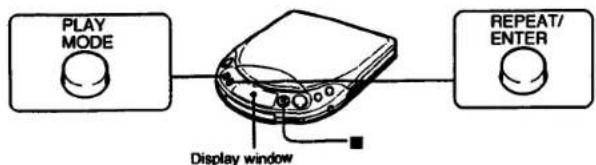
Das Gerät verfügt über INTRO-PGM-Wiedergabe, Einzeltitel-Wiedergabe, SHUFFLE-Wiedergabe und RMS* (Programm)-Wiedergabemodi. Jeder Modus hat normale und Wiederholungs-Wiedergabemodi.
* RMS: Random Music Sensor
So ändern Sie den Modus
Drücken Sie während der Wiedergabe PLAY MODE. Der aktuelle Modus erscheint im Display.
Für wiederholtes Abspielen (WIEDERHOLEN-Wiedergabe)
Drücken Sie REPEAT/ENTER. Im Display erscheint „→“.
Drücken Sie erneut, um die Wiederholung abzubrechen.
So stoppen Sie die Disc
Drücken Sie ■.
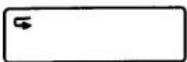
Abspielen der gesamten Disc – Normalwiedergabe
Im Display wird kein Wiedergabemodus angezeigt.
Um die gesamte Disc zu wiederholen, drücken Sie REPEAT/ENTER.
Abspielen der gewünschten Titel nach Anhören der Anfänge aller Titel – INTRO-PGM-Wiedergabe
1. Drücken Sie während der Wiedergabe PLAY MODE, bis „INTRO PGM“ langsam im Display blinkt.
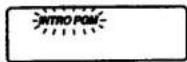
2. Drücken Sie ▶II.
„INTRO PGM“ beginnt schnell zu blinken und das Gerät spielt die ersten ca. 15 Sekunden jedes Titels ab, beginnend mit dem ersten Titel.
3. Drücken Sie während der 15 Sekunden Wiedergabe REPEAT/ENTER, wenn es der gewünschte Titel ist, um ihn in das Programm aufzunehmen.
Wenn es nicht der gewünschte Titel ist, drücken Sie während der 15 Sekunden Wiedergabe keine Taste oder drücken Sie ▶▶▶ I, um den Titel zu überspringen. Wählen Sie auf diese Weise Ihre gewünschten Titel aus.
Nachdem der Anfang des letzten Titels abgespielt wurde, hört „INTRO PGM“ auf zu blinken und die ausgewählten Titel werden automatisch in der Reihenfolge der Titelnummern der Disc abgespielt.
Um die Programmierung zu beenden, bevor Sie die Disc hören, drücken Sie ▶II. Die ausgewählten Titel werden abgespielt.
Um die Programmierung erneut zu versuchen
Drücken Sie während der Programmierung I◀◀, um zurückzugehen. Da die Programmierung der zurückgekehrten Titel abgebrochen wird, wählen Sie die gewünschten Titel ab diesem Punkt aus.
Um die programmierten Titel zu wiederholen, drücken Sie REPEAT/ENTER, während sie abgespielt werden.
Um den Anfang aller Titel zu wiederholen, drücken Sie zuerst REPEAT/ENTER und dann PLAY MODE, bis "INTRO PGM" blinkt. Drücken Sie dann ▶II. Wenn Sie keine Titel in das Programm eingegeben haben, wird der Anfang aller Titel wiederholt.

Nur einen Titel abspielen
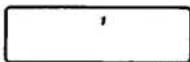
Drücken Sie während der Wiedergabe PLAY MODE, bis "1" im Display erscheint.
Das Gerät spielt nur einen Titel ab und stoppt am Ende des Titels.
Um nur einen Titel wiederholt abzuspielen, drücken Sie REPEAT/ENTER.
Titel in zufälliger Reihenfolge abspielen – Shuffle-Wiedergabe
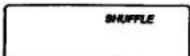
Drücken Sie während der Wiedergabe PLAY MODE, bis "SHUFFLE" im Display erscheint.
Die Wiedergabe beginnt mit dem nächsten Titel.
Um die Titel in zufälliger Reihenfolge wiederholt abzuspielen, drücken Sie REPEAT/ENTER. Nachdem alle Titel in zufälliger Reihenfolge abgespielt wurden, werden sie neu gemischt und in einer anderen Reihenfolge wiederholt abgespielt.
Während der Shuffle-Wiedergabe
Um den Anfang der folgenden Titel zu finden, drücken Sie wiederholt ▶▶▶.
Um den Anfang des aktuellen Titels zu finden, drücken Sie ◀. Auch wenn Sie weiterhin drücken,
geht der Player nicht zum vorherigen Titel zurück. Die Wiedergabe beginnt am Anfang des aktuellen Titels.
Wiedergabe der Titel in der gewünschten Reihenfolge — RMS (Programmwiedergabe)
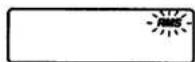
1 Drücken Sie während der Wiedergabe PLAY MODE, bis "RMS" im Display blinkt.
2 Drücken Sie ◀◀ oder ▶▶, um den gewünschten Titel auszuwählen.
Sie können die Titel in der gewünschten Reihenfolge programmieren, unabhängig von ihrer Titelnummer.
Titelnummer des gewünschten Titels Der erste Titel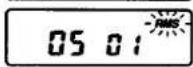
3 Drücken Sie REPEAT/ENTER.
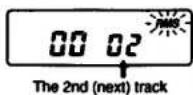
4 Wiederholen Sie die Schritte 2 und 3 (bis zu 22 Titel).
- Wenn nach dem Speichern von 22 Titeln ein weiterer Titel gespeichert wird, wird der erste Titel gelöscht und der neue an seiner Stelle gespeichert.
- Wenn Sie REPEAT/ENTER etwa 1 Sekunde lang gedrückt halten, werden die Gesamtzahl und die Gesamtspielzeit der programmierten Titel angezeigt, während Sie REPEAT/ENTER gedrückt halten. Wenn Sie den 32. oder einen späteren Titel auf der Disc eingeben oder die Gesamtspielzeit mehr als 100 Minuten beträgt, wird "-- -:-" anstelle der Gesamtspielzeit angezeigt. Sie können jedoch weiterhin programmieren.
5 Drücken Sie ▶II.
"RMS" hört auf zu blinken und die Wiedergabe beginnt.
Um zur normalen Wiedergabe zurückzukehren, drücken Sie erneut PLAY MODE.
Um die Programmwiedergabe zu wiederholen, drücken Sie REPEAT/ENTER.
Um den Inhalt des Programms während der Programmierung zu überprüfen
Drücken Sie während der Programmierung leicht REPEAT/ENTER, bevor Sie ▶II drücken. Jedes Mal, wenn Sie REPEAT/ENTER drücken, erscheinen die Titelnummer und die Wiedergabereihenfolge in der programmierten Reihenfolge im Display.
Beispiel: Die Titel 2, 4 und 6 sind in dieser Reihenfolge programmiert.
![graph LR A["02 01"] --> B["04 02"] B --> C["06 03"] C --> D["00 04"] E["Track number"] --> F["Playing order"]](/content/2026/05/805570/images/b862346f4e9d7fa12d50852c1f84e336927c4cc46739ae61967583658ed50bf6.jpg)
Disc-Wiedergabe
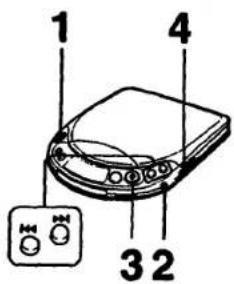
1 Legen Sie die Disc ein. Etikettseite nach oben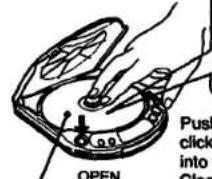
Drücken Sie die Disc vorsichtig, bis sie einrastet, sodass sie in den schwarzen Bereich der Spindel passt. Schließen Sie nach dem Einlegen der Disc den Deckel des Geräts.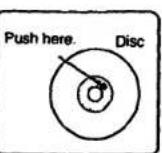
2 Schließen Sie die mitgelieferten Kopfhörer an. Kopfhörer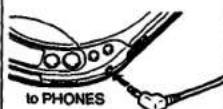
3 Drücken Sie III.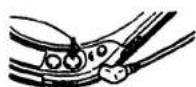
4 Stellen Sie die Lautstärke ein.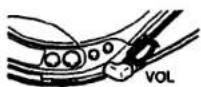
Weitere Bedienvorgänge
| Operation | Press |
| To pause | ▶IIVery short beeps sound until the pause is released. |
| To release pause | ▶IIVery short beep sounds once. |
| To stop | ■A long beep sounds.Disc playing stops and the power is turned off automatically. |
| To locate the beginning of the current track/previous tracks—AMS | ◀◀ lightly/repeatedly.Three short beeps sound. |
| To locate the beginning of the next track/tracks—AMS | ▶▶I lightly/repeatedly.Two short beeps sound. |
| To go back at high speed (Search) | Keep ◀◀ depressed. |
| To go ahead at high speed (Search) | Keep ▶▶▶ depressed. |
- Das Gerät pausiert am Anfang des gewählten Titels, wenn Sie im Pausenmodus leicht ◀◀ oder ▶▶ drücken.
- Während der Programm-Wiedergabe arbeitet die AMS in der programmierten Reihenfolge.
- Wenn Sie die Signaltöne nicht hören möchten, lesen Sie den Abschnitt "Fehlerbehebung".
So entfernen Sie die Disc
Heben Sie die Disc am Rand an, während Sie die Spindel wie abgebildet vorsichtig herunterdrücken.

Einstellen der Lautstärke mit der Fernbedienung
Wenn Sie die Lautstärke mit den LEVEL-Tasten auf der Fernbedienung einstellen, wird der Ausgangspegel in 10 Schritten angezeigt.
Wenn der
Ausgangspegel

Wenn der
Ausgangspegel
minimal ist.
Hinweis
Die LEVEL-Einstellung mit der Fernbedienung wird gespeichert, solange eine wiederaufladbare Batterie oder Alkaline-Batterien im Gerät installiert sind, auch wenn der Netzadapter entfernt wird.
Abspielen einer 8-cm-Disc (3 Zoll)
Sie können sie ohne Adapter abspielen.
Für kräftigeren Bass
(Bei Verwendung der Kopfhörer)
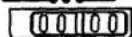
Stellen Sie BASS BOOST auf die gewünschte Position. Sie können dann einen kräftigen, bassverstärkten Klang genießen.
NORM MID MAX BASS BOOST
Hinweise
- Die Wirkung der BASS-BOOST-Funktion kann je nach Position des Lautstärkereglers oder dem Aufnahmepegel der Disc verringert sein.
- Der Klang kann verzerrt oder verzerrt sein, wenn Sie die Lautstärke zu hoch einstellen. In diesem Fall drehen Sie die Lautstärke herunter.
Um die Lautstärke auf einem moderaten Niveau zu begrenzen
Mit dem AVLS (Automatic Volume Limiter System) Schalter können Sie die maximale Lautstärke Ihres Geräts begrenzen. - Wenn der AVLS-Schalter auf Position 1 oder 2 steht, wird die Lautstärke auf einem moderaten Niveau gehalten, auch wenn Sie versuchen, die Lautstärke zu erhöhen. - Wenn der AVLS-Schalter auf Position 1 oder 2 steht, kann der Wiedergabeklang je nach Musik (insbesondere bei bassverstärkten Teilen) verzerrt oder instabil sein. Wenn dies passiert, drehen Sie die Lautstärke herunter. AVLS AUS 1 2 - Wenn der AVLS-Schalter auf AUS steht, können Sie die volle Lautstärke Ihres Geräts genießen.
Im Display
Wenn Sie das Gerät mit dem Akku oder Alkaline-Batterien verwenden, wird das Display für etwa 5 Sekunden beleuchtet, wenn Sie eine Bedientaste drücken (außer und OPEN). Wenn Sie nicht möchten, dass das Display beleuchtet wird, siehe
"Fehlerbehebung".
Wenn Sie das Gerät mit dem Netzteil oder der Autobatterie verwenden, ist das Display immer beleuchtet. (Die Beleuchtung erlischt, wenn Sie ■ drücken oder wenn die Disc stoppt.)
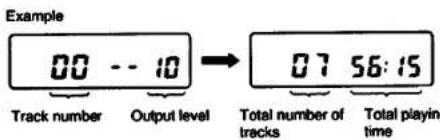
Wenn Sie ▶II drücken (wenn RESUME auf OFF gesetzt ist)
Zuerst erscheint der Ausgangspegel und dann die Gesamtzahl der Titel auf der Disc und die Gesamtspielzeit für 2 Sekunden.
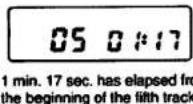
Während der Wiedergabe
Die Titelnnummer und die abgelaufene Spielzeit des aktuellen Titels erscheinen.
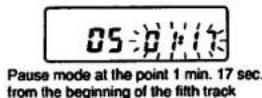
Während der Pause
Die abgelaufene Spielzeit des aktuellen Titels blinkt.
Sperren der Tasten
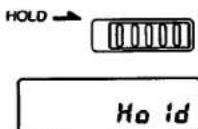
Schieben Sie den HOLD-Schalter in Pfeilrichtung, um ein versehentliches Drücken der Tasten am Gerät zu vermeiden. Wenn eine Taste am Gerät gedrückt wird, erscheint "Hold" im Display. Sie können das Gerät weiterhin mit den Bedientasten auf der Fernbedienung bedienen.
Zum Abspielen ab der Stelle, an der Sie gestoppt haben – Funktion "Resume Play"
Stellen Sie den RESUME-Schalter auf ON, um die Resume-Play-Funktion zu aktivieren. Sie können die Disc-Wiedergabe ab der Stelle fortsetzen, an der Sie zuletzt ■ gedrückt haben.
RESUME ON●● OFF
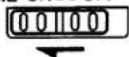
Die Anzeigen zu Beginn der Wiedergabe sind wie folgt:
(Beispiel: Die Wiedergabe wird gestoppt, wenn 6 Minuten und 10 Sekunden des 5. Titels vergangen sind und die Ausgangslautstärke auf 8 eingestellt ist.)
![graph TD A["05 06:10"] --> B["When the RESUME switch is ON."] A --> C["When the RESUME switch is OFF."] B --> D["Press ▶■."] C --> E["Press ▶■."] D --> F["05 --08"] E --> G["00 --08"] F --> H["05 06:10"] G --> I["01 00:00"] H --> J["Play starts."] I --> K["Play starts."]](/content/2026/05/805570/images/8f96589254dfd9e71a6c0de362e2b3f014acc3512c2f230df107a50d084887b8.jpg)
Hinweise
- Wenn Sie nach dem Drücken von ■ den Deckel öffnen, wird die Speicherung der Position, an der Sie ■ gedrückt haben, aufgehoben. Die Wiedergabe beginnt mit dem ersten Titel.
- Wenn Sie den Akku, die Alkaline-Batterien entfernen oder die externe Stromquelle trennen, kann die Resume-Wiedergabe an einer Stelle beginnen, die etwa 30 Sekunden hinter oder vor der Position liegt, an der Sie ■ gedrückt haben.
Fehlerbehebung
Sollte ein Problem nach den folgenden Überprüfungen weiterhin bestehen, wenden Sie sich bitte an Ihre nächste Sony-Kundendienststelle.
| Symptom | Cause and/or solution |
| Disc play does not start. | The disc is inserted upside down or incorrectly. → Insert the disc correctly with the label surface up.Dusty or defective discDirty or dusty lensThe disc compartment lid is not closed.Moisture condensation → Leave the unit in a warm place until the moisture evaporates.The AC power adaptor is not plugged into the wall outlet.The mount plate is not firmly connected to a cigarette lighter socket.The unit is not placed on a level surface.The HOLD switch is set in the direction of the arrow.When the 12 cm CD, which contains many tracks, is replaced with a disc with a few tracks (such as CD single or CDV, etc.), it may take more than 10 seconds before play starts.Weak rechargeable battery or alkaline batteries |
| No sound from the headphones | The headphones plug is not firmly connected to the PHONES jack.Adjust the volume.Dirty plug |
| No sound from the connected speakers | Check the connections.The amplifier is not turned on. |
| Skipping of sound | Dirty or defective discDirty lensStrong vibration |
| Disc play does not stop when you turn off the engine of the car. | Press to stop operation. |
| The “no disc” indication appears in the display window. | Place the CD with the label surface up.Replace the CD if it is badly damaged. |
| The “Hi dc in” indication appears in the display window. | Use the supplied AC power adaptor. |
| Charging is not possible. | Insert the rechargeable battery with the side marked “Sony Discman” facing up. |
| “Hold” appears when you press a button. | The “HOLD” switch is set in the direction of the arrow. |
| When using with batteries, the battery life is short. | Manganese batteries are used. → Use alkaline batteries. |
| Remote commander does not operate. | Replace the lithium battery.Point the head portion of the remote commander toward the signal sensor of the unit. |
Wenn Sie keine Pieptöne hören möchten
Trennen Sie die Stromquellen. Halten Sie ■ gedrückt und schließen Sie die Stromquellen (Akku, Alkaline-Batterien oder externe Stromquelle) wieder an. Die Einstellung für den Piepton bleibt erhalten, solange die Stromquelle angeschlossen ist.
Um das Display nicht zu beleuchten
Sie können dafür sorgen, dass das Display nicht beleuchtet wird, wenn das Gerät mit dem Akku oder mit Alkaline-Batterien betrieben wird.
1 Trennen Sie die Stromquellen (externes Netzteil, Akku, Alkaline-Batterien).
2 Halten Sie PLAY MODE gedrückt und legen Sie den Akku oder die Alkaline-Batterien ein.
Die Beleuchtungseinstellung bleibt erhalten, solange der Akku oder die Alkaline-Batterien nicht entfernt werden.
Vorsichtsmaßnahmen
Zur Sicherheit
- Da der in diesem CD-Player verwendete Laserstrahl für die Augen schädlich ist, versuchen Sie nicht, das Gehäuse zu zerlegen. Überlassen Sie Wartungsarbeiten nur qualifiziertem Fachpersonal.
- Legen Sie keine Fremdkörper in den Sicherheitsschlitz im Disc-Fach. Wenn Sie dies tun, kann der Laserstrahl beim Öffnen des Deckels austreten.
- Stecken Sie keine Fremdkörper in die DC IN 4,5 V (Externe Stromversorgung) Buchse.
- Falls feste Gegenstände oder Flüssigkeiten in das Gerät gelangen, trennen Sie die Stromversorgung und lassen Sie das Gerät von qualifiziertem Fachpersonal überprüfen, bevor Sie es weiter verwenden.
Zu den Stromquellen
- Verwenden Sie den Akku (mitgeliefert), Alkaline-Batterien (nicht mitgeliefert), Haushaltsstrom oder eine Autobatterie.
- Für Netzbetrieb: Verwenden Sie das mitgelieferte Netzteil. Verwenden Sie kein anderes Netzteil, da dies zu Fehlfunktionen führen kann.
- Für Autobatteriebetrieb: Verwenden Sie den Auto-Halterarm CPM-300PK (nicht mitgeliefert) oder die Halterplatte CPM-300P (nicht mitgeliefert) und das Auto-Anschlussset CPA-3/CPA-4 (nicht mitgeliefert).
- Wenn das Gerät längere Zeit nicht verwendet wird, trennen Sie unbedingt die Stromversorgung (Netzteil, Akku, Alkaline-Batterien oder Halterplatte) vom Gerät. Um das Netzteil aus der Steckdose zu ziehen, fassen Sie das Netzteil selbst an; ziehen Sie niemals am Kabel.
- Das Typenschild mit Angaben zu Betriebsspannung, Leistungsaufnahme usw. befindet sich an der Unterseite des Geräts. (Nur für Netzteil für den Nahen Osten.)
Zum Betrieb
- Da das CD-System einen großen Dynamikbereich bietet, werden die Spitzen der hochpegeligen Eingänge mit hoher Wiedergabetreue aufgezeichnet, und der Rauschpegel ist sehr niedrig. Drehen Sie die Lautstärke nicht auf, während Sie einen Teil einer Disc ohne Audiosignale oder mit sehr niedrigen Eingangspegeln hören. Wenn Sie dies tun, können die Lautsprecher beschädigt werden, wenn der Spitzenpegel des Tons wiedergegeben wird. • Die Linse auf dem Disc-Tisch sollte sauber gehalten werden. Berühren Sie die Linse nicht und stochern Sie nicht darauf herum. Wenn Sie dies tun, kann die Linse beschädigt werden und das Gerät funktioniert nicht ordnungsgemäß.
Zum Aufstellen
- Installieren Sie das Gerät niemals an Orten, an denen es folgenden Bedingungen ausgesetzt wäre:
- Wärmequellen wie Heizkörper oder Luftkanäle.
- direktem Sonnenlicht.
- übermäßigem Staub.
- Feuchtigkeit oder Regen.
- mechanischen Vibrationen oder Stößen.
- unebener Oberfläche.
- Stellen Sie das Gerät nicht auf ein Armaturenbrett und lassen Sie es nicht in einem in der Sonne geparkten Auto liegen, da die Temperatur übermäßig ansteigen kann.
- Wenn das Gerät mit dem Netzteil verwendet wird, wickeln Sie es nicht in ein Tuch, eine Decke usw. Wenn Sie dies tun, kann die Temperatur im Inneren und Äußeren des Geräts erheblich ansteigen, was zu Fehlfunktionen des Geräts oder schweren Unfällen führen kann.
- Legen Sie keine schweren Gegenstände auf das Gerät. Das Gerät und die Disc könnten beschädigt werden.
- Wenn das Gerät direkt von einem kalten an einen warmen Ort gebracht wird oder in einem sehr feuchten Raum aufgestellt wird, kann sich Feuchtigkeit an der Linse im Inneren des Geräts kondensieren. Sollte dies auftreten, funktioniert das Gerät nicht. In diesem Fall entfernen Sie die Disc und lassen Sie das Gerät mehrere Stunden an einem warmen Ort stehen, bis die Feuchtigkeit verdunstet ist.
- Für einen optimalen Betrieb sollte das Gerät keinen Temperaturen unter 5 °C (41 °F) oder über 35 °C (95 °F) ausgesetzt werden.
Hinweise zu Kopfhörern
- Verkehrssicherheit
Verwenden Sie Kopfhörer nicht beim Autofahren, Radfahren oder beim Bedienen eines motorisierten Fahrzeugs. Dies kann eine Verkehrsgefahr darstellen und ist in einigen Gebieten illegal. Es kann auch potenziell gefährlich sein, Ihre Kopfhörer beim Gehen mit hoher Lautstärke zu spielen, insbesondere an Fußgängerüberwegen. Seien Sie in potenziell gefährlichen Situationen äußerst vorsichtig oder stellen Sie die Verwendung ein.
• Vermeidung von Hörschäden
Vermeiden Sie die Verwendung von Kopfhörern bei hoher Lautstärke. Hörexperten raten von kontinuierlichem, lautem und längerem Hören ab. Wenn Sie ein Klingeln in Ihren Ohren bemerken, reduzieren Sie die Lautstärke oder stellen Sie die Verwendung ein.
• Rücksicht auf andere
Halten Sie die Lautstärke auf einem moderaten Niveau. So können Sie Außengeräusche hören und Rücksicht auf die Menschen in Ihrer Umgebung nehmen.
Technische Daten
| System | Compact disc digital audio system | |||||
| Laser diode properties | Material: Ga/AlAs | Where purchased | Operating voltage | Card remote commander | ||
| Wavelength: λ =780 nm | European and Asian countries | 220 - 230 V AC, 50 Hz | Operative distance Approx. 5 m (16 feet 5 inches) | |||
| Emission duration: Continuous | Power source DC 3 V, 1 Lithium battery CR025 | |||||
| Laser output: Less than 44.6 μW | U.S.A., Canada, Central and South America | 120 V AC, 60 Hz | Dimensions Approx. 54.1 × 65.5 × 6.15 mm (2 1⁄4 × 3 1⁄2 × 1⁄4 inches) (wh/d) | |||
| (This output is the value measured at a distance of 200 mm from the objective lens surface on the Optical Pick-up Block.) | Middle East | 110 - 240 V AC, 50/60 Hz | Mass Approx. 30 g (1.1 oz) including a lithium battery | |||
| Error correction | Sony Super Strategy Cross Interleave Reed Solomon Code | United Kingdom, Australia | 240 V AC, 50 Hz | Design and specifications are subject to change without notice. | ||
| D-A conversion | 1-bf quartz time-axis control | Other counties | 100 - 240 V AC, 50/60 Hz | |||
| Frequency response | 20 - 20.000 Hz; dB (measured by EIAJ CP-307) | Not supplied: | Accessories not supplied | |||
| • DC IN 4.5 V accepts the Sony CPM-300P mount plate and CPM-300PK mount arm for use on car battery. | Plate arm CPM-300A | |||||
| Line output (stereo minjack) | Mount plate CPM-300P | |||||
| Output level 0.8 V rms at 50 kilohms | Mount arm CPM-300PK | |||||
| Load impedance over 10 kilohms | • DC 3 V, two size AA (LR8) saline batteries | Mount kit CPM-300PC | ||||
| Headphones (stereo minjack) | Dimensions | Approx. 132 × 26.8 × 151 mm (5 1⁄4 × 1 1⁄2 × 6 in.) (wh/d) incl. projecting perts and controls | Mount kit CPM-300CK | |||
| 4 mW + 4 mW at 16 ohms | Car connecting pack CPA-3, CPA-4 | |||||
| General | Approx. 300 g (11 oz.) incl. rechargeable battery pack | Car battery cord DCC-E14SL | ||||
| AC power adaptor (1) | Active speaker system SRS-5B | |||||
| Power requirements | Supplied: | Rechargeable battery pack (1) | Rechargeable battery pack BP-DM10 | |||
| • DC 2.4 V Rechargeable battery pack | Connecting cord (phono plug × 2 × stereo mmplug) (1) | |||||
| • DC IN 4.5 V jack accepts the Sony AC power adaptor for use on: | Stereo headphones (1) | Your dealer may not handle some of the above listed accessories. Please ask the dealer for detailed information about the accessories in your country. | ||||
| Card remote commander (1) | ||||||
| Lithium battery (1) | ||||||
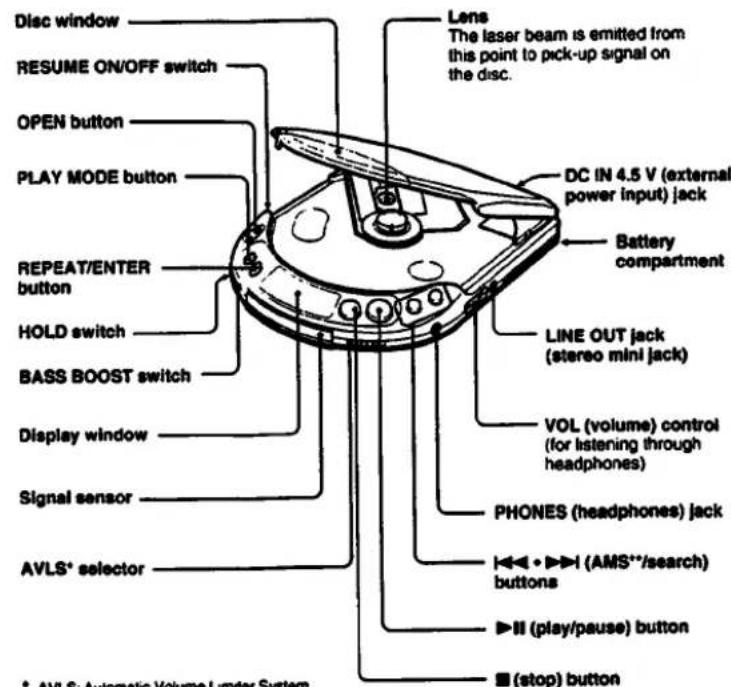
* AVLS: Automatic Volume Limiter System **AMS: Automatic Music Sensor
Karten-Fernbedienung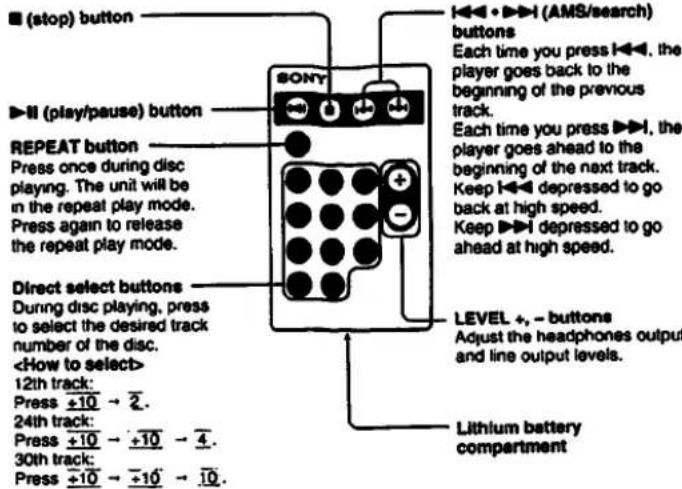
Hinweis zur Fernbedienung
Stellen Sie sicher, dass der Signalsensor am Gerät nicht direktem Sonnenlicht oder hellem Licht wie von Leuchtstofflampen ausgesetzt ist, da dies die ordnungsgemäße Funktion der Fernbedienung beeinträchtigen könnte.
Sie können die Fernbedienung nicht bedienen, wenn die Stromversorgung nicht über die DC IN 4,5-V-Buchse erfolgt.
Lebensdauer der Lithiumbatterie
Ihre Fernbedienung ist mit einer werkseitig eingesetzten Lithiumbatterie ausgestattet. Wenn der fernbedienbare Bereich kleiner wird, ersetzen Sie die Batterie durch eine Sony CR2025-Lithiumbatterie (nicht im Lieferumfang enthalten). Die Verwendung anderer Batterien als CR2025 kann zu Brand- oder Explosionsgefahr führen. Die neue Lithiumbatterie hält normalerweise etwa 6 Monate. (Die Lebensdauer hängt von der Nutzungshäufigkeit ab.)
So ersetzen Sie die Lithiumbatterie
1 Schieben Sie das Lithiumbatteriefach in Pfeilrichtung, während Sie den Verriegelungsschalter drücken. 2 Ersetzen Sie die Batterie durch eine neue Lithiumbatterie (CR2025). 3 Setzen Sie das Lithiumbatteriefach wieder wie zuvor ein.
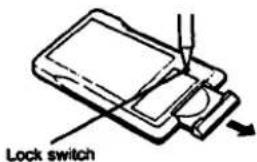
- Seite nach oben
Hinweise zur Lithiumbatterie
- Halten Sie die Lithiumbatterie von Kindern fern. Sollte die Batterie verschluckt werden, suchen Sie sofort einen Arzt auf.
- Wischen Sie die Batterie mit einem trockenen Tuch ab, um einen guten Kontakt zu gewährleisten.
- Achten Sie darauf, die Batterie mit der richtigen Polarität einzusetzen.
- Halten Sie die Batterie nicht mit einer metallischen Pinzette, da dies einen Kurzschluss verursachen kann.
WARNUNG
Die Batterie kann bei unsachgemäßer Behandlung explodieren.
Nicht aufladen, zerlegen oder ins Feuer werfen.
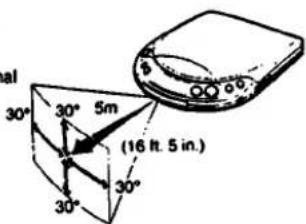
Fernbedienbarer Bereich
Wenn Sie die Karten-Fernbedienung verwenden, ist der steuerbare Bereich wie abgebildet.
Richten Sie die Karten-Fernbedienung auf den Signalsensor des Geräts.
Wartung
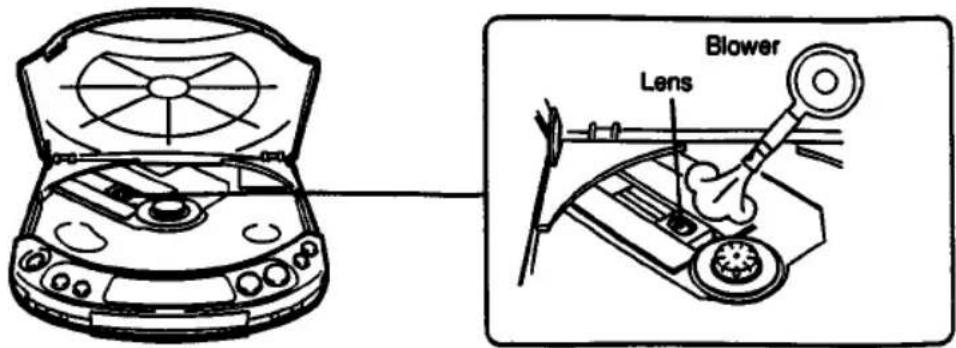
Reinigen der Linse
Wenn Sie die Linse versehentlich mit schmutzigen Fingern berührt haben oder wenn Staub auf der Linse den ordnungsgemäßen Betrieb des Geräts verhindert, öffnen Sie den Disc-Fachdeckel und reinigen Sie die Linse mit einem Linsenreinigungsset (KK-9, nicht im Lieferumfang enthalten).
Reinigen des Kopfhörersteckers
Halten Sie den Stecker Ihrer Kopfhörer sauber, um eine optimale Klangqualität zu erzielen. Wischen Sie ihn mit einem trockenen, weichen Tuch ab.
Reinigen des Gehäuses
Reinigen Sie das Gehäuse mit einem weichen Tuch, das leicht mit Wasser oder einer milden Reinigungslösung angefeuchtet ist. Verwenden Sie keine Scheuerschwämme, Scheuerpulver oder Lösungsmittel wie Alkohol oder Benzin, da diese die Oberfläche des Gehäuses beschädigen können.
Hinweise zu Compact Discs
- Reinigen Sie die Disc vor dem Abspielen mit einem Reinigungstuch. Wischen Sie die Disc von der Mitte nach außen.
- Verwenden Sie keine Lösungsmittel wie Benzin, Verdünner, handelsübliche Reiniger oder Antistatik-Sprays, die für analoge Schallplatten bestimmt sind.
- Setzen Sie die Disc keiner direkten Sonneneinstrahlung oder Wärmequellen wie Warmluftkanälen aus, und lassen Sie sie nicht in einem in der Sonne geparkten Auto liegen, da die Temperatur im Auto erheblich ansteigen kann. • Bewahren Sie die Disc nach dem Abspielen in ihrer Hülle auf.
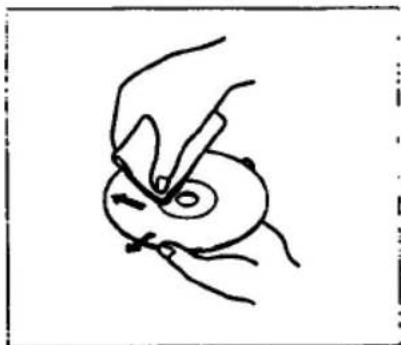
Wenn die Disc Kratzer, Schmutz oder Fingerabdrücke aufweist, kann dies zu Tracking-Fehlern führen.
Handhabung der Disc
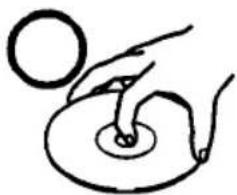
Fassen Sie die Disc nur am Rand an.
Nicht so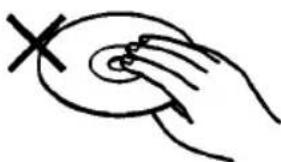
Berühren Sie nicht die Oberfläche.
Nicht so. Kleben Sie kein Papier oder Klebeband auf und schreiben Sie nichts auf die Oberfläche.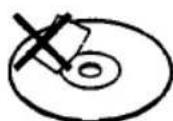
- D-225CR
- BEDIENUNGSANLEITUNG
- DISCMAN
- BESITZERAUFZEICHNUNG
- WARNUNG
- VORSICHT
- INFORMATION (FÜR KUNDEN IN DEN USA)
- FÜR KUNDEN IM VEREINIGTEN KÖNIGREICH
- FÜR KUNDEN IN KANADA
- STROMQUELLEN
- VERWENDUNG MIT DEM AKKU
- LADEN DES AKKUS
- ZUR ANZEIGE
- VERWENDUNG MIT ALKALINE-BATTERIEN
- HINWEISE ZU BATTERIEN
- LEBENSDAUER DER ALKALINE-BATTERIEN
- VERWENDUNG MIT NETZSTROM
- VERSCHIEDENE VERWENDUNGSMÖGLICHKEITEN
- HÖREN IM AUTO
- WENN SIE DIE MONTAGEPLATTE (CPM-300P) VERWENDEN
- WENN SIE DEN MOTOR AUSSCHALTEN
- HINWEIS
- HINWEISE ZUM ANSCHLUSS
- HINWEIS ZUR LAUTSTÄRKEEINSTELLUNG
- VERSCHIEDENE WIEDERGABEMODI
- SO ÄNDERN SIE DEN MODUS
- FÜR WIEDERHOLTES ABSPIELEN (WIEDERHOLEN-WIEDERGABE)
- ABSPIELEN DER GESAMTEN DISC – NORMALWIEDERGABE
- ABSPIELEN DER GEWÜNSCHTEN TITEL NACH ANHÖREN DER ANFÄNGE ALLER TITEL – INTRO-PGM-WIEDERGABE
- NUR EINEN TITEL ABSPIELEN
- TITEL IN ZUFÄLLIGER REIHENFOLGE ABSPIELEN – SHUFFLE-WIEDERGABE
- WÄHREND DER SHUFFLE-WIEDERGABE
- WIEDERGABE DER TITEL IN DER GEWÜNSCHTEN REIHENFOLGE — RMS (PROGRAMMWIEDERGABE)
- DRÜCKEN SIE REPEAT/ENTER
- DISC-WIEDERGABE
- SO ENTFERNEN SIE DIE DISC
- EINSTELLEN DER LAUTSTÄRKE MIT DER FERNBEDIENUNG
- ABSPIELEN EINER 8-CM-DISC (3 ZOLL)
- FÜR KRÄFTIGEREN BASS
- HINWEISE
- UM DIE LAUTSTÄRKE AUF EINEM MODERATEN NIVEAU ZU BEGRENZEN
- IM DISPLAY
- WENN SIE ▶II DRÜCKEN (WENN RESUME AUF OFF GESETZT IST)
- WÄHREND DER WIEDERGABE
- WÄHREND DER PAUSE
- SPERREN DER TASTEN
- ZUM ABSPIELEN AB DER STELLE, AN DER SIE GESTOPPT HABEN – FUNKTION "RESUME PLAY
- DIE ANZEIGEN ZU BEGINN DER WIEDERGABE SIND WIE FOLGT
- FEHLERBEHEBUNG
- WENN SIE KEINE PIEPTÖNE HÖREN MÖCHTEN
- UM DAS DISPLAY NICHT ZU BELEUCHTEN
- VORSICHTSMASSNAHMEN
- ZUR SICHERHEIT
- ZU DEN STROMQUELLEN
- ZUM BETRIEB
- ZUM AUFSTELLEN
- HINWEISE ZU KOPFHÖRERN
- VERKEHRSSICHERHEIT
- VERMEIDUNG VON HÖRSCHÄDEN
- RÜCKSICHT AUF ANDERE
- HINWEIS ZUR FERNBEDIENUNG
- LEBENSDAUER DER LITHIUMBATTERIE
- SO ERSETZEN SIE DIE LITHIUMBATTERIE
- HINWEISE ZUR LITHIUMBATTERIE
- FERNBEDIENBARER BEREICH
- WARTUNG
- REINIGEN DER LINSE
- REINIGEN DES KOPFHÖRERSTECKERS
- REINIGEN DES GEHÄUSES
- HINWEISE ZU COMPACT DISCS
- HANDHABUNG DER DISC
Marke : SONY
Modell : Discman D-225CR
Kategorie : CD-Player