
CDP-CX151 - CD-Player SONY - Kostenlose Bedienungsanleitung
Finden Sie kostenlos die Bedienungsanleitung des Geräts CDP-CX151 SONY als PDF.


| Produkttyp | CD-Player (Multi-Disc-Player) |
| Marke | Sony |
| Modell | CDP-CX151 |
| Anzahl der Discs | 5 |
| Abmessungen (B x H x T) | ca. 430 x 145 x 460 mm |
| Gewicht | ca. 5,8 kg |
| Stromversorgung | 230 V AC, 50/60 Hz |
| Leistungsaufnahme | 15 W |
| Fernbedienung | Ja (infrarot) |
| Wiedergabemodi | Wiederholung (Titel/alle), Zufallswiedergabe, Programmierung |
| Audioausgänge | 2x Cinch (L/R), 1x Digital (optisch) |
| Disc-Formate | CD, CD-R, CD-RW |
| Reinigung | Gehäuse mit trockenem Tuch reinigen; keine Flüssigkeiten verwenden |
| Sicherheitshinweise | Nicht öffnen; keine eigenständigen Reparaturen; nur qualifiziertes Personal |
| Ersatzteile und Reparatur | Bei Bedarf autorisierten Sony-Kundendienst kontaktieren |
| Verwendung | Nur für den Innenbereich geeignet |
Häufig gestellte Fragen - CDP-CX151 SONY
Benutzerfragen zu CDP-CX151 SONY
0 Frage zu diesem Gerät. Beantworten Sie die, die Sie kennen, oder stellen Sie Ihre eigene.
Eine neue Frage zu diesem Gerät stellen
Laden Sie die Anleitung für Ihr CD-Player kostenlos im PDF-Format! Finden Sie Ihr Handbuch CDP-CX151 - SONY und nehmen Sie Ihr elektronisches Gerät wieder in die Hand. Auf dieser Seite sind alle Dokumente veröffentlicht, die für die Verwendung Ihres Geräts notwendig sind. CDP-CX151 von der Marke SONY.
BEDIENUNGSANLEITUNG CDP-CX151 SONY
CD-Player
Bedienungsanleitung
WARNUNG
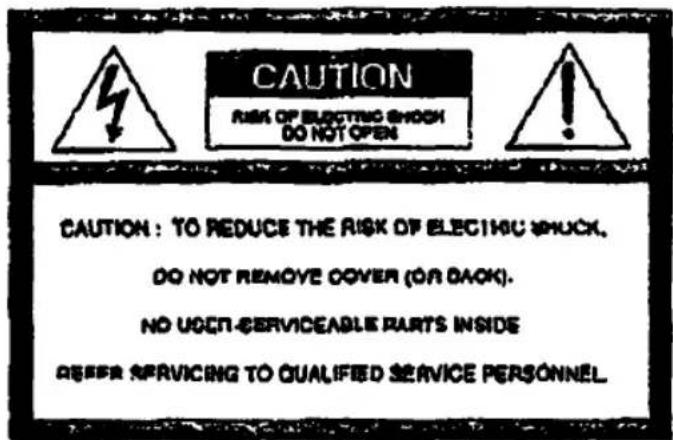
Um Brand- oder Stromschlaggefahr zu vermeiden, setzen Sie das Gerät nicht Regen oder Feuchtigkeit aus. Um einen elektrischen Schlag zu vermeiden, öffnen Sie nicht das Gehäuse. Überlassen Sie Wartungsarbeiten nur qualifiziertem Fachpersonal.
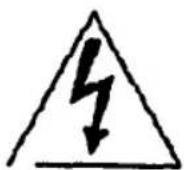
Dieses Symbol soll den Benutzer auf das Vorhandensein von nicht isolierter "gefährlicher Spannung" im Inneren des Produkts aufmerksam machen, die ausreichend stark sein kann, um eine Gefahr eines elektrischen Schlags für Personen darzustellen.

Dieses Symbol soll den Benutzer auf wichtige Betriebs- und Wartungsanweisungen in der dem Gerät beiliegenden Literatur aufmerksam machen.
INFORMATION
Dieses Gerät wurde getestet und entspricht den Grenzwerten für ein digitales Gerät der Klasse B gemäß Teil 15 der FCC-Bestimmungen. Diese Grenzwerte sollen einen angemessenen Schutz gegen schädliche Störungen in einer Wohnanlage bieten. Dieses Gerät erzeugt, verwendet und kann Hochfrequenzenergie ausstrahlen und kann, wenn es nicht gemäß den Anweisungen installiert und verwendet wird, schädliche Störungen des Funkverkehrs verursachen. Es gibt jedoch keine Garantie, dass in einer bestimmten Installation keine Störungen auftreten. Wenn dieses Gerät schädliche Störungen des Radio- oder Fernsehempfangs verursacht, was durch Ein- und Ausschalten des Geräts festgestellt werden kann, wird der Benutzer aufgefordert, die Störungen durch eine oder mehrere der folgenden Maßnahmen zu beheben:
- Richten Sie die Empfangsantenne neu aus oder stellen Sie sie an einen anderen Ort.
- Vergrößern Sie den Abstand zwischen Gerät und Empfänger.
- Schließen Sie das Gerät an eine Steckdose an, die zu einem anderen Stromkreis gehört als der des Empfängers.
- Wenden Sie sich an den Händler oder einen erfahrenen Radio-/Fernsehtechniker.
VORSICHT
Sie werden darauf hingewiesen, dass Änderungen oder Modifikationen, die nicht ausdrücklich in dieser Anleitung genehmigt sind, Ihre Berechtigung zum Betrieb dieses Geräts aufheben können.
Eigentümer-Protokoll
Die Modell- und Seriennummern befinden sich auf der Rückseite des Geräts.
Notieren Sie die Seriennummer im unten vorgesehenen Feld. Beziehen Sie sich darauf, wenn Sie Ihren Sony-Händler bezüglich dieses Produkts kontaktieren.
Modell-Nr. CDT-CX151
Serien-Nr.
Dieses Gerät ist nur für den Heimgebrauch bestimmt. Die Garantie erlischt bei Verwendung in gewerblichen Umgebungen, z. B. durch Discjockeys usw., auch innerhalb des Garantiezeitraums.
Willkommen!
Vielen Dank, dass Sie sich für den Sony Compact Disc Player entschieden haben. Bitte lesen Sie diese Anleitung vor der Inbetriebnahme des Geräts sorgfältig durch und bewahren Sie sie zum späteren Nachschlagen auf.
Über diese Anleitung
Die Anweisungen in dieser Anleitung gelten für das Modell CDP-CX151.
Konventionen
- Die Anweisungen in dieser Anleitung beschreiben die Bedienelemente am Player. Sie können auch die Bedienelemente auf der Fernbedienung verwenden, wenn diese dieselben oder ähnliche Namen wie die am Player haben. • Die folgenden Symbole werden in dieser Anleitung verwendet:

Zeigt an, dass Sie die Aufgabe mit der Fernbedienung ausführen können.

Gibt Tipps zur Vereinfachung der Aufgabe und Hinweise.
INHALTSVERZEICHNIS
Erste Schritte
Auspacken 4
Anschließen des Systems 4
Abspielen von CDs
Einlegen von CDs 6
Abspielen von CDs 7
Verwenden des Displays 8
Auffinden einer bestimmten Disc....9
Festlegen der nächsten abzuspielenden Disc....9
Auffinden eines bestimmten Titels oder einer Stelle in einem Titel 10
Wiederholtes Abspielen 10
Abspielen in zufälliger Reihenfolge (Zufallswiedergabe) 11
Erstellen eigener Programme (Programmwiedergabe) 12
Abspielen mit einem Timer 14
Speichern von Informationen über CDs (Benutzerdateien)
Was Sie mit den Benutzerdateien tun können 15
Beschriften von Discs (Disc Memo) 15
Speichern bestimmter Titel (Delete Bank) 16
Gruppieren von Discs (Group File) 17
Zusätzliche Informationen
Sicherheitsmaßnahmen 20
Hinweise zu CDs 20
Fehlerbehebung 21
Technische Daten 21
Index 27
Auspacken
Überprüfen Sie, dass Sie die folgenden Artikel erhalten haben:
• Audiokabel (1) • Fernbedienung (1) • Sony SUM-3 (NS) Batterien (2) - CD-Booklet-Halter (1) und Etiketten (2)

Verwendung des CD-Booklet-Halters
Der CD-Booklet-Halter hilft Ihnen, die Disc leicht zu finden. Nachdem Sie Discs in den Player eingelegt haben, können Sie das CD-Booklet (das mit einer CD geliefert wird) in den Halter legen. Legen Sie 2 CD-Booklets Rücken an Rücken in eine Tasche. Kleben Sie das Nummernschild auf ein solches Päckchen, das der Nummer des Disc-Slots entspricht, in den Sie die Disc eingelegt haben. Sie können bis zu 100 CD-Booklets in den Halter legen.
Einlegen der Batterien in die Fernbedienung
Sie können den Player mit der mitgelieferten Fernbedienung steuern. Legen Sie zwei Batterien der Größe AA (R6) ein, und achten Sie dabei auf die Markierungen + und – auf den Batterien. Richten Sie die Fernbedienung beim Gebrauch auf den Fernbedienungssensor ■ am Player.
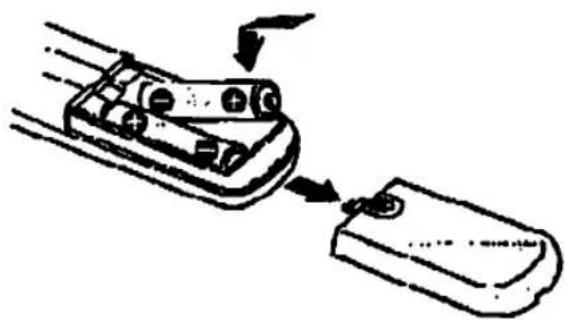

Wann die Batterien ausgetauscht werden sollten
Bei normalem Gebrauch sollten die Batterien etwa sechs Monate halten. Wenn die Fernbedienung den Player nicht mehr bedient, ersetzen Sie alle Batterien durch neue.
Hinweise
- Lassen Sie die Fernbedienung nicht in der Nähe von extrem heißen oder feuchten Orten liegen.
- Lassen Sie keine Fremdkörper in das Gehäuse der Fernbedienung fallen, insbesondere beim Austauschen der Batterien.
- Setzen Sie den Fernbedienungssensor nicht direktem Sonnenlicht oder Beleuchtungsgeräten aus. Dies kann zu Fehlfunktionen führen.
- Wenn Sie die Fernbedienung längere Zeit nicht verwenden, entfernen Sie die Batterien, um mögliche Schäden durch Auslaufen und Korrosion zu vermeiden.
Anschließen des Systems
Übersicht
In diesem Abschnitt wird beschrieben, wie Sie den CD-Player an einen Verstärker anschließen. Schalten Sie vor dem Herstellen der Verbindungen unbedingt die Stromversorgung jeder Komponente aus.
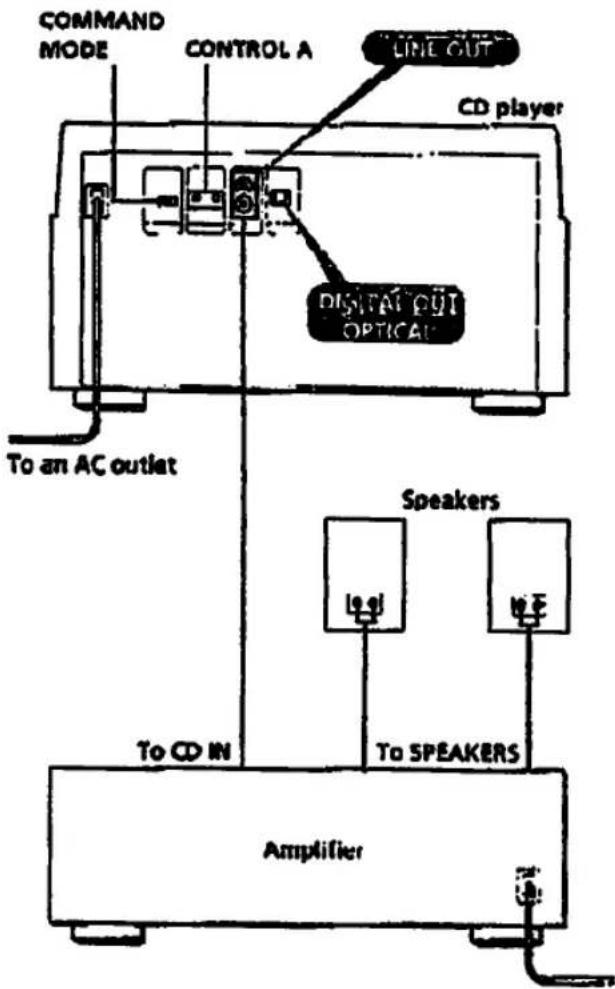
Welche Kabel benötige ich?
Audiokabel (mitgeliefert) (1)![graph LR A["White (L)"] --> C B["Red (R)"] --> C C --> D["White (L)"] C --> E["Red (R)"]](/content/2026/05/805394/images/ff5da61fbcdb2ec3d235adb0a76e7518a093b5773244bfc66fe94f1e3509546f.jpg)
Anschlüsse
Achten Sie beim Anschließen des Audiokabels darauf, dass Sie das farbcodierte Kabel an die entsprechenden Buchsen der Komponenten anschließen: Rot (rechts) an Rot und Weiß (links) an Weiß. Stellen Sie die Verbindungen fest her, um Brummen und Rauschen zu vermeiden.
![graph LR A["CD player"] -->|Line OUT| B["Amplifier"] B -->|L| C["L"] B -->|R| D["R"] B -->|CD| E["CD"] B -->|INPUT| F["INPUT"]](/content/2026/05/805394/images/0def6c98f1fe4953e69843a85d652d14c42451d1a45c6a3cef26fa3b02ecd2ba.jpg)
- Wenn Sie eine digitale Komponente wie einen Digitalverstärker, D/A-Wandler, DAT oder MD haben Verbinden Sie die Komponente über den DIGITAL OUT (OPTICAL)-Anschluss mit dem optischen Kabel (nicht im Lieferumfang enthalten). Entfernen Sie die Schutzkappe und stecken Sie das optische Kabel ein.
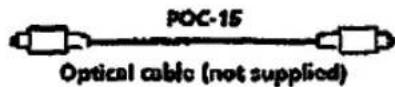
![graph LR A["CD player"] --> B["OPTICAL"] B --> C["Digital OUT"] D["Digital component"] --> E["OPTICAL"] E --> F["Digital INPUT"] B <--> E](/content/2026/05/805394/images/9d813ae66cdf4df18588acc289088f690d74afe71bd541c994cb22ecd65a568c.jpg)
Hinweis
Wenn Sie über den DIGITAL OUT (OPTICAL)-Anschluss verbinden, können bei der Wiedergabe von CD-Software, die keine Musik ist, wie z.B. CD-KUM, Störgeräusche auftreten.

Verwendung der CONTROL A-Anschlüsse und des COMMAND MODE-Wahlschalters
Sie können zwei oder drei dieser Player steuern, indem Sie sie über die CONTROL A-Anschlüsse mit dem Controller-Gerät verbinden, das in Zukunft erhältlich sein wird. Stellen Sie bei der CONTROL A-Verbindung den COMMAND MODE-Wahlschalter auf die entsprechende Position. Für den normalen Gebrauch lassen Sie den Schalter auf der Position CD1, die ab Werk eingestellt ist.
Anschließen des Netzkabels
Schließen Sie das Netzkabel an eine Steckdose an.
Wie geht es weiter?
Jetzt sind Sie bereit, Ihren Player zu verwenden. Schalten Sie vor dem Abspielen einer CD den Verstärker ein und wählen Sie die CD-Player-Position.
Einlegen von CDs
Sie können bis zu 100 Discs in diesen Player einlegen.
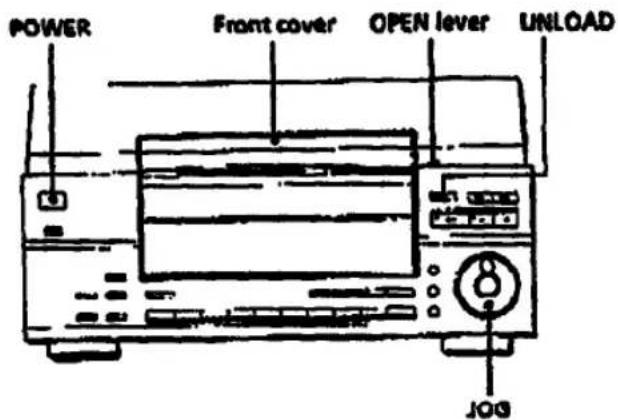
1 Drücken Sie POWER, um den Player einzuschalten. 2 Schieben Sie den OPEN-Hebel zu sich hin und heben Sie die Frontabdeckung an.
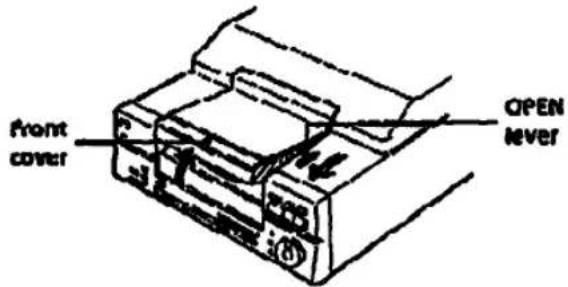
3 Drücken Sie UNLOAD.
Die Anzeige der UNLOAD-Taste und "UNLOAD" im Display blinken. Nachdem sich der Drehteller gedreht hat, leuchten sowohl die Anzeige als auch die Anzeige auf.
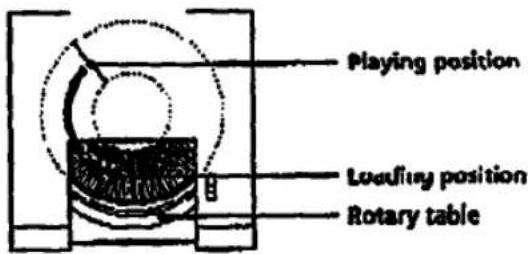
4 Finden Sie den Disc-Schlitz, in den Sie eine Disc einlegen möchten, und überprüfen Sie dabei die Disc-Nummer (neben dem Schlitz geschrieben und auch im Display angezeigt). Wenn Sie den Schlitz zu sich hin bewegen möchten, drehen Sie das JOG-Wahlrad.
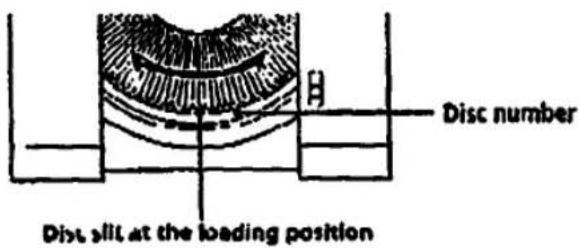
Die Disc-Nummer an der Ladeposition und der Disc-Memo (siehe Seite 15) erscheinen im Display. Wenn Sie den JOG-Dial drehen, ändern sich die Disc-Nummer und der Disc-Memo.
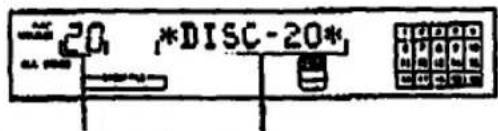
Disc-Nummer an der Ladeposition
Disc-Memo oder Disc-Nummer
Wenn die Disc keinen Disc-Memo hat, erscheint anstelle des Disc-Memos die Disc-Nummer (z. B. *DISC-20*). Diese Disc-Nummer verschwindet, wenn Sie die Disc länger als eine Minute nicht abspielen. Die Disc-Nummer erscheint jedoch wieder, wenn Sie die Disc abspielen.
5 Legen Sie eine Disc mit der Etikettseite nach rechts ein.
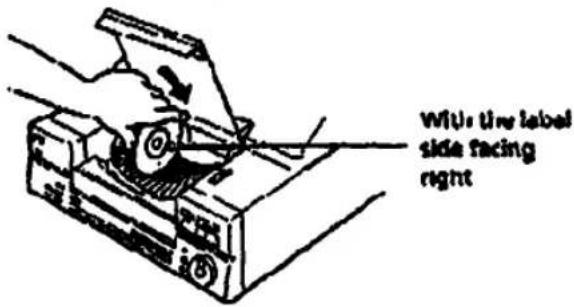
Nach dem Einlegen der Disc können Sie die Disc beschriften, um sie leichter zu finden (siehe "Beschriften von Discs (Disc-Memo)" auf Seite 15).

6 Wiederholen Sie die Schritte 4 und 5, um weitere Discs einzulegen.
7 Schließen Sie die Frontabdeckung, indem Sie die rechte Kante der Abdeckung drücken, bis sie einrastet.
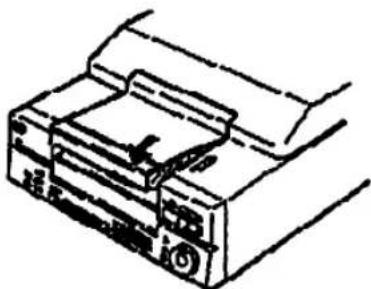
Schließen Sie die Frontabdeckung immer, außer wenn Sie Discs einlegen oder entfernen.

Wenn die UNLOAD-Anzeige leuchtet
"UNLOAD" erscheint im Display und die aktuelle Disc kommt in die Ladeposition. Sie können den Drehteller drehen, aber zu diesem Zeitpunkt keine CDs abspielen.

Der mitgelieferte CD-Booklet-Halter hilft Ihnen, eine Disc zu finden.
Sie können bis zu 100 CD-Booklets aufbewahren. Legen Sie Booklets ein und kleben Sie das Nummernschild auf die Folie einer Tasche und das Booklet, damit Sie die Disc leicht finden können.

Wenn Sie etwas in den Player fallen lassen Schieben Sie die Bodenabdeckung, um sie zu entfernen. Entfernen Sie den Fremdkörper und schieben Sie die Abdeckung wieder zurück.
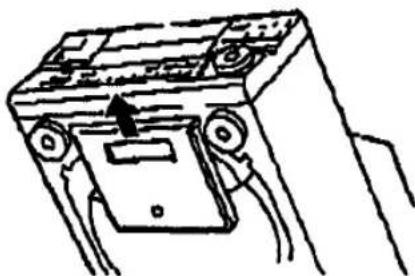
Hinweis
Wenn Sie eine 8-cm-CD (3 Zoll) einlegen, befestigen Sie unbedingt einen Sony CSA-5-Adapter (nicht im Lieferumfang enthalten) an der Disc.
Entfernen von CDs
Nachdem Sie die Schritte 1 bis 4 unter "Einlegen von CDs" auf Seite 6 ausgeführt haben, entfernen Sie die Discs. Schließen Sie dann die Frontabdeckung.

Wenn Sie eine Disc in einem Schlitz ersetzen
Benutzerdefinierte Dateien (siehe Seite 15) bleiben auch dann erhalten, wenn Sie eine Disc entfernen. Wenn Sie die Disc durch eine neue ersetzen, erscheint "DISC CHANGED" im Display. Löschen oder ändern Sie die Informationen der benutzerdefinierten Datei bei Bedarf.
Abspielen von CDs
Sie können alle Titel einer Disc in der ursprünglichen Reihenfolge abspielen (Dauerwiedergabe). Sie können auch bis zu 100 Discs nacheinander abspielen.
Stellen Sie vor Beginn sicher, dass Sie den Player wie auf den Seiten 4 und 5 angegeben korrekt und fest an einen Verstärker angeschlossen und die Discs wie auf Seite 6 angegeben korrekt eingelegt haben.
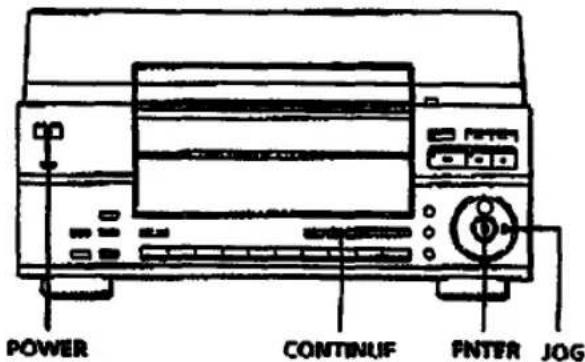
1 Schalten Sie den Verstärker ein und wählen Sie die CD-Player-Position.
2 Drücken Sie POWER, um den Player einzuschalten.
3 Drücken Sie CONTINUE, um ALL DISCS oder 1 DISC auszuwählen. Bei jedem Drücken von CONTINUE erscheinen abwechselnd "ALL DISCS" und "1 DISC" im Display.
| When you select | The player plays |
| ALL DISCS | All discs in the player consecutively in the order of disc number. Empry disc slits are skipped. |
| 1 DISC | Only one disc you have selected |
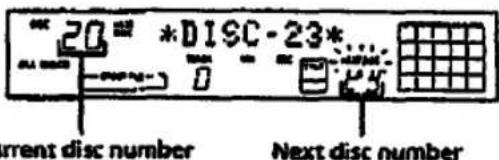
4 Drehen Sie das JOG-Rad, während Sie die Disc-Nummern oder den Disc-Memo (siehe Seite 15) im Display prüfen, um die erste Disc (ALL DISCS) oder die gewünschte Disc (1 DISC) auszuwählen.
Die nächste Disc-Nummer ändert sich, wenn Sie das JOG-Rad drehen.
5 Drücken Sie ENTER.
Die ausgewählte Disc wird in die Abspielposition gebracht, und der Player spielt alle Discs ab der ausgewählten Disc (ALL DISCS) oder alle Titel einmal ab (1 DISC). Stellen Sie die Lautstärke am Verstärker ein.
Zum Stoppen der Wiedergabe drücken Sie ■.
| When you want to | Press |
| Pause | II |
| Resume play after pause | ▷ ur III |
| Go to the next disc | DISC SKIP + once.Hold down the button to skip discs. |
| Go back to the preceding disc | DISC SKIP - once.Hold down the button to skip discs. |
| Go to the next track | DDI |
| Go back to the preceding track | NNI |
| Stop play and release the disc from the playing position | UNLOAD |

Wenn Sie den Player ausschalten
Der Player merkt sich die zuletzt gespielte Disc und den Wiedergabemodus (Fortlaufend, Zufallswiedergabe (siehe Seite 11) oder Programm (siehe Seite 12)). Wenn Sie den Player wieder einschalten, spielt er daher dieselbe Disc im selben Wiedergabemodus.
Verwenden des Displays
Sie können Informationen über die Disc über das Display abrufen.
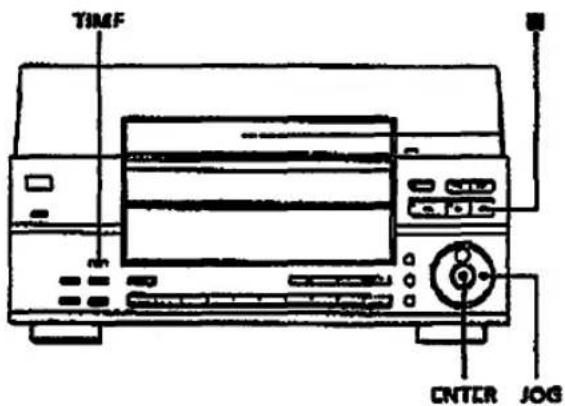
Überprüfen der Gesamtzahl und der Gesamtspielzeit der Titel
Wählen Sie die gewünschte Disc und drücken Sie im Fortlaufenden Wiedergabemodus ENTER. Da der Player automatisch mit der Wiedergabe beginnt, drücken Sie ■ zum Stoppen und dann TIME.
Das Display zeigt die aktuelle Disc-Nummer, die Gesamtzahl der Titel, die Gesamtspielzeit und den Musikkalender an.
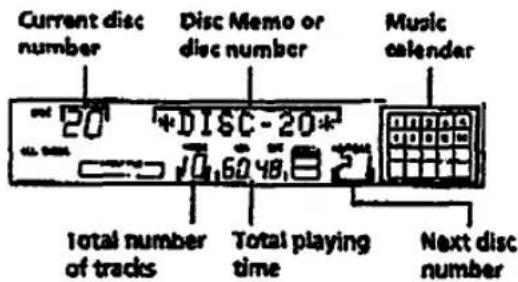

Wenn Sie eine andere Disc überprüfen möchten
Drücken Sie im Stoppmodus DISC SKIP auf der Fernbedienung, um die gewünschte Disc auszuwählen. Die Gesamtzahl der Titel und die Gesamtspielzeit der ausgewählten Disc werden kurz angezeigt.
Überprüfen der Restzeit
Jedes Mal, wenn Sie während der Wiedergabe TIME drücken, ändert sich die Anzeige wie in der folgenden Tabelle gezeigt. Die Titelnummern im Musikkalender verschwinden, nachdem sie abgespielt wurden.
| Press TIME | To check |
| Once | Remaining time on the current track |
| Twice | Remaining time on the current disc* |
| Three times | Playing time and number of the current track |
Diese Informationen sind nur im Fortlaufenden Wiedergabemodus verfügbar. Wenn Sie Titel gelöscht haben (siehe Seite 16), erscheint "--..." anstelle der Restzeit.
Auffinden einer bestimmten Disc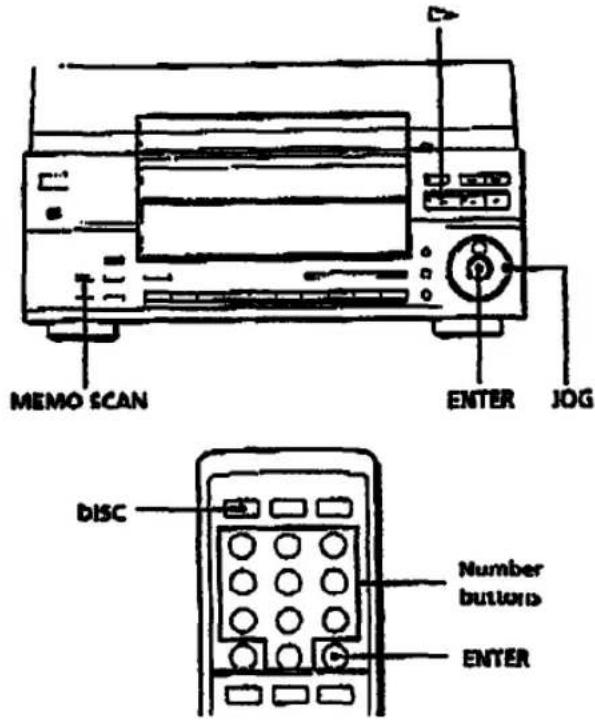
Auswählen einer Disc mit dem Player
Drehen Sie den JOG-Regler, bis die gewünschte Disc-Nummer im Display erscheint. Drücken Sie ENTER, um die Wiedergabe zu starten.
Direktes Auswählen einer Disc mit der Fernbedienung
1 Drücken Sie DISC auf der Fernbedienung. 2 Drücken Sie die Nummerntaste der Disc.
Zum Auswählen einer Disc mit einer Nummer über 10
Zuerst die Zehnerstelle, dann die Einerstelle. Zur Eingabe von 0 verwenden Sie die Taste 10/0.
Beispiel: 10 eingeben, Nummer 30
Drücken Sie 3, dann 0 (10/0).
Zur Eingabe von Nummer 100 drücken Sie zweimal 0 (10/0).
3 Drücken Sie ENTER, um die Wiedergabe zu starten.
Lokalisieren einer Disc durch Scannen der Disc-Memos (Memo-Scan)
Sie können eine gewünschte Disc schnell lokalisieren, indem Sie die Disc-Memos (siehe Seite 15) im Display scannen und die Wiedergabe starten.
Beachten Sie, dass diese Funktion nicht im ALL DISCS Shuffle- und Program-Wiedergabemodus verwendet werden kann.
1 Drücken Sie MEMO SCAN, bis "MEMO SCAN" im Display erscheint.
Die Disc-Memos scrollen im Display.
2 Drücken Sie ▷ oder ENTER, wenn das Disc-Memo der gewünschten Disc erscheint.
Die Disc wird in die Wiedergabeposition gebracht, und der Player beginnt mit der Wiedergabe.

Sie können zum nächsten oder vorherigen Disc-Memo springen, während Sie scannen.
Drücken Sie K43 oder D41.
Hinweis
Wenn "-NO ENTRY-" im Display erscheint, wurde keine Disc mit dem Disc-Memo beschriftet (siehe Seite 15). Versuchen Sie die Memo-Scan-Funktion erneut, nachdem Sie die Discs beschriftet haben.
Festlegen der nächsten abzuspielenden Disc
Sie können die nächste Disc festlegen, die abgespielt werden soll, während eine Disc im Modus "Continuous Play" abgespielt wird.
Während eine Disc abgespielt wird, drehen Sie das JOG-Rad, bis die gewünschte Disc-Nummer im Display erscheint.
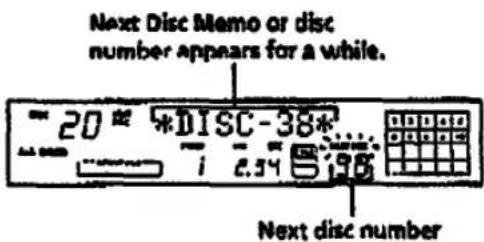
Nachdem die aktuelle Disc abgespielt wurde, beginnt die von Ihnen festgelegte nächste Disc mit der Wiedergabe.
Wenn Sie sofort zur nächsten Disc springen möchten, drücken Sie ENTER, während die aktuelle Disc abgespielt wird.
Zum Abbrechen der festgelegten Disc
Drücken Sie zweimal CONTINUE.
Auffinden eines bestimmten Titels oder einer Stelle in einem Titel
Sie können während der Wiedergabe einer Disc mit den Tasten I< > (AMS: Automatic Music Sensor) oder den Zifferntasten der Fernbedienung schnell einen beliebigen Titel ansteuern. Sie können auch eine bestimmte Stelle in einem Titel während der Wiedergabe ansteuern.
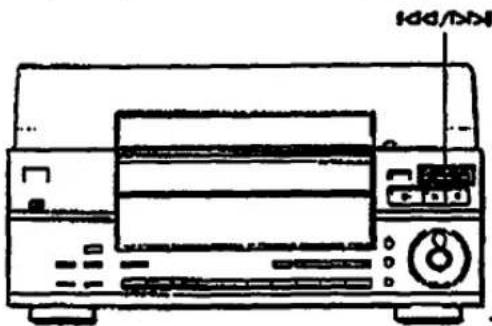
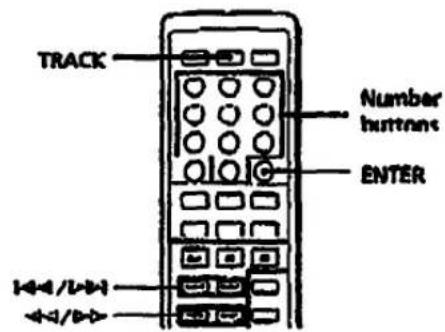
| To locate | Press |
| the next or succeeding tracks | ▷▷I repeatedly until you find the track |
| the current or preceding tracks | ▷▷▷I repeatedly until you find the track |
| a specific track directly | 1 Press TRACK.2 Press the number button of the track.3 Press ENTER. |
| a point in a track while monitoring the sound | ▷▷ (forward) or ▶◀ (backward) and hold down until you find the point |
| a point in a track quickly by observing the display during power | ◀◀/▶▶ and hold down until you find the point. You will not hear the sound during the operation. |

Wenn Sie einen Titel mit einer Nummer über 10 direkt ansteuern
Drücken Sie zuerst die Zehnerstelle, dann die Einerstelle. Um 0 einzugeben, verwenden Sie die Taste 10/0.
Hinweis
Wenn "77" im Display erscheint, ist das Ende der Disc erreicht, während Sie gedrückt haben. Drücken Sie ◀◀ oder ◀◀◀, um zurückzugehen.
Wiederholte Wiedergabe
Sie können Discs/Titel in jedem Wiedergabemodus wiederholt abspielen. Der Player stoppt nach fünfmaliger Wiederholung der Titel in jedem Wiedergabemodus.
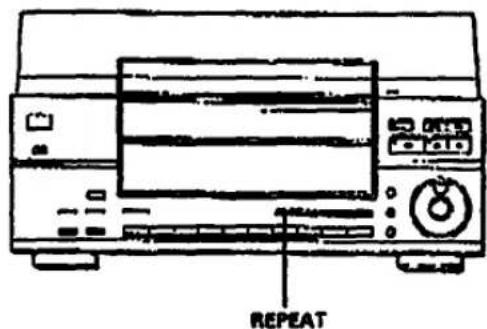
Drücken Sie REPEAT während der Wiedergabe einer Disc.
"REPEAT" erscheint im Display. Der Player wiederholt die Discs/Titel wie folgt:
| When the disc is played in | The player repeats |
| Continuous Play (ALL, DISCS) (page 7) | All tracks on all discs |
| Continuous Play (1 DISC) (page 7) | All tracks on the current disc |
| Shuffle Play (ALL DISCS) (page 11) | All tracks on all discs in random orders |
| Shuffle Play (1 DISC) (page 11) | All tracks on the current disc in random orders |
| Program Play (page 12) | The same program |
Zum Abbrechen der Wiederholungswiedergabe
Drücken Sie erneut REPEAT. "REPEAT OFF" erscheint kurz und "REPEAT" verschwindet aus dem Display.
Wiedergabe in zufälliger Reihenfolge (Shuffle-Wiedergabe)
Sie können den Player die Titel "mischen" und in zufälliger Reihenfolge abspielen lassen. Der Player mischt alle Titel aller Discs oder nur die der von Ihnen gewählten Disc.
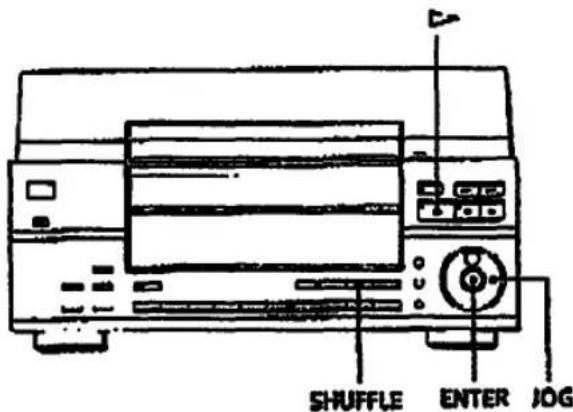
Shuffle-Wiedergabe aller Discs
Sie können alle Titel aller Discs in zufälliger Reihenfolge abspielen.
1. Drücken Sie SHUFFLE wiederholt, bis "ALL DISCS" im Display erscheint.
2. Drücken Sie D-. Die Shuffle-Wiedergabe aller Discs startet. "[ ]" erscheint im Display, während der Player die Discs oder Titel mischt.
Zum Abbrechen des Shuffle-Wiedergabemodus drücken Sie CONTINUE.

Sie können den Shuffle-Wiedergabemodus während der Wiedergabe starten. Drücken Sie SHUFFLE, und der Shuffle-Wiedergabemodus startet mit dem aktuellen Titel.
Hinweise
- Während der Shuffle-Wiedergabe mit ALL DISCS können Sie die nächste Disc nicht auswählen.
- Auch wenn Sie das Gerät während der Shuffle-Wiedergabe mit ALL DISCS ausschalten oder ausschalten, merkt sich das Gerät, welche Discs/Titel bereits abgespielt wurden und welche nicht. Wenn Sie die Shuffle-Wiedergabe mit ALL DISCS also von Anfang an neu starten möchten, wiederholen Sie unbedingt den Vorgang ab Schritt 1.
Shuffle-Wiedergabe auf einer Disc
Sie können alle Titel auf einer bestimmten Disc in zufälliger Reihenfolge abspielen.
1 Drücken Sie SHUFFLE wiederholt, bis "1 DISC" im Display erscheint. 2 Drehen Sie das JOG-Rad, um die Disc auszuwählen. 3 Drücken Sie ENTER.
Die Shuffle-Wiedergabe mit 1 DISC startet auf der ausgewählten Disc. "[ ]" erscheint im Display, während das Gerät die Titel "mischt".
Zum Abbrechen des Shuffle-Wiedergabemodus drücken Sie CONTINUE.

Sie können eine Disc direkt auswählen Siehe "Auswählen einer Disc direkt mit der Fernbedienung" auf Seite 9.

Sie können während der Shuffle-Wiedergabe mit 1 DISC zur nächsten Disc wechseln. Drücken Sie DISC SKIP +.

Sie können die nächste Disc während der Shuffle-Wiedergabe mit 1 DISC festlegen. Drehen Sie das JOG-Rad, um die nächste Disc festzulegen. Nachdem alle Titel auf der aktuellen Disc in zufälliger Reihenfolge abgespielt wurden, startet die nächste Disc. Wenn Sie sofort zur nächsten Disc wechseln möchten, drücken Sie ENTER, während die aktuelle Disc abgespielt wird.

Sie können den Shuffle-Wiedergabemodus während der Wiedergabe starten. Drücken Sie SHUFFLE, und der Shuffle-Wiedergabemodus startet mit dem aktuellen Titel.
Erstellen eigener Programme (Programmwiedergabe)
Sie können die Reihenfolge der Titel und/oder Discs festlegen und 3 verschiedene Programme erstellen. Programme werden automatisch gelöscht. Ein Programm kann bis zu 32 "Schritte" enthalten – ein "Schritt" kann einen Titel oder eine ganze Disc enthalten.
Sie können Programme sowohl mit den Tasten auf der Fernbedienung als auch mit denen am Player erstellen. Die Vorgehensweise ist jedoch unterschiedlich.
Erstellen eines Programms mit dem Player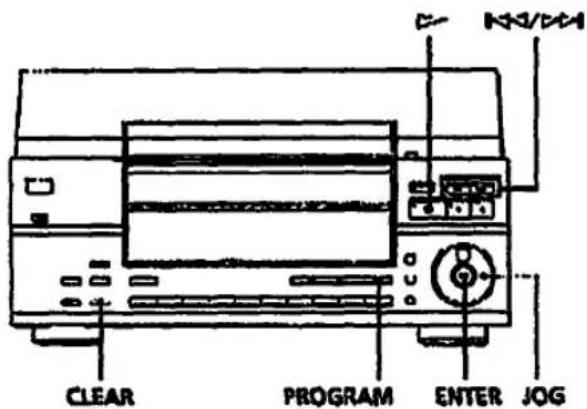
1 Drücken Sie PROGRAM, bis die gewünschte Programmnummer (PROGRAM 1, 2 oder 3) im Display erscheint. Wenn bereits ein Programm unter der gewählten Programmnummer gespeichert ist, erscheint der letzte Schritt des Programms im Display. Wenn Sie das gesamte Programm löschen möchten, halten Sie CLEAR gedrückt, bis "ALL CLEAR" im Display erscheint (siehe Seite 14).
2 Drehen Sie das JOG-Rad, um die Disc auszuwählen.
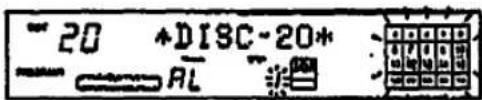
3 Um eine ganze Disc zu programmieren, überspringen Sie diesen Schritt. Drücken Sie ◀◀/▶▶, um einen Titel auszuwählen.
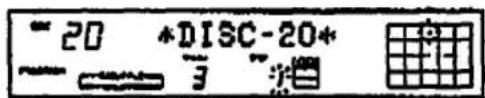
4 Drücken Sie ENTER oder PROGRAM.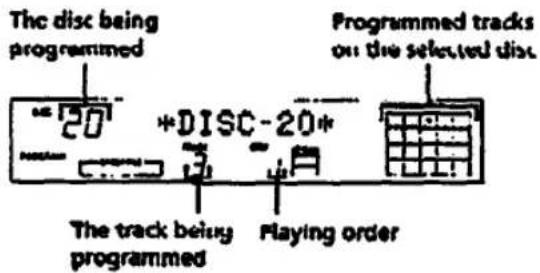
5 Um weitere Discs/Titel zu programmieren, gehen Sie wie folgt vor:
| To program | Repeat Steps |
| Other discs | 2 and 1 |
| Other tracks on the same disc | 3 to 4 |
| Other tracks on other discs | 2 to 4 |
6 Drücken Sie ▷, um die Programm-Wiedergabe zu starten.
Zum Abbrechen der Programm-Wiedergabe drücken Sie CONTINUE.
Erstellen eines Programms mit der Fernbedienung
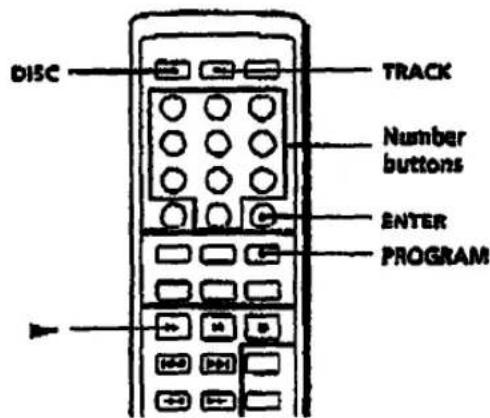
1 Drücken Sie PROGRAM, bis die gewünschte Programmnummer (PROGRAM 1, 2 oder 3) im Display erscheint. Wenn bereits ein Programm unter der gewählten Programmnummer gespeichert ist, erscheint der letzte Schritt des Programms im Display. Wenn Sie das gesamte Programm löschen möchten, halten Sie CLEAR gedrückt, bis "ALL CLEAR" im Display erscheint (siehe Seite 14).
2 Drücken Sie DISC.
![" 20 DISC-[ --- → 0 -o]](/content/2026/05/805394/images/bf6db7edb4c0a17e20447413c73127549ccb6fe8c19d1165a90493a2183ff04e.jpg)
3 Drücken Sie die Zifferntaste der Disc.
So wählen Sie eine Disc mit einer Nummer über 10 aus: Drücken Sie zuerst die Zehnerstelle, dann die Einerstelle. Um 0 einzugeben, verwenden Sie die Taste 10/0 (siehe Seite 9).
![= 20 DISC-[ 24] - U - o](/content/2026/05/805394/images/b4519cb84d90ff36a938feba6666e6a07c20bcd089a7f0a1d5b2b5ce8fa33aaa.jpg)
4 Drücken Sie ENTER.

5 Um eine ganze Disc zu programmieren, überspringen Sie diesen Schritt und gehen Sie zu Schritt 8. Drücken Sie TRACK.
![" 24 TRACK-[ ...] NL : [ ]](/content/2026/05/805394/images/e0cecf81ec6b3c41350ca5df4d3f7c154e3af8d58e92442bb032d69635792f67.jpg)
6 Drücken Sie die Nummerntaste des Titels.
So wählen Sie einen Titel mit einer Nummer über 10
Drücken Sie zuerst die Zehnerstelle, dann die Einerstelle. Um 0 einzugeben, verwenden Sie die Taste 10/0 (siehe Seite 2).
![" 24 TRACK - L" —— AL "1" [ ]](/content/2026/05/805394/images/4a9d90c1f2461bf418f8e91b10e59251f47675edfe7d7c2c79584dce23c73b22.jpg)
7 Drücken Sie ENTER.
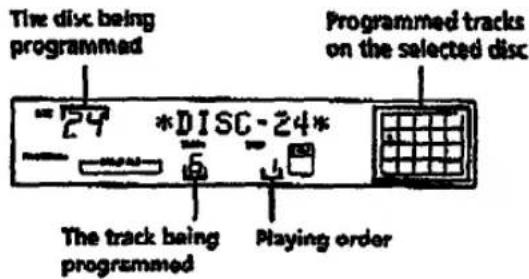
8 Um weitere Discs/Titel zu programmieren, gehen Sie wie folgt vor:
| To program | Repeat Steps |
| Other discs | 2 to 4 |
| Other tracks on the same disc. | 3 to 7 |
| Other tracks on other discs | 2 to 7 |
9 Drücken Sie B-, um die Programmwiedergabe zu starten.
So brechen Sie die Programmwiedergabe ab
Drücken Sie CONTINUE.
Die Programme bleiben auch nach dem Ende der Programmwiedergabe erhalten. Wenn Sie ▶ drücken, können Sie dasselbe Programm erneut abspielen. Die Programme bleiben etwa einen Monat lang im Speicher des Players gespeichert, auch wenn das Gerät ausgeschaltet ist.
Wenn Sie während der fortlaufenden oder Zufallswiedergabe PROGRAM drücken Das zuletzt abgespielte Programm erscheint und wird nach dem aktuellen Titel abgespielt.
Die Programme bleiben erhalten, bis Sie sie löschen. Wenn Sie Discs austauschen, bleiben die programmierten Disc- und Titelnnummern erhalten. Der Player spielt also nur die vorhandenen Disc- und Titelnnummern ab. Disc- und Titelnnummern, die nicht im Player oder auf der Disc gefunden werden, werden jedoch aus dem Programm gelöscht, und der Rest des Programms wird in der programmierten Reihenfolge abgespielt.
Hinweis
Wenn "PROGRAM FULL" im Display erscheint, bedeutet dies, dass Sie bereits 32 Schritte programmiert haben und keine weiteren Titel oder Discs programmieren können.
Überprüfen der programmierten Reihenfolge
Sie können Ihr Programm vor oder nach dem Start der Wiedergabe überprüfen.
Drücken Sie CHECK.
Jedes Mal, wenn Sie diese Taste drücken, zeigt das Display die Disc- und Titelnnummer jedes Schritts in der programmierten Reihenfolge an. (Wenn eine ganze Disc als ein Schritt programmiert ist, erscheint "AL" anstelle der Titelnnummer.) Nach dem letzten Schritt im Programm zeigt das Display "END" an und kehrt zur ursprünglichen Anzeige zurück.
Ändern der programmierten Reihenfolge
Sie können Ihr Programm vor dem Start der Wiedergabe ändern.
| To | You need to |
| Press a track or disc | Press CHECK until the track or disc you do not want appears in the display, then press CLEAR |
| Erase the last track or disc in the program | Press CLEAR. Each time you press the button, the last track or disc will be cleared. |
| Add tracks or discs to the end of the program | Follow the programming procedure |
| Change the whole program completely | I hold down CLEAR until "ALL CLEAR" appears in the display to erase the whole program, then create a new program following the programming procedure. |
Löschen der im Speicher gespeicherten Programme
1 Drücken Sie im Stoppmodus wiederholt PROGRAM, bis die Programmnummer (PROGRAM 1, 2 oder 3), die Sie löschen möchten, im Display erscheint.
2 Halten Sie CLEAR gedrückt, bis "ALL CLEAR" im Display erscheint.
Wiedergabe mit einem Timer
Sie können die Wiedergabe einer Disc zu einem beliebigen Zeitpunkt starten, indem Sie einen Timer (nicht im Lieferumfang enthalten) anschließen. Beachten Sie auch die Anweisungen zum Timer, wenn Sie Hilfe benötigen.
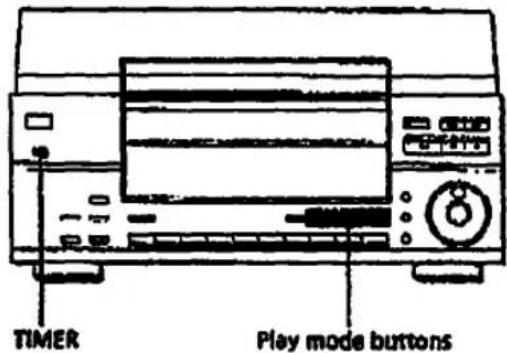
1 Drücken Sie eine der Wiedergabemodus-Tasten, um den gewünschten Wiedergabemodus auszuwählen. 2 Setzen Sie TIMER am Player auf PLAY. 3 Stellen Sie den Timer auf die gewünschte Zeit ein. Der Player schaltet sich aus. Wenn die eingestellte Zeit erreicht ist, schaltet sich der Player ein und startet die Wiedergabe. 4 Nachdem Sie den Timer verwendet haben, setzen Sie TIMER am Player auf OFF.
Was Sie mit den Custom Files tun können
Der Player kann 3 Arten von Informationen speichern, die "Custom Files" genannt werden, für jede Disc. Sobald Sie Custom Files für eine Disc gespeichert haben, ruft der Player automatisch ab, was Sie gespeichert haben, wann immer Sie die Disc auswählen. Beachten Sie, dass Custom Files gelöscht werden, wenn Sie den Player etwa 1 Monat lang nicht verwenden.
Sie können diese Informationen speichern:
| When you use | You can |
| Disc Menu (page 15) | Label the disc using up to 12 characters |
| Delete Bank (page 16) | Delete unwanted tracks and store only the tracks you want |
| Group File (page 17) | Group discs up to 10 groups to locate them easily |
Die Anzeige "Custom File" leuchtet auf, wenn Sie Informationen speichern und wenn Sie Discs mit Informationen auswählen.
Wo werden Custom Files gespeichert?
Custom Files werden nicht auf der Disc, sondern im Speicher des Players gespeichert. Das bedeutet, dass Sie Custom Files nicht verwenden können, wenn Sie die Disc auf anderen Playern abspielen. Da der Player Custom Files für jeden Disc-Schacht separat speichert, können Sie Custom Files nicht verwenden, wenn Sie eine Disc in einen anderen Schacht einlegen.
Wenn Sie eine Disc in einem Schacht ersetzen
Custom Files bleiben auch dann erhalten, wenn Sie die Disc entfernen. Wenn Sie die Disc durch eine neue ersetzen, erscheint "DISC CHANGED" im Display. Löschen oder ändern Sie die Custom-File-Informationen bei Bedarf.
Löschen von Custom Files
Sie können unerwünschte Custom Files wie folgt löschen:
So löschen Sie alle Custom Files einer Disc:
Drücken Sie UNLOAD, um die Anzeige einzuschalten, und wählen Sie dann die Disc mit den Custom Files aus, die Sie löschen möchten. Halten Sie ERASE gedrückt, bis "I DISC ERASE" im Display erscheint, und alle Custom Files der Disc werden gelöscht.
So löschen Sie alle Custom Files aller Discs:
Schalten Sie den Player aus. Halten Sie ERASE und FILE gedrückt und drücken Sie POWER, um den Player einzuschalten. "ALL ERASE" erscheint im Display und alle Custom Files werden gelöscht.
Discs beschriften (Disc-Memo)
Sie können Discs mit bis zu 12 Zeichen beschriften und der Player zeigt das Disc-Memo jedes Mal an, wenn Sie die Disc auswählen. Das Disc-Memo kann alles sein, was Sie möchten, z. B. ein Titel, der Name des Musikers, die Kategorie oder das Kaufdatum.
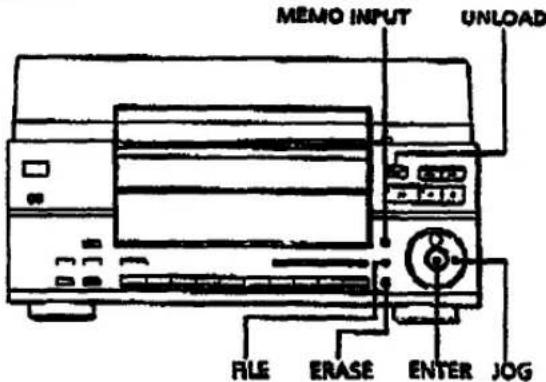
1 Drücken Sie CONTINUE und dann UNLOAD, um die Anzeigen einzuschalten.
2 Drehen Sie den 1OG-Regler, um die Disc auszuwählen, der Sie ein Disc-Memo zuweisen möchten.
3 Drücken Sie MEMO INPUT, bis der gewünschte Buchstabentyp angezeigt wird. Jedes Mal, wenn Sie die Taste drücken, zeigt das Display in dieser Reihenfolge Großbuchstaben (ABC), Kleinbuchstaben (abc) und Zahlen (123) an.
4 Drehen Sie das JOG-Rad, bis das gewünschte Zeichen im Display erscheint. Wenn Sie das JOG-Rad im Uhrzeigersinn drehen, erscheinen die Zeichen in der folgenden Reihenfolge. Drehen Sie das JOG-Rad gegen den Uhrzeigersinn, um zum vorherigen Zeichen zurückzukehren.
(Leerzeichen) A B C D E F G H I J K L M N O P Q R S T U V W X Y Z & a b c d e f g h i j k l m n o p q r s t u v w x y z 0 1 2 3 4 5 6 7 8 9 0 ; : ( ) [ ] % \$ # 0 1 2 3 4 5 6 7 8 9 1 0 → ← * / ! ? " , .
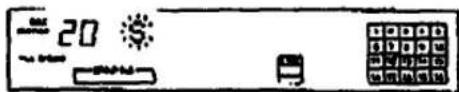
(Fortsetzung)
5 Drücken Sie ENTER.
Das ausgewählte Zeichen leuchtet auf, und der blinkende Cursor bewegt sich zur nächsten Position.
Um ein Leerzeichen einzufügen, drücken Sie CLEAR.

Wenn Sie einen Fehler gemacht haben
Drücken Sie I<< oder D>>, bis der Buchstabe, den Sie ändern möchten, blinkt, und geben Sie dann den richtigen Buchstaben ein.
6 Wiederholen Sie die Schritte 4 und 5, um weitere Zeichen einzugeben.
Wenn Sie den Buchstabentyp ändern möchten, gehen Sie zurück zu Schritt 3.
Um die Beschriftung einer Disc zu beenden
Halten Sie während der Zuweisung eines Disc-Menüs MEMO INPUT gedrückt.
Wenn Sie einem Disc-Memo zuweisen, während eine Disc abgespielt wird oder sich im Stoppmodus befindet (die Anzeige der UNLOAD-Taste leuchtet nicht), drücken Sie ☐.
7 Drücken Sie FILE, um das Disc-Memo zu speichern.
Die Disc-Memo erscheint im Display.
![graph TD A["MEMO FILE"] --> B["Symphony No1"]](/content/2026/05/805394/images/ae0d7f48689f89032e3e51e87783544f1df9b0fdd12ceb5c7e093931f45e48a0.jpg)
Wiederholen Sie die Schritte 2 bis 7, um anderen Discs eine Disc-Memo zuzuweisen.
Löschen der Disc-Memo
1 Drücken Sie UNLOAD, um die Anzeige einzuschalten, und wählen Sie dann die Disc mit der Disc-Memo, die Sie löschen möchten. 2 Drücken Sie MEMO INPUT. Der erste Buchstabe der Disc-Memo blinkt. 3 Drücken Sie ERASE, um die Disc-Memo zu löschen. "FILE ERASE" erscheint im Display.
Speichern bestimmter Titel (Delete Bank)
Sie können unerwünschte Titel löschen und nur die gewünschten Titel speichern. Wenn Sie die Disc mit einer Delete Bank auswählen, können Sie nur die verbleibenden Titel abspielen.
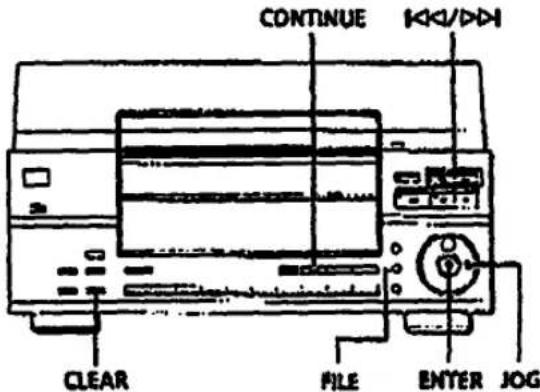
1 Drücken Sie CONTINUE wiederholt, um den 1-DISC-Modus auszuwählen, und drehen Sie dann den JOG-Regler, um die Disc auszuwählen. 2 Drücken Sie ENTER und dann ①. Die Disc wird in die Abspielposition gebracht, und der Musikkalender zeigt die Titel der aktuellen Disc. 3 Drücken Sie K oder D, um die zu löschenden Titel auszuwählen. 4 Drücken Sie CLEAR. Die ausgewählte Titelnummer verschwindet aus dem Musikkalender. 5 Wiederholen Sie die Schritte 3 und 4, um weitere Titel zu löschen. 5 Drücken Sie FILE. "DELETE FILE" erscheint kurz, und "DELETE" in der Custom File-Anzeige leuchtet im Display auf.
Sie können den aktuell abgespielten Titel löschen, indem Sie CLEAR drücken, während ein unerwünschter Titel abgespielt wird, und dann FILE drücken.
Sie können alle Titel vorübergehend wiederherstellen Halten Sie CLEAR im Stoppmodus gedrückt, bis "ALL SELECT" im Display erscheint.

Sie können eine Delete Bank mit der Fernbedienung erstellen [T] Drücken Sie im 1-DISC-Shuffle-Play-Modus TRACK und geben Sie die zu löschende Titelnummer ein, dann drücken Sie ENTER. Die Titelnummer verschwindet aus dem Musikkalender. Wiederholen Sie diesen Vorgang, um weitere Titel zu löschen, und drücken Sie dann FILE, um die verbleibenden Titel als Delete Bank zu speichern. Um einen gelöschten Titel wiederherzustellen, drücken Sie TRACK, geben Sie die Titelnummer erneut ein und drücken Sie dann ENTER.
Hinweis
Die gelöschten Titel werden auch im Shuffle- oder Program-Play-Modus übersprungen (wenn die gesamte Disc mit einer Delete Bank als ein Schritt programmiert ist).
Löschen der Delete Bank
1 Spielen Sie die Disc mit der Delete Bank, die Sie löschen möchten. 2 Drücken Sie FILE. 3 Während "DELETE FILE" im Display leuchtet, drücken Sie ERASE. "FILE ERASE" erscheint, und die Delete Bank für die ausgewählte Disc wird gelöscht.
Gruppieren von Discs (Group File)
Möglicherweise fällt es Ihnen schwer, die gewünschte Disc zu finden, wenn Sie zu viele Discs haben. Dieser Player verfügt über eine Funktion, mit der Sie Discs gruppieren können. Wenn Sie eine Disc einlegen, der Sie eine Gruppe zugewiesen haben, erscheint die Gruppennummer (z. B. Gruppe 1) im Display. Der Player verfügt über 10 voreingestellte Gruppen wie "JAZZ" und "TOP", und jede Gruppe kann bis zu 100 Discs enthalten. Sie können eine Disc auch mehreren Gruppen zuordnen.
Sie können Continuous, Shuffle oder Repeat Play nur innerhalb einer bestimmten Gruppe (Group Play) genießen. Sie können auch Gruppen (Group Scan) oder Discs in einer bestimmten Gruppe scannen, um die gewünschte Gruppe oder Disc schnell zu finden.
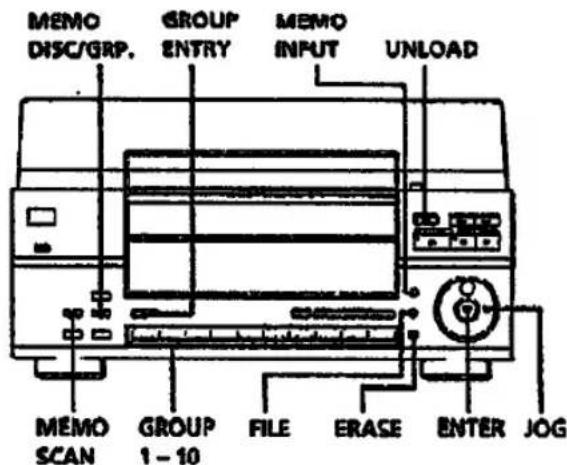
Gruppennamen zuweisen
Bevor Sie Discs gruppieren, suchen Sie die gewünschte Gruppe. Jeder Gruppenname erscheint im Display, wenn Sie die entsprechende Taste GROUP 1 - 10 drücken.
| Press GROUP | To display |
| 1 | Group 1 JA77 |
| 2 | Group 2 POPS |
| 3 | Group 3 CLASSICAL |
| 4 | Group 4 ROCK |
| 5 | Group 5 R & R |
| 6 | Group 6 BALLAIDE |
| 7 | Group 7 C & W |
| 8 | Group 8 FOR FATHER |
| 9 | Group 9 FOR MOTHER |
| 10 | Group 10 FOR CHILD |
(Fortsetzung)
Speichern von Informationen über CDs (Custom Files)
Wenn Sie die Gruppennamen ändern möchten, gehen Sie wie folgt vor:
1 Drücken Sie eine der Tasten GROUP 1 - 10, um die Gruppe auszuwählen. Der voreingestellte Gruppenname erscheint im Display. 2 Während der Gruppenname im Display leuchtet, drücken Sie MEMO INPUT, bis Sie den gewünschten Buchstabentyp finden.
Der erste Buchstabe des Gruppennamens blinkt. Jedes Mal, wenn Sie die Taste drücken, zeigt das Display abwechselnd Großbuchstaben (ABC), Kleinbuchstaben (abc) und Zahlen (123) an.
3 Drehen Sie das JOG-Rad, um ein Zeichen auszuwählen, und drücken Sie dann ENTER.
Das ausgewählte Zeichen leuchtet auf, und der blinkende Cursor bewegt sich zur nächsten Position.
4 Wiederholen Sie Schritt 3, um weitere Zeichen einzugeben. 5 Drücken Sie FILE.
Der Gruppenname wird gespeichert. Sie können bis zu 12 Zeichen für einen Gruppennamen eingeben. Weitere Einzelheiten finden Sie auch unter "Discs beschriften (Disc-Menü)" auf Seite 15.
Discs in Gruppen einfügen
1 Drücken Sie CONTINUE und dann UNLOAD. 2 Drehen Sie das JOG-Rad, um die Disc auszuwählen, die Sie in eine Gruppe einfügen möchten. 3 Drücken Sie GROUP ENTRY.
"GROUP ENTRY" erscheint im Display, und das Navigationsdisplay fordert Sie auf, eine der Gruppen auszuwählen.
4 Drücken Sie eine der Tasten GROUP 1 - 10, um eine Gruppe auszuwählen.
Der Gruppenname erscheint kurz, dann erscheint "GROUP FILE", und die Anzeige der Gruppennummer leuchtet im Display auf.

Sie können die aktuell abgespielte Disc während der Wiedergabe in eine Gruppe aufnehmen, indem Sie die Schritte 3 und 4 oben befolgen.
Wiedergabe von Discs in einer Gruppe (Group Play)
Sie können die fortlaufende oder Zufallswiedergabe innerhalb einer Gruppe genießen.
1 Wählen Sie vor dem Start der Wiedergabe den Wiedergabemodus, indem Sie CONTINUE oder SHUFFLE drücken.
| When you select | The player plays |
| Continuous Play | All discs in the group consecutively |
| ALL DISCS Shuffle Play | All tracks on all discs in the group in random order |
| 1 DISC Shuffle Play | All tracks on the specified disc in the group in random order |
2 Drücken Sie eine der Tasten GROUP 1 - 10, um die Gruppe auszuwählen. Die Gruppenwiedergabe beginnt mit der Disc, die sich am nächsten zur Wiedergabeposition befindet. Wenn die Disc in der Wiedergabeposition in der ausgewählten Gruppe ist, beginnt die Wiedergabe mit dieser Disc. 3 Wenn Sie die Gruppenwiedergabe mit der gewünschten Disc starten möchten, drehen Sie das JOG-Rad, um die Disc auszuwählen, und drücken Sie dann ENTER. (Sie können diesen Schritt überspringen, wenn Sie keine bestimmte Disc zum Starten haben.) Die Gruppenwiedergabe beginnt mit der ausgewählten Disc.
So brechen Sie die Gruppenwiedergabe ab
Drücken Sie ■. "GROUP OFF" erscheint im Display.

Sie können die Gruppenwiedergabe mit der Fernbedienung starten: [1] Drücken Sie vor dem Start der Wiedergabe GROUP, die Nummerntaste der gewünschten Gruppe und dann ENTER.

Sie können die Anzeige zwischen dem Gruppennamen und dem Disc-Memo während der Gruppenwiedergabe umschalten. Jedes Mal, wenn Sie MEMO DISC/GRP. drücken, erscheinen der Gruppenname und das aktuelle Disc-Memo abwechselnd im Display.
Hinweise
- Wenn "-NO ENTRY-" im Display erscheint, wurde keine Disc in die ausgewählte Gruppe aufgenommen.
- Wenn "-ENTRY END-" im Display erscheint, sind alle Disc-Nummern in der Gruppe überprüft, während Sie das JOG-Rad drehen, um die nächste Disc anzugeben. Drehen Sie das Rad gegen den Uhrzeigersinn, um die Disc-Nummern in umgekehrter Reihenfolge anzuzeigen.
Lokalisieren einer Disc innerhalb einer Gruppe durch Scannen der Disc-Memos
Sie können eine Disc, die Sie in einer bestimmten Gruppe abspielen möchten, schnell lokalisieren, indem Sie die Disc-Memos im Display scannen und die Gruppenwiedergabe starten.
Beachten Sie, dass Sie diese Funktion nicht im ALL DISCS Shuffle- und Program Play-Modus verwenden können.
1 Drücken Sie eine der Tasten GROUP 1 - 10, um die Gruppe auszuwählen. Der Gruppenname erscheint im Display. 2 Drücken Sie MEMO SCAN wiederholt, bis "MEMO SCAN" im Display erscheint. Die Disc-Memos der Discs in der ausgewählten Gruppe laufen im Display durch. 3 Drücken Sie ENTER oder [>, wenn das Disc-Memo der gewünschten Disc erscheint. Die Gruppenwiedergabe startet mit der ausgewählten Disc.
Sie können während des Scannens zum nächsten oder vorherigen Disc-Memo springen Drücken Sie K<0 oder D>1.
Lokalisieren einer Gruppe durch Scannen der Gruppennamen (Group Scan)
Sie können eine Gruppe, die Sie abspielen möchten, schnell lokalisieren, indem Sie die Gruppennamen im Display scannen und die Gruppenwiedergabe starten.
Beachten Sie, dass Sie diese Funktion nicht im ALL DISCS Shuffle- und Program Play-Modus verwenden können.
1 Bevor Sie mit der Wiedergabe beginnen, drücken Sie MEMO SCAN wiederholt, bis "GROUP SCAN" im Display erscheint. Die Gruppennamen laufen im Display durch.
2 Drücken Sie ENTER oder I>, wenn der gewünschte Gruppenname erscheint.
Die Gruppenwiedergabe startet.
Sie können während des Scannens zur nächsten oder vorherigen Gruppe springen Drücken Sie 100 oder DDI.
Löschen von Discs aus einer Gruppe
1 Drücken Sie CONTINUE und dann UNLOAD. 2 Drehen Sie das JOG-Rad, um die Disc auszuwählen, die Sie aus einer Gruppe löschen möchten. 3 Drücken Sie GROUP ENTRY. "GROUP ENTRY" erscheint im Display, und das Navigationsdisplay fordert Sie auf, eine der Gruppen auszuwählen. 4 Drücken Sie eine der Tasten GROUP 1 - 10, um eine Gruppe auszuwählen. Der Gruppenname erscheint für eine Weile, dann erscheint "GROUP FILE", und die Gruppennummernanzeige leuchtet im Display auf. 5 Während "GROUP FILE" im Display leuchtet, drücken Sie ERASE. "FILE ERASE" erscheint, und die Gruppennummernanzeige verschwindet aus dem Display.
Sie können die aktuell abgespielte Disc aus einer Gruppe löschen Während die Disc abgespielt wird, befolgen Sie die Schritte 3 bis 5 oben.
Vorsichtsmaßnahmen
Sicherheit
- Da der in diesem Gerät verwendete Laserstrahl für die Augen schädlich ist, versuchen Sie nicht, das Gehäuse zu zerlegen. Überlassen Sie Wartungsarbeiten nur qualifiziertem Fachpersonal.
- Falls ein fester Gegenstand oder eine Flüssigkeit in das Gehäuse gelangt, ziehen Sie den Netzstecker und lassen Sie das Gerät von qualifiziertem Fachpersonal überprüfen, bevor Sie es weiter verwenden.
Stromquellen
- Überprüfen Sie vor dem Betrieb des Geräts, ob die Betriebsspannung des Geräts mit Ihrer örtlichen Stromversorgung übereinstimmt. Die Betriebsspannung ist auf dem Typenschild an der Rückseite des Geräts angegeben.
- Das Gerät ist nicht von der Wechselstromquelle (Netz) getrennt, solange es an die Steckdose angeschlossen ist, auch wenn das Gerät selbst ausgeschaltet wurde.
- Wenn Sie das Gerät längere Zeit nicht verwenden, trennen Sie es unbedingt von der Steckdose. Zum Trennen des Netzkabels fassen Sie den Stecker selbst; ziehen Sie niemals am Kabel.
- Sollte das Netzkabel ausgetauscht werden müssen, lassen Sie dies nur in einer qualifizierten Werkstatt durchführen.
Aufstellung
- Stellen Sie das Gerät an einem Ort mit ausreichender Belüftung auf, um einen Wärmestau im Gerät zu vermeiden.
- Stellen Sie das Gerät nicht auf eine weiche Oberfläche wie einen Teppich, die die Lüftungsöffnungen an der Unterseite blockieren könnte.
- Stellen Sie das Gerät nicht in der Nähe von Wärmequellen oder an Orten auf, die direkter Sonneneinstrahlung, übermäßigem Staub oder mechanischen Erschütterungen ausgesetzt sind.
Betrieb
- Wenn das Gerät direkt von einem kalten an einen warmen Ort gebracht wird oder in einem sehr feuchten Raum aufgestellt wird, kann sich Feuchtigkeit an den Linsen im Inneren des Geräts kondensieren. In diesem Fall funktioniert das Gerät möglicherweise nicht ordnungsgemäß. Drücken Sie in diesem Fall UNLOAD, um die Anzeige der UNLOAD-Taste einzuschalten, und lassen Sie das Gerät etwa eine Stunde lang eingeschaltet, bis die Feuchtigkeit verdunstet ist.
Zum Einstellen der Lautstärke
- Drehen Sie die Lautstärke nicht auf, während Sie einen Teil mit sehr niedrigem Eingangspegel oder ohne Audiosignale hören. Wenn Sie dies tun, können die Lautsprecher beschädigt werden, wenn ein Teil mit Spitzenpegel abgespielt wird.
Zur Reinigung
- Reinigen Sie Gehäuse, Bedienfeld und Bedienelemente mit einem weichen Tuch, das leicht mit einer milden Reinigungslösung angefeuchtet ist. Verwenden Sie keine Scheuerschwämme, Scheuerpulver oder Lösungsmittel wie Alkohol oder Benzin.
Zum Transport
- Wenn Sie den Player über eine kurze Strecke transportieren, drücken Sie UNLOAD, um die Anzeige der UNLOAD-Taste einzuschalten, und schalten Sie dann das Gerät aus. Drehen Sie den Player beim Transport mit eingelegten Discs nicht auf den Kopf.
- Wenn Sie den Player über eine lange Strecke transportieren, drücken Sie UNLOAD, um die Anzeige der UNLOAD-Taste einzuschalten, entfernen Sie dann alle Discs aus dem Player und schalten Sie das Gerät aus.
Wenn Sie Fragen oder Probleme bezüglich Ihres Players haben, wenden Sie sich bitte an Ihren nächsten Sony-Händler.
Hinweise zu CDs
Zum Umgang mit CDs
- Um die Disc sauber zu halten, halten Sie die Disc am Rand. Berühren Sie die Oberfläche nicht. • Kleben Sie kein Papier oder Klebeband auf die Disc.
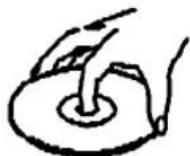
Nicht so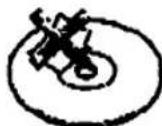
- Setzen Sie die Disc nicht direktem Sonnenlicht oder Wärmequellen wie Warmluftkanälen aus und lassen Sie sie nicht in einem Auto liegen, das in direktem Sonnenlicht geparkt ist, da die Temperatur im Auto erheblich ansteigen kann. • Bewahren Sie die Disc nach dem Entnehmen aus dem Disc-Schlitz in ihrer Hülle auf.
Zur Reinigung
- Reinigen Sie die Disc vor dem Abspielen mit einem Reinigungstuch. Wischen Sie die Disc von der Mitte nach außen.

- Verwenden Sie keine Lösungsmittel wie Benzin, Verdünner, handelsübliche Reinigungsmittel oder Antistatik-Sprays, die für Vinyl-LPs bestimmt sind.
Fehlerbehebung
Wenn beim Gebrauch des Players eine der folgenden Schwierigkeiten auftritt, verwenden Sie diese Anleitung zur Fehlerbehebung, um das Problem zu beheben. Sollte ein Problem weiterhin bestehen, wenden Sie sich an Ihren nächsten Sony-Händler.
Es ist kein Ton zu hören.
→Überprüfen Sie, ob der Player sicher angeschlossen ist. →Stellen Sie sicher, dass Sie den Verstärker richtig bedienen.
Die CD spielt nicht ab.
→Es befindet sich keine CD im Schlitz („-NO DISC--“ erscheint). Legen Sie eine CD ein. →Legen Sie die CD mit der Etikettseite nach rechts ein. →Reinigen Sie die CD (siehe Seite 20). →Im Inneren des Players hat sich Feuchtigkeit kondensiert. Drücken Sie UNLOAD, um die Anzeige der UNLOAD-Taste einzuschalten, und lassen Sie den Player etwa eine Stunde lang eingeschaltet (siehe Seite 20).
Der Drehteller dreht sich nicht.
→Drücken Sie UNLOAD, um die Anzeige der UNLOAD-Taste einzuschalten.
Die Disc-Nummer, die anstelle des Disc-Memos angezeigt wird, ist verschwunden.
→Die Disc-Nummer (z. B. *DISC-20*) verschwindet, wenn Sie die Disc länger als eine Minute nicht abspielen. Dies ist jedoch keine Fehlfunktion. Die Disc-Nummer erscheint wieder, wenn Sie die Disc abspielen.
Die Fernbedienung funktioniert nicht.
→Entfernen Sie Hindernisse im Weg zwischen Fernbedienung und Player. →Richten Sie die Fernbedienung auf den Fernbedienungssensor ☐ am Player. →Ersetzen Sie alle Batterien in der Fernbedienung durch neue, wenn sie schwach sind. →Stellen Sie den COMMAND MODE-Wahlschalter auf der Rückseite auf die Position CD1.
Der Player funktioniert nicht richtig.
→Die Mikrocomputer-Chips funktionieren möglicherweise nicht richtig. Schalten Sie das Gerät aus und wieder ein, um den Player zurückzusetzen.
Technische Daten
CD-Player
| Laser | Semiconductor laser |
| Wavelength | 780 790 nm |
| Frequency response | 2 Hz to 20 kHz ± 0.3 dB |
| Signal-to-noise ratio | More than 107 dB |
| Dynamic range | More than 98 dB |
| Harmonic distortion | Less than 0.0027% |
| Channel separation | More than 100 dB |
Ausgänge
| Jack type | Maximum output level | Load impedance | |
| LINE OUT | Phono jacks | 2 V (at 50 kilohms) | Over 10 kilohms |
| DIGITAL OUT (OPTICAL) | Optical output connector | -16 dBm | Wave length: 660 nm |
Allgemein
Stromversorgung
| Where purchased | Power requirements |
| USA | 120 V AC, 60 Hz |
| Australia | 240 V AC, 50 Hz |
| Power consumption | 15 W |
| Dimensions (approx.) (w/h/d) | When the front cover is closed 430 × 240 × 470 mm ( 17 × 9 1/2 × 18.5/8 in.) incl. projecting partsWhen the front cover is open 430 × 380 × 470 mm ( 17 × 15 × 18.5/8 in.) incl. projecting parts |
| Mass (approx.) | 9.0 kg (19 lbe 14 oz) |
Mitgeliefertes Zubehör
Audiokabel (Cinch-Stecker - 2 Cinch-Stecker) (1) Fernbedienung (1)
- Sony SUM-3 (NS) Batterien (2) CD-Booklet-Halter (1) Etiketten (2)
Änderungen an Design und technischen Daten vorbehalten.
Index
A.B
AMS 10
Automatischer Musiksensor. Siehe AMS
C
Anschluss 4
Continuous Play 7
Custom Files
Delete Bank 16
Disc Memo 15
Group File 17
was Sie damit tun können 15
D
Delete Bank 16
Disc Memo 15
E, F
Löschen
Custom Files 15
Delete Bank 17
Disc Memo 16
Group File 19
Programme 14
G
Gruppendatei 17
Gruppenwiedergabe 18
Gruppenscan 19
H
Handhabung von CDs 20
Anschlüsse
Übersicht 1
1
Einlegen von CDs 6
J.K
JOG-Regler 6
L
Beschriften einer Disc 15
Auffinden
eines bestimmten Titels 10
einer bestimmten Stelle 10
durch Überwachen 10
durch Beobachten der Anzeige 10
Discs 9
direkt 10
mit AMS 10
M, N, O
Memo-Scan 9
P, Q
Wiedergabe
Dauerhaft Mai
Gruppenwiedergabe 18
Programmwiedergabe 12
Wiederholungswiedergabe 10
Zufallswiedergabe 11
Verwendung eines Timers 14
Programm
Ändern 14
Überprüfen 14
Löschen 14
R
Verbleibende Zeile 8
Fernbedienung 4
Wiederholen 10
Drehtisch 6
\$
Suche. Siehe Lokalisieren
Auswählen einer Disc 9
Shuffle Play
auf allen CDs 11
auf einer CD 11
Auswahl der nächsten CD 9
Speichern
Informationen über CDs 15
bestimmte Titel 16
T
Timer-Wiedergabe 14
Gesamtspielzeit 8
Fehlerbehebung 21
U. V. W, X, Y, Z
Auspacken 4
Bezeichnungen der Bedienelemente
Tasten
CHECK 14
CLEAR 14
CONTINUE 7
DISC 9
DISC SKIP 8
ERASE 15
ENTER 7
FILE 16
GROUP 18
GROUP ENTRY 18
GROUP 1-10 17
MEMO DISC/GRP. 18
MEMO INPUT 15
MEMO SCAN 9,19
Number 9
PROGRAMM 12
WIEDERHOLEN 10
MISCHEN 11
ZEIT 8
TITEL 10
ENTLADEN 6
10
8
11 8
8
10
Anschlüsse
STEUERUNG A 5
DIGITALER AUSGANG OPTISCH \$
Schalter
POWER 6
TIMER 14
Sonstiges
BEFEHLSMODUS-Wahlschalter 5
Disc-Schlitze 6
Anzeige 8
Frontabdeckung 6
JOG-Wahlrad 6
LINE OUT-Buchse 5
OPEN-Hebel 6
Drehteller 6
4
- CD-PLAYER
- WARNUNG
- INFORMATION
- VORSICHT
- EIGENTÜMER-PROTOKOLL
- WILLKOMMEN
- ÜBER DIESE ANLEITUNG
- KONVENTIONEN
- INHALTSVERZEICHNIS
- ERSTE SCHRITTE
- ABSPIELEN VON CDS
- SPEICHERN VON INFORMATIONEN ÜBER CDS (BENUTZERDATEIEN)
- ZUSÄTZLICHE INFORMATIONEN
- AUSPACKEN
- VERWENDUNG DES CD-BOOKLET-HALTERS
- EINLEGEN DER BATTERIEN IN DIE FERNBEDIENUNG
- WANN DIE BATTERIEN AUSGETAUSCHT WERDEN SOLLTEN
- HINWEISE
- ANSCHLIESSEN DES SYSTEMS
- ÜBERSICHT
- ANSCHLÜSSE
- HINWEIS
- VERWENDUNG DER CONTROL A-ANSCHLÜSSE UND DES COMMAND MODE-WAHLSCHALTERS
- ANSCHLIESSEN DES NETZKABELS
- WIE GEHT ES WEITER
- EINLEGEN VON CDS
- ENTFERNEN VON CDS
- WENN SIE DEN PLAYER AUSSCHALTEN
- VERWENDEN DES DISPLAYS
- ÜBERPRÜFEN DER GESAMTZAHL UND DER GESAMTSPIELZEIT DER TITEL
- WENN SIE EINE ANDERE DISC ÜBERPRÜFEN MÖCHTEN
- ÜBERPRÜFEN DER RESTZEIT
- AUSWÄHLEN EINER DISC MIT DEM PLAYER
- DIREKTES AUSWÄHLEN EINER DISC MIT DER FERNBEDIENUNG
- LOKALISIEREN EINER DISC DURCH SCANNEN DER DISC-MEMOS (MEMO-SCAN)
- FESTLEGEN DER NÄCHSTEN ABZUSPIELENDEN DISC
- AUFFINDEN EINES BESTIMMTEN TITELS ODER EINER STELLE IN EINEM TITEL
- WIEDERHOLTE WIEDERGABE
- ZUM ABBRECHEN DER WIEDERHOLUNGSWIEDERGABE
- WIEDERGABE IN ZUFÄLLIGER REIHENFOLGE (SHUFFLE-WIEDERGABE)
- SHUFFLE-WIEDERGABE ALLER DISCS
- SHUFFLE-WIEDERGABE AUF EINER DISC
- ERSTELLEN EIGENER PROGRAMME (PROGRAMMWIEDERGABE)
- ERSTELLEN EINES PROGRAMMS MIT DER FERNBEDIENUNG
- ÜBERPRÜFEN DER PROGRAMMIERTEN REIHENFOLGE
- DRÜCKEN SIE CHECK
- ÄNDERN DER PROGRAMMIERTEN REIHENFOLGE
- LÖSCHEN DER IM SPEICHER GESPEICHERTEN PROGRAMME
- WIEDERGABE MIT EINEM TIMER
- WAS SIE MIT DEN CUSTOM FILES TUN KÖNNEN
- WO WERDEN CUSTOM FILES GESPEICHERT
- WENN SIE EINE DISC IN EINEM SCHACHT ERSETZEN
- LÖSCHEN VON CUSTOM FILES
- DISCS BESCHRIFTEN (DISC-MEMO)
- DRÜCKEN SIE ENTER
- WIEDERHOLEN SIE DIE SCHRITTE 4 UND 5, UM WEITERE ZEICHEN EINZUGEBEN
- DRÜCKEN SIE FILE, UM DAS DISC-MEMO ZU SPEICHERN
- LÖSCHEN DER DISC-MEMO
- SPEICHERN BESTIMMTER TITEL (DELETE BANK)
- LÖSCHEN DER DELETE BANK
- GRUPPIEREN VON DISCS (GROUP FILE)
- GRUPPENNAMEN ZUWEISEN
- SPEICHERN VON INFORMATIONEN ÜBER CDS (CUSTOM FILES)
- DISCS IN GRUPPEN EINFÜGEN
- WIEDERGABE VON DISCS IN EINER GRUPPE (GROUP PLAY)
- LOKALISIEREN EINER DISC INNERHALB EINER GRUPPE DURCH SCANNEN DER DISC-MEMOS
- LOKALISIEREN EINER GRUPPE DURCH SCANNEN DER GRUPPENNAMEN (GROUP SCAN)
- LÖSCHEN VON DISCS AUS EINER GRUPPE
- VORSICHTSMASSNAHMEN
- SICHERHEIT
- STROMQUELLEN
- AUFSTELLUNG
- BETRIEB
- ZUM EINSTELLEN DER LAUTSTÄRKE
- ZUR REINIGUNG
- ZUM TRANSPORT
- HINWEISE ZU CDS
- ZUM UMGANG MIT CDS
- FEHLERBEHEBUNG
- ES IST KEIN TON ZU HÖREN
- DIE CD SPIELT NICHT AB
- DER DREHTELLER DREHT SICH NICHT
- DIE DISC-NUMMER, DIE ANSTELLE DES DISC-MEMOS ANGEZEIGT WIRD, IST VERSCHWUNDEN
- DIE FERNBEDIENUNG FUNKTIONIERT NICHT
- DER PLAYER FUNKTIONIERT NICHT RICHTIG
- TECHNISCHE DATEN
- ALLGEMEIN
- MITGELIEFERTES ZUBEHÖR
- INDEX
- A.B
- C
- D
- E, F
- G
- H
- J.K
- L
- M, N, O
- P, Q
- R
- T
- W, X, Y, Z
- BEZEICHNUNGEN DER BEDIENELEMENTE
- TASTEN
- SCHALTER
- SONSTIGES
Marke : SONY
Modell : CDP-CX151
Kategorie : CD-Player