
RQ-XF50 - Hi-Fi-System PANASONIC - Kostenlose Bedienungsanleitung
Finden Sie kostenlos die Bedienungsanleitung des Geräts RQ-XF50 PANASONIC als PDF.


| Produkttyp | Kassettenrekorder mit UKW/MW-Radio |
| Marke | Panasonic |
| Modell | RQ-XF50 |
| Abmessungen (B×H×T) | 109,6 × 97,3 × 70,5 mm |
| Gewicht | ca. 215 g (mit Akku) |
| Stromversorgung | Akku (1,2 V, Ni-MH, RP-BP120H), Batterie (1,5 V, R6/LR6) oder Netzteil (1,5 V Gleichstrom, optional RP-AC11) |
| Frequenzbereich Radio | UKW: 87,5–108,0 MHz; MW: 522–1811 kHz |
| Kassettenspur | 4-Spur, 2-Kanal, Stereo |
| Frequenzgang Wiedergabe | 30–18.000 Hz (-6 dB) (Typ I/II/IV) |
| Kopfhörerausgang | 5 mW + 5 mW (RMS, max.) |
| Mikrofonempfindlichkeit | 0,6 mV (600 Ω) |
| Senderwahl | Manuell oder automatisch (Suchlauf); 24 Senderspeicher (2 Modi) |
| Wiedergabefunktionen | Auto-Reverse, TPS (Titelsuchlauf), Cue/Review |
| Aufnahmefunktionen | Mikrofon- und Radioaufnahme; nur Typ-I-Kassetten |
| Dolby-Rauschunterdrückung | Dolby B (Umschalter) |
| Klangeinstellung | S-XBS (Super-Bass) ein/aus |
| Fernbedienung | Kabelfernbedienung am Ohrhörer |
| Akku-Ladezeit | ca. 8 Stunden für ca. 6 Stunden Wiedergabe |
| Reinigung | Tonköpfe mit Alkohol und Wattestäbchen; Gehäuse mit mildem Seifenwasser |
| Mitgeliefertes Zubehör | Stereo-Ohrhörer mit Fernbedienung, Ladegerät, Ni-MH-Akku, Trageetui, Mikrofon |
Häufig gestellte Fragen - RQ-XF50 PANASONIC
Benutzerfragen zu RQ-XF50 PANASONIC
0 Frage zu diesem Gerät. Beantworten Sie die, die Sie kennen, oder stellen Sie Ihre eigene.
Eine neue Frage zu diesem Gerät stellen
Laden Sie die Anleitung für Ihr Hi-Fi-System kostenlos im PDF-Format! Finden Sie Ihr Handbuch RQ-XF50 - PANASONIC und nehmen Sie Ihr elektronisches Gerät wieder in die Hand. Auf dieser Seite sind alle Dokumente veröffentlicht, die für die Verwendung Ihres Geräts notwendig sind. RQ-XF50 von der Marke PANASONIC.
BEDIENUNGSANLEITUNG RQ-XF50 PANASONIC
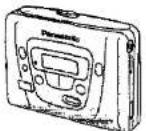
Note:
The "EB" indication shown on the packing case indicates United Kingdom.


Before connecting, operating or adjusting this product, please read these instructions completely.
Matsushita Electric Industrial Co., Ltd.
Central P.O. Box 288, Osaka 530-91, Japan
Printed in Taiwan
RQTT0114-E F0495X0
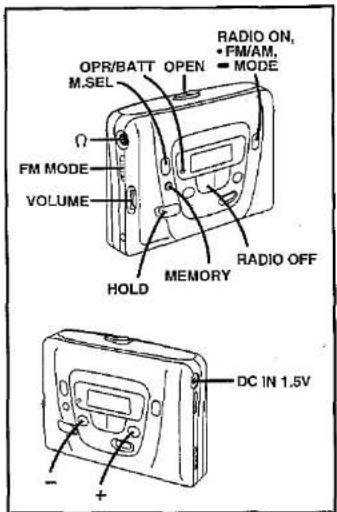
text_image
OPR/BATT OPEN M.SEL Ω FM MODE VOLUME HOLD MEMORY RADIO OFF RADIO ON, • FM/AM. • MODE DC IN 1.5V - +B
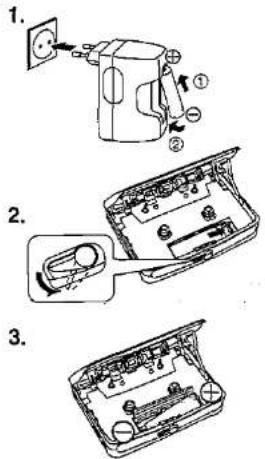
text_image
Technical diagram showing three-step assembly of a device with labeled parts and exploded viewsC
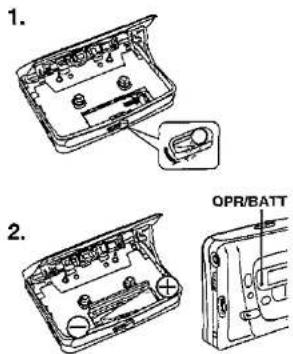
text_image
1. 2. OPR/BATTSpecifications
RADIO
Frequency range:
CASSETTE PLAYER
Track system:
Frequency range:
Playback;
Российский
GENERAL
Input jack:
Output jack:
Power output:
Power requirement:
Rechargeable battery;
Battery;
AC adapter;
Dimensions(W×H×D):
Weight:
CHARGER
Output:
[Non-Text]
(1) 2017年1月1日(T+2)至2017年1月31日
AM 522-1811 kHz
Fm, 87.50=100.00 M=42
4 track, 2 channel, stereo
30-18,000 Hz (-6 dB)
(TYPE 1/TYPE II/TYPE IV)
70-10,000 Hz (TYPE 1)
MIC; 0.6 mV (600 Ω)
PHONES
5 mW+5 mW (RMS...max)
DC 1.2 V
(included rechargeable battery)
DC 1.5 V (one R&LRS battery)
DC IN 1.5 V with spindle
109.6×97.3×70.5 mm
215 p (with rechart)
AC 230 V (For UK, 230-240 V)
50 Hz, 4 W
DC 210 mA 1.2 V
Note:
Specifications are subject to change without notice.
Weight and dimensions are approximate.
A
text_image
Diagram showing five different types of cable and plug devices with numbered labelsD
text_image
Diagram showing a medical device with labeled parts including a nurse, lamp, and two electrical plug tips with numbered instructions.E
text_image
① HOLD ② HOLD ③ HOLD ④ HOLDF
G
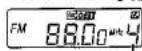
Memory number
ENGLISH
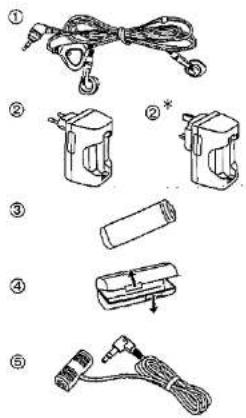
Supplied Accessories
① Stereo earphones with remote controller
RFEV124PVKS
② Charger ..... RFEB105E (for Continental Europe)
• RFEB1058 (for UK)
③ Rechargeable Ni-MH battery ..... RP-BP120H
●This one is in the carrying case (4).
④ Rechargeable battery carrying case ..... RFCT0001
⑤ Stereo microphone ....RFEM301P
Power Sources
This unit operates on the rechargeable battery (included), a dry cell battery (not included) or the AC adaptor (not included).
■ Rechargeable battery
For initial use after purchase or after a long interval (more than three months), be sure to recharge the rechargeable battery.
Normally, 8 hours of recharging will give approximately 6 hours of cassette tape playback (at 25°C). However, playback time may become shorter depending on the operating conditions, e.g., repeating fast-forward or rewind, etc.
- Recharge the rechargeable battery.
- For UK, the shape of the adaptor is different.
-
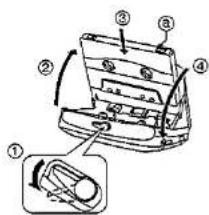
Open the cassette holder and the battery cover.
-
Insert the charged battery into the unit.
■ Dry cell battery
-
Open the cassette holder and the battery cover.
-
Insert one R6/LR6 battery (UM-3 or equivalent, not included) into the unit.
When the battery becomes weak:
As the OPR/BATT Indicator dims or turns off, recharge the rechargeable battery or replace the dry cell battery with new one.
■ AC power operation
Connect only Panasonic AC adaptor RP-AC11 (optional) to the DC IN jack.
Before Use
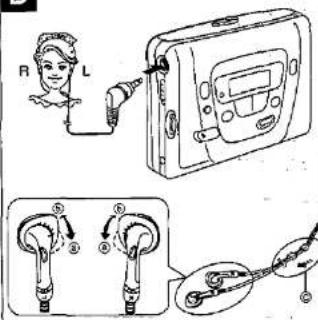
■ Connecting the stereo earphones
Unless the earphones are firmly inserted into the jack, the sound may become intermittent, or operation using the remote controller may become impossible.
The size of the earpiece can be adjusted.
When it's too loose in the ear, turn the fitting ring to ⑧, when it's too light, turn to ⑨.
When not using the stereo earphones, slide up the slider (@) to prevent entanglement of the cord.
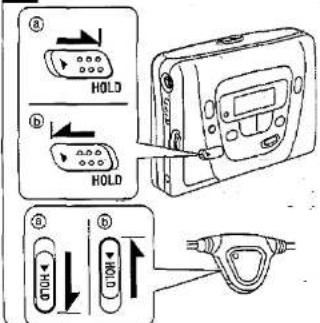
■ Release from the "hold" state E
With the "hold" function in effect, making every button ineffective, wrong operation and subsequent battery wear can be avoided (③).
Before operation, be sure to slide the HCLD switch on either the main unit or the remote controller with which you are going to operate, so that the "hold" function won't work (E).
Both the main unit and remote controller have a HOLD switch, and each of them works individually.
When the "HOLD" appears:
One of the buttons on the unit is pressed in the hold state. First, release the hold state.
Precautions
- If the set is not used for a long period of time or is used only from an AC power supply, remove the battery to prevent potential damage due to possible battery leakage.
- Avoid using or placing this unit near a heat source. Do not leave it in an automobile exposed to direct sunlight for a long period of time with the doors and windows closed, as this may deform the cabinet.
- When not in use, disconnect the AC adaptor from the AC power outlet.
Precautions for Listening with the Headphones:
- Do not play your headset at a high volume. Hearing experts advise against continuous extended play.
- If you experience a ringing in your ears, reduce volume or discontinue use.
- Do not use while operating a motorized vehicle. It may create a traffic hazard and is illegal in many areas.
- You should use extreme caution or temporarily discontinue use in potentially hazardous situations.
- Even if your headset is an open-air type designed to let you hear outside sounds, don't turn up the volume so high that you can't hear what's around you.
Rechargeable battery and charger:
- Use only the included charger when recharging,
- During recharging, it is normal for the charger and the rechargeable battery to get slightly warm.
- Do not leave the charger turned on for more than 24 hours at one time, otherwise, the rechargeable battery life may be shortened.
- Avoid recharging or placing the rechargeable battery near a heat source or humidity.
- The included rechargeable battery can be recharged about 300 times. After that, its operation time becomes shortened, which will be the time to replace it.
Dry cell battery and rechargeable battery:
- Load new battery with their polarities (⊕ and ⊖) aligned correctly.
- Do not apply heat to batteries, or internal shortcircuit may occur.
- If this unit is not to be used for a long period of time, remove the battery and store it in a cool and dry place.
- Remove spent battery immediately.
- Do not peel of the plastic covering on the rechargeable battery. Short-circuiting may result which is dangerous.
Carrying batteries around:
When putting dry battery and rechargeable battery in a pocket or bag, ensure that no other metal objects, such as a necklace, are placed in the pocket or bag with them. Contact with metal may cause short-circuiting which, in turn, may cause a fire. When carrying rechargeable batteries around, be absolutely sure to place it inside the included rechargeable battery carrying case.
Endless tapes:
Failure to operate these tapes correctly may cause the tape to wind around the revolving parts.
For this unit, it is recommended to use the tape which is appropriate to the auto reverse mechanism.
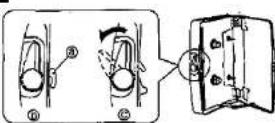
Cassette compartment cover:
If the catch is in the position shown in the figure (S), the cassette compartment cover doesn't close. If this occurs, slide OPEN so that the catch (A) is in the position shown in the figure (C).
If an attempt is made to close the cover forcibly, the compartment cover may get bent out of shape.
Listening to Radio
You can enjoy the FM broadcast with stereo sound and AM with monaural.
-
Press RADIO ON to switch on the power.
-
Press • FM/AM to select the band.
-
Press + or - to select the desired station.
Each press changes the frequency one step at a time. +: Frequency becomes higher.
-: Frequency becomes lower.
To reach the station faster:
Press and hold + or - for more than one second, and the frequency indication starts to run fast. It stops when a broadcast is received. To end this search, press + or - one more time.
4. Adjust the volume.
To stop listening, press RADIO OFF.
Note:
If a cassette tape is inserted while listening to the radio, the sound pauses for about two seconds.
■ To obtain good reception
When listening to AM broadcast:
As the built-in femite antenna works, try various directions to catch optimum reception.
When listening to FM broadcast:
As the cord of the earphone acts as an antenna, use it as extended as possible, not coiled.
■ When there is a noise during FM reception
Set the FM MODE selector to the MONO position. Though the sound becomes monaural, noise is reduced.
■ Preset tuning
Total 24 stations can be stored.
You can store each station separately as follows.
MODE1: FM: 6 stations AFM: 6 stations
MODE2: FM: 5 stations AM: 6 stations
It is recommended that you use MODE1 for daily, and MODE2 for travel.
Mode selecting:
Press and hold -MODE for more than 2 seconds to select the mode (MODE1 or MODE2).
Storing radio station in the memory:
Frequencies of up to 24 radio stations (6 AM and 6 FM in each mode) can be stored.
-
Tune in the station to be stored.
-
Press MEMORY to have "M" Indicated (flashing).
-
While "M" is flashing, press M.SEL to give the received station a memory number.
-
While "M" is flashing, press MEMORY.
To store another station in the memory:
Repeat steps 1 through 4 above.
Listening to a station stored in the memory:
-
Press RADIO ON to switch on the power.
-
Press • FM/AM to select the band.
-
Press M.SEL to select the station.
As the button is pressed, the stations stored in the memory are received in order from small to large memory numbers.
To remove an unnecessary station from the memory:
-
Press M.SEL to select the station you want to remove.
-
Press MEMORY to have "M" flash.
-
Press both + and - buttons to have "-" indicated.
-
Press MEMORY.
text_image
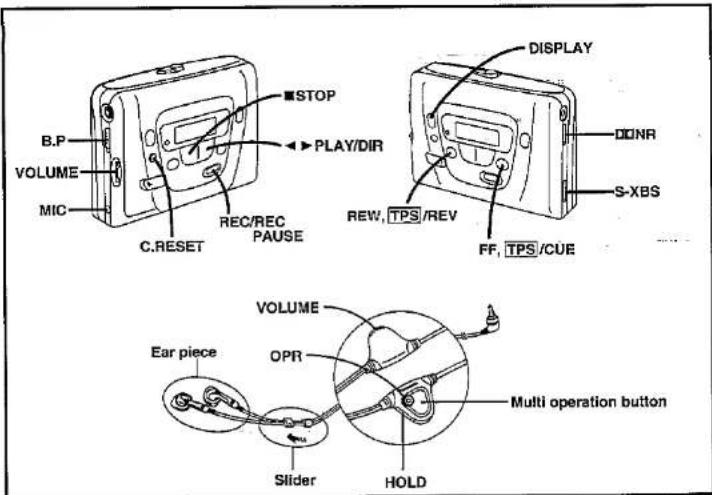
STOP B.P VOLUME MIC C.RESET RECREC PAUSE PLAY/DIR DISPLAY DONR S-XBS REW, TPS/REV FF, TPS/CUE VOLUME OPR Multi operation button Ear piece Slider HOLDH
text_image
Technical diagram of a mechanical component with numbered parts and an inset detail view labeled ①1
text_image
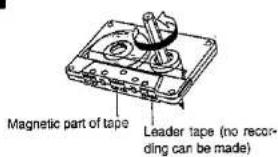
Magnetic part of tape Leader tape (no recording can be made)J
K
text_image
Side A Tab for side A Tab for side BL
M
flowchart
graph TD
    A["RADIO OFF"] --> B["Beep"]
    C["RADIO ON"] --> D["Beep"]
    B --> E["M.SEL"]
    D --> F["BAND"]
    E --> G["Beep Beep"]
    E --> H["Beep"]
    E --> I["Beep"]
    E --> J["..."]
    F --> K["AM"]
    F --> L["FM"]
    F --> M["Beep"]
N
flowchart
graph TD
    A["STOP"] --> B["PLAY"]
    B --> C["STOP"]
    B --> D["DIR"]
    E["Boep Beep"] --> F["FF"]
    G["Boep Beep Beep"] --> H["REW"]
    I["Boe...p"] --> J["STOP"]
    K["Boep"] --> L["DIR"]
    M["PLAY"] --> N["TPS(FF)"]
    O["PLAY"] --> P["TPS(REW)"]
    Q["REC"] --> R["Bec...p"]
    S["REC PAUSE"] --> T["BER"]
0
text_image
Cotton swab Pressure rollers Heads CapstansENGLISH
Listening to Tape
TYPE I, TYPE II or TYPE IV tapes can be used. The type of cassette is automatically selected.
- Insert a cassette tape.
Closing the cover, the tape slack will be wound automatically and playback will be expected to start from the forward side. (©)
- Press ◀▶ PLAY/DIR.
Unless the lid is opened and closed, playback starts from the side that was played when the cassette recorder was switched off.
The indication informs which side of the cassette is in play:
FWD: Forward side REV: Reverse side
- Adjust the volume.
To stop playback, press ■ STOP.
Auto reverse:
Play will be continued, looping forward and reverse side, until ■ STOP is pressed.
■ To change the side to play
Press ◀▶ PLAY/DIR during playback.
■ Dolby noise reduction system
When a cassette recorded with Dolby NR (type B) is played, set the 00 NR selector to the ON position.
Dolby noise reduction manufactured under license from Dolby Laboratories Licensing Corporation, "DOLBY" and the double-D symbol □□ are trademarks of Dolby Laboratories Licensing Corporation.
■ To fast-forward or rewind
Press FF TPS/CUE in the stop mode to fast-forward. Press REW TPS/REV in the stop mode to rewind.
■ Cue and review
Sound can be monitored at a high speed for as long as the FF [TPS]/CUE or REW [TPS]/REV is held down during play-back.
Normal playback will resume from the point where the button is released.
■ To find the beginning of a song
(TPS: Tape Program Sensor)
When the cassette tape is in play:
Press FF TPS/CUE to skip the current song and start playing the following song.
Press REW TPS/REV to go back to the beginning of the current song and start playing.
Note:
Since making use of the silent part between songs, the TPS function may fail to function properly in the following situations:
- When the silent part between songs is less than 4 seconds or has noise.
- When the next silent part is less than 10 seconds away. - When there is a long silent part or particularly low or small sound in the song.
- When there is a part where the sound gradually goes up or goes down in the song.
Recording
■For recording, only TYPE I tapes can be used. If other tapes are used, you may not obtain optimum performance.
- Use a tape with tabs in place.
●Take up the leader tape before proceeding.
■ Recording from stereo microphone
-
Connect the included stereo microphone to the MIC jack.
-
Insert a cassette tape with the side to be recorded facing out. (B-⑨)
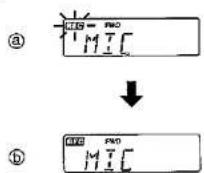
-
Press and hold REC/REC PAUSE.
The record indicator begins flashing. (J-e)
- Press ◀ ▶ PLAY/DIR while REC/REC PAUSE is pressing.
The record indicator illuminates, and the recording starts. (1-6)
■ Recording from radio
-
Tune in the desired broadcasting station. (Refer to "Listening to Radio".)
-
Follow steps 2 to 4 of "Recording from stereo microphone."
- The recording level is automatically adjusted.
The sound being recorded can be monitored through the stereo earphones. The volume adjustment can be done using the volume control.
To stop recording, press ■ STOP.
Auto stop:
Recording can be made only in forward direction.
When the tape reaches its end during recording, recording will stop automatically.
To temporarily stop recording:
Press REC/REC PAUSE during recording.
- Unrecorded part on the tape can be made as long as REC/REC PAUSE is held down during recording. When release the button, the unit will be in recording pause mode.
To resume recording, press ◀▶ PLAY/DIR.
When there is too much interference during AM recording:
Sel the B.P selector to "1", "2" or "3", whichever yields less noise.
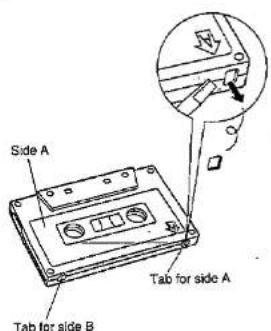
Record prevention tabs: K
To prevent from erasing valuable recordings, record prevention tab should be broken off completely so that fragment isn't left within the slot.
To re-record on a protected cassette, cover the slot with adhesive tape.
Notes:
You cannot make a recording with Dolby noise reduction system.
For your reference:
In order to prevent trouble caused by the flat battery, it is recommended that you replace the battery with new one when you are recording something important.
Your attention is drawn to the fact that recording pre-recorded tapes or discs or other published or broadcast material may infringe copyright laws.
Changing the Display
To select the display mode at your convenience:
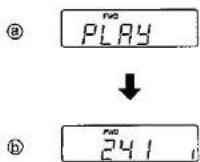
Press DISPLAY during tape operation.
Tape operation mode: (L-2)
Tape counter mode: L-6
It indicates amount of tape movement. (In reverse side operation, counter runs in descendant order.)
To reset the tape counter to "000";
Press C.RESET when the counter is displayed.
Changing the Tone
To listen with emphasized low sound (S-XBS):
Set the \$-XBS selector to the ON position.
If the sound is distorted, turn down the volume a little.
Using Remote Controller
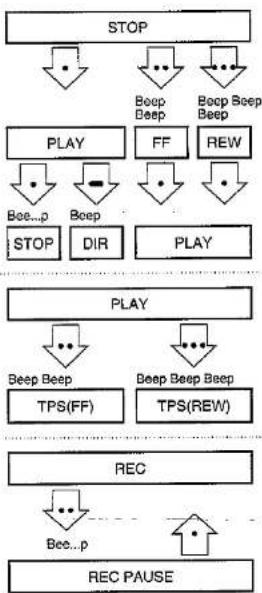
Various radio and cassette recorder functions can be operated with only one remote control button by changing the manner in which it is pressed.
When pressing the button twice or three times in succession, press it within one second and at equal intervals.
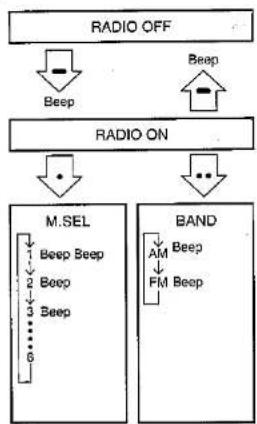
Confirmation beep can be heard as shown on the figure and .
- Before adjusting VOLUME on the remote controller, be sure to set VOLUME on the main unit between the levels 5 and 7.
- The OPR lamp on the remote controller lights up to indicate that the main unit is in operation. (It is not for the indication of battery wear.)
- The beep tone, which is emitted when the button is pressed once in the stop mode, indicates that a cassette is not inserted.
■ Operating the radio M
: Press and hold to switch on and off the radio.
•: Press once to change the memory number.
••: Press twice to change the band.
■ Operating the cassette player N
•; Press once to play and stop
Press and hold to change the direction.
••: Press twice for fast-forward or TPS (FF).
•••: Press three times for rewind or TPS (REW).
Recording operations:
••: Press twice to stop recording temporarily.
■: Press once to resume recording.
Maintenance
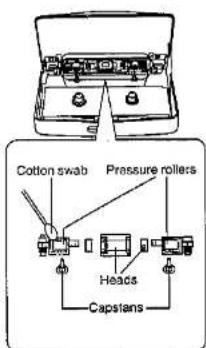
■ Head care
To ensure good sound quality for tape operation, be sure to clean the head after approximately every 10 hours of use. Clean it with a cotton swab dampened with a little alcohol. Do not bring metal articles or magnetic material, such as a screwdriver, near the head assembly.
■ Main unit
Clean it with a cloth, dampened in a mild solution of soap and water. Do not clean the cabinet with benzine or thinner. Avoid excessive moisture. Avoid spray aerosol type cleaner. Some cleaners contain corrosive chemicals that may cause internal damage and cabinet deformation.
For United Kingdom only
This apparatus was produced to BS 800.