
RN-505 - Hi-Fi-System PANASONIC - Kostenlose Bedienungsanleitung
Finden Sie kostenlos die Bedienungsanleitung des Geräts RN-505 PANASONIC als PDF.


Benutzerfragen zu RN-505 PANASONIC
0 Frage zu diesem Gerät. Beantworten Sie die, die Sie kennen, oder stellen Sie Ihre eigene.
Eine neue Frage zu diesem Gerät stellen
Laden Sie die Anleitung für Ihr Hi-Fi-System kostenlos im PDF-Format! Finden Sie Ihr Handbuch RN-505 - PANASONIC und nehmen Sie Ihr elektronisches Gerät wieder in die Hand. Auf dieser Seite sind alle Dokumente veröffentlicht, die für die Verwendung Ihres Geräts notwendig sind. RN-505 von der Marke PANASONIC.
BEDIENUNGSANLEITUNG RN-505 PANASONIC
Panasonic®
Microcassette Recorder
Operating Instructions
Model No. RN-505
Before connecting, operating or adjusting this product, please read these instructions completely. Please keep this manual for future reference.
The model number and serial number of this product can be found on either the back or the bottom of the unit.
Please note them in the space provided below and keep for future reference.
MODEL NUMBER RN-505
SERIAL NUMBER


Panasonic Consumer Electronics Company, Division of Matsushita Electric Corporation of America
One Panasonic Way Secaucus, New Jersey 07094 http://www.panasonic.com
Panasonic Sales Company, Division of
Matsushita Electric of Puerto Rico, Inc. ("PSC")
Ave. 65 de Infantería, Km. 9.5 San Gabriel Industrial Park, Carolina, Puerto Rico 00985
© 2000 Matsushila Electric Industrial Co., Ltd.
Printed in Japan
RQT5406-P
F0100KB0
Supplied Accessories Product Service
2 Rechargeable batteries with carrying case (RP-BP60BPYS1)....1
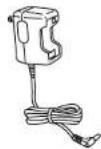
AC adaptor/Charger (RP-BC124PY) .....1
• To order accessories contact 1-800-332-5368 or web site (http://www.panasonic.com).
- Use numbers indicated in parentheses when asking for replacement parts.
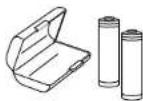
The product you have purchased is powered by a nickel-cadmium battery which is recyclable. Please call 1-800-8-BATTERY for information on how to recycle this battery.

Do not attempt to remove the cover(s) or repair the unit yourself. Refer servicing to qualified personnel only.
Product information
For product service, product information or assistance with product operation, refer to the servicenter directory.
User memo:
DATE OF PURCHASE
DEALER NAME
DEALER ADDRESS
TELEPHONE NUMBER
Power source
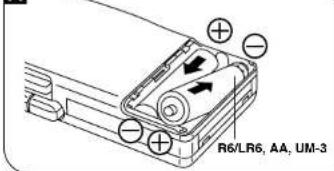
Dry cell batteries A
Use two R6/LR6, AA UM-3 (not included) batteries.
Press in and down towards the minus end.
Battery removal
Press the ⊕ side towards the ⊙ battery terminal and lift up.
A
text_image
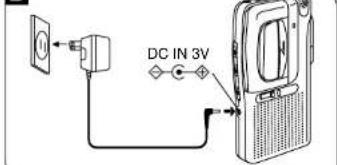
R6/LR6, AA, UM-3AC power operation B
Use the included AC adaptor/charger.
- When not in use, disconnect the AC adaptor from the AC power outlet.
B
text_image
DC IN 3VRechargeable batteries
For initial use after purchase or after a long interval (more than 3 months), be sure to recharge the rechargeable batteries. A full charge, which takes about 2 hours enables you to enjoy about 4 12 hours recording and 3 12 hours playback.
Recharge the rechargeable batteries (included), then insert the batteries into the unit.
C
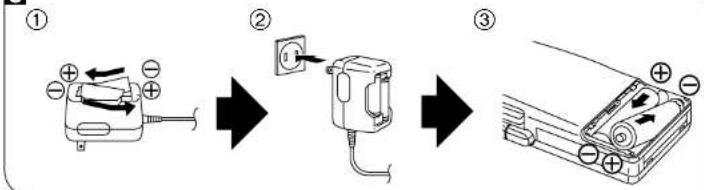
flowchart
graph LR
    A["① Battery with + and - charges"] --> B["② Switch with 120A"]
    B --> C["③ Motor with + and - charges"]
Recording
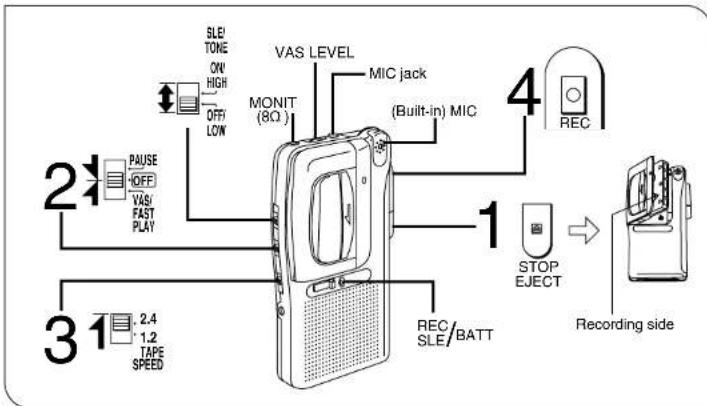
flowchart
graph TD
    A["Speaker"] --> B["MONIT (8Ω)"]
    A --> C["VAS LEVEL"]
    A --> D["MIC jack"]
    A --> E["(Built-in) MIC"]
    A --> F["REC"]
    A --> G["STOP EJECT"]
    A --> H["Recording side"]
    A --> I["REC/SLE/BATT"]
    A --> J["2.4 TAPE SPEED"]
    A --> K["21 PAUSE OFF"]
    A --> L["OFF LOW"]
    style A fill:#f9f,stroke:#333
    style B fill:#ccf,stroke:#333
    style C fill:#ccf,stroke:#333
    style D fill:#ccf,stroke:#333
    style E fill:#ccf,stroke:#333
    style F fill:#ccf,stroke:#333
    style G fill:#ccf,stroke:#333
    style H fill:#ccf,stroke:#333
    style I fill:#ccf,stroke:#333
    style J fill:#ccf,stroke:#333
    style K fill:#ccf,stroke:#333
    style L fill:#ccf,stroke:#333
Basic operation
| Function | Operation |
| Stop | Press [STOP, EJECT]. |
| Temporary stop | Set [PAUSE] to PAUSE.To resume recording set it toOFF. |
| Recording for a long time | Set [TAPE SPEED] to [1.2]. |
■ Program time (with RT-60 MC microcassette tape)
At [1.2]: 1 hour on one side
At [2.4]: 30 minutes on one side
Note:
- Use a tape with tabs in place.
●The recording level is automatically adjusted. - The built-in microphone picks up sound from all directions.
To playback tapes
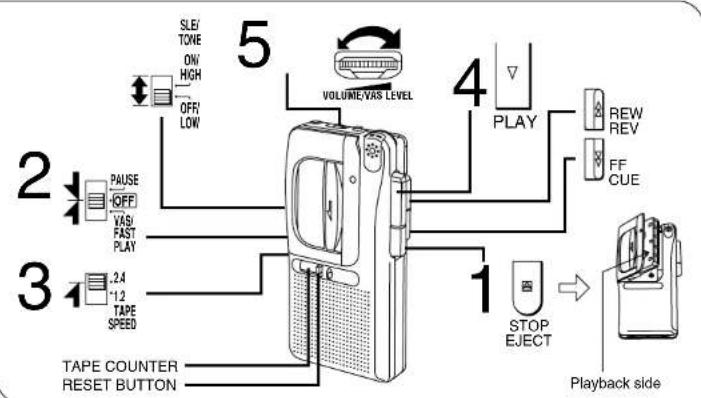
flowchart
graph TD
    A["TAPE COUNTER RESET BUTTON"] --> B["TOILER"]
    B --> C["PLAY"]
    C --> D["REW REV FF CUE"]
    D --> E["Playback side"]
    F["SLE/ TONE ON/ HIGH OFF/ LOW"] --> G["VOLUME/VAS LEVEL"]
    H["2 PAUSE OFF VAS FAST PLAY"] --> I["TAPE"]
    J["2.4 1.2 TAPE SPEED"] --> K["TAPE"]
    L["1 STOP EJECT"] --> M["PLAY"]
    N["5"] --> O["OPEN"]
    P["1"] --> Q["PLAY"]
Basic operation
| Function | Operation |
| Stop | During playback, press [←1 STOP, EJECT]. |
| Fast forward or rewind | In the stop mode, press [▶FF, CUE] (Fast forward) or [◀REW, REV] (Rewind). |
| Temporary stop | Set [PAUSE] to PAUSE.To resume playback set it to [OFF]. |
| To play faster than usual | Set [FAST PLAY] to FAST PLAY. |
| To change the tone | Set [TONE] to [HIGH] or [LOW]. |
Cue and review
Sound can be monitored at a high speed as long as [▶▶FF, CUE] (cue) or [◀◀REW, REV] (review) is held down during playback.
When the button is released, normal playback will start.
- Cue speed is slightly faster than play speed.
Note:
- Set [TAPE SPEED] to the same setting as you used for recording.
- When the tape reaches its end after fast forward or rewind, press [STOP, EJECT] to release the button.
Troubleshooting Guide
BEFORE CALLING


Before requesting service for this unit, check the chart below for a possible cause of the problem you are experiencing. Some simple checks or a minor adjustment on your part may eliminate the problem and restore proper operation.
If you are in doubt about some of the check points, or if the remedies indicated in the chart do not solve the problem, refer to the directory of Authorized Service Centers (enclosed with this unit) to locate a convenient service center, or consult your dealer for instructions.
For detailed instructions, contact an authorized servicenter 1-800-211-7262 or web site (http://www.panasonic.com).
PROBLEM
No operations.
- No sounds.
•A gritty noise is heard.
Cannot hear sound-too noisy. Sepa
No recording.
CHECKPOINT
- Have the batteries been installed with their polarities (⊕, ⊖) reversed?
- Is the earphone plug firmly connected to [MONIT (8 ○)]? - Is the plug dirty? (Wipe away the dirt from the plug.)
rate the unit from mobile phones.
Have the tape's accidental erasure prevention tabs been broken out?
To record with the VAS (Voice Activated System) function
The sound is recorded automatically, so there is no tape waste.
To use VAS function, select [VAS] in step 2 of Recording and adjust VAS LEVEL 1.
2 of Recording and adjust [VAS LEVEL]. No sound is recorded at the "0" position.
- No sound is recorded at the 0° position - After using VAS function, set [VAS] to
OFF
- The following table provides the original
you wish to er sounds.
4-7: If you wish to record normal level sounds.
8-10: If you wish to record lower levels of sound than usual.
SLE (Sound Level Equalizer) recording
SLE improves recording in locations remote from the source. This is helpful in class and conference rooms.
To record with SLE recording, set [SLE] to [ON].
The SLE recording indicator turns green when recording.
Silent auto-stop
When the tape comes to its end during recording or playback, the tape stops moving and the power is turned off. After that,
be sure to press [STOP, EJECT].
To record through the external microphone
Plug the external monaural microphone (not included) into [MIC] jack.
Plug type: 3.5 mm ( ^1/_2 in.) monaural
Note:
- Use a dynamic microphone or a condenser microphone with a built-in power supply. Do not use a condenser microphone without a built-in supply.
- The built-in microphone will be automatically disconnected.
Monitoring
The sound can be heard with an earphone (not included) plugged into [MONIT(8 Ω)].
- Plug type: 3.5 mm ( 12 in.) monaural
Note:
- Any change made to the volume during recording (when [VAS] is set to OFF) will not affect the recorded sound.
- Do not adjust the volume when recording with the VAS function or the VAS level will change.
Erasure prevention
Removing the tab(s) of the cassette (with a small screwdriver) will prevent accidental erasure.
To record again, cover the hole of the tab with adhesive tape.
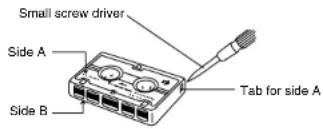
text_image
Small screw driver Side A Side B Tab for side AFollow up recording
Recording can be started during playback
by simply pressing [●REC].
Quick review
To listen to the sound you have recorded, press and hold [◀◀REW, REV].
When the button is released, playback will start.
Tape counter and reset button
The digits return to "000" when the reset button is pressed. The digits advance with
the tape to provide a reference to quickly find a desired portion of tape.
REC, SLE/BATT Indicator
[REC, SLE/BATT] indicator will light during recording.
Also the tape speed will slow down, the sound is distorted, and the volume will decrease as the batteries weaken.
When the batteries are weak
[REC, SLE/BATT] indicator will become dim or turn off during recording.
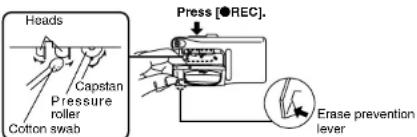
Head care
To ensure good sound quality, be sure to clean the head after approximately every 10
hours of use with a cotton swab dampened with a little alcohol.
text_image
Heads Capstan Pressure roller Cotton swab Press [●REC]. Erase prevention leverMAINTENANCE
Panasonic Consumer Electronics
Company, Division of Matsushit Electric Corporation of America
One Panasonic Way.
Securities, New Jersey 07094
Panasonic Audio Products Limited Warranty
Panasonic Sales Company, Division
of Matsushina Electric Corporation of Puerto Rico, Inc.
of Puerto Rico, Inc. fax: 55 de Intamería
San Gabriel Industrial Park,
Carolina, Puerto Rico 00965
Panasonic Consumer Electronics Company or Panasonic Sales Company (collectively referred to as "the warrantor") will repair this product with new or refurbished parts in the event of a defect in materials or workmanship, free of charge. In the U.S.A. or Puerto Rico as follows (all time periods start from the date of original purchase):
COMPACT DISC PLAYERS. RADIOS, VIDEO CD PLAYERS, RADIO CASSETTE PLAYERS/RECORDERS (with and without CD Players). CASSETTE RECORDERS, MICROCASSETTE RECORDERS/TRANSCRIBERS AND IC RECORDERS—labor and parts for one (1) year.
ACCESSORIES—HEADPHONES, CARTRIDGES.
MICROPHONES, ADAPTERS—labor and parts for ninety (90) days.
BATTERIES—(when applicable)—New rechargeable batteries in exchange for defective rechargeable batteries for ten (10) days. Non-rechargeable batteries are not warranted.
RECHARGEABLE BATTERY PACKS—(when applicable)—New rechargeable battery packs in exchange for defective rechargeable battery packs for ninety (90) days. Non-rechargeable battery packs are not warranted.
Carry-in or mail-in service in the U.S.A. can be obtained during the warranty period by contacting a Panasonic Services Company (PASC) Factory Servicenter listed in the Servicenter Directory. Or call toll free, 1-800-211-7262 to locate a PASC authorized Servicenter. Carry-in or mail-in service in Puerto Rico can be obtained during the warranty period by calling the Panasonic Sales Company telephone number listed in the Servicenter Directory.
This warranty is extended only to the original purchaser. A purchase receipt or other proof of date of original purchase will be required before warranty service is rendered.
This warranty only covers failures due to defects in materials and workmanship which occur during normal use and does not cover
normal wear to the stylus (when applicable) or a dealer installed cartridge or stylus. The warranty does not cover damages which occur in shipment or failures which are caused by products not supplied by the warrantor, or failures which result from accident, misuse, abuse, neglect, mishandling, faulty installation, misapplication, set-up adjustments, maladjustment of consumer controls, improper operation or maintenance, improper antenna. Inadequate signal reception or pick-up, alteration, modification, power line surge, improper voltage supply, lightning damage, commercial use, such as; hotel, office, restaurant, or other business or rental use of the product, or service by anyone other than a PASC Factory Servicenter or a PASC authorized Servicenter, or damage that is attributable to acts of God.
LIMITS AND EXCLUSIONS
There are no express warranties except as listed above. THE WARRANTYOR SHALL NOT BE LIABLE FOR INCIDENTAL OR CONSEQUENTIAL DAMAGES RESULTING FROM THE USE OF THIS PRODUCT. OR ARISING OUT OF ANY BREACH OF THIS WARRANTY INCLUDING WITHOUT LIMITATION, DAMAGE TO OTHERS, RECORDS OR DISCS. ALL EXPRESS AND IMPLIED WARRANTIES, NOIS OR ANY WARRANTY OF MERCHANTABILITY, OR MERCHANTABILITY, AND FITNESS FOR A PARTICULAR PURPOSE, ARE LIMITED TO THE APPLICABLE WARRANTY PERIOD SET FORTH ABOVE. Some states do not allow the exclusion or limitation of incidental or consequential damages, or limitations on how long an implied warranty lasts, so the above exclusions or limitations may not apply to you.
This warranty gives you specific legal rights and you may also have other rights which vary from state to state.
If a problem with this product develops during or after the warranty period, you may contact your dealer or Servicenter. If the problem is not handled to your satisfaction, then write to the Panasonic Consumer Call Center at the company address above or call toll free 1-800-211-7282.
BATTERIES AND CHARGER
Rechargeable batteries and charger
■Use the included charger when recharging.
■During recharging, it is normal for the charger and the rechargeable batteries to become slightly warm.
- Avoid recharging or placing the rechargeable batteries near sources of heat or humidity.
Batteries
- Align the poles (⊕ and ⊖) properly when inserting the batteries.
- Do not mix old and new batteries or different types of batteries.
- Do not recharge ordinary dry cell batteries. - Remove the batteries if the unit is not to be used for a long time.
- Do not use the batteries if the covering has been peeled off.
- The included rechargeable batteries can be recharged about 300 times. When operation time shortens sharply, they should be replaced.
Note:
Do not recharge more than 8 hours at one time, or rechargeable battery life may be shortened.
CAUTION
- Avoid using or placing this unit near sources of heat.
- Do not leave it in an automobile exposed to direct sunlight for a long period of time with doors and windows closed.
- To avoid product damage, do not expose this product to rain, water or other liquids.
Listening caution


Do not play your headphones or earphones at a high volume. Hearing experts advise against continuous extended play.
If you experience a ringing in your ears, reduce volume or discontinue use.
Do not use while operating a motorized vehicle. It may create a traffic hazard and is illegal in many areas.
You should use extreme caution or temporarily discontinue use in potentially hazardous situations.
Even if your headphones or earphones are the open-air type designed to let you hear outside sounds, don't turn up the volume so high that you can't hear what's around you.
Mishandling of batteries can cause electrolyte leakage which can damage items the fluid contacts and may cause a fire.
If electrolyte leaks from the batteries, consult your dealer. Wash thoroughly with water if electrolyte comes in contact with any part of your body.
•These speakers do not have magnetic shielding. Do not place them near televisions, personal computers or other devices easily influenced by magnetism.
Sound can be deceiving. Over time your hearing "comfort level" adapts to higher volumes of sound. So what sounds "normal" can actually be loud and harmful to your hearing.
Guard against this by setting your equipment at a safe level BEFORE your hearing adapts.
To establish a safe level:
- Start your volume control at a low setting.
- Slowly increase the sound until you can hear it comfortably and clearly, and without distortion.
Once you have established a comfortable sound level:
- Set the dial and leave it there.
Specifications
Power requirement
Battery: DC 3 V
(Iwo R6/LR6, AA, UM-3
batteries)
Rechargeable
battery: With two included Panasonic
rechargeable batteries (RP-
BP60BPY)
AC: 120 V, 60 Hz wit
Panasonic AC
adaptor/charger (RP-
BC124PY)
Power consumption;
| Playback | Recording |
| 2.5 W | 2.0 W |
When recharging: 4.0 W
Frequency response 500–3500 Hz
Speaker: 3.6 cm (1
15/27
Tape speed 1.2 cm/s (
15/82 ips)
2.4 cm/s (1½e ips)
Track system 2 track monaural recording
and playback
Jack:
Input: MIC: 0.25 mV
(200-600 Ω)
Output: MONIT (8 0)
58.0×117.0×23.7 mm
(2½6"×4½8"×1½16")
135 g (4.8 oz.)
Play time:
Approximate operating time in hours [at 25°C (77°F).
on a flat, stable surface.]
●The play time may be less depending on the operating
conditions.
| Battery type\Function | Recording | Playback |
| Rechargeable* | 4.5 | 3.5 |
| Panasonic Alkaline | 13.5 | 9 |
*Recharging time: 2 hours
Power consumption in standby mode: 1.0 W
Note:
Specifications are subject to change without notice.
Mass and dimensions are approximate.
If you ship the product Carefully pack and send it prepaid, adequately insured and preferably in the original carton. Attach a postage-affixed letter, detailing the complaint, to the outside of the carton.
Do NOT send the product to the Executive or Regional Sales offices. They are NOT equipped to make repairs.
Customer's Record
Model
No.
Serial
No
Code:
No.
Date
Purchase
Dealer's
Name
Dealer's
Address