
SL-CT352 - Hi-Fi-System PANASONIC - Kostenlose Bedienungsanleitung
Finden Sie kostenlos die Bedienungsanleitung des Geräts SL-CT352 PANASONIC als PDF.


Benutzerfragen zu SL-CT352 PANASONIC
0 Frage zu diesem Gerät. Beantworten Sie die, die Sie kennen, oder stellen Sie Ihre eigene.
Eine neue Frage zu diesem Gerät stellen
Laden Sie die Anleitung für Ihr Hi-Fi-System kostenlos im PDF-Format! Finden Sie Ihr Handbuch SL-CT352 - PANASONIC und nehmen Sie Ihr elektronisches Gerät wieder in die Hand. Auf dieser Seite sind alle Dokumente veröffentlicht, die für die Verwendung Ihres Geräts notwendig sind. SL-CT352 von der Marke PANASONIC.
BEDIENUNGSANLEITUNG SL-CT352 PANASONIC
Panasonic®
Operating Instructions
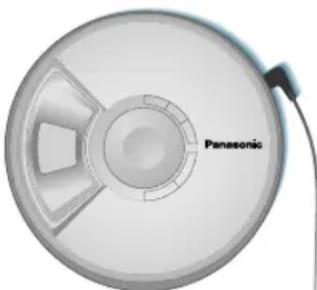
Portable CD Player
SL-CT345 SL-CT350 SL-CT352
Note:
“EB” on the packaging indicates the United Kingdom.

natural_image
Close-up of a Panasonic circular device with a central hub and internal components (no text or symbols visible)
GN SGEB EG
Dear
Customer
Thank you for purchasing this product. Before connecting, operating or adjusting this product, please read these instructions completely. Please keep this manual for future reference.
Matsushita Electric Industrial Co., Ltd.
Web Site: http://www.panasonic.co.jp/global/
RQT7830-B
F1104SZ0
Specifications
Audio (CD-DA)
Sampling frequency: 44.1 kHz
No. of channels: 2 (left and right, stereo)
Frequency response:
20 Hz to 20,000 Hz (+0.5 dB to -7 dB)
Headphone output level:
RMS max. 6 mW+6 mW/16 Ω(adjustable)
Pickup
Light source: Semiconductor laser
Wavelength: 780 nm
(NORSK)
Bølgelengde 780 nm
Laserstyrke
Ingen farlig stråling sendes ut (med sikkerhets-beskyttelse)
General
Power supply:
SL-CT345
DC input (via AC adaptor, not included):
DC 4.5 V
SL-CT352
DC input (via included AC adaptor):
DC 4.5 V
AC adaptor input:
(The United Kingdom)
AC 220 -240 V 50/60 Hz
(Continental Europe)
AC 220 -230 V 50/60 Hz
(Australia and N.Z.)
AC 230-240 V 50 Hz
(Sets purchased in Japan)
AC 110-127 V/220-240 V 50/60 Hz
SL-CT352
Power consumption:
Using AC adaptor: 0.8 W
Recharging: 3.0 W
Play time:
Using on a flat stable surface at
25 °C, EQ is off, Hold is on and
Anti-skip is on POS 1 (CD-DA). Play times are in hours and approximate.
| Batteries used | Play time |
| 2 alkaline batteries (LR03) | 26 |
| 2 alkaline batteries (LR6) | 60 |
| 4 alkaline batteries (2 LR03+2 LR6) | 86 |
| 2 optional rechargeable batteries (Europe: HHR-4AGE/2BOther areas: HHR-4AGT/2B) | 16 |
| 2 optional rechargeable (Europe: HHR-4AGE/2BOther areas: HHR-4AGT/2B) and 2 alkaline (LR6) batteries | 76 |
Recharging time: About 3.5 to 4.5 hours
●The play time may be less depending on the operating conditions.
●Play time will be considerably
reduced when playing CD-RW.
Dimensions (W×H×D):
136.7 mm×21.5 mm×136.7 mm
Mass: 180 g (with batteries)
157 g (without batteries)
Operational temperature range:
0 °C-40 °C
Rechargeable temperature range:
5^-40^
Note:
Specifications are subject to change without notice.
Mass and dimensions are approximate.
Troubleshooting guide
References to the remote control apply only to SL-CT352.
Before requesting service, make the following checks. If you are in doubt about some of the check points, or if the solutions indicated in the chart do not solve the problem, consult your dealer for instructions.
| No play. | ●The HOLD function is on. Cancel HOLD (←page 4).●The batteries may be depleted (←page 3).●The disc isn't correctly set.●The disc is scratched or dirty. (Tracks may be skipped.)●There is moisture on the lens. Wait for about an hour and then try again.●The lens is dirty: clean it with a blower (recommended product: SZZP1038C). If the lens gets marked with fingerprints, gently wipe them off with a cotton swab. |
| No sound or there is a lot of noise. | ●Ensure the plugs are inserted firmly.●Wipe the plugs with a clean cloth.●The disc is scratched or dirty.●The elapsed play time disappears and sound is interrupted if bumps continue repeatedly. |
| Play doesn't resume from the track where play stopped at. | ●This doesn't work during random play.●It may not work correctly under some conditions. |
| Play doesn't start from the first track. | ●Random play modes may be on (←page 4).●Play resumes from the track where you last stopped play (←page 4, Play). (If the lid is opened while the unit is turned off, the resume function may not be cancelled.) |
| Cannot specify point A or B. | You may not be able to specify point A or B at the end of a disc. |
| Cannot change the anti-skip mode. | If [|◄◄] or [►►] is pressed before [MEMO] you cannot change the mode. |
| SL-CT352The unit malfunctions when connected to other equipment. | Be sure to connect other equipment through the remote control. If speakers are connected directly to the unit, they should have an impedance of 1 kΩor less. |
| Cannot hear the remote control's operation tone. | The operation tone may be turned off (←page 4). |
| The remote control does not work properly. | ●Remove the plug and reinsert it as fully as possible.●Use only the included remote control to operate the unit. |
| Cannot recharge. | ●You aren't using the special rechargeable batteries (←page 3).●You must insert two batteries before you can charge.●The unit must be off before you can charge. |
| The AC adaptor becomes warm during recharging. | This is normal. |
| The batteries are taking a long time to recharge. | The batteries may take as long as 4.5 hours to recharge under some conditions. |
| Play time is short after recharging. | ●This may occur the first time you charge the batteries or if you haven't used them for a long time. Play time should be restored after a few recharges.●The batteries can go flat if you leave the AC adaptor connected after charging is complete.●If play is extremely short even after fully recharging the batteries, the batteries may have exceeded their life (Rechargeable batteries can be recharged approximately 300 times). Please purchase new nickel-metal hydride rechargeable batteries (Europe: HHR-4AGE/2B Other areas: HHR-4AGT/2B). |
| The battery indicator fails to appear or is incorrect. | ●The indicator does not appear when the AC adaptor is connected.●The indicator may not appear correctly when using the rechargeable and dry cell batteries at the same time and under certain conditions. |
| The unit stops working. | Disconnect then reconnect all power sources (batteries and AC adaptor). |
| Power cuts off. | If you connect or disconnect the AC adaptor, the power cuts off even if the batteries are inserted. |
Display
| hold | The HOLD function is on. Cancel HOLD ( page 4). |
| no disc | ●You haven't inserted a disc or it isn't inserted correctly. ●You have inserted a disc this unit cannot play. |
| open | The disc lid is open. |
| F | The program already contains 20 tracks. |
Maintenance
If the surfaces are dirty wipe with a soft, dry cloth.
●Never use alcohol, paint thinner or benzine to clean this unit.
● Before using chemically treated cloth, read the instructions that came with the cloth carefully.
CAUTION!
- DO NOT INSTALL OR PLACE THIS UNIT IN A BOOKCASE, BUILT-IN CABINET OR IN ANOTHER CONFINED SPACE. ENSURE THE UNIT IS WELL VENTILATED. TO PREVENT RISK OF ELECTRIC SHOCK OR FIRE HAZARD DUE TO OVERHEATING, ENSURE THAT CURTAINS AND ANY OTHER MATERIALS DO NOT OBSTRUCT THE VENTILATION VENTS.
- DO NOT OBSTRUCT THE UNIT'S VENTILATION OPENINGS WITH NEWSPAPERS, TABLECLOTHS, CURTAINS, AND SIMILAR ITEMS.
- DO NOT PLACE SOURCES OF NAKED FLAMES, SUCH AS LIGHTED CANDLES, ON THE UNIT.
•DISPOSE OF BATTERIES IN AN ENVIRONMENTALLY FRIENDLY MANNER.
CAUTION!
THIS PRODUCT UTILIZES A LASER. USE OF CONTROLS OR ADJUSTMENTS OR PERFORMANCE OF PROCEDURES OTHER THAN THOSE SPECIFIED HEREIN MAY RESULT IN HAZARDOUS RADIATION EXPOSURE. DO NOT OPEN COVERS AND DO NOT REPAIR YOURSELF. REFER SERVICING TO QUALIFIED PERSONNEL.
WARNING:
TO REDUCE THE RISK OF FIRE, ELECTRIC SHOCK OR PRODUCT DAMAGE, DO NOT EXPOSE THIS APPARATUS TO RAIN, MOISTURE, DRIPPING OR SPLASHING AND THAT NO OBJECTS FILLED WITH LIQUIDS, SUCH AS VASES, SHALL BE PLACED ON THE APPARATUS.
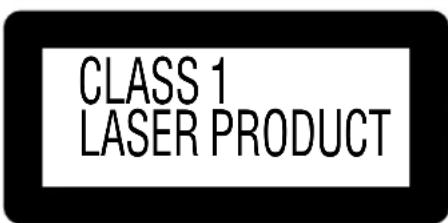
Marking sign is located on bottom of the unit.
This product may receive radio interference caused by mobile telephones during use. If such interference is apparent, please increase separation between the product and the mobile telephone.
The socket outlet shall be installed near the equipment and easily accessible or the mains plug or an appliance coupler shall remain readily operable.
THIS UNIT IS INTENDED FOR USE IN MODERATE CLIMATES.
Caution
- Do not expose the unit to direct sunlight or heat, such as from heating appliances, as these can damage the unit.
●Discontinue use if you experience discomfort with the earphones or any other parts that directly contact your skin. Continued use may cause rashes or other allergic reactions.
■Batteries
- Do not peel off the covering on batteries and do not use if the covering has been peeled off.
- Align the poles + and - correctly when inserting the batteries.
- Do not mix different types of batteries or old and new batteries.
- Remove the batteries if you do not intend to use the unit for a long time.
- Do not throw into fire, short-circuit, disassemble, or subject to excessive heat.
- Do not attempt to recharge dry cell batteries.
- When carrying batteries in a pocket or bag, ensure no metal objects such as necklaces are placed together with them. Contact with metal may cause short-circuiting which can cause a fire.
- Keep out of the reach of small children. Accidental swallowing of batteries can result in stomach and intestinal damage.
■Listening
- Do not play your headphones or earphones at a high volume. Hearing experts advise against continuous extended play.
- If you experience a ringing in your ears, reduce volume or discontinue use.
- Do not use while operating a motorized vehicle. It may create a traffic hazard and is illegal in many areas.
- You should use extreme caution or temporarily discontinue use in potentially hazardous situations.
- Even if your headphones or earphones are the open-air type designed to let you hear outside sounds, don't turn up the volume so high that you can't hear what's around you.
■CDs
- Do not use irregularly shaped CDs.
- Do not use non-specification discs
- Do not use CDs printed with label printers available on the market.
- Do not use CDs with labels and stickers that are coming off or with adhesive exuding from under labels and stickers.
NORSK
ADVARSEL!
- APPARATET MÅ IKKE PLASSERES I EN BOKHYLLE, ET INNEBYGGET KABINETT ELLER ET ANNET LUKKET STED HVOR
VENTILASJONSFORHOLDENE ER UTILSTREKKELIGE. S∅RG FOR AT GARDINER ELLER LIGNENDE IKKE FORVERRER VENTILASJONSFORHOLDENE, SÅ RISIKO FOR ELEKTRISK SJOKK ELLER BRANN FORÅRSAKET AV OVERHETING UNNGÅS. - APPARATETS VENTILASJONSÄPNINGER MÅ IKKE DEKKES TIL MED AVISER, BORDDUKER, GARDINER OG LIGNENDE.
- PLASSER IKKE ÄPEN ILD, SLIK SOM LEVENDE LYS, OPPÅ APPARATET.
- BRUKTE BATTERIER MÅ KASSERES UTEN FARE FOR MILJ∅ET.
ADVARSEL!
DETTE PRODUKTET ANVENDER EN LASER.
BETJENING AV KONTROLLER, JUSTERINGER ELLER ANDRE INNGREP ENN DE SOM ER BESKREVET I DENNE BRUKSANVISNING, KAN Føre TIL FARLIG BESTRÅLING.
DEKSLER MÅ IKKE ÅPNES, OG FORS∅K ALDRI Å REPARERE APPARATET PÅ EGENHÅND. ALT SERVICE OG REPARASJONSARBEID MÅ UTF∅RES AV KVALIFISERT PERSONELL.
ADVARSEL:
FOR Å REDUSERE FAREN FOR BRANN, ELEKTRISK ST∅T ELLER SKADER PÅ PRODUKTET, MÅ DETTE APPARATET IKKE UTSETTES FOR REGN, FUKTIGHET, VANNDRAPER ELLER VANNSPRUT. DET MÅ HELLER IKKE PLASSERES GJENSTANDER FYLT MED VANN, SLIK SOM BLOMSTERVASER, OPPÅ APPARATET.
DETTE APPARATET ER BEREGNET TIL BRUK UNDER MODERATE KLIMAFORHOLD.
Utstyret bør plasseres i nærheten av AC-stikkontakten, og støpslet må være lett tilgjengelig hvis det skulle oppstå problemer.
SUOMI
VAROITUS!
- ÄLÄ ASENNA TAI LAITA TÄTÄ LAITETTA KABINETTITYYPPISEEN KIRJAKAAPPIIN TAI MUUHUN SULJETTUUN TILAAN, JOTTA TUULETUS ONNISTUISI. VARMISTA, ETTÄ VERHO TAI MIKÄÄN MUU MATERIAALI EI HUONONNA TUULETUSTA, JOTTA VÄLTETTAISIIN YLIKUUMENEMISESTA JOHTUVA SÄHKÖISKU-TAI TULIPALOVAARA.
- ÄLÄ PEITÄ LAITTEEN TUULETUSAUKKOJA SANOMALEHDELLÄ, PÖYTÄLIINALLA, VERHOLLA TÄL MUULLA VASTAAVALLA EŞINEELLÄ.
- ALÄ ASETA PALAVAA KYNTTILÄÄ TAI MUUTA AVOTULEN LÄHDETTÄ LAITTEEN PÄÄLLE.
●HAVITA PARISTOT LUONTOA VAHINGOITTAMATTOMALLA TAVALLA.
VAROITUS!
LAITTEEN KÄYTTÄMINEN MUULLA KUIN TÄSSÄ KÄYTTÖOHJEESSA MAINITULLA TAVALLA SAATTAA ALTISTAA KÄYTTÄJÄN TURVALLISUUSLUOKAN 1 YLITTÄVALLE NÄKYMÄTTÖMÄLLE LASERSÄTEILYLLE.
VAROITUS:
TULIPALO-, SÄHKÖISKUVAARAN TAI TUOTETTA KOHTAAVAN MUUN VAHINGON VAHENTÄMISEKSI EI LAITETTA SAA ALTISTAA SATEELLE, KOSTEÜDELLE, VESIPISAROILLE TAI ROISKEELLE, EIKÄ NESTETTÄ SISÄLTÄVIÄ ESINEITÄ, KUTEN ESIMERKIKSI MALJAKOITA, SAA ASETTAA LAITTEEN PÄÄLLE.
TÄMÄ LAITE ON TARKOITETTU KÄYTETTÄVÄKSI LEUDOSSA ILMASTOSSA.
Laite tulee asettaa lähelle verkkopistorasiaa ja pistokkeen täytyy olla sellaisessa asennossa, että siihen on helppo tarttua ongelman sattuessa.
text_image
CLASS 1 LASER PRODUCT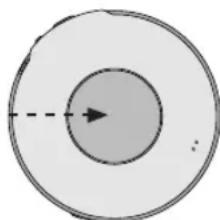
natural_image
Simple diagram of concentric circles with a dashed arrow indicating direction (no text or symbols)(Bottom of product)
LUOKAN 1 LASERLAITE
KLASS 1 LASER APPARAT
| ADVARSEL-USYNLIG LASERSTRÄLINGVED ABNING, NAR SIKERHEDSABFBRYDERE ER UDE AF FUNKTION.UNDGA UNSSETTELE FOR STRÄLING | VARDI AVATTAESSA JA SUOJALUKITUS OHITETTAESSA OLETALTITINA NAKYMATONTÄLASERSATEILYLEALA KATSD SATEESSEN |
| VORSICHT-UNSICHTBARE LASERSTRÄHLUNG, WENN ABDECKUNG GEÖFFENET UND SICHERHEITSVERRIEGELUNGÜBERBRUCKT. NICHT DEM STRAHLAUSSETZEN. | VARNING-DSYNLIG LASERSTRÄLNINGAR NER DENNA DEL AR OPPNADOCH SPARREN AR URKOPPLAD.BETRAKTA EJ STRÄLEN |
| DANGER-INVISIBLE LASER LÄRADIATION WHEN OPEN AND INTERLOCKDEFEATED. AVOID DIRECT EXPOSURETO BEAM. | ADVARSEL-USYNLIG LASERSTRÄLINGAR NER DEKSEL APNES OGSIKERHEHDSLÄS BRYTES, UNNGÄEKSPONERING FOR STRÄLEN. |
| RQLS0244 | A pleine puissance, l'écoute prolongée du baladeur peut endommager l'oreille de l'utilisateur. |
(Inside of product)
(Produktets innside)
(Tuotteen sisällä)
Supplied Accessories
Check the packing carton for these accessories.
Use numbers indicated when asking for replacement parts.
(Product numbers correct as of November 2004. These may be subject to change.)
SL-CT345
• 1 Pair of stereo earphones: LOBAB0000185
SL-CT350
• 1 Pair of stereo earphones: LOBAB0000185
- 1 AC adaptor:
The United Kingdom: RFEA435B-S
Continental Europe: RFEA431E-S
Australia and N.Z.: RFEA436A-S
For Australia and N.Z.:
- 1 External battery case: RFA2666-H
SL-CT352 Only for sets purchased in Japan:
● 1 Pair of stereo earphones: LOBAB0000186
● 1 Wired remote control: N2QCBD000010
• 1 AC adaptor: RFEA444Z-S
• 1 External battery case: RFA2666-H
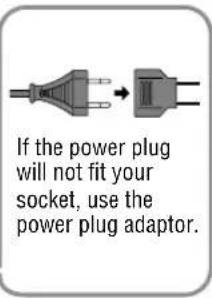
● 1 Power plug adaptor: K2DA42E00001 - 2 Alkaline batteries
text_image
If the power plug will not fit your socket, use the power plug adaptor.For the United Kingdom and Republic of Ireland
■ Sales and Support Information
Customer Care Centre
●For UK customers: 08705 357357
●For Republic of Ireland customers: 01 289 8333
- Visit our website for product information
•E-mail: customer.care@panasonic.co.uk
Direct Sales at Panasonic UK
- Order accessory and consumable items for your product with ease and confidence by phoning our Customer Care Centre Monday - Friday 9:00am – 5:30pm. (Excluding public holidays)
- Or go on line through our Internet Accessory ordering application
at www.panasonic.co.uk - Most major credit and debit cards accepted.
● All enquiries transactions and distribution facilities are provided directly by Panasonic UK Ltd. - It couldn't be simpler!
- Also available through our Internet is direct shopping for a wide range of finished products, take a browse on our website for further details.
Connections
References to the remote control apply only to SL-CT352.
Turn off this unit and the other equipment before connection.
Insert each plug fully. (Plug type: 3.5 mm stereo)
When the unit is connected to other equipment, set the unit's volume to
10-15 and adjust the volume on the connected equipment.
Main unit
The
illustration
shows
SL-CT352
SL-CT350 L-CT345
Connect the other equipment directly to the headphone jack (Ω) on the main unit.
SL-CT352
First connect the remote control to the headphone jack (☐) on the main unit and then connect the other equipment to the remote control jack.
Remote control
If you don't want the remote control operation tone, turn it off ( page 4).
Earphones (included)
Long cord to the right
Audio cable (not included)
Audio system
To CD or AUX terminals
Power Supply
- Recharging/Play time - page 1, Specifications
- To save power when the unit is not to be used for a long time, unplug the AC adaptor from the household mains socket.
Rechargeable batteries (not included) Charge before initial use.
As a safety precaution this unit is constructed so it is not possible to charge ordinary batteries. For details, check with your dealer.
When charging, use only the following Panasonic Nickel-metal hydride rechargeable batteries.
Europe: HHR-4AGE/2B (set of 2)
Other areas: HHR-4AGT/2B (set of 2)
You cannot charge any other type of rechargeable/dry cell batteries.
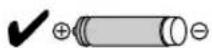
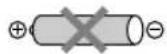
Turn the unit off (→page 4) before charging.
text_image
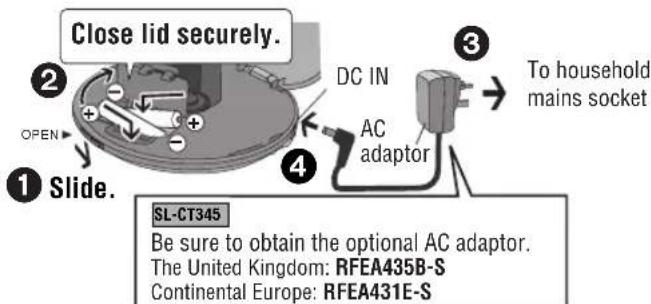
Close lid securely. ② OPEN ① Slide. ③ To household mains socket DC IN AC adaptor SL-CT345 Be sure to obtain the optional AC adaptor. The United Kingdom: RFEA435B-S Continental Europe: RFEA431E-S●The configuration of the AC adaptor differs according to the area.
- Lift up the ⊕ end when removing.
- The battery indicator “ 📄 ” scrolls while charging and disappears when finished.
- You can charge the batteries before they are fully discharged.
●Fit the battery lid so it is secure and flush with the battery compartment. If it comes loose, it may scratch your discs.
The unit is in the standby condition when the AC adaptor is connected. The primary circuit is always "live" as long as the AC adaptor is connected to an electrical outlet.
Dry cell batteries
■Main unit
After disconnecting the AC adaptor, insert two "LR03, AAA, UM-4" alkaline batteries.
Insert in the same way as the rechargeable batteries ( left).
(For Australia and N.Z.) SL-CT352
■External battery case
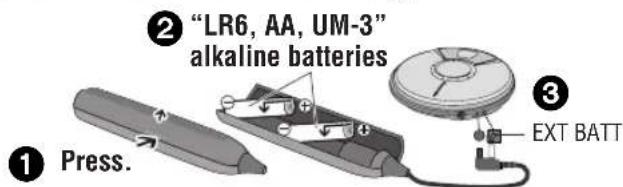
You can get longer play time by also attaching this case. (The unit will also work when batteries are in the case only.)
text_image
① Press. ② "LR6, AA, UM-3" alkaline batteries ③ EXT BATTThe battery indicator
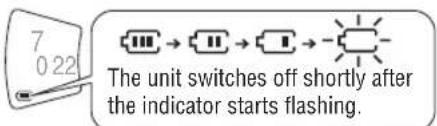
This indicator appears when the unit is on.
text_image
7 0 22 The unit switches off shortly after the indicator starts flashing.- Before play starts the battery indicator level may temporarily go down or flash although the batteries are not drained. It appears correctly once you start play.
AC adaptor
The unit will also work when using the AC adaptor only.
Connect the AC adaptor (←left).
| Open lid | OPEN ▶ | Slide in direction of arrow. | Inserting/removing a disc 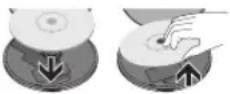 |
| HOLD (function lock) | HOLD ▶(Main unit)⇨ HOLD(Remote control) | Slide in direction of arrow.(Slide in opposite direction to cancel.)●The unit and remote control each have independent HOLD switches. | |
| Play | ▶/■(Main unit)■/▶(Remote control) | Press.1001Current track number Elapsed play time of track●Play begins from the track where you last stopped play (Resume function).(This will be cancelled if you open the lid while play is stopped.) | |
| Skip | ▶▶|(Forward)|◀◀|Backward) | Press.●Press [ ◀◀◀ ] twice consecutively to skip to the previous track during play.●You cannot use [ ◀◀◀ ] to skip to any previous tracks during random and random repeat (⇨ right) modes. | |
| Search | ▶▶|(Forward)|◀◀|Backward) | During play, press and hold.●You can only search within the current track except for during all track repeat (⇨ right) and regular play. | |
| Volume control (0–25) | VOL+ (Increase)− (Decrease) | Press.●The volume returns to 10 when you disconnect the power source. | |
| Pause | ▶/■(Main unit) | Press.●Press again to restart play. | |
| Stop/Turn off | ■(Main unit)■/▶(Remote control) | Press.11—Number of tracks5152—Total play time●Press again to turn the unit off.(Main unit)/Press and hold to turn the unit off.(Remote control)●If the unit is left in stop mode for approximately 10 minutes, it turns itself off automatically. | |
| Sound quality | EQ | Each time you press [EQ][Press [EQ] twice consecutively while “3D” is displayed. (Main unit)]3d-1(3D) 3d-2(3D)Sound field Enhancedof 3D 3d-1↑No ← S-XBS+ ← S-XBSdisplay canceled) Enhanced S-XBS Boosts the bass●“3d-1” or “3d-2” disappears after being selected and “3D” appears instead.●The effect may differ with different kinds of music.●Depending on the recording conditions, sound may be interrupted when switching between EQ settings. | |
| SL-CT352Remote control operation tone | EQ(Remote control) | Each time you press and hold [EQ]bP oFFTone off ←→ bP onTone on | ||
| Play modes | MODE(Main unit) | Each time you press [MODE]1 → → RANDOM → → RANDOM One All Random track track repeat repeatDuring play or while pausedNo display (canceled)AB repeat (←:below)■Specifying the AB segmentPress [MEMO] at the start point (A) and once more at the end point (B).A B → → A BStop or skip (←:left) to cancel.If you do not specify point B this will automatically be set as the end of the disc. Repeat begins when this point is reached. You can specify point B again by pressing [MEMO]. | ||
| Program play(desired tracks only) | MEMO(Main unit) | While stopped, press [ |◄◄ ]or [ ►► ] to select the track, then press [MEMO].Track numberSequence numberWill appear after [MEMO] is pressedRepeat to program up to 20 tracks. | ||
| Play | ►/II(Main unit)■/►(Remote control) | Press after all desired tracks have been programmed. | ||
| Confirm tracks selected | MEMO | Press during play. | ||
| Cancel | ■(Main unit)■/►(Remote control) | Press. (Main unit)/Press during play.(Remote control)(“M”disappears.) | ||
| Anti-skip mode | The anti-skip function (ANTI-SKIP SYSTEM) reduces or eliminates skipping caused by vibration. You can change the anti-skip memory time.While stopped, each time you press and hold [MEMO]POS 2 ←→ POS 1Sound enhanced mode, 10-second anti-skip memory Anti-skip enhanced mode, 45-second anti-skip memory anti-skip memory | |||
| SL-CT352Remote control operation tone | EQ(Remote control) | Each time you press and hold [EQ]bP oFFTone off ←→ bP onTone on | ||
| Play modes | MODE(Main unit) | Each time you press [MODE]1 → → RANDOM → RANDOM One All Random track repeat repeat ▶During play or ▶While paused ▶No display ▶A ▶B ▶AB repeat ▶below)■Specifying the AB segmentPress [MEMO] at the start point (A) and once more at the end point (B). ▶A ▶B → → A ▶B●Stop or skip (←left) to cancel.●If you do not specify point B this will automatically be set as the end of the disc. Repeat begins when this point is reached. You can specify point B again by pressing [MEMO]. | ||
| Program play (desired tracks only) | MEMO(Main unit) | While stopped, press [ |◀◀ ]or [▶▶| ] to select the track, then press [MEMO].Track numberSequence numberWill appear after [MEMO] is pressedRepeat to program up to 20 tracks. | ||
| Play | ▶/I(Main unit) ■/▶(Remote control) | Press after all desired tracks have been programmed. | ||
| Confirm tracks selected | MEMO | Press during play. | ||
| Cancel | ■(Main unit) ■/▶(Remote control) | Press. (Main unit)/Press during play.(Remote control)(“M”disappears.) | ||
| Anti-skip mode | The anti-skip function (ANTI-SKIP SYSTEM) reduces or eliminates skipping caused by vibration. You can change the anti-skip memory time.While stopped, each time you press and hold [MEMO]POS 2 ←→ POS 1Sound enhanced mode, 10-second anti-skip memory Anti-skip enhanced mode, 45-second anti-skip memory | |||
| Note on CD-R and CD-RW (CD-DA)For CD-DA format, use a music disc and finalize* it after recording. The unit may not be able to play some discs due to the condition of the recording.※A process performed after recording that enables CD-R/CD-RW players to play audio CD-R and CD-RW. | ||||