
ST6400C - Temperaturregler HONEYWELL - Kostenlose Bedienungsanleitung
Finden Sie kostenlos die Bedienungsanleitung des Geräts ST6400C HONEYWELL als PDF.


| Produkttyp | Temperaturregler |
| Marke | Honeywell |
| Modell | ST6400C |
| Kategorie | Heizungs- und Warmwasserprogrammiergerät |
| Betriebsspannung | 230 V AC (Netz) |
| Uhrformat | 12 h AM/PM oder 24 h |
| Programmierbare Tage | 7-Tage oder Werktag/Wochenende |
| Schaltzeiten pro Tag | 3 Ein- und 3 Ausschaltzeiten für Heizung und Warmwasser |
| Überbrückungsfunktion | Override-Tasten für Heizung und Warmwasser |
| Extra-Stunden | Bis zu 3 Stunden zusätzlich |
| Notstromversorgung | Eingebaute Batterie für Programmhaltung bei Stromausfall (bis 4 Tage) |
| Anzeige | LCD mit Tagesmarkierung, Uhrzeit und Status |
| Reset-Funktion | Ja, mit Stift |
| Schaltschieber | RUN PROGRAMME, SET DAY/TIME, SET HOT WATER, SET HEATING |
| Kopierfunktion | COPY-Taste zum Kopieren von Programmen |
| Abmessungen | ca. 150 x 80 x 30 mm (geschätzt) |
| Gewicht | ca. 150 g (geschätzt) |
Häufig gestellte Fragen - ST6400C HONEYWELL
Benutzerfragen zu ST6400C HONEYWELL
0 Frage zu diesem Gerät. Beantworten Sie die, die Sie kennen, oder stellen Sie Ihre eigene.
Eine neue Frage zu diesem Gerät stellen
Laden Sie die Anleitung für Ihr Temperaturregler kostenlos im PDF-Format! Finden Sie Ihr Handbuch ST6400C - HONEYWELL und nehmen Sie Ihr elektronisches Gerät wieder in die Hand. Auf dieser Seite sind alle Dokumente veröffentlicht, die für die Verwendung Ihres Geräts notwendig sind. ST6400C von der Marke HONEYWELL.
BEDIENUNGSANLEITUNG ST6400C HONEYWELL
OPERATING YOUR CONTROLLER
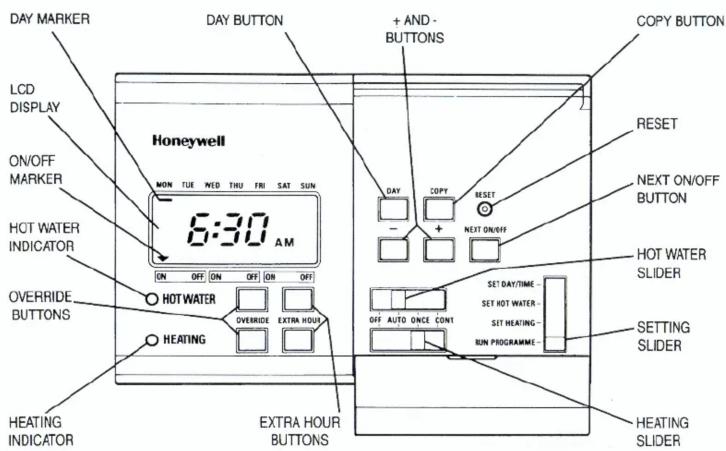
For normal operation the setting slider must be in the RUN PROGRAMME position.
A red indicator lamp shows when the heating or hot water is switched ON.
Two sliders are provided to select how the heating and hot water are controlled.
The HEATING SLIDER has four positions:
OFF The Heating will remain OFF.
AUTO The heating will be switched ON and OFF automatically according to the heating programme.
ONCE The heating will come ON at the first programmed ON time and go OFF at the last programmed OFF time.
CONT. The heating will remain ON continuously.
The HOT WATER slider operates in the same manner as described above for the HEATING SLIDER.
EXTRA HOUR
The EXTRA HOUR buttons switch the heating or hot water ON for up to 3 extra hours without altering the programme. Pressing either button once will give one extra hour, and the words HEATING +1 HR or HOT WATER +1 HR show on the display to confirm the button has been pressed.
When the red indicator lamp is OFF, pressing the EXTRA HOUR button switches the heating or hot water ON for just one hour.
When the red indicator lamp is ON, pressing the EXTRA HOUR button extends the programmed ON period by one hour.
Further presses of the EXTRA HOUR buttons will increase the extra hour period by one hour for each button press, up to a maximum of 3 hours. The display will change to show the number of extra hours, for example HEATING +3 HR or HOT WATER +2 HR.
To cancel the extra hours, keep pressing the EXTRA HOUR button until the HEATING + (1,2 or 3) HR or HOT WATER + (1,2 or 3) HR disappears from the display.
OVERRIDE
The OVERRIDE buttons switch the heating or hot water ON or OFF without altering the programme.
When the indicator lamp is ON, pressing the OVERRIDE button switches the heating or hot water OFF until the next programmed ON time.
When the indicator lamp is OFF, pressing the OVERRIDE button switches the heating or hot water ON until the next programmed OFF time.
RESET
To reset the programmer back to the original built-in programme press the RESET button with the tip of a pen or pencil.
POWER FAILURE
Your programmer has a built-in battery to ensure correct operation after a main supply power cut. No action should be necessary following a power cut of up to 4 days. Longer power cuts may require you to reprogramme.
Honeywell
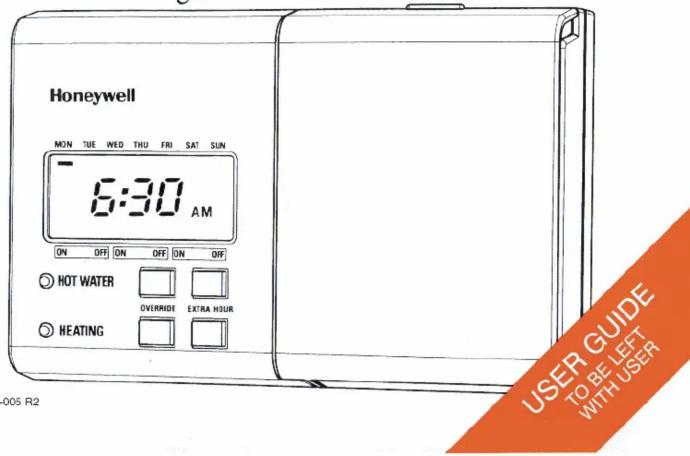
ST6400C Programmer
INTRODUCTION
The ST6400C programmer controls your central heating system. It will enable you to select the times when heating and hot water are switched ON and OFF.
FEATURES
• 7-day or weekday/weekend heating programme.
• 7-day or weekday/weekend hot water programme.
• Three ON/OFF switching times each day.
• Built-in programme with typical ON/OFF times.
• Override buttons for heating and hot water.
• Extra hour buttons for heating and hot water.
• Built-in battery to prevent loss of programme during power cuts.
• 12 hour am/pm or 24 hour clock format.
The ST6400C and other Honeywell controls in your central heating system will provide comfortable temperatures in your home when you want them
12 HOUR AM/PM or 24 HOUR CLOCK DISPLAY
Your programmer can operate on 12 hour am/pm or 24 hour clock formats. To change the format, ensure the setting slider is in the RUN PROGRAMME position then press the + and - buttons together for about 5 seconds. All the displayed times will be automatically changed to the new format.
Repeating this procedure will change the clock display back to the original format.
7 DAY OR WEEKDAY/WEEKEND PROGRAMMING
If installed as a Weekday/Weekend programmer, the day marker will be displayed as a block of days (MON...FRI or SAT...SUN) when setting the programmes times. The DAY button will switch between the Weekday and Weekend programmes when pressed.
SETTING YOUR PROGRAMMER
SETTING THE CORRECT TIME AND DAY
To set the correct time and day open the flap on the front of the programmer.
STEP 1
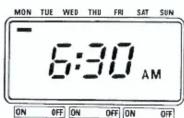
Move the setting slider to the SET DAY/TIME position. The time and day marker on the display will now be flashing to indicate they can be changed.
STEP 2
To change the time, press the + or - buttons until the correct time is displayed.
Each press of the button will change the time by one minute. Holding the button down for more than a few seconds will change the time slowly at first, then quickly.
STEP 3
To change the day, press the DAY button until the day marker is positioned under the correct day. Each press of the button moves the marker by one day.
STEP 4
Moving the setting slider to the next position completes the setting of time and day.
SETTING THE HOT WATER PROGRAMME
The hot water programme has three ON/OFF switching times for every day. Each time can be set between 3.00 am and 2.50 am (on the next day) to allow you to programme the hot water to stay on past midnight, if required.
STEP 5
Move the setting slider to the SET HOT WATER position. The words HOT WATER will now be visible on the display and the first ON time will now be flashing.
STEP 6
Use the + and - buttons to set the first ON time. Each press of the button will change the time by 10 minutes.
STEP 7
Press the NEXT ON/OFF button once to display the first OFF time. Set this time using the + and - buttons.
STEP 8
By pressing the NEXT ON/OFF and + or - buttons the two remaining ON/OFF times can be set. If you only require two ON/OFF times per day it is recommended you set the second OFF time equal to the second ON time.
STEP 9
You now have a choice to set the programme for the next day:-
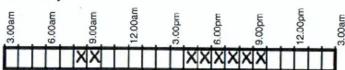
Choice 1 Press the DAY button to step the day marker to the next day. The ON/OFF times for this day can then be set as described in steps 6 to 8.
or
Choice 2 Press the COPY button to copy the first day's programme into the second. Several days can be set to the same programme by pressing the COPY button repeatedly (not required for 5/2 day programming).
STEP 10
The hot water programme for the remaining days of the week can be set by following steps 6 to 9 (applies to 7 day programming only).
*NOTE*
-
When pressing the + button, the next ON or OFF marker may start to flash. If this happens the next programme time will have been changed. Press the NEXT ON/OFF button to check and adjust this programme time if necessary.
-
When pressing the - button, the previous ON or OFF marker may start to flash. If this happens the previous programme time will have been changed. Follow the procedure in "REVIEWING PROGRAMME TIMES" to check and adjust this time if necessary.
Moving the setting slider to the next position completes setting the hot water programme.
SETTING THE HEATING PROGRAMME
The heating programme has three ON/OFF switching times for every day. Each time can be set between 3.00 am and 2.50 am (on the next day) to allow you to programme the heating to stay on after midnight if required.
STEP 11
Move the setting slider to the SET HEATING position. The word HEATING will now be visible on the display and the first ON time will be flashing.
STEP 12
The required heating programme for each day of the week can now be set by following the same procedure as "SETTING THE HOT WATER PROGRAMME" in steps 6 to 10.
STEP 13
Moving the setting slider to the next position completes setting the heating programme.
REVIEWING PROGRAMME TIMES
To review your hot water programme move the setting slider to the SET HOT WATER position.
To review your heating programme move the setting slider to the SET HEATING position.
To review the programme times for a day press the NEXT ON/OFF button repeatedly. Any of these times can be adjusted by using the + and - buttons.
Press the DAY button to review consecutive days.
IF DISPLAY REMAINS BLANK AFTER SWITCH ON - PRESS RESET
BUILT-IN PROGRAMME
| Monday to Friday | HEATING | ||||||||||||||||||||||||||||||||||||||||||||||||||||||||||||||||||||||||||||||||||||||||||||||||||||
| HOT WATER | |||||||||||||||||||||||||||||||||||||||||||||||||||||||||||||||||||||||||||||||||||||||||||||||||||||
| Saturday and Sunday | HEATING | ||||||||||||||||||||||||||||||||||||||||||||||||||||||||||||||||||||||||||||||||||||||||||||||||||||
| HOT WATER |
| Monday | HEATING | |||||||||||||||||||||||||||||||||||||||||||||||||||||||||||||||||||||||||||||||||||||||||||||||||||||||||
| HOT WATER | ||||||||||||||||||||||||||||||||||||||||||||||||||||||||||||||||||||||||||||||||||||||||||||||||||||||||||
| Tuesday | HEATING | |||||||||||||||||||||||||||||||||||||||||||||||||||||||||||||||||||||||||||||||||||||||||||||||||||||||||
| HOT WATER | ||||||||||||||||||||||||||||||||||||||||||||||||||||||||||||||||||||||||||||||||||||||||||||||||||||||||||
| Wednesday | HEATING | |||||||||||||||||||||||||||||||||||||||||||||||||||||||||||||||||||||||||||||||||||||||||||||||||||||||||
| HAT WATER | ||||||||||||||||||||||||||||||||||||||||||||||||||||||||||||||||||||||||||||||||||||||||||||||||||||||||||
| Thursday | HEATING | |||||||||||||||||||||||||||||||||||||||||||||||||||||||||||||||||||||||||||||||||||||||||||||||||||||||||
| HOT WATER | ||||||||||||||||||||||||||||||||||||||||||||||||||||||||||||||||||||||||||||||||||||||||||||||||||||||||||
| Friday | HEATING | |||||||||||||||||||||||||||||||||||||||||||||||||||||||||||||||||||||||||||||||||||||||||||||||||||||||||
| HOT WATER |

- OPERATING YOUR CONTROLLER
- EXTRA HOUR
- OVERRIDE
- RESET
- POWER FAILURE
- Honeywell
- INTRODUCTION
- FEATURES
- HOUR AM/PM or 24 HOUR CLOCK DISPLAY
- DAY OR WEEKDAY/WEEKEND PROGRAMMING
- SETTING YOUR PROGRAMMER
- SETTING THE CORRECT TIME AND DAY
- STEP 1
- STEP 2
- STEP 3
- STEP 4
- SETTING THE HOT WATER PROGRAMME
- STEP 5
- STEP 6
- STEP 7
- STEP 8
- STEP 9
- STEP 10
- SETTING THE HEATING PROGRAMME
- STEP 11
- STEP 12
- STEP 13
- REVIEWING PROGRAMME TIMES
Marke : HONEYWELL
Modell : ST6400C
Kategorie : Temperaturregler