
ST9500C - Temperaturregler HONEYWELL - Kostenlose Bedienungsanleitung
Finden Sie kostenlos die Bedienungsanleitung des Geräts ST9500C HONEYWELL als PDF.


| Produkttyp | Temperaturregler (Programmiergerät) |
| Marke | Honeywell |
| Modell | ST9500C |
| Anzahl der Zonen | 2 (Zone 1 und Zone 2) |
| Betriebsarten | AUTO, ONCE, OFF, CONT |
| Übersteuerungstasten | Ja, für jede Zone separat |
| Extra-Stunden-Tasten | Ja, bis zu 3 Stunden programmierbar |
| Stromversorgung | 230 V AC (Netzbetrieb) |
| Display | LCD-Anzeige mit Tasten |
| Montage | Wandmontage (Aufputz) |
| Abmessungen (ca.) | 120 mm x 80 mm x 30 mm |
| Gewicht (ca.) | 150 g |
| Material | Kunststoffgehäuse |
| Garantie | 2 Jahre |
| Herstellungsland | China |
| Programmieroptionen | Tägliche und wöchentliche Heizprogramme |
| Kompatibilität | Für die meisten Heizsysteme geeignet |
| Lieferumfang | Bedienungsanleitung, Montagematerial |
| Besonderheiten | Zwei unabhängige Zonen, Übersteuerung und Extra-Stunden |
Häufig gestellte Fragen - ST9500C HONEYWELL
Benutzerfragen zu ST9500C HONEYWELL
0 Frage zu diesem Gerät. Beantworten Sie die, die Sie kennen, oder stellen Sie Ihre eigene.
Eine neue Frage zu diesem Gerät stellen
Laden Sie die Anleitung für Ihr Temperaturregler kostenlos im PDF-Format! Finden Sie Ihr Handbuch ST9500C - HONEYWELL und nehmen Sie Ihr elektronisches Gerät wieder in die Hand. Auf dieser Seite sind alle Dokumente veröffentlicht, die für die Verwendung Ihres Geräts notwendig sind. ST9500C von der Marke HONEYWELL.
BEDIENUNGSANLEITUNG ST9500C HONEYWELL
Guide to the Use of the ST9500C Programmer
How do I use the OVERRIDE buttons?
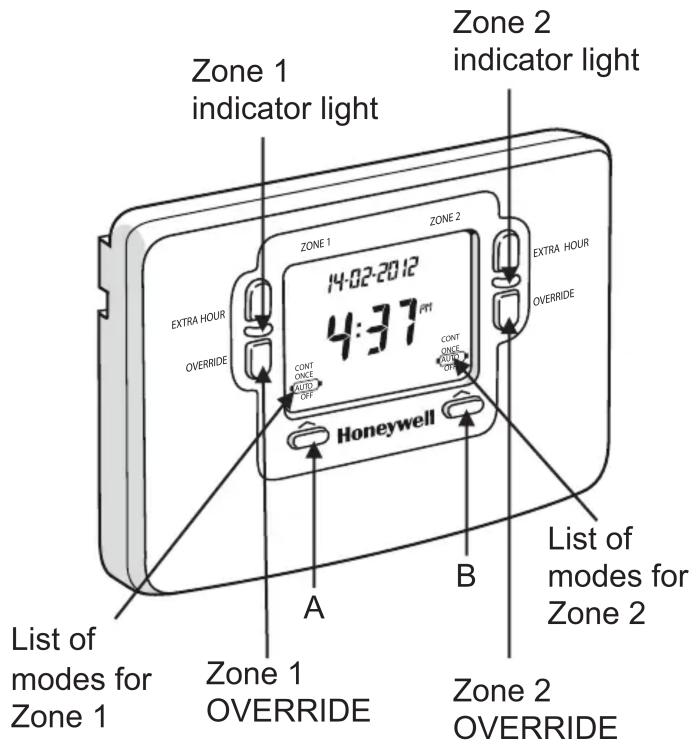
There are two OVERRIDE buttons, one for ZONE 1 and one for ZONE 2 (marked on the image).
To turn ZONE 1 on and override the set programme press the ZONE 2 OVERRIDE button marked in the picture. The indicator light will light up to confirm ZONE 1 is on.
To turn ZONE 1 off again press the OVERRIDE button.
Alternatively the next time the programmer is set to switch on or off the override will be cancelled.
The OVERRIDE button will only work in the AUTO and ONCE modes. It will NOT work in the OFF or CONT modes. To change the mode press the button marked 'A' for ZONE 1 and 'B' for ZONE 2 in the picture. Each time you press the button it will move through the list of modes above it.
To override ZONE 2 follow the same instructions as above but with the ZONE 2 override button marked in the picture.
How do I use the EXTRA HOUR buttons?
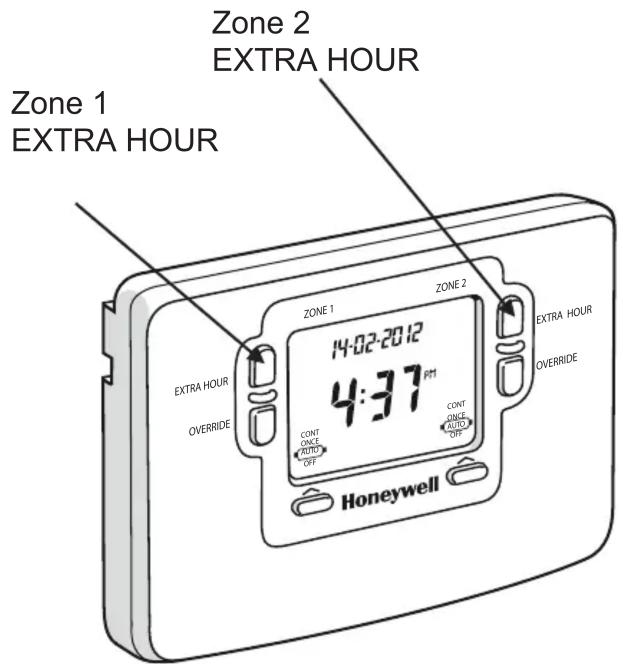
There are two EXTRA HOUR buttons, one for ZONE 1 and one for ZONE 2 (marked on the image).
Press the button once to bring ZONE 1 or ZONE 2 on for 1 hour. Press the button a second time to bring them on for 2 hours and a third for 3 hours. To turn the override off press the button a fourth time.
The EXTRA HOUR button will only work in the AUTO, ONCE and OFF modes. It will NOT work in the CONT mode. To change the mode press the button marked 'A' for ZONE 1 and 'B' for ZONE 2 in the picture. Each time you press the button it will move through the list of modes above it.
honeywelluk.com
Honeywell
This user guide is for guidance only and at the time of production represented the latest information available to Honeywell from various sources. Honeywell reserves the right at any time and without notice to change any product, specification or any other information contained in this publication and cannot accept any responsibility for loss or damage arising out of any errors that may inadvertently be contained herein.

Marke : HONEYWELL
Modell : ST9500C
Kategorie : Temperaturregler