
Ibis - Computerzubehör OCZ - Kostenlose Bedienungsanleitung
Finden Sie kostenlos die Bedienungsanleitung des Geräts Ibis OCZ als PDF.


| Produkttyp | USB-Flash-Laufwerk |
| Modell | Ibis |
| Marke | OCZ |
| Schnittstelle | USB 3.0 |
| Abmessungen | ca. 70 x 20 x 10 mm |
| Gewicht | ca. 15 g |
| Stromversorgung | über USB |
| Kompatible Betriebssysteme | Windows, macOS, Linux |
| Lieferumfang | USB-Flash-Laufwerk, Bedienungsanleitung |
| Garantie | 2 Jahre |
| Farbe | schwarz |
| Material | Kunststoff |
| Betriebstemperatur | 0°C bis 60°C |
| Lagertemperatur | -20°C bis 85°C |
| Besonderheiten | Stoßfest, kompakt |
| Reinigung | Mit trockenem Tuch abwischen |
| Sicherheitshinweise | Nicht in Flüssigkeit tauchen |
| Entsorgung | Elektroschrott |
| Reparatur | Keine reparierbaren Teile; Gerät nicht öffnen |
| Datenübertragungsrate | bis zu 100 MB/s (lesen) |
Häufig gestellte Fragen - Ibis OCZ
Benutzerfragen zu Ibis OCZ
0 Frage zu diesem Gerät. Beantworten Sie die, die Sie kennen, oder stellen Sie Ihre eigene.
Eine neue Frage zu diesem Gerät stellen
Laden Sie die Anleitung für Ihr Computerzubehör kostenlos im PDF-Format! Finden Sie Ihr Handbuch Ibis - OCZ und nehmen Sie Ihr elektronisches Gerät wieder in die Hand. Auf dieser Seite sind alle Dokumente veröffentlicht, die für die Verwendung Ihres Geräts notwendig sind. Ibis von der Marke OCZ.
BEDIENUNGSANLEITUNG Ibis OCZ
DURATION OF WARRANTY
The OCZ IBIS HSDL is covered by this warranty for 3 years from the date-of-purchase. Proof-of-purchase including the date-of -purchase is required to collect on the warranty. OCZ will inspect the product and decide whether to repair or replace it. OCZ reserves the right to provide a functional equivalent product, or a refurbished replacement product.
LIMITATIONS
This warranty does not apply to product failure caused by accidents, abuse, mishandling, improper installation, alteration, acts of nature, improper usage, or problems with electrical power. In addition, opening or tampering with the product casing, or any physical damage, abuse or alteration to the product's surface, including all warranty or quality stickers, product serial or electronic numbers will also void the product warranty. OCZ is not responsible for recovering any data lost due to the failure of a Flash memory device. OCZ products must be used with devices that conform to the recommended industry standards. OCZ will not be liable for damages resulting from a third party device that causes the OCZ product to fail. OCZ shall in no event be liable for any consequential, indirect, or incidental damages, lost profits, lost business investments, lost goodwill, or interference with business relationships as a result of lost data. OCZ is also not responsible for damage or failure of any third-party equipment, even if OCZ has been advised of the possibility. This limitation does not apply to the extent making it illegal or unenforceable under applicable law.


HSDL 3.5" solid state drive

Installation Guide
ISF-OCZ3HSD1IBS1
INSTALLATION
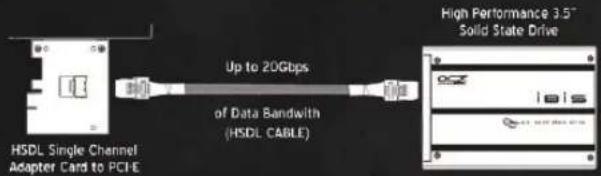
- Locate an x4, x8 or x16 PCI-Express slot and carefully seat the adapter card into the slot.
- Install the solid state drive into an open 3.5" hard drive bay
- Connect the solid state drive to the adapter card using the HSDL cable
Complete HSDL Interface and Solid State Storage Solution
SETTING THE IBIS HSDL AS YOUR BOOT DEVICE
If you will be using the IBIS HSDL as your boot drive, you will need to change the boot order in your BIOS. Normally, this means holding down the DEL or F2 key just as the computer powers up and begins the boot process. Change the boot order to put SCSI to the top of the list. This may vary by platform, please consult motherboard documentation for further details.
INSTALLING WINDOWS ON YOUR IBIS HSDL
There are several steps to successfully install Windows onto your IBIS HSDL;
-
You will need the appropriate device drivers for your IBIS HSDL to operate properly. Drivers for the IBIS HSDL are available online at www.ocztechnology.com. Download the drivers onto a CD or a USB key to be used later during the installation.
-
Using the steps above, Change the boot order in your BIOS to boot off of the Windows CD from which you are installing the Operating system.
- After booting from the CD, the installation will begin. You will come to a screen that prompts you to determine which Hard Drive to install the OS onto. The IBIS HSDL WILL NOT be shown as an option unless the drivers are loaded. On the screen, there will be a button to press that loads the drivers from the CD or USB key you loaded previously. Load the drivers and continue the installation as prompted.
- After the install in complete, you will be able to boot off of the IBIS HSDL.
FORMATTING THE IBIS HSDL IN WINDOWS
Right click My Computer and select Manage. Select disk management on the left side. If correctly installed (Drivers), Windows will have you initialize the drive. After doing so, right click on the un-partitioned/unallocated drive and select format.
LIMITED WARRANTY
OCZ Technology products epitomize the new vanguard of quality standards as part of our commitment to our customers. All OCZ Technology Group ("OCZ") products are warranted and tested to be free from defects in material and workmanship and to conform to the published specifications. Should your OCZ product fail within the warranty period (under normal use in the recommended environment) due to improper workmanship or materials, OCZ will repair the product or replace it with a comparable or better unit. This warranty is subject to the conditions and limitations set forth herein.

Marke : OCZ
Modell : Ibis
Kategorie : Computerzubehör