JK-15 Profi Set - Overvågningskamera Joblotron - Gratis brugsanvisning og manual
Find enhedens vejledning gratis JK-15 Profi Set Joblotron i PDF-format.


Brugerspørgsmål om JK-15 Profi Set Joblotron
0 spørgsmål om dette apparat. Besvar dem du kender, eller stil dit eget.
Stil et nyt spørgsmål om dette apparat
Download vejledningen til din Overvågningskamera i PDF-format gratis! Find din vejledning JK-15 Profi Set - Joblotron og tag din elektroniske enhed tilbage i hånden. På denne side er alle dokumenter nødvendige for brugen af din enhed offentliggjort. JK-15 Profi Set af mærket Joblotron.
BRUGSANVISNING JK-15 Profi Set Joblotron
162
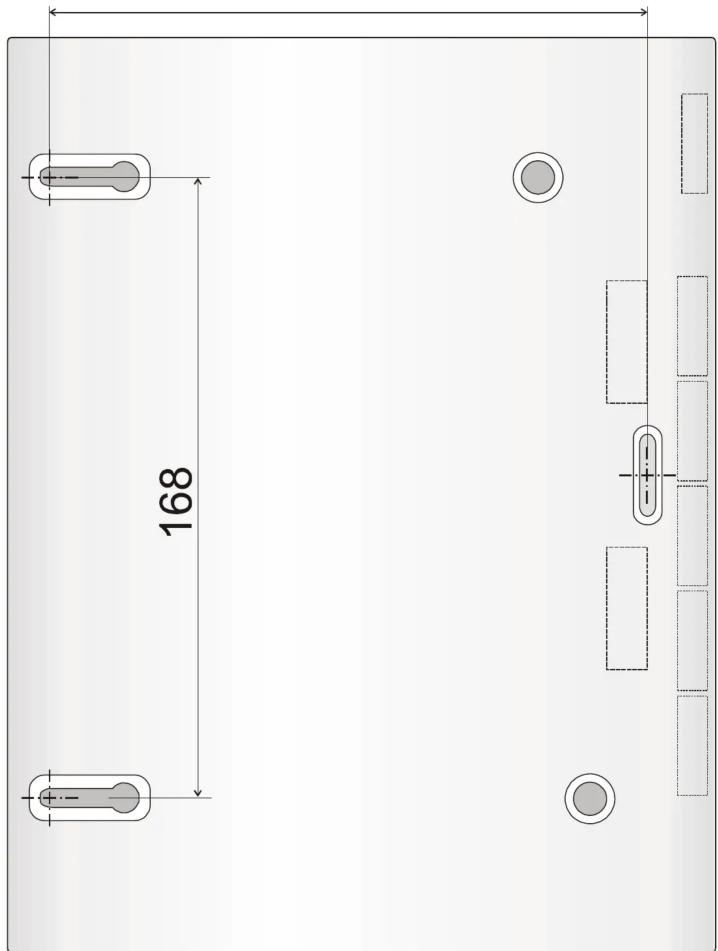
Control panel drilling plan
JK-15 PROFI GSM KIT 4/4 MGK22902
JK-15 PROFI GSM ALARM KIT
• Detailed manuals for all included components can be found on the enclosed CD or on the Jablotron website www.jablotron.com
1. Kit contents
All items in the kit are enrolled and preprogrammed. The detectors and remote controls have batteries pre-installed.
| Item Description Address | |
| JA-60N wireless door sensor 1 | |
| JA-60P wireless motion detector 2 | |
| JA-60F wireless keypad c1 | |
| RC-44 remote control c2 | |
| UC-260 wireless indoor siren panel is enrolled | |
The RC-42 is the same remote control as the RC-44 except that it is built into the housing witch only two buttons ( 1 & 2 ) which have identical functions to the left pair of RC-44 buttons.
2. Before installation
Ensure that PIN code protection has been disabled before you insert a SIM card into the control panel. For example, on a NOKIA phone, select: Menu, Settings, Security settings, PIN code request, Off. Decide upon suitable locations for all of the items. The wireless keypad should be within 20m of the control panel.
3. Control panel installation
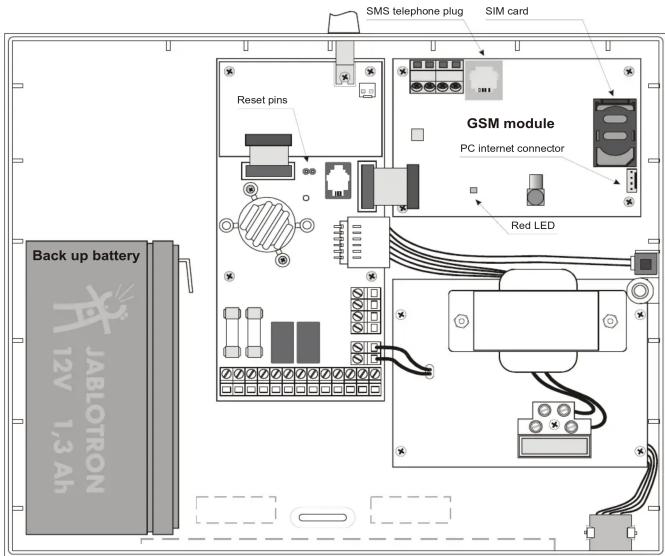
a) Install the control panel - see the drilling plan on the last page of this manual. Plug the SMS phone lead into the GSM dialer's SMS telephone plug (see diagram) and the PC lead into the PC internet connector (if the control panel is to be a
GPRS data modem) before mounting the panel. Push out the appropriate cut-outs to allow the leads access to the panel. b) Open the SIM card holder (by sliding it in the direction shown in picture below) and Insert the SIM card into the holder and close it by sliding it back.
c) Install and connect the backup battery to the control panel
d) Connect the AC power to the control panel
e) The red LED will be lit during connection to a GSM network and should turn off within 60 sec. If the LED starts flashing, GSM network connection was unsuccessful (switch off both the AC and backup up battery and then try the SIM card in your own mobile phone to ensure it is functioning).
f) Connect the keypad batteries (pull out the red tape to activate the batteries). P will be indicated on the keypad (programming mode).
- If F is indicated, there is no communication with the control panel.
- Enter F0 6060 to re-enter P mode if you accidentally exit it by pushing the N key.
- To save the keypad batteries, close the cover while it is in P mode
g) Enter 971 to measure the GSM signal strength. It should register 3 minimum (if not, change the location of the control panel or use an external GSM antenna).
h) Exit measuring by pressing the N key. Attach the control panel cover.
JK-15 PROFI GSM KIT 1/4 MGK22902
4. Detectors and accessories installation
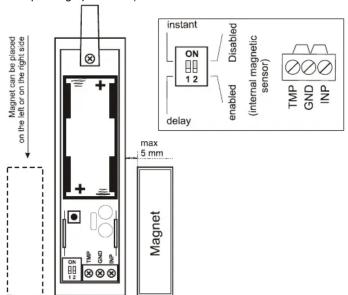
a) Install the JA-60N magnetic detector to a door (antenna pointing up or down)
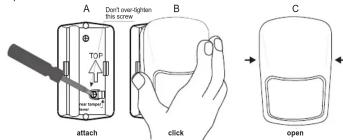
b) Install the JA-60P motion PIR detector
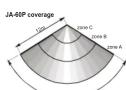

Select Instant or Delay reactions via the DIP switches inside the detectors.
c) Connect the detector batteries (pull out the red tape to activate the batteries)
d) Attach the keypad to the desired location
e) Plug the UC-260 wireless siren into a power socket.
5. Enrollment of additional accessories
If you install additional detectors (max. 32), you have to enroll them. The system should be in the P mode (if not enter F0 6060):
a) Press 1 to enter the learning mode*
b) The next free detector position will be displayed on the keypad.
c) Install batteries into all new detectors step by step to enroll them (system will automatically offer the next free position)
d) To scroll through the sensor positions, press 1 (up) or 7 (down)
e) To enroll a second detector to an occupied position press 5 before you install the detector batteries
f) To exit the learning mode press the N key
The wireless keypad (JA-60F) enrolls after you install its battery while in the learning mode.
The remote control (RC-4x) enrolls after you press and hold both the 🔒 and 🔒 buttons while in the learning mode.
The wireless outdoor siren (JA-60A) enrolls after it is powered up while in the learning mode
JK-15 PROFI GSM KIT 2/4 MGK22902
To enroll the control panel to UC receivers enter 299 on the keypad while in the P mode
Check the manuals of individual items for more details
*Learning mode will also be entered after shorting the Reset pins in the control panel.
6. Detector and controller testing
a) The system should be in P mode (if not, enter F0 6060)
b) Trigger the detectors – their addresses (1=door and 2=PIR) should be displayed (if the PIR detector does not react, re-enter its test mode by opening and closing its cover)
c) Press button on the RC-4x remote control - c2 will be indicated on the alarm display
7. Radio signal strength measurement
a) While in P mode, press 1 and then using 7 scroll to position 1
b) Press 8 to start measuring
c) Activate the door detector to view its signal strength
d) Using the 1 key, scroll to the next position (2=PIR) and check its signal strength (if the PIR detector does not react, re-enter its test mode by opening and closing its cover)
e) Repeat step d) to check all enrolled items. The wireless keypad (c1) signal is indicated after you trigger its tamper. The remote control (c2) is indicated after you press button 🔒.
f) Change the location of an item if its signal is lower than 2
g) Return to P mode by pressing the N key
8. GSM communication testing
a) Call back the system number using your mobile. Let the SMS phone ring until the system answers your call (you will hear a beep). Then enter the installer remote access code 0000 on your mobile.
b) Now the mobile should work as a system keypad. Press the # key to exit P mode and re-enter it by keying *0 6060
c) End the phone call
d) From your mobile, send a command SMS with MO in it to the system. You should then receive a status report reply
9. Programming the system
a) The system should be in P mode (if not enter F0 6060)
b) Using the following sequences you can program:
| Function | Sequence | Comments |
| Your installer code* | 5 xxxx xxxx | 6060 = factory defaultxxxx = new code |
| Installer remote access code* | 94 xxxx F0 | 0000 = factory defaultxxxx = customized code |
| User remote access code* | 94 xxxx F1 | 1111 = factory defaultxxxx = new code |
| Exit delay | 20x | 3=30sec factory def. |
| Entrance delay | 21x | 3=30 sec factory def. |
| Alarm duration | 22x | 4=4min factory def. |
| Alarm SMS reporting | 71 yyy..y F072 yyy..y F0 | yyy..y = phone number7nF0 erases number n |
| Alarm SMS + phone call reporting | 73 yyy..y F074 yyy..y F0 | |
| Alarm & arming SMS reporting | 75 yyy..y F076 yyy..y F0 | |
| Alarm phone call only | 77 yyy..y F0 | |
| Technical trouble SMS reporting | 78 yyy..y F0 | |
| User 1 to 4 arming reporting to 75 & 76 | 80x | x=1 enabledx=2 disabled |
| GSMLink pre-registration | 972 yyy..yF0 | yyy..y = your mobile number (international format 00 country ...) |
| Time & date entry | 4 hh mm DD MM YY | |
See control panel installation manual for more details
* Must be changed
10. SMS text editing
Factory default SMS texts in the system can be modified easily by Jablotron's Comlink software.
yyyy*TXT*z,text,z,text,z,text.....
yyyy = installer remote access code (0000 = factory default)
* = separator, space can also be used
z = text index, see the following table
text = new text (no commas or periods/full stops allowed)
| z | Factory default text | z | Factory default text |
| 700 | Alarm system reports: | 415 | Wireless detector #15 |
| 201 | Controller #1 | 416 | Wireless detector #16 |
| 202 | Controller #2 | 501 | Jser code #1 |
| 203 | Controller #3 | 502 | Jser code #2 |
| 204 | Controller #4 | 503 | Jser code #3 |
| 205 | Controller #5 | 504 | Jser code #4 |
| 206 | Controller #6 | 505 | Jser code #5 |
| 207 | Controller #7 | 506 | Jser code #6 |
| 208 | Controller #8 | 507 | Jser code #7 |
| 401 | Wireless detector #1 | 508 | User code #8 |
| 402 | Wireless detector #2 | 509 | User code #9 |
| 403 | Wireless detector #3 | 510 | User code #10 |
| 404 | Wireless detector #4 | 511 | User code #11 |
| 405 | Wireless detector #5 | 512 | User code #12 |
| 406 | Wireless detector #6 | 513 | User code #13 |
| 407 | Wireless detector #7 | 514 | User code #14 |
| 408 | Wireless detector #8 | z | Factory default commands |
| 409 | Wireless detector #9 | 703 | AM |
| 410 | Wireless detector #10 | 704 | DM |
| 411 | Wireless detector #11 | 705 | MO |
| 412 | Wireless detector #12 | 706 | ME |
| 413 | Wireless detector #13 | 710 | PGON |
| 414 | Wireless detector #14 | 711 | PGOFF |
A complete list of all texts is in the control panel installation manual
11. Finishing the installation
a) Fill in the information on the sticker label and attach it inside the keypad cover.
b) Switch the system to standby (by pressing the N key)
c) Instruct the user on how to operate the system
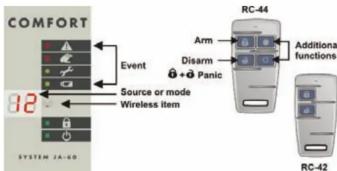
- Keypad operation
| Entry | Function |
| user code | Arming / Disarming |
| F1 / [IMAGE] | Arming without code |
| F2 / [IMAGE] | Partial arming |
| F3 / [IMAGE] | Door lock opening |
| F4 | Memory reading |
| F5 | New master code (example: F5 1234 2789 2789) |
| F6 | User code setting (example: F6 1234 03 3344) |
| F7 / [IMAGE] | Disarming under duress |
| F8 | Appliance control (F81 = ON, F80 = OFF) |
| F0 M.code | User test mode (example F0 1234) |
| N | Escape & fault detail reading |
- Specifications
| Power | 230 VAC, max 0.1 A, supervised, class II |
| Backup battery | 12 V, 2.26 Ah, normal life time 5 years |
| Backup power output | 13VDC, the max, permanent current is 0.4 or 1A for max. 15 min (1 cycle per hour), |
| Self consumption of the control panel is | 30 mA; JA-80E 25 mA |
| Hard-wired inputs | 4 input zones, selectable triggering: |
| Wireless zones | 16 zones (2 detectors can be enrolled to each |
| Wireless controllers | max. 8 (JA-80F, RC-22, RC-44) |
| Access codes | master code and 14 user codes. |
| Wired outputs | Alarm relay dry contacts 1A60V; |
| Programmable outputs | PgX, PgY' connected to the GND max. 0.1 A |
| Siren output | 12 V, 0.7 A |
| Events memory | 127 most recent events |
| Working frequency*433.92 MHz; digital hopping code; supervised communication | |
| Comply with | EN 50131-1, EN 50131-6 |
| Security grade | 2 (low to medium risk) |
| Environmental class | II indoor – general (-10 to 40xC) |
| Safety | EN 60950, class II |
| EMC | ETS 300683 |
| Radio characteristics | ETSI EN 300220 |
| Can be operated according to | ERC REC 70-03 |
| CE | Jablotron Alarms a.s. hereby declares that the JA-63 Profi control panel is in compliance with the essential requirements and other relevant provisions of Directive 1999/5/EC. The original of the conformity assessment can be found on the web site www.jablotron.com, Technical Support section.Note: Dispose of batteries safely depending on the type of the batteries and local regulation. Although this product does not contain any harmful materials we suggest you to return the product to the dealer or directly to the producer after usage. |

JABLOTRON ALARMS o.s., Pod Skalkou 33 466 01 Jablonec nad Nisou Czech Republic Tel.: +420 483 559 911 fax: +420 483 559 993 Internet: www.jablotron.com
JK-15 PROFI GSM KIT
3/4 MGK22902