ST-01 - Overvågningskamera Joblotron - Gratis brugsanvisning og manual
Find enhedens vejledning gratis ST-01 Joblotron i PDF-format.


Brugerspørgsmål om ST-01 Joblotron
0 spørgsmål om dette apparat. Besvar dem du kender, eller stil dit eget.
Stil et nyt spørgsmål om dette apparat
Download vejledningen til din Overvågningskamera i PDF-format gratis! Find din vejledning ST-01 - Joblotron og tag din elektroniske enhed tilbage i hånden. På denne side er alle dokumenter nødvendige for brugen af din enhed offentliggjort. ST-01 af mærket Joblotron.
BRUGSANVISNING ST-01 Joblotron
The ST-01 telephone line simulator (Service tool - 01)
The ST-01 is designed as a telephone line simulator for the JA-80X communicator. Using this tool makes it possible to record voice messages on the JA-80X using a common DTMF telephone without a telephone line. The main advantage of this simulator is the quality of the recorded voice message, which is not worsened by the influence of telephone lines and GSM RF interference. Another advantage is that no other telephone line or mobile phone is necessary for recording voice messages.
1. Connection
- Use the RJ-44 cable supplied with the simulator to connect the RS-LINE data bus connector on the ST-01 to the RS-LINE connector on the JA-80X.
- Use the RJ-64 cable supplied with the simulator to connect the TEL2 connector on the ST-01 to the telephone line input (LINE) on the JA-80X.
- Connect the DTMF telephone to the TEL1 connector on the ST-01 (use the cable supplied with the phone).
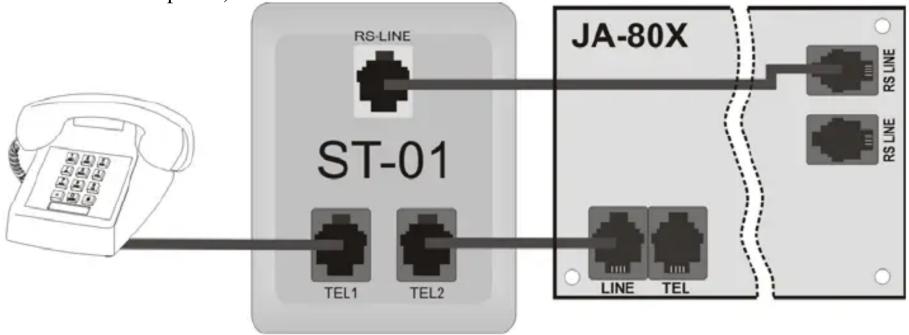
flowchart
graph LR
    A["Phone"] --> B["ST-01"]
    B --> C["RS-LINE"]
    B --> D["TEL1"]
    B --> E["TEL2"]
    B --> F["JA-80X"]
    F --> G["RS LINE"]
    F --> H["RS LINE"]
    F --> I["TEL"]
    style A fill:#f9f,stroke:#333
    style B fill:#ccf,stroke:#333
    style F fill:#cfc,stroke:#333
    style G fill:#fcc,stroke:#333
    style H fill:#fcc,stroke:#333
    style I fill:#fcc,stroke:#333
2. Voice message recording
- Switch the OASiS system to service mode by entering *0 + service code
- Pick up the headset of the telephone connected to the ST-01 and enter sequence 7 2 on the OASiS keypad. You will hear a beep in the headset. You are now in the voice message recording menu.
- All voice messages can be played by pressing 0. This mode can be cancelled anytime by pressing *
- Press button 1 to record message no. 1 "Alarm reports:". (7.5 second message).
- Press button 2 to record message no. 2 "Burglary". (2.5 second message).
- Press button 3 to record message no. 3 "Fire". (2.5 second message).
- Press button 4 to record message no. 4 "Sabotage". (2.5 second message).
- Press button 5 to record message no. 5 "Panic". (2.5 second message).
- Press button 6 to record message no. 6 "Error". (2.5 second message).
- Press button 7 to record message no. 7 "Welcome to OASiS". (2.5 second message).
- Press button 8 to record message no. 8 "Enter your access code". (2.5 second message).
- Press button # to leave voice recording. The communicator will hang up.
To exit service mode press # on the system keypad.
The ST-01 must not be connected to a PSTN line!
Service tool - 01 2/2 MKR52001