
CAL 8627 - Ur CITIZEN - Gratis brugsanvisning og manual
Find enhedens vejledning gratis CAL 8627 CITIZEN i PDF-format.


Brugerspørgsmål om CAL 8627 CITIZEN
0 spørgsmål om dette apparat. Besvar dem du kender, eller stil dit eget.
Stil et nyt spørgsmål om dette apparat
Download vejledningen til din Ur i PDF-format gratis! Find din vejledning CAL 8627 - CITIZEN og tag din elektroniske enhed tilbage i hånden. På denne side er alle dokumenter nødvendige for brugen af din enhed offentliggjort. CAL 8627 af mærket CITIZEN.
BRUGSANVISNING CAL 8627 CITIZEN
TECHNICAL INFORMATION INFORMACION TECNICA
CITIZEN QUARTZ
Cal. No. 86※※
natural_image
Close-up of a wristwatch with visible dials and buttons (no text or symbols)ENGLISH
Contents
§1. OUTLINE ...... 1
§2. SPECIFICATIONS ......1
§3. ABOUT SOLAR CELL WATCH 2
§4. SETTING THE TIME AND CALENDAR ......2
§5. SPECIAL ADDITIONAL FEATURES OF THE SOLAR POWER WATCH ....3
§6. WHEN THE SECOND HAND MOVEMENT IS ABNORMAL....4
§7. TIME REQUIRED FOR RECHARGE 4
§8. NOTE ON RECHARGING 4
§9. CAUTION......4
§10. POINTS FOR FITTING DATE HAND,
DAY HAND AND 24-HOUR HAND ....5
§11. DISASSEMBLY AND ASSEMBLY OF THE MODULE 6
§12. TROUBLESHOOTING AND ADJUSTMENT ....8
ESPAÑOL
Índice
§1. DESCRIPCIÓN GENERAL ...... 13
§2. ESPECIFICACIONES....13
§3. ACERCA DEL RELOJ CON CÉLULA SOLAR ....14
§4. AJUSTE DE LA HORA Y DEL CALENDARIO....14
§5. CARACTERISTÍCAS ADICIONALES ESPECIALES DEL RELOJ CON CÉLULA SOLAR....15
§6. CUANDO EL MOVIMIENTO DE LA AGUJA DE LOS SEGUNDOS SEA ANORMAL....16
§7. TIEMPO REQUERIDO PARA RECARGAR....16
§8. PRECAUCIONES DURANTE LA RECARGA....16
§9. ADVERTENCIA......17
§10. PUNTOS PARA AJUSTE DE LAS AGUJAS DEL DÍA,
DEL DÍA DE LA SEMANA, Y DE 24 HORAS....17
§11. DESMONTAJE Y MONTAJE DEL MÓDULO ..... 18
§12. MÉTODO DE INSPECCIÓN Y DE AJUSTE DEL MÓDULO .....20
§1. OUTLINE
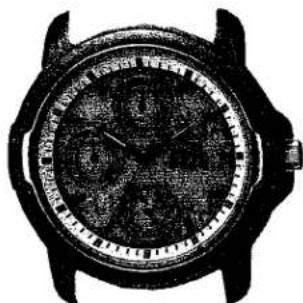
This watch is an analog solar power watch which has solar cell on its dial to convert optical energy into electric energy to drive itself.
§2. SPECIFICATIONS
| Caliber No. | 8625A | 8626A | 8627A | |
| Type | Analog Quartz Solar Cell Watch | |||
| Module size (mm) | ø30.8 x 3.8 mm | |||
| Accuracy (at normal temperature) | Within ±20 sec/monthNormal temperature range of 5°C/41°F ~ 35°C/95°F | |||
| Oscillation frequency | 32,768 Hz | |||
| IC | C/MOS-LSI 1 unit | |||
| Operating temperature range | -10°C ~ +60°C (14°F ~ 140°F) | |||
| Converter | Bipolar step motor | |||
| Time adjustment function | Not installed | |||
| Measurement gate | 10 sec | |||
| Display features | Time | Hour, Minute, Second, 24 hour hand | ||
| Calendar | Date and Day displayed by small hand | |||
| Additional functions | Quick start | |||
| Overcharging prevention | ||||
| Insufficient recharging | ||||
| Time setting indication | ||||
| Secondary battery | Part No & Code | 295-33 (MT621) | 295-33 (MT621) | 295-28 (MT621) |
| Remarks | Secondary battery block (With welded lead plate at (-) side) | Secondary battery block (With welded lead plate at (+) side) | ||
§3. ABOUT SOLAR CELL WATCH
- A secondary battery is used in this watch to store electrical energy. This secondary battery is a clean energy battery which doesn't use any toxic substances such as mercury. Once fully charged, the watch will continue to run for about 60 days without further charging.
To use this watch comfortably, make sure that the watch is always recharged before it finally stops. There is no concern for overcharging this watch. (Overcharging Prevention Feature) we recommend that you recharge the watch everyday.
- Because the secondary battery repeatedly charges and discharges, it is not necessary to replace regularly like a normal battery.
§4. SETTING THE TIME AND CALENDAR
- When setting the time and the calendar together, the following order would be convenient: Day → Time → Date.
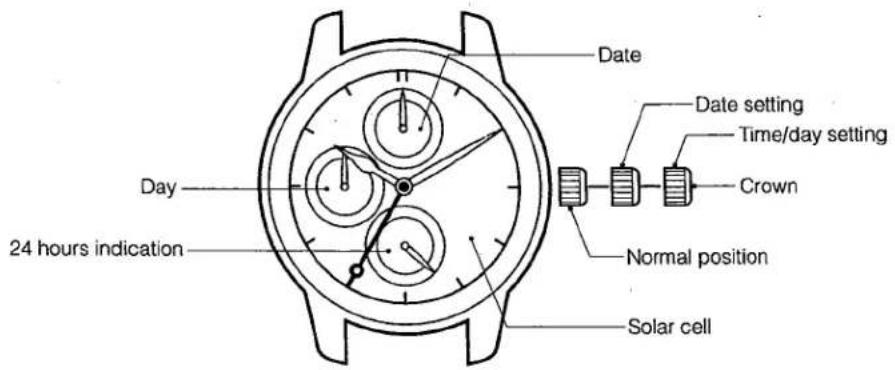
Setting the Time
- Stop the second hand at the 0 second position by pulling out the crown to the 2nd click.
- Turn the crown to set the time.
The 24 hour hand is synchronized with the hour hand.
- After setting the time, firmly push the crown back into its normal position.
Setting the Calendar
- Pull the crown out to the 2nd click.
- Turn the crown and move forward the hour hand and the minute hand to reset the day of the week.
* Please note that if you turn the hour and the minute hands backward, the date may not be changed.
- Pull the crown out to the 1st click.
- Set the date hand to the desired date by turning the crown. (If you turn the crown backward, it runs idle.)
- Do not set the date between 9:00pm and 1:00am. It may affect the clean day function and you may not get the correct date the next day.
★ After you have set the calendar, be sure to firmly return the crown to its normal position.
§5. SPECIAL ADDITIONAL FEATURES OF THE SOLAR POWER WATCH
These functions are only found in the solar power watch.
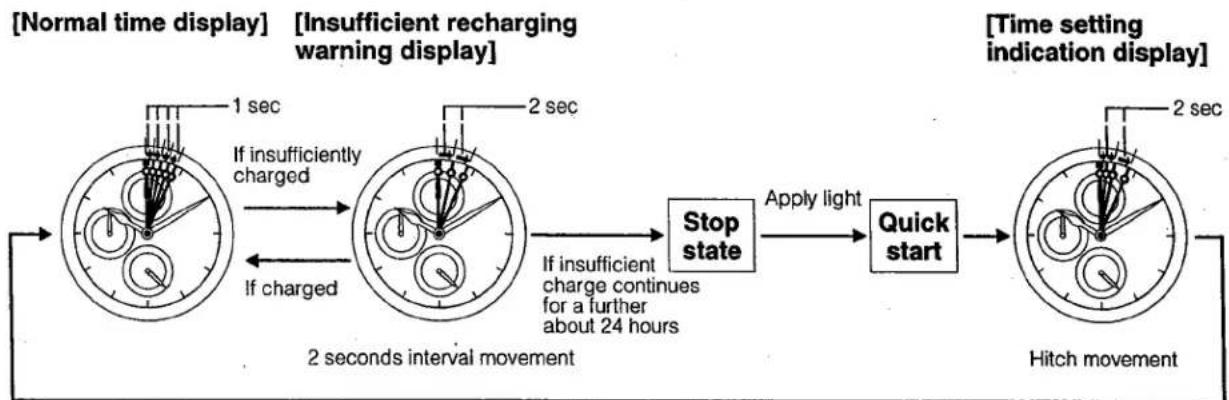
If this watch becomes insufficiently charged, a warning function comes into operation and the display changes, as below:
flowchart
graph LR
    A["Normal time display"] --> B["Insufficient recharging warning display"]
    B --> C["2 seconds interval movement"]
    C --> D["Stop state"]
    D --> E["Apply light"]
    E --> F["Quick start"]
    F --> G["Time setting indication display"]
    G --> H["Hitch movement"]

    style A fill:#f9f,stroke:#333
    style B fill:#f9f,stroke:#333
    style C fill:#f9f,stroke:#333
    style D fill:#ccf,stroke:#333
    style E fill:#ccf,stroke:#333
    style F fill:#ccf,stroke:#333
    style G fill:#ccf,stroke:#333
    style H fill:#ccf,stroke:#333

    note1["1 sec"] --> B
    note2["2 sec"] --> B
    note3["If insufficiently charged"] --> B
    note4["If charged"] --> B
    note5["If insufficient charge continues for a further about 24 hours"] --> C
If sufficiently charged and time is set
Insufficient Recharging Warning Feature
The second hand changes to two-second interval movement to indicate insufficient recharging.
Even in such a case, the watch keeps correct time, but it about 24 hours pass after two-second interval movement begins, the watch stops operating.
After exposing the watch to light, recharging takes place and the watch returns to one-second interval movement.
Quick Start Feature
The watch will stop if it is completely discharged.
It will begin to operate soon after it is exposed to light.
(However, the time it takes to start may vary according to the brightness of the light.)
Please note that if the light is blocked the watch might stop again as a result of being insufficiently recharged.
Time Setting Indication Feature
If the watch stops, subsequent exposure to light allows the 'quick start' function to start again, and the second hand moves with a hitch movement to indicate that displayed time is now incorrect.
In this case, quickly recharge the watch and reset the time.
Otherwise, the hitch movement will continue.
Overcharging Prevention Feature
You can recharge without worry.
Once the secondary battery is fully recharged, the overcharging prevention feature comes into operation and prevents further recharging, so that the secondary battery is not overcharged.
§6. WHEN THE SECOND HAND MOVEMENT IS ABNORMAL
Two-second interval movement
Insufficient recharging warning feature is working.
Recharge the watch immediately by exposing it to light until it has returned to one-second interval movement.
During two-second interval movement, the watch continues to keep the correct time.
Two-second interval movement continues for about 24 hours, and the watch stops.
Hitch movement
Time setting indication feature is working.
Immediately expose the solar cell to light in order to recharge it, then reset to the correct time.
§7. TIME REQUIRED FOR RECHARGE
Time required for recharge may vary according to the design (color of the dial, etc.) and operating environment. The following table will serve you as rough reference.
* The recharging time is the time when the watch is continuously exposed to radiation.
| Illuminance (lux) | Environment | Time required | ||
| One day usage | From the stop state to the one second movement | Empty to full | ||
| 500 | Inside an ordinary office | 1 hour 20 minutes | 5 hours | 100 hours |
| 1000 | 60–70cm under a fluorescent light | 40 minutes | 2 hours 30 minutes | 49 hours |
| 3000 | 20cm under a fluorescent light | 15 minutes | 50 minutes | 15 hours |
| 10000 | Exterior, cloudy | 5 minutes | 15 minutes | 5 hours |
| 100000 | Exterior, summer, sunny | 2 minutes | 7 minutes | 2 hours 30 minutes |
Full recharging time .....The time from when the watch is stopped to when it is fully recharged. (Empty to full)
One day usage ....The recharging time required for the watch to run for one day.
§8. NOTE ON RECHARGING
The watch will be damaged during recharging if it leaves in hot (about 60^ C/140°F or more). Avoid recharging at high temperatures.
§9. CAUTION
Never use another battery apart from the secondary battery (Titanium Lithium Ion Battery) used in this watch.
The watch structure is so designed that a different kind of battery other than the specified cannot be used to operate it. However, in case a different kind of battery such as a silver battery is used by some chance, there is a danger that the watch will be overcharged to burst, causing damage to the watch and even to the human body.
When you replace the secondary battery, be sure to use a designated secondary battery.
- TECHNICAL INFORMATION INFORMACION TECNICA
- ENGLISH
- Contents
- ESPAÑOL
- Índice
- §1. OUTLINE
- §3. ABOUT SOLAR CELL WATCH
- §4. SETTING THE TIME AND CALENDAR
- Setting the Time
- Setting the Calendar
- §5. SPECIAL ADDITIONAL FEATURES OF THE SOLAR POWER WATCH
- Insufficient Recharging Warning Feature
- Quick Start Feature
- Time Setting Indication Feature
- Overcharging Prevention Feature
- You can recharge without worry.
- §6. WHEN THE SECOND HAND MOVEMENT IS ABNORMAL
- Two-second interval movement
- Hitch movement
- §7. TIME REQUIRED FOR RECHARGE
- §8. NOTE ON RECHARGING
- §9. CAUTION
Mærke : CITIZEN
Model : CAL 8627
Kategori : Ur