EW0372-87P - Ur CITIZEN - Gratis brugsanvisning og manual
Find enhedens vejledning gratis EW0372-87P CITIZEN i PDF-format.


Brugerspørgsmål om EW0372-87P CITIZEN
0 spørgsmål om dette apparat. Besvar dem du kender, eller stil dit eget.
Stil et nyt spørgsmål om dette apparat
Download vejledningen til din Ur i PDF-format gratis! Find din vejledning EW0372-87P - CITIZEN og tag din elektroniske enhed tilbage i hånden. På denne side er alle dokumenter nødvendige for brugen af din enhed offentliggjort. EW0372-87P af mærket CITIZEN.
BRUGSANVISNING EW0372-87P CITIZEN
Abbreviated instruction
ENGLISH
- This watch is light-powered. Be sure your watch is fully charged before use.
- For complete instructions for setting, use, charging time and specifications, refer to the full instruction manual: Instruction Manual of general solar-powered watches
Component identification
3-hand models

text_image
Hour hand Minute hand Crown Second hand- Illustrations for reference only. Actual appearance of your watch may differ from the illustrations above. Some models do not have the second hand.

Setting the time
- Pull the crown out when the second hand points to 12:00 (0 second).
The second hand stops.
- Rotate the crown to set the time.
- Move the hands 4 or 5 minutes forward of desired minutes and move them back to the right time to set the time more precisely.
- Push the crown in accordance with a reliable time source.
The second hand starts moving.
3-hand and date models 3-hand and date/day models

text_image
Hour hand Second hand Minute hand Crown 7 Date indication• Illustrations for reference only. Actual appearance of your watch may differ from the illustrations above.
Setting the time
- Do not adjust between 9:00 PM and 1:00 AM. Otherwise the date indication may change incorrectly.
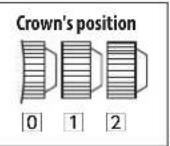
- Pull the crown out to position 2 when the second hand points to 12:00 (0 second).
The second hand stops.
-
Rotate the crown to set the time.
-
Change of date indication shows it just became AM. Set the time to ensure proper AM or PM time is set.
-
Move the hands 4 or 5 minutes forward of desired minutes and move them back to the right time to set the time more precisely.
-
Push the crown in to position 0 in accordance with a reliable time source.
The second hand starts moving.
Setting the date indication
- Do not adjust between 9:00 PM and 1:00 AM. Otherwise the date indication may change incorrectly.
-
Date indication adjustment is required on the first of the following months: March, May, July, October and December.
-
Pull the crown out to position 1.
-
Rotate the crown counterclockwise to adjust the date indication.
- Clockwise rotation moves nothing.
- Push the crown in to position ☐ to finish the procedure.
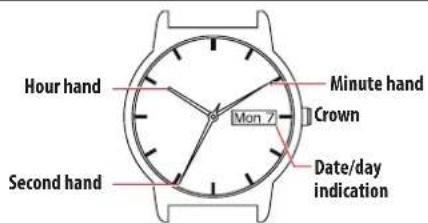
text_image
Hour hand Second hand Mon 7 Minute hand Crown Date/day indication• Illustrations for reference only. Actual appearance of your watch may differ from the illustrations above.

Setting the time
- Do not adjust between 9:00 PM and 4:30 AM. Otherwise the date and day indication may change incorrectly.
- Pull the crown out to position 2 when the second hand points to 12:00 (0 second).
The second hand stops.
-
Rotate the crown to set the time.
-
Change of date indication shows it just became AM. Set the time to ensure proper AM or PM time is set.
-
Move the hands 4 or 5 minutes forward of desired minutes and move them back to the right time to set the time more precisely.
-
Push the crown in to position 0 in accordance with a reliable time source.
The second hand starts moving.
Setting the date and day indication
- Do not adjust between 9:00 PM and 4:30 AM. Otherwise the date and day indication may change incorrectly.
-
Date indication adjustment is required on the first of the following months: March, May, July, October and December.
-
Pull the crown out to position 1.
-
Rotate the crown to adjust the date and day indication.
-
Rotate it counterclockwise to change the date indication.
-
Rotate it clockwise to change the day indication.
-
Push the crown in to position ☐ to finish the procedure.