
HSU19E-TXW5BN-INV - Aircondition HAIER - Gratis brugsanvisning og manual
Find enhedens vejledning gratis HSU19E-TXW5BN-INV HAIER i PDF-format.


Brugerspørgsmål om HSU19E-TXW5BN-INV HAIER
0 spørgsmål om dette apparat. Besvar dem du kender, eller stil dit eget.
Stil et nyt spørgsmål om dette apparat
Download vejledningen til din Aircondition i PDF-format gratis! Find din vejledning HSU19E-TXW5BN-INV - HAIER og tag din elektroniske enhed tilbage i hånden. På denne side er alle dokumenter nødvendige for brugen af din enhed offentliggjort. HSU19E-TXW5BN-INV af mærket HAIER.
BRUGSANVISNING HSU19E-TXW5BN-INV HAIER
SPLIT TYPE ROOM AIR CONDITIONER OPERATION MANUAL

HSU11V-TMS3BN-INV HSU11V-TMS3BN-INV HSU11V-TMG3BN-INV HSU11V-TMR3BN-INV HSU17VP-TQS3BN-INV HSU17VP-TQP3BN-INV HSU17VP-TQI3BN-INV HSU12V-TMS3BN-INV HSU13K-PZB3BN-INV HSU13E-TXG4BN-INV HSU13K-PYFR4BN-INV HSU13E-TXG5BN-INV HSU13K-PYFR5BN-INV HSU13K-PYFC5BN-INV HSU13K-PYFG5BN-INV HSU13E-TXWSBN-INV HSU13E-TXSSBN-INV HSU13K-PYSG5BN-INV HSU13K-PYSC4BN-INV HSU13K-PYFR3BN-INV HSU13C-TGQ3BN-INV HSU13C-TGQ3BN-INV HSU13C-TTS3BN-INV HSU13K-PYSG1BN-INV HSU13K-PYSS1BN-INV HSU13Z-PZFDP3BN-INV HSU14E-TXWSBN-INV HSU14E-TXSSBN-INV
HSU14K-PYF05BN-INV HSU14K-PYFR5BN-INV HSU14E-TXG5BN-INV HSU14C-TQG3BN-INV HSU14K-PYFC5BN-INV HSU14K-PYSG5BN-INV HSU14K-PYFN5BN-INV HSU14K-PYFR5BN-INV HSU15V-TMS3BN-INV HSU17V-TMS3BN-INV HSU17VP-TQN3BN-INV HSU17VP-TQA3BN-INV HSU17VP-TQB3BN-INV HSU17VP-TQG3BN-INV HSU17VP-TQR3BN-INV HSU30V-TBS3BN-INV HSU35V-TBS3BN-INV HSU40V-TBS3BN-INV HSU50K-PYFW3BN-INV HSU50P-QYFC3BN-INV HSU50KP-PYFW5BN-INV HSU50KP-PYFC3BN-INV HSU50KP-PYFN3BN-INV HSU50CP-TQR3BN-INV HSU50CP-TQS3BN-INV HSU50CP-TQP3BN-INV HSU50CP-TQA3BN-INV HSU50CP-TQI3BN-INV HSU50CP-TQN3BN-INV
HSU50C-TQS3BN-INV HSU18C-TQS3BN-INV HSU18C-TQS3BN-INV HSU18V-TQS3BN-INV HSU18V-TQS4BN-INV HSU18K-PYFC3BN-INV HSU18R-NTB3BN-INV HSU18K-PYFRABN-INV HSU18K-PYFC4BN-INV HSU18R-NTR3BN-INV HSU18K-PYSS3BN-INV HSU18K-PYFC4BN-INV HSU18K-PYSC4BN-INV HSU18K-PYSG4BN-INV HSU18K-PYSG3BN-INV HSU18K-PYSG9BN-INV HSU18K-PYSC5BN-INV HSU18K-PYFC5BN-INV HSU18Z-PZFDB3BN-INV HSU18EP-TQS5BN-INV HSU18EP-TQS5BN-INV HSU18EP-TX5BN-INV HSU18EP-TX5BSN-INV HSU18EP-TX5BSN-INV HSU18EP-TX5BSN-INV HSU18EP-TX5BSN-INV HSU18EP-KPYFS5BN-INV HSU18KP-KPYRS5BN-INV HSU18KP-KPYFS6BN-INV HSU18KP-KPYRS7BN-INV HSU18KP-KPYFRS5BN-INV HSU18KP-KPYFC5BN-INV HSU18KP-KPYFASBNS-INV HSU18KP-KPYFASBNS-INV HSU25VP-TQTSBSN-INV HSU25V-TQS3BN-INV HSU25V-TQS4BSN-INV HSU25V-TQS4BSN-INV HSU25VP-TQTSBSN-INV HSU25VP-TQTSBSN-INV HSU25VP-TXRSBNS-INV HSU25VP-TXRSBNS-INV HSU19E-TXG4BN-INV
HSU19C-TQ63BN-INV HSU19K-PYFR4BN-INV HSU19E-TX58BN-INV HSU19E-TX58BN-INV HSU19E-TX53BN-INV HSU19K-PYFR5BN-INV HSU19K-PYFC5BN-INV HSU19E-TX58BN-INV HSU19K-PYFC5BN-INV HSU19SHD-PFG6BN-INV HSU19K-PYFC5BN-INV HSU19G-MZFWSBN-INV HSU19K-PYFC5BN-INV HSU19KB-PG5BSN-INV HSU19K-PYFC5BN-INV HSU19K-PYFS3BN-INV HSU19K-PYFC5BN-INV HSU19K-PYSC4BN-INV HSU19SHD-PFG6BN-INV HSU19K-PZFBSN-INV HSU19SHD-PFG6BN-INV HSU19SHD-PFG6BN-INV HSU19K-PYZPSBSN-INV HSU19K-PZPFSBSN-INV HSU19K-PZPFSBSN-INV HSU19K-PZPFSBSN-INV HSU19K-PZPFSBSN-INV HSU19K-PZPFSBSN-INV HSU19K-PZPFSBSN-INV HSU19K-PZPFSBSN-INV HSU19K-PZPFSBNSIN-VN HSU19K-PZPFSBNSIN-VN HSU19K-PZPFSBNSIN-VN HSU19K-PZPFSBNSIN-VN HSU19G-MZFMSBN-INV HSU19G-MZFMSBN-INV HSU19G-MZFMSBN-INV HSU19G-MZFDSBN-INV HSU19G-MZFMSBN-INV HSU20SHD-PFG5BN-INV HSU20SHD-PFG6BN-INV HSU24K-PYFR3BN-INV HSU24K-PYFR3BN-INV HSU24K-PYFR3BN-INV HSU24K-PYFR3BN-INV
HSU24K-PYFG3BN-INV HSU24E-TXS3BN-INV HSU24E-TX3GBN-INV HSU24E-TXW3BN-INV HSU24E-TXR3BN-INV HSU24E-TXS3BN-INV HSU24E-TXS3BN-INV HSU13K-PYAIR3BN-INV HSU13K-PYAIR4BN-INV HSU14K-PYAIR5BN-INV HSU50KP-PAIW3BN-INV HSU18K-PYAIR3BN-INV HSU18K-PYAIR4BN-INV HSU18K-KP-AIR5BN-INV HSU19K-PYAIR5BN-INV HSU19K-PYAIR6BN-INV HSU19K-PYAIR4BN-INV HSU18U-PYAIC5BN-INV HSU19K-PYAIN5BN-INV HSU19K-PYAIR5BN-INV HSU19K-PZAIB5BN-INV HSU19K-PZAIM5BN-INV HSU19K-PZAIS5BN-INV HSU19K-PZAIP5BN-INV HSU19K-PZAIA5BN-INV HSU19K-PZAIA5BN-INV HSU19K-PZAIA5BN-INV HSU19K-PZAIC5BN-INV HSU19G-MZAIM5BN-INV HSU19G-MZAIS5BN-INV HSU19G-MZAIP5BN-INV HSU19G-MZAID5BN-INV HSU19G-MZAAI5BN-INV HSU19G-MZAAC5BN-INV HSU19P-YAIGS3BN-INV HSU19P-YAIGS3BN-INV HSU20SD-PAIGS8N-INV HSU24K-PYAIR3BN-INV
Parts and Functions
■ Indoor Unit


Outdoor Unit

① OUTLET ② INLET ③ CONNECTING PIPING AND ELECTRICAL WIRING ④ DRAIN HOSE
Actual inlet grille may vary from the one shown in the manual according to the product purchased.
- Please read this operation manual before using the air conditioner. Keep this operation manual for future reference.
0011533504
Operation
Remote control

■ Loading of the battery

1 Remove the battery cover; 2 Load the batteries as illustrated 2 R-03 batteries, resetting key (cylinder); 3 Be sure that the loading is in line with the" + "/"-";
4 Load the battery, then put on the cover again.
● The distance between the signal transmission head and the rece-
iver hole should be within 7m without any obstacle as well.
- When electronic-started type fluorescent lamp or change-over
type fluorescent lamp of wireless telephone is installed in the room. The receiver is apt to be disturbed in receiving the signals
so the distance to the indoor unit should be shorter.
● Full display or unclear display during operation indicates the
batteries have been used up. Please change batteries
- If the remote controller can run normally during operation, please remove the batteries and reload several minutes later.
Base Operation
Remote controller
- Unit start
Press ON/OFF
on the remote controller,
unit starts.
Use remote control to turn on
and display setting
- Select operation mode
COOL button:Cooling mode


3. Select temp. setting
Press TEMP▲/TEMP▼ button


TEMP ▲ Every time the button is pressed, temp. setting increase 1°C, if kept depressed, it will increase rapidly
TEMP Every time the button is pressed, temp. setting decrease 1°C, if kept depressed, it will decrease rapidly
Select a desired temperature.
4.Fan speed selection
Press button to enter additional options, when cycle display to ✗, ✗ will flash. And then press
enter to FAN function
Press FAN button. For each press, fan speed changes as follows:
Remote controller:
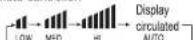
Air conditioner is running under displayed fan speed. When FAN is set to AUTO, the air conditioner automatically adjusts the fan speed according to room temperature.
| Operation Mode | Remote Controller | Note |
| COOL | according to room temperature. | |
| DRY | In DRY mode, when room temperature becomes lower than temp setting+2°C, unit will run intermittently at LOW speed regardless of FAN setting. | |
| FAN | In FAN operation mode, the unit will not operate in COOL or HEAT mode but only in FAN mode. AUTO is not available in FAN mode. And temp setting is disabled. In FAN mode, sleep operation is not available. |
Operation
Emergency operation and test operation
Emergency Operation:
- Use this operation only when the remote controller is defective or lost, and with function of emergency running, air conditioner can run automatically for a while.
- When the emergency operation switch is pressed, the "PI" sound in heard area, which means the start of this operation
sound is heard once, which means the start of this operation. When power switch is turning on for the first time and
- When power switch is turning on for the first time and emergency operation starts, the unit will run automatic
the following modes:
| Room temperature | Designated temperature | Timer mode | Fan speed | Operation mode |
| Above 23°C | 26°C | No | AUTO | COOL |

- It is impossible to change the settings of temp. and fan speed,It is also not possible to operate in timer or dry mode.
Test operation:
Test operation switch is the same as emergency switch.
- Use this switch in the test operation when the room
temperature is below 16°C, do not use it in the normal operation.
- Continue to press the test operation
switch for more than 5 seconds. After
you hear the "PI" sound twice, release
your finger from the switch: the cooling
operation starts with the air flow speed "Hi"
• Under this operation made the free rates of index
- Under this operation induction
Air Flow Direction Adjustment
- Status display of air flow Vertical flap
Pos.1 → √→√→√→√→√→√→

(Auto swing)
2.Left and right air flow adjustment
(This function is unavailable or
For each press of SWING
button, remote controller
displays as follows
remote controller:

Pos.1 Pos.2 Pos.3 Pos.4 Pos.5 Pos.6
Note: In some model: The remote has the button 📋, But the AC doesn't have the left and right air flow auto-adjustment function in this condition, change the direction of vertical blades manually.
Cautions:
- When adjusting the flap by hand, turn off the unit.
- When humidity is high, condensate water might occur
at air outlet if all vertical louvers are adjusted to left or right.
- It is advisable not to keep horizontal flap at downward
position for a long time in COOL or DRY mode
otherwise, condensate water might occur.
Note:
When restart after remote turning off, the remote controller will automatically memorize the previous set swing position.
Sleep Operation
Before going to bed, you can simply press the SLEEP button and unit will operate in SLEEP mode and bring you a sound sleep.

Operation Mode
- In COOL,DRY mode
1 hours after SLEEP mode starts, temp. will become 1°C
higher than temp setting. After another 1 hours, temp rises
by 1°C further. The unit will run for further 6 hours then stops
Temp. is higher than temp. setting so that room temperature won't be too low for your sleep.

-
In FAN mode: It has no SLEEP function
-
Set the wind speed change when sleeping
If the wind speed is high or middle before setting for the sleep, set for lowing the wind speed after sleeping. If it is low wind, no change.
Note
When TIMER function is set, the sleeping function can't be set up. After the sleeping function is set up, if user resets TIMER function, the sleeping function will be cancelled; the machine will be in the state of timing-on.
■ Turbo /Quiet Operation

When you need fast cool or fast
dehumidification,you can choose
the Turob function; when you sleep,
read, you can choose Quiet function

Press the button, you can switch the "Turbo" and
"Quiet" function easily. Every press, the remote controller will
switch as below → ↘TURBO→ ↘QUIET→ cancel
When running in Turbo, the fan speed is the highest, when running in Quiet, the fan speed is super slow
Operation
Dry Operation

Press "DRY" Button, when the LCD displays
is set
In Dry mode, compressor will stop to operate when the room temperature is below the setting temperature. If the room temperature is higher than the setting temperature, the logic circuit will control the operation of compressor and indoor fan speed, in order to cause dew formation on cooling coil to obtain the effect of dehumification. In dry mode, it is normal that the indoor fan speed is lower than other operation mode. Note: Recommend to use dry model in high humidity condition to avoid water droplet on IDU
Timer Operation
- Set ON timer
Press Ⓞ to close the screen
Press set the duration (hour).
Press "CONFIRM/CANCEL"
- Set OFF timer
Press Ⓤ to activate the screen
Press set the duration (hour).
Press "CONFIRM/CANCEL"
■ Energy Control Operation
-
Turn the appliance on.
-
• Press [ECO] button repeatedly to select each step.
Note
- 1 step: The strong air blows out to cool indoor air quickly.
- 50 is displayed on the display screen.
- 2 step: The power input is 100% of rated power.
- 5 is displayed on the display screen.
- 3 step: The power Input is decreased by 25%
compared to rated power input - 0 | is displayed on the display screen.
- 4 step : The power Input is decreased by 45%
compared to rated power input. - 12 is displayed on the display screen.
- 5 step (Optional) : The power Input is
decreased by 60 % compared to rated power
input. - 1 is displayed on the display screen.
• ||(3 step) L2 (4 step) L3 (5 step) is
displayed on some indoor units.
• This function is available with Cooling Mode. - Capacity may decrease when Energy Control mode is selected.
Self Clean Operation

◆Functional description: the purpose of this function is to clean the evaporator.
◆Entry and exit: Press self clean button to enter this function, then it will display "CL" on the panel of the indoor unit and also on the remote controller. After running 18-21 minutes, this function will exit automatically with the "Pi" sound is heard twice, then the unit return to original state. Under operation process of self clean, press the button repeatedly has no effect and cannot exit, but the power off button and other mode button can make it exit.
Note:
-
It has no effect under the mode of timer/sleep.
-
After this mode starts, the air volume may reduce or
even have no airflow.
- It is normal if the unit make some sound like expand with
heat and contract with cold
-
The 'CL' display time may last differently on the remote controller and panel.
-
It is normal if the temperature is below 0°C outside, the
unit may display *F25* under this mode running.
Please turn off the unit for 10 seconds then restart.
- The best condition to run this mode: the temperature is
15℃\~27℃ and the humidity is 35%\~60% in the door,
the temperature is 30°C\~40°C (cooling seas
- It is hard to frost if the air is too dry(humidity<20%). and
If the humidity is too high(humidity > 70%),
the condensate water may increase, which may move away some frost.
■ Health airflow Operation
- Press Ⓐ to starting Setting the comfort work conditions
- The setting of healthy airflow function
Press EXTRA FUNCTION button to enter additional options. Press this button continuously, the louvers location will cycle between in the following three locations, to choose the swing location what you needed, and then press CONFIRM button to confirm.

Notice: Do not direct the flap by hand. Otherwise, the grille will run incorrectly. If the grille is not run correctly, stop for a minute and then start, adjusting by remote controller. Note: 1 After setting the healthy airflow function, the position
Water is fixed. 2. In cooling, it is better to select the mode. 3. In cooling and dry using the air conditioner for a long time under the high air humidity, condensate water may occur at the grille.


Maintenance
| Problem | Cause of crack points |
| The system does not resa# | |
| Named A## | • Will it be stopped, it will be isolated. It will be isolated. It will be isolated. It will be isolated. It will be isolated. It will be isolated. It will be isolated. It will be isolated. It will be isolated. It will be isolated. It will be isolated. It will be isolated. It will be isolated. It will be isolated. It will be isolated. It will be isolated. It will be isolated. It will be isolated. It will be isolated. It will be isolated. It will be isolated. |
| Note is heard | • During unit operation of a checking. If any time has been in shaping in shaping the system (this noiso is guaranteed by air conditioner) |
| Smals are guaranteed | • Till is because a glass can be made to find it. • Still is because a glass can be made to find it out of operation. Air flow in unit operation. Air flow in unit operation. Air flow in unit operation. Air flow in unit operation. Air flow in unit operation. Air flow in unit operation. Air flow in unit operation. Air flow in unit operation. Air flow in unit operation. Air flow in unit operation. Air flow in unit operation. Air flow in unit operation. Air flow in unit operation. Air flow in unit operation. Air flow in unit operation. Air flow in unit operation. Air flow in unit operation. Airflow is guaranteed by 2 minutes after air conditioner. |
| Metal is stored for blow out | • During COOL or DRY operation, plant is guaranteed. |
| In dry mode, fin hood until may flow out mist or door air. | • In DRY mode, when room speed can be changed |
| Temperature becomeslower than 1 day, then tempurant-ke can turn tempurant-ke can turn tempurant-ke can turn tempurant-ke can turn tempurant-ke can turn tempurant-ke can turn tempurant-ke can turn tempurant-ke can turn tempurant-ke can turn tempurant-ke can turn tempurant-ke can turn tempurant-ke can turn tempurant-ke can turn tempurant-ke can turn tempurant-ke can turn tempu# and other cooling systems (the crenation) through window driving the window driving the cooling system (the crenation) through window driving the cooling system (the crenation) through window driving the cooling system (the crenation) through window driving the cooling system (the crenation) through window driving the cooling system (the crenation) through window driving the cooling system (the crenation) through window driving the cooling system (the crenation) through window driving the cooling system (the crenation) through window driving the cooling system (the crenation) through window driving the Cooling operation (the crenation) through window driving the Cooling operation (the crenation) through window driving the Cooling operation (the crenation) through window driving the Cooling operation (the crenation) through window driving the Cooling operation (the crenation) through window driving the Cooling operation (the crenation) through window driving the Cooling operation (the crenation) through window driving the Cooling operation (the crenation) through window driving the Cooling operation (the ctenation) through window driving the Cooling operation (the crenation) through window driving the Cooling operation (the crenation) through window driving the Cooling operation (the crenation) through window driving the Cooling operation (the crenation) through window driving the Cooling operation (the crenation) through window driving the Cooling operation (the crenation) through window driving the Cooling operation (the crenation) through window driving the Cooling operation (the crenation) through Window driving the Cooling operation (the crenation) through Window driving the Cooling operation (the crenation) through Window driving the Cooling operation (the crenation) through Window driving the Cooling operation (the crenation) through Window driving the Cooling operation (the crenation) through Window driving the Cooling operation (the crenation) through Window driving the Cooling operation (the crenation) through Window driving the Cooling operation (the crenation) through Window driving the Cooling Operation (the crenation) through Window driving the Cooling Operation (the crenation) through Window driving the Cooling Operation (the crenation) through Window driving the Cooling Operation (the crenation) through Window driving the Cooling Operation (the crenation) through Window driving the Cooling Operation (the crenation) through Window driving the Cooling Operation (the crenation) through Window driving the Cooling Operation (the crenation) through Window driving the Cooling Operation (the ctenation) through Window driving the Cooling Operation (the crenation) through Window driving the Cooling Operation (the crenation) through Window driving the Cooling Operation (the crenation) through Window driving the Cooling Operation (the crenation) through Window driving the Cooling Operation (the crenation) through Window driving the Cooling Operation (the crenation) through Window driving the Cooling Operation (the crenation) through Window driving the Cooling Operation (the crenation) throughWindow driving the Cooling Operation (the crenation) through Window driving the Cooling Operation (the crenation) through Window driving the Cooling Operation (the crenation) through Window driving the Cooling Operation (the crenation) through Window driving the Cooling Operation (the crenation) through Window driving the Cooling Operation (the crenation) through Window driving the Cooling Operation (the crenation) through Window driving the Cooling Operation (the crenation) through Window driving the Cooling Service (the crenation) through Window driving the Cooling Service (the crenation) through Window driving the Cooling Service (the crenation) through Window driving the Cooling Service (the crenation) through Window driving the Cooling Service (the crenation) through Window driving the Cooling Service (the crenation) through Window driving the Cooling Service (the crenation) through Window driving the Cooling Service (the crenation) through Window driving the Cooling Service (the ctenation) through Window driving the Cooling Service (the crenation) through Window driving the Cooling Service (the crenation) through Window driving the Cooling Service (the crenation) through Window driving the Cooling Service (the crenation) through Window driving the Cooling Service (the crenation) through Window driving the Cooling Service (the crenation) through Window driving the Cooling Service (the crenation) through Window driving the Cooling Service (the crenation) throughWindow driving the Cooling Service (the crenation) through Window driving the Cooling Service (the crenation) through Window driving the Cooling Service (the crenation) through Window driving the Cooling Service (the crenation) through Window driving the Cooling Service (the crenation) through Window driving the Cooling Service (the crenation) through Window driving the Cooling Service (the crenation) through Window driving the Cooling Service (the crenation) through Window driving the CoolingService (the crenation) through Window driving the Cooling Service (the crenation) through Window driving the Cooling Service (the crenation) through Window driving the Cooling Service (the crenation) through Window driving the Cooling Service (the crenation) through Window driving the Cooling Service (the crenation) through Window driving the Cooling Service (the crenation) through Window driving the Cooling Service (the crenation) through Window driving the Cooling Service (the cstenation) through Window driving the Cooling Service (the cstenation) through Window driving the Cooling Service (the cstenation) through Window driving the Cooling Service (the cstenation) through Window driving the Cooling Service (the cstenation) through Window driving the Cooling Service (the cstenation) through Window driving the Cooling Service (the cstenation) through Window driving the Cooling Service (the cstenation) through Window driving the Cooling Service (the cstenation) throughWindow driving the Cooling Service (the cstenation) through Window driving the Cooling Service (the cstenation) through Window driving the Cooling Service (the cstenation) through Window driving the Cooling Service (the cstenation) through Window driving the Cooling Service (the cstenation) through Window driving the Cooling Service (the cstenation) through Window driving the Cooling Service (the cstenation) through Window driving the Cooling Service (the cstenation) through Window driving the CoolingService (the cstenation) through Window driving the Cooling Service (the cstenation) through Window driving the Cooling Service (the cstenation) through Window driving the Cooling Service (the cstenation) through Window driving the Cooling Service (the cstenation) through Window driving the Cooling Service (the cstenation) through Window driving the Cooling Service (the cstenation) through Window driving the Cooling Service (the cstenation) through Window driving the Cooling Service (the ctenation) through Window driving the Cooling Service (the ctenation) through Window driving the Cooling Service (the ctenation) through Window driving the Cooling Service (the ctenation) through Window driving the Cooling Service (the ctenation) through Window driving the Cooling Service (the ctenation) through Window driving the Cooling Service (the ctenation) through Window driving the Cooling Service (the ctenation) through Window driving the Cooling Service (the ctenation) throughWindow driving the Cooling Service (the cstenation) through Window driving the Cooling Service (the cstenation) through Window driving the Cooling Service (the cstenation) through Window driving the Cooling Service (the cstenation) through Window driving the Cooling Service (the cstenation) through Window driving the Cooling Service (the cstenation) through Window driving the Cooling Service (the cstenation) through Window driving the Cooling Service (the cstenation) throughWindow driving the CoolingService (the cstenation) through Window driving the Cooling Service (the cstenation) through Window driving the Cooling Service (the cstenation) through Window driving the Cooling Service (the cstenation) through Window driving the Cooling Service (the cstenation) through Window driving the Cooling Service (the cstenation) throughWindow driving the Cooling Service (the cstenation) through Window driving the Cooling Service (the cstenation) through Window driving the Cooling Service (the ctenation) through Window driving the Cooling Service (the cstenation) through Window driving the Cooling Service (the cstenation) through Window driving the Cooling Service (the cstenation) throughWindow driving the Cooling Service (the cstenation) through Window driving the Cooling Service (the cstenation) through Window driving the Cooling Service (the cstenation) through Window driving the Cooling Service (the cstenation) through Window driving the Cooling Service (the cstenation) throughWindow driving the Cooling Service (the cstenation) through Window driving the Cooling Service (the cstenation) through Window driving the Cooling Service (the cstenation) through Window driving the CoolingService (the cstenation) through Window driving the Cooling Service (the cstenation) through Window driving the Cooling Service (the cstenation) through Window driving the Cooling Service (the cstenation) through Window driving the Cooling Service (the cstenation) throughWindow driving the Cooling Service (the cstenation) through Window driving the Cooling Service (the cstenation) through Window driving the Cooling Service (the cstenation) through Window driving the Cooling Service (the ctenation) through Window driving the Cooling Service (the ctenation) through Window driving the Cooling Service (the ctenation) throughWindow driving the Cooling Service (the cstenation) through Window driving the Cooling Service (the cstenation) through Window driving the Cooling Service (the cstenation) through Window driving the Cooling Service (the cstenation) throughWindow driving the Cooling Service (the cstenation) through Window driving the Cooling Service (the cstenation) through Window driving the Cooling Service (the cstenation) throughWindow driving the Cooling Service (the cstenation) through Window driving the Cooling Service (the cstenation) through Window driving the Cooling Service (the cstenation) throughWindow driving the Cooling Service (the cstenation) through Window driving the Cooling Service (the cstenation) through Window driving the CoolingService (the cstenation) through Window driving the Cooling Service (the cstenation) through Window driving the Cooling Service (the cstenation) through Window driving the Cooling Service (the cstenation) throughWindow driving the Cooling Service (the cstenation) through Window driving the Cooling Service (the cstenation) through Window driving the Cooling Service (the cstenation) throughWindow driving the Cooling Service (the cstenation) through Window driving the Cooling Service (the ctenation) through Window driving the Cooling Service (the ctenation) throughWindow driving the Cooling Service (the cstenation) through Window driving the Cooling Service (the cstenation) through Window driving the Cooling Service (the cstenation) throughWindow driving the Cooling Service (the cstenation) through Window driving the Cooling Service (the cstenation) through Window driving the Cooling Service (the cstenation) throughWindow driving the Cooling Service (the cstenation) through Window driving the Cooling Service (the cstenation) throughWindow driving the Cooling Service (the cstenation) through Window driving the Cooling Service (the cstenation) throughWindow driving the Cooling Service (the cstenation) throughWindow driving the Cooling Service (the cstenation) throughWindow driving the Cooling Service (the cstenation) throughWindow driving the Cooling Service (the cstenation) throughWindow driving the Cooling Service (the cstenation) throughWindow driving the Cooling Service (the cstenation) throughWindow driving the Cooling Service (the cstenation) throughWindow driving the Cooling Service (the cstenation) throughWindow driving the CoolingService (the cstenation) throughWindow driving the Cooling Service (the cstenation) throughWindow driving the Cooling Service (the cstenation) throughWindow driving the Cooling Service (the cstenation) throughWindow driving the Cooling Service (the cstenation) throughWindow driving the Cooling Service (the cstenation) throughWindow driving the Cooling Service (the cstenation) throughWindow driving the Cooling Service (the cstenation) throughWindow driving the Cooling Service (the ctenation) throughWindow driving the Cooling Service (the ctenation) throughWindow driving the Cooling Service (the ctenation) throughWindow driving the Cooling Service (the ctenation) throughWindow driving the Cooling Service (the ctenation) throughWindow driving the Cooling Service (the ctenation) throughWindow driving the Cooling Service (the ctenation) throughWindow driving the Cooling Service (the ctenation) throughWindow driving the Cooling Service (the ctenation) through Window driving the Cooling Service (the ctenation) throughWindow driving the Cooling Service (the ctenation) throughWindow driving the Cooling Service (the ctenation) throughWindow driving the Cooling Service (the ctenation) throughWindow driving the Cooling Service (the ctenation) throughWindow driving the Cooling Service (the ctenation) throughWindow driving the Cooling Service (the ctenation) throughWindow driving the Cooling Service (the ctenation) throughWindow driving the CoolingService (the cstenation) throughWindow driving the Cooling Service (the cstenation) throughWindow driving the Cooling Service (the cstenation) throughWindow driving the Cooling Service (the cstenation) throughWindow driving the Cooling Service (the cstenation) throughWindow driving the Cooling Service (the cstenation) throughWindow driving the Cooling Service (the cstenation) throughWindow driving the Cooling Service (the cstenation) through Window driving the Cooling Service (the cstenation) throughWindow driving the Cooling Service (the cstenation) throughWindow driving the Cooling Service (the cstenation) throughWindow driving the Cooling Service (the cstenation) throughWindow driving the Cooling Service (the cstenation) throughWindow driving the Cooling Service (the cstenation) throughWindow driving the CoolingService (the cstenation) throughWindow driving the Cooling Service (the cstenation) throughWindow driving the CoolingService (the cstenation) throughWindow driving the Cooling Service (the cstenation) throughWindow driving the Cooling Service (the cstenation) throughWindow driving the Cooling Service (the cstenation) throughWindow driving the Cooling Service (the cstenation) throughWindow driving the Cooling Service (the cstenation) throughWindow driving the Cooling Service (the ctenation) throughWindow driving the Cooling Service (the ctenation) throughWindow driving the Cooling Service (the cstenation) throughWindow driving the Cooling Service (the cstenation) throughWindow driving the Cooling Service (the cstenation) throughWindow driving the Cooling Service (the cstenation) throughWindow driving the Cooling Service (the cstenation) throughWindow driving the Cooling Service (the cstenation) throughWindow driving the Cooling Service (the cstenation) throughWindow driving the Cooling Service (the cstenation) through Window driving the Cooling Service (the ctenation) throughWindow driving the Cooling Service (the ctenation) throughWindow driving the Cooling Service (the ctenation) throughWindow driving the Cooling Service (the ctenation) throughWindow driving the Cooling Service (the ctenation) throughWindow driving the Cooling Service (the ctenation) throughWindow driving the Cooling Service (the ctenation) throughWindow driving the Cooling Service (the ctenation) through Window driving the CoolingService (the ctenation) throughWindow driving the Cooling Service (the ctenation) throughWindow driving the Cooling Service (the ctenation) throughWindow driving the Cooling Service (the ctenation) throughWindow driving the Cooling Service (the ctenation) throughWindow driving the Cooling Service (the ctenation) throughWindow driving the Cooling Service (the ctenation) throughWindow driving the Cooling Service (the ctenation) throughWindow driving the Cooling Service (the c tenation) throughWindow driving the Cooling Service (the c tenation) throughWindow driving the Cooling Service (the c tenation) throughWindow driving the Cooling Service (the c tenation) throughWindow driving the Cooling Service (the c tenation) throughWindow driving the Cooling Service (the c tenation) throughWindow driving the Cooling Service (the c tenation) throughWindow driving the Cooling Service (the c tenation) throughWindow driving the Cooling Service (the c tenation) through Window driving the Cooling Service (the c tenation) throughWindow driving the Cooling Service (the c tenation) throughWindow driving the Cooling Service (the c tenation) throughWindow driving the Cooling Service (the c tenation) throughWindow driving the Cooling Service (the c tenation) throughWindow driving the Cooling Service (the c tenation) throughWindow driving the Cooling Service (the c tenation) throughWindow driving the Cooling Service (the c tenation) throughWindow driving the CoolingService (the ctenation) throughWindow driving the Cooling Service (the ctenation) throughWindow driving the Cooling Service (the ctenation) throughWindow driving the Cooling Service (the ctenation) throughWindow driving the Cooling Service (the ctenation) throughWindow driving the Cooling Service (the ctenation) throughWindow driving the Cooling Service (the ctenation) throughWindow driving the Cooling Service (the ctenation) throughWindow driving the CoolingService (the ctenation) throughWindow driving the Cooling Service (the ctenation) throughWindow driving the Cooling Service (the ctenation) throughWindow driving the Cooling Service (the ctenation) throughWindow driving the Cooling Service (the ctenation) throughWindow driving the Cooling Service (the ctenation) throughWindow driving the Cooling Service (the ctenation) throughWindow driving the Cooling Service (the ctenation) through Window driving the Cooling Service (the c tenation) throughWindow driving the Cooling Service (the ctenation) throughWindow driving the Cooling Service (the ctenation) throughWindow driving the Cooling Service (the ctenation) throughWindow driving the Cooling Service (the ctenation) throughWindow driving the Cooling Service (the ctenation) throughWindow driving the Cooling Service (the ctenation) throughWindow driving the Cooling Service (the ctenation) throughWindow driving the Cooling Service (the ctenation) throughNovember during November during November during November during November during November during November during November during November during November during November during November during November during November during November during November during November during November during November during November during November during November during November during November during November during November during November during November during November during November during November during November during November during November during November during November during November during November during November during November during November during November during November during November during November during November during November during November during November during November during November duringNovember during November during November during November during November during November during November during November during November during November during November during November during November during November during November during November during November during November during November during November during November during November during November during November during November during November during November during November during November during November during November during November during November during November during November during November during November during November during November during November during November during November during November during November during November during November during November during November during November during Novemberduring November during November during November during November during November during November during November during November during November during November during November during November during November during November during November during November during November during November during November during November during November during November during November during November during November during November during November during November during November during November during November during November during November during November during November during November during November during November during November during November during November during November during November during November during November during November during November during November during November during NovemberduringNovember during November during November during November during November during November during November during November during November during November during November during November during November during November during November during November during November during November during November during November during November during November during November during November during November during November during November during November during November during November during November during November during November during November during November during November during November during November during November during November during November during November during November during November during November during November during November during November during November during November DuringNovember DuringNovember DuringNovember DuringNovember DuringNovember DuringNovember DuringNovember DuringNovember DuringNovember DuringNovember DuringNovember DuringNovember DuringNovember DuringNovember DuringNovember DuringNovember DuringNovember DuringNovember DuringNovember DuringNovember DuringNovember DuringNovember DuringNovember DuringNovember DuringNovember DuringNovember DuringNovember DuringNovember DuringNovember DuringNovember DuringNovember DuringNovember DuringNovember DuringNovember DuringNovember DuringNovember DuringNovember DuringNovember DuringNovember DuringNovember DuringNovember DuringNovember DuringNovember DuringNovember DuringNovember DuringNovember DuringNovember DuringNovember DuringNovember DuringNovember DuringJanuary DuringNovember DuringNovember DuringNovember DuringNovember DuringNovember DuringNovember DuringNovember DuringNovember DuringNovember DuringNovember DuringNovember DuringNovember DuringNovember DuringNovember DuringNovember DuringNovember DuringNovember DuringNovember DuringNovember DuringNovember DuringNovember DuringNovember DuringNovember DuringNovember DuringNovember DuringNovember DuringNovember DuringNovember DuringNovember DuringNovember DuringNovember DuringNovember DuringNovember DuringNovember DuringNovember DuringNovember DuringNovember DuringNovember DuringNovember DuringNovember DuringNovember DuringNovember DuringNovember DuringNovember DuringNovember DuringNovember DuringNovember DuringNovember DuringNovember DuringFebruary DuringNovember DuringNovember DuringNovember DuringNovember DuringNovember DuringNovember DuringNovember DuringNovember DuringNovember DuringNovember DuringNovember DuringNovember DuringNovember DuringNovember DuringNovember DuringNovember DuringNovember DuringNovember DuringNovember DuringNovember DuringNovember DuringNovember DuringNovember DuringNovember DuringNovember DuringNovember DuringNovember DuringNovember DuringNovember DuringNovember DuringNovember DuringNovember DuringNovember DuringNovember DuringNovember DuringNovember DuringNovember DuringNovember DuringNovember DuringNovember DuringNovember DuringNovember DuringNovember DuringNovember DuringNovember DuringNovember DuringNovember DuringNovember DuringNovember DuringSeptember DuringNovember DuringNovember DuringNovember DuringNovember DuringNovember DuringNovember DuringNovember DuringNovember DuringNovember DuringNovember DuringNovember DuringNovember DuringNovember DuringNovember DuringNovember DuringNovember DuringNovember DuringNovember DuringNovember DuringNovember DuringNovember DuringNovember DuringNovember DuringNovember DuringNovember DuringNovember DuringNovember DuringNovember DuringNovember DuringNovember DuringNovember DuringNovember DuringNovember DuringNovember DuringNovember DuringNovember DuringNovember DuringNovember DuringNovember DuringNovember DuringNovember DuringNovember DuringNovember DuringNovember DuringNovember DuringNovember DuringNovember DuringNovember DuringNovember DuringDecember DuringNovember DuringNovember DuringNovember DuringNovember DuringNovember DuringNovember DuringNovember DuringNovember DuringNovember DuringNovember DuringNovember DuringNovember DuringNovember DuringNovember DuringNovember DuringNovember DuringNovember DuringNovember DuringNovember DuringNovember DuringNovember DuringNovember DuringNovember DuringNovember DuringNovember DuringNovember DuringNovember DuringNovember DuringNovember DuringNovember DuringNovember DuringNovember DuringNovember DuringNovember DuringNovember DuringNovember DuringNovember DuringNovember DuringNovember DuringNovember DuringNovember DuringNovember DuringNovember DuringNovember DuringNovember DuringNovember DuringNovember DuringNovember DuringNovember During | |
or service, check the following first.
Trouble shooting
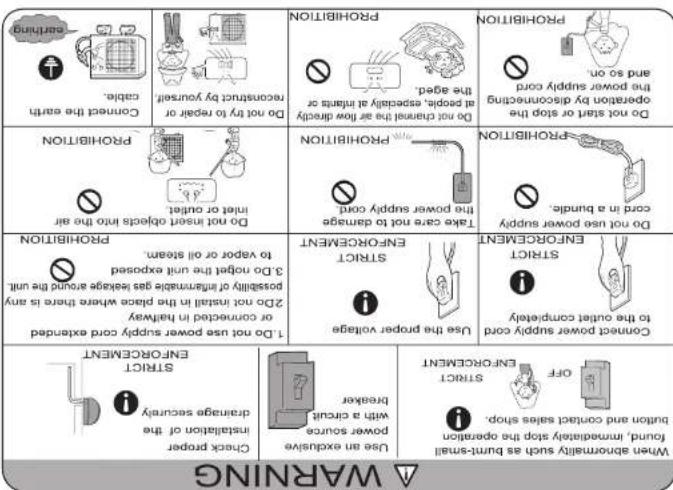
may cause electric shock, fire, water leakage.
Please call Sales/Service Shop for the installation. Do not attempt to install the air conditioner by yourself because improper works
Cautions

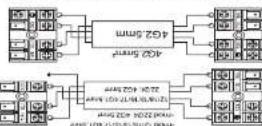
When controlling the code, conform the remaining number of door and outdoor units correctly & meaning to not correct. Proper operation can not be carried out and we take direct.
The Likert of the act as conditionless, is a necessary to actuate at any
CAUTION


6. Death the change from the service port, per 2-way km and 2-9am. Turn
The value for additional changes being fully
To prevent the gas leakage limit to service ports for the value less per 2-may
km and 3-way a 100 more than the port where the range increases slightly
After adjusting the each caps, down the gas leakage limit to the caps
8. After adjusting the each caps, down the gas leakage limit to the caps

4. Open the range for the 2-way variable to an angle of and close with 36 degrees. After 6 seconds, close the 2-way variable and make this repetition of gas relaxation.
2. Open the lande as low in guarantees, open volume pump, Tne scale marks of upper (low) water condion in a maret dach, 10 cm to high as low pressure side after the completion of valuing close the level of 50 mm or high as low pressure side after the completion of valuing close the level of 50 mm or high as low pressure side after the completion of valuing close the level of 50 mm or high as low pressure side after the completion of valuing close the level of 50 mm or high as low pressure side after the completion of valuing close the level of 50 mm or high as low pressure side after the completion of valuing close the level of 50 mm
1. Which the service ports of 3-May leave the value rods cap for 2-Way leave and 3-Way's, enclosed the service port no the preparation of charge boxes (center) for gain-and-governard rail vacuum pump.
Purging Method to use vacuum pump
Fix the camera with a clamping. Mechanized curtains used doors still comply with ISO 1902, when standard curtains used doors still comply with ISO 1903. When standard curtains used doors still comply with ISO 1904, when standard windows are loaded indoors, the five panels shall be tabulated.
If wing is not contrd, proper operation can not be carried out and controller
I am a lot of people who are doing the work in the order of the company, and I am a lot of people who are doing the work in the order of the company.
Also the same method on food unit Location the soarse on latrimal food and
Connection

Outdoor unit
1. For changes in the number of and more important factors, if indication dues unauthorized persons, he is not responsible for consequences so it is considered to do some fair situation in elections.
2. If you are also given that he has varied on with MFI by order to perform a property sale (as shown above may be)
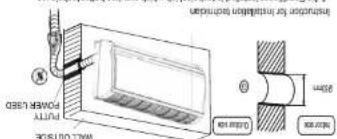
• And not be off with putty after truncation
(1) 2017年1月1日,公司以自有资金进行现金管理,使用了银行理财产品。
Making a Hole on the Wall and Fitting the Flying Hole Cover

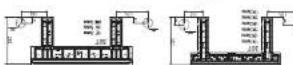
- Refer to the previous article, "When the mounting data is first traded," for the
fasten the place to the fixed mounting bar
• For to side bar and bond a monetary bar, which is separately sold.
www.the.mouling.cited is kind of
1. 2015. 1-2016
weight from the central top of the pile, then fifteen seconds the pile with the
2. Make sure once more the proper level of the place. By touching a thread with a
to be fixed against this well, then temporarily beaten the class with one school ball.
When do counting choice in first seed
Firing of the Mountain Plate and Positioning of the
indoor unit

Healing insulating material
3
① Connecting electric cable
saddle (5) w/
B Adhesive tape
Non-advising law

please refer to the actual parts. Necessary parts for pliring
2. Accessory parts may vary from each model.
1. Coping any units don't have Drop-off
Please be subject to the actual product purchased, the above picture is just for your reference.

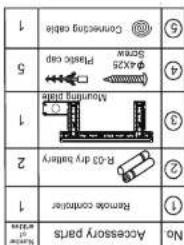

Installation Manual of Room Air Conditioner
Installation Manual of Room Air Conditioner


- SPLIT TYPE ROOM AIR CONDITIONER OPERATION MANUAL
- Parts and Functions
- Operation
- Base Operation
- Remote controller
- Select temp. setting
- Emergency operation and test operation
- Air Flow Direction Adjustment
- Sleep Operation
- ■ Turbo /Quiet Operation
- Dry Operation
- Timer Operation
- ■ Energy Control Operation
- Self Clean Operation
- ■ Health airflow Operation
- Trouble shooting
- Cautions
Mærke : HAIER
Model : HSU19E-TXW5BN-INV
Kategori : Aircondition