
HSU19EH-TXS3BE-INV - Aircondition HAIER - Gratis brugsanvisning og manual
Find enhedens vejledning gratis HSU19EH-TXS3BE-INV HAIER i PDF-format.


Brugerspørgsmål om HSU19EH-TXS3BE-INV HAIER
0 spørgsmål om dette apparat. Besvar dem du kender, eller stil dit eget.
Stil et nyt spørgsmål om dette apparat
Download vejledningen til din Aircondition i PDF-format gratis! Find din vejledning HSU19EH-TXS3BE-INV - HAIER og tag din elektroniske enhed tilbage i hånden. På denne side er alle dokumenter nødvendige for brugen af din enhed offentliggjort. HSU19EH-TXS3BE-INV af mærket HAIER.
BRUGSANVISNING HSU19EH-TXS3BE-INV HAIER
SPLIT TYPE ROOM AIR CONDITIONER OPERATION MANUAL
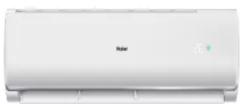
HSU19EH-TXG3BE-INV
HSU19EH-TXS3BE-INV
HSU19EH-TXB3BE-INV
HSU19EH-TXW3BE-INV
- Please read this operation manual before using the air conditioner.
Keep this operation manual for future reference.
Parts and Functions
■ Indoor Unit and Outdoor Unit


Actual inlet grille may vary from the one shown in the manual according to the product purchased
① OUTLET
② INLET
③ CONNECTING PIPING
AND ELECTRICAL WIRING
④ DRAIN HOSE
0011526222
Operation
Remote controlle
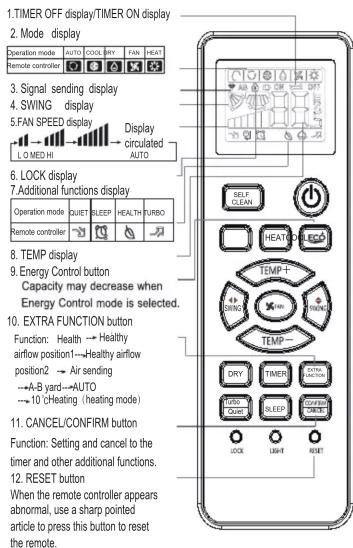
Healthy function is not available for some units.
- Loading of the battery

1 Remove the battery cover;
2 Load the batteries as illustrated.
2 R-03 batteries, resetting key (cylinder);
3 Be sure that the loading
is in line with the" + "/"-";
4 Load the battery, then put on the cover again.
●The distance between the signal transmission head and the receiver hole should be within 7m without any obstacle as well.
- When electronic-started type fluorescent lamp or change-over type fluorescent lamp or wireless telephone is installed in the room, the receiver is apt to be disturbed in receiving the signals, so the distance to the indoor unit should be shorter.
● Full display or unclear display during operation indicates the batteries have been used up. Please change batteries.
- If the remote controller can't run normally during operation, please remove the batteries and reload several minutes later.
Base Operation
Remote controller
- Unit start
Press ON/OFF
on the remote controller, unit starts.
Use remote control to turn on and display setting temperature 24.
- Select operation mode COOL button:Cooling mo
HEAT button: Heating mode
- Select temp. setting
Press TEMP▲/TEMP▼ button

TEMP ▲ Every time the button is pressed, temp. setting increase 1°C, if kept depressed, it will increase rapidly
TEMP Every time the button is pressed, temp. setting decrease 1°C, if kept depressed, it will
decrease rapidly
Select a desired temperature.
4.Fan speed selection
PressFAN button. For each press, fan speed changes as follows:
Remote controller:


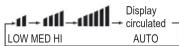
Air conditioner is running under displayed fan speed. When FAN is set to AUTO, the air conditioner automatically adjusts the fan speed according to room temperature.
| Operation Mode | Remote Controller | Note |
| AUTO | Under the mode of auto operation, air conditioner will automate speed and temperature. Cool or heat operation according to room temperature. When FAN is set to AUTO the air conditioner automatically adjusts the fan speed according to room temperature. | |
| COOL | Cooling only unit do not have displays and functions related with heating | |
| DRY | In DRY mode, when room temperature becomes lower than temp setting-2°C, cut off run intermittently at LOW speed regardless of FAN setting. | |
| HEAT | In HEAT mode, warm air will blow out after a short period of the time due to cold - draft prevention function. When FAN is set to AUTO, the air conditioner automatically adjusts the fan speed according to room temperature. | |
| FAN | In FAN operation mode, then unit will not operate in COOL or HEAT setting-2°C, cut off run intermittently at FAN mode. But not in order to FAN mode. And temp, settling is disabled. In FAN mode, sleep operation is not available. |
Operation
Emergency operation and test operation
Emergency Operation:
- Use this operation only when the remote controller is defective or lost, and with function of emergency running, air conditioner can run automatically for a while
- When the emergency operation switch is pressed, the "Pi"
sound is heard once, which means the start of this operation. - When power switch is turning on for the first time and emergency operation starts, the unit will run automatically in the following modes:
| Room temperature | Designated temperature | Timer mode | Fan speed | Operation mode |
| Above 23°C 26 | °C AUTO NOOL | |||

- It is impossible to change the settings of temp. and fan speed,It is also not possible to operate in timer or dry mode.
Test operation:
Test operation switch is the same as emergency switch.
- Use this switch in the test operation when the room temperature is below 16ircC , do not use it in the normal operation.
- Continue to press the test operation switch for more than 5 seconds. After you hear the "Pi" sound twice, release your finger from the switch: the cooling
operation starts with the air flow speed "Hi".
• Under this operation mode, the fan motor of indoor unit will run in high speed.
Air Flow Direction Adjustment
1. Status display of air flow Vertical flap
Pos.1 For each press of SWING ◆ button, remote controller displays as follows:
displays as follows :
remote controller:
COOL / DRY: → 丼 → 丼 → 丼 → 丼 → 丼
HEAT: → ν → γ → γ → γ → γ → 圆
Pos.2 No initial state disaplayed on remote controller, the vertical flap will be fixed on the current position
-
Press ☑ extra FUNCTION button to choose the ↗ and ↙
-
Left and right air flow adjustment(manual) Move the vertical blade by a knob on airconditioner to adjust left and right direction referring to Fig.
-
When adjusting the flap by hand, turn off the unit.
- When humidity is high, condensate water might occur adjusted to left or at air outlet if all vertical louvers are right.
- It is advisable not to keep horizontal flap at downward position for a long time in COOL or DRY mode, otherwise, condensate water might occur.
Sleep Operation
Before going to bed, you can simply press the SLEEP button and unit will operate in SLEEP mode and bring
you a sound sleep.
Operation Mode
- In COOL, DRY mode
1 hours after SLEEP mode starts, temp. will become 1irc C higher than temp. setting. After another 1 hours, temp. rises by 1irc C further. The unit will run for further 6 hours then stops Temp. is higher than temp. setting so that room temperature won't be too low for your sleep.

flowchart
graph TD
    A["SLEEP operation starts"] --> B["1 hr"]
    B --> C["Rises 1°C"]
    C --> D["Approx.6hrs"]
    D --> E["1 hr"]
    E --> F["Rises 1°C"]
    F --> G["Unit stop"]
flowchart
graph TD
    A["Temp. setting"] --> B["1 hr"]
    B --> C["Decreases 2°C"]
    C --> D["1 hr"]
    D --> E["Decreases 2°C"]
    E --> F["3 hrs"]
    F --> G["Rises 1°C"]
    G --> H["SLEEP operation stops"]
    style A fill:#f9f,stroke:#333
    style H fill:#f9f,stroke:#333
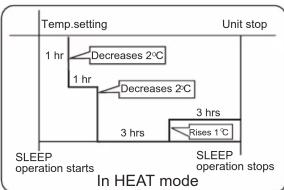
- In HEAT mode
1 hours after SLEEP mode starts, temp will become 2irc C lower than temp. setting. After another 1 hours, temp decrease by 2irc C further. After more another 3 hours, temp. rises by 1irc C further. The unit will run for further 3 hours then stops. Temp. is lower than temp. setting so that room temperature won't be too high for your sleep.
- In AUTO mode
The unit operators in corresponding sleep mode adapted to the automatically selected operation mode.
- In FAN mode
It has no SLEEP function.
- Set the wind speed change when sleeping
If the wind speed is high or middle before setting for the sleep, set for lowing the wind speed after sleeping.
If it is low wind, no change.
Note:
When TIMER function is set, the sleeping function can't be set up. After the sleeping function is set up, if user resets TIMER function, the sleeping function will be cancelled; the machine will be in the state of timing-on.
Operation
■ Turbo/Quiet Operation

When you need fast cool or fast dehumidification, you can choose the Turob function; when you sleep, read, you can choose Quiet function
Press the Turbo Quiet button, you can switch the "Turbo" and
"Quiet" function easily. Every press, the remote controller will
switch as below → (TURBO) → (QUIET) → cancel
When running in Turbo, the fan speed is the highest, when running in Quiet, the fan speed is super slow
Dry Operation

Press "DRY" Button, when the LCD displays is set.
In Dry mode, compressor will stop to operate when the room temperature is below the setting temperature. If the room temperature is higher than the setting temperature, the logic circuit will control the operation of compressor and indoor fan speed, in order to cause dew formation on cooling coil to obtain the effect of dehumification. In dry mode, it is normal that the indoor fan speed is lower than other operation mode
Timer Operation
- Set ON timer
Press ⏻ to close the screen.
Press TIMER set the duration (hour).
Press "CONFIRM/CANCEL".
- Set OFF timer
Press ⏻ to activate the screen
). Press TIMER set the duration (hour).
Press "CONFIRM/CANCEL".
■ Energy Control Operation


- Turn the appliance on
- 1 step: The strong air blows out to cool indoor air quickly.
- 50 is displayed on the display screen.
- 2 step: The power input is 100% of rated power.
- 51 is displayed on the display screen.
• 3 step : The power Input is decreased by 25%
compared to rated power input. - ☎ LI is displayed on the display screen.
- 4 step: The power Input is decreased by 45% compared to rated power input.
- 2 L2 is displayed on the display screen.
- 5 step (Optional): The power Input is decreased by 60% compared to rated power input.
- is displayed on the display screen.
- L1(3 step), L2 (4 step), L3 (5 step) is
displayed on some indoor units. - This function is available with Cooling Mode.
- Capacity may decrease when Energy Control mode is selected.
Self Clean Operation

◆Functional description: the purpose of this function is to clean the evaporator.
◆Entry and exit Press self clean button to enter this function, then it will display "CL" on the panel of the indoor unit and also on the remote controller. After running 18-21 minutes, this function will exit automatically with the "Pi" sound is heard twice, then the unit return to original state. Under operation process of self clean, press the button repeatedly has no effect and cannot exit, but the power off button and other mode button can make it exit. Note:
1. It has no effect under the mode of timer/sleep.
2. After this mode starts, the air volume may reduce or even have no airflow.
3. It is normal if the unit make some sound like expand with heat and contract with cold
4. The "CL" display time may last differently on the remote controller and panel.
5. It is normal if the temperature is below 0°C outside, the unit may display "F25" under this mode running.
Please turn off the unit for 10 seconds then restart.
6. The best condition to run this mode: the temperature is 15ircC 27ircC and the humidity is 35% 60% in the door,
the temperature is 30ircC 40ircC (cooling season)
7. It is hard to frost if the air is too dry(humidity<20%). and if the humidity is too high(humidity>70%),
the condensate water may increase, which may move away some frost.
■ Health airflow Operation
- Press ⓑ to starting Setting the comfort work conditions.
- The setting of healthy airflow function
Press EXTRA FUNCTION button to enter additional options, Press this button continuously, the louvers location will cycle between in the following three locations, to choose the swing location what you needed and then press CLOSE HANDLE button to confirm.

Notice: Do not direct the flap by hand. Otherwise, the grille will run incorrectly. If the grille is not run correctly, stop for a minute and then start, adjusting by remote controller. Note:
1. After setting the healthy airflow function, the position grill is fixed.
2.In cooling, it is better to select the mode.
3.In cooling and dry, using the air conditioner for a long time under the high air humidity, condensate water may occur at the grille.


- SPLIT TYPE ROOM AIR CONDITIONER OPERATION MANUAL
- Parts and Functions
- Operation
- Base Operation
- Remote controller
- Emergency operation and test operation
- Emergency Operation:
- Test operation:
- Air Flow Direction Adjustment
- Status display of air flow Vertical flap
- Sleep Operation
- ■ Turbo/Quiet Operation
- Dry Operation
- Timer Operation
- ■ Energy Control Operation
- Self Clean Operation
- ■ Health airflow Operation
Mærke : HAIER
Model : HSU19EH-TXS3BE-INV
Kategori : Aircondition