BE-TA55T8.02 - Hjemmeautomatisering MDT - Gratis brugsanvisning og manual
Find enhedens vejledning gratis BE-TA55T8.02 MDT i PDF-format.


Brugerspørgsmål om BE-TA55T8.02 MDT
0 spørgsmål om dette apparat. Besvar dem du kender, eller stil dit eget.
Stil et nyt spørgsmål om dette apparat
Download vejledningen til din Hjemmeautomatisering i PDF-format gratis! Find din vejledning BE-TA55T8.02 - MDT og tag din elektroniske enhed tilbage i hånden. På denne side er alle dokumenter nødvendige for brugen af din enhed offentliggjort. BE-TA55T8.02 af mærket MDT.
BRUGSANVISNING BE-TA55T8.02 MDT
Technische Daten - Technical Data
| BE-TA55x2.02 | BE-TA55x4.02 | BE-TA55x6.02 | BE-TA55x8.02 | |
| BE-TA55x2.02 | BE-TA55x4.02 | BE-TA55x6.02 | BE-TA55x8.02 | |
| Anzahl TastenflächenNumber of rockers | 2 4 6 8 | |||
| Anzahl zweifarbige LEDs (TASSP / TASST)Number of bicoloured LEDs (TASSP / TASST) | 2 4 6 8 | |||
| Orientierungslicht (TASSP / TASST)Orientation LED (TASSP / TASST) | 1 1 1 1 | |||
| Temperatursensor (TASST)Temperature sensor (TASST) | 1 1 1 1 | |||
| Spezifikation KNX SchnittstelleSpecifi cation KNX interface | TP-256 TP-258 TP-256 TP-256 | |||
| Verfügbare KNX DatenbankenAvailable KNX databank | ab ETS5 ab ETS5 ab ETS5 ab ETS5 | |||
| Max. KabelquerschnittMax. conductor cross section | ||||
| KNX BusklemmoKNX busconnection terminal | 0,5 mm ∅, single core | 0,5 mm ∅, single core | 0,5 mm ∅, single core | 0,5 mm ∅, single core |
| VersorgungsgespannungPower Supply | KNX Bus KNX Bus KNX Bus KNX Bus | |||
| Leistungsaufnahme KNX Bus typ.Power Consumption KNX bus typ. | < 0,3 W < 0,3 W < 0,3 W < 0,3 W | |||
| UmgebungstemperaturAmbient temperature range | 0 ... +45 °C 0 ... +45 °C 0 ... +45 °C 0 ... +45 °C | |||
| SchulzartProtection classification | IP20 IP20 IP20 IP20 | |||
| Abmessungen (B x H x T)Dimensions (W x H x D) | 65 mm x 55 mm x13 mm | 55 mm x 55 mm x13 mm | 65 mm x 55 mm x13 mm | 55 mm x 55 mm x13 mm |

TECHNOLOGIES

Betriebsanleitung KNX Taster
nur für autorisiertes Elektrofachpersonal
Operating instructions KNX Push-button
for authorised electricians only
KNX Taster 55, BE-TA550x.x2,
KNX Taster Plus 55, BE-TA55Px.x2,
KNX Taster Plus TS 55, BE-TA55Tx.x2
Allgemeine Sicherheitshinweise - Important safety notes
Lebensgefahr durch elektrischen Strom - Danger High Voltage

Das Gerät darf nur von Elektrofachkräften montiert und angeschlossen werden, Beachlen sie die ländenspezifischen Vorschriften sowie die gültigen KNX-Richtlinien. Die Geräte sind für den Betrieb in der EU zugelassen und fragen das CE Zeichen. Die Verwendung in den USA und Kansada ist nicht gestattet. Installation and commissioning of the device is only to be carried out by authorised electricians. The relevant local standards, directives, regulations and instructions must be observed. The devices are approved for use in the EU and have the CE mark. Use in the USA and Canada is prohibited.
Anschlussklemmen, Bedien- und Anzeigeelemente
Connection terminals, operating and display elements
Frontansicht - Front view
Rückansicht - Rear view
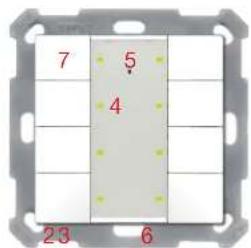
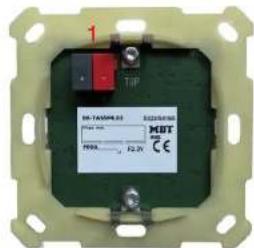
1 - Busanschlussklemme - KNX busconnection terminal
3 - Role Programmer LED - Red programming LED
5 - Orientierungs LED (TA56P/TA65T) - Orientation LED (TA56P/TA65T)
7 - Bedientasten - Operating buttons
2 - Programmertaster - Programming key
4 - Statusanzeige LED (TA55P/TA55T) 6 - Temperature sensor (TA55T) - Status indication LED (TA55P/TA55T) - Temperature sensor (TA55T)
MDT technologies GmbH • 51766 Engelskirchen • Papiermühle 1
Tel.: +49-2263-880 • knx@mdt.de • www.mdt.de
Stand: 0623
Technische Änderungen und Irrtümer vorbehalten. Abbildungen können abwelchen.
Technical modifications and corrections may be made without notice. Images may differ.
- ZZBETA5502 -
Montage und Anschluss KNX Taster - Assembly and connection KNX Push-button
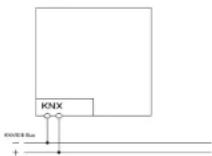
- Schließen Sie den KNX Taster am KNX Bus an. Connect the KNX Push-button to the KNX bus.
- Einbau des KNX Tasters in die Schalterdose. Installation of the KNX Push-button.
- Busspannungsversorgung zuschalten. Switch on KNX power supply.
Anschlussbeispiel BE-TA55xx.x2 - Exemplary circuit diagram BE-TA55xx.x2
Beschreibung KNX Taster - Description KNX Push-button
Der MDT Taster löst nach Tastendruck abhängig von der Parametierung KNX/EIB Telegramme aus. Die Tasten sind als Tastenoar (zweiflisch) oder als Einzelstaten parametierbar. Neben Dimmer/Valousie, Kontaktart und Sperrobjekten stehen zahlreiche Funktionen zur Auswahl. Der MDT Taster Plus verfügt über 4 integrierte Logikmodule. Das Senden eines zweiten Oxyektes ist über die Logikmodule möglich. Das mittige Schriftfeld mit Deckloie erlaubt die individuelle Beschriftung des Tasters. Die Beschriftungsvorlage finden Sie auf unserer Webseite im Downloadbereich. Der MDT Taster der Plus Series verfügt zusätzlich über ein Orientierungsticht und je eine zweifarbige (rot/grün) LED pro Tastenfläche. Diese können mit internen oder externen Objekten angeslauer werden. Es besteht die Möglichkeit 3 Zustände mit einer LED anzuzeigen z.B.: LED aus – „abwesend“, LED grün – „anwesend“, LED rot – „Fenster auf“.
Der MDT Taster Plus TS 55 verfügt über einen zusätzlichen Temperatursensor zur Erfassung der Raumtemperatur.
Passend für 55mm Schalterprogramme z.B.:
• GIRA Standard 55, E2, E22, Event, Esprit
• BERKER S1, B3, B7 glass
• JUNG A500, Aplus, Acreation, AS5000
• MERTEN 1M, M-Smart, M-Plan, M-Pure
Der MDT Taster ist zur Installation in Schalterdosen vorgesehen. Die Montage muss in trockenen Innenräumen erfolgen.
The MDT KNX Push-button sends KNX telegrams after pressing a button on top, 1 or 2 Button operation can be selected. The device provides extensive functions like switching of lighting, operation of blinds and shutters, contact type and block communication objects for each channel. The MDT KNX Push-button has 4 Integrated logical modules, the sending of an second object is possible over the logical modules. The centered labeling field allows individually marking of the MDT KNX Push-button. You find the labeling draft in our download area. The MDT KNX Push-button from the Plus series has an additional orientation LED and a blocoloured (red/green) LED for each rocker. These LED can be set from internal or external objects. The LED can display 3 situations like: LED off 0, absent*, LED green, present*, LED red, window open".
The MDT Taster Plus TS 55 has an additional temperature sensor to detect the room temperature.
Fits 55mm systems/ranges:
• GIRA Standard 55, E2, E22, Event, Esprit
• BERKER S1, B3, B7 glass
• JUNG A500, Aplus, Acreation, AS5000
• MERTEN 1M, M-Smart, M-Plan, M-Pure
The MDT KNX Push-button is a flush-mounted device for fixed installations in dry rooms, it is delivered with support ring.
Inbetriebnahme KNX Taster - Commissioning KNX Push-putton
Hinweis: Die Produktdatenbank finden Sie unter www.mdt.de'Downloads.html
Note: Before commissioning please download application software at www.mrdl.de\Downloads.html
- Physikalische Adresse vergeben und Applikationsprogramm in der ETS erstellen. Assign the physical address and set parameters within the ETS.
- Laden Sie die Physikalische Adresse und das Applikationsprogramm in den KNX Taster. Drücken Sie den Programmiersteller wenn Sie dazu aufgefordert werden. Upload the physical address and parameters into the KNX Push-button. After request, press programming button.
- Die rote LED erlischt nach erfolgreicher Programmierung. After successful programming the red LED turns off.
MDT technologies GmbH • 51766 Engelskirchen • Papiermühle 1
Tel.: +49-2263-880 • knx@mdt.de • www.mdt.de
Stand: 0623
Technische Änderungen und Irrtümer vorbehalten. Abbildungen können abweichen.
Technical modifications and corrections may be made without notice. Images may differ.