DarkCrystal 110 - 视频采集卡 AVERMEDIA - 免费用户手册
免费查找设备手册 DarkCrystal 110 AVERMEDIA PDF格式.
请选择您的语言并填写邮箱:我们将为您发送专门翻译的版本。
用户关于以下问题的提问 DarkCrystal 110 AVERMEDIA
0 问题 关于此设备。回答您知道的问题或提出自己的问题。
提出关于此设备的新问题
还没有问题。成为第一个提问的人。
下载您的设备说明 视频采集卡 免费PDF格式!查找您的手册 DarkCrystal 110 - AVERMEDIA 并重新掌握您的电子设备。本页发布了使用您的设备所需的所有文档。 DarkCrystal 110 品牌 AVERMEDIA.
用户手册 DarkCrystal 110 AVERMEDIA
- 圆刚科技设备圆刚科技设备iere Pro CS6 插件 ..... 12
- 圆刚科技圆圈科技ny Vegas Pro 插件 ..... 15
- 圆刚科技设备圆刚科技插件 ..... 17
*本档中所有截图仅供参考。不同产品和软件版本的图像可能会有所不同。
目錄
- 圓剛科技產品圓剛科技廣品iere Pro CS6 外掛程式外掛程式....21
- 圓剛科技圖圖科技ny Vegas Pro 外掛程式外掛程式....24
- 圓剛科技圖圖科號ageJ外掛程式外掛程式....26
*本檔中所有截圖僅供參考。不同產品和軟件版本的圖像可能會有所不同。
Adobe Premiere Pro CS6 Plug-in for AVerMedia Devices
text_image
AVerMedia HD Capture Video Window AverMedia HD Capture Picture 120x480 pixels, RGB 1.3MB 公演 華博發 臨時新聞 林鴻池:力拼服買過關 落實國會監督text_image
AVerMedia HD Capture Video Window AVerHDCapture.avi 10/17/32 (X.37 X) 公報 18:42:12 共贏 業 國共密商 掏空台灣 凡應定三元政府 服務貿易證書 是 不可自人的秘書 國共聯 掏空台灣 暗時新聞 林鴻池:服買關係重大 政院應提論述 Tāi-gī Sin-60nAVerMedia 设备Adobe Premiere Pro CS6 播件
- 请到 AVerMedia 官网下载插件 Adobe Premiere Pro
- 根据说明安装插件
- 运行 Adobe Premiere Pro CS6

- 选择 New Project
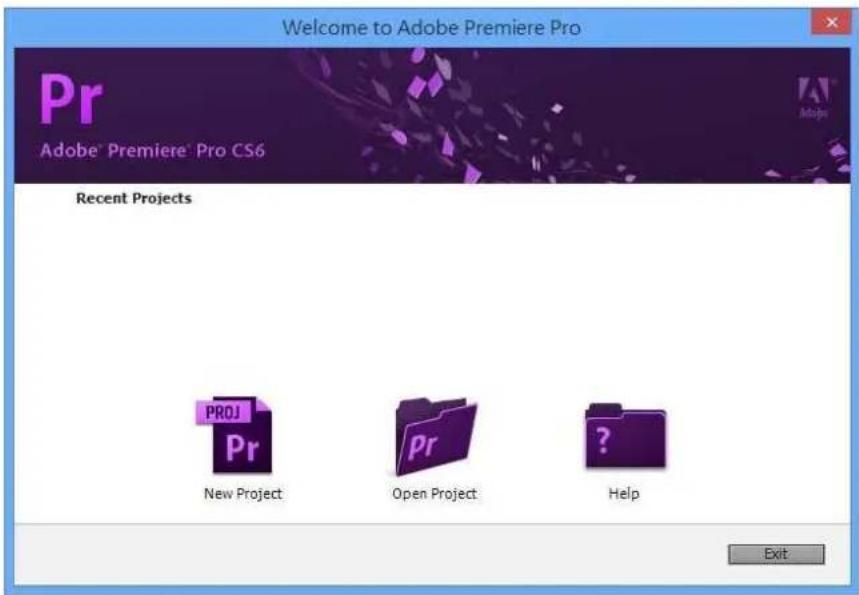
text_image
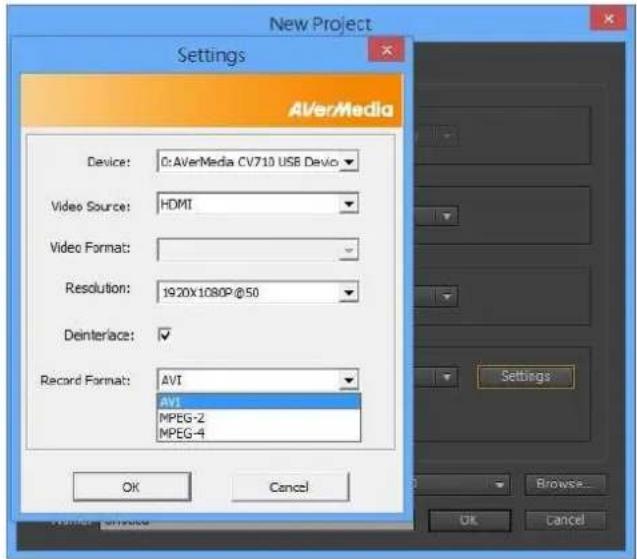
Welcome to Adobe Premiere Pro Pr Adobe® Premiere® Pro CS6 Recent Projects PROJ Pr New Project Open Project Help Exit- 点击 Settings, 选择你的 AVerMedia 设备 照着 Video Source, Resolution 和 Record Format 设置,点击 OK 确认。
text_image
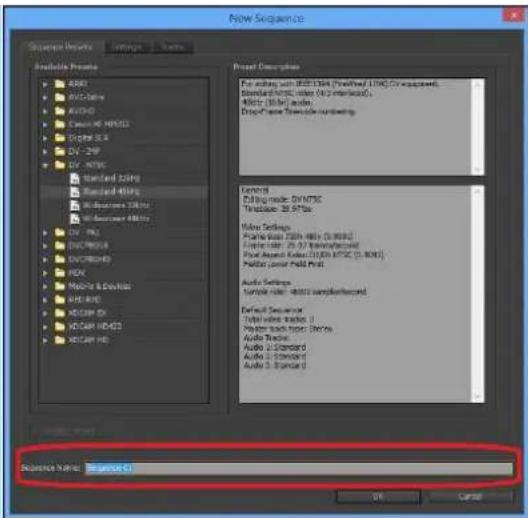
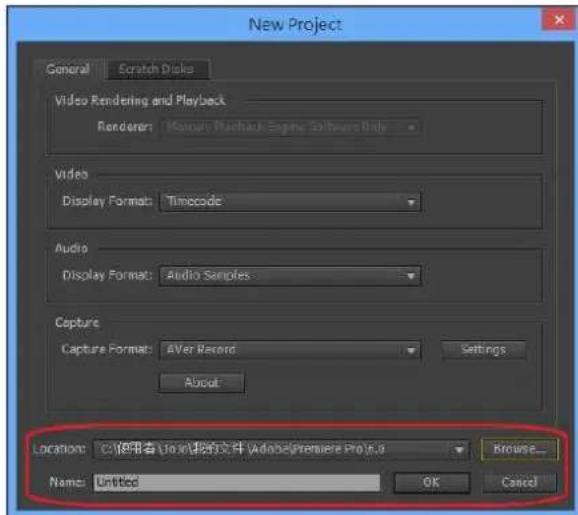
New Project Settings AVerMedia Device: 0:AVerMedia CV710 USB Devio Video Source: HDMI Video Format: Resolution: 1920x1080P@50 Deinterlace: ✓ Record Format: AVI AVI MPEG-2 MPEG-4 OK Cancel Settings... Browse... OK Cancel- 选择你的偏爱 Location, Project Name 和 Sequence Name,点击 OK 确认。
text_image
New Project General Scratch Disks Video Rendering and Playback Renderer: Macau Merchack Specific Software Help Video Display Format: Timecode Audio Display Format: Audio Samples Capture Capture Format: AVer Record Settings About Locations: C:\使用者\Adobe\Premiere Pro 8.0 Browse... Name: Untitled OK Cancel
text_image
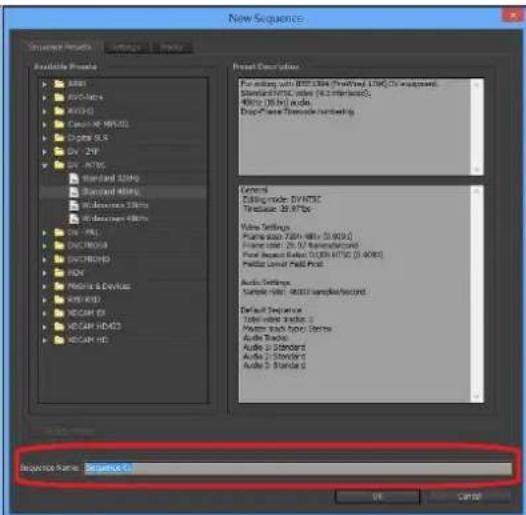
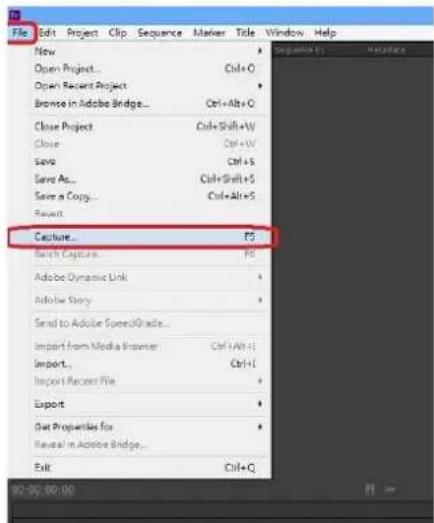
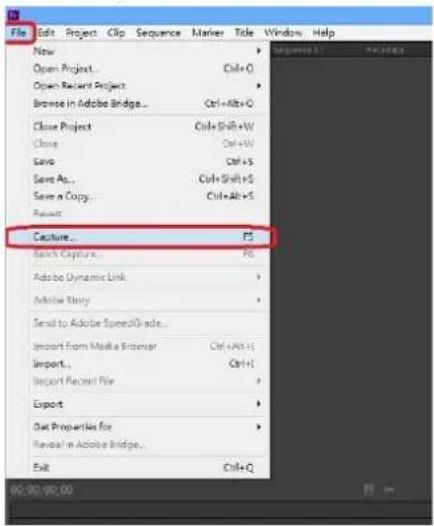
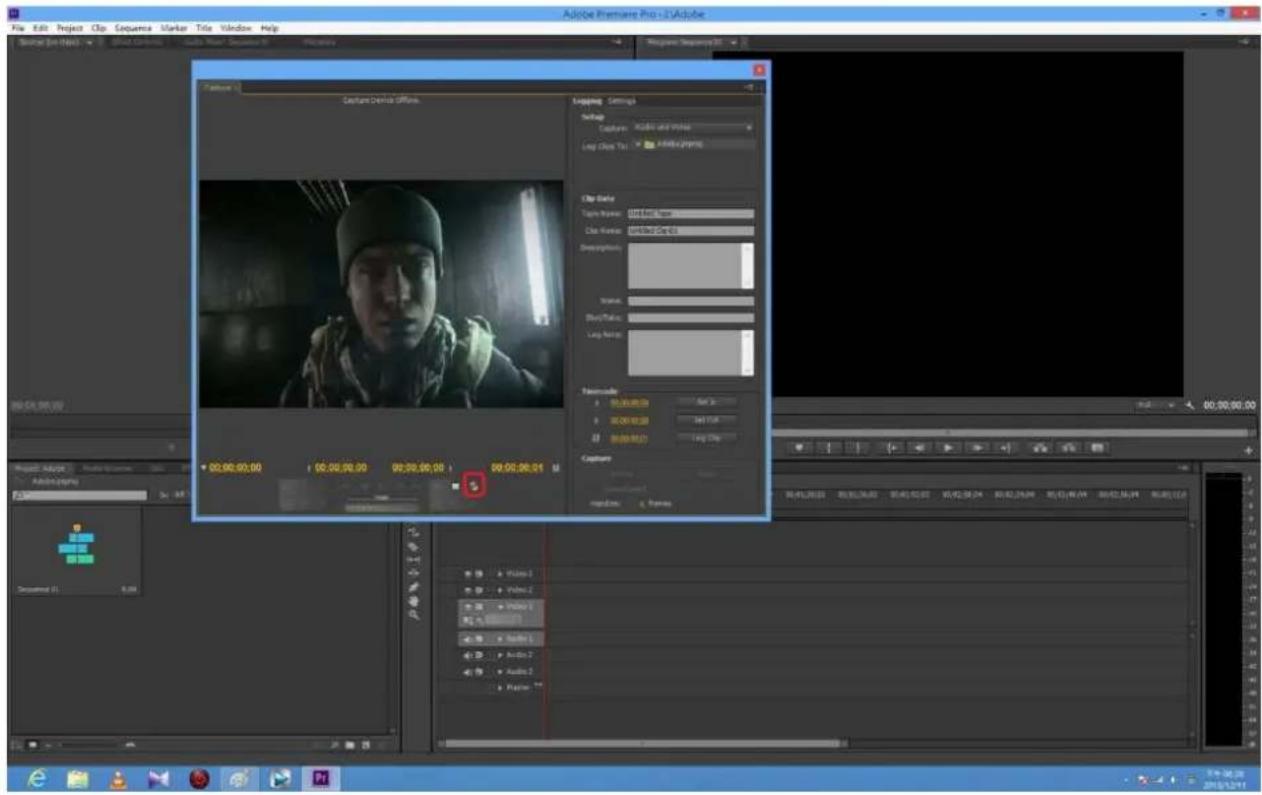
New Sequence Sequence Name: Sequence 01 Available Preseta • A##s • B####es • KX345 • C#e## ## HX432 • C#g## SLR • DV- 2VP • DV- MT3C • Standard 32MP • Standard M6% • W#d#m## 28MP • W#d#m## 98MP • DV- PD • DV-PCB • DV-PCB • DV-PCB/HD • HDV • HDV & Devices • HDV KB • HDV KB • HDV KB • HDV KB • HDV KB • HDV KB • HDV KB • HDV KB • HDV KB • HDV KB • HDV KB • HDV KB • HDV KB • HDV KB • HDV KB • HDV KB • HDV KB • HDV KB • HDV KB • HDV KB • HDV BK • HDV BK • HDV BK • HDV BK • HDV BK • HDV BK • HDV BK • HDV BK • HDV BK • HDV BK • HDV BK • HDV BK • HDV BK • HDV BK • HDV BK • HDV BK • HDV BK • HDV BK • HDV BK • HDV BK • HDV PKT • HDV PKT • HDV PKT • HDV PKT • HDV PKT • HDV PKT • HDV PKT • HDV PKT • HDV PKT • HDV PKT • HDV PKT • HDV PKT • HDV PKT • HDV PKT • HDV PKT • HDV PKT • HDV PKT • HDv PKT • HDv PKT • HDv PKT • HDv PKT • HDv PKT • HDv PKT • HDv PKT • HDv PKT • HDv PKT • HDv PKT • HDv PKT • HDv PKT • HDv PKT • HDv PKT • HDv PKT • HDv PKT • HDv PKT - Default Sequence: Total value: 0.0000000000000000000000000000000000000000000000000000000000000000000000000000000000000000000000000000- File → Capture...

9. 预览窗口准备开始采集,设置已完成。
text_image
Adobe Premiere Pro - 2 Adobe File Edit Project Clip Sequence Marker Tools Window Help Script Edit View Insert Tools Help Window Help Project Preview Capture Device Office Locking Settings Setup Capture Audio and audio Log Close To: Audio/JPmmg Clip Date Picture Name: Hard Band Image Clip Frame: Hard Band Chir 43 Description: Trance: Blay/Pass: Log Note: Formatize 00:00:00:00 00:00:00:00 00:00:00:00 00:00:00:00 Audio/JPmmg Audio/JPmmg Audio/JPmmg Audio/JPmmg Audio/JPmmg Audio/JPmmg Audio/JPmmg Audio/JPmmg Audio/JPmmg Audio/JPmmg Audio/JPmmg Audio/JPmmg Audio/JPmmg Audio/JPmmg Audio/JPmmg Audio/JPmmg Audio/JPmmg Audio/Jo Audio/Jo Audio/Jo Audio/Jo Audio/Jo Audio/Jo Audio/Jo Audio/Jo Audio/Jo Audio/Jo Audio/Jo Audio/Jo Audio/Jo Audio/Jo Audio/Jo Audio/Jo Audio/Jo Audio/Jo Audio/Jo Audio/Jo Audio/Jo Audio/Jo Audio/Jo Audio/Jo Audio/Jo Audio/jo Audio/jo Audio/jo Audio/jo Audio/jo Audio/jo Audio/jo Audio/jo Audio/jo Audio/jo Audio/jo Audio/jo Audio/jo Audio/jo Audio/jo Audio/jo Audio/jo Audio/jo Audio/jo Audio/jo Audio/jo Audio/jo Audio/jo Audio/jo Audio/jo Audio/ooo Audio/ooo Audio/ooo Audio/ooo Audio/ooo Audio/ooo Audio/ooo Audio/oo oo oo oo oo oo oo oo oo oo oo oo oo oo oo oo oo oo oo oo oo oo oo oo oo oo oo oo oo oo oo oo oo oo oo oo oo oo oo oo oo oo oo oo oo oo oo oo oo oo ooAVerMedia 设备 Sony Vegas Pro 插件
- 请到 AVerMedia 官网下载插件 Sony Vegas
- 根据说明安装插件
- 打开 Sony Vegas

- Media Generators → Third Party → AVerMedia HD Capture
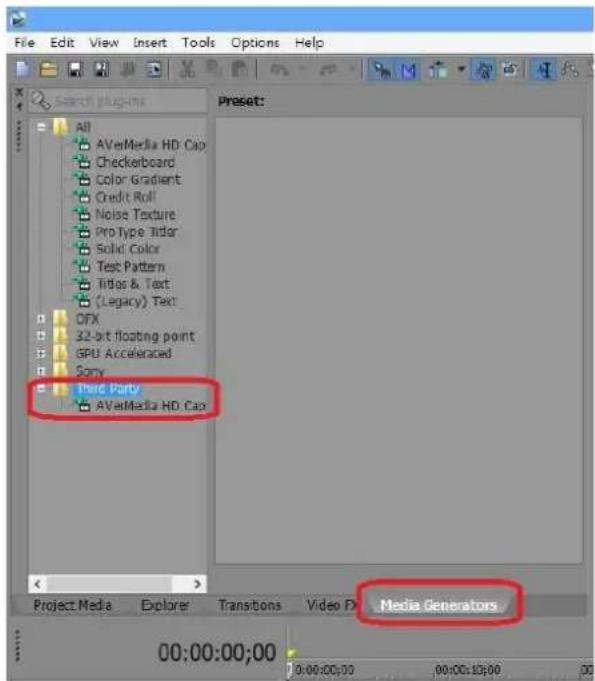
text_image
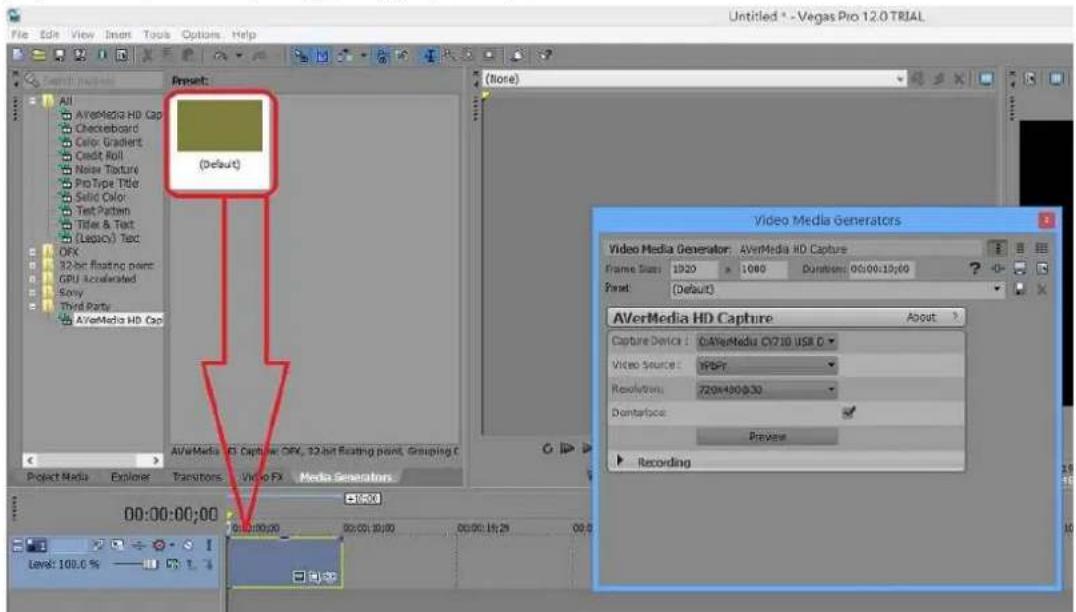
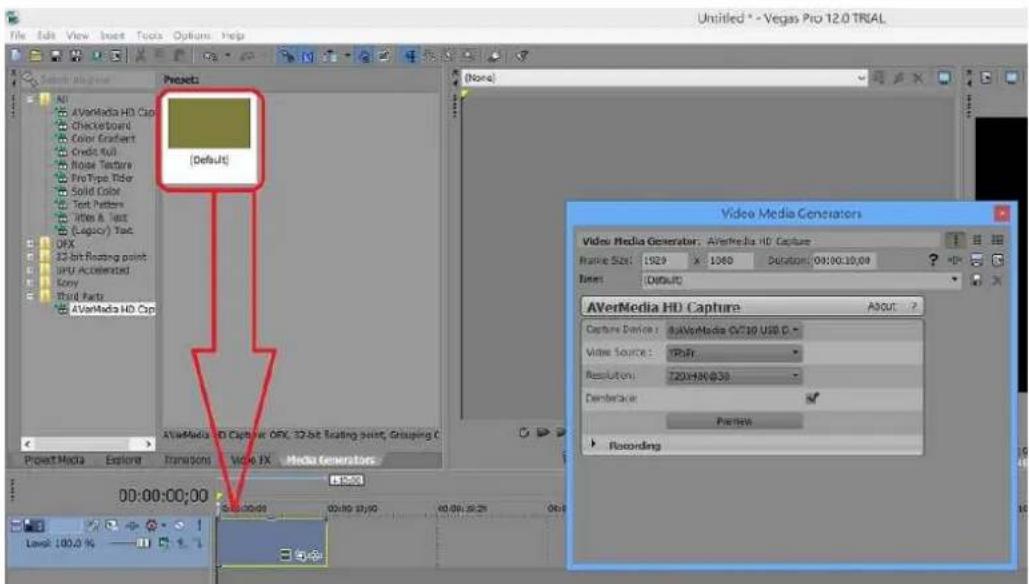
File Edit View Insert Tools Options Help Search plugins All AVaMedia HD Cap Checkerboard Color Gradient Credit Roll Noise Texture ProType Tidor Solid Color Test Pattern Titles & Text (Legacy) Text OFX 32-bit floating point GPU Accelerated Sony Third Party AVaMedia HD Cap Preset: Project Media Explore Transitions Video FX Media Generators 00:00:00:00 10:00:00:00 00:00:10:00 30- 把(Default) Preset 拖到箭头指出的区域

text_image
File Edit View Insert Tools Options Help Untitled * - Vegas Pro 12.0 TRIAL File Edit View Insert Tools Options Help Control Panel Amplify All AfterMedia HD Cap Checkboard Color Gradient Credit Roll Noise Texture ProType Title Solid Color Text Pattern Title & Text (Logic) Test DFX 32-bit floating point: GPU Accelerated Sony Third Parts AfterMedia HD Cap (Store) AfterMedia HD Cap: AfterMedia HD Capture Frame Size: 1920 > 1060 Duration: 00:00:19:00 Reset: (Default) Video Media Generators Video Media Generator: AfterMedia HD Capture Capture Device: C:\AfterMedia CV710 USB D Video Source: VSPF Resolution: 720K430/0.33 Dontarface: Preview Recording Project Media Explorer Transistors Video FX Media Generators 00:00:00:00 Level: 100.0 %6. 建立 AVerMedia 高清采集

text_image
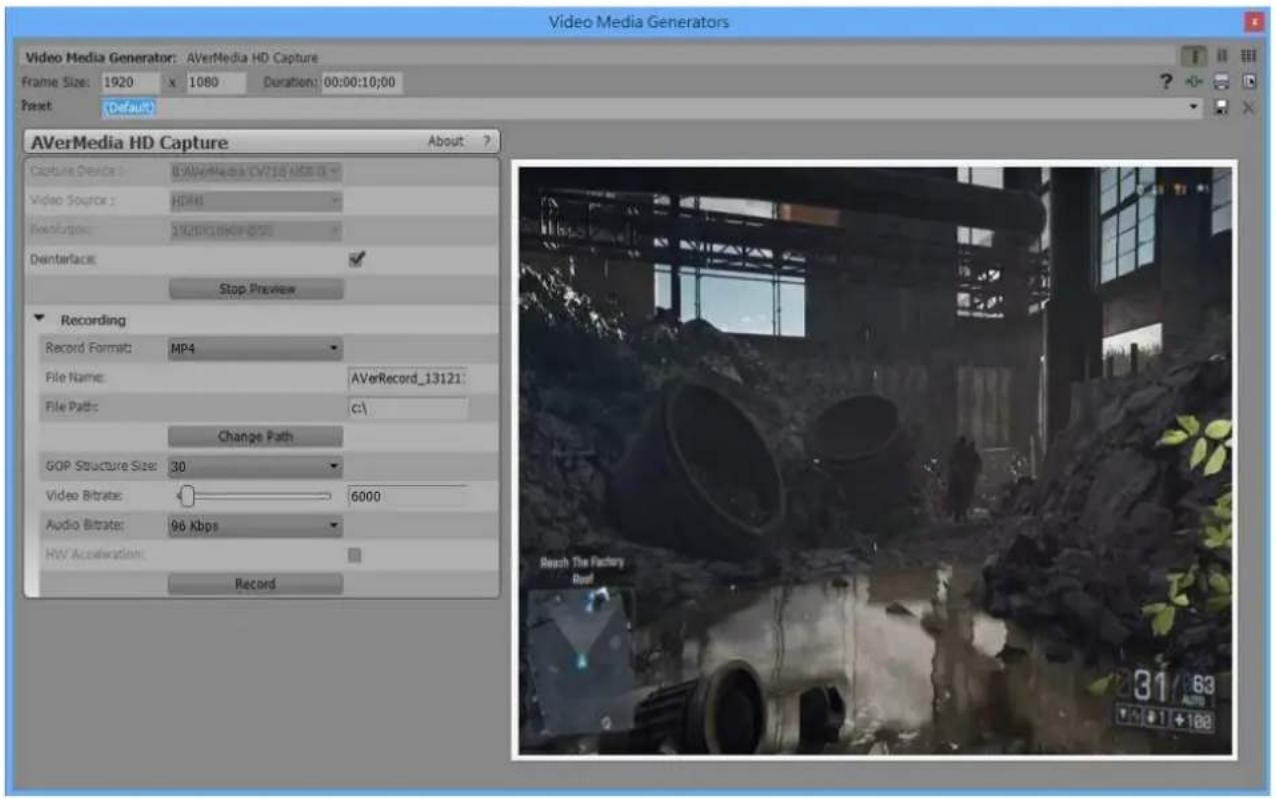
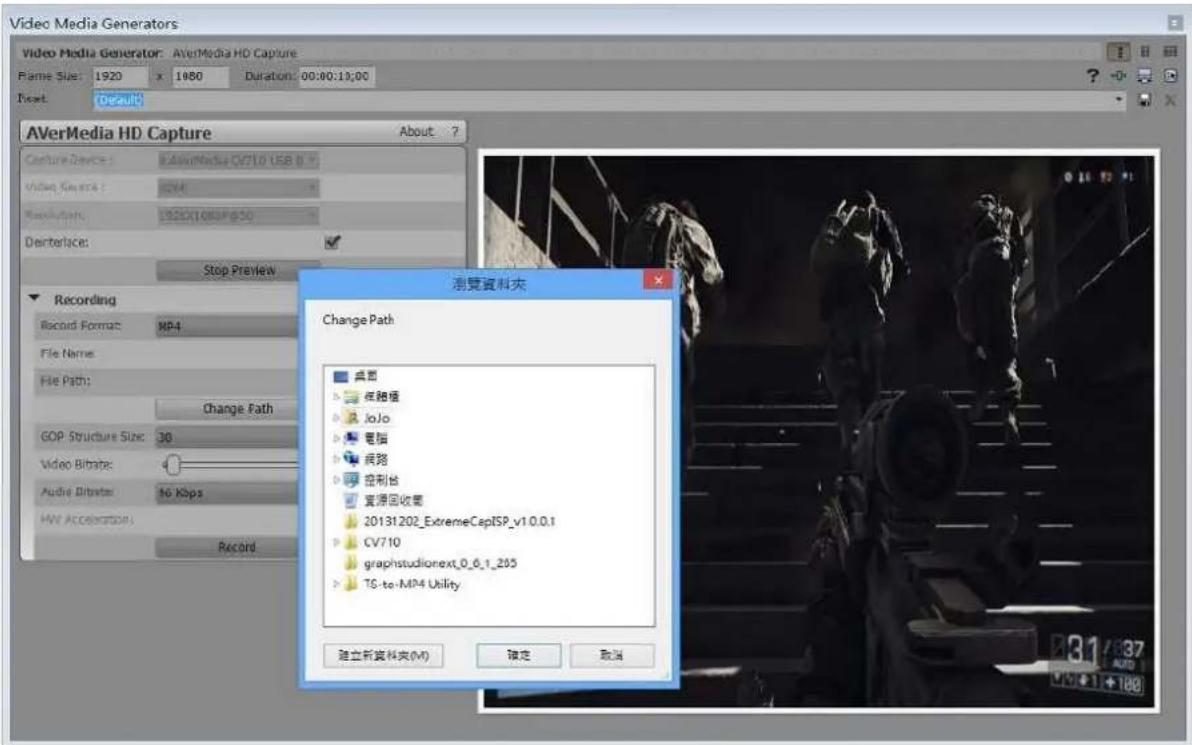
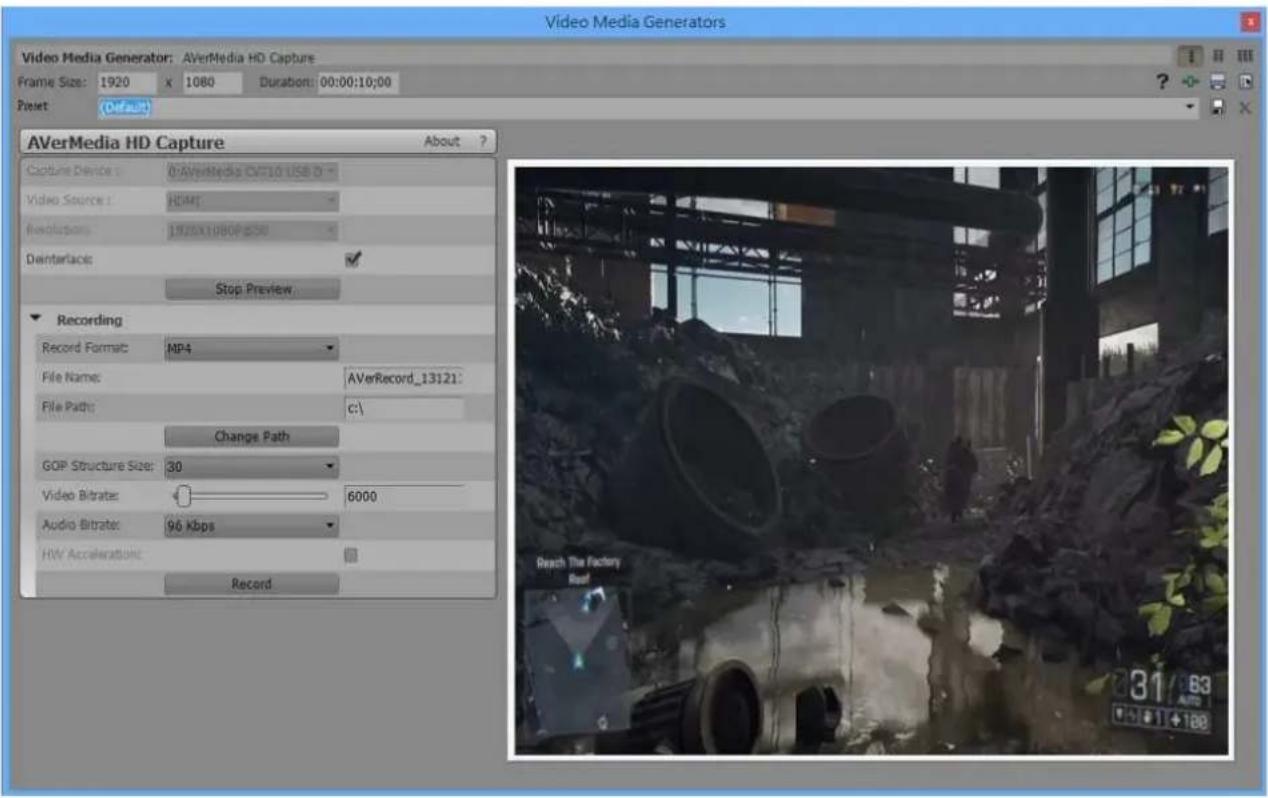
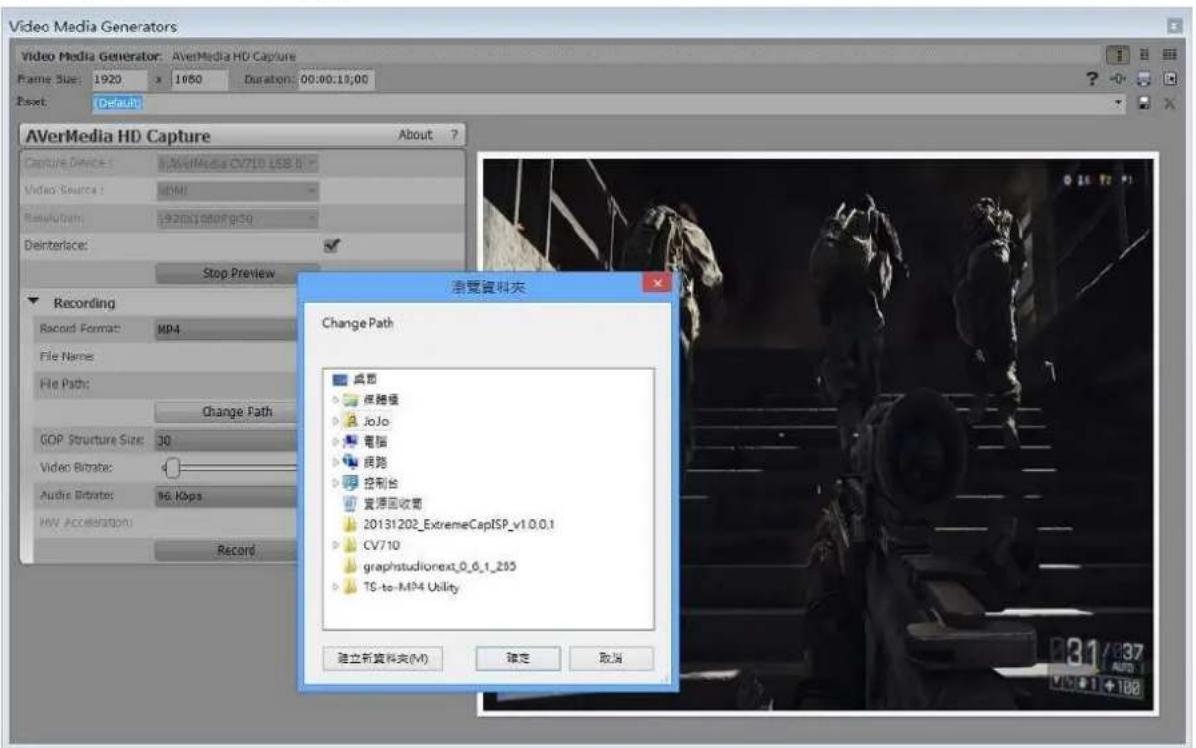
Video Media Generators Video Media Generator: AVerMedia HD Capture Framie Size: 1920 x 1080 Duration: 00:00:10:00 Reset: Default AVerMedia HD Capture About ? Capture Devices: I:\AVerMedia\CV710\KBS.0 Video Source: HD46 Recurrents: 23/2013/1969-075 Deinterfac: Stop Preview Recording Record Format: MP4 File Name: AVerRecord_13121 File Path: c1 Change Path GOP Structure Size: 30 Video Bitrates: 6000 Audio Bitrates: 96 Kbps HIV Acceleration: Record Reach The Factory Roof 31 63 +1 +1887. 改变路径(注意:我们建议不要直接建立路径在 C:\下)

text_image
Video Media Generators Video Media Generator: AVerMedia HD Capture Flame Size: 1920 x 1980 Duration: 00:00:13:00 Reset: Default AVerMedia HD Capture Capture Device: AVerMedia-CV71.0 USB 0 Video Server: GCM Rebootpath: 1920x1.080/PG50 DeInterface: Stop Preview Recording Record Format: MP4 File Name: File Path: Change Path GOP Structure Size: 30 Video Bibrates: Audio Bibrates: No Kbps HV Acceleration: Record 測覽資料夾 Change Path 桌面 網路権 JoJo 電腦 網路 控制台 資源回收書 20131202_ExtremeCapISP_v1.0.0.1 CV710 graphstudionext_0_6_1_205 TS-to-MP4 Utility 建立新資料夾(M) 確定 取消AVerMedia 设备ImageJ 播件
- 请到 AVerMedia 官网下载插件 ImageJ
- 根据说明安装插件
- 运行 ImageJ
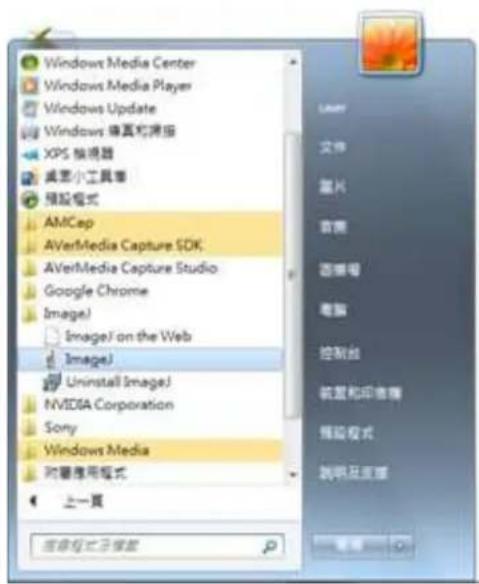
text_image
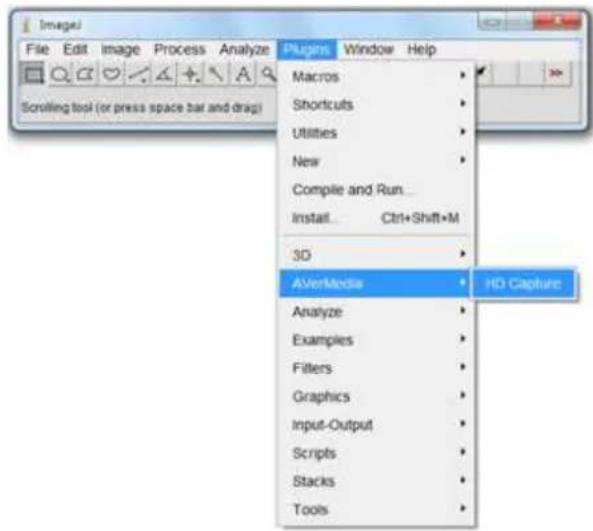
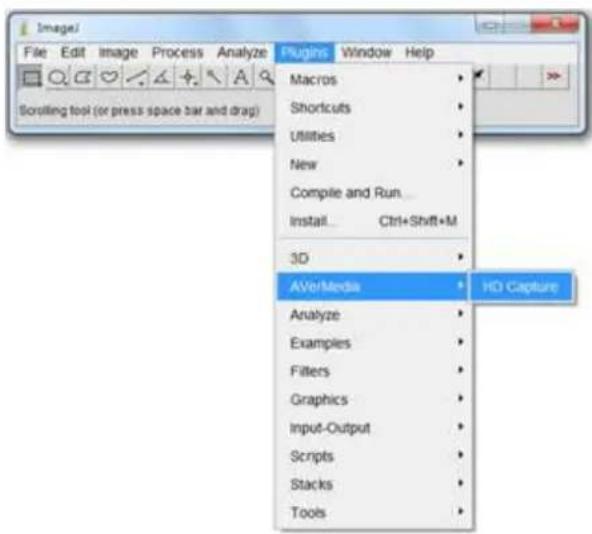
Windows Media Center Windows Media Player Windows Update Windows 偏真和弹报 XPS 指镜器 桌面小工具箱 预设格式 AMCap AVerMedia Capture SDK AVerMedia Capture Studio Google Chrome ImageJ ImageJ on the Web ImageJ Uninstall ImageJ NVIDIA Corporation Sony Windows Media 附着应用程序 上一页 应用程序已安装4. 选择 Plugins → AVerMedia → HD Capture

text_image
File Edit Image Process Analyze Scrolling tool (or press space bar and drag) Plugins Window Help Macros Shortcuts Utilities New Complete and Run... Install Ctrl+Shift+M 3D AV/VerMedia HD Capture Analyze Examples Filters Graphics Input-Output Scripts Stacks Tools- 选择你的 AVerMedia 设备 相应地设置 Video Source, Resolution, Video Format 和 Options,点击 Start Streaming 确认。

text_image
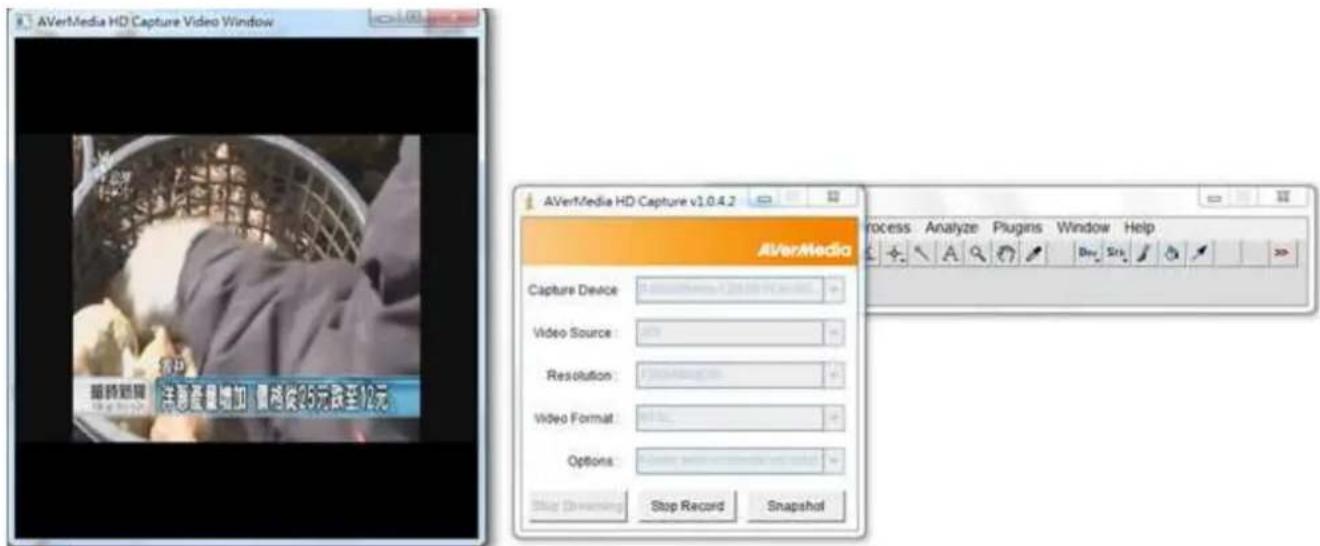
AVerMedia HD Capture v1.0.4.2 AVerMedia Capture Device: 0AVerMedia CD110 PCIe HD... Video Source: 50X Resolution: 720X480@30 Video Format: Options: [Frame with deinterlaced] only) Start Streaming All Record Inspector Process Analyze Plugins Window Help and " ” keys)- 出现流媒体图像,现在你可以选择 Snapshot, AVI Record 或者 Stop Streaming
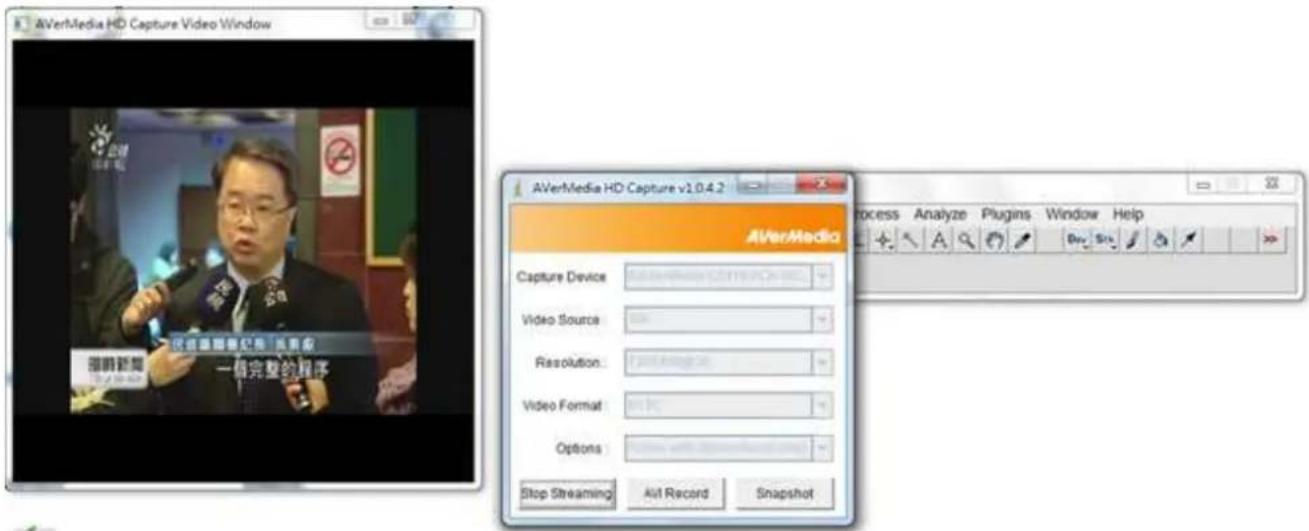
text_image
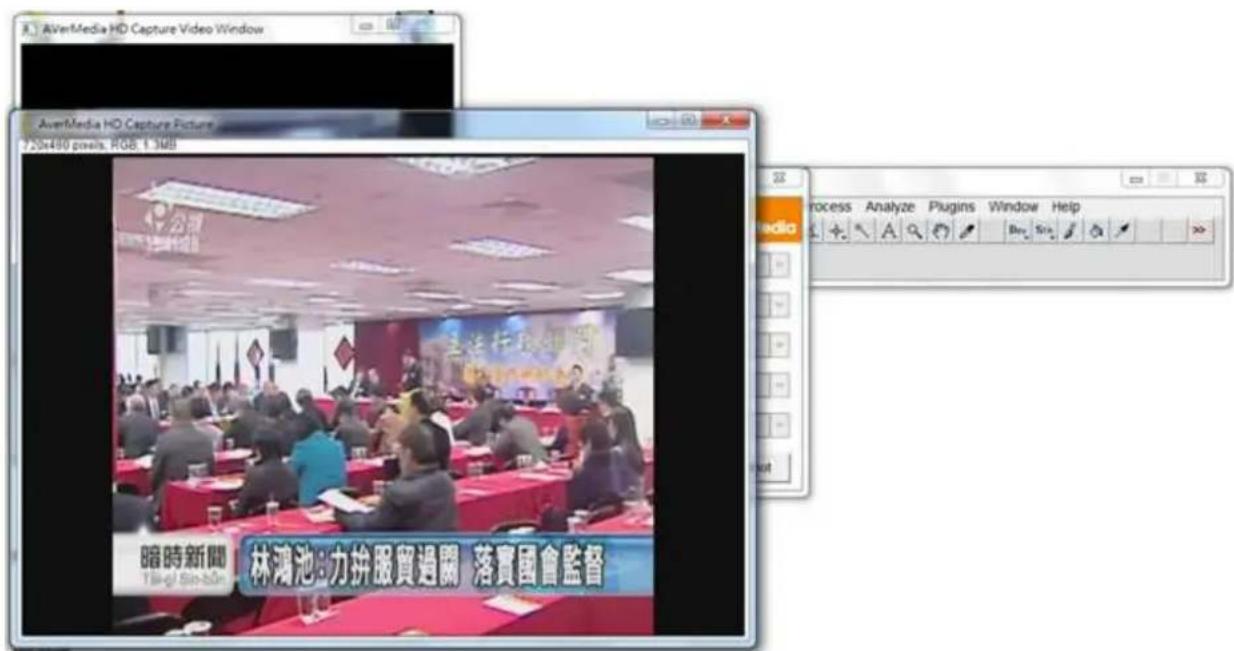
AVerMedia HD Capture Video Window AVerMedia HD Capture v1.0.4.2 Capture Device Video Source Resolution: Video Format: Options: Stop Streaming All Record Snapshot Process Analyze Plugins Window Help- 点击 Snapshot,立即查看图片

text_image
AVerMedia HD Capture Video Window AVerMedia HO Capture Picture 20x490 pixels, RGB 1.5MB 暗時新聞 林鴻池:力拼服貿過關 落實國會監督- 在使用 AVI Recorder 采集图像之前,需要建立保存路径。点击 Save 确认。
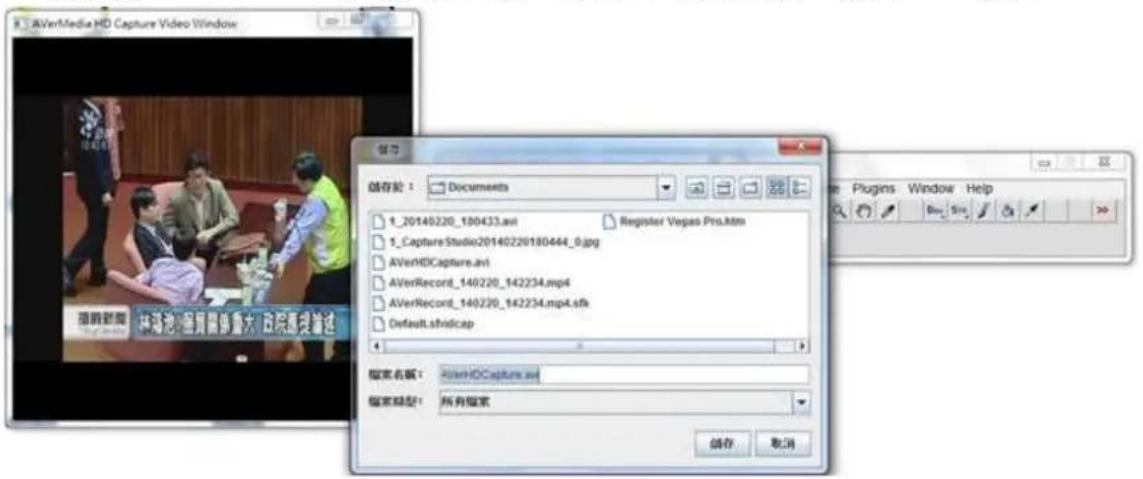
text_image
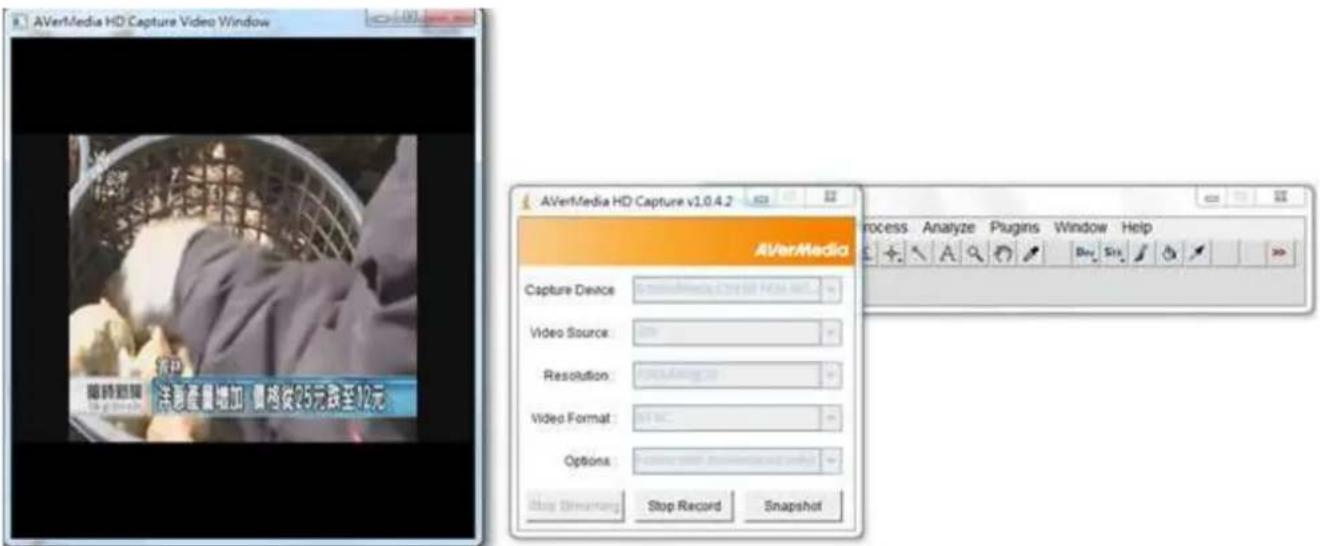
AVerMedia HD Capture Video Window 保存 文件名: AVerHDCapture.avi 保存类型: 所有搜索 储存 取消- 开始采集

text_image
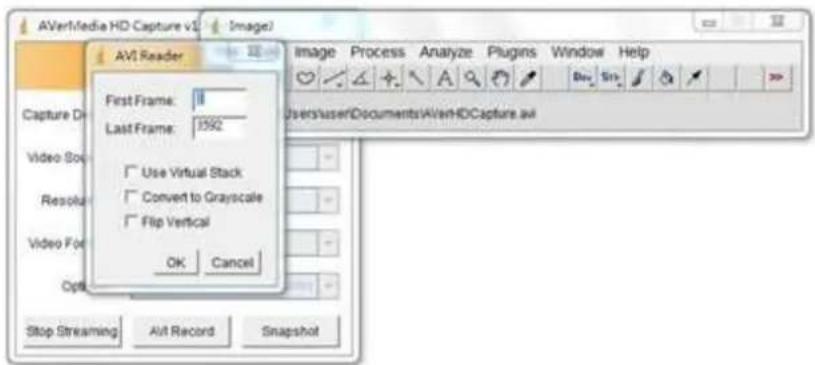
AVerMedia HD Capture Video Window AVerMedia HD Capture v1.0.4.2 Capture Device Video Source: Resolution: Video Format: Options: Stop Simuning Stop Record Snapshot Process Analyze Plugins Window Help- 点击 Stop Record 选择 First Frame, Last Frame, 相应地勾选 Use Virtual Stack, Convert to Grayscale 或者 Flip Vertical,点击 OK.
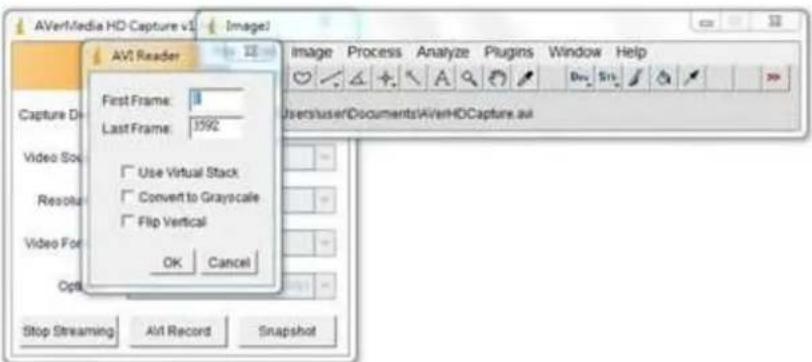
text_image
AVerMedia HD Capture Video Window 18:732 (0:03) x 720x410 pixels RGB 2.308 公報 18:42:11 服務貿易協議 是 不可言人的祕密 服務貿易協議 國共識 黑箱作業 國共 獨空 暗時新聞 Tāi-gī Bin-būn 林鴻池:服貿關係重大 政院應提論述AVerMedia 產品專用產AdobePremiere Pro CS6 外掛程式外掛程式
- 請到 AVerMedia 官網下載外掛程式 Adobe Premiere Pro
- 根據說明安裝外掛程式
- 執行 Adobe Premiere Pro CS6

4. 選擇 New Project
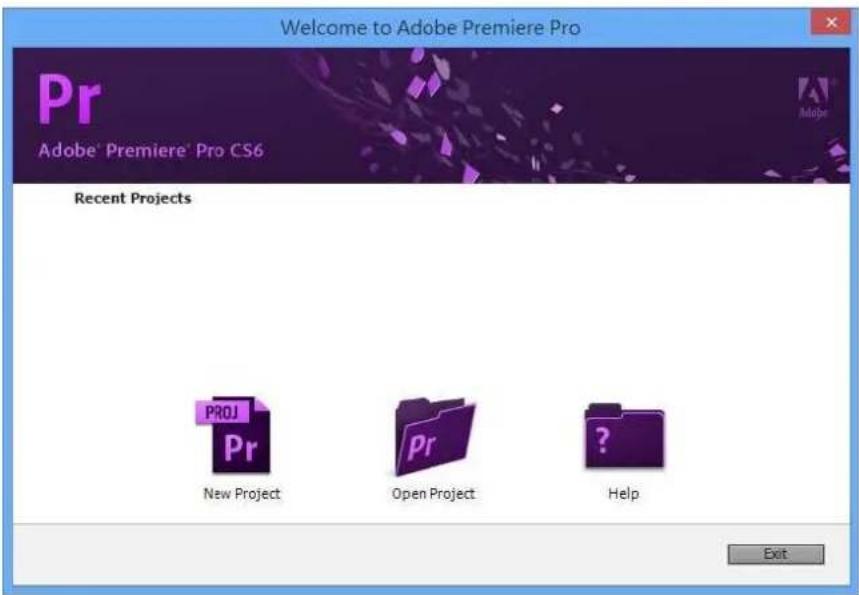
text_image
Welcome to Adobe Premiere Pro Pr Adobe® Premiere® Pro CS6 Recent Projects PROJ Pr New Project Pr Open Project Help Exit5. General → Capture Format → AVer Record
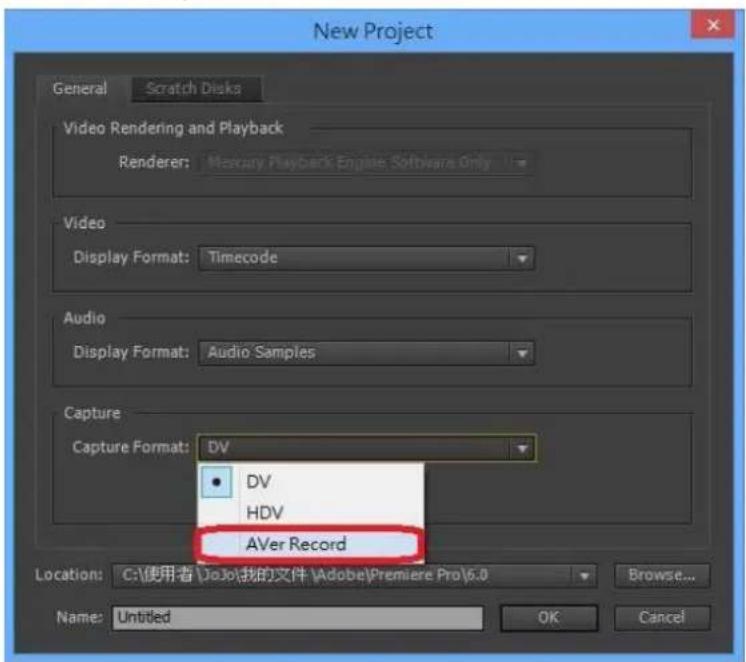
text_image
New Project General Scratch Disks Video Rendering and Playback Renderer: Mercury Playback Engine Software Only Video Display Format: Timecode Audio Display Format: Audio Samples Capture Capture Format: DV DV HDV AVer Record Location: C:\使用者\JoJo\我的文件\Adobe\Premiere Pro\6.0 Browse... Name: Untitled OK Cancel- 點選 Settings, 選擇你要使用的 AVerMedia 裝置:依照 Video Source, Resolution 和 Record Format 設定,點選 OK 確認。
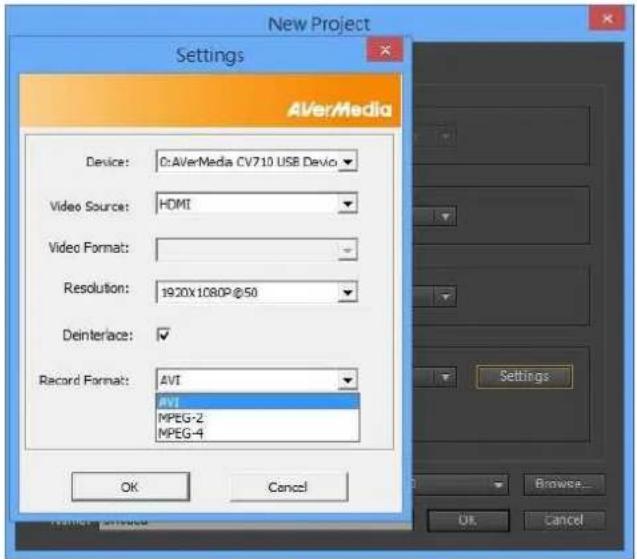
text_image
New Project Settings AVerMedia Device: 0:AVerMedia CV710 USB Devio Video Source: HDMI Video Format: Resolution: 1920x1080P@50 Deinterface: ✓ Record Format: AVI AVI MPEG-2 MPEG-4 OK Cancel Settings... Browse... Ok Cancel- 偏好設定 Location, Project Name 和 Sequence Name,點選 OK 確認。
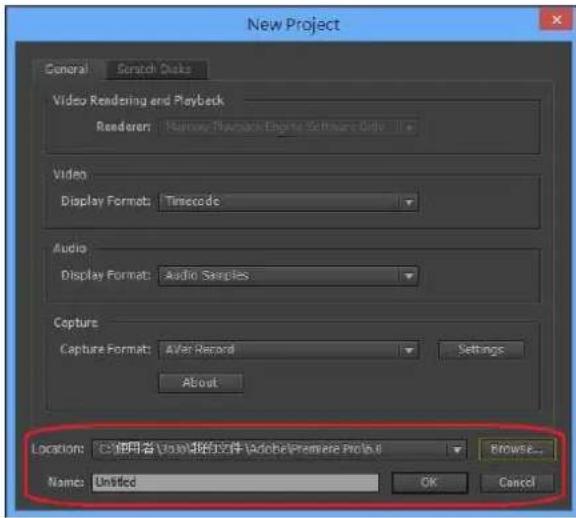
text_image
New Project General Scratch Goals Video Rendering and Playback Renderer: Name: Macromedia Engine Software Only Video Display Format: Timecode Audio Display Format: Audio Samples Capture Capture Format: After Record Settings About Location: 使用者: United版的文件 (Adobe Premiere Prods.0) Browse... Names: Untitled OK Cancel
text_image
New Sequence Sequence Results Settings Options Available Preses ARST AVOCable AVOC Cassier ME MRS2 C208M SLR DV-25P DV-MRTC Standard 325MHz Standard 400MHz Standard 125MHz Standard 400MHz DV-16P DV-200MHz DV-250MHz DV-300MHz DV-350MHz DV-400MHz DV-450MHz DV-500MHz DV-550MHz DV-600MHz DV-650MHz DV-700MHz DV-750MHz DV-800MHz DV-850MHz DV-900MHz DV-950MHz DV-1000MHz DV-1050MHz DV-1100MHz DV-1150MHz DV-1200MHz DV-1250MHz DV-1300MHz DV-1350MHz DV-1400MHz DV-1450MHz DV-1500MHz DV-1550MHz DV-1600MHz DV-1650MHz DV-1700MHz DV-1750MHz DV-1800MHz DV-1850MHz DV-1900MHz DV-1950MHz DV-2000MHz DV-2050MHz DV-2100MHz DV-2150MHz DV-2200MHz DV-2250MHz DV-2300MHz DV-2350MHz DV-2400MHz DV-2450MHz DV-2500MHz DV-2550MHz DV-2600MHz DV-2650MHz DV-2700MHz DV-2750MHz DV-2800MHz DV-2850MHz DV-2900MHz DV-2950MHz DV-3000MHz DV-3050MHz DV-3100MHz DV-3150MHz DV-3200MHz DV-3250MHz DV-3300MHz DV-3350MHz DV-3400MHz DV-3450MHz DV-3500MHz DV-3550MHz DV-3600MHz DV-3650MHz DV-3700MHz DV-3750MHz DV-3800MHz DV-3850MHz DV-3900MHz DV-3950MHz DV-4000MHz DV-4050MHz DV-4100MHz DV-4150MHz DV-4200MHz DV-4250MHz DV-4300MHz DV-4350MHz DV-4400MHz DV-4450MHz DV-4500MHz DV-4550MHz DV-4600MHz DV-4650MHz DV-4700MHz DV-4750MHz DV-4800MHz DV-4850MHz DV-4900MHz DV-4950MHz DV-5000MHz DV-5050MHz DV-5100MHz DV-5150MHz DV-5200MHz DV-5250MHz DV-5300MHz DV-5350MHz DV-5400MHz DV-5450MHz DV-5500MHz DV-5550MHz DV-5600MHz DV-5650MHz DV-5700MHz DV-5750MHz DV-5800MHz DV-5850MHz DV-5900MHz DV-5950MHz DV-6000MHz DV-6100MHz DV-6150MHz DV-6200MHz DV-6250MHz DV-6300MHz DV-6350MHz DV-6400MHz DV-6450MHz DV-6500MHz DV-6550MHz DV-6600MHz DV-6650MHz DV-6700MHz DV-6750MHz DV-6800MHz DV-6850MHz DV-6900MHz DV-6950MHz DV-7000MHz DV-7100MHz DV-7150MHz DV-7200MHz DV-7250MHz DV-7300MHz DV-7350MHz DV-7400MHz DV-7450MHz DV-7500MHz DV-7550MHz DV-7600MHz DV-7650MHz DV-7700MHz DV-7750MHz DV-7800MHz DV-7850MHz DV-7900MHz DV-7950MHz DV-8O 1.1.1.1.1.1.1.1.1.1.1.1.1.1.1.1.1.1.1.1.1.1.1.1.1.1.1.1.1.1.1.1.1.1.1.1.1.1.1.1.1.1.1.1.1.1.1.1.1.1.1. Console: Dilving mode: DV-MRTC, Transloc: 39 MHz. Video Settings: Frame size: 229 mm x 2 (X 8x8x) Frame size: 29.37 mm x 2 (mm x 8x8x) Photo aspect size: 33 (X 8x8x) / (X 8x8x) / (X 8x8x) / (X 8x8x) / (X 8x8x) / (X 8x8x) / (X 8x8x) / (X 8x8x) / (X 8x8x) / (X 8x8x) / (X 8x8x) / (X 8x8x) / Audio Settings: Sample size: 229 mm x 2 (X 8x8x) Default Sequence: Total size: 2.2; Audio Track type: 2; Audio Track: Audio 2 Standard: Audio 2 Standard: Audio 2 Standard:- File → Capture...

9. 預覽視窗準備開始擷取,設定已完成。

text_image
Adobe Premiere Pro - [1]Adobe File Edit Project Clip Sequence Marker Tile Window Help Project00Project00 Capture Driver effects. Caption Settings Setup Capture: Multi- and Multi- Loop Close To: Add library Clip Data Copy frames: Untitled Time Clip frames: Untitled Clip 61 Desorption Scene: DropTake: Drop Note: Timeline 选择时间 取消时间 显示时间 显示时间 确定方式 取消 Sequence 31 2014/12/11AverMedia 產品專用產品專Megas Pro 外掛程式外掛程式
- 請到 AVerMedia 官網下載外掛程式 Sony Vegas
- 根據說明安裝外掛程式
- 開啓 Sony Vegas

4. Media Generators → Third Party → AVerMedia HD Capture
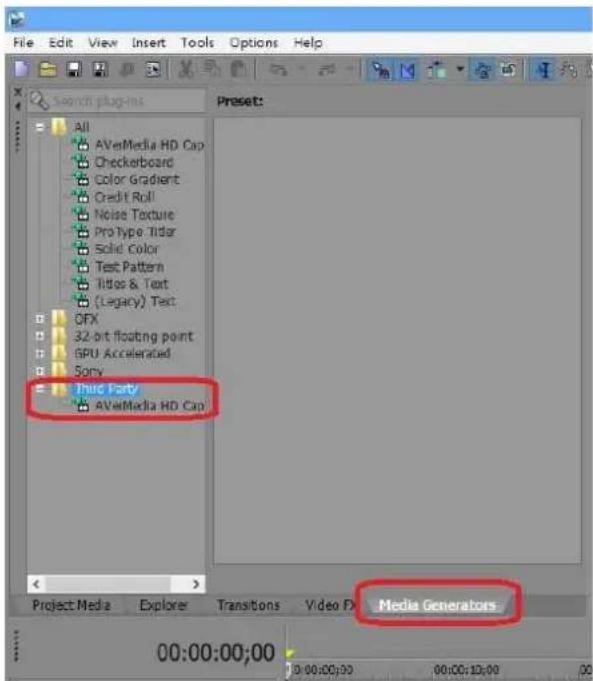
text_image
File Edit View Insert Tools Options Help Search plugins All AVeMedia HD Cap Checkerboard Color Gradient Credit Roll Noise Texture Pro Type Tidar Solid Color Text Pattern Titles & Text (Legacy) Text OFX 32-bit floating point GPU Accelerated Sony Third Party AVeMedia HD Cap Project Media Explorer Transitions Video FX Media Generators 00:00:00:00 00:00:00 00:00:10:00 005. 把(Default) Preset 拖曳到箭頭指示的區域

text_image
Untitled * - Vegas Pro 12.0 TRIAL File Edit View Insert Tools Options Help Project Manager Al AVverMedia HD Corp Checkboard Color Gradient Credit Full Noise Texture Pro Type Ticker Solid Color Text Patterns Titles & Text (Legory) Text OFX 32 bit Floating point GPU Accelerated Sony Text Parts AVverMedia HD Corp [Default] Video Media Generators Video Media Generator: AVverMedia HD Capture Frame Size: 1929 x 1080 Durations: 09:00:10,00 Tunes: [Default] Project Media Explore Transitions Movie IX Media Generators AVVerMedia HD Capture A30U: Capture Device: AVVerMedia OV10 USB D - Vite Source: TRAF Resolution: 720x86x838 Dendenter: Preview Recording 00:00:00:00 5:00:00:00 00:00:00:00 40:00:00:25 Level: 100.0 %6. 建立 AVerMedia 高畫質擷取

text_image
Video Media Generators Video Media Generator: AVerMedia HD Capture Frame Size: 1920 x 1080 Durabon: 00:00:10:00 Reset: Default AVerMedia HD Capture About ? Capture Device: AVerMedia OV710 USB 0 Video Source: HDMI Reclusions: 1970/1980P 530 Deinterlace: ✓ Stop Preview Recording Record Format: MP4 File Name: AVerRecord_13121: File Path: c:\ Change Path GOP Structure Size: 30 Video Bitrate: 6000 Audio Bitrate: 96 Kbps HIV Acceleration: Record Reach The Factory Roof 31/83 +1+1887. 改變路徑(注意:建議不要直接建立路徑在 C:\下)

text_image
Video Media Generators Video Media Generator: AverMedia HD Capture Frame Size: 1920 x 1060 Duration: 00:00:19:00 Reset: Default AVerMedia HD Capture About ? Capture Device: AverMedia CV710 USB 8 Video Source: IBM Resolution: 1920010000g50 Deinterface: Stop Preview Recording Record Format: MP4 File Name: File Path: Change Path GOP Structure Size: 30 Video Bitrate: Audio Bitrate: 96 Kbps MW Acceleration: Record 浏览资料夹 Change Path 桌面 保健楼 JoJo 电脑 视频 控制台 资源回收箱 20131202_ExtremeCapIFSP_v1.0.0.1 CV710 graphstudionext_0_6_1_205 TS-to-MP4 Utility 建立新资料夹(M) 确定 取消AVerMedia 產品專用產品外掛程式外掛程式
- 請到 AVerMedia 官網下載外掛程式 ImageJ
- 根據說明安裝外掛程式
- 執行 ImageJ
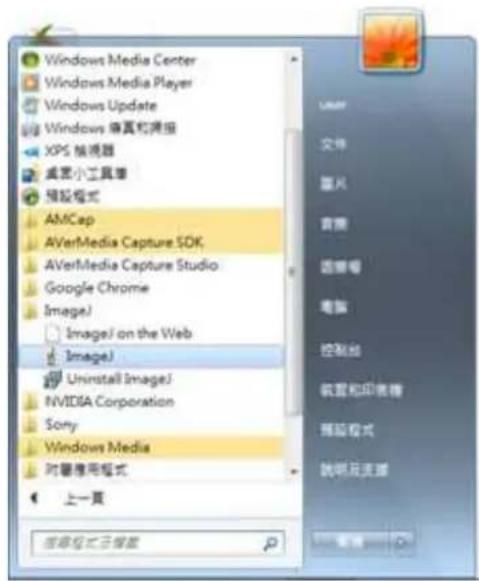
text_image
Windows Media Center Windows Media Player Windows Update Windows 做真和摸报 XPS 模块器 桌面小工具箱 预设格式 AMCap AVerMedia Capture SDK AVerMedia Capture Studio Google Chrome Image1 Image1 on the Web Image1 Uninstall Image1 NVIDIA Corporation Sony Windows Media 对屏幕应用格式 上一页 应用程序已删除4. 選擇 Plugins → AVerMedia → HD Capture

text_image
File Edit Image Process Analyze Scrolling tool (or press space bar and drag) Plugins Window Help Macros Shortcuts Utilities New Compile and Run... Install Ctrl+Shift+M 3D AVoMedia HD Capture Analyze Examples Filters Graphics Input-Output Scripts Stacks Tools- 選擇要使用的 AVerMedia 裝置:設定 Video Source, Resolution, Video Format 和 Options,點選 Start Streaming 確認。
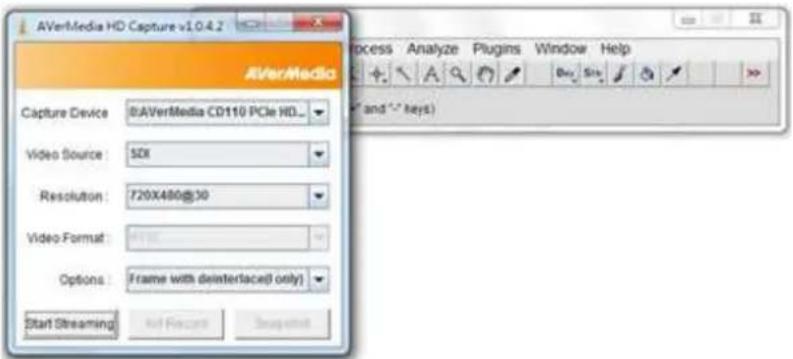
text_image
AVerMedia HD Capture v1.0.4.2 AVerMedia Capture Device: 8AVerMedia CD110 PCIe HD... Video Source: 52X Resolution: 720X480@30 Video Format: Options: Frame with deinterlaced( only ) Start Streaming Add Record Refresh Process Analyze Plugins Window Help and " > keys)- 顯示出串流媒體的影像,現在可以選擇 Snapshot, AVI Record 或者 Stop Streaming
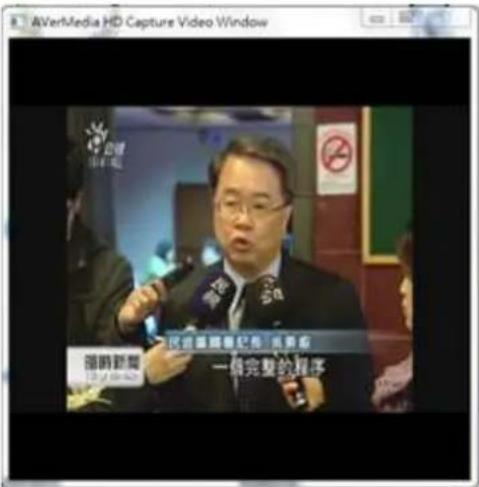
- 在使用 AVI Recorder 撷取圖片之前,需要建立儲存路徑。點選 Save 確認。

text_image
AVerMedia HD Capture Video Window 保存 文件 储存名: Documents 1_20140220_180433.avi Register Vegas Pro.htm 1_CaptureStudio20140220180444_0.jpg AVerHDCapture.avi AVerRecord_140220_142234.mp4 AVerRecord_140220_142234.mp4.stk Default.sfvidcep 搜索名称: AVerHDCapture.avi 搜索类型: 所有搜索 储存 取消- 開始擷取

text_image
AVerMedia HD Capture Video Window AVerMedia HD Capture v1.0.4.2 Capture Device: Video Source: Resolution: Video Format: Options: Stop Streaming Stop Record Snapshol Process Analyze Plugins Window Help- 點選 Stop Record,選擇 First Frame, Last Frame, 再勾選 Use Virtual Stack, Convert to Grayscale 或者 Flip Vertical,點選 OK.