
TMX-R700 - Écran vidéo ALPINE - Notice d'utilisation et mode d'emploi gratuit
Retrouvez gratuitement la notice de l'appareil TMX-R700 ALPINE au format PDF.


| Type de produit | Écran vidéo pour véhicule (moniteur de plafond) |
| Marque | ALPINE |
| Modèle | TMX-R700 |
| Taille de l'écran | 7 pouces (6,07" x 3,43") |
| Technologie d'affichage | TFT LCD à matrice active |
| Format d'image | 16:9 |
| Résolution | 480 x 234 pixels (x3, total 336 960 pixels) |
| Rétroéclairage | Lampe fluorescente à cathode froide |
| Alimentation | 14,4 VDC (11 - 15 VDC admissible) |
| Entrées vidéo | 3 entrées A/V (AUX1, AUX2, AUX3) |
| Sortie vidéo | 1 sortie A/V (AUX OUT, miroir de l'écran) |
| Sorties casque filaire | 2 prises mini-jack (3,5 mm) |
| Transmetteur infrarouge | 2 canaux sélectionnables (A/B/OFF) pour casques sans fil |
| Mécanisme SmartView | Rotation gauche/droite jusqu'à 30°, inclinaison de 90° à 120° par pas de 10° |
| Angle de vision | 120° horizontal |
| Compatibilité vidéo | NTSC/PAL (sélectionnable) |
| Télécommande | Sans fil infrarouge RUE-4153 (piles AAA incluses) |
| Éclairage intérieur | Lampe de plafond intégrée (12V, 5W, culot type DE3022) |
| Dimensions (L x P x H) | 228 x 267 x 45 mm |
| Poids | 1,02 kg |
| Température de fonctionnement | 0°C à +45°C |
| Accessoires inclus | Télécommande, connecteur d'alimentation, piles AAA (x2), bande velcro, vis (x12), câble Mini-DIN 5m |
| Installation | Module interface dissimulé (Hide-Away Box), adapté aux consoles de toit ALPINE |
| Réglages OSD | Contraste, luminosité, couleur, teinte, gradation, canal IR, système vidéo, réinitialisation |
| Sécurité | Ne pas utiliser en conduisant, ne pas installer près des airbags, faire appel à un professionnel |
FOIRE AUX QUESTIONS - TMX-R700 ALPINE
Questions des utilisateurs sur TMX-R700 ALPINE
0 question sur cet appareil. Repondez a celles que vous connaissez ou posez la votre.
Poser une nouvelle question sur cet appareil
Téléchargez la notice de votre Écran vidéo au format PDF gratuitement ! Retrouvez votre notice TMX-R700 - ALPINE et reprennez votre appareil électronique en main. Sur cette page sont publiés tous les documents nécessaires à l'utilisation de votre appareil TMX-R700 de la marque ALPINE.
MODE D'EMPLOI TMX-R700 ALPINE
TMX-R700A
Mobile Overhead Monitor
OWNER'S MANUAL

WARNING
It is dangerous and illegal for the driver to watch the TV/Video while driving the vehicle. The driver may be distracted from looking ahead and an accident could occur.
Caution
- Read this manual thoroughly before starting installation and operation. You will find a number of Safety Warnings in this manual to tell you about things that could hurt you or other people if you were to ignore the Warnings. We cannot be responsible for problems resulting from failure to observe the Warnings in this manual.
- This manual uses a symbol to show how to use this product safely and to avoid harm to yourself and others and damage to your property. Here is what this symbol means. Understanding it is important for reading the Manual.
- Meaning of Symbol:

WARNING
This symbol means there is something that could cause serious injury or death to you or other people.
DO NOT DISASSEMBLE OR ALTER
Attempts to disassemble or alter this product can lead to accidental fires or electrical shock.
KEEP SMALL ARTICLES OUT OF THE REACH OF CHILDREN
Keep small articles (wire-ties, etc.) out of reach of children. If swallowed, consult a physician immediately.
USE ONLY IN CARS WITH A 12 VOLT NEGATIVE GROUND
Use only in cars with a 12 volt negative (−) ground electrical system. (Check with your dealer if you are not sure.) Failure to do so may result in fire, etc.
BEFORE WIRING, DISCONNECT THE CABLE FROM THE NEGATIVE BATTERY TERMINAL
Before doing any electrical wiring, disconnect the cable from the negative (−) terminal of the battery. Failure to do so may result in electric shock or injury due to electrical shorts.
KEEP ELECTRICAL CABLES TOGETHER TO AVOID OPERATING HAZARDS
Dress the wiring to keep them from interfering with the operation of the steering wheel, gear lever, brake pedals, etc.
DO NOT CUT AWAY ANY WIRE INSULATION TO USE ITS POWER FOR OTHER EQUIPMENT
Tapping power from wiring to supply voltage to another piece of equipment could exceed the current carrying capacity of that wire. This could result in fire or electric shock.
DO NOT INSTALL IN LOCATIONS WHICH MIGHT HINDER VEHICLE OPERATION
Do not install in locations which might create hazards for the vehicle occupants or hinder vehicle operation (such as the steering wheel or gear shift) by obstructing forward vision or hampering movement etc.
DO NOT DAMAGE PIPES OR WIRING WHEN DRILLING HOLES
When drilling holes in the chassis for installation, take precautions so as not to contact, damage or obstruct pipes, tanks or electrical wiring. Failure to take such precautions may result in fire.
DO NOT USE NUTS OR BOLTS IN THE BRAKE SYSTEM FOR INSTALLATION OR GROUND CONNECTIONS
Never use safety-related parts such as bolts or nuts in the steering or brake systems or tanks to make wiring installations or ground connections. Using such parts could disable control of the vehicle and cause fire etc.
HALT USE IMMEDIATELY IF A PROBLEM APPEARS
When problems appear, stop using the system immediately and contact the dealer from whom you purchased the equipment. Some problems which may warrant immediate attention include a lack of sound, noxious odors or smoke being emitted from the unit, or foreign objects dropped inside the unit.
DO NOT OPERATE THE EQUIPMENT OR LOOK AT THE SCREEN WHILE DRIVING
Do not change settings while driving. If operation requiring a prolonged view of the display is required, stop the vehicle in a safe location before attempting operation.
DO NOT INSTALL THE MONITOR NEAR THE PASSENGER SEAT AIR BAG
Ensure that the location chosen for the monitor does not interfere with the operation of the passenger seat air bag.
This will prevent the triggered air bag from launching the display towards passengers, possible causing injury.
HAVE THE WIRING AND INSTALLATION DONE BY EXPERTS
The wiring and installation of this unit requires special technical skill and experience. To ensure safety, always contact the dealer where you purchased this unit to have the work done.
DO NOT INSTALL IN LOCATIONS WITH HIGH MOISTURE OR DUST
Avoid installing the unit in locations with high incidence of moisture or dust. Moisture or dust that penetrates into this unit may cause smoke or fire.
MAKE THE CORRECT CONNECTIONS
Failure to make the correct connections can cause fire or accident to occur.
ARRANGE THE WIRING SO IT IS NOT CRIMPED OR PINCHED
Route the cables and wiring so as not to be crimped by moving parts like seat rails or to make contact with sharp spots which could damage the wiring.
DO NOT RAISE THE VOLUME EXCESSIVELY
Keep the volume at a level where you can still hear outside noises while driving. Driving while unable to hear outside sounds could cause an accident.
FEATURES/DESCRIPTION
Alpine's TMX-R700 integrates a 7.0 inch color LCD panel, a newly designed two channel selectable infrared transmitter for wireless headphones, triple video source selector with a newly designed hide-away box for easier installation. Three A/V inputs on the TMX-R700 allow for easy system building with Alpine premium video sources, such as its DVD-7996 in-dash DVD player, DVA-5205 CD/DVD player, TCS-V430A TV tuner, DHA-S680 6-disc DVD changer Other third-party sources may also be connected. Alpine's SmartView™ Swivel mechanism allows the monitor to swivel 30^ left/right and to tilt, providing a 120^ -wide viewing angle from the center and a constant horizontal viewing angle for vivid picture quality and optimal viewing for all rear-seat passengers.
| WARNING | It is dangerous and illegal for the driver to watch TV/Video while driving any vehicle. The driver may be distracted from looking ahead and an accident could occur. |
Features:
• 7 inch Wide TFT Active Matrix Color LCD
• SmartView™ Swivel Mechanism
• 3 A/V Inputs
• 1 A/V Output
• On Screen Display for Easy Setup
• Wireless Remote Control
• CH Selectable IR Transmitter for IR Headphones (A/B/OFF)
• Dual Wired Headphone Outputs
• NTSC/PAL Compatibility
- Dimmer Control
• Hide Away Interface Module for Easy Install
• Direct Fit To Alpine Overhead Console
Note:
If you have any questions regarding the application of this device, see your authorized Alpine dealer.
It is recommended that this product be used with Alpine's various Overhead Consoles. Your authorized Alpine dealer will have more information on these products.
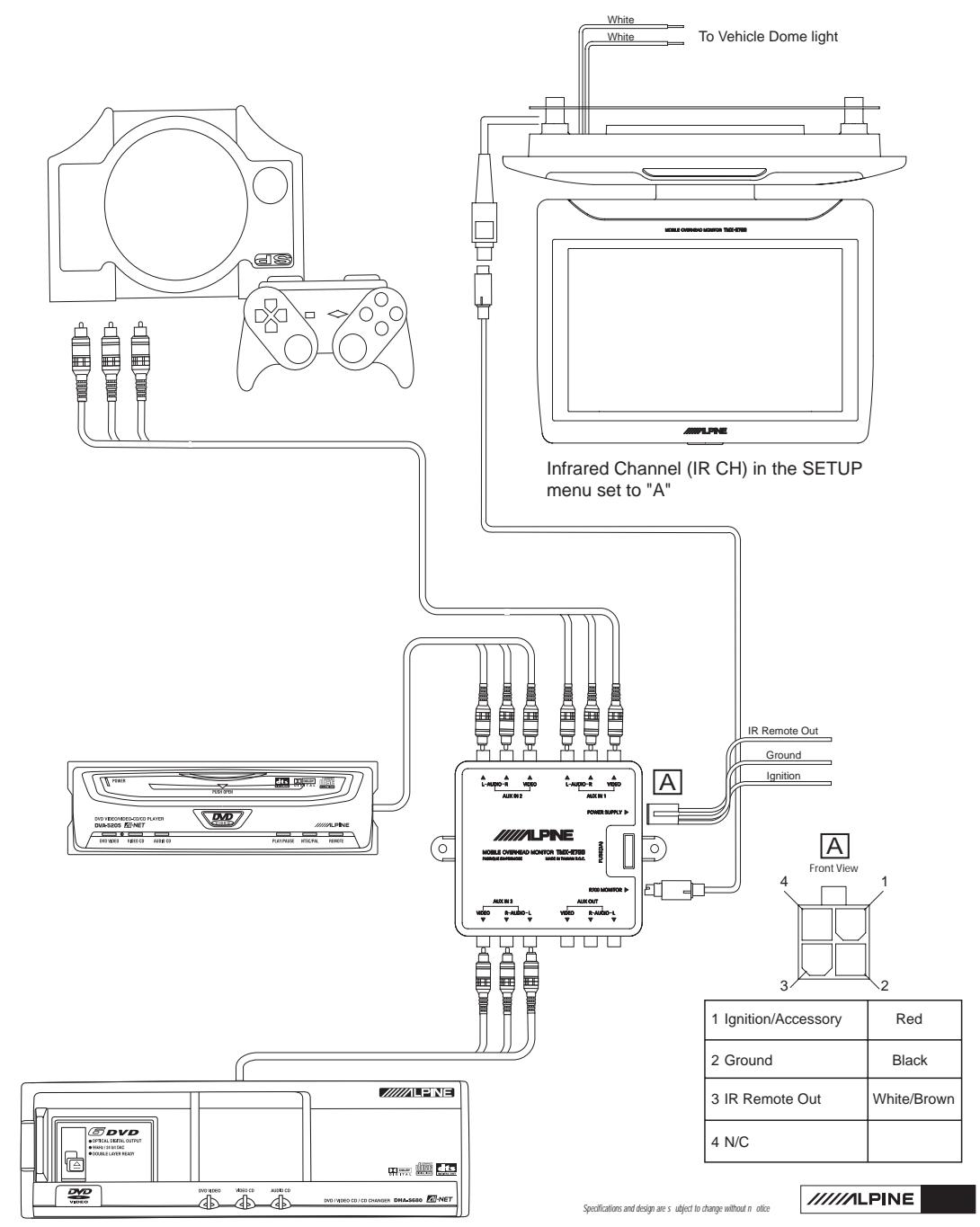
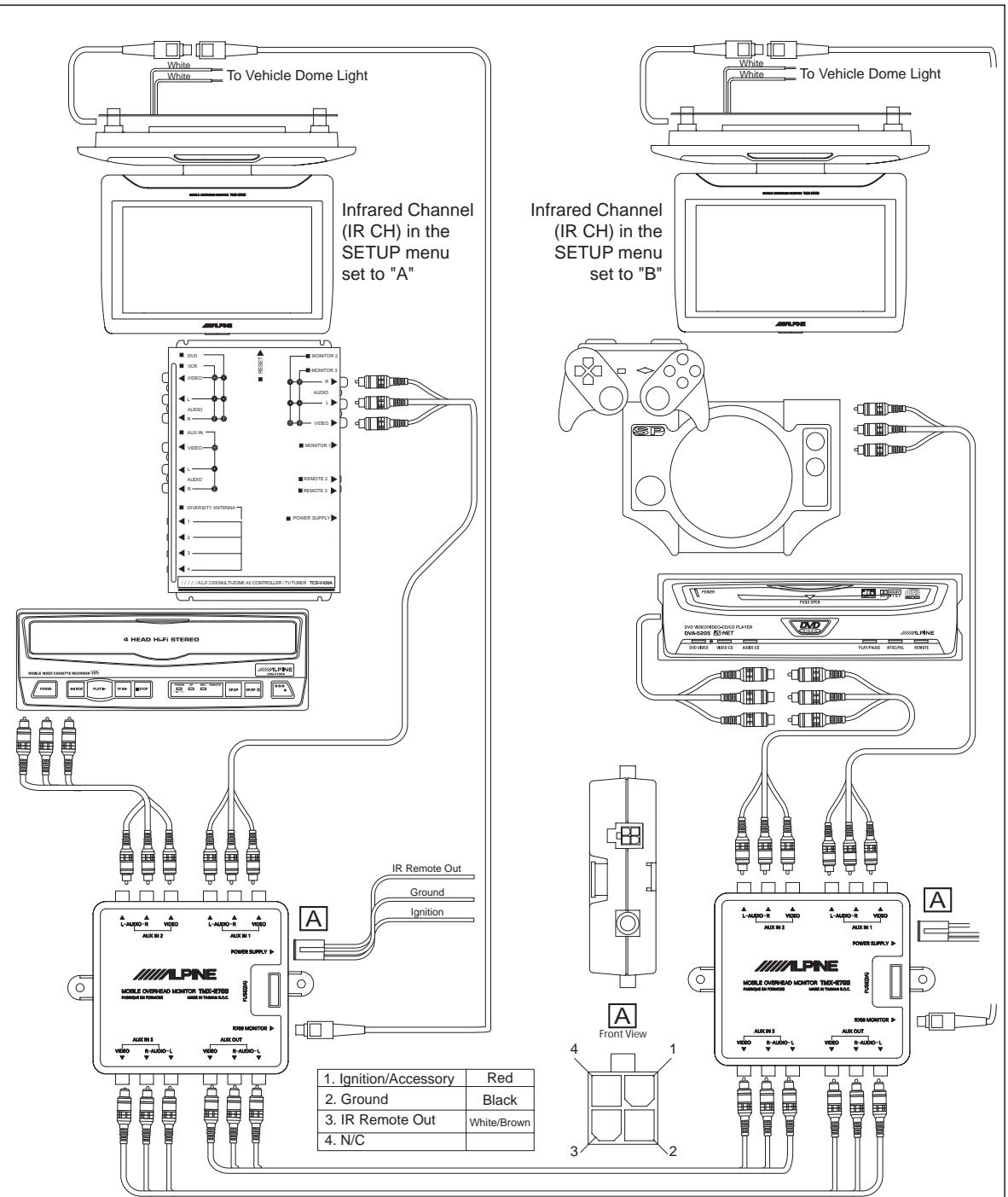
See page 10 for the Typical Rear Seat Entertainment System using the TMX-R700.
OPERATION - Overhead Monitor
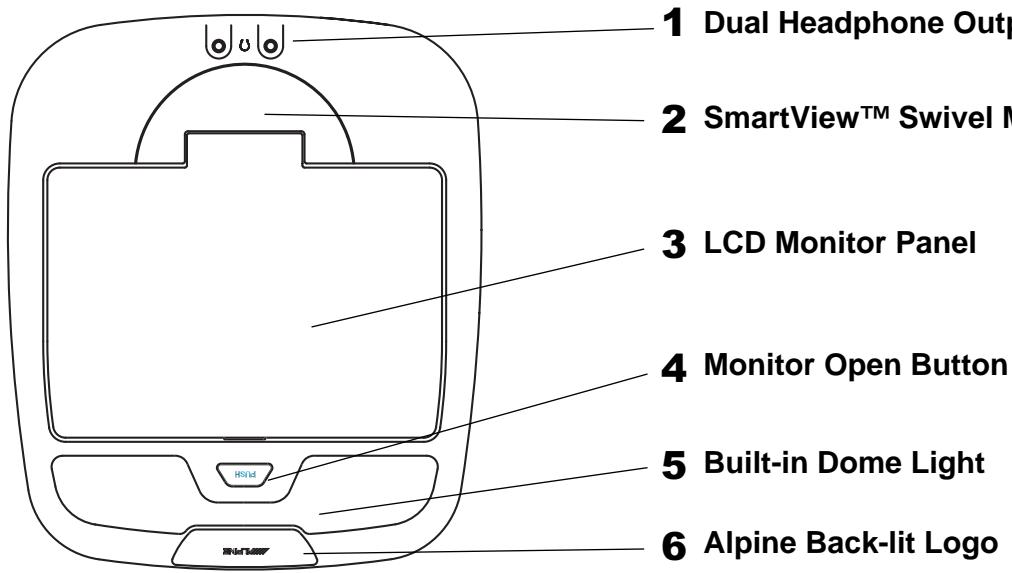
1) Dual Headphone Outputs
Two output jacks (mini-phono plug) are provided for wired headphones. Output level is adjusted using the Volume UP/DN buttons on the remote control.
2) SmartView™ Swivel Mechanism
The design of this mechanism provides the rear seat passengers a stable picture, viewable from many different angles. This system allows the LCD to tilt from 90 to 120 degrees in 10 degree steps. At the same time, the LCD will maintain its horizontal view while being rotated from left to right, up to 30 degrees, in 10 degree steps.
NOTE:
- The LCD will only close when rotation is at 0 degrees to prevent damage to the monitor.
- When rotating the monitor, use both hands on either side of the panel to ensure even pressure on the mechanism. This will prevent damage to the SmartView™ Swivel mechanism.
- Make sure the panel is fully opened (90 degree position) before trying to rotate.
3) LCD Monitor Panel
This is a 7 inch, Widescreen TFT, Active Matrix LCD. In addition, an Infrared Wireless Headphone transmitter is located on top of the LCD panel. When the monitor panel is closed, the power is automatically turned off.
NOTE: Whenever the LCD Panel is opened from closed position or Ignition/ACC is ON at opened position, the Main Power is turned on automatically.
4) Monitor Open Button
Press this button to release the Monitor Panel. The Panel will drop down slightly allowing you to fully open to its 90 degree or greater position. To close, firmly press the LCD Monitor Panel back up into the housing until a click is heard.
5) Built-in Dome Light
To replace the bulb, gently open the dome light lens from the front. Use a 12V, 5W bulb or equivalent. (e.g. SYLVANIA DE3022)
6) Alpine Back-lit Logo
Blue, back-lit ALPINE logo will turn on when the overhead monitor main power is on.
OPERATION - Remote Control
REMOTE CONTROL
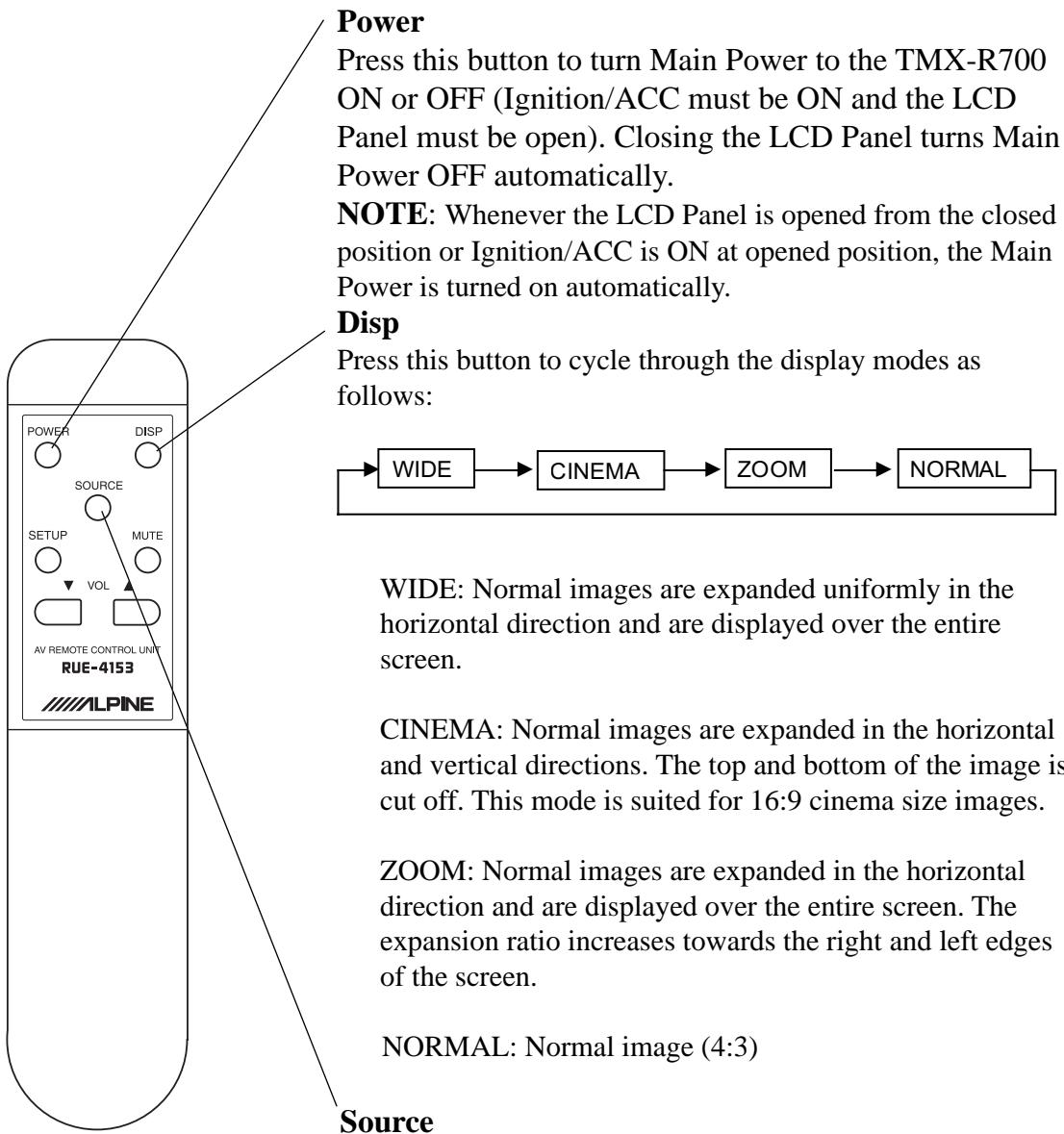
flowchart
graph TD
    A["ALPINE"] --> B["AV REMOTE CONTROL UNIT RUE-4153"]
    B --> C["SOURCE"]
    C --> D["POWER"]
    C --> E["MUTE"]
    C --> F["SUP"]
    C --> G["AV"]
    style A fill:#f9f,stroke:#333
    style B fill:#ccf,stroke:#333
    style C fill:#cfc,stroke:#333
    style D fill:#fcc,stroke:#333
    style E fill:#fcc,stroke:#333
    style F fill:#cff,stroke:#333
    style G fill:#ffc,stroke:#333
Source
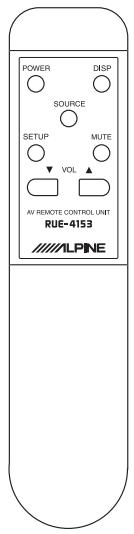
Press the Source button to toggle between the three A/V sources (AUX1, AUX2 and AUX3). As you toggle, the source will be displayed on the OSD (On Screen Display).
OPERATION - Remote Control
REMOTE CONTROL (continued)
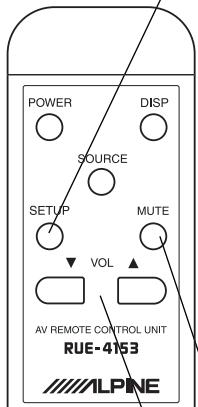
Setup
Press the Setup button to make adjustments to the picture. The various options will rotate in the following order.

flowchart
graph LR
    A["CONTRAST"] --> B["BRIGHT"]
    B --> C["COLOR"]
    C --> D["TINT"]
    D --> E["DIMMER"]
    E --> F["IR CH"]
    F --> G["NTSC/PAL"]
    G --> H["RESET"]
    H --> A
Once the parameter you want to change is on the screen, use the Volume UP or DN buttons to increase or decrease the level respectively. If no action is taken within 10 seconds after making the selection or adjustment, the Setup mode is ended and the OSD turns off.
CONTRAST: Adjust the contrast of the picture.
BRIGHT: Adjust the brightness of the picture.
COLOR: Adjust the color balance of the picture.
TINT: Adjust the tint of the picture.
DIMMER: Select the Dimmer level (ON/OFF), Default: OFF
IR CH: Select the Infrared frequency of the transmitter for the wireless headphone SHS-N202 (A/B/OFF). Default: A
This function allows building a dual monitor system and each monitor displays and broadcasts a different video source.
NTSC/PAL: Select the Video system. Default: NTSC
RESET: Reset all selection and adjustment to the factory default.
Mute
Instantly mute the wired headphones by pressing this button. Pressing the Mute button again (or pressing either the Volume UP or DN button) will return the volume to its original level.
Volume
Use the volume UP and DN buttons to increase or decrease the wired headphone output levels. Pressing and holding either button will increase or decrease the volume rapidly. The volume function does not affect AUX A/V Output or the Infrared Wireless Headphone.
Battery Compartment (AAA Battery x 2)
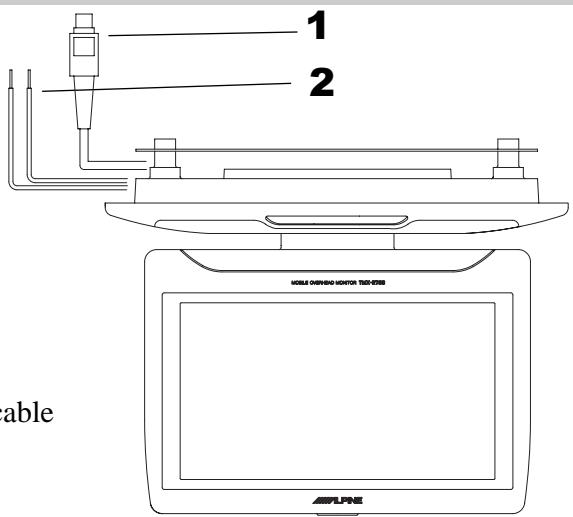
WIRING/CONNECTIONS
1. Mini-DIN Connector (Pigtail)
This is connected to the TMX-R700 Overhead Monitor, through the 5m, Mini-DIN Extension Cable.
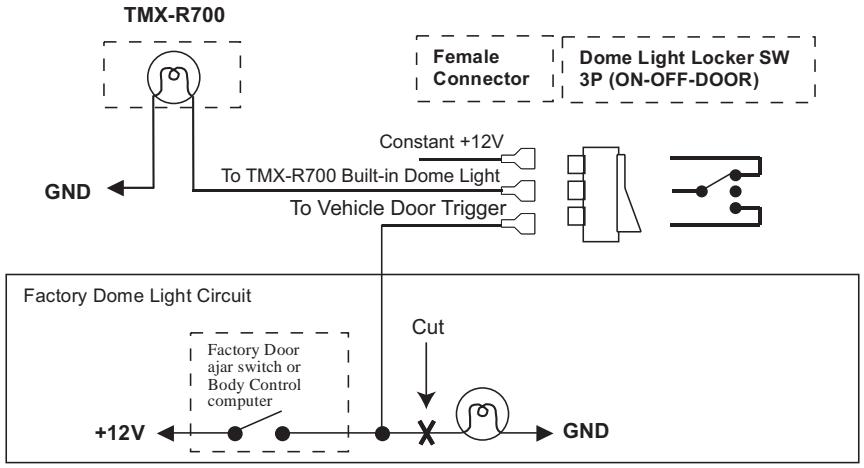
2. Dome Light Wire
This wire connects the built-in Dome Light to the cable from the vehicle's Dome Light Switch.
Positive Switched System
flowchart
graph TD
    A["TMX-R700"] -->|GND| B["To TMX-R700 Built-in Dome Light"]
    B --> C["To Vehicle Door Trigger"]
    C --> D["Dome Light Locker SW 3P (ON-OFF-DOOR)"]
    D --> E["Factory Door ajar switch or Body Control computer"]
    E --> F["+12V"]
    F --> G["GND"]
    H["Constant +12V"] --> B
    I["Cut"] --> J["Factory Door Light Circuit"]
Negative Switched System
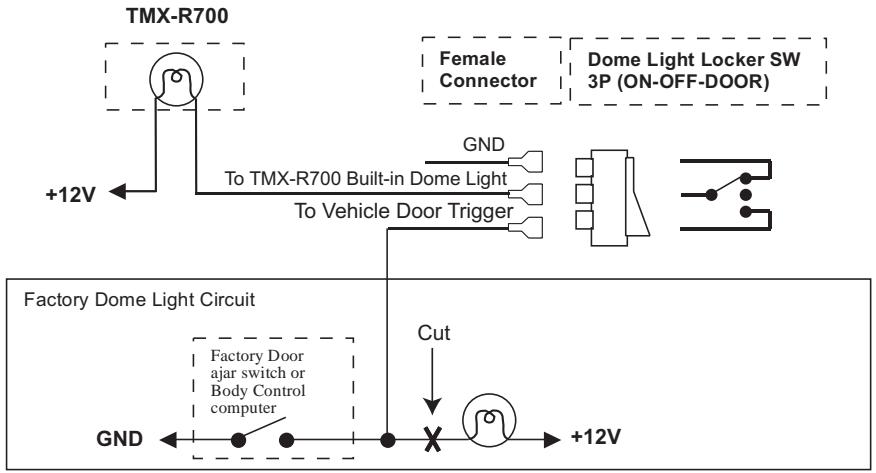
flowchart
graph TD
    A["TMX-R700"] -->|+12V| B["To TMX-R700 Built-in Dome Light"]
    B --> C["To Vehicle Door Trigger"]
    C --> D["Dome Light Locker SW 3P (ON-OFF-DOOR)"]
    D --> E["Factory Door ajar switch or Body Control computer"]
    E --> F["Cut"]
    F --> G["+12V"]
    style A fill:#f9f,stroke:#333
    style D fill:#ccf,stroke:#333
    style G fill:#cfc,stroke:#333
WIRING/CONNECTIONS
3. 5m Mini-DIN Extension Cable
This cable is included. It is connected between the TMX-R700 display and the Hide-Away Box (included).
Hide-Away Box
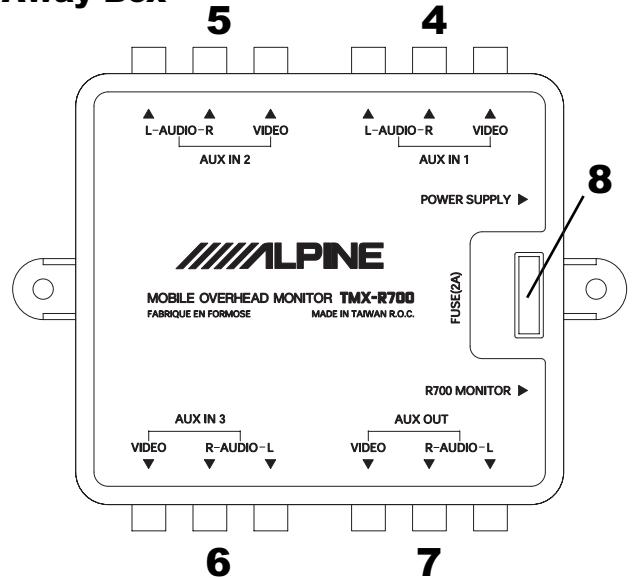
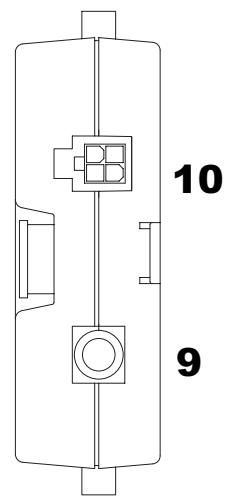
3

natural_image
Pure electrical circuit lines without any symbols-
AUX A/V, Input 1
-
AUX A/V, Input 2
-
AUX A/V, Input 3
-
AUX A/V, Output
An auxiliary A/V output is provided to drive an external monitor. This signal mirrors what's being shown on the TMX-R700 display. The volume function does not affect the Auxiliary A/V Output.
-
Fuse (2 A)
-
Mini-DIN Connector
This is connected to the TMX-R700 Overhead Monitor through 5m Mini DIN Extension Cable (included).
-
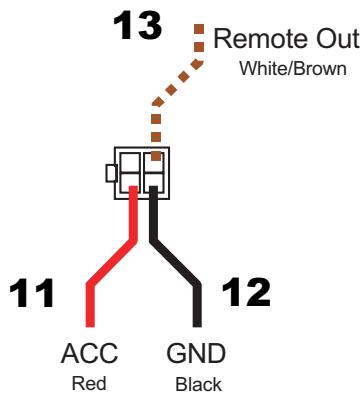
Power Supply Connector
-
ACC Power lead (Red)
To ACC power lead powered when engine key position is ACC.
- Ground lead (Black)
Connect the lead to a good chassis ground on the vehicle. Make sure the connection is made to bare metal and is securely fastened using the sheet metal screw provided.
- Remote Out
The Remote Out wire connects to any ALPINE Mobile Video product which has an external remote input function. For example, products such as a DVD, VCR and TV Tuner.
SPECIFICATIONS
Specifications
Video Display System .... NTSC/PAL Compatibility
Display Screen .... Size 7 inches, 6.07"(W) x 3.43"(H) 16:9 Aspect Ratio
Element TFT-LCD, Active Matrix
Format 7.0", 480(W) x 234(H) x 3
Total 336,960 pixels
Back Light ...... Cold Cathode Fluorescent Lamp
Power Requirement 14.4 VDC (11 - 15 VDC allowable)
Headphone Output 32ohm 100mW(max)
Video Input (DIN) 1.0V p-p 75ohm
Audio Input (DIN) 2.0V rms (max)
Operating Temperature ....+32 °F to +113 °F (0 °C to +45 °C)
Dimensions 267mm (D) x 228mm (W) x 45mm (H)
10.51” (D) x 8.98” (W) x 1.77” (H)
Weight 1.02 kg (2 lbs 4 oz)
Accessories
RUE-4153 Remote Control ....x 1
Power Supply Connector ....x 1
AAA batteries ....x 2
Velcro Tape ...... x 1
Screws ...... x 12
NOTES:
Due to continuous product improvements, specifications and design are subject to change without notice.
The LCD panel is manufactured using an extremely high precision manufacturing technology. Its effective pixel ratio is over 99.99%. This means that 0.01% of the pixels could be either always ON or OFF.
Typical Rear Seat Entertainment System
Dual Rear Seat Entertainment System
flowchart
graph TD
    subgraph_Infrared_Channel["Infrared Channel (IR CH) in the SETUP menu set to "A""]
        A1["White"] --> B1["To Vehicle Dome Light"]
        A2["White"] --> B2["To Vehicle Dome Light"]
        A3["White"] --> B3["To Vehicle Dome Light"]
        A4["White"] --> B4["To Vehicle Dome Light"]
        A5["White"] --> B5["To Vehicle Dome Light"]
        A6["White"] --> B6["To Vehicle Dome Light"]
        A7["White"] --> B7["To Vehicle Dome Light"]
        A8["White"] --> B8["To Vehicle Dome Light"]
        A9["White"] --> B9["To Vehicle Dome Light"]
        A10["White"] --> B10["To Vehicle Dome Light"]
        A11["White"] --> B11["To Vehicle Dome Light"]
        A12["White"] --> B12["To Vehicle Dome Light"]
        A13["White"] --> B13["To Vehicle Dome Light"]
        A14["White"] --> B14["To Vehicle Dome Light"]
        A15["White"] --> B15["To Vehicle Dome Light"]
        A16["White"] --> B16["To Vehicle Dome Light"]
        A17["White"] --> B17["To Vehicle Dome Light"]
        A18["White"] --> B18["To Vehicle Dome Light"]
        A19["White"] --> B19["To Vehicle Dome Light"]
        A20["White"] --> B20["To Vehicle Dome Light"]
        A21["White"] --> B21["To Vehicle Dome Light"]
        A22["White"] --> B22["To Vehicle Dome Light"]
        A23["White"] --> B23["To Vehicle Dome Light"]
        A24["White"] --> B24["To Vehicle Dome Light"]
        A25["White"] --> B25["To Vehicle Dome Light"]
        A26["White"] --> B26["To Vehicle Dome Light"]
        A27["White"] --> B27["To Vehicle Dome Light"]
        A28["White"] --> B28["To Vehicle Dome Light"]
        A29["White"] --> B29["To Vehicle Dome Light"]
        A30["White"] --> B30["To Vehicle Dome Light"]
        A31["White"] --> B31["To Vehicle Dome Light"]
        A32["White"] --> B32["To Vehicle Dome Light"]
        A33["White"] --> B33["To Vehicle Dome Light"]
        A34["White"] --> B34["To Vehicle Dome Light"]
        A35["White"] --> B35["To Vehicle Dome Light"]
        A36["White"] --> B36["To Vehicle Dome Light"]
        A37["White"] --> B37["To Vehicle Dome Light"]
        A38["White"] --> B38["To Vehicle Dome Light"]
        A39["White"] --> B39["To Vehicle Dome Light"]
        A40["White"] --> B40["To Vehicle Dome Light"]
        A41["White"] --> B41["To Vehicle Dome Light"]
        A42["White"] --> B42["To Vehicle Dome Light"]
        A43["White"] --> B43["To Vehicle Dome Light"]
        A44["White"] --> B44["To Vehicle Dome Light"]
        A45["White"] --> B45["To Vehicle Dome Light"]
        A46["White"] --> B46["To Vehicle Dome Light"]
        A47["White"] --> B47["To Vehicle Dome Light"]
        A48["White"] --> B48["To Vehicle Dome Light"]
        A49["White"] --> B49["To Vehicle Dome Light"]
        A50["White"] --> B50["To Vehicle Dome Light"]
        A51["White"] --> B51["To Vehicle Dome Light"]
        A52["White"] --> B52["To Vehicle Dome Light"]
        A53["White"] --> B53["To Vehicle Dome Light"]
        A54["White"] --> B54["To Vehicle Dome Light"]
        A55["White"] --> B55["To Vehicle Dome Light"]
        A56["White"] --> B56["To Vehicle Dome Light"]
        A57["White"] --> B57["To Vehicle Dome Light"]
        A58["White"] --> B58["To Vehicle Dome Light"]
        A59["White"] --> B59["To Vehicle Dome Light"]
        A60["White"] --> B60["To Vehicle Dome Light"]
        A61["White"] --> B61["To Vehicle Dome Light"]
        A62["White"] --> B62["To Vehicle Dome Light"]
        A63["White"] --> B63["To Vehicle Dome Light"]
        A64["White"] --> B64["To Vehicle Dome Light"]
        A65["White"] --> B65["To Vehicle Dome Light"]
        A66["White"] --> B66["To Vehicle Dome Light"]
        A67["White"] --> B67["To Vehicle Dome Light"]
        A68["White"] --> B68["To Vehicle Dome Light"]
        A69["White"] --> B69["To Vehicle Dome Light"]
        A70["White"] --> B70["To Vehicle Dome Light"]
        A71["White"] --> B71["To Vehicle Dome Light"]
        A72["White"] --> B72["To Vehicle Dome Light"]
        A73["White"] --> B73["To Vehicle Dome Light"]
        A74["White"] --> B74["To Vehicle Dome Light"]
        A75["White"] --> B75["To Vehicle Dome Light"]
        A76["White"] --> B76["To Vehicle Dome Light"]
        A77["White"] --> B77["To Vehicle Dome Light"]
        A78["White"] --> B78["To Vehicle Dome Light"]
        A79["White"] --> B79["To Vehicle Dome Light"]
        A80["White"] --> B80["To Vehicle Dome Light"]
        A81["White"] --> B81["To Vehicle Dome Light"]
        A82["White"] --> B82["To Vehicle Dome Light"]
        A83["White"] --> B83["To Vehicle Dome Light"]
        A84["White"] --> B84["To Vehicle Dome Light"]
        A85["White"] --> B85["To Vehicle Dome Light"]
        A86["White"] --> B86["To Vehicle Dome Light"]
        A87["White"] --> B87["To Vehicle Dome Light"]
        A88["White"] --> B88["To Vehicle Dome Light"]
        A89["White"] --> B89["To Vehicle Dome Light"]
        A90["White"] --> B90["To Vehicle Dome Light"]
    end

    subgraph Infrared_Channel_Setup
    direction TB
    direction LR
    direction S
    direction T
    direction U
    direction V
    direction W
    direction X
    direction Y
    direction Z
    direction AA
    direction AB
    direction AC
    direction AD
    direction AE
    direction AF
    direction AG
    direction AH
    direction AI
    direction AJ
    direction AK
    direction AL
    direction AM
    direction AN
    direction AO
    direction AP
    direction AQ
    direction AR
    direction AS
    direction AT
    direction AU
    direction AV
    direction AW
    direction AX
    direction AZ
    direction BA
    direction BB
    direction BC
    direction BD
    direction BE
    direction BF
    direction BG
    direction BH
    direction BI
    direction BJ
    direction BK
    direction BL
    direction BM
    direction BN
    direction BO
    direction BP
    direction BPB
    direction BPB
    direction BPB
    direction BPB
    direction BPB
    direction BPB
    direction BPB
    direction BPB
    direction BPB
    direction BPB
    direction BPB
    direction BPB
    direction BPB
    direction BPB
    direction BPB
    direction BPB
    direction BPB
    direction BPB
    direction BPB
    direction BPB
    direction BPBB
    direction BPBB
    direction BPBB
    direction BPBB
    direction BPBB
    direction BPBB
    direction BPBB
    direction BPBB
    direction BPBB
    direction BPBB
    direction BPBB
    direction BPBB
    direction BPBB
    direction BPBB
    direction BPBB
    direction BPBB
    direction BPBB
    direction BPBB
    direction BPBB
    direction BPBB
    direction BPBS
    direction BPBS
    direction BPBS
    direction BPBS
    direction BPBS
    direction BPBS
    direction BPBS
    direction BPBS
    direction BPBS
    direction BPBS
    direction BPBS
    direction BPBS
    direction BPBS
    direction BPBS
    direction BPBS
    direction BPBS
    direction BPBS
    directional BPBS
    directional BPBS
    directional BPBS
    directional BPBS
    directional BPBS
    directional BPBS
    directional BPBS
    directional BPBS
    directional BPBS
    directional BPBS
    directional BPBS
    directional BPBS
    directional BPBS
    directional BPBS
Specifications and design are subject to change without notice
ALPINE
ALPINE®
ALPINE ELECTRONICS, INC.
Tokyo office; 1-1-8 Nishi Gotanda,
Shinagawa-ku, Tokyo 141-8501, Japan
Tel.: (03) 3494-1101
ALPINE ELECTRONICS OF AMERICA, INC.
19145 Gramercy Place, Torrance,
California 90501, U.S.A.
Tel.: 1-800-ALPINE1 (1-800-257-4631)
1-888-NAV-HELP (1-888-628-4357)
ALPINE ELECTRONICS OF CANADA, INC.
Suite 203, 7300 Warden Ave. Markham, Ontario
L3R 9Z6, Canada
Tel.: 1-800-ALPINE1 (1-800-257-4631)
ALPINE ELECTRONICS OF AUSTRALIA PTY. LTD.
6-8 Fiveways Boulevarde Keysborough Victoria 3173,
Australia
Tel.: (03) 9769-0000
ALPINE ELECTRONICS GmbH
Kreuzerkamp 7-11 40878 Ratingen, Germany
Tel.: 02102-45 50
ALPINE ITALIA S.p.A.
Viale C.Colombo 8, 20090 Trezzano
Sul Naviglio (MI), Italy
Tel.: 02-48 47 81
ALPINE ELECTRONICS FRANCE S.A.R.L.
98, Rue De La Belle Etoile, Z.I. Paris Nord II B.P.50016
F-95945, Roissy, Charles De Gaulle Cedex, France
Tel.: 01-48 63 89 89
ALPINE ELECTRONICS OF U.K., LTD.
13 Tanners Drive, Blakelands,
Milton keynes MK14 5BU, U.K.
Tel.: 01908-61 15 56
ALPINE ELECTRONICS DE ESPANÃ, S.A.
Portal De Gamarra 36, Pabollón 32
01013 Vitoria(Alava)-Apdo. 133, Spain
Tel.: 34-45-283588
- TMX-R700A
- WARNING
- Caution
- DO NOT DISASSEMBLE OR ALTER
- KEEP SMALL ARTICLES OUT OF THE REACH OF CHILDREN
- USE ONLY IN CARS WITH A 12 VOLT NEGATIVE GROUND
- BEFORE WIRING, DISCONNECT THE CABLE FROM THE NEGATIVE BATTERY TERMINAL
- KEEP ELECTRICAL CABLES TOGETHER TO AVOID OPERATING HAZARDS
- DO NOT CUT AWAY ANY WIRE INSULATION TO USE ITS POWER FOR OTHER EQUIPMENT
- DO NOT INSTALL IN LOCATIONS WHICH MIGHT HINDER VEHICLE OPERATION
- DO NOT DAMAGE PIPES OR WIRING WHEN DRILLING HOLES
- DO NOT USE NUTS OR BOLTS IN THE BRAKE SYSTEM FOR INSTALLATION OR GROUND CONNECTIONS
- HALT USE IMMEDIATELY IF A PROBLEM APPEARS
- DO NOT OPERATE THE EQUIPMENT OR LOOK AT THE SCREEN WHILE DRIVING
- DO NOT INSTALL THE MONITOR NEAR THE PASSENGER SEAT AIR BAG
- HAVE THE WIRING AND INSTALLATION DONE BY EXPERTS
- DO NOT INSTALL IN LOCATIONS WITH HIGH MOISTURE OR DUST
- MAKE THE CORRECT CONNECTIONS
- ARRANGE THE WIRING SO IT IS NOT CRIMPED OR PINCHED
- DO NOT RAISE THE VOLUME EXCESSIVELY
- FEATURES/DESCRIPTION
- Features:
- Note:
- OPERATION - Overhead Monitor
- 1) Dual Headphone Outputs
- 2) SmartView™ Swivel Mechanism
- 3) LCD Monitor Panel
- 4) Monitor Open Button
- 5) Built-in Dome Light
- 6) Alpine Back-lit Logo
- OPERATION - Remote Control
- REMOTE CONTROL
- Source
- REMOTE CONTROL (continued)
- Setup
- Mute
- Volume
- WIRING/CONNECTIONS
- Mini-DIN Connector (Pigtail)
- Dome Light Wire
- 5m Mini-DIN Extension Cable
- SPECIFICATIONS
- Accessories
- NOTES:
- Typical Rear Seat Entertainment System
- Dual Rear Seat Entertainment System
- ALPINE®
Marque : ALPINE
Modèle : TMX-R700
Catégorie : Écran vidéo