
VISO THIRTY - Système audio haut de gamme NAD - Notice d'utilisation et mode d'emploi gratuit
Retrouvez gratuitement la notice de l'appareil VISO THIRTY NAD au format PDF.



| Type de produit | Système audio haut de gamme 2.1 / 5.1 canaux |
| Marque | NAD |
| Modèle | VISO THIRTY |
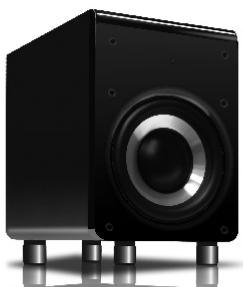
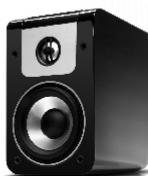
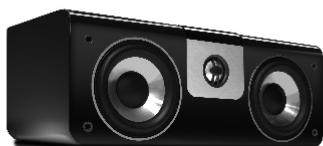
| Composants | Enceintes satellites LR5 (x2), enceinte centrale C20, caisson de basses S10 |
| Dimensions LR5 (l x h x p) | 129 x 205 x 178 mm chacun |
| Dimensions C20 (l x h x p) | 350 x 134 x 178 mm |
| Dimensions S10 (l x h x p) | 244 x 375 x 395 mm |
| Poids LR5 | 2,4 kg chacun |
| Poids C20 | 4,0 kg |
| Poids S10 | 10,4 kg |
| Poids total système (VISO THIRTY) | Environ 11 kg (emballé) |
| Alimentation caisson de basses | 100-240 V AC, 50/60 Hz (cordon secteur fourni) |
| Amplification caisson | 110 W continus, 140 W dynamiques, 280 W crête, classe AB MOSFET |
| Réponse en fréquence LR5/C20 | 75 Hz - 23 kHz (±3 dB) |
| Réponse en fréquence S10 | 36 Hz - 150 Hz (±3 dB) |
| Impédance nominale LR5/C20 | 8 ohms |
| Fonctions principales | Configuration 2.1 ou 5.1, caisson de basses actif avec interrupteur de phase et de volume, bornes plaquées or, grille ABS, patins caoutchouc |
| Entretien et nettoyage | Dépoussiérage avec un chiffon doux ; pour les saletés tenaces, utiliser un chiffon légèrement humide avec du nettoyant vitre. Éviter les abrasifs. Ne pas toucher les membranes. |
| Sécurité | Ne pas exposer à l'eau ; ne pas obstruer les ouvertures de ventilation ; débrancher en cas d'orage ; confier toute réparation à un personnel qualifié. |
| Pièces détachées et réparabilité | Contacter un revendeur NAD agréé pour toute réparation ou pièce de rechange. |
| Informations générales | Finition laque noire brillante. Garantie : se référer au revendeur. Conçu par NAD Electronics International. |
FOIRE AUX QUESTIONS - VISO THIRTY NAD
Questions des utilisateurs sur VISO THIRTY NAD
0 question sur cet appareil. Repondez a celles que vous connaissez ou posez la votre.
Poser une nouvelle question sur cet appareil
Téléchargez la notice de votre Système audio haut de gamme au format PDF gratuitement ! Retrouvez votre notice VISO THIRTY - NAD et reprennez votre appareil électronique en main. Sur cette page sont publiés tous les documents nécessaires à l'utilisation de votre appareil VISO THIRTY de la marque NAD.
MODE D'EMPLOI VISO THIRTY NAD
NAD
VISO TWENTY
VISO THIRTY
Owner's Manual


IMPORTANT SAFETY INSTRUCTIONS
- Read these instructions.
- Keep these instructions.
- Heed all warnings.
- Follow all instructions.
- Do not use this apparatus near water.
- Clean only with dry cloth.
- Do not block any ventilation openings. Install in accordance with the manufacturer's instructions.
- Do not install near any heat sources such as radiators, heat registers, stoves, or other apparatus (including amplifiers) that produce heat.
- Do not defeat the safety purpose of the polarized or grounding-type plug. A polarized plug has two blades with one wider than the other. A grounding type plug has two blades and a third grounding prong. The wide blade or the third prong is provided for your safety. If the provided plug does not fit into your outlet, consult an electrician for replacement of the obsolete outlet.
- Protect the power cord from being walked on or pinched particularly at plugs, convenience receptacles, and the point where they exit from the apparatus.
- Only use attachments/accessories specified by the manufacturer.
- Unplug this apparatus during lightning storms or when unused for long periods of time.
- Refer all servicing to qualified service personnel. Servicing is required when the apparatus has been damaged in any way, such as power-supply cord or plug is damaged, liquid has been spilled or objects have fallen into the apparatus, the apparatus has been exposed to rain or moisture, does not operate normally, or has been dropped.
- WARNING: To reduce the risk of fire or electric shock, this apparatus should not be exposed to rain or moisture and objects filled with liquids, such as vases, should not be placed on this apparatus.
- To completely disconnect this equipment from the mains, disconnect the power supply cord plug from the receptacle.
- The mains plug of the power supply cord shall remain readily operable.

The lightning flash with arrowhead symbol within an equilateral triangle is intended to alert the user to the presence of uninsulated "dangerous voltage" within the product's enclosure that may be of sufficient magnitude to constitute a risk of electric shock to persons.

The exclamation point within an equilateral triangle is intended to alert the user to the presence of important operating and maintenance (servicing) instructions in the literature accompanying the product.
Notes on environmental protection

At the end of its useful life, this product must not be disposed of with regular household waste but must be returned to a collection point for the recycling of electrical and electronic equipment. The symbol on the product, user's manual and packaging, point this out.
The materials can be reused in accordance with their markings. Through re-use, recycling of raw materials, or other forms of recycling of old products, you are making an important contribution to the protection of our environment.
Your local administrative office can advise you of the responsible waste disposal point.
Table of Contents
I. Quick Start 4
II. More on Speaker Positioning 5
A. Main Speakers
B. Surround Speakers
C. Subwoofer
D. Wall Mounting
III. Additional Details on Configuring Your VISO System 7
A. Important
B. Selecting Speaker Wire
C. Configurations
D. Tighten Terminals
E. NAD VISO DVD Receiver Setup
F. Subwoofer Level
G. Subwoofer LED Indicator
H. AC Power Switch
IV. Protecting Your Speakers 15
V. Cabinet Care 15
VI. In Case of Problems 15
VII. In Case of Problems with your Subwoofer 16
VIII. Specifications 20
Thank you for your purchase. The NAD VISO speakers are designed to deliver high performance in many uses, and we hope they add much enjoyment to your listening life.
I. QUICK START
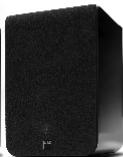
A. Attach the supplied adhesive backed bumpers near the corners of the LR5's and C20's bottom surface to protect the finish of speakers and furnishings.
B. Position LR5 speakers as symmetrically as possible, at a comfortable distance from your seating position—slightly closer to each other than they are to you. Position the C20 center channel directly above or underneath your TV screen. (Keep its front as much in line as possible with the front of the picture.)
C. Using standard lamp "zip cord" (18 gauge/1.0mm dia) wire or better, connect the Red (positive) binding post of each speaker to the Red terminal of your signal source on the channel. Similarly, connect Black (ground) on each speaker to Black on that channel's signal source. (If the output of the signal source is via a proprietary cable with a jack at one end, connect the color-coded wires at the other end of the cable to the speaker's similarly-coded posts.) Be sure to follow color-coding to make sure that your speakers are "in phase" for smoothest sound with deepest bass.
D. The loudest bass output from a subwoofer will come from corner placement. As you position the subwoofer outward from the corner along one wall or another, bass output diminishes somewhat, it also becomes more uniform throughout the room, with fewer of the "standing waves" that produce peaks and nulls at various points. Turn off all other components, and follow one of the connection diagrams. Connect the supplied power cord to the AC power socket, then plug the subwoofer into an active AC outlet. The same receptacle as the rest of your audio/video system or another on the same electrical circuit should be used to avoid ground hum. Set the subwoofer's phase switch to 0^ and volume switch to 0dB. Flip the Power Switch to the on position.
E. Turn ON your NAD VISO DVD Receiver. If you're using an NAD VISO FIVE DVD Receiver, ensure that the settings for "Front", "Centre" and "Surround" speakers are all set to "Small" via the "Speaker Settings" section of the Audio Setup menu. Return to Audio Setup menu and select Channel Levels. By pressing the [▼] button on the remote control select Center Channel speaker and using the [▶] button select -3dB. If you're using an NAD VISO TWO DVD Receiver, configure the following settings via the Audio Setup Menu—in "Listening Mode" set the mode to "DVS Reference" and in "Speaker Settings" menu set "Front" to "Small". Refer to the item about NAD VISO DVD RECEIVER SETUP under the ADDITIONAL DETAILS ON CONFIGURING YOUR VISO SYSTEM section to learn more about configuring your NAD VISO system.
F. Find a comfortable volume setting and play a bass-rich program source. Slowly adjust the [SUB] level button on the remote control of your NAD VISO DVD Receiver until the subwoofer contributes a natural level of low frequency sound. Now, please read the rest of this guide and fine-tune your installation accordingly—it will be time well spent!
II. MORE ON SPEAKER POSITIONING
A. Main Speakers
The three factors to adjust according to your own tastes—keeping in mind that you are the judge and the one(s) to be satisfied-are:
- The closer you place speakers to room surfaces, the greater the proportion of bass in their sound, because of the "focusing" effects of nearby surfaces on lower, longer-wavelength frequencies. Positioning the speakers near the intersection of two surfaces (wall and wall, wall and floor, or wall and ceiling) will produce more apparent bass than placing them near a single surface (a wall or floor or ceiling). The greatest apparent bass will result from placement near the intersection of three surfaces-in a room corner, near the floor or ceiling, where there will be a reinforcing effect which is somewhat uneven, like that of a megaphone.
- Distances of speakers from the wall can make a great difference in the frequency balance, sonic spaciousness, and definition in their sound, because of changes in the number, strength, and particular frequencies of secondary reflections from surfaces. The sound will generally have greater spaciousness, especially depth, if they are out at least a foot (30cm) from the nearest wall.
- Small changes in positioning may make a big difference in sound quality. Because of the varying relationships of the dimensions of a room and their relation both to where you place the speakers and where you sit, the wavelengths of sound and their interaction both with you and with the room can vary a great deal. There can be sharp increases or decreases in the relative loudness of different frequency bands, greatly amplifying or almost nullifying whole ranges. Since VISO Speakers are small and easy to position, it's easy to experiment with small, incremental changes until you are satisfied.
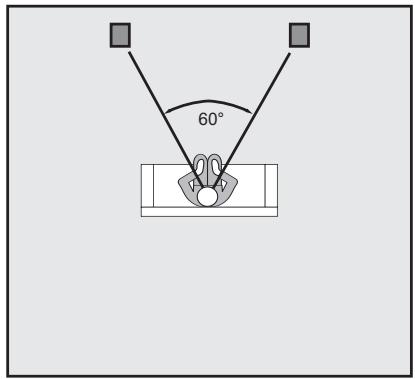
Ideal speaker placement: 2.1
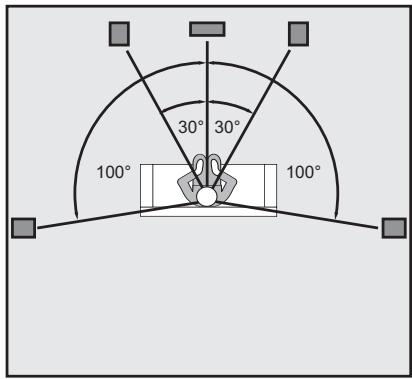
Ideal speaker placement: 5.1
B. Surround Speakers
Begin with the knowledge of the above factors about main speakers. Then modify things as needed for your convenience and the surround effect that works best for you. If you want maximum localization and definition, you probably will want to aim the speakers toward your seating area, both
horizontally and vertically. If you prefer the surround effect to be more diffused rather than pinpointed, aiming the speakers somewhat away from your ears probably will be more satisfying. You may want even to place them to reflect their sound off the sides or rear of you room rather than have them radiate toward you. Side-wall positioning, slightly behind you as specified in our Quick Start tips, is preferable to most listeners, but rear-wall placement can work well-especially for bouncing the sound off the side walls.
C. Subwoofer
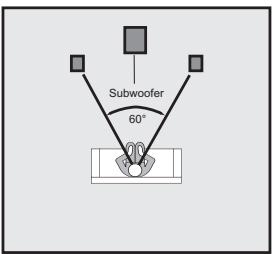
There is no argument among audiophiles that the loudest bass output from a subwoofer comes from corner placement. The natural megaphone-like flaring outward of walls from a room corner focuses low frequencies—giving them no place to go but toward you. It may be too much bass for your room or (more particularly) your favorite listening spot in the room, but unless you are seated in a "null" spot, where sound from the sub is cancelled or diminished by out-of phase reflections from elsewhere, there should be plenty of bass from corner placement.
If you are seated in such a null spot, your only real choices are generally to move either the subwoofer or your listening position until bass returns to the point that satisfies. Cranking up the level control almost certainly won't help much. But flipping the phase control 180 degrees sometimes may make a difference, especially if the null is a product of cancellations caused by interaction with low frequencies from your main speakers.
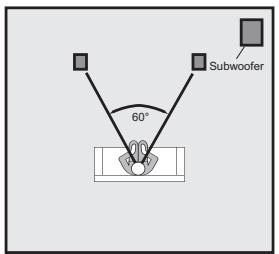
Most bass output; least even bass response
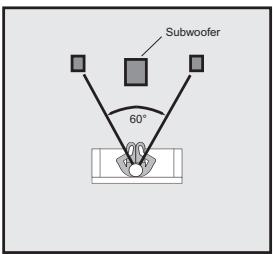
Moderate bass output; more even bass response
Lowest bass output; most even bass response
If you are in the opposite sort of situation, where direct and reflected bass waves converge in phase and produce a strong peak at your listening location, you can—if you like—deal with that both with changes in placement or in the position of your sub's level control (or, less likely but possible, the crossover frequency chosen). We say "if you like" because there is no such thing as too much bass for some listeners, and we don't want to be dogmatic. You are definitely the one who has to be pleased, unless your Significant Other chimes in to the contrary. As you go outward from the corner along one wall or another, the general consensus (with which we tend to agree) is that while bass output diminishes somewhat, it also becomes more uniform throughout the room, with fewer of the "standing waves" that produce peaks and nulls at various points.
Chances are things won't be so simple, so the best method for positioning a subwoofer, although a rather undignified-looking one, is to put the subwoofer in your listening chair, then play music with lots of bass through the system
something with steady low frequencies (such as organ music) or continuous test tones, not movie material. Move around the room and note where the bass sounds best; if you place the subwoofer there and yourself in your chair, you should get the same bass performance. Bear in mind that the test only works if you have your ears as high off the floor as the subwoofer will be, so don't be afraid to crawl around. A recommended starting point for the placement of this subwoofer would be in either of the front corners of the room (on either side of the main speakers).
D. About Wall-Mounting for Surround and Other Uses
The VISO speaker's rear baffle incorporates pilot holes which can easily secure speakers to Vogel VLB50 brackets.
III. ADDITIONAL DETAILS ON CONFIGURING YOUR VISO SYSTEM
A. Important:
Always turn off your electronic equipment before connecting speakers. If you don't, severe damage to equipment and/or your ears may result.
B. Selecting Speaker Wire
We recommend the following gauge (thickness) of standard two-conductor wire for the wiring distances specified; if you prefer you can use thicker (lower-gauge) wire.
Under 25 ft (<7.5m)
25 - 50 ft (7.5 - 15 m)
50 - 100 ft (15 - 30 m)
Over 100 ft (>30m)
18-gauge or 1.0 mm dia (lamp cord)
16-gauge or 1.3 mm dia (heater cord)
14-gauge or 1.6 mm dia
12-gauge or 2.0 mm dia
C. Configurations
Connect speakers identically to your amplifier or receiver on each channel—Red amp/receiver terminal to Red speaker terminal, Black to Black. This will ensure that the diaphragms of the speakers of both channels move forward and backward together ("in-phase"), rather than in opposition ("out-of-phase"). In-phase connection provides maximum clarity and bass, while out-of-phase connection results in frequency cancellations and produces thinner and less distinct sound—with less bass, vague vocal quality, and no solid center image. To help ensure the proper connection, the two separate conducting wires in a standard two-conductor speaker cable are coded in one way or another to be distinguishable from each other. (The jacket of one wire may be ribbed or marked with "+" signs, or one wire under the insulation may be a different colour from the other.) Use this wire-coding, together with the amp/receiver and speaker colour-coding, to be sure you are connecting the same wire of a given pair to a like-coded terminal at both ends of your connection. (See figures 1 & 2)
D. Tighten Terminals
Be sure all wiring terminals, are tightened firmly and securely, but be careful
not to over-tighten and damage the connectors.
E. NAD VISO DVD Receiver Setup
NAD VISO FIVE
If you're using an NAD VISO FIVE DVD Receiver connected to an NAD VISO THIRTY and NAD VISO TWENTY, you must configure the Speaker Settings to calibrate the frequency response of the system. The following steps will guide you in configuring your NAD VISO FIVE with respect to NAD VISO THIRTY and NAD VISO TWENTY speakers.
Ensure that your NAD VISO FIVE is unplugged when you connect the speakers. It is also advisable to power-down or unplug all associated components while making or breaking any signal or AC power connections.
Connect at least one of the NAD VISO FIVE Monitor Outputs (Component Video, S-Video or Composite Video Monitor Out) to a corresponding video input of a compatible TV/Monitor.
A. With NAD VISO THIRTY and NAD VISO TWENTY speakers connected to the corresponding speaker terminals of your NAD VISO FIVE, connect the supplied AC cord to NAD VISO FIVE's AC Mains input and then plug into an AC outlet.
B. The Standby LED indicator embedded around the bezel of the POWER button in the front panel will illuminate amber. Press the POWER button to turn ON the NAD VISO FIVE. The Standby LED indicator will turn from amber to blue. Turn ON also your TV/Monitor and set it to the corresponding video input setting.
You may operate the NAD VISO FIVE from its front panel in combination with the supplied HTR 7 remote control. Since the remote control will be the primary controller for most cases, the following procedures are all made with reference to the use of the appropriate HTR 7 button controls.
Speaker Settings
- Using the HTR 7 remote control, press the [SETUP] button. Below On-Screen-Display (OSD) will appear in your connected TV/Monitor.
Setup Menu
Audio Setup Menu
Video Setup Menu
OSC Language
Exit
- With "Audio Setup Menu" highlighted, press [ENTER] button to select "Audio Setup Menu" and correspondingly bring up the Audio Setup Menu OSD.
Audio Setup Menu
Listening Mode
Input Settings
Speakers Settings
Speakers Distance
Channel Levels
Exit
- Use the [▼] button to scroll down to "Speaker Settings". Press [ENTER] to select "Speaker Settings" menu.
- At "Speaker Settings" OSD menu and with "Front" speaker item highlighted, set "Front" speaker to "Small" by pressing [▶] button until "Small". Then, press [▼] button to select "Small" and at the same time move on to the next item - "Center". Follow the same procedure - set "Center" to "Small" and also "Surround" to "Small".
Speaker Settings
Front
Small
Center
Small
Surround
Small
Subwoofer
On
Enhanced Bass
Off
Do not Save & Exit
Save & Exit
- With "Front", "Center" and "Surround" all set to "Small", press [▼] button to scroll down to "Save & Exit".
- Press [ENTER] to save the new settings and at the same time exit the Speaker Settings menu. Press [SETUP] button to completely exit the Setup menu OSD.
- Center Channel Level Setting as a default setting, we suggest adjusting the Center Channel level to -3dB.
Follow steps 1. and 2. above to arrive at Audio Setup menu.
In Audio Setup menu select Channel Levels. Press the [▼] button on the
remote to select Center speaker. Then by pressing the [▶] button set the level to -3dB.
Channel Levels
| Front L | 0dB |
| Center | -3dB |
| Front R | 0dB |
| Surr L | 0dB |
| Surr R | 0dB |
| Subwoofer | 0dB |
| Do not Save & Exit | |
| Save & Exit |
- Press [▼] button to scroll down to "Save & Exit.
- Press [ENTER] to save the new setting and at the same time exit the Channel Levels menu. Press [SETUP] button to completely exit the Setup menu OSD.
- Confirm the relative balance of your system's loudspeakers including the Center speaker by following the instructions in the section of the VISO FIVE DVD Receiver Owner's Manual entitled "USING THE VISO FIVE -- AUDIO SETUP MENU".
NAD VISO TWO
If you're using an NAD VISO TWO DVD Receiver, you must configure the menu items "Listening Mode" and "Speaker Settings" to calibrate the frequency response of the system. The following steps will guide you in configuring your NAD VISO TWO receiver with respect to NAD VISO TWENTY speakers.
Ensure that your NAD VISO TWO is unplugged when you connect the speakers. It is also advisable to power-down or unplug all associated components while making or breaking any signal or AC power connections.
Connect at least one of the NAD VISO TWO Monitor Outputs (Component Video, S-Video or Composite Video Monitor Out) to a corresponding video input of a compatible TV/Monitor.
A. With NAD VISO TWENTY speakers connected to the corresponding speaker terminals of your NAD VISO TWO, connect the supplied AC cord to NAD VISO TWO's AC Mains input and then plug into an AC outlet.
B. The Standby LED indicator embedded around the bezel of the POWER button in the front panel will illuminate amber. Press the POWER button to turn ON the NAD VISO TWO. The Standby LED indicator will turn from amber to blue. Turn ON also your TV/Monitor and set it to the corresponding video input setting.
You may operate the NAD VISO TWO from its front panel in combination with
the supplied HTR 6 remote control. Since the remote control will be the primary controller for most cases, the following procedures are all made with reference to the use of the appropriate HTR 6 button controls.
Listening Mode
- Using the HTR 6 remote control, press the [SETUP] button. The SETUP menu On-Screen-Display (OSD) will be shown in your connected TV/Monitor.
Setup Menu
Audio Setup Menu
Video Setup Menu
OSC Language
Exit
- With "Audio Setup Menu" highlighted, press [ENTER] and you will be directed to the "Audio Setup Menu" OSD.
Audio Setup Menu
Listening Mode
Input Settings
Speakers Settings
Channel Levels
Exit
- With "Listening Mode" highlighted, press [ENTER] for you to be directed to the "Listening Mode" menu OSD.
Listening Mode
Mode
Do not Save & Exit
Save & Exit
Stereo
- While at the "Listening Mode" menu item, use the [▶] button to select "DVS Reference" – this is the calibrated listening mode setting when using the NAD VISO TWENTY speakers.
Listening Mode
Mode
DVS Reference
Do not Save & Exit
Save & Exit
- Use the [▼] button to scroll down to the "Save & Exit" menu item. Press [ENTER] to save the new settings and at the same time exit the Listening Mode menu. Press [SETUP] button to completely exit the Setup menu OSD.
NOTE
The Listening Mode can also be alternatively set to "DVS Reference" by directly pressing the front panel [SURROUND MODE] button. With disc loaded or while at other Sources, toggle the front panel [SURROUND MODE] button until "DVS Reference" mode.
Speaker Settings
- Using the HTR 6 remote control, press the [SETUP] button. The SETUP menu On-Screen-Display (OSD) will be shown in your TV/Monitor.
Setup Menu
Audio Setup Menu
Video Setup Menu
OSD Language
Exit
-
With "Audio Setup Menu" highlighted, press [ENTER] button and you will be directed to "Audio Setup Menu" OSD. Use the [▼] button to scroll down to the "Speaker Settings" menu item.
-
Press [ENTER]. While at the "Front" menu item, use the [▶] button to select the "Small" setting - this is the calibrated Speaker Setting when using the NAD VISO TWENTY speakers.
Speaker Settings
Front
Small
Subwoofer
On
Enhanced Bass
Off
Do not Save & Exit
Save & Exit
- Use the [▼] button to scroll down to the "Save & Exit" menu item. Press [ENTER] to save the new settings and at the same time exit the Speaker Settings menu. Press [SETUP] button to completely exit the Setup menu OSD.
F. Subwoofer Level
When calibrated, the bass reproduced by the subwoofer is on the same relative level as the signal reproduced by the full range speakers. Always start your subwoofer volume adjustments from the calibrated subwoofer reference level. The calibrated subwoofer reference level is achieved when the volume switch on the VISO subwoofer is set to the 0dB position (factory default) and subwoofer level is set to 0dB on the VISO receiver. Use the [▼] or [▲] buttons on your receiver's remote control to adjust the subwoofer level.
Another setting that achieves the calibrated subwoofer reference level is the +10dB position on the VISO subwoofer and the -10dB subwoofer level on the VISO receiver.
With the subwoofer volume set to 0dB, if by gradually increasing bass output at the VISO receiver a point is reached at which the subwoofer starts audibly
to clip and/or the bass output from the subwoofer is insufficient, this indicates that the volume on the subwoofer is set too low. In such a case, turn down the subwoofer level on the VISO receiver to -10dB and set the volume switch on the subwoofer to the +10dB position. Then by adjusting again the subwoofer level on the VISO receiver, set the desired bass level.
G. Subwoofer LED Indicator
When the LED is red this indicates a stand-by mode. When the subwoofer senses a program signal at its input the LED turns green. After approximately 15 to 20 minutes with no signal at its input, the subwoofer will switch to a stand-by mode and the LED turns red.
H. AC Power Switch
The Power Switch turns the NAD VISO subwoofer on and off. As the subwoofer draws only an extremely small current when idle, this may be left normally on and turned off only when you do not expect to use the subwoofer for an extended period. The Power Switch must be in the on position for normal operation.
IV. PROTECTING YOUR SPEAKERS
A. First and foremost, respect your speaker's limits. Never turn up the volume all the way to see how loud your system will play. And avoid larger-than-life playback of music or movies, especially in a large room.
B. When listening at loud volumes, do not turn the bass or treble up all the way or close thereto. This sends greatly increased, disproportionate power into the speakers and may well damage them. Loudness compensation controls, which are intended for low level listening, should be turned off at normal and loud listening levels.
C. Turning amplifiers up to their limits to produce loud sound may drive them into "clipping" and cause severe speaker damage. Often the damage is done by underpowered amplifiers, which when clipping may generate "spikes" of tremendous momentary power.
D. If you are using your speakers at loud volume, listen carefully for any sign of harsh, garbled midrange and diminishing intelligibility. If you detect any problem, turn the volume down right away.
V. CABINET CARE
Cabinets have varying materials and finishes, including high gloss "poly lacquers", vinyl, and anodized aluminum. They should be treated as you would furniture with similar finishes. Dust lightly with a soft cloth; avoiding abrasives. If necessary, wipe carefully with a cloth slightly dampened with glass cleaner to remove heavy soil. Avoid touching speaker diaphragms. In particular pushing in domes will permanently damage tweeters.
VI. IN CASE OF PROBLEMS
A. If a speaker begins to sound distorted, or seems to be missing certain frequencies, check first to see whether playing at somewhat lower volume seems to clear up the problem. It can be especially important to turn down the volume right away if you have pushed an amplifier or receiver past its comfortable limits.
B. Determine if the problem is the speakers, the electronics, or the wire connections. If a problem on one speaker doesn't go away, interchange the speaker wire connections on your amplifier or receiver, so that the left speaker is connected to the right channel, and vice versa. If the problem shifts to the other speaker, the problem is not in the speaker. (Another component-or, very often, a cable or connection problem between components-may be at fault.) If the problem stays in the same speaker, swap the speaker cables next. If the problem remains in the same speaker, irrespective of the channel to which it's connected and the connecting wire used, the speaker itself probably needs service.
C. See your dealer if you require service. NAD dealers are equipped to handle almost all problems. If you have moved since your purchase, the nearest authorized NAD dealer should be able to help you. If the problem is not resolved, please contact us, providing the Model name, Serial Number, date of purchase, dealer name, and a full description of the problem.
VII. IN CASE OF PROBLEMS WITH YOUR SUBWOOFER
Symptom
No sound/power indicator not lit
Action
Ensure the main power switch is toggled to the "Power" position. This switch is located at the back of the subwoofer.
Ensure the power cord is connected to the subwoofer and plugged into a live AC outlet.
Check the main fuse located in the power cord socket and replace as required. If the new fuse also blows, the subwoofer amplifier requires service.
No sound/power indicator remains red
The VISO S10 subwoofer utilizes signal sensing auto on/off circuitry. If no signal is sent to the subwoofer, it will not power up and the front panel power indicator will remain red. When using the subwoofer output of the VISO receiver, no signal may be immediately present in this output. The subwoofer will only power up when a signal appears at the subwoofer input.
If the signal cable connection is poor or has been severed, the subwoofer will not power up. Swap cables to determine if this is the source of the problem.
To ensure the problem is not associated with the subwoofer, rapidly
disconnect and connect the subwoofer input signal. If the subwoofer power indicator color changes to green, the VISO receiver may not be sending a signal to the subwoofer. Ensure the VISO receiver is correctly configured to provide signal at the subwoofer output.
Sounds distorted
Lower volume if the subwoofer begins to sound distorted to determine if playback at a lower level solves the problem. If a slight reduction in level solves the problem, were you being realistic in your subwoofer level setting? If the distorted sound remains at a low level, the woofer may be damaged.
Hum
Hum is usually caused by using an inferior, damaged, exceptionally long signal cable or cables routed near high current wiring/appliances. Replace/shorten the cable connecting the subwoofer to the VISO receiver. Cable runs of longer than 20 feet may require the use of a line driver (not available from PSB).
Setting the volume switch of the subwoofer to 0dB and increasing the volume control of the VISO receiver subwoofer output can sometimes reduce hum to an acceptable level.
Thank you again for your purchase. We hope this owner's guide helps you enjoy the exceptional satisfaction that NAD VISO speaker systems have to offer. And we wish you many years of enjoyable listening!
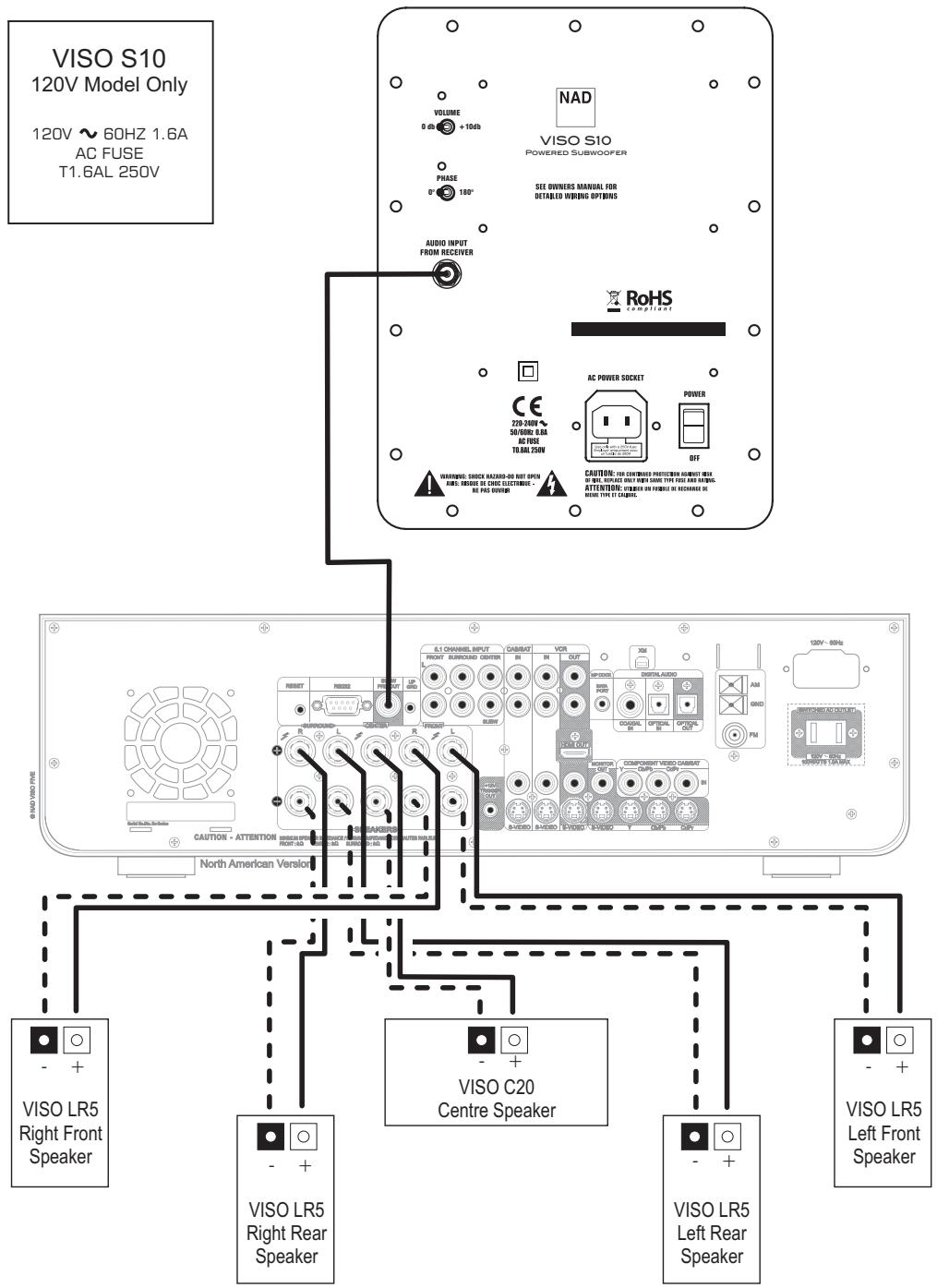
FIGURE 1
5.1 System with VISO FIVE
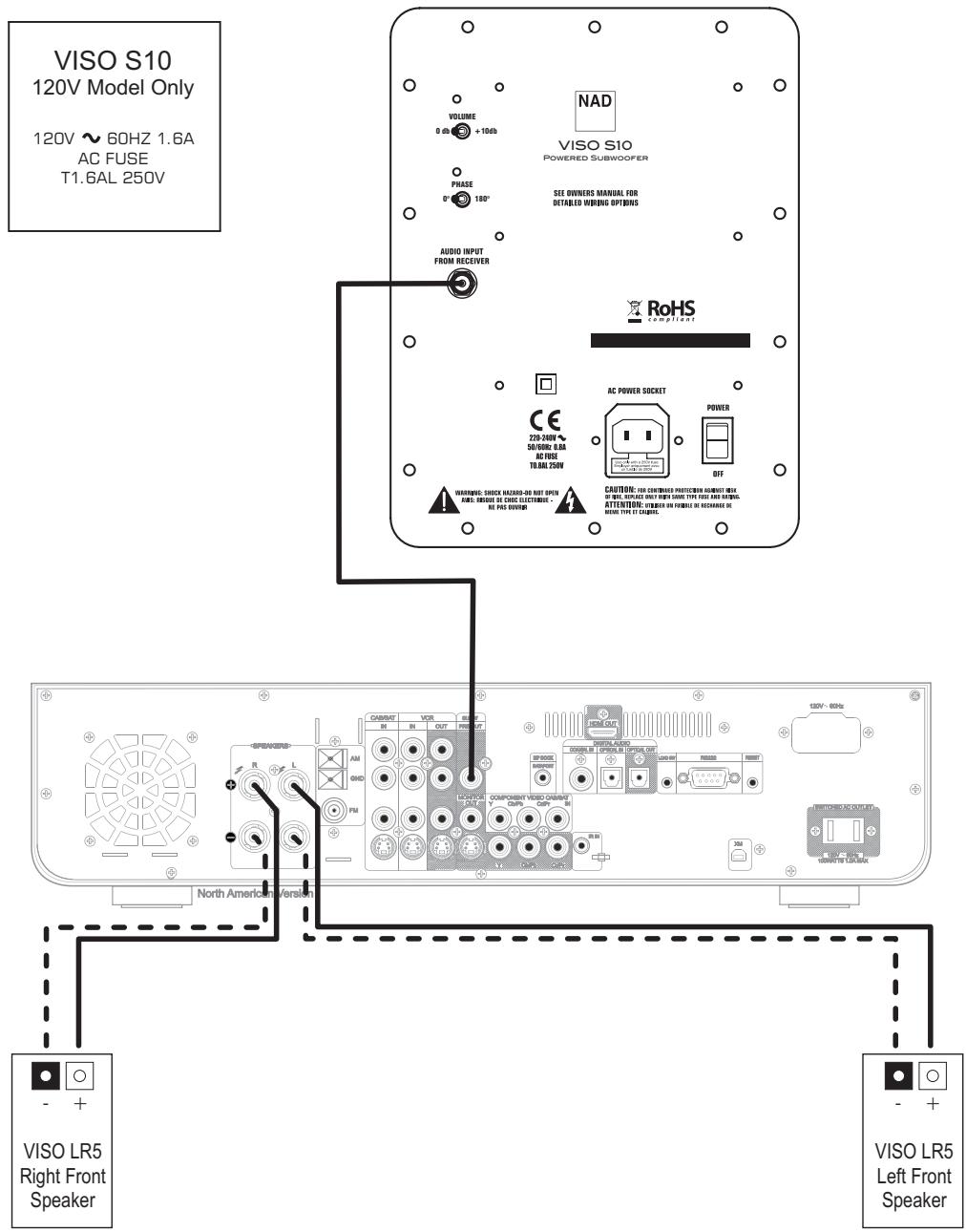
FIGURE 2
2.1 System with VISO TWO
| VISO LR5 Compact Monitor | VISO C20 Centre | VISO S10 Subwoofer | |
| FREQUENCY RESPONSE (Anechoic) On Axis @ 0° ± 3dB | 75-23,000Hz | 75-23,000Hz | 36-150Hz |
| Off Axis @ 30° ± 1.5dB | 80-10,000Hz | 80-10,000Hz | |
| LF cutoff - 10dB | 65Hz | 65Hz | 32Hz |
| AMPLIFIER POWER Continuous Dynamic Dynamic Peak Type | 110 Watts 140 Watts 280 Watts Class AB Discrete MOSFET Output Devices | ||
| SENSITIVITY Anechoic Chamber | (1W (2.83V) @ 1m, IEC-filtered Pink Noise, C-weighted) | ||
| Typical Listening Room | 84dB | 87dB | |
| IMPEDANCE Nominal | 8 Ohms | 8 Ohms | |
| Minimum | 6 Ohms | 6 Ohms | |
| INPUT POWER Recommended | (RMS, Clipping < 10% Time) | ||
| Program | 15-80 Watts | 15-80 Watts | |
| 60 Watts | 60 Watts | ||
| ACOUSTIC DESIGN Tweeter (Nominal) | 1" (25mm) Aluminum Dome with Ferrofluid | 1" (25mm) Aluminum Dome with Ferrofluid | |
| Woofer (Nominal) | 4" (102mm) Injection Molded Metalized Polypropylene cone Rubber surround | 2 x 4" (102mm) Injection Molded Metalized Polypropylene cone Rubber surround | 8" (203mm) Injection Molded Metalized Polypropylene cone Rubber surround |
| Crossover | 3,000Hz, B3 | 3,000Hz, B3 | Fixed |
| Internal Volume | 0.10 cu ft (2.8 liters) | 0.15 cu ft (4.3 liters) | 0.68 cu ft (19.3 liters) |
| Design Type | Bass Reflex 1" (25mm) Rear Port | Sealed | Bass Reflex 2 1/2" (64mm) Down Firing Port |
| SIZE (W x H x D) | 5" x 8" x 7" 129mm x 205mm x 178mm | 13 3/4" x 5 1/4" x 7" 350mm x 134mm x 178mm | 9 3/8" x 14 3/4" x 15 1/2" 244mm x 375mm x 395mm |
| WEIGHT Net | 5.3lb (2.4kg)/each | 8.7lb (4.0kg)/each | 22.8lb (10.4kg)/each |
| Shipping VISO TWENTY VISO THIRTY | 42lb (19kg)/system 25lb (11kg)/system | ||
| FINISH | High Gloss Black | High Gloss Black | Textured Black Sleeve with High Gloss Black Baffle |
| FEATURES | Gold Plated Binding Post ABS Grille Rubber Bumpers | Gold Plated Binding Post ABS Grille Rubber Bumpers | Phase Switch 10dB Volume Switch On-Standby/Off Gold Plated RCA |

www.NADelectronics.com