
TRC-2050C - Dictaphone SANYO - Notice d'utilisation et mode d'emploi gratuit
Retrouvez gratuitement la notice de l'appareil TRC-2050C SANYO au format PDF.


| Marque | SANYO |
| Modèle | TRC-2050C |
| Type de produit | Dictaphone stéréo à cassette standard |
| Alimentation | Adaptateur secteur AC 120V 60Hz (modèle Sanyo 3CV-120US) ou 2 piles AA (non fournies) |
| Microphones | 2 micros omnidirectionnels intégrés, prises pour micros externes (mono ou stéréo) |
| Haut-parleur | Intégré |
| Écouteurs | Prise jack stéréo pour casque (mini-jack) |
| Vitesses d'enregistrement | 2.4 cm/s (longue durée) et 4.8 cm/s (compatible standard) |
| Vitesse de lecture | Lente, normale, rapide (commutateur TAPE PLAY SPEED) |
| Fonctions principales | Enregistrement, lecture, avance rapide, retour, pause, indexation (INDEX), activation vocale (VAS) |
| Modes d'enregistrement | DIC (dictée) et CONF (conférence) |
| Protection anti-effacement | Onglets cassants sur la cassette |
| Entretien et nettoyage | Nettoyer les têtes, galet presseur et cabestan avec un coton-tige imbibé de nettoyant toutes les 10 heures d'utilisation |
| Sécurité | Arrêt automatique en fin de bande lors de l'enregistrement/lecture |
| Garantie | 1 an pièces et main-d'œuvre (États-Unis), 1 an pièces / 90 jours main-d'œuvre (Canada) |
| Service client | Ligne d'assistance SANYO : 1-877-999-1840 (jours ouvrés, 8h-17h Pacifique) |
FOIRE AUX QUESTIONS - TRC-2050C SANYO
Questions des utilisateurs sur TRC-2050C SANYO
0 question sur cet appareil. Repondez a celles que vous connaissez ou posez la votre.
Poser une nouvelle question sur cet appareil
Téléchargez la notice de votre Dictaphone au format PDF gratuitement ! Retrouvez votre notice TRC-2050C - SANYO et reprennez votre appareil électronique en main. Sur cette page sont publiés tous les documents nécessaires à l'utilisation de votre appareil TRC-2050C de la marque SANYO.
MODE D'EMPLOI TRC-2050C SANYO

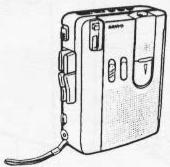
SANYO
INSTRUCTION MANUAL
TRC-2050C
Standard Cassette Stereo Dictation
natural_image
Line drawing of a portable electronic device with ports and cables (no text or symbols)SANYO'S HELP-LINE
Call the toll-free number below if you have any difficulties operating this product.
1-877-999-1840 (Weekdays: 8:00 AM - 5:00 PM, Pacific Time)
LINEA DE CONSULTA SANYO
Llame gratis al número indicado a continuación si tiene dificultades al utilizar este producto.
1-877-999-1840 (días laborables de 8:00 AM a 5:00 PM, hora del Pacífico)
1AD6P1P1819-A
TRC-2050C, Issue Number 1
Printed in China
ENGLISH
ESPAÑOL

ENGLISH
CONTROLS (Fig. 1)
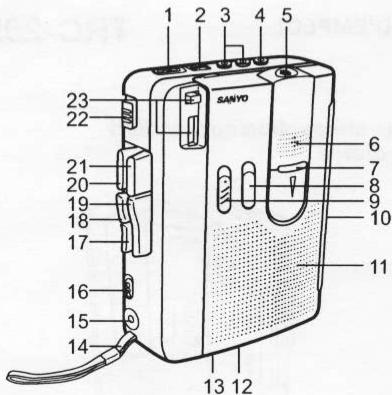
Fig. 1
- Voice activation system switch (VAS)
- Volume control (VOL)
- External microphone jacks (1 EXT-MIC 2)
- Stereo headphones jack (PHONES)
- 2nd built-in nondirection microphone
- 1st built-in nondirection microphone
- Battery/Operation indicator (BATT/OPR)
- Cue index button (INDEX)
- Record mode select switch (REC MODE)
(This switch is also used as the external microphone selector.)
1
- Battery compartment lid (back panel)
- Built-in speaker
- Tape playback speed switch (TAPE PLAY SPEED)
- Remote controller jack (REMOTE)
- Hand-strap
- External DC 3V jack (EXT DC 3V)
- Speed switch (SPEED)
- Fast forward/Cue button (FFWD/CUE)
- Rewind/Review button (REW/REVIEW)
- Play button (PLAY)
- Stop button (STOP)
- Record button (REC)
- Pause switch (PAUSE)
- Tape counter and reset button
POWER SUPPLY
AC adaptor
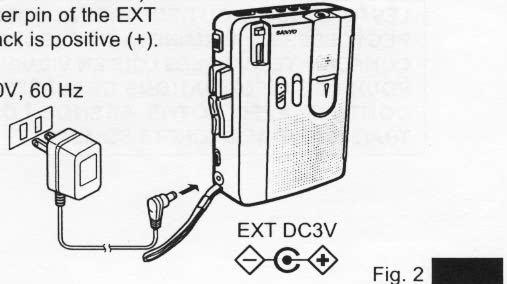
Connect the included AC adaptor (Sanyo Model No. 3CV-120US) to the EXT DC 3V jack (Fig. 2). (The batteries are automatically disconnected.)
• The center pin of the EXT DC 3V jack is positive (+).
AC 120V, 60 Hz
2
20/3/03, 9:39

Battery
Install two "AA" batteries (not supplied) as shown in Fig. 3. Observe proper polarity.
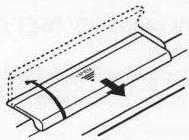
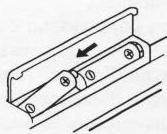
Fig. 3
• If you are not going to use the unit with batteries for one month or more, remove the batteries.
Battery replacement
When the BATT/OPR indicator does not light during operation or is lit dimly, replace the batteries.
- When replacing the batteries, use two new batteries of the same type. Do not mix a used battery with a new one or mix different types of batteries.
IMPORTANT NOTE:
SPENT OR DISCHARGED BATTERIES MUST BE RE- CYCLED OR DISPOSED OF PROPERLY IN COMPLI- ANCE WITH ALL APPLICABLE LAWS. FOR DETAILED INFORMATION, CONTACT YOUR LO- CAL COUNTY SOLID WASTE AUTHORITY.

3

CONNECTIONS
External microphone (not supplied)
NOTE:
If you don't connect any external microphones, skip this section.
• Using two monaural microphones (not supplied)
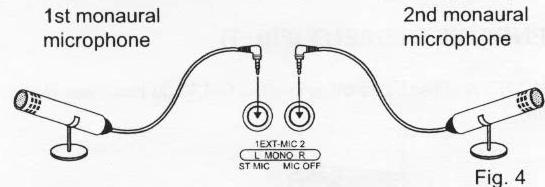
• Using one stereo microphones (not supplied)
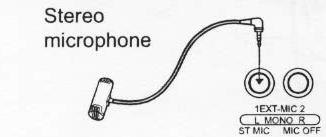

Fig. 5
Pause function remote control
Connect the remote controller (not supplied) to the REMOTE jack. (The PAUSE switch on the main unit is automatically cut off.)
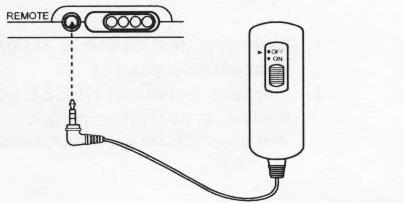
Fig. 6
4

Stereo headphones jack
Connect a pair of stereo headphones with mini plug (not supplied) to the PHONES jack for monitoring or private listening. (The built-in speaker is automatically disconnected.)
RECORDING (Fig. 7)
NOTE: Do not use C-120 or endless tapes.
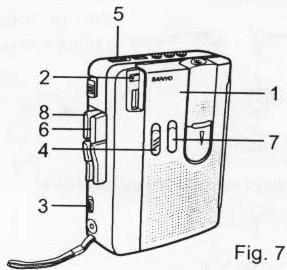
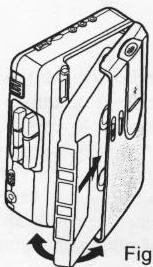
- Load a cassette tape as shown in Fig. 8.
- Press the reset button to set the counter to "000". The counter shows relative tape position.
natural_image
Diagram of an electronic device with labeled parts and directional arrows indicating motion (no text or symbols present)Fig. 8
5

- Set the SPEED switch to 2.4 or 4.8.
4.8: Compatible with most single speed cassette recorders.
2.4: For longer recordings; approximately 2 hours of recording time (total for both sides of a 60-minute cassette; C-60).
- Set the REC MODE switch to DIC (Dictation) or CONF (Conference).
NOTE: This switch does not affect playback.
Using the built-in microphones
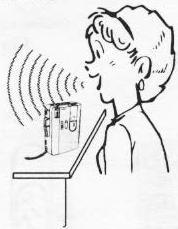
For dictation
natural_image
Illustration of a person using a device to smoke or smoke from behind (no text or symbols)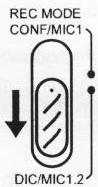
Fig. 9
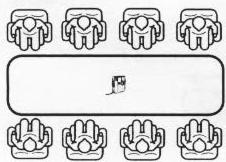
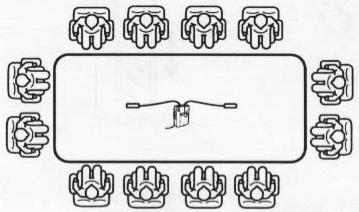
For conference
natural_image
Simple line drawing of a table with eight identical chairs arranged in two rows (no text or symbols)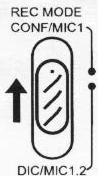
Fig. 10




Using external microphones (not supplied)
(Please refer to "CONNECTIONS" for external microphone connections.)
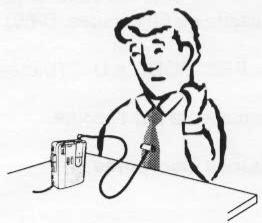
For one stereo microphone
natural_image
Illustration of a person sitting at a desk with a pen and microphone (no text or symbols)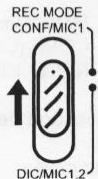
Fig. 11

For two monaural microphones
natural_image
Diagram of a round table with eight identical seated figures arranged in rows around it, no text or symbols present.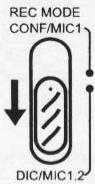
- Set the VAS switch to ON or OFF.

Fig. 12
Fig. 13

7
TRC-2050C/US-book
8

- Press the REC button. (The PLAY button is engaged simultaneously.)
VAS ON: Voice activated recording
When you talk, the unit will start recording. When you stop talking for as long as 3 to 8 seconds, the unit will stop recording (variations in voice level do not stop recording).
Use the VOL control to adjust the microphone sensitivity to your voice. If recording does not stop when talking stops, decrease volume.
NOTE:
If the first few words you speak activate recording but are not recorded, say an extra word to start recording before you dictate. (For important recordings, set the VAS switch to OFF.)
VAS OFF: Standard recording
Recording will continue until the STOP button is pressed.
- Press and hold the INDEX button for at least 3 seconds to mark important segments of the recording. The unit records an index tone on the tape. Release the INDEX button to resume recording.
- An index tone can be heard when the tape is played back.
- Press the STOP button to stop recording.

Automatic stop system
At the end of the tape while recording or playing back, the cassette tape stops automatically and the buttons are released.
This system does not work in fast forward and rewind operation. Be sure to press STOP button when the end of the tape has been reached.
Example (When using C-60 tape):
Press the STOP button after approximately 2 minutes have elapsed under fast forward and rewind operation.
Fast forwarding or rewinding
In the stop mode, press the FFWD/CUE or REW/REVIEW button.
Press the STOP button when the desired point or end of the tape is reached.
Temporarily stopping operation (all modes)
Slide the PAUSE switch right. Slide it left to resume operation.
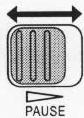
Fig. 14
Slide the ON/OFF switch on the remote control (not supplied) to perform the similar functions as the PAUSE switch.
ON: Pause mode on OFF: Resume operation
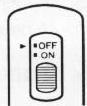
Fig. 15
9

Quick reviewing and recording
While recording, press and hold the REW/REVIEW button (the REC button is released) until the tape has rewound to the desired point. Release the REW/REVIEW button to play back your recording. Press the REC button to resume recording.
Safeguards against accidental erasure (Fig. 16)
To protect side A, break out tab (1). To protect side B, break out tab (2).
• To erase or record a protected cassette, cover the tab openings with adhesive tape (3).
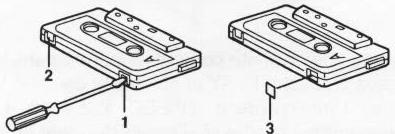
Fig. 16
NOTE: The REC button cannot be depressed when using a protected cassette.

PLAYBACK (Fig. 17)
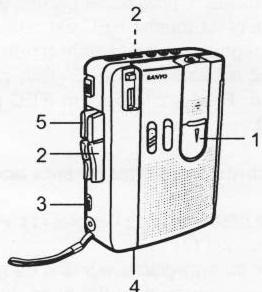
Fig. 17
- Load the cassette tape as shown in Fig. 8.
- Press the PLAY button and adjust the VOL control.
- Set the SPEED switch to 2.4 or 4.8 to correspond with the recorded tape speed.
- Set the TAPE PLAY SPEED switch to SLOW, NOR or FAST as desired
SLOW: Slow speed
NOR: Normal speed
FAST: Fast speed - Press the STOP button to stop playback.
Cue and reviewing
During playback, press and hold the FFWD/CUE or REW/REVIEW button. Release the button when the desired point is reached. Playback continues.
11

MAINTENANCE
To ensure continued high performance, use cotton swab (1) moistened with head cleaner to clean the heads (4, 5), pinch roller (3) and capstan (2) after about every 10 hours of use (Fig. 18).
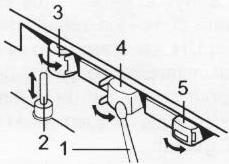
Fig. 18

12

For USA
SANYO SERVICE PLUS LIMITED WARRANTY CTATION PRODUCTS ONLY
OBLIGATIONS
In order to obtain factory warranty service for Sanyo Dictation Products, call the toll-free number below. The unit must be packed in the original carton or a well-padded sturdy carton in order to avoid shipping damage.
Note: Do not return this unit to the retail store for service.
To obtain Service Plus Warranty service, product operation information or for problem resolution, call
Toll Free 1-877-999-1840
Weekdays 8:00 AM - 5:00 PM Pacific Time
THIS WARRANTY IS VALID ONLY ON SANYO DICTATION PRODUCTS PURCHASED AND USED IN THE UNITED STATES OF AMERICA, EXCLUDING ALL U.S. TERRITORIES AND PROTECTORATES. THIS WARRANTY APPLIES ONLY TO THE ORIGINAL RETAIL USER, AND DOES NOT APPLY TO PRODUCTS USED FOR ANY INDUSTRIAL, PROFESSIONAL, OR COMMERCIAL PURPOSE. THE ORIGINAL DATED BILL OF SALE OR SALES SLIP MUST BE SUBMITTED AT THE TIME WARRANTY SERVICE IS REQUESTED.
13

Subject to the OBLIGATIONS above and EXCLUSIONS below, SANYO FISHER COMPANY (SFC) warrants this SANYO Dictation product against defects in materials and workmanship for the periods of LABOR and PARTS specified below. SFC will, at its option, within two business days after its receipt of any dictation product that fails to conform to this warranty at SFC's designated facility, either (a) repair such product or any of its parts which fail to conform to this warranty or (b) ship a replacement product. The warranty period commences on the date the product was first purchased at retail.
| LABOR | PARTS |
| 1 YEAR | 1 YEAR |
EXCLUSIONS
This warranty does not cover (A) the adjustment of customer-operated controls as explained in the appropriate model's instruction manual, or (B) the repair of any product, whose serial number has been altered, defaced or removed. This warranty shall not apply to the cabinet or cosmetic parts, knobs or routine maintenance.
This warranty does not apply to repairs or replacements necessitated by any cause beyond the control of SFC including, but not limited to, any malfunction, defect, or failure caused by or resulting from unauthorized service or parts, improper maintenance, operation contrary to furnished instructions, shipping or transit accidents, modification or repair by the user, abuse, misuse, neglect, accident, incorrect line voltage, fire, flood, or other Acts of God, or normal wear and tear.
The foregoing is in lieu of all other expressed warranties and SFC does not assume or authorize any party to assume for it any other obligation or liability.
THE DURATION OF ANY WARRANTIES WHICH MAY BE IMPLIED BY LAW (INCLUDING THE WARRANTIES OF MERCHANTABILITY AND FITNESS) IS LIMITED TO THE TERM OF THIS WARRANTY. IN NO EVENT SHALL SFC BE LIABLE FOR SPECIAL, INCIDENTAL OR CONSEQUENTIAL DAMAGES ARISING FROM OWNERSHIP OR USE OF THIS PRODUCT, OR FOR ANY DELAY IN THE PERFORMANCE OF ITS OBLIGATIONS UNDER THIS WARRANTY DUE TO CAUSES BEYOND ITS CONTROL. SOME STATES DO NOT ALLOW LIMITATIONS ON HOW LONG AN IMPLIED WARRANTY LASTS AND/OR DO NOT ALLOW THE EXCLUSION OR LIMITATION OF CONSEQUENTIAL DAMAGES, SO THE ABOVE LIMITATIONS AND EXCLUSIONS MAY NOT APPLY TO YOU. THIS WARRANTY GIVES YOU SPECIFIC LEGAL RIGHTS. YOU MAY HAVE OTHER RIGHTS, WHICH VARY FROM STATE TO STATE. S/D R2
For your protection in the event of theft or loss of this product, please fill in the information below for your own personal records.
Model No.
Serial No.
(Located on back or bottom side of unit)
Date of Purchase ____
Purchase Price ____
Where Purchased ____

21605 Plummer Street
Chatsworth, CA 91311
For Canada
THE SANYO COMFORT WARRANTY BUSINESS SYSTEMS - DICTA RECORDERS
WARRANTY APPLICATION
New, unused Sanyo Dicta Recorder products purchased in Canada are warranted against manufacturing defects in materials and workmanship for ONE YEAR for parts and NINETY DAYS for labour, from the date of purchase by the original retail purchaser. This warranty only applies in favour of the original retail purchaser of the warranted product.
SANYO CANADA INC.'S RESPONSIBILITY
During the warranty period, SANYO Canada Inc. will repair, or at our option, replace a Sanyo Dicta Recorder product which shows evidence of a manufacturing defect in materials or workmanship.
Replacement PARTS are warranted for the remaining portion of the warranty period.
WHAT IS NOT COVERED
(a). Dicta Recorder products purchased outside Canada.
(b). Dicta Recorder products purchased in a used condition.
(c). Problems due to product set-up and installation.
(d). Adjustments that are outlined in the Operating Manual.
(e). Accessory items including carrying cases, cassette tapes and cables.
(f). Damage in or due to transportation.
(g). Damage due to improper maintenance, accident, abuse, misuse or negligence.


ORIGINAL RETAIL PURCHASER'S RESPONSIBILITY
You, the original retail purchaser, must present your original, dated bill-of-sale together with this warranty to SANYO Canada Inc. or to an authorized Sanyo Service Depot when you make a claim under this Warranty.
You, the original retail purchaser, are responsible for any costs of TRANSPORTING the product to and from SANYO Canada Inc. or an authorized Sanyo Service Depot. You also are responsible for the cost of any MAINTENANCE necessary in respect of the product.
WARRANTY BECOMES VOID
This warranty becomes void if the product's serial numbers are altered or removed or if any repair to the product is made other than by SANYO Canada Inc. or by an authorized Sanyo Service Depot.
LIMITATIONS
(a) SANYO Canada Inc. reserves the right to change or improve the design of the model of the product warranted hereunder without incurring any obligation to make any modifications to or to install any improvement in or on the product.
(b) In no event shall SANYO Canada Inc. or any of its Authorized Dealers be liable for special or consequential damage arising from the use of this product.


STATUTORY WARRANTIES
The above provisions do not preclude the operation of any applicable provincial statute which in certain circumstances may not allow some of the limitations and exclusions described in this Warranty. Where any terms of this Warranty are prohibited by such a statute, they shall be deemed null and void but the remainder of this warranty shall remain in effect.
HOW TO OBTAIN WARRANTY SERVICE
Please contact the Sanyo Authorized Dealer from whom the product was purchased, or contact us directly at:
SANYO Canada Inc.
1-300 Applewood Crescent
Concord, Ontario
L4K 5C7
(905) 760-9944
1-800-263-2244
http://www.sanyocanada.com
SDR 01/05 (R11)
Model No.
Serial No. ____
(Located on back or bottom side of unit)
Date of Purchase ____
Purchase Price ____
Where Purchased ____

SANYO Canada Inc.


natural_image
Abstract grayscale gradient bar with no text or symbols


- SANYO
- SANYO'S HELP-LINE
- LINEA DE CONSULTA SANYO
- POWER SUPPLY
- AC adaptor
- Battery
- Battery replacement
- IMPORTANT NOTE:
- 3
- CONNECTIONS
- Stereo headphones jack
- RECORDING (Fig. 7)
- Using the built-in microphones
- Using external microphones (not supplied)
- VAS ON: Voice activated recording
- VAS OFF: Standard recording
- Automatic stop system
- Fast forwarding or rewinding
- Temporarily stopping operation (all modes)
- Quick reviewing and recording
- Safeguards against accidental erasure (Fig. 16)
- Cue and reviewing
- MAINTENANCE
- For USA
- SANYO SERVICE PLUS LIMITED WARRANTY CTATION PRODUCTS ONLY
- OBLIGATIONS
- EXCLUSIONS
- For Canada
- THE SANYO COMFORT WARRANTY BUSINESS SYSTEMS - DICTA RECORDERS
- WARRANTY APPLICATION
- SANYO CANADA INC.'S RESPONSIBILITY
- WHAT IS NOT COVERED
- ORIGINAL RETAIL PURCHASER'S RESPONSIBILITY
- WARRANTY BECOMES VOID
- LIMITATIONS
- STATUTORY WARRANTIES
- HOW TO OBTAIN WARRANTY SERVICE
- SANYO Canada Inc.
Marque : SANYO
Modèle : TRC-2050C
Catégorie : Dictaphone