
C49C62N0 - Four électrique NEFF - Notice d'utilisation et mode d'emploi gratuit
Retrouvez gratuitement la notice de l'appareil C49C62N0 NEFF au format PDF.


| Type de produit | Four combiné vapeur |
| Marque | NEFF |
| Modèle | C49C62N0 |
| Catégorie | Four électrique |
| Dimensions (L x H x P) | Environ 595 x 595 x 548 mm (estimation) |
| Poids net | Environ 38 kg (estimation) |
| Alimentation électrique | 230 V, 16 A (estimation) |
| Puissance totale | Environ 3,3 kW (estimation) |
| Modes de cuisson | Cuisson vapeur, CircoSteam®, Air chaud, Réchauffer, Levée de pâte, Décongélation, Cuisson basse température, Maintien au chaud |
| Fonctions automatiques | 16 groupes de programmes automatiques (70 programmes) |
| Mémoire personnalisée | Jusqu'à 6 réglages mémorisables |
| Capacité du réservoir d'eau | Environ 1 L (estimation) |
| Positions de grille | 4 niveaux |
| Accessoires inclus | Grille métallique, récipient perforé (1/3 GN), récipient plein (1/3 GN), récipient perforé (2/3 GN), récipient plein (2/3 GN - plat de cuisson) |
| Nettoyage facilité | EasyClean® (nettoyage vapeur) et programme de détartrage |
| Sécurité enfant | Verrouillage temporaire et permanent |
| Arrêt de sécurité automatique | Oui, réglable |
| Éclairage de la cavité | Ampoule halogène 230 V / 25 W |
| Entretien du joint de porte | Nettoyable à l'eau savonneuse, remplaçable |
| Pièces détachées | Accessoires supplémentaires disponibles (n° de commande fournis dans la notice) |
| Réparabilité | Ampoule, joint de porte et rails amovibles remplaçables par l'utilisateur |
| Classe énergétique | Non spécifié dans la notice (estimation A+ à A+++) |
| Informations générales | Notice d'utilisation disponible en téléchargement gratuit |
FOIRE AUX QUESTIONS - C49C62N0 NEFF
Questions des utilisateurs sur C49C62N0 NEFF
0 question sur cet appareil. Repondez a celles que vous connaissez ou posez la votre.
Poser une nouvelle question sur cet appareil
Téléchargez la notice de votre Four électrique au format PDF gratuitement ! Retrouvez votre notice C49C62N0 - NEFF et reprennez votre appareil électronique en main. Sur cette page sont publiés tous les documents nécessaires à l'utilisation de votre appareil C49C62N0 de la marque NEFF.
MODE D'EMPLOI C49C62N0 NEFF
Chère cliente, cher client,
Félicitations pour l'achat de votre nouveau four combiné vapeur Neff. Nous vous remercions de la confiance que vous nous accordez et espérons que vous prendrez beaucoup de plaisir à cuisiner avec votre nouvel appareil, au cœur de votre cuisine.
Afin de profiter pleinement de toutes les fonctionnalités techniques de votre four combiné vapeur, veuillez lire attentivement cette notice d'utilisation.
La table des matières détaillée vous guidera rapidement vers toutes les informations importantes :
■ Vous serez informé des consignes de sécurité importantes. - Vous découvrirez ensuite les différentes pièces de votre nouveau four combiné vapeur. ■ Et nous vous montrerons comment effectuer les réglages étape par étape. Les tableaux indiquent les réglages et les positions des grilles pour de nombreux plats connus, testés par nos soins. En cas de dysfonctionnement improbable, vous trouverez ici des informations pour remédier vous-même aux petites pannes.
Bon appétit !
Notice d'utilisation
C49C62.0
fr
9000 474 008
Table des matières
Consignes de sécurité 5
Causes de dommages 6
Conseils d'économie d'énergie et de protection de l'environnement 8
Économiser de l'énergie 8
Élimination respectueuse de l'environnement 8
Votre nouvel appareil 9
Panneau de commande 9
Modes de fonctionnement 10
Compartiment de cuisson et accessoires 11
Réservoir d'eau 14
Calibrage automatique 15
Avant la première utilisation 16
Réglage de la langue 16
Réglage de l'horloge 17
Réglage de la dureté de l'eau 17
Nettoyage 18
Utilisation de l'appareil 19
Mise en marche de l'appareil 19
Arrêt de l'appareil 21
Après chaque utilisation 22
Arrêt de sécurité automatique 22
Modification des réglages de base 22
Horloge électronique 24
Affichage de l'horloge 24
Minuteur 25
Durée de cuisson 26
Table des matières
Fin de fonctionnement 27
Mode de présélection 28
Réglage de l'horloge 29
Vérification, correction ou suppression des réglages ..... 29
Sécurité enfants 30
Verrouillage 30
Verrouillage permanent 31
Programmes automatiques 32
Réglage du programme 32
Remarques sur les programmes 35
Tableaux des programmes 35
Mémoire 45
Fonction Mémoire 45
Démarrage de la fonction Mémoire 46
Suppression d'un réglage en mémoire 46
Entretien et nettoyage 47
Produits de nettoyage 48
EasyClean 49
Détartrage 51
Dépose et repose de la porte de l'appareil 53
Nettoyage des rails 54
Dépannage 55
Remplacement de l'ampoule du compartiment de cuisson ..... 57
Changement du joint de porte 58
Service après-vente 59
Numéro E et numéro de production 59
Table des matières
Tableaux et conseils 60
Cuisson à la vapeur 60
Air chaud 61
CircoSteam 61
Légumes 62
Accompagnements et légumineuses 64
Viande, volaille, poisson 65
Braiser la viande 69
Gratins, ingrédients pour soupes.... 69
Desserts, compote 70
Gâteaux et pâtisseries 71
Réchauffage des aliments 74
Décongélation 75
Levée de la pâte 76
Extraction de jus 77
Conservation 77
Produits surgelés 78
Plats d'essai 80
⚠ Consignes de sécurité
Veuillez lire attentivement ce manuel d'instructions.
Cet appareil est destiné uniquement à un usage domestique. Cet appareil doit être utilisé uniquement pour la préparation d'aliments.
Ni les adultes ni les enfants ne doivent utiliser l'appareil sans surveillance :
■ s'ils sont physiquement ou mentalement incapables de le faire ou ■ s'ils manquent de connaissances et d'expérience pour l'utiliser correctement et en toute sécurité.
Ne laissez jamais les enfants jouer avec l'appareil.
Compartiment de cuisson chaud
Risque de brûlure.
Ne touchez jamais les surfaces chaudes des appareils de chauffage et de cuisson, ni les surfaces chaudes de la cavité de cuisson. Ouvrez la porte de la cavité de cuisson avec précaution. De la vapeur chaude s'échappera. Les jeunes enfants doivent être tenus à une distance sûre de l'appareil à tout moment.
Risque d'incendie.
Ne stockez jamais de matériaux combustibles dans la cavité de cuisson.
Risque de court-circuit.
Ne coincez jamais les câbles de connexion d'appareils électriques dans la porte chaude de l'appareil. L'isolation du câble pourrait fondre.
Risque de brûlure.
Ne préparez jamais d'aliments contenant de grandes quantités de boissons à forte teneur en alcool. Les vapeurs d'alcool peuvent s'enflammer dans la cavité de cuisson. Utilisez uniquement de petites quantités de boissons à forte teneur en alcool et ouvrez la porte de l'appareil avec précaution.
Accessoires chauds
Risque de brûlure.
Utilisez toujours un chiffon ou des gants de cuisine pour retirer les accessoires chauds de l'appareil.
| Hot water | Risk of scalding.Do not clean the appliance immediately after switching it off. The water in the evaporator dish is still hot. Wait until the appliance has cooled down. |
| Incorrect repairs | Danger of electric shock.Incorrect repairs are dangerous. Repairs may only be carried out by one of our trained after-sales engineers.If the appliance is faulty, switch off the circuit breaker in the fuse box or disconnect the appliance at the mains. Contact the after-sales service. |
Causes de dommages
| Keep the cooking compartment floor clear | Do not place anything on the cooking compartment floor. Do not cover it with aluminium foil. A build-up of heat could damage the appliance.The cooking compartment floor and the evaporator dish must always be kept clear. Always place ovenware on the wire rack or in the perforated cooking container. |
| Aluminium foil | Aluminium foil in the cooking compartment must not come into contact with the door panel. This could cause permanent discolouration of the door panel. |
| Ovenware | Ovenware must be heat and steam resistant. Silicone baking tins are not suitable for combined operation with hot air and steam.Do not use ovenware that shows signs of rust. Even the smallest spots of rust can lead to corrosion in the cooking compartment. |
| Steaming with a perforated cooking container | When steaming in a perforated cooking container, always insert the baking tray underneath. Dripping liquid is caught. |
| Moist food | Do not store moist food in the closed cooking compartment for prolonged periods. It can lead to corrosion in the cooking compartment. |
| Fruit juice | When baking very moist fruit flan, do not pack the baking tray too generously. If fruit juice drips from the baking tray, it leaves stains that cannot be removed. |
| Very dirty door seal | If the door seal is very dirty, the appliance door will no longer close properly. The fronts of adjacent units could be damaged. Always keep the door seal clean and replace when necessary. |
| Appliance door as a set down area | Do not place anything on the appliance door when it is open. The appliance could be damaged. |
| Transporting the appliance | Do not carry or hold the appliance by the door handle. The door handle could break. |
| Care and cleaning | The cooking compartment in your appliance is made of high grade stainless steel. Improper care can lead to corrosion in the cooking compartment. Refer to the care and cleaning instructions in the instruction manual. Remove food residues from the cooking compartment as soon as the appliance has cooled. |
Conseils d'économie d'énergie et d'environnement
Vous trouverez ici des conseils pour économiser l'énergie et éliminer correctement votre appareil.
Économiser de l'énergie
Ne préchauffez l'appareil que si cela est spécifié dans la recette ou dans le tableau des instructions d'utilisation.
Ouvrez la porte de l'appareil le moins souvent possible pendant la cuisson des aliments.
Cuisson
Utilisez des moules à pâtisserie de couleur sombre, laqués noirs ou émaillés. Ils absorbent particulièrement bien la chaleur.
Il est préférable de cuire plusieurs gâteaux l'un après l'autre. Le four combiné vapeur sera encore chaud. Cela réduit le temps de cuisson du deuxième gâteau. Vous pouvez également placer deux moules à cake côte à côte.
Lorsque les temps de cuisson sont relativement longs, vous pouvez éteindre le four vapeur 10 minutes avant la fin du temps de cuisson et utiliser la chaleur résiduelle du four pour terminer la cuisson.
Vapeur
Lors de la cuisson à la vapeur, vous pouvez cuisiner sur plusieurs niveaux en même temps. Lors de la préparation d'aliments avec des temps de cuisson différents, ceux qui ont le temps de cuisson le plus long doivent être placés dans le four en premier.
Élimination respectueuse de l'environnement

Éliminez les emballages de manière respectueuse de l'environnement.
Cet appareil est étiqueté conformément à la directive européenne 2002/96/CE sur les déchets d'équipements électriques et électroniques (DEEE).
Cette directive fournit un cadre pour la collecte et le recyclage des anciens appareils, valable dans toute l'UE.
Votre nouvel appareil
Dans cette section, vous trouverez des informations sur
■ le bandeau de commande ■ les modes de cuisson ■ la cavité de cuisson et les accessoires
Panneau de commande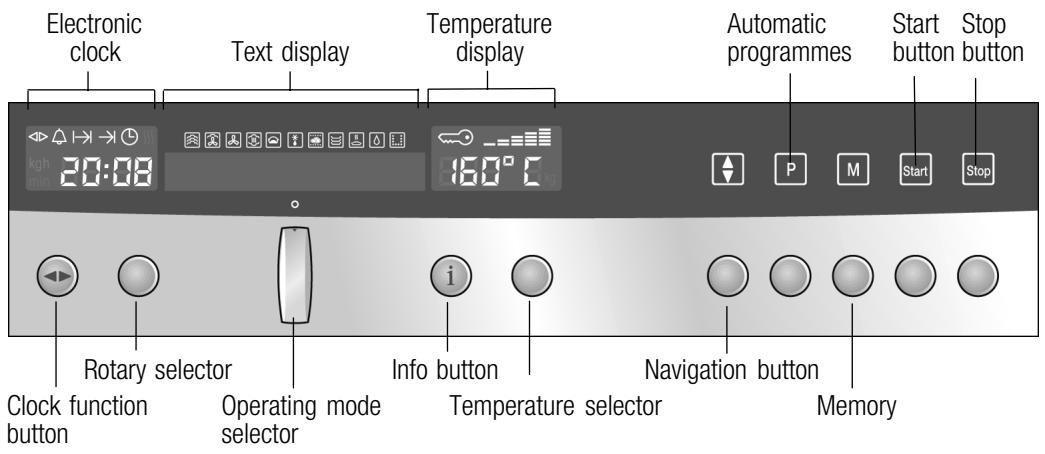
| Control | Use | |
| Clock function button | Selects the clock function (see section: Electronic clock) | |
| Rotary selector | Make settings within a clock function(see section: Electronic clock) | |
| Operating mode selector | Selects the operating mode | |
| i | Info button | Appliance switched on: checks the current informationAppliance switched off: selects the basic settings (see section: Basic settings) |
| Temperature selector | Appliance switched on: sets the temperatureAppliance switched off: changes the basic settings(see section: Basic settings) | |
| Navigation button | Switches between the different lines of the text display.Changes are saved. | |
| P | Automatic programmes | Selects preset programmes(see section: Automatic Programmes) |
| M | Memory | Saves and accesses Memory (see section: Memory) |
| start | Start button | Starts operation |
| stop | Stop button | press briefly: Stops (pauses) an operationlong press: Ends operation |
Boutons de commande escamotables
Les sélecteurs rotatifs, de température et de mode de fonctionnement peuvent tous être escamotés. Pour sortir ou rentrer le bouton, poussez le bouton de commande approprié.
Modes de fonctionnement
À l'aide du sélecteur de mode de fonctionnement, vous pouvez sélectionner les modes de fonctionnement suivants :
| Operating mode | Used for |
| Steam cooking | For vegetables, fish, side dishes, for juicing fruit and for blanching. |
| CircoSteam® | For meat, bakes, and pastries.Hot air and steam are then combined. |
| Hot air | For moist cakes, sponges and pot roasts.A fan in the back wall of the oven distributes the heat evenly inside the cooking compartment. |
| Reheat | For plated meals and baked items.Cooked food is gently reheated. The steam ensures that the food does not dry out. |
| Dough proving | For yeast dough and sour dough.Dough will prove considerably more quickly than at room temperature. Steam and hot air are combined, so that the dough surface does not dry out |
| Defrost | for vegetables, meat, fish and fruit.Steam and hot air are combined. The moisture gently transfers the heat to the food. The food does not dry out or lose shape. |
| Low-temperature cooking | For sirloin, leg of lamb.Tender pieces of meat stay particularly juicy. |
| Plate warming | For porcelain ovenware.Food does not cool down so quickly in preheated ovenware.Drinks also remain warm for longer. |
| Keep warm | For keeping dishes warm for up to two hours |
| EasyClean® | Makes cleaning the cooking compartment easier |
| Descale | For descaling the water system and the evaporator dish |
Compartiment de cuisson et accessoires
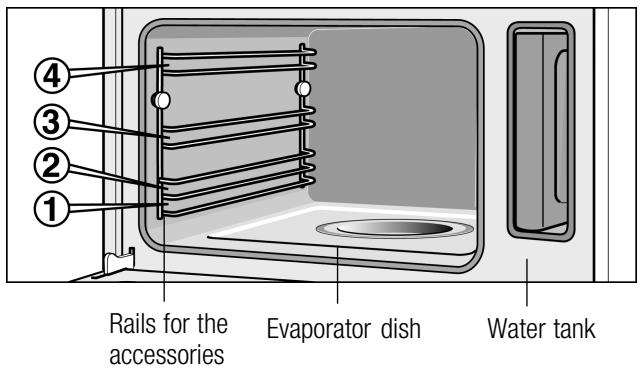
Le compartiment de cuisson comporte quatre niveaux de grille. Les niveaux sont comptés de bas en haut.
Attention
Le bac évaporateur ne doit pas être recouvert. Ne placez aucun plat sur le fond du compartiment de cuisson. - Ne glissez aucun accessoire entre les niveaux de grille, sinon ils risquent de basculer.
Accessoires
Utilisez uniquement les accessoires fournis avec le produit ou disponibles auprès du service après-vente. Ils sont spécialement conçus pour votre appareil.
Votre appareil est équipé des accessoires suivants :
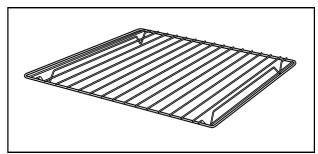
Grille métallique
pour plats allant au four, gâteaux et plats résistants à la chaleur, ainsi que pour rôtir
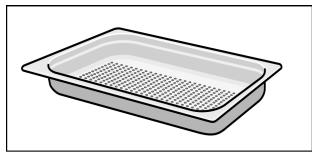
Récipient de cuisson, perforé,
GN 1/3, 40 mm deep
pour cuire les légumes à la vapeur, presser les baies et décongeler
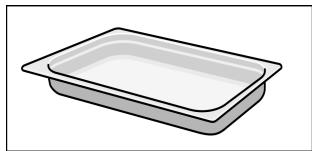
Récipient de cuisson, plein, GN 1/3, 40 mm de profondeur
pour cuire le riz, les légumineuses et les céréales
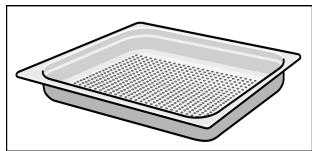
Récipient de cuisson, perforé,
GN 2/3, 40 mm de profondeur
pour la cuisson à la vapeur de poissons entiers ou de grandes quantités de légumes, pour presser les baies, etc.
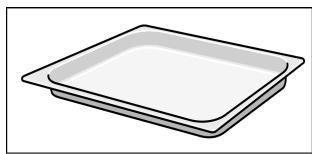
Récipient de cuisson, plein, GN 2/3, 28 mm de profondeur (plaque de cuisson)
pour les cuissons sur plaque et pour récupérer le liquide qui s'écoule pendant la cuisson à la vapeur
Vous pouvez ranger les accessoires sous le compartiment de cuisson. Placez les accessoires les uns dans les autres dans le bon ordre (voir figure ci-dessous). Ensuite, insérez-les tous ensemble dans l'appareil.
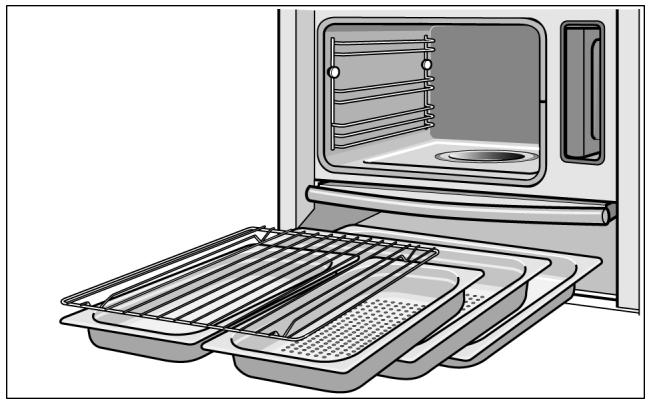
Vous pouvez obtenir d'autres accessoires auprès des revendeurs spécialisés :
| Accessories | Order no. |
| Cooking container, solid, GN 2/3 , 40 mm deep | Z1683X0 |
| Cooking container, perforated, GN 2/3 , 40 mm deep | Z1682X0 |
| Cooking container, solid, GN 2/3 , 28 mm deep (baking tray) | Z1673X0 |
| Cooking container, solid, GN 1/3 , 40 mm deep | Z1663X0 |
| Cooking container, perforated, GN 1/3 , 40 mm deep | Z1662X0 |
| Wire rack | Z1664X0 |
| Roasting set | Z1684X0 |
| Cleaning sponge | 643 254 |
| Descaler | 311 138 |
| Honeycomb microfibre cloth | 460 770 |
Les récipients de cuisson peuvent se déformer pendant le fonctionnement du four. Cela est dû aux différences de température importantes sur les accessoires. Cela peut se produire si une partie seulement de l'accessoire est couverte ou si vous placez des aliments surgelés, comme une pizza, sur l'accessoire.
Réservoir d'eau
Lorsque vous ouvrez la porte de l'appareil, vous verrez le réservoir d'eau sur le côté droit.
Ne remplissez le réservoir d'eau qu'avec de l'eau du robinet fraîche ou de l'eau en bouteille non gazeuse.
Si votre eau est très dure, nous vous recommandons d'utiliser de l'eau adoucie.
Si votre eau du robinet contient un pourcentage élevé de chlorures (> 40 mg/l), utilisez de l'eau minérale plate pauvre en chlorures. Vous pouvez obtenir des informations sur votre eau du robinet auprès de votre compagnie de distribution d'eau.
Avant la première utilisation, humidifiez le joint du couvercle du réservoir avec un peu d'eau.
Attention.
Ne remplissez pas le réservoir d'eau avec de l'eau distillée ou tout autre liquide. Vous pourriez endommager l'appareil.
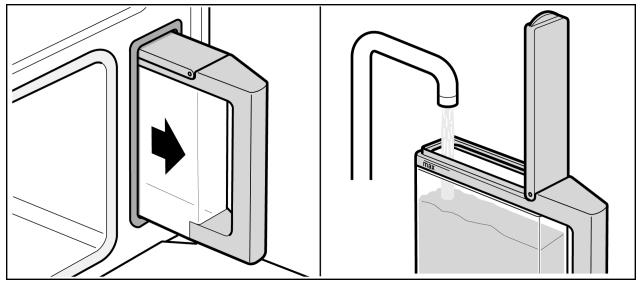
Remplissez le réservoir d'eau avant chaque utilisation.
- Remplissez le réservoir d'eau avec de l'eau froide jusqu'au repère "max.".
- Fermez le couvercle du réservoir jusqu'à ce qu'il s'enclenche.
- Faites glisser le réservoir d'eau jusqu'à ce qu'il s'enclenche.
Après chaque opération
Videz le réservoir d'eau après chaque utilisation.
- Retirez le réservoir d'eau de l'appareil lentement, en le maintenant horizontal, afin qu'aucune eau résiduelle ne puisse s'écouler par la valve.
- Videz l'eau.
- Séchez soigneusement le réservoir d'eau dans l'appareil et le joint dans le couvercle du réservoir.
Message "Remplir le réservoir d'eau"
Si le réservoir d'eau est vide, un signal sonore retentit. « Remplir le réservoir d'eau » s'affiche à l'écran. L'opération est arrêtée.
- Ouvrez la porte de l'appareil avec précaution. De la vapeur s'échappera.
- Retirez le réservoir d'eau, remplissez-le jusqu'au repère et réinsérez-le.
- Appuyez sur la touche Départ.
Message « Remplir le réservoir d'eau ? »
Ce message apparaît si vous réglez un mode de fonctionnement et que le réservoir d'eau n'est qu'à moitié plein.
Si vous pensez que l'eau dans le réservoir est suffisante pour la cuisson, vous pouvez redémarrer l'appareil.
Sinon, remplissez le réservoir d'eau jusqu'au repère « max », réinsérez-le et démarrez l'appareil.
Calibrage automatique
La température d'ébullition de l'eau dépend de la pression atmosphérique. Lors du calibrage, l'appareil est réglé en fonction des conditions de pression du lieu d'installation. Cela se produit automatiquement lors de la première cuisson à la vapeur à 100 °C. Cela génère plus de vapeur que d'habitude.
Après un déménagement
Pour que l'appareil s'adapte automatiquement au nouveau lieu d'installation, vous devez le réinitialiser aux réglages d'usine (voir section : Réglages de base).
Avant la première utilisation
Dans cette section, vous apprendrez :
- Comment régler l'horloge après le raccordement de l'appareil ■ Comment modifier la langue d'affichage ■ Comment modifier la plage de dureté de l'eau
- Comment nettoyer votre appareil avant la première utilisation
Réglage de la langue
Une fois les connexions électriques effectuées, vous devez régler la langue de l'affichage du texte.
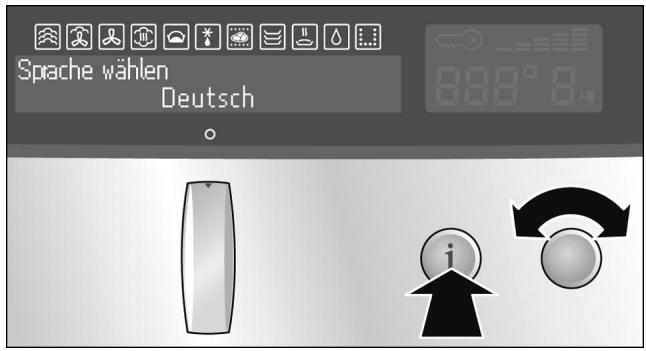
Changement de la langue
- Tournez le sélecteur de température jusqu'à ce que la langue souhaitée apparaisse sur l'écran de texte.
- Maintenez enfoncé le bouton d'information pendant 3 secondes. Votre réglage est adopté.
Si l'appareil est verrouillé, vous devez d'abord déverrouiller les commandes (voir section : Sécurité enfants).
- Tournez le sélecteur de mode de fonctionnement sur la position o.
- Maintenez enfoncé le bouton Info jusqu'à ce que "Sprache wählen" (Sélectionner la langue) s'affiche à l'écran.
- Utilisez le sélecteur de température pour régler la langue souhaitée.
- Maintenez enfoncé le bouton d'information pendant 3 secondes. La modification est enregistrée.
Réglage de l'horloge
0:00 clignote dans l'affichage de l'horloge.
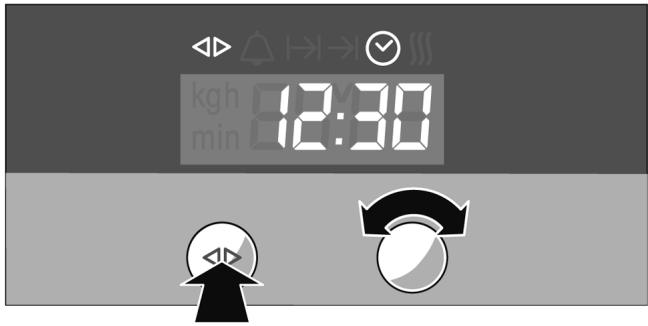
Réglage de l'heure
- Appuyez sur la touche de fonction horloge. Les symboles ◀ et Ⓧ s'allument. 12:00 apparaît sur l'affichage de l'horloge.
- Réglez l'heure actuelle à l'aide du sélecteur rotatif. Le réglage est automatiquement accepté après 3 secondes.
Pour modifier l'heure ultérieurement, appuyez à plusieurs reprises sur la touche de fonction horloge jusqu'à ce que les symboles ◀ et ⚙ soient allumés.
Modifiez l'heure avec le sélecteur rotatif.
Réglage de la dureté de l'eau
Détartrez vos appareils à intervalles réguliers. C'est le seul moyen d'éviter les dommages.
Votre appareil affiche automatiquement quand il doit être détartré. Il est préréglé sur la dureté de l'eau II. Modifiez la valeur si votre eau est plus douce ou plus dure.
Vérification de la dureté de l'eau
Vous pouvez vérifier la dureté de l'eau avec les bandelettes de test fournies ou demander à votre fournisseur d'eau.
Eau adoucie
Modification de la dureté de l'eau
Vous pouvez vous passer complètement de détartrage si vous utilisez exclusivement de l'eau adoucie. Si c'est le cas, réglez la dureté de l'eau sur "adoucie".
Vous pouvez modifier la dureté de l'eau dans les réglages de base.
- Tournez le sélecteur de mode de fonctionnement sur la position o.
- Maintenez enfoncée la touche Info jusqu'à ce que « Sélectionner la langue » s'affiche à l'écran.
- Appuyez plusieurs fois sur la touche Info jusqu'à ce que « Dureté de l'eau 2-moyenne » s'affiche.
- Utilisez le sélecteur de température pour modifier la dureté de l'eau. Valeurs possibles :
| softened | |
| 1-soft | I |
| 2-medium | II |
| 3-hard | III |
| 4-very hard | IV |
- Maintenez enfoncée la touche Info pendant 3 secondes. La modification est enregistrée.
Pour plus d'informations, voir la section : Réglages de base.
Nettoyage
Chauffage de l'appareil
Chauffez l'appareil vide avant la première utilisation et nettoyez les accessoires.
- Remplissez le réservoir d'eau et insérez-le.
- Tournez le sélecteur de mode de fonctionnement sur le mode de cuisson à la vapeur 📋.
- Appuyez sur la touche Démarrer. L'appareil chauffe automatiquement à 100 °C et s'éteint après 20 minutes. Un signal sonore retentit.
- Appuyez sur la touche Arrêt et ramenez le sélecteur de mode de fonctionnement sur la position o.
- Appuyez sur la touche de fonction Horloge pour quitter la fonction horloge. Laissez la porte de l'appareil entrouverte jusqu'à ce que l'appareil ait refroidi.
Nettoyage des accessoires
Nettoyez soigneusement les accessoires avant la première utilisation avec un chiffon et de l'eau savonneuse.
Utilisation de l'appareil
Dans cette section, vous découvrirez :
■ comment allumer et éteindre l'appareil ■ ce qu'il faut noter après chaque utilisation
Allumer l'appareil
Appuyez sur le sélecteur de mode de fonctionnement enfoncé pour qu'il sorte. Cela allume l'appareil.
« L'appareil est prêt à l'emploi » s'affiche sur l'écran.
- Tournez le sélecteur de mode de fonctionnement jusqu'à ce que le mode souhaité apparaisse sur l'écran.
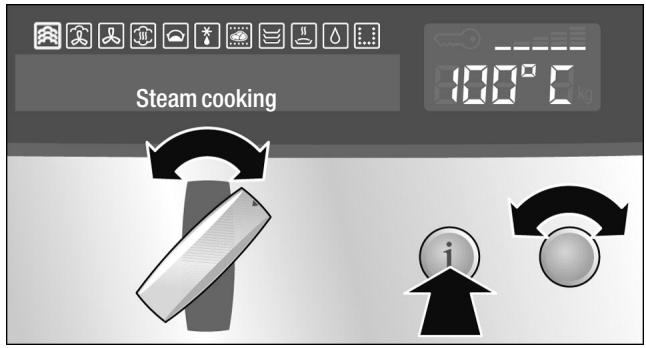
Une température par défaut apparaît sur l'affichage de la température.
- Tournez le sélecteur de température pour modifier la température par défaut.
Pour les modes de fonctionnement utilisant la vapeur, un temps de cuisson par défaut apparaît sur l'horloge électronique.
Les symboles ◀▷ et I→I (temps de cuisson) s'allument.
- Tournez le sélecteur rotatif pour modifier le temps de cuisson par défaut.
Le nouveau temps de cuisson est enregistré automatiquement après 3 secondes.
Vous pouvez également régler le temps de cuisson pour les modes de fonctionnement qui n'utilisent pas la vapeur (voir section : Horloge électronique).
4. Appuyez sur le bouton Démarrer.
Si vous n'appuyez pas sur la touche Départ, un signal sonore retentit et « Appuyer sur la touche Départ » s'affiche à l'écran.
En mode de cuisson vapeur, le temps de cuisson ne commence qu'une fois le temps de préchauffage écoulé.
| Operating mode | Defaulttemperature in °C | Temperature range °C |
| Steam cooking | 100 | 35 - 100 |
| CircoSteam® | 160 | 120 - 230 |
| Hot air | 160 | 30 - 230 |
| Reheat | 120 | 100 - 180 |
| Dough proving | 40 | 35 - 50 |
| Defrost | 45 | 35 - 60 |
| Low-temperature cooking | 80 | 60 - 120 |
| Plate warming | 50 | 30 - 70 |
| Keep warm | 70 | 60 - 100 |
| EasyClean® | For information about operation, see section: EasyClean® | |
| Descale | For information about operation, see section: Descaling | |
Température actuelle
Appuyez sur la touche Info. La température actuelle s'affiche pendant 3 secondes.
Affichage et modification du temps de cuisson
L'indicateur de chauffe affiche la montée en température dans la cavité de cuisson.
Appuyez sur la touche de fonction Horloge jusqu'à ce que les symboles ◀ et I→I s'allument. Le temps de cuisson actuel s'affiche. Tournez le sélecteur rotatif pour modifier le temps de cuisson. La modification est enregistrée automatiquement.
Modification de la température
La température peut être modifiée à tout moment. Pour modifier la température, tournez le sélecteur de température jusqu'à ce que la température souhaitée s'affiche.
Arrêt de l'appareil

Risque d'ébouillantage
De la vapeur chaude peut s'échapper à l'ouverture de la porte de l'appareil. Ouvrez la porte de l'appareil très prudemment après la cuisson.
Temps de cuisson écoulé
Si vous avez réglé un temps de cuisson, votre appareil s'éteint automatiquement. Un signal sonore retentit.
Appuyez sur la touche de fonction Horloge pour désactiver le signal.
Appuyez sur le bouton Arrêt ou ouvrez soigneusement la porte de l'appareil.
Remettez le sélecteur de mode de fonctionnement sur la position o.
Pause
Appuyez brièvement sur le bouton Arrêt. Le bouton Départ clignote. Le ventilateur de refroidissement peut continuer à tourner. Appuyez sur le bouton Départ pour démarrer.
Si vous ouvrez la porte de l'appareil pendant le fonctionnement, l'opération est interrompue. Fermez la porte de l'appareil et appuyez sur le bouton Départ pour redémarrer.
Si vous avez activé le départ automatique, vous n'avez pas besoin de redémarrer (voir la section : Modification des réglages de base).
Arrêt manuel
Appuyez sur le bouton Arrêt et ouvrez soigneusement la porte de l'appareil, ou maintenez le bouton Arrêt enfoncé.
Remettez le sélecteur de mode de fonctionnement sur la position o.
Le ventilateur de refroidissement peut continuer à tourner lorsque vous ouvrez la porte de l'appareil.
Indicateur de chaleur résiduelle
Vous pouvez voir dans l'affichage de température s'il y a une chaleur résiduelle élevée ou faible dans la cavité de cuisson.
| Temperature display | Text display |
| H | Residual heat high |
| h | Residual heat low |
Après chaque utilisation
Vidange du réservoir d'eau
Videz le réservoir d'eau. Séchez soigneusement le joint du couvercle du réservoir et l'arbre du réservoir dans l'appareil.
Ne pas sécher le réservoir d'eau dans le compartiment de cuisson chaud. Cela endommagerait le réservoir d'eau.
Séchage du compartiment de cuisson
Laissez la porte de l'appareil entrouverte jusqu'à ce que l'appareil ait refroidi.

Risque de brûlure
L'eau dans le bac d'évaporation peut encore être chaude. Laissez-la refroidir avant de l'essuyer.
Essuyez le compartiment de cuisson et le bac d'évaporation avec l'éponge fournie et séchez bien avec un chiffon doux.
Retirez la saleté du compartiment de cuisson dès que l'appareil a refroidi. Les résidus brûlés seront beaucoup plus difficiles à enlever plus tard.
Essuyez les unités et les poignées où la condensation s'est accumulée.
Arrêt de sécurité automatique
L'arrêt de sécurité automatique n'est activé que si vous n'avez pas effectué de réglages sur votre appareil pendant une longue période.
Vous pouvez ajuster la durée après laquelle votre appareil s'éteint.
Désactivation
000 clignote dans l'affichage de la température. Le fonctionnement de l'appareil est interrompu.
Tournez le sélecteur de mode de fonctionnement sur la position o.
Modification des réglages de base
Votre appareil possède divers réglages de base prédéfinis par le fabricant. Vous pouvez toutefois modifier ces réglages de base selon vos besoins.
L'appareil doit être éteint et les commandes ne doivent pas être verrouillées.
- Tournez le sélecteur de mode de fonctionnement sur la position o.
- Maintenez enfoncée la touche info pendant 3 secondes pour accéder au menu des réglages de base.
L'afficheur texte indique « Sélectionner la langue ». Si les commandes de l'appareil sont verrouillées, vous devez d'abord les déverrouiller.
- Appuyez brièvement sur la touche info à plusieurs reprises jusqu'à ce que le réglage de base actuel du sous-menu concerné s'affiche sur l'afficheur texte (par ex. « Signal sonore désactivé »).
- À l'aide du sélecteur de température, réglez le réglage de base souhaité dans un sous-menu (par ex. « Durée du signal sonore 2 minutes »).
- Maintenez enfoncée la touche info pendant 3 secondes. Votre réglage de base est enregistré.
Vous pouvez modifier les réglages de base suivants :
Menu des réglages de base
| Submenu | Basic setting | Setting symbol(temperature display) |
| Select language | Additional languages are possible | |
| Childproof lock | Lock is not activated | c 10 |
| Lock is activated | c 11 | |
| Permanent lock is activated | c21 | |
| Cooking time audible signal | Audible signal off | c30 |
| Audible signal duration 30 seconds | c31 | |
| Audible signal duration 2 minutes | c32 | |
| Audible signal duration 10 minutes | c33 | |
| Auto start | off | c40 |
| on | c41 | |
| Adjust individually | - □□□■□□□+ | c5... |
| Water hardness | Softened | c60 |
| 1 - Soft | c61 | |
| 2 - Medium | c62 | |
| 3 - Hard | c63 | |
| 4 - Very hard | c64 | |
| Steam heating up signal | off | c70 |
| on | c71 | |
| Restore factory settings | Do not restore | c80 |
| Restore | c81 |
Horloge électronique
Dans cette section, vous apprendrez
■ comment régler la minuterie ■ comment éteindre automatiquement votre appareil ■ comment allumer et éteindre automatiquement votre appareil (fonctionnement présélectionné) ■ comment régler l'heure
Affichage de l'horloge
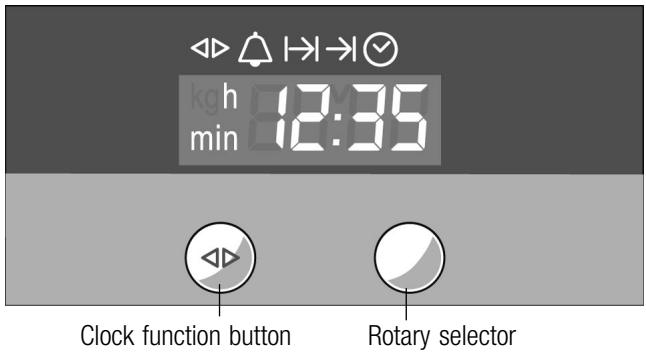
| Clock function | Use |
| Minute minder | You can use the minute minder as an egg timer or a kitchen timer.The appliance does not switch on or off automatically. |
| I→I Cooking time | The appliance switches off automatically after a set cooking time (e.g. 1:30 hours). |
| →I End of operation | The appliance switches off automatically at a set time (e.g. 12:30). |
| Preselection mode | The appliance switches on and off automatically. Cooking time and end of operation are combined. |
| Clock | Setting the clock. |
Remarques :
Lorsque vous réglez une fonction d'horloge, l'intervalle de temps augmente si vous définissez des valeurs plus élevées (par exemple, un temps de cuisson jusqu'à 1h00 peut être réglé à la minute près, au-delà de 1h00 à 5 minutes près). ■ Entre 22h00 et 5h59, l'affichage de l'horloge est assombri si vous n'effectuez aucun réglage pendant cette période ou si aucune fonction d'horloge n'est activée. Pour les fonctions d'horloge (sauf l'horloge elle-même), un signal sonore retentit lorsque le réglage est écoulé et le symbole ou → clignote. Pour annuler le signal sonore avant qu'il ne se termine, appuyez sur le bouton de fonction d'horloge.
Activation et désactivation de l'affichage de l'horloge
- Maintenez enfoncé le bouton de fonction d'horloge pendant 7 secondes.
L'affichage de l'horloge s'éteint. Si une fonction d'horloge est active, le symbole correspondant reste allumé.
- Appuyez brièvement sur le bouton de fonction d'horloge. L'affichage de l'horloge s'allume.
Minuteur
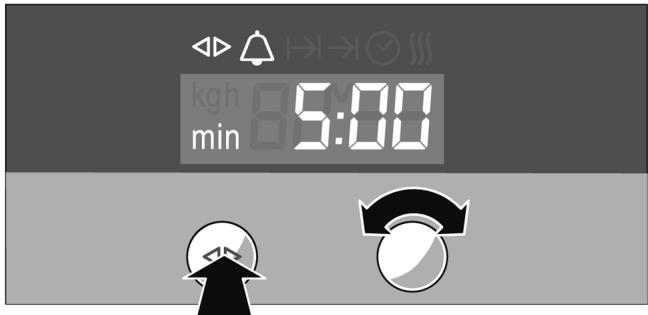
- Appuyez sur le bouton de fonction d'horloge jusqu'à ce que les symboles ◀ et △ s'allument.
- Réglez la durée à l'aide du sélecteur rotatif (par exemple, 5:00 minutes).
Le réglage est accepté automatiquement. Ensuite, l'heure est de nouveau affichée et le minuteur commence le compte à rebours.
Durée de cuisson
Arrêt automatique après l'écoulement d'un réglage de durée de cuisson.
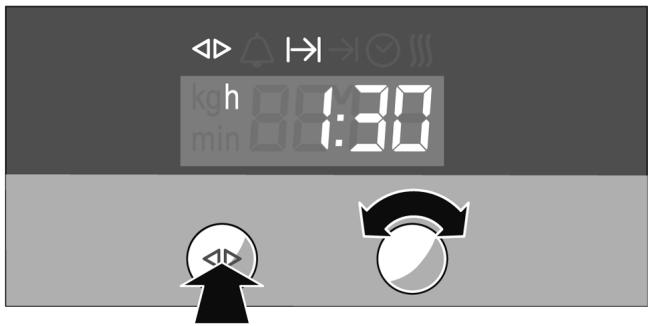
- Réglez le mode de fonctionnement et la température. Appuyez sur le bouton Démarrer.
L'appareil chauffe.
- Appuyez sur le bouton de fonction d'horloge jusqu'à ce que les symboles ◀ et I→I s'allument.
- Réglez la durée de cuisson avec le sélecteur rotatif (par exemple 1:30 heure).
Le réglage est accepté automatiquement et l'horloge s'affiche à nouveau.
En mode de cuisson vapeur, la durée de cuisson ne commence qu'une fois le temps de préchauffage écoulé.
Une fois la durée de cuisson écoulée, l'appareil s'éteint automatiquement.
- Remettez le sélecteur de mode sur la position o.
- Appuyez sur la touche de fonction horloge pour quitter la fonction horloge.
Fin de fonctionnement
Arrêt automatique à une heure réglée. Cette fonction n'est possible que pour les modes de cuisson qui n'utilisent pas la vapeur.
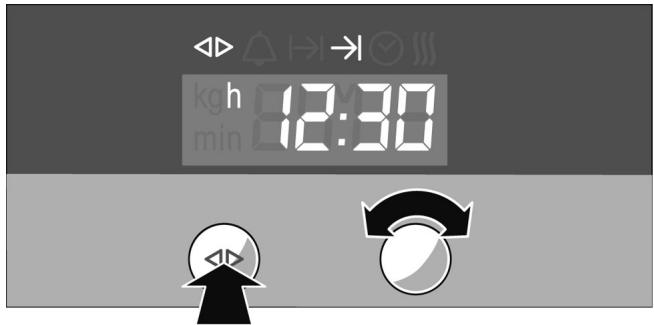
- Réglez le mode de cuisson et la température. Appuyez sur la touche Départ.
L'appareil chauffe.
- Appuyez sur la touche de fonction horloge jusqu'à ce que les symboles ◀ et → s'allument.
- Réglez la fin de fonctionnement avec le sélecteur rotatif (par exemple 12:30).
Le réglage est accepté automatiquement. L'horloge est ensuite réaffichée.
L'appareil s'éteint automatiquement à l'heure réglée pour la fin de l'opération.
- Tournez le sélecteur de mode de fonctionnement sur la position o.
- Appuyez sur la touche de fonction horloge pour quitter la fonction horloge.
Mode de présélection
L'appareil s'allume automatiquement, puis s'éteint automatiquement à l'heure présélectionnée pour la fin de l'opération. Pour régler cette fonction, combinez les fonctions horloge pour la durée de cuisson et la fin de l'opération.
Gardez à l'esprit que les aliments qui se périment facilement ne doivent pas être laissés trop longtemps dans le compartiment de cuisson.
Le mode de présélection n'est pas possible avec certains programmes.
Lors de l'utilisation de la vapeur, le temps de chauffe doit être ajouté au temps de cuisson. La fin de l'opération réglée peut donc être retardée par le temps de chauffe.
- Réglez le mode de fonctionnement et la température. Appuyez sur la touche Démarrer. L'appareil chauffe.
- Appuyez sur la touche de fonction horloge jusqu'à ce que les symboles ◀ et I→I s'allument.
- Réglez la durée de cuisson avec le sélecteur rotatif (par exemple 1:30 heures).
- Appuyez sur la touche de fonction horloge jusqu'à ce que les symboles ◀ et → s'allument.
- Réglez la fin de l'opération avec le sélecteur rotatif (par exemple 12:30).
L'appareil s'éteint et attend l'heure correcte pour s'allumer (dans l'exemple, 11:00).
L'appareil s'éteint automatiquement à l'heure réglée pour la fin de l'opération (12h30). Un signal sonore retentit et le symbole → I clignote.
- Remettez le sélecteur de mode de fonctionnement sur la position o.
- Appuyez sur la touche de fonction horloge pour terminer le mode de présélection.
Réglage de l'horloge
Vous ne pouvez modifier l'horloge que lorsqu'aucune autre fonction horloge n'est active.
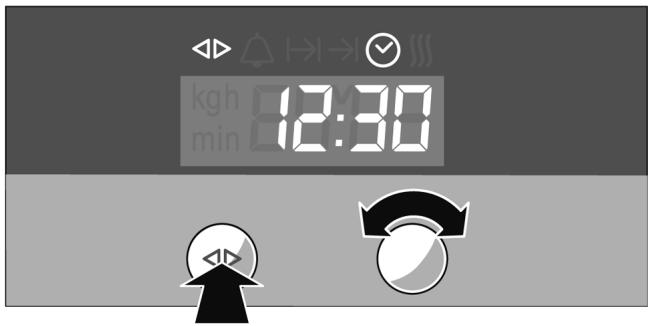
Vérification, correction ou suppression des réglages
- Appuyez plusieurs fois sur la touche de fonction horloge jusqu'à ce que les symboles ◀ et Ⓧ s'allument.
- Réglez l'horloge à l'aide du sélecteur rotatif. Le réglage est accepté automatiquement.
- Pour vérifier vos réglages, appuyez sur la touche de fonction horloge jusqu'à ce que le symbole correspondant s'allume.
- Si nécessaire, vous pouvez corriger votre réglage à l'aide du sélecteur rotatif.
- Si vous souhaitez annuler votre réglage, tournez le sélecteur rotatif dans le sens inverse des aiguilles d'une montre jusqu'à zéro.
Sécurité enfants
Dans cette section, vous apprendrez
■ comment verrouiller votre appareil ■ comment verrouiller votre appareil de manière permanente
Verrouillage
L'appareil verrouillé ne peut pas être allumé accidentellement ou par des utilisateurs non autorisés (par exemple, des enfants qui jouent).
Pour rallumer l'appareil, vous devez le déverrouiller. Après une utilisation, l'appareil n'est pas automatiquement verrouillé. Verrouillez-le à nouveau si nécessaire ou activez le verrouillage permanent.
Verrouillage de l'appareil
- Éteignez l'appareil.
- Maintenez enfoncé le bouton d'information pendant 3 secondes pour afficher le menu des réglages de base.
- Appuyez brièvement sur le bouton d'information à plusieurs reprises jusqu'à ce que c 10 s'affiche dans l'affichage de température.
- Tournez le sélecteur de température jusqu'à ce que c // apparaisse dans l'affichage de température.
- Maintenez enfoncé le bouton d'information jusqu'à ce que le symbole ≈ apparaisse dans l'affichage de température.
Remarque :
Si vous essayez d'allumer l'appareil verrouillé, -5 – s'affiche sur l'affichage de température et « commandes verrouillées » sur l'affichage de texte.
Déverrouillage de l'appareil
- Maintenez la touche info enfoncée jusqu'à ce que c // apparaisse dans l'affichage de la température.
- Tournez le sélecteur de température jusqu'à ce que c 10 apparaisse dans l'affichage de la température.
- Maintenez la touche info enfoncée jusqu'à ce que le symbole ⇌ s'éteigne.
Verrouillage permanent
L'appareil verrouillé en permanence ne peut pas être allumé accidentellement ou par des utilisateurs non autorisés (par exemple, des enfants qui jouent).
Pour allumer l'appareil, vous devez interrompre brièvement le verrouillage permanent. Après avoir éteint votre appareil, il se verrouille à nouveau automatiquement.
Verrouillage permanent de l'appareil
- Éteignez l'appareil.
- Maintenez la touche info enfoncée pendant 3 secondes pour afficher le menu des réglages de base.
- Appuyez brièvement sur la touche info à plusieurs reprises jusqu'à ce que c 10 s'affiche dans l'affichage de la température.
- Tournez le sélecteur de température jusqu'à ce que c21 apparaisse dans l'affichage de la température.
- Maintenez la touche info enfoncée pendant 3 secondes. Votre appareil sera verrouillé après 30 secondes. Le symbole ⇌ apparaît dans l'affichage de la température.
Remarque :
Si vous essayez d'allumer l'appareil verrouillé, -SP - apparaît sur l'affichage de la température et "verrouillage permanent de l'appareil" sur l'affichage texte.
Déverrouillage d'un verrouillage permanent
- Maintenez enfoncée la touche info jusqu'à ce que c21 apparaisse dans l'affichage de la température.
- Tournez le sélecteur de température jusqu'à ce que c20 apparaisse dans l'affichage de la température. 3. Maintenez enfoncée la touche info jusqu'à ce que le symbole ≈ s'éteigne. Le verrouillage permanent est interrompu.
- Allumez l'appareil dans les 30 secondes.
Après l'extinction, le verrouillage permanent est réactivé après 30 secondes.
Déverrouillage permanent de l'appareil
- Maintenez enfoncée la touche info jusqu'à ce que c21 apparaisse dans l'affichage de la température.
- Tournez le sélecteur de température jusqu'à ce que c20 apparaisse dans l'affichage de la température. 3. Maintenez enfoncée la touche info jusqu'à ce que le symbole ≈ s'éteigne.
- Dans les 30 secondes, appuyez à nouveau sur la touche info pendant 3 secondes pour afficher le menu des réglages de base.
- Appuyez brièvement plusieurs fois sur la touche info jusqu'à ce que cc21 s'affiche dans l'affichage de la température.
- Tournez le sélecteur de température jusqu'à ce que c10 apparaisse dans l'affichage de la température.
- Maintenez enfoncée la touche info pendant 3 secondes. L'appareil est déverrouillé en permanence.
Programmes automatiques
Dans cette section, vous découvrirez :
Comment régler un programme de la sélection automatique ■ Conseils et remarques sur les programmes ■ Quels programmes vous pouvez régler (tableaux des programmes)
Les programmes automatiques vous permettent de préparer très facilement vos aliments. Il existe 16 groupes de programmes avec un total de 70 programmes.
Réglage du programme
Suivez les instructions des programmes. Sélectionnez le programme approprié dans les tableaux de programmes.
Exemple sur la figure : vous souhaitez cuire à la vapeur 500 g de blanc de poulet frais.
■ Groupe de programmes « Volaille » ■ Programme « Blanc de poulet frais, cuit à la vapeur »
Sélection du groupe de programmes
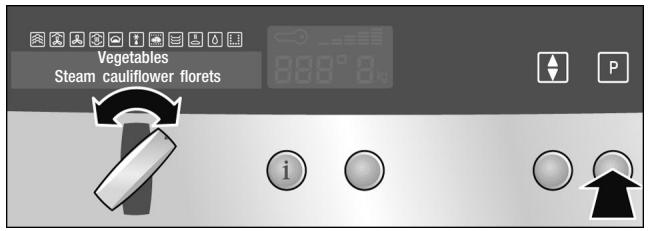
Sélection du programme
- Tournez le sélecteur de mode de fonctionnement sur la position o.
- Appuyez sur la touche Ⓗ.
Le premier groupe de programmes s'affiche à l'écran.
- Tournez le sélecteur de mode de fonctionnement jusqu'à ce que le groupe de programmes approprié s'affiche à l'écran.
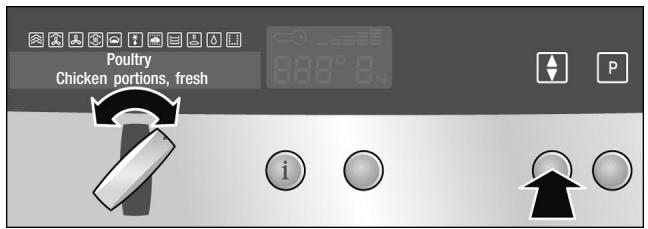
Ajustement du résultat de cuisson selon les goûts personnels
- Appuyez sur la touche ◆.
Le premier programme du groupe de programmes s'affiche à l'écran.
- Tournez le sélecteur de mode de fonctionnement jusqu'à ce que le programme approprié s'affiche.
Si le résultat de cuisson d'un programme ne correspond pas à vos attentes, vous pouvez l'ajuster individuellement.
- Appuyez sur la touche ◆.
L'échelle permettant de régler individuellement le résultat de cuisson s'affiche sur l'écran.

- Tournez le sélecteur de mode de fonctionnement pour modifier le réglage sur l'échelle :
Dans le sens inverse des aiguilles d'une montre = résultat de cuisson moins intense Dans le sens des aiguilles d'une montre = résultat de cuisson plus intense
Vous pouvez également modifier le résultat de cuisson pour tous les programmes en même temps (voir section : Réglages de base).
Réglage du poids
Un poids par défaut s'affiche sur l'écran de température.
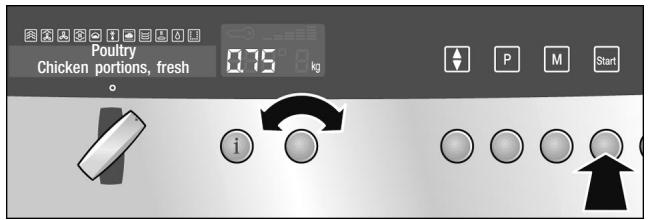
- Tournez le sélecteur de température pour régler le poids.
Appuyez sur la touche info pour demander des informations sur les accessoires. Les informations s'affichent pendant quelques secondes.
- Appuyez sur la touche Départ.
Aucun indicateur de préchauffage ne s'affiche.
Vérification du temps de cuisson
Appuyez plusieurs fois sur la touche de fonction horloge jusqu'à ce que les symboles ◀▷ et I→I s'allument.
Programme avec opération présélectionnée
Pour certains programmes, vous pouvez définir une opération présélectionnée. Le programme démarrera plus tard, pour se terminer à l'heure souhaitée (voir section : Horloge électronique).
Fin du programme
Un signal sonore retentit. L'appareil s'éteint. Appuyez sur le bouton Arrêt.

Risque de brûlure En ouvrant la porte de l'appareil, de la vapeur chaude peut s'échapper. Ouvrez la porte de l'appareil très prudemment après la cuisson.
Annulation du programme
Maintenez enfoncé le bouton Arrêt.
| Notes about the programmes | All programmes are designed for cooking on one level.The cooking result can vary according to the size and quality of the food. |
| Ovenware | Use the suggested ovenware. All meals have been tested using this ovenware. The cooking result may change if you use different ovenware.When cooking in the perforated cooking container, also insert the solid cooking tray at level 1. Dripping liquid is caught. |
| Amount / weight | Do not fill the food more than 4 cm high in the accessories.The automatic programmes require the weight of the food. With individual pieces always use the weight of the largest. The total weight must be within the specified weight range. |
| Cooking time | After the programme is started the cooking time is displayed. It may change during the first 10 minutes, as the heating-up time depends among other things on the temperature of the food and the water. |
| Programme tables | In this section you will find all the programme groups and the programmes they contain.Read the instructions before preparing food using a programme. |
| Vegetables | Do not season vegetables until after cooking. |
| Programme | Notes | Ovenware/accessories | Level |
| Steam cauliflower/In florets* | florets of equal size | perforated cooking container + baking tray | 31 |
| Steam broccoli florets* | florets of equal size | perforated cooking container + baking tray | 31 |
| Steam green beans* | - | perforated cooking container + baking tray | 31 |
* Vous pouvez régler un mode de présélection pour ce programme
| Programme | Notes | Ovenware/accessories | Level |
| Steam sliced carrots* | slices, approx.3 mm thick | perforated cooking container+ baking tray | 31 |
| Steam sliced kohlrabi* | slices, approx.3 mm thick | perforated cooking container+ baking tray | 31 |
| Steam Brussels sprouts* | - | perforated cooking container+ baking tray | 31 |
| Steam asparagus/White asparagus* | - | perforated cooking container+ baking tray | 31 |
| Steam asparagus/Green asparagus* | - | perforated cooking container+ baking tray | 31 |
| Steam frozen mixed vegetables | - | perforated cooking container+ baking tray | 31 |
* Vous pouvez régler un mode de présélection pour ce programme
Pommes de terre Ne salez pas les pommes de terre avant la cuisson.
| Programme | Notes | Ovenware/accessories | Level |
| Boiled potatoes* | medium-sized, quartered, individual weight 30 - 40 g | perforated cooking container+ baking tray | 3 |
| 1 | |||
| Unpeeled boiled potatoes* | medium-sized, dia. 4 - 5 cm | perforated cooking container+ baking tray | 3 |
| 1 |
* Vous pouvez régler un mode de présélection pour ce programme
Produits céréaliers
Pesez les aliments et ajoutez la bonne proportion d'eau :
Riz 1:1,5
Couscous 1:1
Millet 1:3
Lentilles 1:2
Saisir le poids sans le liquide.
Remuer les produits céréaliers après la cuisson. L'eau restante est alors rapidement absorbée.
Préparation du risotto
Ajouter de l'eau au risotto dans un rapport de 1:2. Saisir le poids total, eau comprise. Le message "Remuer" apparaît après environ 15 minutes. Remuer le risotto et appuyer sur le bouton de démarrage.
| Programme | Notes | Ovenware/accessories | Level |
| Rice/Long grain rice | max. 0.75 kg | solid cooking container | 2 |
| Rice/Basmati rice | max. 0.75 kg | solid cooking container | 2 |
| Rice/Brown rice | max. 0.75 kg | solid cooking container | 2 |
| Couscous | max. 0.75 kg | solid cooking container | 2 |
| Millet | max. 0.55 kg | solid cooking container | 2 |
| Risotto | max. 2 kg | solid cooking container | 2 |
| Lentils | max. 0.55 kg | solid cooking container | 2 |
Cuissons au four
| Programme | Notes | Ovenware/accessories | Level |
| Bake, savoury, cooked ingredients* | max. 4 cm high | wire rack + ovenproof dish | 2 |
| Bake, sweet* | max. 4 cm high | wire rack + ovenproof dish | 2 |
| * You can set a preselection mode for this programme | |||
Volaille
Ne pas superposer les blancs de poulet ou les morceaux de poulet dans le plat allant au four.
Les morceaux de poulet peuvent être marinés au préalable.
| Programme | Notes | Ovenware/accessories | Level |
| Chicken, fresh | total weight0.7 - 1.5 kg | wire rack + baking tray | 2 |
| Chicken portions, fresh | weight per piece0.04 - 0.35 kg | wire rack + baking tray | 2 |
| Duck, fresh | total weight1 - 2 kg | wire rack + baking tray | 2 |
| Chicken breast, fresh, steamed | total weight0.2 - 1.5 kg | perforated cooking container+ baking tray | 31 |
Bœuf
Pour le faux-filet, il est recommandé d'utiliser un morceau épais.
| Programme | Notes | Ovenware/accessories | Level |
| Pot roast, fresh* | 1 - 1.5 kg | baking tray | 2 |
| Slow-cook fresh sirloin / Sirloin, medium** | total weight 1 - 2 kg | baking tray | 2 |
| Slow-cook fresh sirloin / Sirloin, rare** | total weight 1 - 2 kg | baking tray | 2 |
* Vous pouvez régler un mode de présélection pour ce programme
** Bien saisir la viande au préalable
Veau
| Programme | Notes | Ovenware/accessories | Level |
| Joint, fresh / Lean joint* | 1 - 2 kg | wire rack + baking tray | 2 |
| Joint, fresh / Marbled joint* | 1 - 2 kg | wire rack + baking tray | 2 |
| Breast, stuffed* | 1 - 2 kg | wire rack + baking tray | 2 |
* Vous pouvez régler un mode de présélection pour ce programme
Porc
Inciser la couenne au préalable, du centre vers l'extérieur.
Pour une pièce avec couenne, il est préférable d'utiliser un morceau d'épaule.
| Programme | Notes | Ovenware/accessories | Level |
| Boned neck joint, fresh* | 1 - 2 kg | wire rack + baking tray | 2 |
| Joint with crackling, fresh* | 0.8 - 2 kg | wire rack + baking tray | 2 |
| Boiled sausages* | - | perforated + solid cooking container | 31 |
* Vous pouvez régler un mode de présélection pour ce programme.
Agneau
| Programme | Notes | Ovenware/accessories | Level |
| Drumsticks, fresh/Boned, well done | 1 - 2 kg | wire rack + baking tray | 2 |
| Drumsticks, fresh/Boned, medium, slow cook* | 1 - 2 kg | baking tray | 2 |
* Faire bien saisir la viande au préalable.
Pain de viande
| Programme | Notes | Ovenware/accessories | Level |
| Made from fresh minced meat | total weight0.5 - 2 kg | baking tray | 2 |
Poisson
Lors de la préparation du poisson, graisser le récipient de cuisson perforé.
Ne pas superposer les poissons entiers, les filets de poisson ou les bâtonnets de poisson. Saisir le poids du poisson le plus lourd et choisir des morceaux de taille aussi similaire que possible.
| Programme | Notes | Ovenware/accessories | Level |
| Steam whole fresh fish | 0.3 - 2 kg | perforated cooking container + baking tray | 31 |
| Steam fish fillet/ Fish fillet, fresh | max. 2.5 cm thick | perforated cooking container + baking tray | 31 |
| Steam fish fillet/ Fish, frozen | max. 2.5 cm thick | perforated cooking container + baking tray | 31 |
| Blue mussels | - | perforated cooking container + baking tray | 31 |
| Breaded squid rings, frozen | 0.5 - 1.25 kg | baking tray + greaseproof paper | 2 |
| Fish fingers | 0.5 - 1 kg | baking tray + greaseproof paper | 2 |
Pâtisseries, dessert
Cuisson de la tresse
Laisser lever la pâte à levure dans le four combiné vapeur pendant une demi-heure à 40 °C.
Préparation de la compote de fruits
Le programme Compote de fruits ne convient qu'aux fruits à noyau et à pépins. Peser les fruits et ajouter environ 1/3 de la quantité en eau, et ajouter du sucre et des épices selon le goût.
Préparation du riz au lait
Pesez le riz et ajoutez 2,5 fois la quantité de lait. Ne remplissez pas le riz et le lait à plus de 2,5 cm de hauteur dans les accessoires. Remuez après la cuisson. Le lait restant est rapidement absorbé.
Préparation du yaourt
Chauffez le lait à 90 °C sur la cuisinière. Laissez ensuite refroidir à 40 °C. Si vous utilisez du lait UHT, il n'est pas nécessaire de le chauffer.
Incorporez une à deux cuillères à café de yaourt nature pour 100 ml de lait, ou la quantité correspondante de ferment lactique. Versez le mélange dans des pots propres et fermez-les.
Après préparation, laissez refroidir les pots au réfrigérateur.
| Programme | Notes | Ovenware/accessories | Level |
| Plaited loaf | 0.6 - 1.8 kg | baking tray+ greaseproof paper | 2 |
| Sponge cake | 0.8 - 2 kg | greased springform cake tin with a 26 cm dia.ring-mould base+ wire rack | 2 |
| Fruit compote* | - | baking tray | 2 |
| Rice pudding | - | baking tray | 2 |
| Yogurt in glass jars | - | glass jars+ perforated cooking container | 2 |
* Vous pouvez régler un mode de présélection pour ce programme
Pain, petits pains
Cuisson du pain
Les programmes sont prévus pour un pain cuit sans moule. La pâte ne doit pas être trop molle. Avant la cuisson, incisez la pâte plusieurs fois avec un couteau bien aiguisé sur une profondeur d'environ 1 cm.
Levée et cuisson de la pâte
Le message "Inciser le pain" apparaît après environ 20 minutes. Incisez la pâte et appuyez sur le bouton Démarrer.
Cuisson de petits pains frais
Les petits pains doivent tous avoir le même poids. Saisissez le poids d'un petit pain individuel.
| Programme | Notes | Ovenware/accessories | Level |
| Multigrain bread/Bake* | 0.6 - 2 kg | baking tray + greaseproof paper | 2 |
| Multigrain bread/Prove and bake | note the message | baking tray + greaseproof paper | 2 |
| Rye bread/Bake* | 0.6 - 2 kg | baking tray + greaseproof paper | 2 |
| Rye bread/Prove and bake | note the message | baking tray + greaseproof paper | 2 |
| White bread/Bake* | 0.4 - 2 kg | baking tray + greaseproof paper | 2 |
| White bread/Prove and bake | note the message | baking tray + greaseproof paper | 2 |
| Bread rolls/Bake fresh bread rolls* | weight per piece0.05 - 0.1 kg | baking tray + greaseproof paper | 2 |
| Bread rolls/Bake frozen bread rolls | total weight0.2 - 1 kg | baking tray + greaseproof paper | 2 |
* Vous pouvez régler un mode de présélection pour ce programme
Réchauffage
| Programme | Notes | Ovenware/accessories | Level |
| 1 portion* | - | wire rack | 2 |
| 2 portions* | - | wire rack | 2 |
| Side dishes, cooked* | - | baking tray | 2 |
| Vegetables, cooked* | - | baking tray | 2 |
| Pizza, cooked/Pizza, thin base* | - | wire rack + baking tray | 3 |
| Pizza, cooked/Pizza, deep-pan* | - | wire rack + baking tray | 3 |
* Vous pouvez prérégler un mode de sélection pour ce programme
Décongélation
Si possible, congelez les aliments à plat et en portions à -18 °C. Ne congelez pas de quantités excessivement grandes. Une fois décongelés, les aliments ne se conservent pas aussi longtemps et se détériorent plus rapidement que les aliments frais.
Laissez les aliments décongeler dans le sac de congélation, sur une assiette ou dans le récipient de cuisson perforé. Placez toujours la plaque de cuisson en dessous. Les aliments ne baignent alors pas dans l'eau de décongélation et le compartiment de cuisson reste propre.
Tous les programmes de décongélation s'appliquent aux aliments crus.
Si nécessaire, les aliments peuvent être séparés de temps en temps ou les morceaux déjà décongelés peuvent être retirés de l'appareil.
Après la décongélation, laissez reposer les aliments pendant 5 à 15 minutes supplémentaires pour qu'ils atteignent la température ambiante.

Risque pour la santé.
Lors de la décongélation d'aliments d'origine animale, vous devez retirer le liquide qui s'écoule pendant la décongélation. Il ne doit jamais entrer en contact avec d'autres aliments. Des bactéries pourraient être transférées.
Après la décongélation, faites fonctionner le four combiné vapeur en chaleur pulsée pendant 15 minutes à 180 °C.
Décongélation de filets de poisson
Ne placez jamais les filets de poisson les uns sur les autres.
Décongélation de volailles entières
Retirez l'emballage avant la décongélation.
Laissez la volaille reposer après la décongélation. Pour les grosses volailles (par exemple les petites dindes), vous pouvez retirer les abats après environ 30 minutes de repos.
Décongélation de la viande
Avec ce programme, vous pouvez décongeler des morceaux individuels.
Décongélation légère des fruits
Si vous souhaitez uniquement décongeler légèrement les fruits, modifiez le résultat de cuisson individuellement.
| Programme | Notes | Ovenware/accessories | Level |
| Fish/Whole fish | max. 3 cm thick | perforated cooking container + baking tray | 31 |
| Fish/Fish fillet | max. 2.5 cm thick | perforated cooking container + baking tray | 31 |
| Whole poultry | max. 1.5 kg | perforated cooking container + baking tray | 31 |
| Meat | max. weight 1.5 kg per piece | perforated cooking container + baking tray | 31 |
| Berries | - | perforated cooking container + baking tray | 31 |
Spécial
Stérilisation des biberons
Nettoyez toujours les biberons immédiatement après utilisation avec une brosse à biberon. Ensuite, lavez-les au lave-vaisselle.
Placez les biberons dans le récipient de cuisson perforé afin qu'ils ne se touchent pas.
Séchez les biberons avec un chiffon propre après la stérilisation. Ce processus correspond à une stérilisation normale par ébullition.
Conservation
Ce programme convient aux fruits avec noyaux et pépins et aux légumes (sauf les haricots).
Blanchissez le potiron avant de le conserver.
Le programme est conçu pour des bocaux d'un litre.
Pour des bocaux plus grands ou plus petits, vous devez ajuster le résultat de cuisson individuellement.
Après la fin du programme, ouvrez la porte de l'appareil pour éviter que la cuisson se poursuive. Laissez les bocaux refroidir quelques minutes dans la cavité de cuisson.
Le programme est conçu pour des fruits fermes. Si les fruits utilisés ne sont plus fermes, ajustez individuellement les résultats de cuisson.
Cuisson des œufs
Percez les œufs avant la cuisson. Ne placez pas les œufs les uns sur les autres. La taille M correspond à un poids unitaire d'environ 50 g.
| Programme | Notes | Ovenware/accessories | Level |
| Sterilise bottles* | - | perforated cooking container | 2 |
| Preserve | in 1 litre jars | perforated cooking container + baking tray | 31 |
| Eggs/Hard-boiled eggs* | eggs, size M, max. 1.8 kg | perforated cooking container + baking tray | 31 |
| Eggs/Soft-boiled eggs* | eggs, size M, max. 1 kg | perforated cooking container + baking tray | 31 |
* Vous pouvez régler un mode de présélection pour ce programme
Mémoire
Vous pouvez utiliser la fonction Mémoire pour stocker jusqu'à 6 de vos propres réglages et les rappeler à tout moment. La fonction Mémoire est particulièrement utile pour les plats que vous préparez régulièrement. Vous pouvez également stocker un plat des programmes automatiques.
Enregistrement dans la fonction Mémoire
- Sélectionnez le mode de fonctionnement, la température et le temps de cuisson, ou sélectionnez un programme parmi les programmes automatiques (n'appuyez pas sur le bouton Démarrer).
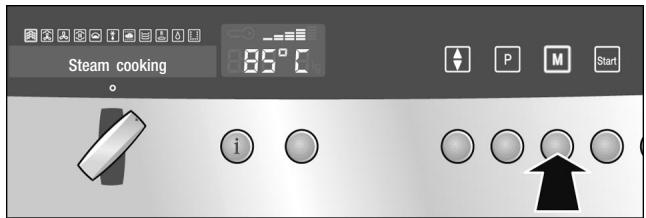
Annulation de la fonction Mémoire
- Appuyez sur le bouton Ⓜ pour appeler le menu Mémoire.
- Tournez le sélecteur de mode de fonctionnement pour choisir l'un des 6 emplacements mémoire.
- Maintenez le bouton Ⓜ enfoncé jusqu'à ce qu'un signal sonore retentisse. "Mémoire enregistrée" s'affiche à l'écran.
Appuyez brièvement sur le bouton ☐ pour quitter le menu Mémoire sans enregistrer.
Démarrage de la fonction Mémoire
- Tournez le sélecteur de mode de fonctionnement sur la position o.
- Placez le plat dans la cavité de cuisson.
- Appuyez sur la touche ☐ pour ouvrir le menu Mémoire.
- Tournez le sélecteur de modes de cuisson pour sélectionner l'emplacement mémoire.
- Appuyez sur la touche Démarrer.
Après avoir appuyé sur Démarrer, vous pouvez modifier la température et le temps de cuisson (ne s'applique pas aux programmes automatiques).
Si vous sélectionnez le mode de cuisson Vapeur, le temps de cuisson ne commence qu'une fois le temps de préchauffage écoulé.
Pause
Appuyez brièvement sur la touche Arrêt. La touche Démarrer clignote. Le ventilateur de refroidissement peut continuer à fonctionner. Appuyez sur la touche Démarrer pour reprendre.
Annulation
Appuyez sur la touche Arrêt et maintenez-la enfoncée.
Suppression d'un réglage mémoire
Vous pouvez supprimer ou remplacer un réglage mémoire.
- Tournez le sélecteur de modes de cuisson sur la position o.
- Appuyez sur la touche ☐ pour ouvrir le menu Mémoire.
- Tournez le sélecteur de modes de cuisson pour sélectionner l'emplacement mémoire.
- Appuyez sur la touche ◆. « Annuler : Non » s'affiche à l'écran.
- Utilisez le sélecteur de mode de fonctionnement pour choisir « Annuler : Oui ».
- Appuyez sur la touche ◆ pour supprimer le réglage de mémoire.
- Appuyez brièvement sur la touche Ⓜ pour quitter le menu Mémoire.
Entretien et nettoyage
Dans cette section, vous trouverez des informations sur
■ Entretien et nettoyage de votre appareil ■ Produits et accessoires de nettoyage ■ Le mode de fonctionnement EasyClean® ■ Le mode de fonctionnement Détartrage

Risque de court-circuit.
N'utilisez pas de nettoyeurs haute pression ni de nettoyeurs à vapeur pour nettoyer votre appareil.
Attention
Risque d'endommagement de la surface. N'utilisez pas
■ de produits de nettoyage agressifs ou abrasifs, ■ de nettoyants pour four, ■ de détergents corrosifs ou agressifs, ou contenant du chlore.
Si une substance abrasive entre en contact avec la façade, rincez-la immédiatement à l'eau.
Retirez les résidus alimentaires de la cavité de cuisson dès que l'appareil a refroidi. Les résidus brûlés seront beaucoup plus difficiles à enlever plus tard.
En cas de salissures importantes, utilisez l'aide au nettoyage (voir section : EasyClean®).
Les sels sont très abrasifs et peuvent provoquer de la rouille. Retirez immédiatement les résidus d'aliments salés et de sauces acides (ketchup, moutarde) de la cavité de cuisson après refroidissement.
Éponge de nettoyage
L'éponge de nettoyage fournie est très absorbante.
Utilisez l'éponge de nettoyage uniquement pour nettoyer la cavité de cuisson et pour éliminer l'eau résiduelle du bac d'évaporation.
Lavez soigneusement l'éponge de nettoyage avant la première utilisation. Vous pouvez la laver en machine (cycle chaud).
Chiffon en microfibre
Le chiffon en microfibre en nid d'abeille est particulièrement adapté au nettoyage des surfaces sensibles telles que le verre, la vitrocéramique, l'acier inoxydable ou l'aluminium (réf. 460 770, également disponible dans notre boutique en ligne). Il élimine les dépôts de liquide et de graisse en une seule opération.
Produits de nettoyage
| Appliance exterior | Use soapy water and dry with a soft cloth. |
| with aluminium front | Mild window cleaning agent - wipe the surfaces horizontally and without applying pressure using a soft window cloth or a lint-free microfibre cloth. |
| with stainless steel front | Use soapy water and dry with a soft cloth. Always remove any flecks of limescale, grease, starch and albumin (e.g. egg white) immediately.Special stainless steel cleaning agents can be obtained from the after-sales service or from specialist retailers. |
| Cooking compartment interior | Hot soapy water or a vinegar solutionUse the enclosed cleaning sponge or a soft washing-up brush.Do not use steel pads or scourers. The cooking compartment could rust.If the cooking compartment is very dirty, use only the oven and grill cleaning gel available from the after-sales service (product no. 463582, also available online from the eShop). Follow the manufacturers instructions. Other oven cleaners could damage the appliance.The cooking compartment light and the seals around the door, light and evaporator dish must not come into contact with the gel. Allow the gel to act for at least 12 hours and do not switch on the appliance during this time. Then rinse the cooking compartment thoroughly with water (e.g. with a spray bottle) to remove all traces of the gel. |
| Evaporator dish | Hot soapy water or a vinegar solution |
| Seal around the outside of the cooking compartment | Hot soapy water |
| Water tank | Soapy water, do not clean in the dishwasher. |
| Tank shaft | Rub dry after every use. |
| Seal in the lid | Thoroughly dry after every use. |
| Rails | Use hot, soapy water, or clean in the dishwasher. |
| Door panel | Glass cleaner |
| Accessories | Soak in hot soapy water. Clean with a washing-up brush or sponge or in the dishwasher.Clean stains caused by starchy food (e.g. rice) with a vinegar solution. |
EasyClean®
Le mode de fonctionnement EasyClean® est une aide au nettoyage pour votre appareil. La saleté dans la cavité de cuisson est ramollie par la vapeur. Elle peut ensuite être éliminée facilement. EasyClean® prend environ 30 minutes.
Remarque :
Si EasyClean® est annulé, l'appareil ne peut pas être utilisé. Ce n'est qu'après le 1er et le 2e rinçage que l'appareil peut être réutilisé, garantissant ainsi qu'aucun détergent ne reste dans l'appareil.
Préparation
Laissez refroidir la cavité de cuisson et retirez les accessoires. Nettoyez le bac d'évaporation avec l'éponge de nettoyage fournie.
Remplissez le réservoir d'eau jusqu'au repère « max ». Mettez une goutte de liquide vaisselle dans le bac d'évaporation au fond de la cavité de cuisson.
Démarrage d'EasyClean®
- Tournez le sélecteur de mode de fonctionnement sur ☐ EasyClean®.
- Appuyez sur la touche Départ. EasyClean® démarre. La lumière dans le compartiment de cuisson reste éteinte. ECS apparaît dans l'affichage de température.
1er rinçage
Un signal sonore retentit après environ 30 minutes. « Essuyer l'appareil » apparaît dans l'affichage texte.
- Retirez les grilles du compartiment de cuisson et nettoyez-les (voir section : Nettoyage des grilles).
- Essuyez toute la saleté détachée dans le compartiment de cuisson et le bac d'évaporation à l'aide d'une brosse à vaisselle douce et de l'éponge de nettoyage.
- Si nécessaire, remplissez le réservoir d'eau avec de l'eau et réinsérez-le.
- Appuyez sur la touche Départ.
L'appareil commence le rinçage.
« 1er rinçage » apparaît dans l'affichage texte.
2e rinçage
Après un court instant, « Plaque d'évaporation vide » s'affiche à l'écran.
- Rincez soigneusement l'éponge de nettoyage.
- Retirez l'eau restante de la plaque d'évaporation à l'aide de l'éponge de nettoyage.
- Appuyez sur la touche Départ. L'appareil commence le rinçage. « 2e rinçage » s'affiche à l'écran.
Après le 2e rinçage, « Fin » et « Plaque d'évaporation vide » s'affichent à l'écran.
- Remettez le sélecteur de mode de fonctionnement sur la position o.
Retrait de l'eau restante
Retirez l'eau restante de la plaque d'évaporation à l'aide de l'éponge de nettoyage. Essuyez la cavité de cuisson avec l'éponge de nettoyage, puis séchez-la avec un chiffon doux.
Annulation d'EasyClean®
- Maintenez la touche Arrêt enfoncée.
EasyClean® est annulé.
Pour garantir qu'aucun produit vaisselle ne reste dans l'appareil, il doit être rincé deux fois après une annulation.
- Appuyez sur la touche Départ.
« Essuyer l'appareil » s'affiche à l'écran.
Procédez comme décrit dans la section « 1er rinçage ».
Détartrage
L'appareil doit être détartré à intervalles réguliers pour continuer à fonctionner correctement. L'affichage « Détartrer l'appareil » vous le rappelle.
Le détartrage dure environ 30 minutes.
Vous pouvez vous passer complètement du détartrage uniquement si vous utilisez exclusivement de l'eau adoucie.
Remarque :
Si l'opération de détartrage est annulée, l'appareil ne peut pas être utilisé. Ce n'est qu'après le 1er et le 2e rinçage que l'appareil peut être réutilisé, garantissant ainsi qu'aucune solution de détartrage ne reste dans l'appareil.
Détartrant
Utilisez uniquement le détartrant liquide recommandé par le service après-vente pour le détartrage (réf. 311138, également disponible en ligne sur l'eShop). D'autres détartrants peuvent endommager l'appareil.
- Préparez une solution de détartrage en mélangeant 300 ml d'eau et 60 ml de détartrant liquide.
- Videz le réservoir d'eau et remplissez-le avec la solution de détartrage.
Attention.
Ne renversez pas de solution de détartrage sur le bandeau de commande ou d'autres surfaces sensibles. Si cela se produit, retirez immédiatement la solution avec de l'eau.
Démarrage du détartrage
Le compartiment de cuisson doit avoir complètement refroidi.
- Réglez le sélecteur de mode de fonctionnement sur ☐☐ Détartrage.
- Appuyez sur le bouton Démarrer.
Le détartrage commence. La lumière dans le compartiment de cuisson reste éteinte.
1er rinçage
Un signal sonore retentit après environ 30 minutes. « Vider le bac à évaporateur et remplir le réservoir d'eau » s'affiche à l'écran.
- Retirez le détartrant du bac à évaporateur à l'aide de l'éponge de nettoyage fournie.
- Rincez soigneusement le réservoir d'eau, remplissez-le d'eau et réinsérez-le. « Appareil prêt à rincer » et « 1er rinçage » s'affichent à l'écran.
- Appuyez sur le bouton Démarrer. L'appareil commence le rinçage. « 1er rinçage » s'affiche à l'écran.
2e rinçage
Après un court instant, « Vider le bac à évaporateur » s'affiche à l'écran.
- Rincez soigneusement l'éponge de nettoyage.
- Retirez l'eau restante du bac à évaporateur à l'aide de l'éponge de nettoyage.
- Appuyez sur le bouton Démarrer. L'appareil commence le rinçage. « 2e rinçage » s'affiche à l'écran.
Après le 2e rinçage, « Fin » et « Vider le bac à évaporateur » s'affichent.
- Tournez le sélecteur de mode de fonctionnement sur la position o.
Retrait de l'eau restante
Retirez l'eau restante du bac de l'évaporateur à l'aide de l'éponge de nettoyage. Essuyez la cavité de cuisson avec l'éponge de nettoyage, puis séchez avec un chiffon doux.
Annulation du détartrage
- Maintenez la touche Arrêt enfoncée. Le détartrage est annulé. Pour garantir qu'aucune solution de détartrage ne reste dans l'appareil, il doit être rincé deux fois après une annulation.
- Appuyez sur la touche Départ. « Vider le bac de l'évaporateur et remplir le réservoir d'eau » s'affiche à l'écran. Procédez comme décrit dans la section « 1er rinçage ».
Détartrage du bac de l'évaporateur uniquement
Vous pouvez également utiliser le mode de fonctionnement Détartrage si vous ne souhaitez pas détartrer tout l'appareil, mais uniquement le bac de l'évaporateur dans la cavité de cuisson.
Seule différence :
- Préparez la solution de détartrage en mélangeant 100 ml d'eau et 20 ml de détartrant liquide.
- Remplissez complètement le bac de l'évaporateur avec la solution de détartrage.
- Remplissez uniquement le réservoir d'eau avec de l'eau.
- Démarrez le mode de fonctionnement Détartrage comme décrit.
Vous pouvez également détartrer le bac de l'évaporateur manuellement, sans utiliser le mode de fonctionnement.
Retrait et installation de la porte de l'appareil
Retrait de la porte de l'appareil
- Enfoncez les deux boulons de verrouillage sur le dessous de la porte (figure A).
- Ouvrez un peu la porte de l'appareil (figure B).
- Soulevez légèrement la poignée de la porte avec les deux pouces et sortez la porte de l'appareil.
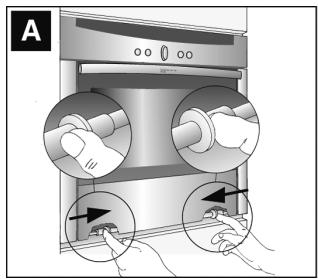
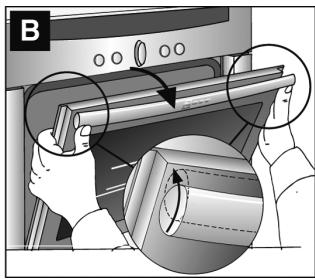
Remise en place de la porte de l'appareil
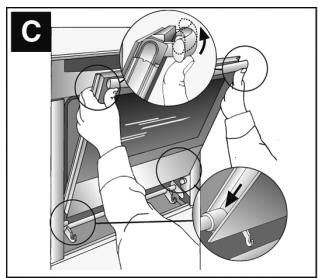
- Insérez la porte de l'appareil en biais, en utilisant les galets de guidage (figure C).
- Soulevez doucement la poignée de la porte avec les deux pouces jusqu'à la position verticale, jusqu'à ce que la porte de l'appareil s'enclenche.
- Fermez la porte de l'appareil.
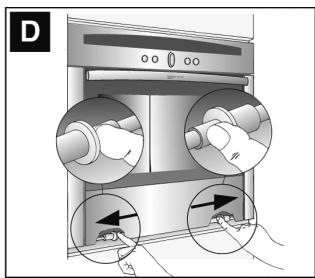
- Poussez les deux boulons de verrouillage sur le dessous de la porte (figure D).
Nettoyage des rails
Les rails peuvent être retirés pour le nettoyage.
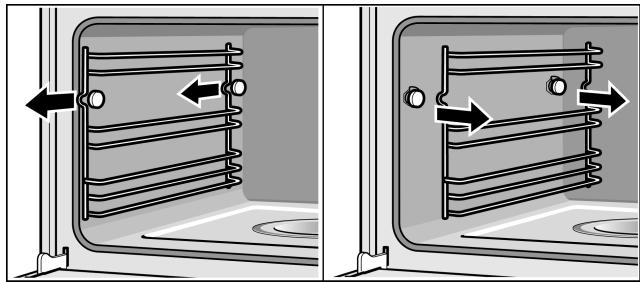
Pour cela, tirez les rails vers l'avant et décrochez-les.
Nettoyez les rails avec du détergent et une éponge ou une brosse. Vous pouvez également les nettoyer au lave-vaisselle.
Remise en place des rails
Accrochez les rails à l'arrière et à l'avant, puis faites-les glisser jusqu'à ce qu'ils s'enclenchent.
Chaque ensemble de rails ne s'adapte que sur un seul côté.
Dépannage
Les dysfonctionnements ont souvent des explications simples. Veuillez lire les instructions suivantes avant d'appeler le service après-vente.
Les réparations ne peuvent être effectuées que par des techniciens du service après-vente entièrement formés. Des réparations incorrectes de l'appareil peuvent présenter des risques considérables pour l'utilisateur.
| Problem | Possible cause | Notes/remedy |
| The appliance does not work | The plug is not plugged into the mains | Connect the appliance to the electricity supply |
| Power cut | Check whether other kitchen appliances are working | |
| Faulty fuse | Check in the fuse box to make sure that the fuse for the appliance is OK | |
| Faulty operation | Switch the appliance off using the fuse in the fuse box. Wait approximately 10 seconds and then switch it back on | |
| The appliance cannot be started | The appliance door is not fully closed | Close the appliance door |
| The appliance can not be started. “Clean” or “Descale” appears on the display | EasyClean® or Descale was cancelled | Rinse the appliance 2x (see section “Cancelling EasyClean®” or “Cancelling Descale”) |
| 0:00 flashes on the clock display | There was a power cut | Reset the clock(see section: Electronic clock) |
| The appliance is not in operation. A cooking time is shown in the display | The Start button was not pressed after the setting had been made | Press the Start button or delete the setting with the Stop button |
| “Safety cut-out” appears in the text display and 000 flashes in the temperature display | Automatic Safety cut-out is active | Turn the operating mode selector back to the o position |
| “Fill water tank” appears even though the water tank is full | The water tank has not been pushed in properly | Slide in the water tank until it engages |
| The detection system is not working | Call the after-sales service | |
| “Fill water tank” appears, although the water tank is not yet empty, or the water tank is empty but “Fill water tank” does not appear | The water tank is dirty. The moving water level indicators are jammed | Shake and clean the water tank. If the parts cannot be released, obtain a new water tank from the after-sales service |
| The water tank empties for no discernible reason. The evaporator dish overflows | The water tank was not closed properly | Close the lid until you feel it engage |
| The tank lid seal is dirty | Clean the seal | |
| The seal in the tank cover is defective | Obtain a new water tank from the after-sales service. | |
| The evaporator dish has boiled empty even though the water tank is full | The water tank has not been pushed in properly | Slide in the water tank until it engages |
| The feed line is blocked | Descale the appliance. Check whether the water hardness range is set correctly | |
| “Empty/Clean tank?” appears in the display | The appliance has not been used for at least 2 days and the water tank is full | Empty and clean the water tank. Always empty the water tank after cooking |
| There is a “pop” noise during cooking | Cold/warm effect from frozen food, caused by the steam | This is normal |
| When you cook with steam, a lot of steam is created | The appliance is being automatically calibrated | This is normal |
| When cooking with steam, a lot of steam is created again | The appliance is unable to calibrate itself automatically if cooking times are too short | Restore appliance to factory settings (see section: Basic settings). Then start the Steam cooking operating mode for 20 minutes at 100 °C |
| Steam escapes from the ventilation slots during cooking | This is normal | |
| The appliance is not producing steam properly | Limescale has formed in the appliance | Start the descaling programme. |
| An error message “E...” appears in the temperature display | Technical fault | Press the clock function button to delete the error message. Reset the clock if required.If the error message appears again, call the after-sales service |
| Error message “E011” appears in the temperature display | A button was pressed for too long or is jammed | Press the clock function button to delete the error message.Press all of the buttons individually and check if they are clean |
| The appliance is not heating.The colon is flashing in the clock display. For example, 100oappears in the temperature display | A button combination was actuated | Switch off the appliance, press and hold the info button for 3 seconds, then press and hold the clock function button for 4 seconds before pressing and holding the info button again for a further 3 seconds |
Remplacement de l'ampoule du compartiment de cuisson
Des ampoules halogènes résistantes à la chaleur de 230 V/25 W avec joints sont disponibles auprès du service après-vente. Veuillez spécifier le numéro E et le numéro FD de votre appareil.

Risque de brûlure. Laissez refroidir le compartiment de cuisson et la lumière du compartiment de cuisson avant de changer l'ampoule.
Utilisez toujours un chiffon sec pour retirer une nouvelle ampoule halogène de son emballage, sinon elle ne durera pas aussi longtemps.
- Coupez le fusible dans la boîte à fusibles ou débranchez l'appareil du secteur.
- Tournez le couvercle dans le sens inverse des aiguilles d'une montre.
- Retirez l'ampoule et remplacez-la par une ampoule du même type.
- Glissez les nouveaux joints et la bague de serrage dans le bon ordre sur le couvercle en verre.
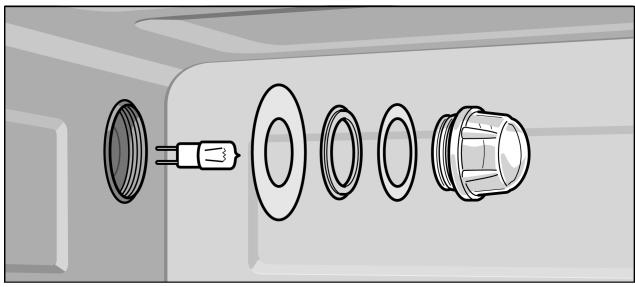
Remplacement du couvercle en verre ou des joints de la lampe
- Revissez le couvercle en verre avec les joints.
- Connectez l'appareil au secteur et réinitialisez l'horloge.
Ne jamais faire fonctionner l'appareil sans le couvercle en verre et les joints.
Tout couvercle en verre ou joint de lampe endommagé doit être remplacé. Veuillez fournir au service après-vente le numéro E et le numéro FD de votre appareil.
Remplacement du joint de porte
Si le joint autour de l'extérieur de la cavité de cuisson est défectueux, il doit être remplacé. Les joints de remplacement pour votre appareil sont disponibles auprès de notre service après-vente. Veuillez préciser le numéro E et le numéro FD de votre appareil.
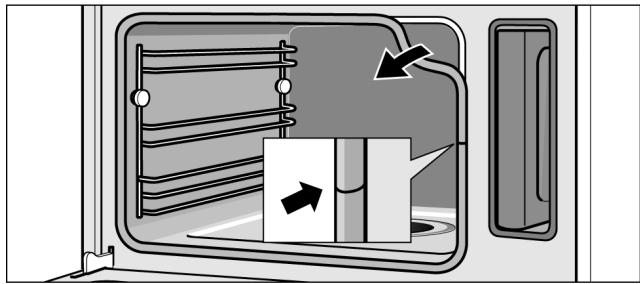
- Ouvrez la porte de l'appareil.
- Retirez l'ancien joint.
- Insérez le nouveau joint de porte à un endroit et tirez-le tout autour. La jonction doit être sur le côté.
- Vérifiez à nouveau que le joint est correctement installé dans les coins.
Service après-vente
Notre service après-vente est à votre disposition si votre appareil doit être réparé. Vous trouverez l'adresse et le numéro de téléphone du centre de service après-vente le plus proche dans l'annuaire téléphonique. Les centres de service après-vente répertoriés se feront également un plaisir de vous indiquer un point de service dans votre région.
Numéro E et numéro de production
Lorsque vous contactez le service après-vente, indiquez toujours le numéro de produit (n° E) et le numéro de production (n° FD) de votre appareil. La plaque signalétique portant ces numéros se trouve en bas à droite en ouvrant la porte de l'appareil. Notez ces numéros dans l'espace ci-dessous pour gagner du temps en cas de dysfonctionnement de votre appareil.
N° E
FD
Service après-vente
Tables et conseils
| The tables contain a selection of dishes which are particularly suitable for your combination steam oven. You can find out which operating mode, accessories and cooking time to select. Unless otherwise stated, the information given applies to inserting accessories when the appliance is cold. | |
| Accessories | Use the accessories provided.When steaming in the perforated cooking container, always insert the baking tray underneath. Dripping liquid is caught. |
| Ovenware | When using ovenware, always place it in the middle of the wire rack.Ovenware must be heat and steam resistant. Cooking times are increased when thick-walled ovenware is used.Food which would normally be prepared in a bain-marie should always be covered with foil (e.g. melting chocolate). |
| Steam cooking | Steaming is a particularly gentle way of cooking food. The steam surrounds the dish thereby preventing a loss of nutrients from the food. Cooking takes place without overpressure. As a result, the shape, colour and typical aroma of the dishes are retained. |
| Cooking times and quantities | The cooking times for the steam cooking setting depend on the unit sizes and are independent of the overall quantity. The appliance can steam food to a maximum of 2 kg.Follow the unit sizes given in the tables. The cooking time is reduced for smaller pieces and increased for larger ones. Cooking time is also influenced by the quality and ripeness of the food. The values quoted can therefore only serve as a guideline. |
Répartir les aliments uniformément
Répartissez toujours les aliments uniformément dans le plat. La cuisson ne sera pas homogène si les couches ont des épaisseurs différentes.
Aliments sensibles à la pression
Lorsque vous superposez des aliments délicats dans le récipient de cuisson, ne les empilez pas trop haut. Il est préférable d'utiliser deux récipients.
Cuisson d'un menu complet
Avec la vapeur, vous pouvez cuire un menu complet en une seule fois, sans que les différentes saveurs se mélangent. Placez d'abord les aliments dont le temps de cuisson est le plus long dans l'appareil et retardez les autres jusqu'au moment approprié. Ainsi, tous les aliments seront prêts en même temps.
Le temps de cuisson total est prolongé lors de la cuisson d'un menu, car un peu de vapeur s'échappe à chaque ouverture de la porte de l'appareil et doit être réchauffée.
Air chaud
Le mode de chauffe Air chaud est idéal pour la cuisson de plats sucrés et salés, les rôtis en cocotte et divers gâteaux.
CircoSteam®
Le mode de fonctionnement CircoSteam® utilise une combinaison d'air chaud et de vapeur, et convient particulièrement à la préparation de rôtis, de poulet et de produits de boulangerie tels que les pâtes levées et le pain.
Les rôtis et le poulet sont bien croustillants à l'extérieur et juteux à l'intérieur. De plus, la viande perd moins de poids.
Les produits de boulangerie, tels que les pâtes levées et le pain, prennent un brillant de surface particulièrement attrayant et ne se dessèchent pas.
Légumes
Placez les légumes dans le récipient de cuisson perforé et insérez-le au niveau 3. Insérez la plaque de cuisson en dessous au niveau 1. Le liquide qui s'écoule est recueilli.
| Food | Size | Accessories | Operating mode | Temperature in °C | Duration in min. |
| Artichokes | Whole | Perforated + baking tray | Steam cooking | 100 | 30 - 35 |
| Cauliflower | Whole | Perforated + baking tray | Steam cooking | 100 | 30 - 40 |
| Cauliflower | Florets | Perforated + baking tray | Steam cooking | 100 | 10 - 15 |
| Broccoli | Florets | Perforated + baking tray | Steam cooking | 100 | 8 - 10 |
| Peas | - | Perforated + baking tray | Steam cooking | 100 | 5 - 10 |
| Fennel | Slices | Perforated + baking tray | Steam cooking | 100 | 10 - 14 |
| Stuffed vegetables (courgettes, aubergines, peppers) | Do not precook vegetables | Baking tray at level 2 | CircoSteam® | 160 - 180 | 15 - 30 |
| Vegetable flan | - | 1.5 l bain-marie dish + wire rack at level 2 | Steam cooking | 100 | 50 - 70 |
| Green beans | - | Perforated + baking tray | Steam cooking | 100 | 15 - 20 |
| Carrots | Slices | Perforated + baking tray | Steam cooking | 100 | 10 - 20 |
| Kohlrabi | Slices | Perforated + baking tray | Steam cooking | 100 | 15 - 20 |
| Leeks | Slices | Perforated + baking tray | Steam cooking | 100 | 4 - 6 |
* Préchauffez l'appareil
| Food | Size | Accessories | Operating mode | Temperature in °C | Duration in min. |
| Swiss chard* | Shredded | Perforated + baking tray | Steam cooking | 100 | 8 - 10 |
| Green asparagus* | Whole | Perforated + baking tray | Steam cooking | 100 | 7 - 12 |
| White asparagus* | Whole | Perforated + baking tray | Steam cooking | 100 | 10 - 15 |
| Spinach* | - | Perforated + baking tray | Steam | 100 | 2 - 3 |
| Romanesco | Florets | Perforated + baking tray | Steam cooking | 100 | 8 - 10 |
| Brussels sprouts | Florets | Perforated + baking tray | Steam cooking | 100 | 20 - 30 |
| Beetroot | Whole | Perforated + baking tray | Steam cooking | 100 | 40 - 50 |
| Red cabbage | Shredded | Perforated + baking tray | Steam cooking | 100 | 30 - 35 |
| White cabbage | Shredded | Perforated + baking tray | Steam cooking | 100 | 25 - 35 |
| Courgettes | Slices | Perforated + baking tray | Steam cooking | 100 | 2 - 3 |
| Mangetout | - | Perforated + baking tray | Steam cooking | 100 | 8 - 12 |
* Préchauffez l'appareil
Accompagnements et légumineuses
Ajoutez de l'eau ou du liquide dans la proportion indiquée.
Exemple : 1 : 1,5 = ajoutez 150 ml de liquide pour 100 g de riz.
Vous pouvez choisir n'importe quelle position de grille pour le récipient de cuisson solide.
| Food | Ratio/information | Accessories/level | Operating mode | Tempera-ture in °C | Duration in min. |
| Unpeeled boiled potatoes | Medium size | Perforated (level 3) + baking tray (level 1) | Steam cooking | 100 | 35 - 45 |
| Boiled potatoes | Quartered | Perforated (level 3) + baking tray (level 1) | Steam cooking | 100 | 20 - 25 |
| Potato gratin | - | Baking tray (level 2) | Hot air | 170 - 180 | 35 - 45 |
| Brown rice | 1 : 1.5 | Solid | Steam cooking | 100 | 30 - 40 |
| Long grain rice | 1 : 1.5 | Solid | Steam cooking | 100 | 20 - 30 |
| Basmati rice | 1 : 1.5 | Solid | Steam cooking | 100 | 20 - 30 |
| Parboiled rice | 1 : 1.5 | Solid | Steam cooking | 100 | 15 - 20 |
| Lentils | 1 : 2 | Solid | Steam cooking | 100 | 30 - 45 |
| Haricot beans, pre-softened | 1 : 2 | Solid | Steam cooking | 100 | 65 - 75 |
| Couscous | 1 : 1 | Solid | Steam cooking | 100 | 6 - 10 |
| Unripe spelt grain, coarse ground | 1 : 2.5 | Solid | Steam cooking | 100 | 15 - 20 |
| Millet, whole | 1 : 2.5 | Solid | Steam cooking | 100 | 25 - 35 |
| Wheat, whole | 1 : 1 | Solid | Steam cooking | 100 | 60 - 70 |
| Dumplings | - | Perforated (level 3) + baking tray (level 1) | Steam cooking | 95 | 20 - 25 |
Viande, volaille, poisson
Insérez la grille et la plaque de cuisson ensemble au même niveau.
Lorsque le rôti est cuit, éteignez le four vapeur combiné et laissez le rôti reposer dans le four pendant 10 minutes supplémentaires avec la porte fermée. Cela gardera la viande juteuse.
En utilisant le mode de fonctionnement CircoSteam®, la viande reste particulièrement tendre à l'intérieur tout en étant croustillante à l'extérieur.
Volaille
| Food | Amount/weight | Accessories | Level | Operating mode | Temperature in °C | Duration in min. |
| Chicken, whole | 1.2 kg | Wire rack + baking tray | 2 | CircoSteam® | 180 - 190 | 50 - 60 |
| Chicken, halved | per 0.4 kg | Wire rack + baking tray | 2 | CircoSteam® | 180 - 190 | 35 - 45 |
| Chicken breast | per 0.15 kg | Perforated + baking tray | 3 | Steam cooking | 100 | 15 - 25 |
| Chicken portions | per 0.12 kg | Wire rack + baking tray | 2 | CircoSteam® | 180 - 200 | 20 - 35 |
| Duck, whole | 2 kg | Wire rack + baking tray | 2 | CircoSteam® | 170 | 60 - 80 |
| Hot air | 210 | 15 - 20 | ||||
| Duck breast* | per 0.35 kg | Wire rack + baking tray | 2 | CircoSteam® | 170 - 180 | 10 - 15 |
| Rolled turkey joint | 1.5 kg | Wire rack + baking tray | 2 | CircoSteam® | 150 - 160 | 70 - 90 |
| Turkey breast | 1 kg | Wire rack + baking tray | 2 | CircoSteam® | 150 - 160 | 60 - 80 |
| * Sear first | ||||||
Bœuf
| Food | Amount/weight | Accessories | Level | Operating mode | Temperature in °C | Duration in min. |
| Pot-roasted beef* | 1.5 kg | Wire rack + baking tray | 2 | Reheat | 140 - 150 | 100 - 140 |
| Tenderloin, medium* | 1 kg | Wire rack + baking tray | 2 | Reheat | 170 - 180 | 20 - 28 |
| Thin piece of sirloin, medium* | 1 kg | Wire rack + baking tray | 2 | Hot air | 170 - 180 | 40 - 55 |
| Thick piece of sirloin, medium* | 1 kg | Wire rack + baking tray | 2 | Hot air | 170 - 180 | 45 - 60 |
* Saisir d'abord
Veau
| Food | Amount/weight | Accessories | Level | Operating mode | Temperature in °C | Duration in min. |
| Joint of veal | 1.5 kg | Wire rack + baking tray | 2 | CircoSteam® | 160 - 180 | 50 - 70 |
| Veal back* | 1 kg | Wire rack + baking tray | 2 | CircoSteam® | 160 - 180 | 15 - 25 |
| Breast of veal, stuffed | 1.5 kg | Wire rack + baking tray | 2 | CircoSteam® | 140 - 160 | 75 - 120 |
* Saisir d'abord
Porc
| Food | Amount/weight | Accessories | Level | Operating mode | Temperature in °C | Duration in min. |
| Joint without rind (e.g. neck) | 1.5 kg | Wire rack + baking tray | 2 | CircoSteam® | 170 - 180 | 70 - 80 |
| Joint with rind (crackling) | 1.5 kg | Wire rack + baking tray | 2 | Steam cooking | 100 | 20 - 25 |
| CircoSteam® | 140 - 160 | 40 - 50 | ||||
| Hot air | 210 - 220 | 20 |
* Saisir d'abord
| Food | Amount/weight | Accessories | Level | Operating mode | Temperature in °C | Duration in min. |
| Pork fillet* | 0.5 kg | Wire rack + baking tray | 2 | CircoSteam® | 160 - 180 | 20 - 30 |
| Sirloin in puff pastry | 1 kg | Baking tray | 2 | CircoSteam® | 180 - 200 | 40 - 60 |
| Smoked pork on the bone | 1 kg | Wire rack + baking tray | 2 | CircoSteam® | 120 - 140 | 60 - 70 |
| Smoked pork ribs | Sliced | Baking tray | 2 | Steam cooking | 100 | 15 - 20 |
| Rolled joint | 1.5 kg | Wire rack + baking tray | 2 | CircoSteam® | 170 - 180 | 70 - 80 |
* Saisir d'abord
Divers
| Food | Amount/weight | Accessories | Level | Operating mode | Temperature in °C | Duration in min. |
| Meat loaf | made from 0.5 kg minced meat | Baking tray | 2 | CircoSteam® | 140 - 150 | 45 - 60 |
| Saddle of venison on the bone* | 0.6 - 0.8 kg | Wire rack + baking tray | 2 | CircoSteam® | 150 - 170 | 15 - 30 |
| Boned leg of lamb | 1.5 kg | Wire rack + baking tray | 2 | CircoSteam® | 170 - 180 | 60 - 80 |
| Saddle of lamb on the bone* | 1.5 kg | Wire rack + baking tray | 2 | CircoSteam® | 160 - 170 | 15 - 25 |
| Rabbit pieces | 1.5 kg | Wire rack + baking tray | 2 | CircoSteam® | 150 - 160 | 40 - 60 |
| Wiener sausage | - | Perforated + baking tray | 31 | Steam cooking | 80 - 85 | 12 - 18 |
| Veal sausages | Perforated + baking tray | 31 | Steam cooking | 80 - 85 | 15 - 20 |
* Saisir d'abord
Poisson
| Food | Amount/weight | Accessories | Level | Operating mode | Temperature in °C | Duration in min. |
| Sea bream, whole | per 0.3 kg | Perforated + baking tray | 31 | Steam cooking | 80 - 90 | 15 - 25 |
| Sea bream fillet | per 0.15 kg | Perforated + baking tray | 31 | Steam cooking | 80 - 90 | 10 - 20 |
| Fish terrine | Bain-marie dish 1.5 l | Wire rack | 2 | Steam cooking | 70 - 80 | 40 - 80 |
| Trout, whole | per 0.2 kg | Perforated + baking tray | 31 | Steam cooking | 80 - 90 | 12 - 15 |
| Cod fillet | per 0.15 kg | Perforated + baking tray | 31 | Steam cooking | 80 - 90 | 10 - 14 |
| Salmon fillet | per 0.15 kg | Perforated + baking tray | 31 | Steam cooking | 100 | 8 - 10 |
| Mussels | 1.5 kg | Baking tray | 2 | Steam cooking | 100 | 10 - 15 |
| Rose fish | per 0.15 kg | Perforated + baking tray | 31 | Steam cooking | 80 - 90 | 10 - 20 |
| Stuffed sole rolls | - | Perforated + baking tray | 31 | Steam cooking | 80 - 90 | 10 - 20 |
Conseils de rôtissage
| Using the roasting set. | Using the roasting set will give you optimum results and the cooking compartment will stay as clean as possible.You can obtain the roasting set as an accessory in specialist retailers(see section: Cooking compartment and accessories). |
| When is the roast ready? | Use a meat thermometer (available from specialist shops) or carry out a “spoon test”: press down on the roast with a spoon. If it feels firm, it is ready. If the spoon can be pressed in, it needs to be cooked for a little longer. |
| The roast is too dark and the outside is partly burnt. | Check the shelf position and temperature. |
| The roast looks good but the juices are burnt. | Next time, chose a smaller roasting dish or add more liquid. |
| The roast looks good, but the juices are too clear and watery. | Next time, chose a larger roasting dish or add less liquid. |
Braiser la viande
Le braisage est la méthode de cuisson idéale pour tous les morceaux de viande tendres qui doivent être cuits à point ou saignants. La viande reste très juteuse et devient aussi tendre que du beurre.
Glissez la plaque de cuisson dans le four combiné vapeur et préchauffez avec le mode de cuisson Cuisson lente.
Saisissez la viande sur la cuisinière sur toutes les faces.
Placez-la dans le four vapeur préchauffé et continuez à cuire doucement.
Une fois cuite, disposez-la sur des assiettes préchauffées et servez avec une sauce chaude.
| Food | Amount | Accessories | Level | Temperature in °C | Duration in min. |
| Boned leg of lamb | 1 - 1.5 kg | Baking tray | 2 | 80 | 140 - 160 |
| Roast beef | 1.5 - 2.5 kg | Baking tray | 2 | 80 | 150 - 180 |
| Pork fillet | - | Baking tray | 2 | 80 - 90 | 50 - 70 |
| Pork medallions | - | Baking tray | 2 | 80 | 60 - 80 |
| Beef steaks | approx. 3 cm thick | Baking tray | 2 | 80 | 40 - 60 |
| Duck breast | - | Baking tray | 2 | 80 | 35 - 55 |
Pâtisseries, ingrédients pour soupes...
| Food | Accessories | Level | Operating mode | Temperature in °C | Duration in min. |
| Lasagne | Baking tray | 2 | CircoSteam® | 160 - 170 | 35 - 45 |
| Soufflé | Mould + wire rack | 2 | CircoSteam® | 180 - 200 | 15 - 25 |
| Royale | Solid | 2 | Steam cooking | 90 | 15 - 20 |
| Semolina dumplings | Perforated + baking tray | 31 | Steam cooking | 90 - 95 | 7 - 10 |
Desserts, compote
Compote
Peser les fruits et ajouter environ 1/3 de la quantité d'eau, ainsi que du sucre et des épices selon le goût.
Riz au lait
Peser le riz et ajouter 2,5 fois la quantité de lait. Ne pas remplir le riz et le lait à plus de 2,5 cm de hauteur dans les accessoires. Remuer après la cuisson. Le lait restant est rapidement absorbé.
Yaourt
Chauffer le lait à 90 °C sur la cuisinière. Puis laisser refroidir à 40 °C. Si vous utilisez du lait UHT, il n'est pas nécessaire de le chauffer.
Incorporer une à deux cuillères à café de yaourt nature pour 100 ml de lait, ou la quantité correspondante de ferment lactique. Verser le mélange dans des pots propres et les fermer.
Après la préparation, laisser les pots refroidir au réfrigérateur.
| Food | Accessories | Operating mode | Temperature in °C | Duration in min. |
| Yeast dumplings | Baking tray | Steam cooking | 100 | 20 - 25 |
| Crème caramel | Mould + wire rack | Steam cooking | 90 - 95 | 15 - 20 |
| Sweet bake (e.g. semolina pudding) | Ovenproof dish+ wire rack | CircoSteam® | 160 - 170 | 50 - 60 |
| Rice pudding* | Baking tray | Steam cooking | 100 | 25 - 35 |
| Yoghurt* | Portion-sized glasses + wire rack | Steam cooking | 40 | 300 - 360 |
| Apple compote | Baking tray | Steam cooking | 100 | 10 - 15 |
| Pear compote | Baking tray | Steam cooking | 100 | 10 - 15 |
| Cherry compote | Baking tray | Steam cooking | 100 | 10 - 15 |
| Rhubarb compote | Baking tray | Steam cooking | 100 | 10 - 15 |
| Plum compote | Baking tray | Steam cooking | 100 | 15 - 20 |
* Vous pouvez également utiliser le programme approprié (voir la section : Programmes automatiques).
Gâteaux et pâtisseries
Il est préférable d'utiliser des moules à pâtisserie en métal de couleur sombre.
La température et le temps de cuisson dépendent de la quantité et de la composition de la pâte.
Pour cette raison, des plages de température sont indiquées dans les tableaux.
Commencez par régler la température la plus basse. Cela permettra de dorer le plat plus uniformément. Une température plus élevée peut être sélectionnée la prochaine fois, si nécessaire.
Ne surchargez pas la grille ou la plaque de cuisson avec des aliments.
Gâteaux dans des moules
| Food | Accessories | Level | Operating mode | Tempera-ture in °C | Cooking time in min. |
| Sponge cake | Ring/loaf tin | 2 | Hot air | 150 - 160 | 60 - 70 |
| Sponge flan base | Flan tin | 2 | Hot air | 150 - 160 | 30 - 45 |
| Delicate fruit flan, sponge | Springform cake tin | 2 | Hot air | 150 - 160 | 45 - 55 |
| Sponge base (2 eggs) | Flan tin | 2 | Hot air | 180 - 190 | 12 - 16 |
| Sponge flan (6 eggs) | Springform cake tin | 2 | Hot air | 150 - 160 | 25 - 35 |
| Shortcrust pastry base with crust | Springform cake tin | 2 | Hot air | 150 - 160 | 40 - 50 |
| Swiss flan | Springform cake tin | 2 | Hot air | 180 - 190 | 35 - 60 |
| Ring cake | Ring cake tin | 2 | CircoSteam® | 150 - 160 | 35 - 45 |
| Savoury tarts (e.g. quiche) | Quiche tin | 2 | Hot air | 180 - 190 | 35 - 60 |
| Apple tart | Flan tin | 2 | Hot air | 170 - 190 | 35 - 50 |
Gâteaux sur plaques
| Food | Accessories | Level | Operating mode | Temperature in °C | Cooking time in min. |
| Yeast cake with dry topping | Baking tray | 2 | CircoSteam® | 150 - 160 | 35 - 45 |
| Yeast cake with moist topping (fruit) | Baking tray | 2 | Hot air | 150 - 160 | 35 - 45 |
| Swiss roll | Baking tray | 2 | Hot air | 180 - 200 | 10 - 15 |
| Plaited loaf (500 g flour) | Baking tray + greaseproof paper | 2 | CircoSteam® | 150 - 160 | 25 - 35 |
| Strudel, sweet | Baking tray | 2 | CircoSteam® | 160 - 180 | 40 - 60 |
| Onion tart | Baking tray | 2 | CircoSteam® | 170 - 180 | 30 - 40 |
Pain, petits pains
| Food | Accessories | Level | Operating mode | Tempera-ture in °C | Cooking time in min. |
| White bread (750 g flour) | Baking tray + greaseproof paper | 2 | CircoSteam® | 200 - 210 | 15 - 20 |
| Hot air | 160 - 170 | 20 - 25 | |||
| Sourdough bread (750 g flour) | Baking tray + greaseproof paper | 2 | CircoSteam® | 200 - 220 | 15 - 25 |
| Hot air | 150 - 160 | 40 - 60 | |||
| Multigrain bread (750 g flour) | Baking tray + greaseproof paper | 2 | CircoSteam® | 200 - 220 | 15 - 20 |
| Hot air | 160 - 170 | 25 - 40 | |||
| Wholemeal bread (750 g flour) | Baking tray + greaseproof paper | 2 | CircoSteam® | 200 - 220 | 20 - 30 |
| Hot air | 140 - 150 | 40 - 60 | |||
| Food | Accessories | Level | Operating mode | Temperature in °C | Cooking time in min. |
| Rye bread (750 g flour) | Baking tray + greaseproof paper | 2 | CircoSteam® | 200 - 220 | 20 - 30 |
| Hot air | 150 - 160 | 50 - 60 | |||
| Bread rolls (70 g each, unbaked) | Baking tray + greaseproof paper | 2 | CircoSteam® | 190 - 200 | 25 - 30 |
| Bread rolls made with yeast dough, sweet (70 g each, unbaked) | Baking tray + greaseproof paper | 2 | CircoSteam® | 170 - 180 | 20 - 30 |
Petites pâtisseries
| Food | Accessories | Level | Operating mode | Tempera-ture in °C | Cooking time in min. |
| Meringue | Baking tray | 2 | Hot air | 80 - 90 | 120 - 180 |
| Macaroons | Baking tray | 2 | Hot air | 140 - 160 | 15 - 25 |
| Puff pastry | Baking tray | 2 | CircoSteam® | 170 - 190 | 10 - 20 |
| Muffins | Bun tray | 2 | Hot air | 170 - 180 | 20 - 30 |
| Choux pastry | Baking tray | 2 | Hot air | 170 - 190 | 27 - 35 |
| Biscuits | Baking tray | 2 | Hot air | 150 - 160 | 12 - 17 |
| Leavened cake | Baking tray | 2 | Hot air | 150 - 160 | 15 - 20 |
| You want to bake following your own recipe. | Use similar items in the baking tables as a guide. |
| to help you establish whether the sponge cake is baked through. | Approx. 10 minutes before the end of the baking time stated in the recipe, use a cocktail stick to prick the cake at its highest point. If there is no mixture stuck to the cocktail stick when it is removed, the cake is ready. |
| The cake collapses. | Next time, use less liquid or set the baking temperature 10 °C lower. Observe the specified mixing times in the recipe. |
| The cake has risen in the middle but has sunk around the edge. | Do not grease the edge of the springform cake tin. After baking, loosen the cake carefully with a knife. |
| Cakes baked in a tray or tin are overbrowned at the back | Place the baking tray in the middle of the accessories, not directly against the rear panel. |
| The cake is too dry. | Make small holes in the cake when it is done using a toothpick. Then drizzle fruit juice or an alcoholic drink over it. Next time, set the temperature 10 °C higher and shorten the cooking times or use the Combination type of heating. |
| The bread or the cake has a good appearance but it is soggy inside (overmoist with wet streaks) | Next time, use less liquid. Bake at a lower temperature for a little longer. For cakes with a moist topping, bake the base first. Cover the base with almonds or bread crumbs first and then apply the topping. Observe the baking time in the recipe. |
| The cake or pastry is unevenly browned. | Next time, set the temperature a little lower. |
Réchauffage des aliments
Avec le mode Réchauffage, les plats peuvent être réchauffés en douceur. Ils ont le goût et l'aspect de plats fraîchement préparés. Même les pâtisseries de la veille peuvent être redonnées croustillantes.
| Food | Accessories | Level | Operating mode | Temperature in °C | Duration in min. |
| Meals arranged on plates | Wire rack | 2 | Reheat | 120 | 12 - 18 |
| Vegetables | Baking tray | 3 | Reheat | 100 | 12 - 15 |
| Noodles, potatoes, rice | Baking tray | 3 | Reheat | 100 | 5 - 10 |
| Bread rolls* | Wire rack | 2 | CircoSteam® | 170 - 180 | 6 - 8 |
* Préchauffez pendant 5 minutes
| Food | Accessories | Level | Operating mode | Temperature in °C | Duration in min. |
| Baguette* | Wire rack | 2 | CircoSteam® | 170 - 180 | 5 - 10 |
| Bread* | Wire rack | 2 | CircoSteam® | 170 - 180 | 8 - 12 |
| Pizza | Wire rack + Baking tray | 3 | Reheat | 170 - 180 | 12 - 15 |
* Préchauffez pendant 5 minutes
Décongélation
Si possible, congelez les aliments à plat et en portions à -18°C. Ne congelez pas des quantités excessivement grandes. Une fois décongelés, les aliments ne se conservent pas aussi longtemps et se détériorent plus rapidement que les aliments frais.
Laissez les aliments décongeler dans le sac de congélation, sur une assiette ou dans le récipient de cuisson perforé. Placez toujours la plaque de cuisson en dessous. Les aliments ne baignent alors pas dans l'eau de décongélation et le compartiment de cuisson reste propre.
Utilisez le mode de fonctionnement Décongélation.
Si nécessaire, le plat peut être occasionnellement séparé ou les morceaux déjà décongelés peuvent être retirés de l'appareil.
Après décongélation, laissez reposer les aliments pendant 5 à 15 minutes supplémentaires pour qu'ils atteignent la température ambiante.

Risque pour la santé.
Lors de la décongélation d'aliments d'origine animale, vous devez éliminer le liquide qui s'échappe pendant la décongélation. Il ne doit jamais entrer en contact avec d'autres aliments. Des bactéries pourraient être transférées.
Après la décongélation, faites fonctionner le four vapeur en air chaud pendant 15 minutes à 180 °C.
Décongeler la viande
Laissez les morceaux de viande destinés à être panés décongeler jusqu'au point où l'assaisonnement et la panure adhèrent à la viande.
Décongeler la volaille : retirez-la de son emballage avant de la décongeler. Vous devez jeter le liquide de décongélation.
| Food | Amount/weight | Accessories | Level | Temperature in °C | Duration in min. |
| Chicken | 1 kg | Perforated + baking tray | 3 | 45 - 50 | 60 - 70 |
| 1 | |||||
| Chicken drumsticks | 0.4 kg | Perforated + baking tray | 3 | 45 - 50 | 30 - 35 |
| 1 | |||||
| Block-frozen vegetables (e.g. spinach) | 0.4 kg | Perforated + baking tray | 3 | 45 - 50 | 20 - 30 |
| 1 | |||||
| Berries | 0.3 kg | Perforated + baking tray | 3 | 45 - 50 | 5 - 8 |
| 1 | |||||
| Fish fillet | 0.4 kg | Perforated + baking tray | 3 | 45 - 50 | 15 - 20 |
| 1 | |||||
| Goulash | Perforated + baking tray | 3 | 45 - 50 | 40 - 50 | |
| 1 | |||||
| Roast beef | Perforated + baking tray | 3 | 45 - 50 | 70 - 80 | |
| 1 |
Pousse de la pâte
En utilisant le mode de fonctionnement de pousse de la pâte, la pâte lève considérablement plus vite qu'à température ambiante.
Vous pouvez choisir n'importe quelle position de grille pour la grille métallique ou la placer soigneusement sur le plancher du compartiment de cuisson.
Attention : ne rayez pas le plancher du compartiment de cuisson.
Placez le bol de pâte sur la grille métallique. Ne couvrez pas la pâte.
| Food | Amount | Cookware | Temperature in °C | Duration in min. |
| Yeast dough | 1 kg | Bowl + wire rack | 40 | 20 - 30 |
| Sourdough | 1 kg | Bowl + wire rack | 40 | 20 - 30 |
Extraction de jus
Avant d'extraire le jus, placez les baies dans un bol et saupoudrez-les de sucre. Laissez reposer au moins une heure pour faire sortir le jus.
Versez les baies dans le récipient de cuisson perforé et insérez-le au niveau 3. Insérez le récipient de cuisson solide au niveau 1 pour recueillir le jus.
Enfin, placez les baies dans un torchon et pressez pour extraire le reste du jus.
| Food | Accessories | Level | Operating mode | Temperature in °C | Duration in min. |
| Raspberries | Perforated + solid | 3 | Steam cooking | 100 | 30 - 45 |
| 1 | |||||
| Redcurrants | Perforated + solid | 3 | Steam cooking | 100 | 40 - 50 |
| 1 |
Conservez des aliments aussi frais que possible. Lorsque les aliments sont stockés pendant une période relativement longue, leur teneur en vitamines diminue et ils cuisent plus facilement.
N'utilisez que des fruits et légumes en parfait état.
Vérifiez les bocaux de conservation, les joints en caoutchouc, les clips et les ressorts.
Nettoyez soigneusement les joints en caoutchouc et les bocaux à l'eau chaude. Le programme "Stériliser les bouteilles" convient également pour nettoyer les verres.
Placez les bocaux dans le récipient de cuisson perforé. Ils ne doivent pas être en contact les uns avec les autres.
Après le temps de cuisson spécifié, ouvrez la porte du compartiment de cuisson.
Ne retirez pas les bocaux de conservation de l'appareil avant qu'ils aient complètement refroidi.
| Food | Accessories | Level | Operating mode | Temperature in °C | Duration in min. |
| Vegetables | 1-litre preserving jars | 2 | Steam cooking | 100 | 30 - 120 |
| Stone fruits | 1-litre preserving jars | 2 | Steam cooking | 100 | 25 - 30 |
| Pip fruits | 1-litre preserving jars | 2 | Steam cooking | 100 | 25 - 30 |
Produits surgelés
Respectez les instructions du fabricant sur l'emballage.
Les temps de cuisson indiqués s'appliquent à des plats placés dans un compartiment de cuisson froid.
| Food | Accessories | Level | Operating mode | Tempera-ture in °C | Cooking time in min. |
| Chips | Baking tray + greaseproof paper | 2 | Hot air | 170 - 190 | 25 - 35 |
| Croquettes | Baking tray + greaseproof paper | 2 | Hot air | 180 - 200 | 18 - 22 |
| Rösti | Baking tray + greaseproof paper | 2 | Hot air | 180 - 200 | 25 - 30 |
| Pasta, fresh, refrigerated* | Baking tray | 2 | Steam cooking | 100 | 5 - 10 |
| Lasagne, frozen | Baking tray + wire rack | 2 | CircoSteam® | 190 - 210 | 35 - 55 |
| Pizza, thin base | Baking tray + wire rack | 2 | Hot air | 180 - 200 | 15 - 23 |
| Pizza, deep pan | Baking tray + wire rack | 2 | Hot air | 180 - 200 | 18 - 25 |
| Pizza baguette | Baking tray + wire rack | 2 | Hot air | 180 - 200 | 18 - 22 |
| Pizza, refrigerated | Baking tray | 2 | Hot air | 170 - 180 | 12 - 17 |
| Herb butter baguette, refrigerated | Baking tray | 2 | Hot air | 180 - 200 | 15 - 20 |
| Bread rolls, baguette, frozen | Baking tray + wire rack | 2 | Hot air | 180 - 200 | 18 - 22 |
| Pretzels, frozen | Baking tray + greaseproof paper | 2 | Hot air | 180 - 200 | 18 - 22 |
| Croissant, frozen | Baking tray + greaseproof paper | 2 | CircoSteam® | 180 - 200 | 20 - 25 |
| Part-cooked bread rolls or baguette, pre-baked | Baking tray + greaseproof paper | 2 | Hot air | 150 - 170 | 12 - 15 |
| * Add a little liquid | |||||
| Strudel, frozen | Baking tray + greaseproof paper | 2 | CircoSteam® | 160 - 180 | 45 - 60 |
| Fish fingers | Baking tray + greaseproof paper | 2 | Hot air | 195 - 205 | 20 - 24 |
| Trout | Perforated + baking tray | 31 | Steam cooking | 80 - 100 | 20 - 25 |
| Frozen fish portion | Baking tray + wire rack | 2 | CircoSteam® | 180 - 200 | 35 - 50 |
| Salmon fillet | Perforated + solid | 31 | Steam cooking | 80 - 100 | 20 - 25 |
| Squid rings | Baking tray + greaseproof paper | 2 | Hot air | 190 - 210 | 25 - 30 |
| Broccoli | Perforated + solid | 31 | Steam cooking | 100 | 4 - 6 |
| Cauliflower | Perforated + solid | 31 | Steam cooking | 100 | 5 - 8 |
| Beans | Perforated + solid | 31 | Steam cooking | 100 | 4 - 6 |
| Peas | Perforated + solid | 31 | Steam cooking | 100 | 4 - 6 |
| Carrots | Perforated + solid | 31 | Steam cooking | 100 | 3 - 5 |
| Mixed vegetables | Perforated + solid | 31 | Steam cooking | 100 | 4 - 8 |
| Brussels sprouts | Perforated + solid | 31 | Steam cooking | 100 | 5 - 10 |
| * Add a little liquid | |||||
Plats d'essai
Conformément à DIN 44547 et EN 60350.
Les valeurs du tableau s'appliquent à des plats placés dans un compartiment de cuisson froid.
| Food | Tin/tray | Level | Mode of operation | Temperature in °C | Duration in min. |
| Viennese whirls | Baking tray | 2 | Hot air | 160 - 170 | 17 - 20 |
| Small cakes | Baking tray | 2 | Hot air | 160 - 170 | 25 - 33 |
| Hot water sponge cake | 26 cm springform cake tin | 2 | Hot air | 150 - 160 | 35 - 40 |
| Yeast cakes on a baking tray | Baking tray | 2 | Hot air | 150 - 160 | 36 - 44 |
| German apple pie | 20 cm springform cake tin | 2 | Hot air | 160 - 170 | 60 - 70 |

- NOTICE D'UTILISATION
- TABLE DES MATIÈRES
- TABLEAUX ET CONSEILS
- ⚠ CONSIGNES DE SÉCURITÉ
- COMPARTIMENT DE CUISSON CHAUD
- ACCESSOIRES CHAUDS
- CONSEILS D'ÉCONOMIE D'ÉNERGIE ET D'ENVIRONNEMENT
- ÉCONOMISER DE L'ÉNERGIE
- CUISSON
- VAPEUR
- ÉLIMINATION RESPECTUEUSE DE L'ENVIRONNEMENT
- VOTRE NOUVEL APPAREIL
- BOUTONS DE COMMANDE ESCAMOTABLES
- MODES DE FONCTIONNEMENT
- COMPARTIMENT DE CUISSON ET ACCESSOIRES
- ATTENTION
- ACCESSOIRES
- GRILLE MÉTALLIQUE
- RÉCIPIENT DE CUISSON, PERFORÉ
- RÉCIPIENT DE CUISSON, PLEIN, GN 1/3, 40 MM DE PROFONDEUR
- RÉCIPIENT DE CUISSON, PLEIN, GN 2/3, 28 MM DE PROFONDEUR (PLAQUE DE CUISSON)
- RÉSERVOIR D'EAU
- APRÈS CHAQUE OPÉRATION
- MESSAGE "REMPLIR LE RÉSERVOIR D'EAU
- MESSAGE « REMPLIR LE RÉSERVOIR D'EAU
- CALIBRAGE AUTOMATIQUE
- APRÈS UN DÉMÉNAGEMENT
- AVANT LA PREMIÈRE UTILISATION
- RÉGLAGE DE LA LANGUE
- CHANGEMENT DE LA LANGUE
- RÉGLAGE DE L'HORLOGE
- RÉGLAGE DE L'HEURE
- RÉGLAGE DE LA DURETÉ DE L'EAU
- VÉRIFICATION DE LA DURETÉ DE L'EAU
- EAU ADOUCIE
- MODIFICATION DE LA DURETÉ DE L'EAU
- NETTOYAGE
- CHAUFFAGE DE L'APPAREIL
- NETTOYAGE DES ACCESSOIRES
- UTILISATION DE L'APPAREIL
- ALLUMER L'APPAREIL
- APPUYEZ SUR LE BOUTON DÉMARRER
- TEMPÉRATURE ACTUELLE
- AFFICHAGE ET MODIFICATION DU TEMPS DE CUISSON
- MODIFICATION DE LA TEMPÉRATURE
- ARRÊT DE L'APPAREIL
- TEMPS DE CUISSON ÉCOULÉ
- PAUSE
- ARRÊT MANUEL
- INDICATEUR DE CHALEUR RÉSIDUELLE
- APRÈS CHAQUE UTILISATION
- VIDANGE DU RÉSERVOIR D'EAU
- SÉCHAGE DU COMPARTIMENT DE CUISSON
- ARRÊT DE SÉCURITÉ AUTOMATIQUE
- DÉSACTIVATION
- MODIFICATION DES RÉGLAGES DE BASE
- HORLOGE ÉLECTRONIQUE
- AFFICHAGE DE L'HORLOGE
- REMARQUES
- ACTIVATION ET DÉSACTIVATION DE L'AFFICHAGE DE L'HORLOGE
- MINUTEUR
- DURÉE DE CUISSON
- FIN DE FONCTIONNEMENT
- MODE DE PRÉSÉLECTION
- VÉRIFICATION, CORRECTION OU SUPPRESSION DES RÉGLAGES
- SÉCURITÉ ENFANTS
- VERROUILLAGE
- VERROUILLAGE DE L'APPAREIL
- REMARQUE
- DÉVERROUILLAGE DE L'APPAREIL
- VERROUILLAGE PERMANENT
- VERROUILLAGE PERMANENT DE L'APPAREIL
- DÉVERROUILLAGE D'UN VERROUILLAGE PERMANENT
- DÉVERROUILLAGE PERMANENT DE L'APPAREIL
- PROGRAMMES AUTOMATIQUES
- RÉGLAGE DU PROGRAMME
- SÉLECTION DU GROUPE DE PROGRAMMES
- SÉLECTION DU PROGRAMME
- AJUSTEMENT DU RÉSULTAT DE CUISSON SELON LES GOÛTS PERSONNELS
- RÉGLAGE DU POIDS
- VÉRIFICATION DU TEMPS DE CUISSON
- PROGRAMME AVEC OPÉRATION PRÉSÉLECTIONNÉE
- FIN DU PROGRAMME
- ANNULATION DU PROGRAMME
- PRODUITS CÉRÉALIERS
- PRÉPARATION DU RISOTTO
- VOLAILLE
- PÂTISSERIES, DESSERT
- CUISSON DE LA TRESSE
- PRÉPARATION DE LA COMPOTE DE FRUITS
- PRÉPARATION DU RIZ AU LAIT
- PRÉPARATION DU YAOURT
- PAIN, PETITS PAINS
- CUISSON DU PAIN
- LEVÉE ET CUISSON DE LA PÂTE
- CUISSON DE PETITS PAINS FRAIS
- DÉCONGÉLATION
- DÉCONGÉLATION DE FILETS DE POISSON
- DÉCONGÉLATION DE VOLAILLES ENTIÈRES
- DÉCONGÉLATION DE LA VIANDE
- DÉCONGÉLATION LÉGÈRE DES FRUITS
- SPÉCIAL
- STÉRILISATION DES BIBERONS
- CONSERVATION
- CUISSON DES ŒUFS
- MÉMOIRE
- ENREGISTREMENT DANS LA FONCTION MÉMOIRE
- ANNULATION DE LA FONCTION MÉMOIRE
- DÉMARRAGE DE LA FONCTION MÉMOIRE
- ANNULATION
- SUPPRESSION D'UN RÉGLAGE MÉMOIRE
- ENTRETIEN ET NETTOYAGE
- ÉPONGE DE NETTOYAGE
- CHIFFON EN MICROFIBRE
- EASYCLEAN®
- PRÉPARATION
- DÉMARRAGE D'EASYCLEAN®
- ER RINÇAGE
- E RINÇAGE
- RETRAIT DE L'EAU RESTANTE
- ANNULATION D'EASYCLEAN®
- DÉTARTRAGE
- DÉTARTRANT
- DÉMARRAGE DU DÉTARTRAGE
- ANNULATION DU DÉTARTRAGE
- DÉTARTRAGE DU BAC DE L'ÉVAPORATEUR UNIQUEMENT
- RETRAIT ET INSTALLATION DE LA PORTE DE L'APPAREIL
- RETRAIT DE LA PORTE DE L'APPAREIL
- REMISE EN PLACE DE LA PORTE DE L'APPAREIL
- NETTOYAGE DES RAILS
- REMISE EN PLACE DES RAILS
- DÉPANNAGE
- REMPLACEMENT DE L'AMPOULE DU COMPARTIMENT DE CUISSON
- REMPLACEMENT DU COUVERCLE EN VERRE OU DES JOINTS DE LA LAMPE
- REMPLACEMENT DU JOINT DE PORTE
- SERVICE APRÈS-VENTE
- NUMÉRO E ET NUMÉRO DE PRODUCTION
- TABLES ET CONSEILS
- RÉPARTIR LES ALIMENTS UNIFORMÉMENT
- ALIMENTS SENSIBLES À LA PRESSION
- CUISSON D'UN MENU COMPLET
- AIR CHAUD
- CIRCOSTEAM®
- LÉGUMES
- ACCOMPAGNEMENTS ET LÉGUMINEUSES
- VIANDE, VOLAILLE, POISSON
- BRAISER LA VIANDE
- DESSERTS, COMPOTE
- COMPOTE
- RIZ AU LAIT
- YAOURT
- GÂTEAUX ET PÂTISSERIES
- RÉCHAUFFAGE DES ALIMENTS
- DÉCONGELER LA VIANDE
- POUSSE DE LA PÂTE
- EXTRACTION DE JUS
- PRODUITS SURGELÉS
- PLATS D'ESSAI
Marque : NEFF
Modèle : C49C62N0
Catégorie : Four électrique