
MP-RUMBA FM - Lecteur mp3 MPMAN - Notice d'utilisation et mode d'emploi gratuit
Retrouvez gratuitement la notice de l'appareil MP-RUMBA FM MPMAN au format PDF.


| Type d'appareil | Lecteur audio/vidéo portable |
| Formats audio supportés | MP3, WMA |
| Formats vidéo supportés | AMV |
| Radio FM | Oui |
| Écran | Non précisé |
| Capacité de stockage | Non précisé |
| Connectivité | Non précisé |
| Alimentation | Non précisé |
| Autonomie | Non précisé |
| Poids | Non précisé |
| Dimensions | Non précisé |
| Fonctions supplémentaires | Radio FM intégrée |
| Interface utilisateur | Non précisé |
| Langues supportées | Non précisé |
| Accessoires inclus | Non précisé |
FOIRE AUX QUESTIONS - MP-RUMBA FM MPMAN
Questions des utilisateurs sur MP-RUMBA FM MPMAN
0 question sur cet appareil. Repondez a celles que vous connaissez ou posez la votre.
Poser une nouvelle question sur cet appareil
Téléchargez la notice de votre Lecteur mp3 au format PDF gratuitement ! Retrouvez votre notice MP-RUMBA FM - MPMAN et reprennez votre appareil électronique en main. Sur cette page sont publiés tous les documents nécessaires à l'utilisation de votre appareil MP-RUMBA FM de la marque MPMAN.
MODE D'EMPLOI MP-RUMBA FM MPMAN
DIGITALVIDEO AND MUSIC PLAYER MP3,WMA,AMV
USER MANUAL
MP-RUMBA FM
www.mpmaneurope.com
GENERAL
1.1 RUMBA Features
Supports the following music formats: MP1, MP2, MP3, WMA
LCD screen
- Graphical user interface control
Built-in stereo speakers
1.2 The package contents
- MP3 player
- Stereo earphones
CD-ROM with driver programs and useful software - Quick-start guide
USB cable
1.3 Computer requirements
- Pentium 100 MHz or faster
32 MB RAM or more
CD-ROM - Hard disk with a minimum of 15 MB free space
USB 1.1/2.0 - Windows 98/ME/2000/XP, Mac OS 10, Linux 2.4.2
1.4The player interface
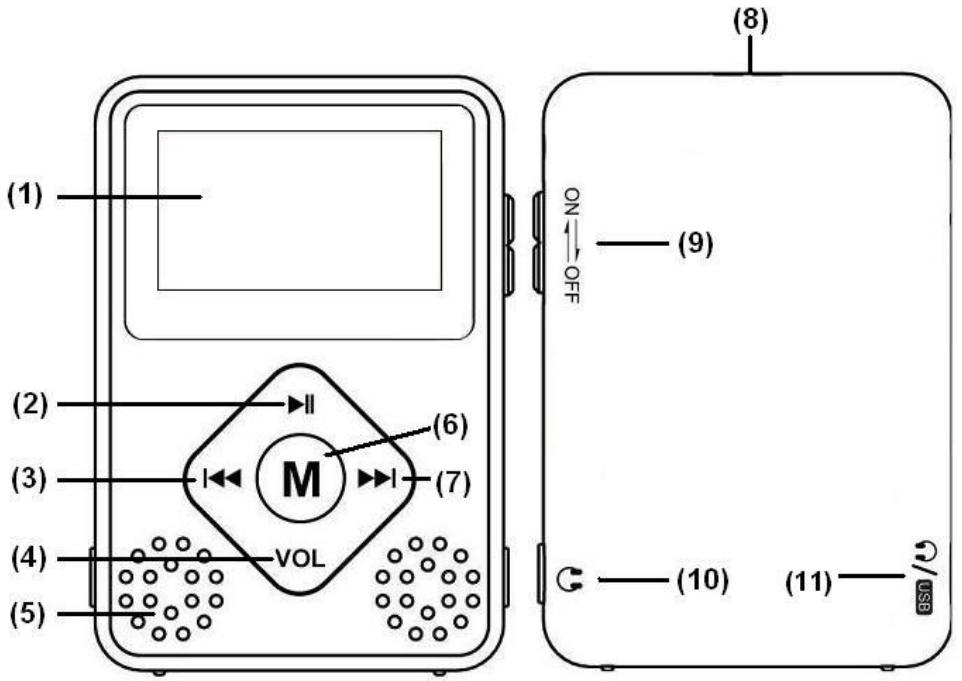
1.5 Layout and controls
(1) LCD screen
(2) PLAY button
(3) PREV/REV or reduce volume
(4) VOL : volume mode
(5) SPEAKERS
(6) MENU button (press and hold for 2 seconds to return to the main menu)
(7) NEXT/FWD or increase volume
(8) Attachment point for carrying cord
(9) ON/OFF switch VOL : volume mode
(10)Earphone connection
(11)Earphone and USB cable connection
1.6 Battery
The RUMBA has an on-screen battery power indicator:
- Charge the battery when the remaining power is low (connect the MP-RUMBA via USB to the PC or optional charger).
1.7 Switching on and off
- Switch the player on and off with the ON/OFF switch.
- If you press and hold the PLAY button for 2 seconds, the player will be switched off. If you press and hold the PLAY button again, the player will be switched on again.
1.7Switching speakers on and off
While playing music, press M button and select "loudspeaker" option
OPERATION
2.0 Main menu
In the main menu you can choose one of three modes with different features:
Music
FM Mode
Setting
You can choose a function with the NEXT and PREV buttons. Press the MENU button to activate the function. Keep the MENU button pressed for 2 seconds to return to the main menu.
2.1 Music mode
Choose MUSIC mode in the main menu and press MENU to activate it.
You can choose a music file with the NEXT and PREV buttons. Press PLAY to play the file.
MUSIC mode has two sub-modes:
- Play mode (available during playback)
- Stop mode (available during standby)
Play mode
During playback, press the MENU button to activate Play mode. There are 7 options:
Repeat
| Normal | All songs will be played once |
| Repeat One | Repeat the current song |
| Folder | Play all the songs in a specific folder |
| Repeat Folder | Repeat all the songs in a specific folder |
| Repeat All | Repeat all songs |
| Random | Play all the songs in random order |
| Intro | Play the first 10 seconds of each song |
Equalizer
| Natural |
| Rock |
| Pop |
| Classic |
| Soft |
| Jazz |
| DBB |
Tempo rate
Press the NEXT and PREV buttons to change the playback speed.
Note: The Tempo rate option only works with MP3 files!
Replay
A-B replay - you can mark selected music segments for continual replay.
When Replay mode is selected, the icon appears and the letter A flashes.
Press NEXT to set the starting point (A) of the segment to be repeated.
The letter B starts to flash.
Press NEXT to set the end point (B) of the segment to be repeated.
The A-B segment will now be replayed continuously. Press the MENU button to return to normal playback.
Replay times
Choose how many times the A-B segment must be repeated (1 to 10 times).
Replay gap
Choose the time interval between each A-B-segment (1-10 seconds).
LOUDSPEAKER: on/off
Exit
Stop mode
Press the MENU button briefly while the player is in standby to activate Stop mode. There are 4 options:
Local folder
You can browse files and folders saved on the player here.
Select with the NEXT and PREV buttons and press MENU to activate or confirm the selection.
Delete file
You can delete files and folders saved on the player here.
Select with the NEXT and PREV buttons and press MENU to confirm the deletion.
Delete all
- Deletes all the music files on the player.
Exit
2.2 FM radio
Choose FM radio in the main menu and press MENU to activate it.
- Briefly press or to change the frequency in steps of 0.1 MHz
- Keep the or button pressed. Release it when the frequency changes. The radio receiver searches automatically for the next available station.
- Press PLAY to select the next saved radio station.
- Press and hold the MENU button to return to the main menu.
- Briefly press the Vol button to open the volume control and press or to adjust the volume.
-
Press the MENU button once to display the FM sub-menu:
-
Save: save the current radio frequency
- Record: Record the FM program from the current radio station
- Delete: delete the current radio frequency
- Delete All: delete all saved frequencies
- Auto search: the available radio stations will be selected and saved automatically
Normal Band: American FM radio frequency (87-108 MHz)
Japan Band: Japanese FM radio frequency (76-90 MHz) - Exit: leave the sub-menu
Press the or buttons to select the various functions.
Press the MENU button once to activate the function.
Press and hold the MENU button to return to the main menu.
2.3 Setting mode
Choose SETTING mode in the main menu and press MENU to activate it.
- Backlight
Here you can set how quickly the LCD screen will be switched off.
You can briefly press any button to switch the LCD screen on again.
Choose a duration between 0 and 30 seconds. 0 seconds means that the screen will always be lit.
Language
Here you can choose the interface language.
Power off
Off time - Battery saving function. Here you can set the number of seconds after which the player will be switched off when it is not being used. (0-60 seconds in 10-second intervals).
Sleep time - Here you can set the time after which the player will be switched off automatically (0-120 minutes in 10-minute intervals)
Note: 0 seconds /minutes means that automatic switching off or sleep mode are disabled. Sleep mode must always be set again.
- Contrast
- Memory info
Here you can see the storage capacity (in MB) of the RUMBA and the percentage capacity used.
F/W version
Here you can find information about the current firmware version.
- Exit
SPECIFICATIONS
| SCREEN PC CONNECTION | LCD screen USB 2.0, high speed |
| FLASH MEMORY | 1, 2, 4 GB |
| POWER SUPPLY | Rechargeable lithium polymer battery |
| MUSIC FORMAT | MP1, MP2, MP3, WMA |
| DISTORTION | Less than 0.1 % |
| FREQUENCY RANGE | 20 Hz~20 KHz |
| EARPHONE OUTPUT | 5 mW (320 Ohm) |
| OPERATING SYSTEM | Windows 98/ME/2000/XP, Mac OS 10, Linux 2.4.2 |
TECHNICAL SUPPORT
For more information, please visit our website www.mpmaneurope.com

CE