MP-FUB269 - Lecteur audio numérique MPMAN - Notice d'utilisation et mode d'emploi gratuit
Retrouvez gratuitement la notice de l'appareil MP-FUB269 MPMAN au format PDF.


| Type d'appareil | Lecteur audio numérique |
| Formats audio supportés | MP3, WMA |
| Capacité de stockage | Non précisé |
| Écran | Non précisé |
| Autonomie de la batterie | Non précisé |
| Connectivité | USB |
| Fonctions supplémentaires | Lecture de musique numérique |
| Dimensions | Non précisé |
| Poids | Non précisé |
| Alimentation | Batterie rechargeable |
| Interface utilisateur | Non précisé |
| Langues supportées | Non précisé |
| Accessoires inclus | Non précisé |
| Garantie | Non précisé |
| Marque | Non précisé |
FOIRE AUX QUESTIONS - MP-FUB269 MPMAN
Questions des utilisateurs sur MP-FUB269 MPMAN
0 question sur cet appareil. Repondez a celles que vous connaissez ou posez la votre.
Poser une nouvelle question sur cet appareil
Téléchargez la notice de votre Lecteur audio numérique au format PDF gratuitement ! Retrouvez votre notice MP-FUB269 - MPMAN et reprennez votre appareil électronique en main. Sur cette page sont publiés tous les documents nécessaires à l'utilisation de votre appareil MP-FUB269 de la marque MPMAN.
MODE D'EMPLOI MP-FUB269 MPMAN
DIGITAL MUSIC PLAYER
MP3&WMA
USER MANUAL MP-FUB269
www.mpmaneurope.com
Before connecting, operating or adjusting this product please read these instructions completely.
UP TILL 99 SONGS IN ONE DIRECTORY
YOUR MP-FUB269 ACCEPTS
UPTILL 99 SONGS IN ONE DIRECTORY
IF YOU WANT MORE THEN 99 SONGS.
STORE THEM IN A NEW DIRECTORY
IN PLAY MODE, YOU CAN CHANGE THE DIRECTORY
IN THE MENU.
DON'T FORGET: MAXIMUM 99 SONGS IN EACH DIRECTORY
The player characteristics
Supports MP3 and WMA music format.
Supports USB function
Supports two lines of lyrics display synchronization
Big display (128*32) LCD display
Supports Firmware upgrade function
Voice equalizer
GUI (graphical user interfaces).
The box:
(1) MP3 player 1Pc
(2) Stereo earphone 1Pc
(3)CD ROM 1Pc
(4) Manual 1Pc
(5) USB cable 1Pc
(6) Battery 1.5V/“AAA” 1Pc
PC needs
(1) Pentium 100 MHz or faster
(2) Windows 98/2000/ ME/XP
(3) USB port
(4) CD-ROM driver
(5) 15MB of free space on harddisk
(6)32MBRAM
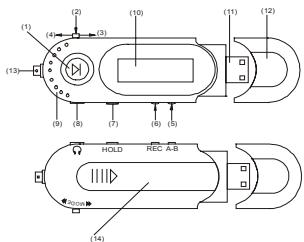
1.1 The player appearance interface
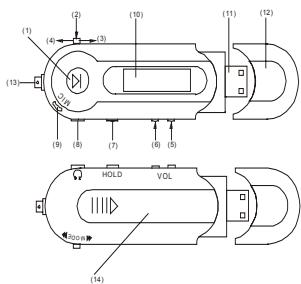
3
1.2 The buttons
(1)“ II” OPEN/PLAY/PAUSE/STOP/POWER OFF
(2) "MODE" Switch modes, menu selection by pressing on button
(3) “ ” NEXT/FWD
(4) “←” ⇒ PREV/REV
(5)“VOL+” Volume increase/fast increase
(6) "VOL-⇒Volume decrease/fast decrease
(7)“HOLD” Keyboard lock switch
(8) “ Q ” Earphone input ja
(9) MIC Built-in microphone
(10) LCD Liquid crystal display
(11) USB interface
(12) USB cover
(13) Ribbon keyhole
(14) Battery door
1.3 Push-button definition
Push-button includes four operation methods as short push, long push, push and hold, single push.
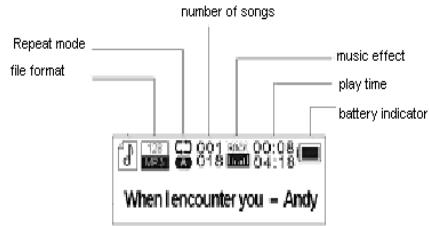
1.4 Display
This player adopts big LCD of 128*32 lattice
2 Operating instruction
2.1 Turning on the MP3 player
Push the "PLAY" button for several seconds. The LCD display will light up.
2.2 Main menu
Press the "MODE" button for several seconds, from any point in the menu, and the player returns automatically back to the main menu.
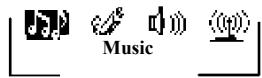
Five options:
1) MUSIC
2) RECORD
3)VOCIE
4)SYSTEM
5) EXIT
| Music | Music |
| Record | Record |
| Voice | Voice |
| System | System |
| Exit | Exit |
You can switch between options by sliding the "MODE" button
right “ ” or left “ ”. Then push shortly on the
"MODE" button to enter the submenu or confirm a function.
2.3 "Music" mode
Select "Music" mode in the main menu.
2.3.1 Stop submenu
Press "Mode" button once to enter the stop menu.
Four options:
Local Folder
Delete file
- Delete all
- Exit
2.3.1.1 Local folder

王藏园
Files can be stored in different folders.
Create new folders in Windows explorer when MP3 is connected.
Open "external drive".
Create new folder
-
Press "Mode" button to open Local folder
-
Move mode button left or right to select the catalog
Press "Mode" button to confirm
2.3.1.2 Delete file
2.3.1.3 Delete all
Deletes all files of the current catalog
2.3.2 Play submenu
During playback, press "MODE" button to enter "Play menu":
Six options:
- Repeat
Equalizer
- Tempo Rate
Replay
Replay times
Replay gap
- Exit
2.3.2.1 Repeat
| Normal | All songs are played once |
| Repeat One | Repeats the current song |
| Folder | Plays all the music of a specific folder |
| Repeat Folder | Repeats the music of a specific folder |
| Repeat All | Repeats all the music. |
| Random | Plays music at random. |
| Intro | First 10 seconds of each song is played. |
2.3.2.2 Equalizer
9
Seven options:
- Natural
- Rock
- Pop
- Classic
- Soft
- Jazz
-DBB
ENGLISH
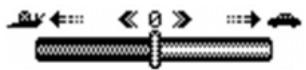
2.3.2.3 Tempo Rate
The music can be played faster or slower (only with MP3 files)
Change the rate by pushing the "Mode" Button left or right.
2.3.2.4 Replay mode
-A-B replay
When replay mode is selected, the A-B icon is visible. Select the start point A (flashing) by sliding "Mode" button right.
Select the end point B(flashing) by sliding "Mode" button right. The A-B section will be repeated continuously Press "Mode" button to return to normal playback
-During replay, the play-rate can be changed with VOL+ or VOL-.
- Adding your voice to the A-B section During playback of the A-B section, slide "Mode" button to the right. The microphone icon appears and your voice is recorded. Slide "Mode" button right again to stop the recording. The A-B section + the voice recording will be repeated
2.3.2.5 Replay times
Here you are able to choose how many times (1-10) the A-B section will be repeated.
2.3.2.6 Replay gap
Choose the time (1-10 sec) between each A-B section.
2.4.3Lyrics
This MP3 player supports **. Irc "Lyric files
Lyrics can be downloaded from the internet.
Make sure that Irc-file has the same name as the corresponding song. For example:If the song name is "Yesterday.mp3", the lyric file should be named "Yesterday.lrc"
MP3 and LRC file must be stored in the same folder!
Attention: A lyric can not be larger then 500 words.
2.4 Record mode
-Select"Recordmode"inthemainmenu.
The unit can store 99 recordings in each folder.
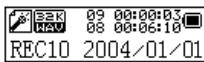
- Press "PLAY" button to start recording.
- Press "PLAY" button again to pause the recording (Time flashes).
- Press "PLAY" again to continue recording
- Press and hold the "PLAY" button to stop recording.
2.4.1 Record submenu
In the Record mode, press mode button once
3 options:
Local folder
REC type
- Exit
2.4.1.1 Local folder
cfr 2.3.1.1
2.4.1.2 REC type
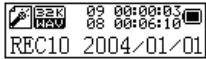
12
Four options:
- "Fine REC": high quality recording, wav format, good quality.
- "Long REC": lower quality recording, act format, uses less space
- "Fine VOR": wav format
- "Long VOR": act format
When using "VOR recording", the player enters into the state of "pause recording" if no sound is detected by the microphone. Recording starts again when sound is detected.
2.5 Voice mode
In this mode you can listen to the recordings created in "Record mode". Select in the main menu "Voice mode".
2.5.1 Voice stop submenu
When playback is stopped, press "Mode" button to enter the Voice submenu.
2.5.1.1 Local folder (Stop submenu)
cfr 2.3.1.1
2.5.1.2 Delete file (Stop submenu)
2.5.1.3 Delete all (Stop submenu)
Deletes all files of the current catalog
2.5.2 Voice play submenu
During playback, press "Mode" button to enter the Voice play menu. 4 options: -Repeat
- Tempo rate
- Replay
-Exit
Those options are similar to the music play submenu
2.6 Systems set up
Select "System" in the main menu
Record Time
Backlight
Language
- Power off
Replay mode
- Contrast
Online Mode
Memory info
- Animation
Firmware version
Firmware upgrade
Exit
2.6.1 Record Time
Enter here the correct date and time.
Press VOL+ button and the year- number will start flashing.
Change the year number by pushing Mode button left or right
Press again VOL+ button and the months will start flashing flashing....
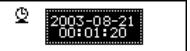
When date and time are correct, press mode button to confirm.
2.6.2 Language
Change the language by moving Mode button left or right.
Press Mode button to confirm.
2.6.3 Power off
-Off time
With this function the device will automatically shut down after a preset
time.(0-60sec), when no button is touched and music is not playing.
If time is set at 0 seconds, the function is cancelled.
- Sleeping mode
With this function the device will always shut down after a preset time (0-120 min).
If time is set at 0, the function is cancelled.
When the device is powered off, sleeping mode is set at 0.
2.6.4 Replay
Manual replay or auto replay
2.6.5 Contrast
Change contrast by moving mode button left or right.
Press Mode button to confirm.
2.6.6 Online mode
- Multi drive
- Normal (1 drive)
- Encrypted drive
2.6.7 Memory info
Givesthe percentage of the used memory compared to the total memory size
2.6.8Animation
Choose between several "start up" animations.
2.6.9 Logo
Choose between different logo's
2.7 Firmware version
Info about software version
2.8 USB disk use
The unit functions as a standard USB disk with most operating systems.
Windows98 (driver needed)
above Windows 2000 ( no need to install driver)
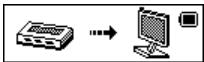
When connected with PC (battery not needed), the device can be in 3 different modes
-waitmode
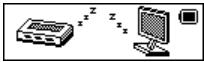
- "download data" mode
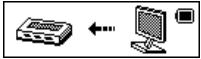
- "send data" mode
Attention: Removing the device from the PC during data transfer can cause severe damage to the device!
2.9 upgrade
New upgrades are (will be) available on WWW.MPMANEUROPE.COM.

2.10 Hold switch
When "HOLD" switch is moved left, the other buttons are inactive and "Hold icon" will light up.
2.11 Specification
(1) FLASH Memory
(2) Music format
(3) Liquid crystal display monitor
(4) Languages
(5) Power supply
(6) USB2.0
(7) Recording
(8) Frequency response
(9) Distortion
(10) Baud rate
(11) Weight
(12) Size
256MB
MP3.WMA
128 × 32 lattices
English, French, Italian,
German, Spanish, Swedish
Portuguese, Denmark, Dutch.
1.5V/AAA
Read 1033K Byte/S
Write 955K Byte/S
WAV (32K bps), ACT (8K bps)
20Hz~20KHz
< 0.1%
4Mbps
30g (Without battery)
96mm x 30mm x 21mm (L x W x D)
RESET FUNCTION
IF FOR ANY REASON YOUR PLAYER IS BLOCKED YOU CAN RESET IT BY TAKING OUT AND THEN IN THE BATTERY
FOR MORE INFORMATION PLEASE VISIT OUR WEBSITE www.mpmaneurope.com