
ESAM 4500 220V - Machine à café automatique DELONGHI - Notice d'utilisation et mode d'emploi gratuit
Retrouvez gratuitement la notice de l'appareil ESAM 4500 220V DELONGHI au format PDF.


| Marque | De'Longhi |
| Modèle | ESAM 4500 220V |
| Type de produit | Machine à café automatique (expresso broyeur) |
| Alimentation | 220-240 V, 50/60 Hz |
| Capacité du réservoir d'eau | 1,8 L (estimation) |
| Capacité du réservoir à grains | 250 g (estimation) |
| Pression | 15 bars (typique) |
| Fonctions principales | Préparation de café avec grains ou café moulu ; eau chaude ; cappuccino ; lait chaud/froid ; mouture réglable ; hauteur des becs ajustable ; programmation des quantités ; arrêt automatique |
| Réglages | Dureté de l'eau, température du café, quantité café/lait, minuterie de mise en marche, horloge |
| Système de mousse de lait | Intégré avec réservoir à lait et régulateur de mousse |
| Entretien | Nettoyage régulier du groupe d'infusion, du réservoir d'eau, du bac d'égouttage et du conteneur à marc ; détartrage périodique |
| Nettoyage du groupe d'infusion | Retirer et laver à l'eau courante sans détergent (ne pas laver au lave-vaisselle) |
| Détartrage | Utiliser le produit DURGOL recommandé ; procédure automatique via le menu |
| Sécurité | Arrêt automatique après 1 heure (réglable jusqu'à 3 heures) ; protection contre les surchauffes |
| Pièces détachées | Disponibles auprès des centres de service agréés |
| Dimensions (L x H x P) | Environ 280 x 340 x 430 mm (estimation) |
| Poids | Environ 10 kg (estimation) |
| Couleur | Noir et argent (typique) |
| Accessoires inclus | Doseur, brosse de nettoyage, test de dureté, câble d'alimentation |
FOIRE AUX QUESTIONS - ESAM 4500 220V DELONGHI
Questions des utilisateurs sur ESAM 4500 220V DELONGHI
0 question sur cet appareil. Repondez a celles que vous connaissez ou posez la votre.
Poser une nouvelle question sur cet appareil
Téléchargez la notice de votre Machine à café automatique au format PDF gratuitement ! Retrouvez votre notice ESAM 4500 220V - DELONGHI et reprennez votre appareil électronique en main. Sur cette page sont publiés tous les documents nécessaires à l'utilisation de votre appareil ESAM 4500 220V de la marque DELONGHI.
MODE D'EMPLOI ESAM 4500 220V DELONGHI
INDEX
1 DESCRIPTION DE L'APPAREIL (voir page 3) 2 AVERTISSEMENTS DE SÉCURITÉ 3 INSTALLATION 4 PREMIÈRE UTILISATION 5 ALLUMAGE ET PRÉCHAUFFAGE 6 PRÉPARATION DU CAFÉ (AVEC DES GRAINS DE CAFÉ) 7 MODIFICATION DE LA QUANTITÉ DE CAFÉ DANS LA TASSE 8 RÉGLAGE DU MOULIN À CAFÉ 9 PRÉPARATION D'UN CAFÉ ESPRESSO AVEC DU CAFÉ MOULU (AU LIEU DE GRAINS) 10 ÉCOULEMENT D'EAU CHAUDE 11 MODIFICATION DE LA QUANTITÉ D'EAU CHAUDE 12 PRÉPARATION DE CAPPUCCINOS (LAIT MOUSSÉ ET CAFÉ) 13 PRÉPARATION DE LAIT MOUSSÉ (SANS CAFÉ) 14 MODIFICATION DE LA QUANTITÉ DE CAFÉ ET DE LAIT POUR LES CAPPUCCINOS 15 NETTOYAGE ET ENTRETIEN 15.1 NETTOYAGE DE LA MACHINE À CAFÉ 15.2 NETTOYAGE DE L'INFUSEUR 15.3 NETTOYAGE DU RÉCIPIENT À LAIT 16 MODIFICATION ET RÉGLAGE DES PARAMÈTRES DU MENU 16.1 RÉGLAGE DE L'HORLOGE 16.2 RÉGLAGE DE L'HEURE DE DÉMARRAGE AUTOMATIQUE 16.3 DÉTARTRAGE 16.4 MODIFICATION DE LA TEMPÉRATURE DU CAFÉ 16.5 MODIFICATION DE LA DURÉE DE FONCTIONNEMENT DE L'APPAREIL 16.6 RÉGLAGE DE LA DURETÉ DE L'EAU 16.7 RÉINITIALISATION DES PARAMÈTRES D'USINE 16.8 PROCESSUS DE LAVAGE 17 CHANGEMENT DE LANGUE 18 SIGNIFICATION DES MESSAGES ET CONDUITE À TENIR 19 PROBLÈMES POUVANT ÊTRE RÉSOLUS AVANT DE CONTACTER LE SERVICE APRÈS-VENTE
INFORMATIONS IMPORTANTES POUR L'ÉLIMINATION CORRECTE DU PRODUIT CONFORMÉMENT À LA DIRECTIVE CE 2002/96/CE.
À la fin de sa durée de vie, le produit ne doit pas être éliminé avec les déchets urbains.
Il doit être déposé dans un centre de collecte sélective des déchets géré par les autorités locales ou chez un revendeur offrant ce service.
L'élimination séparée d'un appareil électroménager évite les conséquences négatives possibles pour l'environnement et la santé dues à une élimination inappropriée et permet de récupérer les matériaux constitutifs pour réaliser des économies significatives d'énergie et de ressources. Pour rappeler la nécessité d'éliminer séparément les appareils électroménagers, le produit est marqué d'une poubelle à roues barrée.

1 DESCRIPTION DE L'APPAREIL (VOIR PAGE 3)
A. Régulateur de mouture B. Réservoir de grains de café C. Couvercle du réservoir de grains D. Couvercle central pour café moulu E. Compartiment pour mesure F. Plateau chauffe-tasses G. Entonnoir pour café moulu H. Couvercle du récipient à lait avec régulateur de mousse I. Bec verseur de lait moussé J. Tube d'aspiration du lait K. Buse L. Réservoir d'eau (amovible) M. Récipient à lait N. Câble d'alimentation O. Plateau à tasses P. Mesure pour café moulu Q. Bac d'égouttage (amovible) R. Bec d'eau chaude S. Porte de service T. Conteneur à marc de café (amovible) U. Bec verseur de café (réglable en hauteur) V. Tiroir mobile X. Infuseur Z. Panneau de commande Z1. Accessoire Caffelatte
Panneau de commande
- Afficheur
- Voyant MENU
- Bouton pour activer ou désactiver le mode de réglage des paramètres du menu
- Bouton pour sélectionner le café moulu ou, si le voyant MENU est allumé, pour afficher le paramètre suivant du menu
- Bouton pour rincer l'appareil ou, si le voyant MENU est allumé, pour confirmer les paramètres du menu
- Bouton pour sélectionner l'eau chaude ou, si le voyant MENU est allumé, pour confirmer les paramètres du menu
- Bouton marche/arrêt de l'appareil
- Bouton de sélection du goût du café
- Bouton café court une ou deux tasses
- Bouton café normal une ou deux tasses
- Bouton café long une ou deux tasses
- Bouton cappuccino ou lait moussé
2 CONSIGNES DE SÉCURITÉ
LISEZ ATTENTIVEMENT CES INSTRUCTIONS ET CONSERVEZ-LES POUR CONSULTATION FUTURE !
- Cet appareil est conçu pour « faire du café expresso » et « chauffer des boissons ». Utilisez-le avec précaution pour éviter les brûlures causées par les jets d'eau et de vapeur ou par une utilisation incorrecte.
- Cet appareil est destiné à un usage domestique uniquement. Toute autre utilisation est considérée comme inappropriée et donc dangereuse.
- Le fabricant ne peut être tenu responsable des dommages causés par une utilisation incorrecte, erronée ou déraisonnable.
- Lors de l'utilisation de l'appareil, ne touchez pas les surfaces chaudes. Utilisez les boutons ou les poignées.
- Ne touchez jamais l'appareil avec les mains ou les pieds mouillés ou humides.
- Cet appareil n'est pas destiné à être utilisé par des personnes (y compris les enfants) dont les capacités physiques, sensorielles ou mentales sont réduites, ou qui manquent d'expérience et de connaissances, à moins qu'elles ne soient supervisées ou instruites sur l'utilisation de l'appareil par une personne responsable de leur sécurité. Les enfants doivent être surveillés pour s'assurer qu'ils ne jouent pas avec l'appareil.
- En cas de panne ou de dysfonctionnement, débranchez l'appareil de la prise secteur et ne le manipulez en aucune façon. S'il nécessite une réparation, contactez uniquement un centre de service agréé et demandez que des pièces de rechange d'origine soient utilisées. Le non-respect de ce qui précède pourrait réduire la sécurité de l'appareil.
- Les matériaux et accessoires entrant en contact avec les aliments sont conformes au règlement CE 1935/2004.
3 INSTALLATION
- Après le déballage, assurez-vous que l'appareil est complet et non endommagé. En cas de doute, ne l'utilisez pas. Contactez un personnel qualifié.
- Les éléments d'emballage (sacs en plastique, polystyrène, etc.) doivent être tenus hors de portée des enfants car ils présentent un danger.
- Placez l'appareil sur un plan de travail loin des robinets, des éviers et des sources de chaleur.
- Après avoir positionné l'appareil sur le plan de travail, laissez un espace d'au moins 5 cm entre les surfaces de l'appareil et les parois latérales et arrière, et d'au moins 20 cm au-dessus de la machine à café.
- N'installez jamais l'appareil dans des environnements où la température peut atteindre 0 °C ou moins (l'appareil peut être endommagé si l'eau gèle).
- Assurez-vous que la tension du secteur correspond à celle indiquée sur la plaque signalétique de l'appareil. Connectez l'appareil à une prise efficacement mise à la terre avec un courant nominal minimum de 10 A uniquement. Le fabricant ne peut être tenu responsable d'incidents éventuels causés par une mise à la terre inadéquate du secteur.
- Si la prise de courant ne correspond pas à la fiche de l'appareil, faites remplacer la prise par un type approprié par un professionnel qualifié.
- Le câble d'alimentation de cet appareil ne doit pas être remplacé par l'utilisateur car cette opération nécessite l'utilisation d'outils spéciaux. Si le câble est endommagé ou doit être remplacé, contactez uniquement un centre de service agréé pour éviter tout risque.
- Vous devez personnaliser la dureté de l'eau dès que possible en suivant les instructions de la section 16.6.
Pour apprendre correctement à utiliser l'appareil, lors de la première mise en service, suivez attentivement les instructions étape par étape décrites dans les paragraphes suivants.
4 PREMIÈRE UTILISATION
- La première fois que vous utilisez l'appareil, sélectionnez la langue.
Pour régler le français, branchez l'appareil sur la prise secteur et attendez que le message suivant s'affiche :
APPUYEZ SUR OK POUR INSTALLER LE FRANÇAIS
Pendant que le message est affiché, appuyez sur le bouton OK (fig. 1) pendant au moins trois secondes jusqu'à ce que l'écran affiche :
FRANÇAIS INSTALLÉ
L'appareil affiche alors le message de réglage en français. Si vous sélectionnez la mauvaise langue par erreur, suivez les instructions de la section 17 pour choisir la bonne.
- Après 5 secondes, l'appareil affiche :
REMPLIR LE RÉSERVOIR
Pour remplir le réservoir, retirez-le (fig. 2), rincez-le et remplissez-le d'eau fraîche. Ne dépassez jamais la ligne MAX.
Remettez le réservoir en place et poussez-le jusqu'au bout.
- Placez une tasse sous le bec verseur d'eau chaude (fig. 3). (Si le bec verseur n'est pas en place, le message INSÉRER LE BEC VERSEUR s'affiche. Fixez-le comme indiqué sur la figure 4, en veillant à ce que la flèche sur le bec soit alignée avec la flèche sur le panneau de commande de l'appareil, fig. 4). L'appareil affiche maintenant :
APPUYEZ SUR OK
- Appuyez sur le bouton OK (fig. 1) et après quelques secondes, un peu d'eau s'écoule du bec. (L'écoulement s'arrête automatiquement).
- L'appareil affiche :
EXTINCTION EN COURS, VEUILLEZ PATIENTER
et il s'éteint.
- Remplissez le réservoir avec des grains de café (fig. 5).
IMPORTANT : pour éviter tout dysfonctionnement, ne remplissez jamais avec du café moulu, du café lyophilisé, des grains caramélisés ou tout autre produit susceptible d'endommager l'appareil.
5 MISE EN MARCHE ET PRÉCHAUFFAGE
- Appuyez sur le bouton ① (fig. 6). L'appareil affiche :
CHAUFFAGE EN COURS, VEUILLEZ PATIENTER...
pour indiquer que le préchauffage est en cours.
- Une fois le préchauffage terminé, l'appareil affiche
RINÇAGE EN COURS, VEUILLEZ PATIENTER...
et effectue un cycle de rinçage automatique (un peu d'eau chaude s'écoule des buses et est recueillie dans le bac d'égouttage situé en dessous).
Astuce : si vous souhaitez un café court (moins de 60 cc), pour le rendre plus chaud, remplissez d'abord la tasse avec cette eau chaude de rinçage. Laissez agir quelques secondes, puis videz-la pour préchauffer la tasse.
- L'appareil affiche alors le message de prêt :
PRÊT GOÛT STANDARD
6 PRÉPARATION DU CAFÉ (AVEC DES GRAINS DE CAFÉ)
- L'appareil est préréglé pour préparer un café au goût normal. Vous pouvez également choisir un café au goût extra-léger, léger, fort ou extra-fort. Pour choisir le goût souhaité, appuyez sur le bouton 📋 (fig. 7). Le goût de café sélectionné s'affichera.
- Placez une tasse sous les becs pour faire 1 café (fig. 8) ou 2 tasses pour 2 cafés (fig. 9). Pour un café plus crémeux, abaissez les becs afin de les rapprocher le plus possible des tasses (fig. 10).
- Appuyez sur la touche 📋 pour faire un café court (fig. 11), sur la touche 📋 pour un café normal ou sur la touche 📋 pour un café long.
Pour faire 2 cafés, appuyez deux fois sur la touche (dans un délai de 2 secondes).
Pour modifier la quantité de café distribuée automatiquement dans la tasse, suivez les instructions de la section 7. (L'appareil broie alors les grains et commence à verser le café dans la tasse.
Une fois la quantité souhaitée atteinte, l'appareil arrête automatiquement de distribuer le café et éjecte le marc dans le conteneur prévu à cet effet).
- Après quelques secondes, le message de prêt s'affiche à nouveau et vous pouvez préparer un autre café.
- Pour éteindre l'appareil, appuyez sur la touche ①.
Avant de s'éteindre, l'appareil effectue un cycle de rinçage automatique (un peu d'eau chaude s'écoule des becs et est recueillie dans le bac d'égouttage situé en dessous. Veillez à éviter les brûlures).
REMARQUE 1 : Si le café s'écoule goutte à goutte ou pas du tout, tournez le régulateur de mouture (fig. 12) d'un cran dans le sens des aiguilles d'une montre (voir section 8).
Tournez d'un cran à la fois jusqu'à ce que le café s'écoule de manière satisfaisante.
REMARQUE 2 : Si le café s'écoule trop vite et n'est pas assez crémeux, tournez le régulateur de mouture (fig. 12) d'un cran dans le sens inverse des aiguilles d'une montre (voir section 8).
Évitez de tourner excessivement le régulateur de mouture, sinon lorsque vous sélectionnez 2 tasses, le café pourrait s'écouler goutte à goutte.
REMARQUE 3 : Conseils pour obtenir un café plus chaud :
- Lorsque vous allumez l'appareil, si vous souhaitez préparer un café court (moins de 60 cl), utilisez l'eau chaude de rinçage pour préchauffer les tasses. Si 2 à 3 minutes se sont écoulées depuis votre dernier café, avant de refaire un café, vous devez préchauffer l'infuseur en appuyant sur le bouton 📄 (fig. 13). Évacuez l'eau dans le bac d'égouttage ou utilisez-la pour remplir (puis vider) la tasse qui servira au café, afin de la préchauffer.
- Sauf s'ils sont préchauffés, n'utilisez pas de tasses trop épaisses, car elles absorberaient trop de chaleur.
- Utilisez des tasses préchauffées en les rinçant à l'eau chaude ou en les laissant au moins 20 minutes sur le plateau chauffe-tasses situé sur le dessus de l'appareil, lorsque celui-ci est allumé.
REMARQUE 4 : pendant que l'appareil prépare le café, l'écoulement peut être interrompu à tout moment en appuyant sur le bouton 📋 ou 🏱 précédemment sélectionné.
REMARQUE 5 : dès que l'écoulement est terminé, pour augmenter la quantité de café, il suffit d'appuyer de manière prolongée sur le bouton 📋 ou 🌐 précédemment sélectionné, jusqu'à obtenir la quantité souhaitée (cette opération doit être effectuée dans les 3 secondes suivant l'arrêt de l'écoulement du café par les buses).
REMARQUE 6 : lorsque l'appareil affiche :
RÉSERVOIR PLEIN
le réservoir d'eau doit être rempli, sinon l'appareil ne fera pas de café. (Il est normal qu'il reste un peu d'eau dans le réservoir lorsque le message s'affiche).
REMARQUE 7 : toutes les 14 cafés simples (ou 7 doubles), l'appareil affiche :
VIDER LE RÉCIPIENT À MARC
indiquant que le récipient à marc est plein et doit être vidé et nettoyé.
Tant que le récipient à marc n'a pas été nettoyé, l'appareil continue d'afficher le message et ne peut pas faire de café.
Pour nettoyer, ouvrez la porte de service à l'avant en tirant sur la buse (fig. 14), retirez le bac d'égouttage (fig. 15), videz-le et nettoyez-le.
Videz le récipient à marc et nettoyez-le soigneusement, en veillant à éliminer tous les résidus déposés au fond.
IMPORTANT : lors du retrait du bac d'égouttage, le récipient à marc DOIT être vidé, même s'il n'est pas complètement plein. Sinon, lors de la prochaine préparation de café, le marc pourrait dépasser le niveau maximal et bloquer l'appareil.
NOTE 8 : lorsque l'appareil fonctionne avec du café, ne retirez jamais le réservoir d'eau. S'il est retiré, il ne sera pas possible de faire le café et l'appareil affichera :
CAFÉ TROP FIN, RÉGLEZ LE MOULU ET
INSÉREZ LE BEC VAPEUR ET APPUYEZ SUR OK
Pour rallumer l'appareil, vous devez insérer le bec vapeur (fig. 4), appuyer sur le bouton OK et faire couler de l'eau par le bec pendant quelques secondes.
Lors de la première utilisation, il faut préparer 4 à 5 tasses de café et un cappuccino avant que l'appareil ne donne des résultats satisfaisants.
Si l'appareil ne fonctionne pas correctement, ne contactez pas immédiatement le service après-vente.
Le problème peut presque toujours être résolu en suivant les instructions des paragraphes 18 et 19.
Si ce n'est pas le cas, ou pour plus d'explications, contactez le service clientèle en appelant le numéro indiqué sur la feuille jointe à la page 2.
Si votre pays ne figure pas sur la feuille, appelez le numéro indiqué sur la garantie.
7 MODIFICATION DE LA QUANTITÉ DE CAFÉ DANS LA TASSE
L'appareil est réglé en usine pour distribuer automatiquement les quantités de café suivantes :
- café court (40 ml) (lorsque le bouton 📄 est enfoncé) ;
- café normal (80 ml) (lorsque le bouton 📄 est enfoncé) ;
- café long (120 ml) (lorsque le bouton 📌 est enfoncé) ;
Pour modifier ces quantités, procédez comme suit :
- Appuyez sur le bouton correspondant à la quantité que vous souhaitez modifier ( , ou ) pendant au moins 8 secondes, puis relâchez jusqu'à ce que le message "PROGRAM QUANTITY" s'affiche et que le café soit distribué ;
- Lorsque le café dans la tasse atteint le niveau requis, appuyez à nouveau sur le même bouton pour mémoriser la nouvelle quantité.
L'appareil est maintenant reprogrammé avec les nouveaux réglages et affiche : READY.
8 RÉGLAGE DU MOULIN À CAFÉ
Le moulin à café est préréglé en usine pour préparer le café correctement et ne devrait pas nécessiter de réglage au départ.
Cependant, après avoir préparé les premiers cafés, si vous constatez que la distribution du café est trop rapide ou trop lente (goutte à goutte), le régulateur de mouture peut être ajusté (fig. 12).
Le tourner d'un clic (1 chiffre) dans le sens horaire accélère la distribution du café (sans goutte à goutte).
Le tourner d'un clic dans le sens antihoraire ralentit la distribution, donnant un aspect plus crémeux au café.
Ces ajustements ne seront visibles qu'après avoir préparé au moins 2 tasses de café.
Le régulateur de mouture ne doit être tourné que lorsque le moulin à café est en marche.
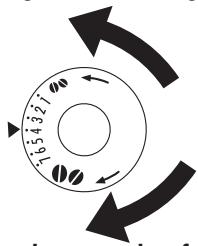
Tournez d'un clic dans le sens antihoraire pour obtenir une distribution plus lente et un aspect plus crémeux (café moulu plus fin).
Tournez d'un clic dans le sens horaire pour une distribution plus rapide (pas goutte à goutte) (café moulu plus grossier).
(Du café a été utilisé pour tester l'appareil en usine, il est donc tout à fait normal qu'il y ait des traces de café dans le moulin. Cet appareil est cependant garanti neuf).
9 PRÉPARATION D'UN CAFÉ ESPRESSO AVEC DU CAFÉ MOULU (AU LIEU DE GRAINS)
- Appuyez sur le bouton 🔊 (fig. 16) pour sélectionner la fonction café moulu. Cela désactive la fonction moulin à café. L'appareil affiche :
PRÊT MOULU
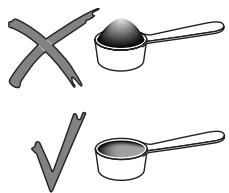
- Soulevez le couvercle au centre, placez une mesure de café moulu dans l'entonnoir (voir fig. 17) et procédez comme décrit à la section 6. Vous pouvez préparer une seule tasse de café à la fois en appuyant une seule fois sur le bouton 📋, 📋 ou 📋.
- Après avoir utilisé l'appareil avec du café moulu, pour revenir à la préparation de café avec des grains, désactivez la fonction café moulu en appuyant à nouveau sur le bouton 🔒 pour préparer le broyeur à fonctionner à nouveau.
REMARQUE 1 : N'ajoutez jamais le café moulu lorsque l'appareil est éteint pour éviter qu'il ne se disperse à l'intérieur de l'appareil.
REMARQUE 2 : N'ajoutez jamais plus d'une mesure rase, sinon l'appareil ne fera pas le café, le café moulu se perdra à l'intérieur de l'appareil, le salissant, le café s'écoulera goutte à goutte et le message "MOULU TROP FIN RÉGLER LE BROYEUR ET TOURNER LE BOUTON VAPEUR" s'affichera.

REMARQUE 3 : Lors du dosage de la quantité de café à ajouter, utilisez uniquement la mesure fournie.
REMARQUE 4 : Utilisez uniquement du café moulu pour machines à espresso. N'utilisez pas de grains de café, de café lyophilisé ou d'autres matériaux qui pourraient endommager l'appareil.
REMARQUE 5 : Si l'entonnoir se bouche en raison de l'humidité à l'intérieur de l'appareil ou d'une quantité excessive de café moulu, utilisez un couteau pour pousser le café vers le bas (Fig. 18), puis retirez et nettoyez l'infuseur et l'appareil comme décrit au paragraphe 15.2 "Nettoyage de l'infuseur".
10 PRODUCTION D'EAU CHAUDE
• Assurez-vous toujours que l'appareil est prêt. • Assurez-vous que le bec verseur d'eau est fixé à la buse (fig. 4) ; • Placez un récipient sous le bec (fig. 3). - Appuyez sur le bouton 🔊 (fig. 1).
L'appareil affiche :
EAU CHAUDE
et de l'eau chaude s'écoule du bec verseur dans le récipient en dessous (vous ne devez pas faire couler de l'eau chaude pendant plus de deux minutes à la fois). Pour arrêter le flux, appuyez sur le bouton 🔊. Une fois la quantité d'eau chaude définie atteinte, l'écoulement s'arrête automatiquement.
11 CHANGEMENT DE LA QUANTITÉ D'EAU CHAUDE
L'appareil est préréglé en usine pour fournir automatiquement 250 ml d'eau chaude. Pour modifier ces quantités, procédez comme suit :
- Fixez le bec verseur d'eau (fig. 4). • Placez un récipient sous le bec (fig. 3).
- Appuyez sur le bouton 📋 pendant au moins 8 secondes puis relâchez. L'appareil affiche :
PROGRAMME EAU CHAUDE QUANTITÉ
et de l'eau chaude s'écoule du bec verseur.
- Lorsque l'eau chaude dans la tasse atteint le niveau souhaité, appuyez sur le bouton ☐ pour mémoriser la nouvelle quantité. (Ne faites pas couler d'eau chaude pendant plus de deux minutes à la fois).
12 PRÉPARATION DES CAPPUCCINOS OU CAFFELATTE
- Sélectionnez le goût du café que vous souhaitez utiliser pour préparer le cappuccino en appuyant sur le bouton 📋
- Retirez le couvercle du réservoir à lait.
- Remplissez le réservoir avec environ 100 grammes de lait pour chaque cappuccino à préparer (fig. 19). Ne dépassez jamais le niveau MAX (correspondant à environ 900 ml) indiqué sur le réservoir. Il est recommandé d'utiliser du lait écrémé ou demi-écrémé à température de réfrigérateur (environ 5°C/41°F).
- Assurez-vous que le tube d'aspiration est bien inséré dans la rondelle en caoutchouc (fig. 20), puis remettez le couvercle du réservoir à lait.
- Retirez le bec verseur d'eau chaude (fig. 21) et fixez le réservoir à lait sur la buse, en veillant à ce que la flèche sur le couvercle du réservoir soit alignée avec la flèche sur le panneau de commande de l'appareil (fig. 22).
- Positionnez le tube à lait comme indiqué sur la fig. 23, puis placez une tasse suffisamment grande sous les becs à café et à lait (fig. 23).
- Si vous souhaitez préparer un cappuccino (lait moussé + café), placez le régulateur de mousse sur le mot "CAPPUCCINO" entre les symboles "-" et "+" marqués sur le couvercle du réservoir à lait (fig. 25). Pour obtenir un cappuccino avec peu de mousse, positionnez le régulateur de mousse près du symbole "-". Pour obtenir un cappuccino avec beaucoup de mousse, positionnez le régulateur de mousse près du symbole "+".
- Si vous souhaitez préparer un caffelatte (lait chaud + café), positionnez le régulateur de mousse sur CAFFELATTE (fig. 25).
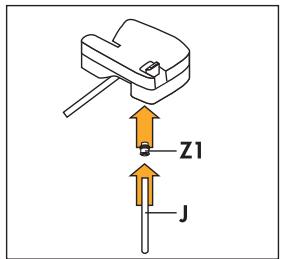
REMARQUE : Si vous souhaitez un caffelatte plus chaud, insérez l'accessoire caffelatte dans le tube d'aspiration du lait (J) comme indiqué sur la figure ci-contre.
Insérez ensuite l'extrémité du tube dans la rondelle en caoutchouc du couvercle du réservoir à lait. N'utilisez pas la buse caffelatte lorsque le régulateur de mousse de lait n'est PAS en position CAFFELATTE.
REMARQUE : Vous pouvez ajuster la quantité de mousse de lait en plaçant le régulateur sur une position intermédiaire.
- Appuyez sur la touche 🎨 (fig. 24). L'appareil affiche :
CAPPUCCINO OU LATTE
et après quelques secondes, le lait moussé s'écoule de la buse à lait dans la tasse placée en dessous. (L'écoulement s'arrête automatiquement).
- L'appareil broie ensuite les grains, distribue le café et affiche à nouveau le message "prêt".
- Le cappuccino est prêt. Sucrez à votre goût et, si vous le souhaitez, saupoudrez la mousse d'un peu de cacao en poudre.
REMARQUE 1 : Pendant la préparation du cappuccino, l'écoulement du lait ou du café peut être interrompu en appuyant sur la touche 🎨.
REMARQUE 2 : Pour modifier la quantité de café ou de lait moussé distribuée automatiquement dans la tasse, suivez les instructions de la section 14.
REMARQUE 3 : Pour des raisons d'hygiène, ne laissez jamais le réservoir à lait attaché à la machine à café plus de quelques minutes (placez-le au réfrigérateur après 15 minutes maximum). Si le réservoir se vide complètement pendant la distribution du lait, retirez-le et ajoutez du lait. Replacez-le puis appuyez sur la touche 🎨 pour demander à nouveau un cappuccino.
REMARQUE 4 : Après avoir préparé les cappuccinos et avant de retirer le réservoir à lait, vous devez nettoyer les circuits internes du réservoir et du couvercle en maintenant enfoncée la touche CLEAN du couvercle du réservoir à lait pendant au moins 8 secondes (fig. 25). L'appareil affiche :
NETTOYAGE
13 PRÉPARATION DU LAIT MOUSSÉ (SANS CAFÉ)
- Retirez le couvercle du réservoir à lait.
- Remplissez le réservoir avec la quantité de lait que vous souhaitez préparer (fig. 19).
- Replace the lid on the milk container.
- Attach the milk container to the appliance (fig. 22).
- Place a sufficiently large cup under the coffee spout (fig. 23).
- If you want to make frothed milk, place the froth regulator on the word "CAPPUCCINO" marked on the milk container lid (fig. 25). If on the other hand you want to prepare hot milk without froth, position the froth regulator to CAFFELATTE (fig. 25).
- Press the 📋 button twice (within 2 seconds). The appliance displays:
HOT OR FROTHED MILK
and after a few seconds, the frothed milk is run off from the milk spout into the cup below.
- After run off, clean the channels inside the milk container by pressing the CLEAN button as described in the previous section (note 4).
14 CHANGING THE QUANTITY OF COFFEE AND MILK FOR CAPPUCCINOS
The appliance is factory preset to automatically deliver a standard cappuccino. To change these quantities, proceed as follows:
- Fill the container with milk up to the maximum level indicated on the container.
- Press the 📋 button for at least 8 seconds then release. • The appliance displays:
MILK FOR CAPPUCCINO PROGRAM QUANTITY
and starts to run off milk.
- Once the required quantity of milk has been run off, press the 🎨 button again. Milk delivery stops and the quantity is memorised. You should not run off frothed milk for more than 3 minutes at a time. • After a few seconds, the appliance runs off coffee into the cup and displays:
PROGRAMME QUANTITÉ CAFÉ POUR CAPPUCCINO
- Une fois la quantité de café souhaitée écoulée, appuyez à nouveau sur le bouton 🎨. L'écoulement du café s'arrête et la quantité est mémorisée.
L'appareil est maintenant reprogrammé avec les nouveaux réglages et affiche : PRÊT.
15 NETTOYAGE ET ENTRETIEN
Avant toute opération de nettoyage, l'appareil doit avoir refroidi et être débranché de l'alimentation électrique.
Ne jamais immerger l'appareil dans l'eau : c'est un appareil électrique.
Ne pas utiliser de solvants ni de produits de nettoyage abrasifs pour nettoyer l'appareil. Un chiffon doux et humide suffit.
L'infuseur, le bac à marc, le réservoir d'eau et le bac d'égouttage ne doivent JAMAIS être lavés au lave-vaisselle.
15.1 Nettoyage de la machine à café
Nettoyez le bac à marc (comme décrit dans la section 6, note 7) chaque fois qu'il doit être vidé.
Le réservoir d'eau doit également être nettoyé régulièrement.
Le bac d'égouttage est équipé d'un indicateur de niveau (rouge) indiquant le niveau d'eau qu'il contient.
Lorsque l'indicateur commence à devenir visible (quelques millimètres sous le bac d'égouttage), le bac doit être vidé et nettoyé.
Vérifiez que les trous de la buse à café ne sont pas obstrués.
Pour les déboucher, grattez les résidus de café secs avec une aiguille (fig. 27).
Nettoyez régulièrement la buse avec une éponge comme indiqué sur la fig. 26.
15.2 Nettoyage de l'infuseur
L'infuseur doit être nettoyé régulièrement pour éviter l'accumulation de dépôts de café qui pourraient provoquer un dysfonctionnement. Procédez comme suit :
- éteignez l'appareil en appuyant sur le bouton ① (fig. 6) (ne débranchez pas) et attendez que l'écran s'éteigne ; • ouvrez la porte de service (Fig. 14) ;
- retirez le bac d'égouttage et le conteneur à marc (Fig. 15) et nettoyez-les ;
- appuyez sur les deux boutons rouges de déverrouillage de l'infuseur latéralement et vers le centre (Fig. 28) et tirez-le vers l'extérieur ;
- IMPORTANT : L'INFUSEUR NE PEUT ÊTRE RETIRÉ QUE SI L'APPAREIL EST ÉTEINT. TENTER DE RETIRER L'INFUSEUR LORSQUE L'APPAREIL EST ALLUMÉ PEUT CAUSER DES DOMMAGES GRAVES.
- lavez l'infuseur à l'eau courante, sans utiliser de détergents. Ne lavez jamais l'infuseur au lave-vaisselle ;
- nettoyez soigneusement l'intérieur de l'appareil. Pour éliminer le café collé aux pièces internes, grattez-le avec une fourchette en plastique ou en bois (Fig. 29), puis ramassez tous les résidus à l'aide d'un aspirateur (Fig. 30) ;
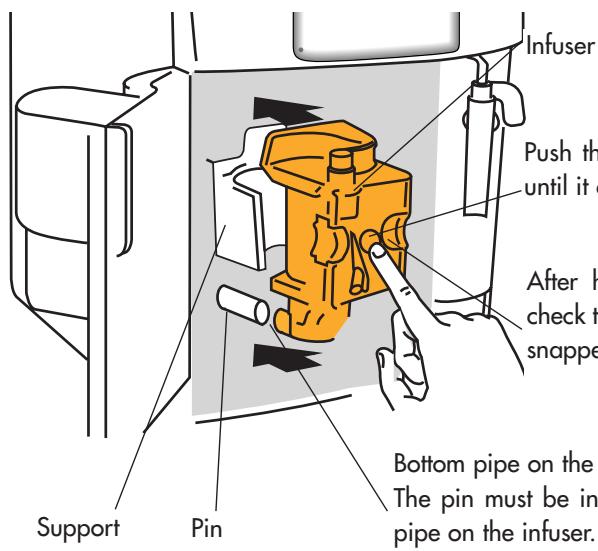
Poussez le symbole PUSH complètement jusqu'à ce qu'il s'enclenche.
Après avoir entendu le clic, vérifiez que les boutons rouges se sont bien dégagés.
Tube inférieur de l'infuseur.
La broche doit être insérée dans le tube inférieur de l'infuseur.
Remplacez l'infuseur en le faisant glisser sur les supports et la goupille en bas, puis poussez le symbole POUSSER à fond jusqu'à ce qu'il s'enclenche.
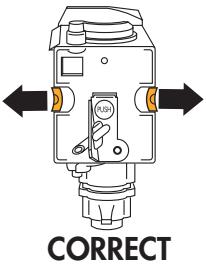
Vérifiez que les deux boutons rouges se sont bien déclenchés, sinon la porte ne peut pas être fermée.
Les deux boutons rouges se sont bien déclenchés
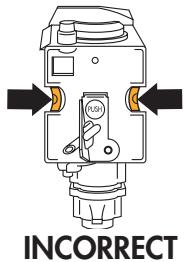
Les deux boutons rouges ne se sont pas déclenchés
- Replacez le bac d'égouttage, avec le récipient à marc ;
- Fermez la porte de service.
REMARQUE 1 : Si l'infuseur n'est pas inséré correctement jusqu'à ce qu'il s'enclenche et que les deux boutons rouges ne se sont pas déclenchés, la porte de service ne peut pas être fermée.
REMARQUE 2 : s'il est difficile d'insérer l'infuseur, avant de l'insérer, comprimez-le en appuyant vigoureusement dessus par le haut et par le bas en même temps, comme illustré à la figure 31.
REMARQUE 3 : S'il est toujours difficile d'insérer l'infuseur, laissez-le hors de l'appareil, fermez la porte de service, débranchez la prise, puis rebranchez-la. Attendez que tous les voyants s'éteignent après l'autodiagnostic, puis ouvrez la porte et remettez l'infuseur en place.
15.3 Nettoyage du réservoir à lait
Procédez comme suit :
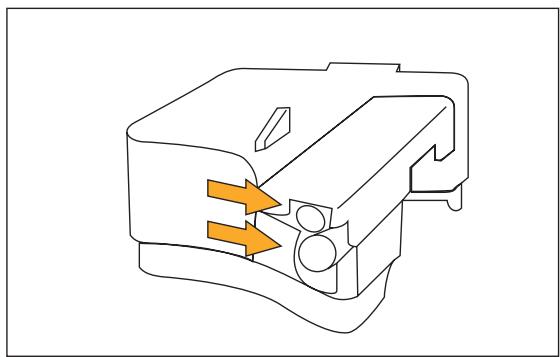
- Retirez le bec à lait (fig. 32) et le tube d'aspiration.
- Retirez le régulateur de mousse en le tirant vers l'extérieur.
- Lavez le réservoir et le couvercle au lave-vaisselle ou dans de l'eau chaude savonneuse. Assurez-vous qu'il ne reste pas de résidus de lait à l'intérieur des deux trous du couvercle du réservoir à lait indiqués par les flèches sur la figure.
- Remettez le régulateur de mousse, le tube d'aspiration et le bec à lait dans le couvercle du réservoir à lait.
16 MODIFICATION ET RÉGLAGE DES PARAMÈTRES DU MENU
Après avoir appuyé sur le bouton ⏻, lorsque l'appareil est prêt, vous pouvez utiliser le menu interne pour modifier les paramètres et fonctions suivants :
- Horloge
- Heure de démarrage automatique.
- Processus de détartrage
- Température du café
• Durée de mise en marche de l'appareil - Dureté de l'eau • Valeurs par défaut d'usine - Processus de lavage
16.1 Réglage de l'horloge
Pour régler l'horloge, procédez comme suit :
- Appuyez sur le bouton MENU (le voyant au-dessus du bouton s'allume) puis appuyez plusieurs fois sur le bouton NEXT jusqu'à ce que l'appareil affiche :
HORLOGE 00:00
- Appuyez sur le bouton CHANGE pour régler l'horloge. (Si vous maintenez le bouton CHANGE enfoncé, l'heure change rapidement).
- Appuyez sur le bouton OK pour confirmer la valeur ;
- Appuyez sur le bouton MENU pour quitter le mode programmation ou sur NEXT pour modifier d'autres paramètres.
16.2 Réglage de l'heure de démarrage automatique
Cette fonction permet de programmer l'heure à laquelle l'appareil se mettra automatiquement en marche et sera prêt à l'emploi.
• Assurez-vous que l'horloge de l'appareil est réglée comme décrit ci-dessus. - Appuyez sur le bouton MENU, puis appuyez plusieurs fois sur le bouton NEXT jusqu'à ce que l'appareil affiche :
HEURE DE DÉMARRAGE 00:00
- Appuyez sur le bouton CHANGE pour régler l'heure de démarrage automatique. (Si vous maintenez le bouton CHANGE enfoncé, l'heure change rapidement).
- Appuyez sur le bouton OK pour confirmer la valeur ;
- Appuyez une fois sur NEXT et l'appareil affiche le message :
DÉMARRAGE AUTO NON
Appuyez sur le bouton CHANGE pour modifier la fonction (l'appareil affiche : DÉMARRAGE AUTO OUI) ;
- Appuyez sur le bouton OK pour activer le démarrage automatique ;
REMARQUE : lorsque l'appareil est éteint et que l'heure de démarrage automatique est réglée, le symbole 🏠 apparaît à côté de l'heure sur l'écran éteint.
- Appuyez sur le bouton MENU pour quitter le mode de programmation ou sur NEXT pour modifier d'autres paramètres.
16.3 Détartrage
Au fil du temps, le chauffage continu de l'eau utilisée pour faire le café entraîne une accumulation de calcaire dans les circuits internes de l'appareil.
Lorsque l'appareil affiche le message :
DÉTARTRAGE
Vous devez effectuer le cycle de détartrage.
Procédez comme suit :
• Assurez-vous que l'appareil est prêt. - Appuyez sur le bouton MENU (le voyant au-dessus du bouton s'allume), puis appuyez plusieurs fois sur le bouton NEXT jusqu'à ce que l'appareil affiche :
DÉTARTRAGE NON
- Appuyez sur CHANGE et l'appareil affiche le message :
DÉTARTRAGE OUI
- Appuyez sur le bouton OK pour démarrer le programme de détartrage.
- Videz le réservoir et versez-y le contenu d'une bouteille (125 ml) de détartrant DURGOL plus un litre d'eau. Pour les détartrages suivants, utilisez un détartrant du même type et de la même marque que celui fourni (disponible dans les centres de service technique agréés par le fabricant).
REMARQUE : Veillez à ce que les éclaboussures de détartrant ne tombent pas sur des surfaces sensibles aux acides telles que le marbre, le calcaire et l'émail.
- Fixez le bec verseur d'eau chaude à la buse ;
- Placez un récipient en plastique ou en verre d'une capacité minimale de 1,5 litre sous le bec verseur d'eau chaude (Fig. 3) ;
- Appuyez sur le bouton OK. Le détartrant s'écoule du bec verseur d'eau chaude dans le récipient placé en dessous. L'appareil affiche :
APPAREIL EN DÉTARTRAGE
- Le programme de détartrage effectue automatiquement une série d'écoulements et de pauses pour éliminer les dépôts de calcaire à l'intérieur de la machine à café. • Après environ 30 minutes, l'appareil affiche :
RINÇAGE REMPLIR LE RÉSERVOIR
L'appareil doit maintenant être rincé pour éliminer les résidus de solution détartrante à l'intérieur. Procédez comme suit :
• Videz le réservoir d'eau, rincez-le et remplissez-le d'eau propre. - Replacez le réservoir. - Videz le récipient plein puis remettez-le sous la buse à eau chaude. - Appuyez sur le bouton OK. De l'eau chaude s'écoule de la buse dans le récipient en dessous et l'appareil affiche :
RINÇAGE
- Lorsque le réservoir d'eau est vide, l'appareil affiche le message :
RINÇAGE TERMINÉ APPUYEZ SUR OK
- Appuyez sur le bouton OK et remplissez à nouveau le réservoir d'eau avec de l'eau propre.
- Le programme de détartrage est maintenant terminé et l'appareil est prêt à refaire du café.
REMARQUE : si le cycle de détartrage est interrompu avant la fin, l'appareil continue d'afficher le message de détartrage et le programme doit être recommencé depuis le début. Videz le réservoir d'eau, rincez-le, remplissez-le d'eau propre et faites couler une tasse d'eau chaude.
IMPORTANT : LE NON-DÉTARTRAGE RÉGULIER DE L'APPAREIL INVALIDE LA GARANTIE.
16.4 Modification de la température du café
Pour modifier la température du café, procédez comme suit :
- Appuyez sur le bouton MENU (le voyant au-dessus du bouton s'allume) puis appuyez plusieurs fois sur le bouton NEXT jusqu'à ce que l'appareil affiche :
TEMPÉRATURE ÉLEVÉE.
- Appuyez sur le bouton CHANGE jusqu'à ce que l'appareil affiche la température de café souhaitée.
- Appuyez sur le bouton OK pour confirmer la température sélectionnée.
- Appuyez sur la touche MENU' pour quitter le mode de programmation ou sur NEXT pour modifier d'autres paramètres.
16.5 Modification de la durée de mise en marche de l'appareil
L'appareil est réglé en usine pour s'éteindre automatiquement une heure après la dernière préparation de café. Le nombre d'heures de fonctionnement de l'appareil (max. 3) peut être augmenté comme suit :
- Appuyez sur la touche MENU' (le voyant au-dessus de la touche s'allume), puis appuyez plusieurs fois sur la touche NEXT jusqu'à ce que l'appareil affiche :
ARRÊT APRÈS 1 HEURE.
- Appuyez sur la touche CHANGE pour modifier le nombre d'heures de fonctionnement de l'appareil.
- Appuyez sur la touche OK pour confirmer la valeur ;
- Appuyez sur la touche MENU' pour quitter le mode de programmation ou sur NEXT pour modifier d'autres paramètres.
16.6 Réglage de la dureté de l'eau
Le message de détartrage s'affiche après une durée de fonctionnement réglée en usine, calculée sur la base de la quantité maximale de calcaire pouvant être contenue dans l'eau utilisée. Si nécessaire, cette durée de fonctionnement peut être prolongée, ce qui rend le détartrage moins fréquent, en programmant l'appareil en fonction de la teneur réelle en calcaire de l'eau utilisée. Procédez comme suit :
- retirez la bandelette "Test de dureté totale" (jointe en page 2) de son emballage, puis plongez-la entièrement dans l'eau pendant quelques secondes. Retirez-la et attendez environ 30 secondes (jusqu'à ce qu'elle change de couleur et que des points rouges se forment) ;
- Allumez l'appareil en appuyant sur la touche ① (fig. 6).
- Appuyez sur la touche MENU', puis appuyez plusieurs fois sur la touche NEXT jusqu'à ce que l'appareil affiche :
DURETÉ DE L'EAU 4
- Appuyez plusieurs fois sur la touche CHANGE jusqu'à ce que le nombre corresponde au nombre de carrés rouges sur la bandelette de test (par exemple, s'il y a 3 carrés rouges sur la bandelette, appuyez sur la touche jusqu'à ce que DURETÉ DE L'EAU 3 s'affiche).
- Appuyez sur la touche OK pour confirmer la valeur. La machine à café est maintenant programmée pour fournir l'avertissement de détartrage lorsque cela est nécessaire, en fonction de la dureté réelle de l'eau.
16.7 Réinitialisation des paramètres d'usine (réinitialisation)
Si vous avez modifié les valeurs d'origine, les valeurs par défaut peuvent être réinitialisées comme suit :
- Appuyez sur la touche MENU, puis appuyez plusieurs fois sur NEXT jusqu'à ce que l'appareil affiche :
RÉINITIALISER PAR DÉFAUT NON
- Appuyez sur la touche CHANGE et l'appareil affiche "RÉINITIALISER PAR DÉFAUT OUI".
- Appuyez sur la touche OK pour réinitialiser les valeurs par défaut ;
- L'appareil est maintenant réinitialisé aux paramètres d'usine et le message PRÊT s'affiche.
16.8 Processus de lavage
Cette fonction ne peut être utilisée que par le personnel du service technique.
17 CHANGEMENT DE LA LANGUE
Pour changer la langue, appuyez sur la touche CHANGE pendant au moins 5 secondes jusqu'à ce que l'appareil affiche le message d'installation dans différentes langues. Pour sélectionner la langue souhaitée, suivez les instructions de la section 4.1 :
| MESSAGE | MEANING | WHAT TO DO |
| FILL TANK | The water tank is empty or is positioned incorrectly.The tank is dirty or encrusted with lime scale. | Fill the water tank as described in section 6, note 6 and insert it fully.Rinse or descale the tank. |
| GROUND TOO FINE / ADJUST MILL AND / INSERT WATER SPOUT AND / PRESS OK | The appliance cannot make coffeeThe coffee runs off too slowly. | Insert the hot water spout, press the button and run off water from the spout for a few seconds.Turn the grinding regulator (fig. 12) one click clockwise (see section 8). |
| EMPTY GROUNDS / CONTAINER | The grounds container is full or missing. | Empty the grounds container and clean as described in section 6, note 7, then replace. |
| INSERT GROUNDS / CONTAINER | After cleaning, the grounds container has not been replaced. | Open the service door and insert the grounds container. |
| ADD PRE-GROUND COFFEE | With the function selected, the pre-ground coffee has not been poured into the funnel. | Add the ground coffee as described in section 9. |
| FILL BEANS CONTAINER | The coffee beans have run out.If the coffee grinder is very noisy, this means a small stone in the coffee beans has blocked the mill. | Fill bean containerContact an authorised De' Longhi service centre. |
| DESCALE | This indicates the presence of lime scale in the appliance. | The descaling procedure, described in section 16.3, needs to be performed as soon as possible. |
| PRESS NEXT CHANGE | After cleaning, the infuser has probably been left out of the coffee maker. | Leave the service door closed and the infuser out of the appliance, then follow the instructions displayed. |
| CLOSE DOOR | The service door is open | If the service door cannot be closed, check that the infuser is inserted correctly (section 15.2 - note 1) |
| INSERT THE WATER SPOUT | The button has been pressed and the hot water spout has not been inserted. | Insert the hot water spout (fig. 4) |
| INSERT INFUSER ASSEMBLY | After cleaning, the infuser has probably been left out of the coffee maker. | Insert the infuser, see section 15.2 |
| MESSAGE | MESSAGE | WHAT TO DO |
| LESS COFFEE | The ground coffee funnel is clogged.Too many coffee beans or too much ground coffee has been added. | Empty the funnel with the help of a knife, as described in section 9 note 5 (Fig.18).Select a milder taste or reduce the quantity of ground coffee, then run off the coffee again. |
| GENERIC ALARM | The inside of the appliance is very dirty. | Clean the inside of the appliance thoroughly, as described in section 15.2 If the message is still displayed after cleaning, contact a service centre. |
19 PROBLÈMES À RÉSOUDRE AVANT D'APPELER LE SERVICE APRÈS-VENTE
Si l'appareil ne fonctionne pas et qu'un voyant d'alarme est allumé, les causes du dysfonctionnement peuvent être identifiées et résolues en se référant à la section 18. Si, en revanche, aucun voyant d'alarme n'est allumé, effectuez les vérifications suivantes avant d'appeler le service après-vente.
| PROBLEM | CAUSE | SOLUTION |
| The coffee is not hot | The cups have not been preheated.The infuser is too cold | Heat the cups by rinsing them in hot water or leaving them to rest for at least 20 minutes on the cup warmer tray on the lid (see section 6, note 3).Heat the infuser by pressing the button (fig. 13) before making the coffee (see section 6, note 3). |
| The coffee is not creamy enough | The coffee is ground too coarselyWrong type of coffee | Turn the grinding adjustment knob one click anticlockwise (see section 8).Use a type of coffee for espresso coffee makers. |
| The coffee runs out too slowly. | The coffee is ground too finely. | Turn the grinding adjustment knob one click anticlockwise (see section 8). |
| The coffee runs out too quickly. | The coffee is ground too coarsely. | Turn the grinding adjustment knob one click anticlockwise (see section 8). |
| The coffee does not come out of one of the spouts. | The spout holes are blocked. | Scrape the remains of dry coffee accumulated with a needle (Fig. 27). |
| When the and buttons are pressed, the appliance does not deliver coffee, but only water. | The ground coffee may be blocked in the funnel. | Remove the ground coffee inside the funnel using a knife (see note 5, section 9). Then clean the infuser and the inside of the appliance (see description in section 11.2) |
| When the 1 button is pressed, the appliance does not come on. | The appliance is not plugged in. | Check that the power cable is plugged into the mains socket |
| The infuser cannot be removed for cleaning. | The appliance is on. The infuser can only be removed if the appliance is off | Turn the appliance off and remove the infuser (see section 11.2). IMPORTANT: the infuser can only be removed if the appliance is off. Attempting to remove the infuser with the appliance on will risk causing damage. |
| Pre-ground coffee is being used (not beans) and the appliance does not deliver coffee. | Too much ground coffee has been added.Thebutton has not been pressed and the appliance has used both the ground coffee added and the coffee ground by the grinder.Ground coffee has been added when the appliance is off. | Remove the infuser and thoroughly clean the inside of the appliance, as described in section 15.2. Repeat the operation using a maximum of 1 measure of ground coffee.Thoroughly clean the inside of the appliance, as described in section 15.2. Repeat the operation, first pressing thebutton as described in section 9.Remove the infuser and thoroughly clean the inside of the appliance, as described in section 15.2. Repeat the operation, but switch the appliance on first. |
| The coffee does not come out of the spouts, but rather around the service door. | The holes in the spouts are clogged with dry coffee.The mobile drawer inside the service door is blocked and cannot swing. | Scrape the holes with a needle (see section 15.1, Fig. 27).Thoroughly clean the mobile drawer, particularly near the hinges to ensure they are free to swing smoothly. |
| The milk does not run out of the milk spout. | The intake tube is not inserted or is inserted incorrectly. | Insert the intake tube in the rubber washer in the milk container lid (fig. 20). |
| With frequent use, the milk is not satisfactorily frothed. | The milk container lid is dirty. | Clean the milk lid as described in section 15.3. |
| The milk is insufficiently frothed or runs off from the spout in irregular spurts. | The milk is not cold enough or is not semi-skimmed. | Use semi-skimmed milk at refrigerator temperature. If you are still not getting the required results, try changing brand of milk. |
- INDEX
- DESCRIPTION DE L'APPAREIL (VOIR PAGE 3)
- PANNEAU DE COMMANDE
- CONSIGNES DE SÉCURITÉ
- INSTALLATION
- PREMIÈRE UTILISATION
- APPUYEZ SUR OK POUR INSTALLER LE FRANÇAIS
- FRANÇAIS INSTALLÉ
- REMPLIR LE RÉSERVOIR
- APPUYEZ SUR OK
- EXTINCTION EN COURS, VEUILLEZ PATIENTER
- MISE EN MARCHE ET PRÉCHAUFFAGE
- CHAUFFAGE EN COURS, VEUILLEZ PATIENTER
- RINÇAGE EN COURS, VEUILLEZ PATIENTER
- PRÊT GOÛT STANDARD
- PRÉPARATION DU CAFÉ (AVEC DES GRAINS DE CAFÉ)
- RÉSERVOIR PLEIN
- VIDER LE RÉCIPIENT À MARC
- MODIFICATION DE LA QUANTITÉ DE CAFÉ DANS LA TASSE
- RÉGLAGE DU MOULIN À CAFÉ
- PRÉPARATION D'UN CAFÉ ESPRESSO AVEC DU CAFÉ MOULU (AU LIEU DE GRAINS)
- PRÊT MOULU
- PRODUCTION D'EAU CHAUDE
- EAU CHAUDE
- CHANGEMENT DE LA QUANTITÉ D'EAU CHAUDE
- PROGRAMME EAU CHAUDE QUANTITÉ
- PRÉPARATION DES CAPPUCCINOS OU CAFFELATTE
- CAPPUCCINO OU LATTE
- NETTOYAGE
- PRÉPARATION DU LAIT MOUSSÉ (SANS CAFÉ)
- HOT OR FROTHED MILK
- CHANGING THE QUANTITY OF COFFEE AND MILK FOR CAPPUCCINOS
- MILK FOR CAPPUCCINO PROGRAM QUANTITY
- PROGRAMME QUANTITÉ CAFÉ POUR CAPPUCCINO
- NETTOYAGE ET ENTRETIEN
- NETTOYAGE DE LA MACHINE À CAFÉ
- NETTOYAGE DE L'INFUSEUR
- NETTOYAGE DU RÉSERVOIR À LAIT
- MODIFICATION ET RÉGLAGE DES PARAMÈTRES DU MENU
- RÉGLAGE DE L'HORLOGE
- HORLOGE
- RÉGLAGE DE L'HEURE DE DÉMARRAGE AUTOMATIQUE
- HEURE DE DÉMARRAGE
- DÉMARRAGE AUTO NON
- DÉTARTRAGE
- DÉTARTRAGE NON
- DÉTARTRAGE OUI
- APPAREIL EN DÉTARTRAGE
- RINÇAGE REMPLIR LE RÉSERVOIR
- RINÇAGE
- RINÇAGE TERMINÉ APPUYEZ SUR OK
- MODIFICATION DE LA TEMPÉRATURE DU CAFÉ
- TEMPÉRATURE ÉLEVÉE
- MODIFICATION DE LA DURÉE DE MISE EN MARCHE DE L'APPAREIL
- ARRÊT APRÈS 1 HEURE
- RÉGLAGE DE LA DURETÉ DE L'EAU
- DURETÉ DE L'EAU
- RÉINITIALISATION DES PARAMÈTRES D'USINE (RÉINITIALISATION)
- RÉINITIALISER PAR DÉFAUT NON
- PROCESSUS DE LAVAGE
- CHANGEMENT DE LA LANGUE
- PROBLÈMES À RÉSOUDRE AVANT D'APPELER LE SERVICE APRÈS-VENTE
Marque : DELONGHI
Modèle : ESAM 4500 220V
Catégorie : Machine à café automatique