
STEREO HEADSET WH-800 - Accessoire audio NOKIA - Notice d'utilisation et mode d'emploi gratuit
Retrouvez gratuitement la notice de l'appareil STEREO HEADSET WH-800 NOKIA au format PDF.


| Type de produit | Casque stéréo filaire |
| Marque | Nokia |
| Modèle | Stereo Headset WH-800 |
| Connectivité | Filaire, connecteur Nokia AV 3,5 mm (adaptateurs fournis pour connecteur 2,5 mm et jack audio standard 3,5 mm) |
| Fonctions principales | Écouter de la musique, passer et répondre aux appels, contrôle du volume, touche répondre/raccrocher |
| Compatibilité | Appareils Nokia avec connecteur AV 3,5 mm ou 2,5 mm (via adaptateur AD-52), autres appareils avec prise jack 3,5 mm (via adaptateur AD-63, écoute uniquement) |
| Poids | Environ 30 g |
| Longueur de câble | Environ 1,2 m |
| Matériaux | Acier inoxydable et autres alliages (surface sans nickel) |
| Entretien et nettoyage | Nettoyer avec un chiffon doux et sec, ne pas utiliser de produits chimiques agressifs |
| Sécurité | Ne pas utiliser dans des situations dangereuses ; contient de petites pièces et des aimants ; éloigner des cartes de crédit |
| Pays d'origine | Finlande (Nokia) |
FOIRE AUX QUESTIONS - STEREO HEADSET WH-800 NOKIA
Questions des utilisateurs sur STEREO HEADSET WH-800 NOKIA
0 question sur cet appareil. Repondez a celles que vous connaissez ou posez la votre.
Poser une nouvelle question sur cet appareil
Téléchargez la notice de votre Accessoire audio au format PDF gratuitement ! Retrouvez votre notice STEREO HEADSET WH-800 - NOKIA et reprennez votre appareil électronique en main. Sur cette page sont publiés tous les documents nécessaires à l'utilisation de votre appareil STEREO HEADSET WH-800 de la marque NOKIA.
MODE D'EMPLOI STEREO HEADSET WH-800 NOKIA
Nokia Stereo Headset WH-800
9211097/2
CE
© 2009 Nokia. All rights reserved.
Nokia, Nokia Connecting People and the Nokia Original Accessories logo are trademarks or registered trademarks of Nokia Corporation.
Introduction
With the Nokia Stereo Headset WH-800, you can make and answer calls and listen to music from a compatible device.
This product may contain small parts. Keep them out of the reach of small children. Surface of this device does not contain nickel in platings. Surface of this device contains stainless steel and other alloys.
Parts of the device are magnetic. Metallic materials may be attracted to the device. Do not place credit cards or other magnetic storage media near the device, because information stored on them may be erased.

Warning: When you use the headset, your ability to hear outside sounds may be affected. Do not use the headset where it can endanger your safety.
Get started
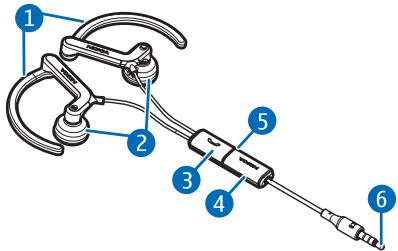
To connect the headset to a compatible Nokia device that has the Nokia 3.5mm AV connector, insert the headset plug (part 6 shown on the title page) into the AV connector. For details, see the user guide of your device.
To connect the headset to a compatible Nokia device that has the Nokia 2.5 mm AV connector, connect the supplied AD-52 adapter to the headset plug and then the adapter to the device.
To connect the headset to a compatible device (such as a music player) that has the standard 3.5mm audio connector, connect the supplied
AD-63 adapter to the headset plug and then the adapter to the device. When you use this adapter, you can only use the headset to listen to music.
Wear the headset so that the microphone (4) is near to your mouth. Slide the earlops (1) over your ears. Gently insert the earpieces (2) into your ears, and rotate the earlops for the best fit. The headset is now ready for use.
Adjust the volume
To adjust the volume, press the volume key (5) up or down.
Calls
To make a call, use your mobile device in the normal way when the headset is connected to your mobile device. During the call, speak into the microphone of the headset.
If your mobile device supports voice dialling, press and hold the answer/ end key (3), and proceed as described in the user guide of your mobile device.
To answer or end a call, press the answer/end key. To reject a call, press the answer/end key twice.
Care and maintenance
Your device is a product of superior design and craftsmanship and should be treated with care. The following suggestions will help you protect your warranty coverage.
- Keep the device dry. Precipitation, humidity, and all types of liquids or moisture can contain minerals that will corrode electronic circuits. If your device does get wet, allow it to dry completely.
-
Do not use or store the device in dusty, dirty areas. Its moving parts and electronic components can be damaged.
-
Do not store the device in hot areas. High temperatures can shorten the life of electronic devices, damage batteries, and warp or melt certain plastics.
- Do not store the device in cold areas. When the device returns to its normal temperature, moisture can form inside the device and damage electronic circuit boards.
- Do not attempt to open the device.
- Do not drop, knock, or shake the device. Rough handling can break internal circuit boards and fine mechanics.
- Do not use harsh chemicals, cleaning solvents, or strong detergents to clean the device.
- Do not paint the device. Paint can clog the moving parts and prevent proper operation.
If the product is not working properly, take it to the nearest authorised service facility for service.

Disposal
The crossed-out wheeled-bin symbol on your product, literature, or packaging reminds you that all electrical and electronic products, batteries, and accumulators must be taken to separate collection at the end of their working life. This requirement applies to the European Union and other locations where
separate collection systems are available. Do not dispose of these products as unsorted municipal waste.
By returning the products to collection you help prevent uncontrolled waste disposal and promote the reuse of material resources. More detailed information is available from the product retailer, local waste authorities, national producer responsibility organizations, or your local Nokia representative. For the product Eco-Declaration or instructions for returning your obsolete product, go to country-specific information at www.nokia.com.
Marque : NOKIA
Modèle : STEREO HEADSET WH-800
Catégorie : Accessoire audio