
DIGITAL RADIO HEADSET DAB - Casque audio NOKIA - Notice d'utilisation et mode d'emploi gratuit
Retrouvez gratuitement la notice de l'appareil DIGITAL RADIO HEADSET DAB NOKIA au format PDF.


| Type de produit | Casque audio numérique avec réception radio DAB/DAB+ |
| Marque | Nokia |
| Modèle | Digital Radio Headset DAB |
| Connectivité | Micro USB (USB 2.0 Full Speed) + prise casque 3,5 mm stéréo |
| Fonctions principales | Réception radio DAB/DAB+, écoute de musique, appels téléphoniques avec commandes |
| Commandes | Touche DAB radio, volume +/-, avance/retour rapide, lecture/pause, touche appel |
| Antenne | Intégrée dans le casque, utilise le câble du casque comme antenne |
| Alimentation | Via le périphérique mobile connecté (câble USB) |
| Matériau de surface | Acier inoxydable ; fiches contenant du nickel |
| Compatibilité | Appareils mobiles Nokia compatibles avec connecteur micro USB et application Nokia Digital Radio DAB/DAB+ |
| Sécurité | Ne pas utiliser dans des environnements dangereux ; écouter à niveau modéré ; éviter le contact prolongé avec les fiches pour les personnes sensibles au nickel |
| Entretien | Nettoyer avec un chiffon doux et sec ; ne pas exposer à l'humidité, poussière, températures extrêmes ; ne pas peindre |
| Recyclage | Ne pas jeter avec les déchets ménagers ; déposer dans un point de collecte approprié |
| Accessoires inclus | Casque (écouteurs), câble USB, clip |
FOIRE AUX QUESTIONS - DIGITAL RADIO HEADSET DAB NOKIA
Questions des utilisateurs sur DIGITAL RADIO HEADSET DAB NOKIA
0 question sur cet appareil. Repondez a celles que vous connaissez ou posez la votre.
Poser une nouvelle question sur cet appareil
Téléchargez la notice de votre Casque audio au format PDF gratuitement ! Retrouvez votre notice DIGITAL RADIO HEADSET DAB - NOKIA et reprennez votre appareil électronique en main. Sur cette page sont publiés tous les documents nécessaires à l'utilisation de votre appareil DIGITAL RADIO HEADSET DAB de la marque NOKIA.
MODE D'EMPLOI DIGITAL RADIO HEADSET DAB NOKIA
Nokia Digital Radio Headset DAB
Issue 1.0

© 2010 Nokia. All rights reserved.
Introduction
Nokia, Nokia Connecting People and the Nokia Original Accessories logo are trademarks or registered trademarks of Nokia Corporation.
With the Nokia Digital Radio Headset DAB, you can receive digital radio broadcasts in the Digital Audio Broadcasting (DAB) format, make and answer calls, and listen to music from a compatible device.
To listen to radio, you must have a compatible Nokia mobile device with the Nokia Digital Radio DAB/DAB+ application installed. If the application is not already installed in your device, for availability, go to www.ovi.com. To use the application, you may need to update the software of your device.
Read this user guide carefully before using the headset. Also read the help of the Nokia Digital Radio DAB/DAB+ application and the user guide for the device to which you connect the headset.
This product may contain small parts. Keep them out of the reach of small children.

Warning: The plugs of this device may contain a small amount of nickel. Persons
who are sensitised to nickel may have symptoms from prolonged skin contact with the plugs. The surface of this device contains stainless steel.
Digital radio services
Digital radio services may only be available upon subscription. For the digital radio network coverage, the availability and costs of the services, and instructions on how to access the services, contact your service provider.
If you do not have access to a digital radio service, make sure you have a valid subscription to the service and that you are in the coverage area of the service.
In some countries, the DAB radio broadcasting coverage might not be optimal in all locations. Especially, indoor radio reception may be affected by poor weather conditions or obstacles, such as buildings or bridges. In the headset, the antenna is located inside the headphones. To improve indoor reception, move close to a window while wearing the headset.
Get started
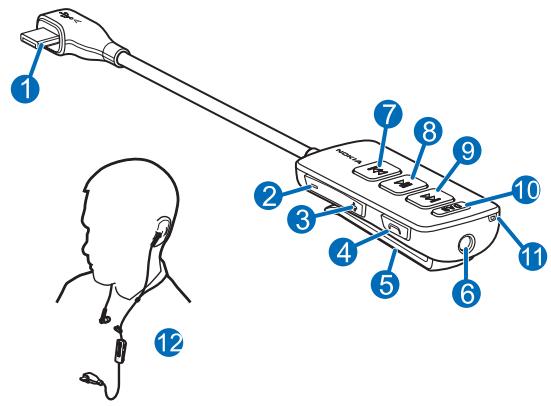
The headset contains the following parts shown on the title page: USB plug (1), volume down key (2), volume up key (3), call key (4), clip (5), headphone connector (6), rewind key (7), play/pause key (8), fast-forward key (9), DAB radio key (10), and microphone (11).
The headset can be used with a compatible Nokia mobile device that has a micro USB connector and with compatible headphones that have a 3.5 mm stereo plug.
The headset supports the USB 2.0 Full Speed standard.

Warning: When you use the headset, your ability to hear outside sounds may be affected. Do not use the headset where it can endanger your safety.
Parts of the device are magnetic. Metallic materials may be attracted to the device. Do not place credit cards or other magnetic storage media near the device, because information stored on them may be erased.
Basic use
Connect headphones
Insert the plug of your headphones into the headphone connector, and insert the USB plug of the headset into the USB connector in your mobile device.
For optimal performance, use the headphones supplied with the headset.
Wear the headset
Place the speaker pads of your headphones on your ears (12).
Listen to digital radio
Before you start using the headset to listen to radio broadcasts on your compatible Nokia device, make sure the Nokia Digital Radio DAB/DAB+ application is installed in the device.
Connect your compatible headphones to the headset. The headset uses the headphone cable as an antenna for the built-in radio receiver.
To open the application on your device, press the DAB radio key. For details on using the application, see the in-device help of the application.
To select the next DAB radio station on the station list in the application, press the fast-forward key. To select the previous station, press the rewind key.
Change the volume
To change the headset volume, use the volume keys.
Calls
To make a call, use your mobile device in the normal way when the headset is connected to your device.
If your mobile device supports voice dialling, press and hold the call key, and proceed as described in the user guide of your device.
To answer or end a call, press the call key. To reject a call, press the call key twice.
Listen to music
You can use the headset to listen to music on your compatible mobile device.

Warning: Listen to a headset at a moderate level.
To play a song, select the song in the music player of your mobile device, and press the play/pause key. For details, see the user guide of your device.
To select the next song, press the fast-forward key. To select the previous song, press the rewind key. To scroll through the songs quickly during playback, press and hold either key.
To pause or restart playback, press the play/pause key.
Take care of your device
Handle your device and accessories with care. The following suggestions help you protect your warranty coverage.
- Keep the device dry. Precipitation, humidity, and all types of liquids or moisture can contain minerals that corrode electronic circuits. If your device gets wet, allow it to dry completely.
- Do not use or store the device in dusty or dirty areas. Moving parts and electronic components can be damaged.
- Do not store the device in high temperatures. High temperatures can shorten the life of the device and warp or melt plastics.
-
Do not store the device in cold temperatures. When the device warms to its normal temperature, moisture can form inside the device and damage electronic circuits.
-
Do not attempt to open the device.
- Do not drop, knock, or shake the device. Rough handling can break internal circuit boards and mechanics.
- Only use a soft, clean, dry cloth to clean the surface of the device.
- Do not paint the device. Paint can clog the moving parts and prevent proper operation.
Recycle
Always return your used electronic products, batteries, and packaging materials to dedicated collection points. This way you help prevent uncontrolled waste disposal and promote the recycling of materials. Check product environmental information and how to recycle your Nokia products at www.nokia.com/werecycle, or with a mobile device, www.nokia.mobi/werecycle.

The crossed-out wheeled-bin symbol on your product, battery, literature, or packaging reminds you that all electrical and electronic products, batteries, and accumulators must be taken to separate collection at the end of their working life. This requirement applies in the European Union. Do not dispose of these products as unsorted municipal waste. For more information on the environmental attributes of your device, see www.nokia.com/ecodeclaration.


Marque : NOKIA
Modèle : DIGITAL RADIO HEADSET DAB
Catégorie : Casque audio