
MEDALLION II - Dispositif électronique portable NOKIA - Notice d'utilisation et mode d'emploi gratuit
Retrouvez gratuitement la notice de l'appareil MEDALLION II NOKIA au format PDF.


| Type de produit | Dispositif électronique portable d'affichage d'images |
| Marque | NOKIA |
| Modèle | MEDALLION II |
| Dimensions (L x l x h) | 47 mm x 36 mm x 15 mm |
| Poids | Environ 35 g |
| Écran | Résolution 96 x 96 pixels, jusqu'à 4096 couleurs |
| Alimentation | Batterie Li-Ion rechargeable intégrée |
| Chargeur compatible | ACP-8 ou ACP-12 |
| Autonomie | 10 à 15 heures selon l'état de la batterie |
| Connectivité | Port infrarouge (IR) selon la norme IrOBEX 1.3 |
| Formats d'image supportés | JPEG, taille max. VGA 640 x 480 |
| Capacité de stockage | Jusqu'à 8 images |
| Résistance à l'eau | Résistant à la pluie, ne pas immerger |
| Température de fonctionnement | -15 °C à 55 °C |
| Compatibilité | Téléphones et PC compatibles Nokia (voir emballage ou site web Nokia) |
| Classe laser | Produit laser de classe 1 |
| Entretien et nettoyage | Nettoyer avec un chiffon doux et sec ; ne pas utiliser de produits chimiques agressifs |
| Sécurité | Ne pas ouvrir le boîtier ; confier toute réparation à un personnel qualifié |
| Pièces détachées et réparabilité | Batterie non amovible par l'utilisateur ; remplacer uniquement par un centre de service agréé |
| Informations générales | Notice d'utilisation disponible en PDF sur notice-facile.com |
FOIRE AUX QUESTIONS - MEDALLION II NOKIA
Questions des utilisateurs sur MEDALLION II NOKIA
0 question sur cet appareil. Repondez a celles que vous connaissez ou posez la votre.
Poser une nouvelle question sur cet appareil
Téléchargez la notice de votre Dispositif électronique portable au format PDF gratuitement ! Retrouvez votre notice MEDALLION II - NOKIA et reprennez votre appareil électronique en main. Sur cette page sont publiés tous les documents nécessaires à l'utilisation de votre appareil MEDALLION II de la marque NOKIA.
MODE D'EMPLOI MEDALLION II NOKIA
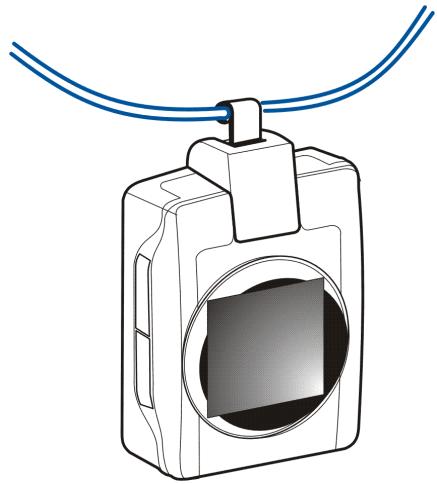
User Guide for Nokia Medallion II
9311023
Issue 1
DECLARATION OF CONFORMITY
We, NOKIA CORPORATION, declare under our sole responsibility that the product
RX-4 is in conformity with the provisions of the following Council Directive: 1999/5/EC.
A copy of the Declaration of Conformity can be found at
http://www.nokia.com/phones/declaration_of_conformity/.

Copyright © 2004 Nokia. All rights reserved.
Reproduction, transfer, distribution or storage of part or all of the contents in this document in any form without the prior written permission of Nokia is prohibited.
Nokia and Nokia Connecting People are registered trademarks of Nokia Corporation. Other product and company names mentioned herein may be trademarks or tradenames of their respective owners.
Nokia operates a policy of continuous development. Nokia reserves the right to make changes and improvements to any of the products described in this document without prior notice.
Under no circumstances shall Nokia be responsible for any loss of data or income or any special, incidental, consequential or indirect damages howsoever caused.
The contents of this document are provided "as is". Except as required by applicable law, no warranties of any kind, either express or implied, including, but not limited to, the implied warranties of merchantability and fitness for a particular purpose, are made in relation to the accuracy, reliability or contents of this document. Nokia reserves the right to revise this document or withdraw it at any time without prior notice.
The availability of particular products may vary by region. Please check with the Nokia dealer nearest to you.
Contents
FOR YOUR SAFETY 4
Introduction......5
Chargers and batteries....5
Technical data 6
1. Overview....7
Connecting the cord or strap....9
2. Using Nokia Medallion II 10
Charging the battery 10
Switching the power on and off....11
Checking the time and battery status....11
Switching the lights on 11
Viewing images....12
Sending an image from Nokia Medallion II 12
Receiving an image with Nokia Medallion II....12
Deleting an image from Nokia Medallion II 13
Setting the time....14
3. Battery information....15
Charging and discharging....15
Care and maintenance 17
Read these simple guidelines. Breaking the rules may be dangerous or illegal. Further detailed information is given in this manual.

QUALIFIED SERVICE
Only qualified personnel may install or repair this device.

CONNECTING TO OTHER DEVICES
When connecting to any other device, read its user's guide for detailed safety instructions. Do not connect incompatible products.

BACKUP COPIES
Remember to make backup copies of all important data.

IMPORTANT:
This device is water resistant. You can use this device in the rain, but do not submerge it in water.
Chargers do not meet the same water resistance specifications as the device itself. Only use chargers in dry conditions. Never charge the device when the device or charger or their parts are damp or wet. If the device has been exposed to salt water, wash it immediately with fresh water to avoid corrosion. The device must then be carefully wiped dry.
Do not point the IR (infrared) beam at anyone's eye or allow it to interfere with other IR devices. This device is a Class 1 Laser product.
Introduction
Nokia Medallion II is a fashion enhancement, which enables you to carry your most cherished compatible digital images with you. Nokia Medallion II comes supplied with three pre-loaded images and it is easy both to add new images from a compatible phone or PC and to delete old images.
Read this user guide carefully before using Nokia Medallion II.
■ Chargers and batteries

Warning! Do not try to remove the battery. Contact qualified service personnel to change the battery when needed.
Check the model number of any charger before use with this device. Nokia Medallion II is intended for use with the following chargers: ACP-8 and ACP-12.

Warning! Use only batteries and chargers approved by the manufacturer for use with this particular enhancement. The use of any other types will invalidate any approval or warranty applying to the enhancement, and may be dangerous.
For availability of approved batteries and chargers, please check with your dealer. When you disconnect the power cord of any enhancement, grasp and pull the plug, not the cord.
■ Technical data
• Weight: approx. 35 g
- Length (max) / width (max) / thickness (max): 47 mm / 36 mm / 15 mm
• Display: 96 * 96 resolution, up to 4096 colours
- Operating time up to 10 - 15 hours (depending on battery level)
- Operating temperature: -15°C to 55°C
- Compatibility: For information on compatible phones and PCs, refer to the sales package of Nokia Medallion II. The most up-to-date compatibility information can be found from the Nokia web site.
- IrDA standard: IrOBEX 1.3 send and receive
• Supported image format: JPEG and max size: VGA 640 * 480
1. Overview
Nokia Medallion II has the following keys and main parts:
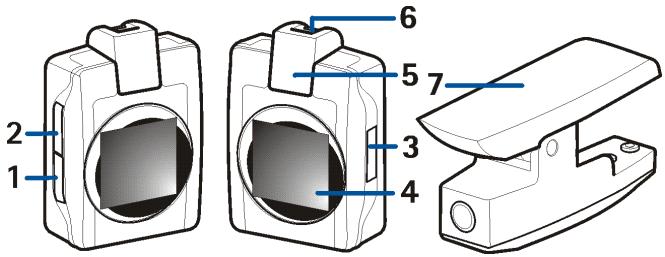
In this user guide, the keys are indicated by (1), (2) and (3). There are three ways to press the keys. These are as follows:
- Press briefly – press a key for less than one second
- Press – press a key for longer than one second
-
Press and hold – press and hold down the key (the function remains activated until you release the key)
-
Display
- Infrared (IR) port
- Attachment bar
- Charging cradle
Indicators on the display

A connection is being attempted between Nokia Medallion II and another device. The indicator rolls right when you are creating a connection from Nokia Medallion II and left when you are creating a connection to Nokia Medallion II.

An IR connection has been established and Nokia Medallion II is sending or receiving an image. The indicator rolls right when sending and left when receiving an image.

IR connection has been lost or no connection is formed.

Confirms that images have been successfully sent, received or deleted, or that the clock has been adjusted.

The memory in Nokia Medallion II is full, eight images have been saved.

The image is corrupted or not supported by Nokia Medallion II. For example, it may be too large or not in a compatible JPEG format. The IR connection is terminated.

The battery is charging. The animation stops when the battery is full.

Nokia Medallion II is ready to delete an image.

Battery status. The icon is also shown when charging (the icon moves randomly) and when the battery is low (the icon appears in the upper left corner).
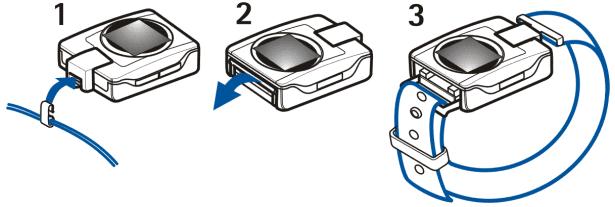
■ Connecting the cord or strap
You can connect a cord or strap to Nokia Medallion II to carry it around your neck or on your wrist. Connect the cord to Nokia Medallion II by sliding the hook hanging from the cord under the attachment bar on top of Nokia Medallion II (1).
To connect the strap, attach the hook the same way as in the cord. Turn the strap bar down (2) and slide the strap under the bar. Secure the strap in place (3).
2. Using Nokia Medallion II
■ Charging the battery
Push down on the charging cradle and slide it in place around Nokia Medallion II as shown in the picture below. Make sure that the charging cradle and Nokia Medallion II fit as tightly together as possible. Connect the charger to the back of the charging cradle and to an AC wall socket.
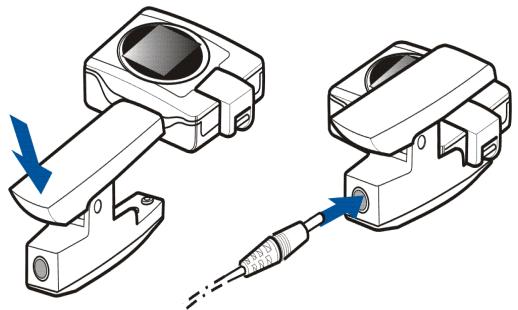
While charging, the screensaver is shown on the display. If Nokia Medallion II is switched on, after approx. 30 seconds it automatically switches the power off for more efficient charging.
When charging Nokia Medallion II for the first time, charge it until the battery is full. Note that when connecting the charger to Nokia Medallion II for the first
time or if you have not used Nokia Medallion II for a long period, you have to charge the device for at least five minutes before the charging icon appears on the display.
■ Switching the power on and off
Press (3) to switch on Nokia Medallion II.
Press (3) to switch off the power.
■ Checking the time and battery status
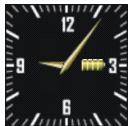
To check the current time and battery status, briefly press (3) when the power is switched on. Nokia Medallion II displays the current time and the battery icon. A completely yellow battery is fully charged, and a completely grey battery has no charge.
■ Switching the lights on
When the power is on, the brightness of the background lights changes randomly. When the lights are dim, press briefly any key to switch on the bright lights for approximately 30 seconds.
Use of the lights increases the demand on battery power and reduces the operating time. If the battery level is low, the bright lights cannot be switched on, and the 📄 icon is displayed in the upper left corner.
■ Viewing images
If there is only one image in Nokia Medallion II, it is displayed when you switch on the power.
If there is more than one image in Nokia Medallion II, you can
- press (1) to select the next image.
- press and hold (1) to scroll through the images.
■ Sending an image from Nokia Medallion II
When the power is switched on, select the image you want to send so that it is on Nokia Medallion II display.
- Point the IR ports of Nokia Medallion II and the receiving compatible device at each other and ensure that there are no obstructions between the devices or other active IR devices nearby.
- Press (2) to send the image. The √ icon indicates that the image is successfully sent.
■ Receiving an image with Nokia Medallion II
When the power is switched on, Nokia Medallion II can receive images. Note that Nokia Medallion II may resize and crop the received images to display them. The received images are also saved in the original format and if you want to forward a received image, Nokia Medallion II sends it in the original format.
- Point the IR ports of Nokia Medallion II and the compatible sending device at each other and ensure that there are no obstructions between the devices or other active IR devices nearby.
- Press briefly (2) to activate the IR port of Nokia Medallion II to receive an image.
- The user of the sending device starts to send the image. For more information on how to send the image from the other device, refer to the user guide of that device. The √ icon indicates that the image is successfully sent.
■ Deleting an image from Nokia Medallion II
When the power is switched on, select the image you want to delete so that it is on the display.
To begin deleting the image, press (1) and (2) simultaneously. The indicator shows that you are going to delete an image.

To delete the image, simultaneously press (1) and (2) again within three seconds. Otherwise, the images will not be deleted. The image disappears in approximately three seconds.
Remember to make backup copies of your images by, for example, sending and saving them to another compatible device.
■ Setting the time
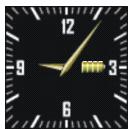
To activate the clock display, briefly press(3) when the power is switched on.
Within 10 seconds, press (3) again. The battery icon disappears and Nokia Medallion II is now ready for you to set the time. Within the following 10 seconds, press and hold (2) to run the clock forward or press and hold (1) to run the clock backward.
When you have changed the time, confirm it by briefly pressing (3). Otherwise, the time will not be changed.
3. Battery information
■ Charging and discharging
Nokia Medallion II is powered by a rechargeable Li-Ion battery.
Note that a new battery's full performance is achieved only after two or three complete charge and discharge cycles!
The battery can be charged and discharged hundreds of times but it will eventually wear out. When the operating time is noticeably shorter than normal, it is time to buy a new battery.
Use only batteries approved by the phone manufacturer and recharge your battery only with the chargers approved by the manufacturer. Unplug the charger when not in use. Do not leave Nokia Medallion II connected to a charger for longer than a week, since overcharging may shorten its lifetime. If left unused a fully charged battery will discharge itself over time.
Temperature extremes can affect the ability of your battery to charge.
Use the battery only for its intended purpose.
Never use any charger or battery which is damaged.
Leaving Nokia Medallion II in hot or cold places, such as in a closed car in summer or winter conditions, will reduce the capacity and lifetime of the battery. Always try to keep the battery between 15°C and 25°C (59°F and 77°F). Nokia Medallion II with a hot or cold battery may temporarily not work, even when the battery is fully charged. Batteries' performance is particularly limited in temperatures well below freezing.
Do not dispose of Nokia Medallion II in a fire!
If you need to remove or change the battery for some reason, contact the qualified service personnel to do that for you. Do not attempt to do it yourself. For environmentally sound
recycling, contact your local Nokia service point or check local regulations for the correct discarding of Nokia Medallion II (including its battery).
Your Nokia Medallion II is a product of superior design and craftsmanship and should be treated with care. The suggestions below will help you to fulfil any warranty obligations and to enjoy this product for many years.
- Keep all enhancements out of the reach of small children.
- Keep Nokia Medallion II dry. Precipitation, humidity and all types of liquids or moisture can contain minerals that will corrode electronic circuits.
- Do not use or store Nokia Medallion II in dusty, dirty areas. Its moving parts can be damaged.
- Do not store Nokia Medallion II in hot areas. High temperatures can shorten the life of electronic devices, damage batteries, and warp or melt certain plastics.
- Do not store Nokia Medallion II in cold areas. When it warms up (to its normal temperature), moisture can form inside, which may damage electronic circuit boards.
- Do not attempt to open Nokia Medallion II. Non-expert handling may damage it.
- Do not drop, knock or shake Nokia Medallion II. Rough handling can break internal circuit boards.
- Do not use harsh chemicals, cleaning solvents, or strong detergents to clean Nokia Medallion II.
- Do not paint Nokia Medallion II. Paint can clog the moving parts and prevent proper operation.
If Nokia Medallion II is not working properly, take it to your nearest qualified service facility. The personnel there will assist you and, if necessary, arrange for service.
- USER GUIDE FOR NOKIA MEDALLION II
- DECLARATION OF CONFORMITY
- CONTENTS
- FOR YOUR SAFETY 4
- INTRODUCTION......5
- OVERVIEW....7
- USING NOKIA MEDALLION II 10
- BATTERY INFORMATION....15
- CARE AND MAINTENANCE 17
- QUALIFIED SERVICE
- CONNECTING TO OTHER DEVICES
- BACKUP COPIES
- IMPORTANT
- INTRODUCTION
- CHARGERS AND BATTERIES
- TECHNICAL DATA
- OVERVIEW
- INDICATORS ON THE DISPLAY
- CONNECTING THE CORD OR STRAP
- USING NOKIA MEDALLION II
- CHARGING THE BATTERY
- SWITCHING THE POWER ON AND OFF
- CHECKING THE TIME AND BATTERY STATUS
- SWITCHING THE LIGHTS ON
- VIEWING IMAGES
- SENDING AN IMAGE FROM NOKIA MEDALLION II
- RECEIVING AN IMAGE WITH NOKIA MEDALLION II
- DELETING AN IMAGE FROM NOKIA MEDALLION II
- SETTING THE TIME
- BATTERY INFORMATION
- CHARGING AND DISCHARGING
Marque : NOKIA
Modèle : MEDALLION II
Catégorie : Dispositif électronique portable