
INDUCTIVE LOOPSET LPS-4 - Accessoire audio NOKIA - Notice d'utilisation et mode d'emploi gratuit
Retrouvez gratuitement la notice de l'appareil INDUCTIVE LOOPSET LPS-4 NOKIA au format PDF.


| Marque | NOKIA |
| Modèle | INDUCTIVE LOOPSET LPS-4 |
| Type de produit | Boucle inductive pour appareils auditifs avec mode T |
| Catégorie | Accessoire audio |
| Compatibilité téléphone | Téléphones Nokia avec connecteur Pop-Port (ex: Nokia 6681, 6682) |
| Alimentation | Alimenté par le téléphone via le connecteur Pop-Port (aucune pile séparée) |
| Connecteur téléphone | Fiche Pop-Port |
| Connecteur audio externe | Prise jack 3,5 mm stéréo/mono (sortie audio) |
| Sortie audio externe | 0,5 - 10 mV RMS, impédance >1 kΩ (nominale 2,2 kΩ) à 1 kHz |
| Fonctions principales | Permet aux malentendants équipés d'aides auditives en mode T d'utiliser un téléphone mobile sans le tenir près de l'oreille ; connexion possible à un processeur vocal d'implant cochléaire |
| Réponse aux appels | Bouton répondre/fin d'appel sur l'appareil ou via le téléphone |
| Réglage du volume | Via les touches volume du téléphone |
| Utilisation recommandée | Porté autour du cou, brancher la fiche Pop-Port au téléphone et la fiche du câble à la boucle |
| Alertes d'appel | Sonnerie émise par le téléphone et la boucle lorsque le câble est connecté et l'aide auditive en mode T ou MT |
| Entretien et nettoyage | Garder au sec, éviter poussière et températures extrêmes ; ne pas utiliser de produits chimiques ; ne pas ouvrir |
| Sécurité | Ne pas exposer à l'humidité, ne pas laisser tomber, ne pas peindre ; usage réservé aux adultes, tenir hors de portée des enfants |
| Certifications | Conforme à la directive européenne 1999/5/EC |
| Garantie | Couverture sous réserve de traitement soigneux (voir notice) |
| Informations réglementaires | Ne pas jeter avec les ordures ménagères (poubelle barrée) ; recyclage séparé dans l'UE |
| Site web fabricant | http://www.nokiaaccessibility.com/ |
FOIRE AUX QUESTIONS - INDUCTIVE LOOPSET LPS-4 NOKIA
Questions des utilisateurs sur INDUCTIVE LOOPSET LPS-4 NOKIA
0 question sur cet appareil. Repondez a celles que vous connaissez ou posez la votre.
Poser une nouvelle question sur cet appareil
Téléchargez la notice de votre Accessoire audio au format PDF gratuitement ! Retrouvez votre notice INDUCTIVE LOOPSET LPS-4 - NOKIA et reprennez votre appareil électronique en main. Sur cette page sont publiés tous les documents nécessaires à l'utilisation de votre appareil INDUCTIVE LOOPSET LPS-4 de la marque NOKIA.
MODE D'EMPLOI INDUCTIVE LOOPSET LPS-4 NOKIA
Inductive Loopset LPS-4 User Guide
9354812
Issue 3
DECLARATION OF CONFORMITY
We, NOKIA CORPORATION declare under our sole responsibility that the product LPS-4 is in conformity with the provisions of the following Council Directive: 1999/5/EC.
A copy of the Declaration of Conformity can be found from
http://www.nokia.com/phones/declaration_of_conformity/.


The crossed-out wheeled bin means that within the European Union the product must be taken to separate collection at the product end-of-life. Do not dispose of these products as unsorted municipal waste.
© 2002-2006 Nokia. All rights reserved.
Reproduction, transfer, distribution or storage of part or all of the contents in this document in any form without the prior written permission of Nokia is prohibited.
Nokia, Nokia Connecting People and Pop-Port are registered trademarks of Nokia Corporation.
Nokia operates a policy of continuous development. Nokia reserves the right to make changes and improvements to any of the products described in this document without prior notice.
Under no circumstances shall Nokia be responsible for any loss of data or income or any special, incidental, consequential or indirect damages howsoever caused.
The contents of this document are provided "as is". Except as required by applicable law, no warranties of any kind, either express or implied, including, but not limited to, the implied warranties of merchantability and fitness for a particular purpose, are made in relation to the accuracy, reliability or contents of this document. Nokia reserves the right to revise this document or withdraw it at any time without prior notice.
The availability of particular products may vary by region. Please check with the Nokia dealer nearest to you.
Unauthorized changes or modifications to this device may void the user's authority to operate the equipment.
Export Controls
This device may contain commodities, technology or software subject to export laws and regulations from the US and other countries. Diversion contrary to law is prohibited.
9354812 / Issue 3
1. General
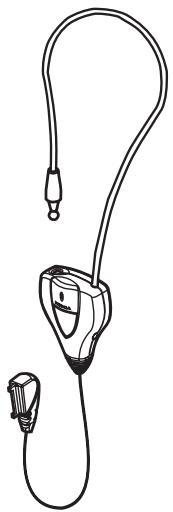
The Mobile Inductive Loopset LPS-4 for people with hearing aids is developed to facilitate the use of a compatible mobile phone together with T-coil equipped hearing aids.
When using the inductive loopset, you can speak directly to the microphone inside it. You do not need to hold a mobile phone near your ear, but you can carry it using a carrying case, belt clip, or other accessory. The loopset does not require any separate batteries.
The operation of the device is based on induction technology used in public places: a loop system sends out sounds wirelessly to be picked up by the telecoil of the hearing aid that is switched to the T mode.
The device described in this guide is compatible with phones with a Pop-Port™ interface connector (for example, the Nokia 6681 and Nokia 6682 mobile phones).
The inductive loopset can also be connected to the speech processor of a compatible cochlear implant by using the audio output connector.
Read this user guide carefully before using the loopset. Also read the user guide for your phone, which provides important safety and maintenance information. Keep the loopset out of reach of small children.
For more information about loopsets and other accessibility solutions, visit our Web site at http://www.nokiaaccessibility.com/.
2. Using the loopset
Make and receive calls
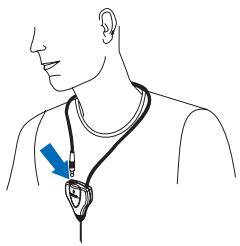
- Place the loop around your neck, and connect the plug to its counterpart.
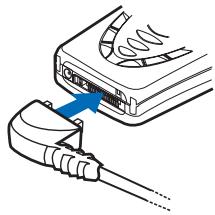
- Connect the Pop-Port plug to the bottom of the phone. The phone displays the following symbol:
-
Switch your hearing aid to the T or MT mode.
-
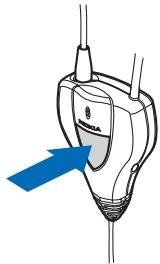
To answer or end a call, press the answer button on the device or use the keys on your phone. Calls can be made in the normal way (see the user guide of your phone).
Notes
- The lead does not need to be connected to the Pop-Port connector of the phone all the time. You can choose to connect it only when you wish to make or receive calls.
- When you receive a call, both the phone and the loopset sound an alert if the lead is connected to the phone and if the hearing aid is in the T or MT mode.
- To adjust the volume of the loopset, use the volume keys of the phone. For normal use, keep the volume low, where you can clearly hear your own voice. In a noisy environment or if the received speech is weak, increase the volume so that the background noise becomes weaker and the caller's voice becomes stronger.
Connect the loopset to external devices
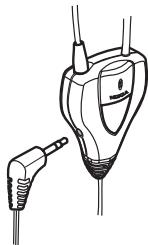
The loopset can be connected to a compatible speech processor of a cochlear implant or to the audio input of a hearing aid. Contact your hearing aid specialist for the compatibility with your cochlear implant or hearing aid, the correct connection cable, and instructions on the use of the connection cable. Connect the plug of the external device to the audio output connector with the symbol on the right side of the loopset device.
3. Technical data
External audio output:
- Connector: 3.5-mm socket
- Can be connected to the audio input of a compatible hearing aid or to a compatible speech processor of a cochlear implant
Impedance: >1k @1kHz (nominal 2.2k @1kHz )
Typical output signal level: 0.5 - 10mV rms
Symbol:
The loopset can be connected to a compatible speech processor with a suitable cable that has a 3.5-mm stereo or mono plug. The sound that you hear through the loopset is monophonic.
External audio input:
This feature is not available.
Symbol:
Care and maintenance
Your device is a product of superior design and craftsmanship and should be treated with care. The suggestions below will help you protect your warranty coverage.
- Keep the device out of the reach of small children.
- Keep the device dry. Precipitation, humidity, and all types of liquids or moisture can contain minerals that will corrode electronic circuits. If your device does get wet, allow the device to dry completely.
- Do not use or store the device in dusty, dirty areas. Its electronic components can be damaged.
- Do not store the device in hot areas. High temperatures can shorten the life of electronic devices and warp or melt certain plastics.
- Do not store the device in cold areas. When the device returns to its normal temperature, moisture can form inside the device and damage electronic circuit boards.
- Do not attempt to open the device.
- Do not drop, knock, or shake the device. Rough handling can break internal circuit boards and fine mechanics.
- Do not use harsh chemicals, cleaning solvents, or strong detergents to clean the device.
- Do not paint the device. Paint can clog the moving parts and prevent proper operation. If the device is not working properly, take it to the nearest authorized service facility for service.
Marque : NOKIA
Modèle : INDUCTIVE LOOPSET LPS-4
Catégorie : Accessoire audio