
DISPLAY HEADSET HS-69 - Accessoire audio NOKIA - Notice d'utilisation et mode d'emploi gratuit
Retrouvez gratuitement la notice de l'appareil DISPLAY HEADSET HS-69 NOKIA au format PDF.


| Type de produit | Casque à écran (Display Headset) |
| Marque | NOKIA |
| Modèle | HS-69 |
| Connecteur | Pop-Port™ |
| Fonctions principales | Écoute de musique, radio FM, gestion d'appels, affichage de l'heure et notifications SMS/MMS |
| Écran | Affichage numérique pour heure, identifiant d'appel, radio, musique |
| Alimentation | Alimenté par le téléphone via le connecteur Pop-Port |
| Réglage du volume | Touches volume + et - sur le casque |
| Verrouillage des touches | Interrupteur de verrouillage (Keylock switch) |
| Gestion des appels | Touche Appel, touche Fin/Stop, prise en charge des appels multiples |
| Fonctions radio | Recherche et sélection de stations, lecture via haut-parleur du casque |
| Fonctions musique | Lecture, pause, arrêt, navigation entre pistes |
| Rejet d'appel | Appui sur touche Fin/Stop |
| Composition vocale | Maintenir la touche Appel et dire le tag vocal (selon téléphone) |
| Entretien | Garder au sec, éviter poussière et températures extrêmes, ne pas utiliser de produits chimiques |
| Sécurité | Écouter à volume modéré, ne pas utiliser dans des situations dangereuses |
| Compatibilité | Téléphones Nokia avec connecteur Pop-Port |
| Réparabilité | Contacter un service agréé pour toute réparation |
FOIRE AUX QUESTIONS - DISPLAY HEADSET HS-69 NOKIA
Questions des utilisateurs sur DISPLAY HEADSET HS-69 NOKIA
0 question sur cet appareil. Repondez a celles que vous connaissez ou posez la votre.
Poser une nouvelle question sur cet appareil
Téléchargez la notice de votre Accessoire audio au format PDF gratuitement ! Retrouvez votre notice DISPLAY HEADSET HS-69 - NOKIA et reprennez votre appareil électronique en main. Sur cette page sont publiés tous les documents nécessaires à l'utilisation de votre appareil DISPLAY HEADSET HS-69 de la marque NOKIA.
MODE D'EMPLOI DISPLAY HEADSET HS-69 NOKIA
Nokia Display Headset HS-69 User Guide
natural_image
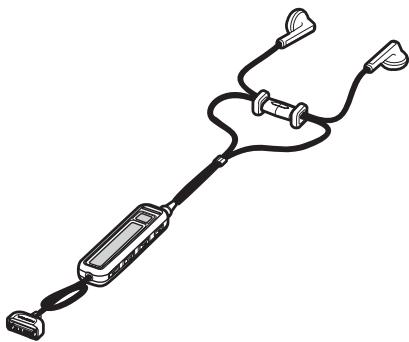
Illustration of a handheld electronic device with two earphones and a coiled cable (no text or symbols)DECLARATION OF CONFORMITY
Hereby, NOKIA CORPORATION declares that this HS-69 product is in compliance with the essential requirements and other relevant provisions of Directive 1999/5/EC. A copy of the Declaration of Conformity can be found at
http://www.nokia.com/phones/declaration_of_conformity/.

©2006 Nokia. All rights reserved.
Reproduction, transfer, distribution or storage of part or all of the contents in this document in any form without the prior written permission of Nokia is prohibited.
Nokia, Nokia Connecting People and Pop-Port are registered trademarks of Nokia Corporation. Other product and company names mentioned herein may be trademarks or tradenames of their respective owners.
Nokia operates a policy of continuous development. Nokia reserves the right to make changes and improvements to any of the products described in this document without prior notice.
Under no circumstances shall Nokia be responsible for any loss of data or income or any special, incidental, consequential or indirect damages howsoever caused.
The contents of this document are provided "as is". Except as required by applicable law, no warranties of any kind, either express or implied, including, but not limited to, the implied warranties of merchantability and fitness for a particular purpose, are made in relation to the accuracy, reliability or contents of this document. Nokia reserves the right to revise this document or withdraw it at any time without prior notice.
The availability of particular products may vary by region. Please check with the Nokia dealer nearest to you.
Unauthorized changes or modifications to this device may void the user's authority to operate the equipment.
Export Controls
This device may contain commodities, technology or software subject to export laws and regulations from the US and other countries. Diversion contrary to law is prohibited.
Contents
- Introduction ...... 4
- Headset parts 5
- Basic and call functions ..... 7
Lock keys 7
Adjust earpiece volume.... 7
Received messages.... 7
Display time.... 8
Make calls.... 8
Redial 8
Answer and end calls.... 8
Handle multiple calls.... 9
Reject calls.... 9
Voice dialing.... 9
- Radio and music functions 10
Activate the radio or music player. 10
Radio functions 10
Music player functions.... 11
Care and maintenance...... 12
1. Introduction
The Nokia Display Headset HS-69 allows you to handle basic phone calls, listen to FM radio and music tracks, as well as view the current time and notifications of received text messages (SMS) and multimedia messages (MMS). Some features of the headset are network-dependent.
The headset connects to compatible Nokia phones with a Pop-Port™ connector. To check the compatibility of your Nokia phone, visit the Nokia Web site www.nokia-asia.com/support or contact your dealer.
Read this user guide carefully before using the headset. Also read the user guide for your phone, which provides important safety and maintenance information. Keep the headset out of reach of small children.
2. Headset parts
The headset has the following parts:
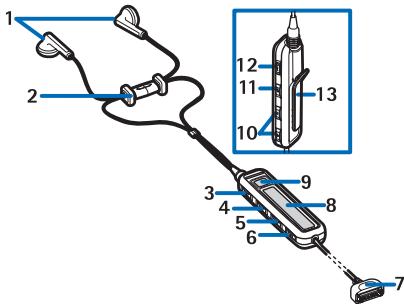
- Earpieces (1)
- Clip, which goes at the back of your neck (2)
- End/stop button to end and reject calls or to stop playing music on the music player (3)
- Play button to play and pause music on the music player (4)
- Fast backward button to move between music tracks or stored radio channels or to scan for new radio channels (5)
- Fast forward button to move between music tracks or stored radio channels or to scan for new radio channels (6)
- Pop-Port™ connector to connect the headset to the phone (7)
Headset parts
- Display to show time, radio channels, music tracks, caller IDs or numbers, and icons (8)
- Call button to redial, answer or swap between calls, or to display the time (9)
- Volume up and volume down buttons to increase or decrease the volume (10)
- Music button to activate and deactivate the FM radio or music player or to switch between the two (11)
• Keylock switch to lock the headset buttons (12) - Clip to attach the headset for carrying (13)
3. Basic and call functions
Lock keys
Slide the keylock switch to lock and unlock the headset buttons.
When locked, all button presses are ignored and 0 appears on the display. Press the call or end/stop button to answer or reject incoming calls even if the buttons are locked.
■ Adjust earpiece volume
Press the volume up and volume down buttons to adjust the earpiece volume. If you press and hold either button, the volume continues to increase or decrease until you release the button.
The current volume level appears on the display.
Received messages
When you receive SMS or MMS messages, the following icons appear near the call button:
indicates you have at least one unread SMS message that you can view on the phone.
indicates you have at least one unread MMS message that you can view on the phone.
Display time
Briefly press the call button to display the current time for 5 seconds, unless you are listening to the radio or music or are in the middle of a call.
Make calls
When the headset is connected to your phone, make calls by using your phone normally.
Redial
Press the call button twice to redial the last number you called.
Answer and end calls
When you receive a call, the ringing tone selected on your phone sounds, and the caller ID and flash on the display. If the caller ID is unknown, the number of the caller, a note, or nothing flashes on the display. If you are listening to FM radio or music, the headset automatically stops the radio or music when you answer a call and starts it again when you end the call.
To answer calls, press the call button.
To end currently active calls, press the end/stop button.
You can always answer and end calls with your phone.
■ Handle multiple calls
If you receive a new call before you end a current call, the new caller ID flashes on the display. Press the call button once to put the current call on hold, and answer the new call. Press the call button again to swap between the two calls.
Reject calls
If you do not want to answer a call, press the end/stop button. You can also reject calls by using your phone.
Voice dialing
Depending on your phone model, you may be able to make a call with the headset by voice dialing. When no call is in progress, press and hold the call button until 📋 appears on the display. Say the voice tag. The phone dials the related phone number.
4. Radio and music functions
■ Activate the radio or music player
Press the music button to activate the FM radio or music player. If your phone has both an FM radio and a music player, the FM radio starts playing. Briefly press the music button to switch between the radio and music.
Press and hold the music button to deactivate the FM radio or the music player.
You can also activate and deactivate the FM radio and the music player by using your phone.

Warning: When using the headset your ability to hear outside sounds may be affected. Do not use the headset where it can endanger your safety.
Radio functions
You must activate the FM radio with the music button or your phone before you can use it. If you have no radio channels preset in your phone, the currently used radio frequency and 📁 appear on the display.
If there are radio channels preset in your phone, the name of the current channel and 📁 appear on the display.
To skip to the next or previous stored radio channel, press the fast forward or fast backward button. If there is only one channel preset in your phone, the same channel continues to play.
To automatically search for new channels, press and hold the fast forward or fast backward button. The found channel appears on the display. You can store the channel using your phone.
■ Music player functions
You must activate the music player with the music button or your phone before you can use it. If you have no music tracks stored in your phone,


appears on the display, and the music player is turned off.

Warning: Listen to music at a moderate level. Continuous exposure to high volume may damage your hearing.
If you have at least one music track stored in your phone, the current music track title and 🎨 appear on the display.
To pause or resume the music, press the play button.
To stop the music, press the end/stop button. To restart it, press the play button.
To skip to the next or previous music track, press the fast forward or fast backward button. If there is only one music track stored in your phone, you skip to the beginning of the same track.
To move forward or backward within the current music track, press and hold the fast forward or fast backward button.
Care and maintenance
Your device is a product of superior design and craftsmanship and should be treated with care. The suggestions below will help you protect your warranty coverage.
- Keep the device dry. Precipitation, humidity, and all types of liquids or moisture can contain minerals that will corrode electronic circuits. If your device does get wet, allow it to dry completely.
- Do not use or store the device in dusty, dirty areas. Its moving parts and electronic components can be damaged.
- Do not store the device in hot areas. High temperatures can shorten the life of electronic devices and warp or melt certain plastics.
- Do not store the device in cold areas. When the device returns to its normal temperature, moisture can form inside the device and damage electronic circuit boards.
- Do not attempt to open the device other than as instructed in this guide.
- Do not drop, knock, or shake the device. Rough handling can break internal circuit boards and fine mechanics.
- Do not use harsh chemicals, cleaning solvents, or strong detergents to clean the device.
- Do not paint the device. Paint can clog the moving parts and prevent proper operation.
If your device is not working properly, take it to the nearest authorized service facility for service.
- Nokia Display Headset HS-69 User Guide
- DECLARATION OF CONFORMITY
- Export Controls
- Contents
- Introduction
- Headset parts
- Headset parts
- Basic and call functions
- Lock keys
- ■ Adjust earpiece volume
- Received messages
- Display time
- Make calls
- Redial
- Answer and end calls
- ■ Handle multiple calls
- Reject calls
- Voice dialing
- Radio and music functions
- ■ Activate the radio or music player
- Radio functions
- ■ Music player functions
- Care and maintenance
Marque : NOKIA
Modèle : DISPLAY HEADSET HS-69
Catégorie : Accessoire audio