
CAR HANDSET HSU-4 - Accessoire de voiture NOKIA - Notice d'utilisation et mode d'emploi gratuit
Retrouvez gratuitement la notice de l'appareil CAR HANDSET HSU-4 NOKIA au format PDF.


| Type de produit | Accessoire de voiture (kit mains-libres) |
| Marque | NOKIA |
| Modèle | CAR HANDSET HSU-4 |
| Compatibilité | Nokia 610 et Nokia 616 car kit phone |
| Alimentation | Via le kit voiture (câble raccordé à l'unité radio) |
| Fonctions principales | Remplace le dispositif CUW-3, clavier alphanumérique, molette Navi™, haut-parleur, microphone, fonctions de téléphonie mains-libres |
| Nombre de touches | 12 touches alphanumériques + 4 touches de fonction + molette Navi™ |
| Affichage | Écran de l'unité radio du kit voiture |
| Installation | Fixation horizontale sur la console centrale, débranchement du câble CUW-3 et branchement du câble du combiné |
| Sécurité routière | Ne pas utiliser si les conditions de circulation ne le permettent pas ; ne pas gêner le conducteur |
| Sécurité airbag | Vérifier que l'installation ne bloque pas le déploiement de l'airbag |
| Nettoyage | Nettoyer avec un chiffon doux et sec |
| Entretien | Éviter l'exposition à l'humidité et aux températures extrêmes |
| Réparabilité | Contacter un technicien agréé Nokia pour toute réparation |
| Garantie | Conformément à la législation en vigueur, sous réserve des conditions générales de Nokia |
| Informations générales | Manuel d'utilisation et d'installation fourni ; Nokia se réserve le droit de modifier le produit sans préavis |
FOIRE AUX QUESTIONS - CAR HANDSET HSU-4 NOKIA
Questions des utilisateurs sur CAR HANDSET HSU-4 NOKIA
0 question sur cet appareil. Repondez a celles que vous connaissez ou posez la votre.
Poser une nouvelle question sur cet appareil
Téléchargez la notice de votre Accessoire de voiture au format PDF gratuitement ! Retrouvez votre notice CAR HANDSET HSU-4 - NOKIA et reprennez votre appareil électronique en main. Sur cette page sont publiés tous les documents nécessaires à l'utilisation de votre appareil CAR HANDSET HSU-4 de la marque NOKIA.
MODE D'EMPLOI CAR HANDSET HSU-4 NOKIA
Nokia Car Handset Installation Guide User Guide
© 2004-2006 Nokia. All rights reserved.
Reproduction, transfer, distribution or storage of part or all of the contents of this document in any form without the prior written permission of Nokia is prohibited.
Nokia and Nokia Connecting People are trademarks or registered trademarks of Nokia Corporation. Other product and company names mentioned herein may be trademarks or tradenames of their respective owners.
Nokia operates a policy of ongoing development. Nokia reserves the right to make changes and improvements to any of the products described in this document without prior notice.
Under no circumstances shall Nokia be responsible for any loss of data or income or any special, incidental, consequential or indirect damages howsoever caused.
The contents of this document are provided "as is". Except as required by applicable law, no warranties of any kind, either express or implied, including, but not limited to, the implied warranties of merchantability and fitness for a particular purpose, are made in relation to the accuracy, reliability or contents of this document. Nokia reserves the right to revise this document or withdraw it at any time without prior notice.
The availability of particular products and services may vary by region. Please check with the Nokia dealer nearest to you.
9232831 / Issue 2
ROAD SAFETY COMES FIRST

Remember that the safety of operating a motor vehicle in traffic requires the full attention of all motorists. Only operate your handset if allowed by local laws and restrictions and if traffic conditions permit safe use.
Observe the safety and care and maintenance guidelines set out in the Nokia 610 or Nokia 616 car kit phone user guide.
1. Important information
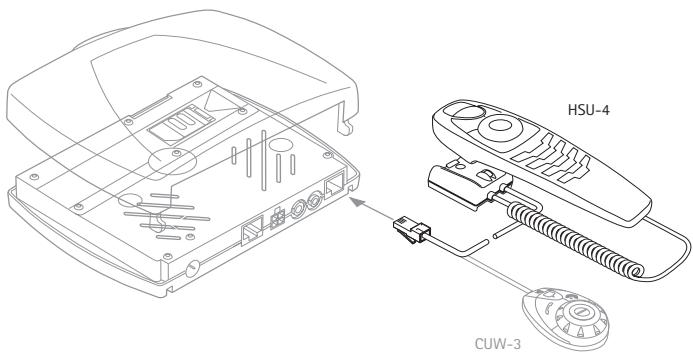
The Nokia Car Handset HSU-4 replaces the CUW-3 input device supplied with the Nokia 610 or Nokia 616 car kit phone.
This user and installation guide supplements the user guide belonging to the scope of supply of the car kit phone.
2. Mounting the handset
The handset comes with a mount that is to be fixed in a suitable location where it is easily accessible for the user.
Remember that all equipment must be mounted so that it does not interfere with the operation of the vehicle. Check to make sure that deployment of the airbag is not blocked or impaired in any way.
With ignition off, remove the cable connection from the CUW-3 input device to the radio unit and insert the handset cable in the appropriate socket in the radio unit (see the figure on the title page).
The best location to mount the handset is horizontally on the console between the driver's and front passenger's seats.
Contact your service technician for further detailed information on alternatives for mounting the handset suitably in your vehicle.
3. Functions of the handset
The handset consists of the function selectors including four keys and a Navi™ wheel, the alphanumeric keypad, the microphone, and the earpiece. As the function selectors at the upper part of the handset are identical to the components on CUW-3 input device supplied with the Nokia 610 or Nokia 616 car kit phone, please refer to the car kit phone user guide for the relevant information on their use.
■ Alphanumeric keypad
Use these keys to enter numbers 0-9, letters, and other characters.
Several characters have been assigned to each key. To enter a character, repeatedly press the related key until you have reached the desired character.
Entering numbers and characters:
- To enter a number, press and hold the number key for approximately one second.
• To call up characters, repeatedly press 1 _∞ .
• To enter a blank space, press ☐. - To switch between upper- and lower-case characters, press ⚠️.
- Use 📄 I to move the cursor in the entered text.
For example, if you wish to enter the letter "C", press three times. When the flashing cursor appears to the right of the letter entered, you can select the next character to be entered. Repeat these steps until you have completed your entry.
The procedure set out above applies only for entering text.

When you have finished using the handset, make sure that it is placed securely in the cradle. A loose handset may cause bodily injury if you have to brake sharply or should have an accident.
■ Making a call using the keypad
You can also make a call by keying in a phone number:
- In the standby display, key in the desired phone number by pressing the number keys 0 to 9.
- If you have keyed in the number incorrectly, press ↗ to delete it.
- To call the number shown on the display, press ↗.
■ Searching for names and numbers
You can access the list of names and phone numbers quickly from the standby display:
- Scroll with 📋 to the first letter of the desired name and press 🖱️ to select it.
You can now view all the names stored in your contacts list which start with the letter selected. They are listed in alphabetical order.
- Scroll with 📂 to the desired name in the list.
• To make a call to this person, press ↗. - To end the call, press ↗.
■ Adding a name and a phone number
Names and phone numbers are stored in the phone book. You can add a name and the related number to the contacts entries starting from the standby display:
- Select the Contacts menu and press 🔒 to open the list of contacts.
- Scroll with 📋 to Add contact and press 🔊 to select this option.
- Key in the name with the alphanumeric keys and press 🔒 to save it.
• Key in the corresponding number and press ↓ to save it. - To erase a character incorrectly selected, press ↗.
■ Editing names and phone numbers
You can edit names and phone numbers in the Contacts starting from the standby display:
- Select the Contacts menu and press 🔒 to open the list of contacts.
- Scroll with 📋 to Edit contact and press 📋 to select this option.
- Scroll with 📁 to the first letter of the desired name and press 📋 to view the list of entries starting with this letter.
- Scroll with 🔊 to the desired name in the contacts and press 🔊 to select it.
- Scroll with 📁 to the letter or number to be changed and make the desired changes.
- To save any changes made, press 📋.
■ Saving multiple numbers and text items per name
You can add as many as four additional phone numbers to an entry in the contacts. The first number saved under a name is automatically set as the default number and is indicated with ☐ (General). Symbols can be added for other number types, i.e. ☐ (Mobile), ☐ (Home),
(Office), and (Fax).
Starting from the standby display:
- Select the Contacts menu and press 📋 to open the list of contacts.
- Scroll with 📋 to Add number and press 🖼️ to select this option.
- Scroll with 🔒 to the desired name and press 🔒 to select it.
- Scroll with 🔍 to the symbol you wish to assign to the number you are adding and press 🔍 to select it.
• Key in the number and press 📋 to save it.
Speed dialling
The speed dialling option is a convenient shortcut function that lets you dial a phone number assigned to a number key quickly and easily. You can activate (On) or deactivate (Off) this feature in the menu Settings - Call settings - Speed dialling.
Assigning a phone number to a speed dialling key
You can assign any phone number in your phone book to a speed dialling key (2.5 to 9). Note that the key is reserved for speed dialling your voice mailbox. The following options are available for each of the dialling keys: show number, edit or erase.
Starting from the standby display:
- Select the Contacts menu and press 🏠 to open it.
- Scroll with 📋 to Speed dialling and press 📋 to select this option.
You can now view the list of speed dialling keys and the phone numbers that have been assigned to them.
- Scroll with 📋 to the desired entry in the contacts and press 🖱️ to select it.
The options Show number, Edit, and Erase will be displayed.
- Scroll with 📄 to the desired option and press 🐃 to select it.
- Follow the instructions shown on the display.
Speed dialling a number
- Press and hold the speed dialling key assigned to the number until the call is started.
- Nokia Car Handset Installation Guide User Guide
- ROAD SAFETY COMES FIRST
- Important information
- Mounting the handset
- Functions of the handset
- ■ Alphanumeric keypad
- ■ Making a call using the keypad
- ■ Searching for names and numbers
- ■ Adding a name and a phone number
- ■ Editing names and phone numbers
- ■ Saving multiple numbers and text items per name
- Speed dialling
- Assigning a phone number to a speed dialling key
- Speed dialling a number
Marque : NOKIA
Modèle : CAR HANDSET HSU-4
Catégorie : Accessoire de voiture