
BLUETOOTH HEADSET BH-208 - Accessoire audio NOKIA - Notice d'utilisation et mode d'emploi gratuit
Retrouvez gratuitement la notice de l'appareil BLUETOOTH HEADSET BH-208 NOKIA au format PDF.


| Type de produit | Casque Bluetooth (oreillette) |
| Marque | Nokia |
| Modèle | BH-208 |
| Technologie Bluetooth | Bluetooth 2.0 + EDR |
| Profils pris en charge | Profil casque 1.1, Profil mains-libres 1.5 |
| Portée maximale | Jusqu'à 10 mètres |
| Autonomie en communication | Jusqu'à 6 heures 30 minutes |
| Autonomie en veille | Jusqu'à 150 heures |
| Temps de charge | Environ 1 heure 30 minutes |
| Type de batterie | Interne rechargeable, non amovible |
| Chargeurs compatibles | AC-3, AC-4, DC-4 |
| Indicateur lumineux | Rouge pendant la charge, vert lorsque la charge est complète |
| Fonctionnalités des touches | Touche Répondre/Fin d'appel, touche Volume (haut/bas/muet), touche Marche/Arrêt |
| Contour d'oreille | Amovible et réversible pour oreille gauche ou droite |
| Code d'appairage | 0000 |
| Entretien | Garder au sec, éviter poussière et températures extrêmes |
| Sécurité | Ne pas exposer au feu, garder hors de portée des enfants |
| Homologation | CE 0434, conforme à la directive 1999/5/CE |
FOIRE AUX QUESTIONS - BLUETOOTH HEADSET BH-208 NOKIA
Questions des utilisateurs sur BLUETOOTH HEADSET BH-208 NOKIA
0 question sur cet appareil. Repondez a celles que vous connaissez ou posez la votre.
Poser une nouvelle question sur cet appareil
Téléchargez la notice de votre Accessoire audio au format PDF gratuitement ! Retrouvez votre notice BLUETOOTH HEADSET BH-208 - NOKIA et reprennez votre appareil électronique en main. Sur cette page sont publiés tous les documents nécessaires à l'utilisation de votre appareil BLUETOOTH HEADSET BH-208 de la marque NOKIA.
MODE D'EMPLOI BLUETOOTH HEADSET BH-208 NOKIA
Nokia Bluetooth Headset BH-208
Issue 1
DECLARATION OF CONFORMITY
Hereby, NOKIA CORPORATION declares that this HS-80W product is in compliance with the essential requirements and other relevant provisions of Directive 1999/5/EC. A copy of the Declaration of Conformity can be found at http://www.nokia.com/phones/declaration_of_conformity/.
C€0434
© 2007 Nokia. All rights reserved.
Reproduction, transfer, distribution or storage of part or all of the contents in this document in any form without the prior written permission of Nokia is prohibited.
Nokia and Nokia Connecting People are registered trademarks of Nokia Corporation. Other product and company names mentioned herein may be trademarks or tradenames of their respective owners.
Bluetooth is a registered trademark of Bluetooth SIG, Inc.
Nokia operates a policy of ongoing development. Nokia reserves the right to make changes and improvements to any of the products described in this document without prior notice.
Under no circumstances shall Nokia be responsible for any loss of data or income or any special, incidental, consequential or indirect damages howsoever caused.
The contents of this document are provided "as is". Except as required by applicable law, no warranties of any kind, either express or implied, including, but not limited to, the implied warranties of merchantability and fitness for a particular purpose, are made in relation to the accuracy, reliability or contents of this document. Nokia reserves the right to revise this document or withdraw it at any time without prior notice.
The availability of particular products may vary by region. Please check with the Nokia dealer nearest to you.
Unauthorized changes or modifications to this device may void the user's authority to operate the equipment.
Export Controls
This device may contain commodities, technology or software subject to export laws and regulations from the US and other countries. Diversion contrary to law is prohibited.
The Nokia Bluetooth Headset BH-208 allows you to make and receive calls while on the move. You can use the headset with compatible phones that support Bluetooth wireless technology.
Read this user guide carefully before using the headset. Also read the user guide for your phone, which provides important safety and maintenance information. Keep the headset out of reach of small children.
Bluetooth wireless technology
Bluetooth wireless technology allows you to connect compatible devices without cables. The phone
Get started
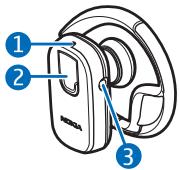
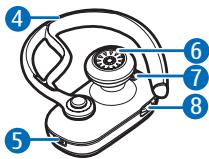
The headset contains the following parts shown on the title page:
and the headset do not need to be in line of sight, but they should be within 10 meters (30 feet) of each other. Connections may be subject to interference from obstructions, such as walls, or other electronic devices.
The headset complies with the Bluetooth Specification 2.0 + EDR that supports the Headset Profile 1.1 and Hands-Free Profile 1.5. Check with the manufacturers of other devices to determine their compatibility with this device.
There may be restrictions on using Bluetooth technology in some locations. Check with your local authorities or service provider.
indicator light (1), answer/end key (2), charger connector (3), earloop
(4), microphone (5), earpiece (6), power key (7), and volume key (8).
Before using the headset, you must charge the battery and pair the headset with a compatible phone.
Parts of the headset are magnetic. Metallic materials may be attracted to the headset. Do not place credit cards or other magnetic storage media near the headset, because information stored on them may be erased.
Chargers
Check the model number of any charger before using it with this headset. The headset is intended for use with the
AC-3, AC-4, and DC-4 chargers.

Warning: Use only chargers approved by Nokia for use with this
particular enhancement. The use of any other types may invalidate any approval or warranty and may be dangerous.
When you disconnect the power cord of any enhancement, grasp and pull the plug, not the cord.
Charge the battery
The headset has an internal, nonremovable, rechargeable battery. Do not attempt to remove the battery from the device, as you may damage the device.
- Connect the charger to a wall outlet.
- Connect the charger cable to the charger connector. The red indicator light is on while charging. It may take a while before charging starts. If charging does not start, disconnect the charger, plug it in again, and retry. Charging the battery fully may take up to 1 hour and 30 minutes.
- When the battery is fully charged, the indicator light turns to green. Disconnect the
charger from the headset and the wall outlet.
The fully charged battery has power for up to 6 hours and 30 minutes of talk-time or up to 150 hours of standby time. However, the talk and standby times may vary when used with different mobile phones or other compatible Bluetooth devices, usage settings, usage styles, and environments.
When battery power falls low, the headset beeps and the red indicator light starts to flash.
Switch the headset on or off
To switch on, press and hold the power key until the headset beeps and the green indicator light is displayed.
To switch off, press and hold the power key until the headset beeps and the red indicator light is displayed briefly.
Pair the headset
- Ensure that your phone is switched on and the headset is switched off.
- Press and hold the power key until the green indicator light starts to flash quickly.
- Activate the Bluetooth feature on the phone, and set the phone to search for Bluetooth devices.
- Select the headset from the list of found devices.
- Enter the passcode 0000 to pair and connect the headset to your phone. In some phones you may need to make the connection separately after pairing. You only need to pair the headset with your phone once.
If the pairing is successful, the headset beeps and appears in the phone menu where you can view the currently paired Bluetooth devices. The headset is now ready for use.
Place the headset on the ear
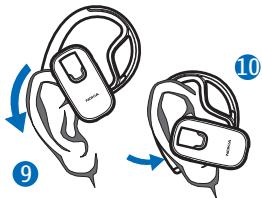
Slide the earloop behind your ear (9), and point the headset toward your mouth. Carefully bend the earloop around your ear for the best fit (10).
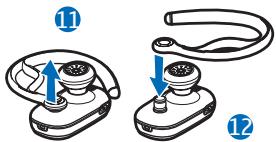
To use the headset on the left ear, gently detach, rotate, and attach the earloop as shown in Figures 11 and 12.
Call handling
To make a call, use your phone in the normal way when the headset is connected to your phone.
If your phone supports last number redialing with the headset, press the answer/end key twice while no call is in progress.
If your phone supports voice dialing with the headset, press and hold the answer/end key when no call in progress, and proceed as described in the user guide of your phone.
To answer or end a call, press the answer/end key. To reject an incoming call, press the answer/end key twice.
To adjust the headset volume, press the volume key up or down.
To mute or unmute the microphone, press the middle of the volume key.
To switch the call between the headset and a compatible phone, press and hold the answer/end key.
Clear settings or reset
To clear all the pairing settings from the headset, switch off the headset, and press and hold the power key and the answer/end key until the red and green indicator lights start to alternate.
To reset the headset if it stops functioning, although it is charged, plug the headset into a charger, and
press the power key and the answer/end key at the same time.
Battery information
Your device is powered by a rechargeable battery. The battery can be charged and discharged hundreds of times, but it will eventually wear out. Recharge your battery only with Nokia approved chargers designated for this device.
Unplug the charger from the electrical plug and the device when not in use. Do not leave a fully charged battery connected to a charger, since overcharging may shorten its lifetime. If left unused, a fully charged battery will lose its charge over time.
Never use any charger that is damaged.
Leaving the device in hot or cold places, such as in a closed car in summer or winter conditions, will reduce the capacity and lifetime of the battery. Always try to keep the battery between 15°C and 25°C (59°F and 77°F). A device with a hot or cold battery may not work temporarily, even when the battery is fully charged. Battery performance is particularly limited in temperatures well below freezing.
Do not dispose of batteries in a fire as they may explode. Batteries may also explode if damaged.
Care and maintenance
Your device is a product of superior design and craftsmanship and should
be treated with care. The following suggestions will help you protect your
warranty coverage.
- Keep the device dry. Precipitation, humidity, and all types of liquids or moisture can contain minerals that will corrode electronic circuits. If your device does get wet, allow it to dry completely.
- Do not use or store the device in dusty, dirty areas. Its moving parts and electronic components can be damaged.
- Do not store the device in hot areas. High temperatures can shorten the life of electronic devices, damage batteries, and warp or melt certain plastics.
- Do not store the device in cold areas. When the device returns to its normal temperature, moisture can form inside the device and damage electronic circuit boards.
- Do not attempt to open the device.
- Do not drop, knock, or shake the device. Rough handling can break internal circuit boards and fine mechanics.
- Do not use harsh chemicals, cleaning solvents, or strong detergents to clean the device.
- Do not paint the device. Paint can clog the moving parts and prevent proper operation.
All of the above suggestions apply equally to your device, battery, charger, or any enhancement. If any device is not working properly, take it to the nearest authorized service facility for service.
- Nokia Bluetooth Headset BH-208
- DECLARATION OF CONFORMITY
- C€0434
- Export Controls
- Bluetooth wireless technology
- Get started
- Chargers
- Charge the battery
- Switch the headset on or off
- Pair the headset
- Place the headset on the ear
- Call handling
- Clear settings or reset
- Battery information
- Care and maintenance
Marque : NOKIA
Modèle : BLUETOOTH HEADSET BH-208
Catégorie : Accessoire audio