
BTHF-011MT - Kit voiture MT Logic - Notice d'utilisation et mode d'emploi gratuit
Retrouvez gratuitement la notice de l'appareil BTHF-011MT MT Logic au format PDF.


| Type de produit | Kit voiture Bluetooth mains-libres |
| Marque | MT Logic |
| Modèle | BTHF-011MT |
| Technologie Bluetooth | Bluetooth (version non spécifiée, compatible avec la plupart des téléphones) |
| Portée Bluetooth | Environ 10 mètres (champ libre) |
| Alimentation | Batterie rechargeable intégrée (charge via adaptateur allume-cigare ou port USB) |
| Temps de charge | Environ 3 heures pour une charge complète |
| Autonomie en communication | Non communiquée (utilisation typique de plusieurs heures) |
| Autonomie en veille | Jusqu'à plusieurs jours (s'estime automatiquement après 30 min sans connexion) |
| Indicateur LED | Bleu (marche/veille), rouge (charge/muet), alternance bleu/rouge (appairage) |
| Commandes vocales | Oui (activation par "Hello BlueGenie", reconnaissance vocale intégrée) |
| Fonctions principales | Appels mains-libres, numérotation vocale, recomposition, refus d'appel, renvoi d'appel, mode silencieux, transfert d'appel, téléchargement du répertoire téléphonique |
| Boutons physiques | Touche multifonction (MFT), touche MODE, volume +/-, micro, haut-parleur |
| Compatibilité | Téléphones mobiles et lecteurs musicaux Bluetooth |
| Poids | Environ 50 g (estimation) |
| Dimensions (L x l x H) | Environ 10 x 5 x 2 cm (estimation) |
| Entretien et nettoyage | Essuyer avec un chiffon doux et sec. Ne pas utiliser de produits abrasifs. |
| Sécurité | Ne pas exposer à l'eau, aux liquides ou à des sources de chaleur. Ne pas démonter. |
| Pièces détachées et réparabilité | Non prévu par l'utilisateur. Contacter un centre de service agréé. |
| Garantie | Garantie constructeur (conditions non détaillées) |
| Informations générales | Conforme à la directive R&TTE 1999/5/EC. Fabricant : Tristar Europe B.V., Pays-Bas. |
FOIRE AUX QUESTIONS - BTHF-011MT MT Logic
Questions des utilisateurs sur BTHF-011MT MT Logic
0 question sur cet appareil. Repondez a celles que vous connaissez ou posez la votre.
Poser une nouvelle question sur cet appareil
Téléchargez la notice de votre Kit voiture au format PDF gratuitement ! Retrouvez votre notice BTHF-011MT - MT Logic et reprennez votre appareil électronique en main. Sur cette page sont publiés tous les documents nécessaires à l'utilisation de votre appareil BTHF-011MT de la marque MT Logic.
MODE D'EMPLOI BTHF-011MT MT Logic

text_image
MTlogicNL Gebruiksaanwijzing
EN Instruction Manual
natural_image
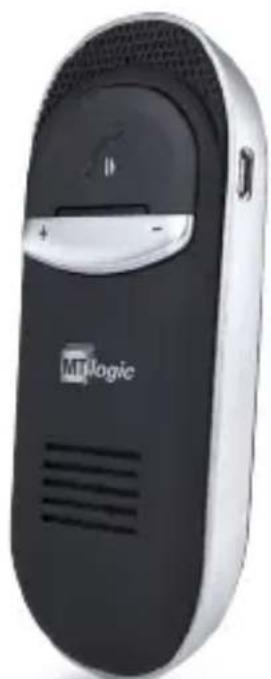
Black MTLogic mobile phone with speaker grille and control buttons (no visible text beyond brand logo)Bluetooth handsfree carkit
Spraakcommando's – Tekst naar spraak
BTHF-011MT
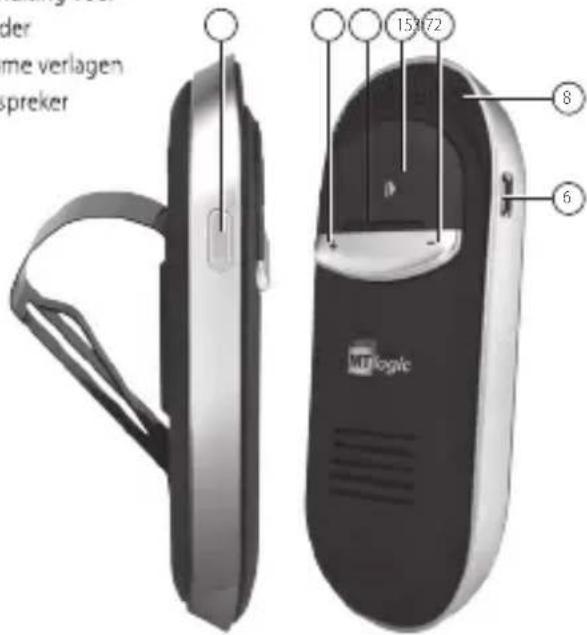
PRODUCTOVERZICHT
- Multifunctionele toets (MFT)
- MODE-toets
- Volume verhogen
- Microfoon
- LED-indicatielampje
- Aansluiting voor oplader
- Volume verlagen
- Luidspreker
text_image
der me verlagen spreker 15372 8 6OPLADEN
- Laad voor het gebruik het toestel gedurende ongeveer 3,5 uur op, om ervoor te zorgen dat de luidsprekertelefoon volledig is opgeladen en dat de batterij zijn volledige capaciteit heeft bereikt (met een autolader of een PC m.b.v. een USB-laadkabel).
- Het duurt ongeveer 3 uur om de batterij volledig te laden.
- De LED licht tijdens het laden rood op en gaat uit als het opladen is voltooid.
- Als u de luidsprekertelefoon gedurende enkele maanden niet hebt gebruikt, kan het zijn dat de LED bij het opladen niet gelijk rood oplicht – het kan 15-35 minuten duren voordat de LED rood oplicht.
PAREN/AANSLUITEN (ONLINE HANDLEIDING)
Wanneer u de luidsprekertelefoon voor de eerste keer met een Bluetooth toestel gebruikt, is het belangrijk om ze eerst te paren.
Procedure voor paren:
• Zorg ervoor dat de luidsprekertelefoon uit is.
- Houd de MFT-toets gedurende ongeveer 4 seconden ingedrukt, totdat de LED afwisselend blauw en rood knippert. Dit geeft aan dat de luidsprekertelefoon gereed is om te paren. De luidsprekertelefoon kondigt aan: "Welcome to the BlueGenie voice interface car kit. Pair mode, enable the Bluetooth
search function on your device, search for and select BlueGenie ID. When prompted, enter "0000" as the passcode."
• Schakel de Bluetooth-functie van uw Bluetooth-toestel in.
- Zoek vanaf uw telefoon (of muziekspeler) naar apparatuur.
- Selecteer in de lijst met gevonden apparatuur "BTHF-011MT" en volg om het paren uit te voeren de aanwijzingen op; voer de pincode 0000 in. De luidsprekertelefoon kondigt aan: "Pairing successful".
- Als het paren niet binnen 2 minuten lukt, kondigt de luidsprekertelefoon aan: "Pairing failed, please put your phone in pairing mode and try again". Herstart het toestel en paar opnieuw, zoals hierboven aangegeven.
- De luidsprekertelefoon is aangesloten op uw telefoon (of muziekspeler) en is gereed voor gebruik als hij aankondigt: "your phone is connected".
- Als de luidsprekertelefoon voor de eerste keer met uw telefoon wordt gebruikt, kondigt hij aan: "Your phone is connected. To check your connection at any time, press the main button on your Handsfreee CarKit and say "Am I connected?" Always remember the "What can I Say" command for a list of active commands."
Zodra hij eenmaal is gepaard en er een verbinding tot stand is gebracht, zal de luidsprekertelefoon iedere keer
dat u de luidsprekertelefoon inschakelt, automatisch een verbinding met het toestel tot stand brengen, op voorwaarde dat het toestel binnen bereik is.
BASISBEDIENING
In-/Uitschakelen
- Inschakelen van de luidsprekertelefoon – Houd de MFT gedurende 4 seconden ingedrukt, totdat u een korte pieptoon hoort. De blauw LED licht op.
- De luidsprekertelefoon kondigt aan: "Welcome to the BlueGenie voice interface car kit"
- Uitschakelen van de luidsprekertelefoon – Houd de MFT gedurende 4 seconden ingedrukt, totdat u een pieptoon hoort. Voordat het toestel uitgaat, licht de rode LED op.
- De luidsprekertelefoon kondigt aan: "Goodbye"
OPMERKING:
- In de stand-bystand knippert het LED-indicatielampje om de 3 seconden in blauw.
- Als de verbinding verloren gaat, schakelt de luidsprekertelefoon zichzelf na 30 minuten automatisch uit.
HET VOEREN VAN GESPREKKEN
Spraksturing
- Zeg "Hello BlueGenie" en wacht totdat de luidsprekertelefoon u vraagt: "Say a Command", zeg dan:
- "Phone Commands" om de functie kiezen met spraak op uw telefoon te activeren, als uw telefoon dit ondersteunt.
• "Redial" om het laatstgekozen nummer te herhalen. - "Call Back" om het nummer van het laatste inkomende gesprek terug te bellen.
Handmatige bediening
Herhalen laatstgekozen nummer: Druk tweemaal de MFT-toets voor het herhalen van het laatstgekozen nummer.
HET BEANTWOORDEN VAN GESPREKKEN
Spraksturing
Wacht wanneer u wordt gebeld tot de luidsprekertelefoon u vraagt: "Call from (naam of nummer), answer or ignore?" en zeg dan: "Answer" of "Ignore".
Handmatige bediening
Druk bij een inkomend gesprek kort op de MFT om het gesprek aan te nemen. Houd de MFT 2 seconden ingedrukt om het gesprek te weigeren.
Beëindigen van een gesprek
Druk eenmaal kort op de MFT.
Volumestand
- Minimale stand: Druk tijdens een gesprek kort op de toets "MODE". Het volume van de luidspreker en de microfoon worden teruggebracht tot het minimum niveau. In deze toestand brandt de LED constant blauw.
- Normale stand: Druk in de "stand minimaal volume" kort op de toets "MODE". Het volume van de luidspreker en de microfoon keren terug naar het normale niveau.
Microfoon dempen & herstellen
- Dempen: Houd tijdens een gesprek de toets "MODE" gedurende 3 seconden ingedrukt. Het volume van de luidspreker en de microfoon worden gedempt. In de stand "Dempen" brandt de LED constant rood.
- Stand normaal volume: Houd in de stand "Dempen"
de toets "MODE" gedurende 3 seconden ingedrukt. Het volume van de microfoon keert terug naar het normale niveau.
Het overdragen van gesprekken
- Van de luidsprekertelefoon naar een mobiele telefoon: Druk tijdens een gesprek tweemaal op de toets "MODE" om het gesprek over te dragen.
- Van een mobiele telefoon naar de luidsprekertelefoon: Druk eenmaal de MFT-toets. Het gesprek keert terug naar de luidsprekertelefoon.
Downloaden telefoonboek
- Als de luidsprekertelefoon voor de eerste keer een verbinding tot stand brengt met een mobiele telefoon, downloadt hij automatisch het telefoonboek en kondigt aan: "Loading phonebook, please wait". Tijdens deze procedure blijft de LED blauw branden.
- Tijdens het overdragen van het telefoonboek kondigt hij iedere 30 seconden aan "please wait".
-
Als de overdracht van het telefoonboek is voltooid, kondigt de luidsprekertelefoon aan: "contact saved" en "numbers of phonebook data received from mobile phone phonebook and SIM card". The LED zal in de stand-bystand staan.
-
De luidsprekertelefoon draagt het telefoonboek niet opnieuw over als er weer een verbinding met de mobiele telefoon tot stand wordt gebracht. Het telefoonboek dient handmatig te worden bijgewerkt. Houd in de stand-bystand de toets "MODE" gedurende 3 seconden ingedrukt. Hierdoor wordt het oude telefoonboek verwijderd en het nieuwe telefoonboek opnieuw gedownload.
- De in de luidsprekertelefoon opgeslagen gegevens van het telefoonboek worden automatisch vervangen als hij met een andere mobiele telefoon wordt gepaard.
- Verwijderen van posten in het telefoonboek: Houd in de stand-bystand gelijktijdig de toetsen "V +" en "V-" gedurende 3 seconden ingedrukt (Er wordt aangekondigd: "Phonebook deleted").
- Als de luidsprekertelefoon er niet in slaagde om het telefoonboek te downloaden, dan kondigt hij aan: "Loading phonebook failed". Controleer in dat geval uw mobiele telefoon.
Herstellen van de standaard instellingen
Als de standaard fabrieksinstellingen van de luidsprekertelefoon worden hersteld, dan wordt alle informatie van de gepaarde mobiele telefoon
gewist. Volg onderstaande stappen om uw luidsprekertelefoon opnieuw in te stellen in de standaard fabrieksinstellingen:
- Zorg ervoor dat de luidsprekertelefoon in de standbystand staat.
- Houdt de toetsen "V+" en "V-" gedurende ongeveer 10 seconden ingedrukt, totdat de LED blauw begint te knipperen. Laat nu de toetsen los.
- Houdt de toetsen "V+" en "V-" gedurende nog 2 seconden ingedrukt. Het toestel kondigt aan: "Set factory default complete". Laat nu de toetsen los. De luidsprekertelefoon schakelt zichzelf automatisch uit. De luidsprekertelefoon keert terug naar de oorspronkelijke instellingen. Als hij weer wordt ingeschakeld, gaat hij automatisch naar de paarstand.
SPRAAKCOMMANDO'S
Als u iets wilt doen, zeg dan gewoon: "Hello BlueGenie", wacht totdat de luidsprekertelefoon u vraagt: "Say a command" en spreek dan een van de volgende commando's in:
"What can I say?"
De luidsprekertelefoon leest een lijst met alle commando's die beschikbaar zijn in het huidige menu: "You can say: Pair mode, Am I connected, Phone command, Check battery, Call back, Redial, Call information, Call Favorite 1 to 5, Call voicemail, Call home, Call office, Settings menu en Cancel."
"Pair mode"
De luidsprekertelefoon gaat in de paarstand.
"Am I connected?"
De luidsprekertelefoon controleert of er een verbinding is. Als dit niet het geval is, zal hij proberen een verbinding tot stand te brengen.
"Phone command"
Voor het activeren van de functie kiezen met spraak op uw telefoon, als uw telefoon dit ondersteunt.
"Check battery"
De luidsprekertelefoon vertelt u het niveau van de batterij.
"Call back"
Bel het nummer van het laatste inkomende gesprek terug.
"Redial"
Herhalen laatstgekozen nummer
"Call voicemail"
Kies het voicemailnummer voor uw telefoon.
"Call Favorite 1 to 5, Call home, Call office"
Kies het nummer dat u in uw favoriete nummers hebt opgeslagen.
"Settings menu"
Het instellingenmenu omvat:
- Say a command prompt: u kunt kiezen uit "Pieptoon" in plaats van de aankondiging "Say a command".
- Incoming call announcement: In- of uitschakelen van alle aankondigingen van inkomende gesprekken.
- Opslaan als favoriet: Sla het nummer van het laatste inkomende gesprek op in "Favoriet thuis", "Favoriet kantoor", "Favoriet 1", "Favoriet 2", "Favoriet 3", "Favoriet 4" of "Favoriet 5".
Hulp bij spraaksturing
Handenvrije activering (Instellingenmenu activering):
- Trigger always on: De luidsprekertelefoon luistert altijd naar uw stem.
- Battery saving trigger: In deze stand luistert de luidsprekertelefoon slechts 10 minuten na de laatste
actie. Zodra de 10 minuten voorbij zijn stopt de luidsprekertelefoon met luisteren; druk de MFT in plaats van te zeggen: "Hello BlueGenie".
- Trigger off: De luidsprekertelefoon stopt met luisteren. Druk de MFT in plaats van te zeggen: "Hello BlueGenie"
- Schakel spraaksturing uit: Uitschakelen van de spraaksturing op de luidsprekertelefoon.
- Schakel spraakturing in: Houd in de stand-bystand de toets "V-" gedurende 6 seconden ingedrukt. De luidsprekertelefoon kondigt aan: "The Voice Control is on".
"Cancel"
Annuleer de uitvoering van het huidige commando.
VEILIGHEIDSINFORMATIE
- Laat het toestel niet van grote hoogte vallen, om schade of storingen te voorkomen.
-
Houd het toestel uit de buurt van vocht, water en andere vloeistoffen. Als het toestel wordt blootgesteld aan water, vocht of andere vloeistoffen, gebruik het dan niet om elektrische schokken, explosies en schade aan het toestel of letsel aan uzelf te voorkomen.
-
Plaats of bewaar dit toestel niet in de buurt van warmtebronnen, zoals radiators, formuizen of andere apparaten die warmte produceren. Dit kan leiden tot explosies, degradatie van de prestaties en/of de levensduur van de batterij verminderen.
- Modificeer of repareer het toestel niet en haal het niet uit elkaar (in het bijzonder de batterij: dit kan een explosie veroorzaken). Als u dit doet wordt de garantie ongeldig.
- Plaats geen zware voorwerpen op het toestel.
- Gebruik uitsluitend de meegeleverde en goedgekeurde oplader.
- Onderhoud of vervangingen mogen uitsluitend worden uitgevoerd door een bevoegd onderhoudscentrum of door de fabrikant.
- Ontkoppel het toestel wanneer het gedurende langere tijd niet wordt gebruikt of tijdens onweer.
LET OP: GEVAAR OP ELEKTRISCHE SCHOKKEN
De in dit toestel gebruikte batterij kan bij misbruik het risico op brand of chemische brandwonden opleveren.

text_image
Diagram showing a trash bin crossed with a diagonal line and a blank rectangular block below, indicating no waste or disposal.RICHTLIJNEN VOOR MILIEUBESCHERMING
Dit toestel mag aan het eind van zijn levensduur niet worden afgevoerd met het huishoudelijke afval, maar dient te worden ingeleverd bij een centraal
punt voor het recyclen van elektrische en elektronische huishoudelijke apparaten. Dit symbool op het toestel, de gebruiksaanwijzing en de verpakking vestigt uw aandacht op deze belangrijke kwestie. De in dit toestel gebruikte materialen kunnen worden gerecycled. Door het recyclen van gebruikte huishoudelijke apparatuur levert u een belangrijke bijdrage aan de bescherming van het milieu. Vraag uw lokale overheid om informatie over het inzamelpunt.
Dit product voldoet aan de belangrijkste eisen en andere relevante voorzieningen van de richtlijn eindapparatuur voor radio- en telecommunicatie 1999/5/EC.
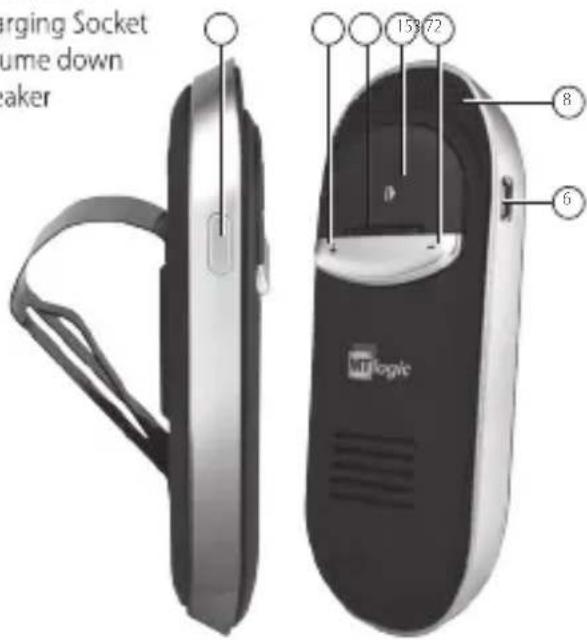
PRODUCT OVERVIEW
- Multi-function button (MFB)
- MODE button
- Volume up
- Microphone
- LED indicator
- Charging Socket
- Volume down
- Speaker
text_image
Merging Socket lume down Breaker 153/72 8 6CHARGING
- Before use, please charge the device for around 3.5 hours to make sure the speakerphone is fully charged and the battery reach its full capacity (by car charger, or by PC via USB charging cable).
• A full charge takes about 3 hours.
• LED will indicate red when charging and off when charging is complete. - If you have not used the Speakerphone for a few months, LED might not turn red when first charging – it might take 15-35 minutes before the LED turns red.
PAIRING/CONNECTING (TUTORIAL
ONLINE)
It is important to pair the Speakerphone with your Bluetooth device for the first time use.
Pairing procedure:
• Ensure the speakerphone is off.
- Press and hold the MFB button for about 4 seconds until the LED flashes blue and red alternately. This indicates the speakerphone is ready for pairing.
Speakerphone will announce: "Welcome to the BlueGenie voice interface car kit. Pair mode, enable the Bluetooth search function on your device, search for and select BlueGenie ID. When prompted, enter "0000" as the passcode."
• Turn on the Bluetooth feature in your Bluetooth device.
• Perform a device discovery from your phone (or music device).
- Select "BTHF-011MT" in the list of discovered devices, follow the steps and enter pin code 0000 to pair. Speakerphone will announce: "Pairing successful".
- If pairing is not completed successfully within 2 minutes, Speakerphone will announce "Pairing failed, please put your phone in pairing mode and try again". Restart the device and re-pair them as above.
- Speakerphone has been connected with your phone (or music device) and is ready for use when it announces "Your phone is connected".
- If Speakerphone is being used with your phone for the first time, it will announce "Your phone is connected. To check your connection at any time, press the main button on your Handsfreee CarKit and say 'Am I connected?" Always remember the "What can I Say" command for a list of active commands."
Once paired and connected, the speakerphone will be automatically connected to the device whenever you turn the speakerphone on again, provided the device is in range.
BASIC OPERATIONS
Turn ON/OFF
- Turn on the Speakerphone – Press and hold the MFB for 4 seconds until you hear a short beep. The blue LED will light up.
- Speakerphone will announce: "Welcome to the BlueGenie voice interface car kit"
- Turn off the Speakerphone – Press and hold the MFB for 4 seconds until you hear a beep. The red LED will light up before power off.
• Speakerphone will announce: "Goodbye"
NOTE:
- In standby mode, the LED indicator will flash blue every 3 seconds.
- When losing connection, the speakerphone will automatically switch itself off after 30 minutes.
MAKING CALLS
Voice Control
- Say "Hello BlueGenie" and wait for the Speakerphone to ask you to "Say a Command", then:
- Say "Phone Commands" to activate the voice dial feature on your phone, if your phone supports this.
- Say "Redial" to redial the last outgoing call.
- Say "Call Back" to call back the last incoming call.
Hand Operation
Re-dialing: Press the MFB button twice for last number redialing.
ANSWERING CALLS
Voice Control
When you have an incoming call, wait for the Speakerphone to ask you "Call from (Name or Number), answer or ignore?", then say "Answer" or "Ignore".
Hand Operation
When you have an incoming call, press the MFB briefly to pick up the call. Alternatively, hold the MFB for 2 seconds to reject the call.
Ending a Call
Press the MFB briefly once.
VOLUME MODE
- Minimal Mode: During a call, press the "MODE" button briefly. The speaker and microphone volume will be decreased to minimal level, and the blue LED will stay on in this mode.
- Normal Mode: Press the "MODE" button briefly during the "Minimal Volume Mode". The speaker and microphone volume will back to be normallevel.
Microphone Mute & Un-mute
- Mute: During a call, press and hold the "MODE" button for 3 seconds. The microphone volume will be muted, and the red LED will stay on in "Mute" mode.
- Normal Volume Mode: Press the "MODE" button for 3 seconds in the "Mute" mode. The microphone volume will be back to normal level.
Transferring Calls
- Speakerphone to mobile phone: During a call, press the "MODE" button twice to transfer the call.
• Mobile phone to Speakerphone: Press the
MFB button once. The call will be back on the Speakerphone.
Phonebook Downloading
- When the Speakerphone is connected with a mobile phone for the first time, it will automatically download the phonebook, and announce "Loading phonebook, please wait". The blue LED will remain on during this process.
- During phonebook transfer, it will announce "please wait" in every 30 seconds.
- When the phonebook transfer has completed, the Speakerphone will announce "contact saved" and "numbers of phonebook data received from mobile phone phonebook and SIM card". The LED will be in standby mode.
- Speakerphone will not transfer the phonebook again when connected again to the mobile phone. Updates to the phonebook are done manually. In standby mode, press and hold the "MODE" button for 3 seconds. This will remove the old phonebook and re-download the new phonebook.
• The phonebook data saved in Speakerphone will
be replaced automatically when it is paired with another mobile phone.
- Removing Phonebook Entries: In standby mode, hold both "V+" and "V-" for 3 seconds ("Phonebook deleted" is announced).
- If your Speakerphone failed to download the phonebook, it will announce "Loading phonebook failed". Please check your mobile phone.
Restore to Default Settings
When your Speakerphone is reset to factory default settings, all the paired mobile phone information will be erased. Please follow the steps below to reset your Speakerphone to factory default settings:
- Ensure the Speakerphone is in standby mode.
- Press and hold both "V+" and "V-" for about 10 seconds, until the Blue LED flashes. Now release the buttons.
- Press and hold both "V+" and "V-" for 2 more seconds. It will announce "Set factory default complete". Now release the buttons. Speakerphone will automatically switch itself off. Speakerphone will be back to original settings, and after power on
again it will enter pairing mode automatically.
VOICE COMMANDS
When you want to do something, just say "Hello BlueGenie", wait for the Speakerphone to ask you to "Say a command", and then say one of the following commands:
"What can I say?"
Speakerphone will read out a list of all the commands available on the current menu: "You can say: Pair mode, Am I connected, Phone command, Check battery, Call back, Redial, Call information, Call Favorite 1 to 5, Call voicemail, Call home, Call office, Settings menu and Cancel."
"Pair mode"
The Speakerphone will enter pair mode.
"Am I connected?"
The Speakerphone will check if your phone is connected, and attempt to connect if it is not.
"Phone command"
To activate the voice dial feature on your phone, if your phone supports this.
"Check battery"
The Speakerphone will tell you the battery level.
"Call back"
Call back the last incoming call.
"Redial"
Redial the last outgoing call
"Call voicemail"
Dial the voicemail number for your phone.
"Call Favorite 1 to 5, Call home, Call office"
Dial the number that you saved in your favorite numbers.
"Settings menu"
The Settings menu includes:
- Say a command prompt: you can select "Beep" instead of the "Say a command" announcement.
- Incoming call announcement: Turn the incoming call announcement on or off.
- Save Favorite: Save the last incoming call number to "Favorite Home", "Favorite Office", "Favorite 1", "Favorite 2", "Favorite 3", "Favorite 4" or "Favorite 5".
Voice control help
- Hands-free Trigger (Trigger setting Menu):
- Trigger always on: The Speakerphone is always listening for your voice.
- Battery saving trigger: In this mode, the Speakerphone only listens for 10 minutes after the last action. Once the 10 minutes are up, the Speakerphone stops listening, press the MFB instead of saying "Hello BlueGenie".
- Trigger off: The Speakerphone stops listening. Press the MFB instead of saying "Hello BlueGenie"
- Turn off voice control: Disable voice control on Speakerphone.
- Turn on voice control: In standby mode, press and hold the "V-"button for 6 seconds. Speakerphone will announce "The Voice Control is on".
"Cancel"
Cancel the execution of the current command.
SAFETY INFORMATION
• To avoid any damage or malfunction, do not drop device from high places.
- Keep device away from humidity, water and any other liquid. If the device is exposed to water, moisture and other liquid do not operate it to avoid
any electrical shock, explosion and damage to the device or yourself.
- Do not place or keep this device near any heat source, such as radiators, stoves or other apparatus which produces heat. It may cause explosion, degrade the performance and/or reduce battery life.
- Do not modify, repair or disassemble device at discretion (especially the battery, it may cause an explosion). Doing this will revoke the warranty.
• Do not place heavy objects on the device.
• Use only supplied and approved charger. - Replacement or service must be done by qualified service center or manufacturer.
- Unplug this device when unused for long periods of time or during lightning storms.
CAUTION: ELECTRIC SHOCK HAZARD
The battery used in this device may present a risk of fire or chemical burn if mistreated.

GUIDELINES FOR PROTECTION OF THE ENVIRONMENT
This appliance should not be put into the domestic garbage at the end of its durability, but must be offered
at a central point for the recycling of electric and electronic domestic appliances. This symbol on the appliance, instruction manual and packaging puts your attention to this important issue. The materials used in this appliance can be recycled. By recycling of used domestic appliances you contribute an important push to the protection of our environment. Ask your local authorities for information regarding the point of recollection.
This product is in compliance with the essential requirements and other relevant provisions of the R&TTE directive 1999/5/EC.

text_image
MTlogicTristar Europe B.V., Jules Verneweg 87, 5015 3H Tilburg, The Netherlands, www.tristar.eu
BTHF-011MT