HydroGlance 240 ARGB LCD - Système de refroidissement de matériel informatique KRUX - Notice d'utilisation et mode d'emploi gratuit
Retrouvez gratuitement la notice de l'appareil HydroGlance 240 ARGB LCD KRUX au format PDF.


| Type de produit | Système de refroidissement liquide pour processeur (AIO) |
| Marque | KRUX |
| Modèle | HydroGlance 240 ARGB LCD |
| Format du radiateur | 240 mm (double ventilateur) |
| Dimensions du radiateur | 274 x 120 x 27 mm |
| Poids total | Environ 1,2 kg |
| Matériau du radiateur | Aluminium |
| Matériau de la base | Cuivre |
| Vitesse de la pompe | 2800 ± 10% RPM (PWM) |
| Niveau sonore de la pompe | < 20 dBA |
| Vitesse des ventilateurs | 800 - 1800 RPM (PWM) |
| Débit d'air des ventilateurs | 65 CFM |
| Pression statique | 2,5 mmH₂O |
| Niveau sonore des ventilateurs | < 30 dBA |
| Écran LCD | Oui, affichage personnalisable (température, images, etc.) |
| Éclairage ARGB | Oui, compatible 5V ARGB (broche 3 broches) |
| Compatibilité socket | Intel LGA 1700/1200/115X/2011 ; AMD AM4/AM5 |
| Alimentation | Connecteur SATA pour pompe, connecteur 5V ARGB, connecteur PWM pour pompe et ventilateurs |
| Pâte thermique | Incluse, pré-appliquée ou en tube |
| Contenu du colis | Radiateur 240 mm, pompe avec bloc, 2 ventilateurs 120 mm ARGB, backplate Intel, brackets, vis, pâte thermique, manuel |
| Entretien | Nettoyer le radiateur avec de l'air comprimé, éviter les chocs sur les tubes |
| Sécurité | Ne pas plier les tubes, ne pas utiliser de tension excessive, respecter les polarités ARGB (5V uniquement) |
| Pièces détachées | Ventilateurs de rechange, pâte thermique, kit de montage (disponible chez KRUX) |
| Réparabilité | Pompe et ventilateurs ne sont pas réparables par l'utilisateur ; contacter le SAV pour remplacement |
FOIRE AUX QUESTIONS - HydroGlance 240 ARGB LCD KRUX
Questions des utilisateurs sur HydroGlance 240 ARGB LCD KRUX
0 question sur cet appareil. Repondez a celles que vous connaissez ou posez la votre.
Poser une nouvelle question sur cet appareil
Téléchargez la notice de votre Système de refroidissement de matériel informatique au format PDF gratuitement ! Retrouvez votre notice HydroGlance 240 ARGB LCD - KRUX et reprennez votre appareil électronique en main. Sur cette page sont publiés tous les documents nécessaires à l'utilisation de votre appareil HydroGlance 240 ARGB LCD de la marque KRUX.
MODE D'EMPLOI HydroGlance 240 ARGB LCD KRUX
text_image
Hydroglance LCD SERIES Use and warranty limitations The above symbol means that, according to its intended purpose, incorrect use can damage you with any other hand. According to this request, please refer to: (1) The warranty does not cover mechanical damage to the product. (2) The warranty does not cover mechanical damage to the product. (3) The warranty does not cover mechanical damage to the product. (4) The warranty does not cover mechanical damage to the product. (5) The warranty does not cover mechanical damage to the product. (6) The warranty does not cover mechanical damage to the product. (7) The warranty does not cover mechanical damage to the product. (8) The warranty does not cover mechanical damage to the product. (9) The warranty does not cover mechanical damage to the product. (10) The warranty does not cover mechanical damage to the product. (11) The warranty does not cover mechanical damage to the product. (12) The warranty does not cover mechanical damage to the product. (13) The warranty does not cover mechanical damage to the product. (14) The warranty does not cover mechanical damage to the product. (15) The warranty does not cover mechanical damage to the product. (16) The warranty does not cover mechanical damage to the product. (17) The warranty does not cover mechanical damage to the product. (18) The warranty does not cover mechanical damage to the product. (19) The warranty does not cover mechanical damage to the product. (20) The warranty does not cover mechanical damage to the product. (21) The warranty does not cover mechanical damage to the product. (22) The warranty does not cover mechanical damage to the product. (23) The warranty does not cover mechanical damage to the product. (24) The warranty does not cover mechanical damage to the product. (25) The warranty does not cover mechanical damage to the product. (26) The warranty does not cover mechanical damage to the product. (27) The warranty does not cover mechanical damage to the product. (28) The warranty does not cover mechanical damage to the product. (29) The warranty does not cover mechanical damage to the product. (30) The warranty does not cover mechanical damage to the product. (31) The warranty does not cover mechanical damage to the product. (32) The warranty does not cover mechanical damage to the product. (33) The warranty does not cover mechanical damage to the product. (34) The warranty does not cover mechanical damage to the product. (35) The warranty does not cover mechanical damage to the product. (36) The warranty does not cover mechanical damage to the product. (37) The warranty does not cover mechanical damage to the product. (38) The warranty does not cover mechanical damage to the product. (39) The warranty does not cover mechanical damage to the product. (40) The warranty does not cover mechanical damage to the product. (41) The warranty does not cover mechanical damage to the product. (42) The warranty does not cover mechanical damage to the product. (43) The warranty does not cover mechanical damage to the product. (44) The warranty does not cover mechanical damage to the product. (45) The warranty does not cover mechanical damage to the product. (46) The warranty does not cover mechanical damage to the product. (47) The warranty does not cover mechanical damage to the product. (48) The warranty does not cover mechanical damage to the product. (49) The warranty does not cover mechanical damage to the product. (50) The warranty does not cover mechanical damage to the product. (51) The warranty does not cover mechanical damage to the product. (52) The warranty does not cover mechanical damage to the product. (53) The warranty does not cover mechanical damage to the product. (54) The warranty does not cover mechanical damage to the product. (55) The warranty does not cover mechanical damage to the product. (56) The warranty does not cover mechanical damage to the product. (57) The warranty does not cover mechanical damage to the product. (58) The warranty does not cover mechanical damage to the product. (59) The warranty does not cover mechanical damage to the product. (60) The warranty does not cover mechanical damage to the product. (61) The warranty does not cover mechanical damage to the product. (62) The warranty does not cover mechanical damage to the product. (63) The warranty does not cover mechanical damage to the product. (64) The warranty does not cover mechanical damage to the product. (65) The warranty does not cover mechanical damage to the product. (66) The warranty does not cover mechanical damage to the product. (67) The warranty does not cover mechanical damage to the product. (68) The warranty does not cover mechanical damage to the product. (69) The warranty does not cover mechanical damage to the product. (70) The warranty does not cover mechanical damage to the product. (71) The warranty does not cover mechanical damage to the product. (72) The warranty does not cover mechanical damage to the product. (73) The warranty does not cover mechanical damage to the product. (74) The warranty does not cover mechanical damage to the product. (75) The warranty does not cover mechanical damage to the product. (76) The warranty does not cover mechanical damage to the product. (77) The warranty does not cover mechanical damage to the product. (78) The warranty does not cover mechanical damage to the product. (79) The warranty does not cover mechanical damage to the product. (80) The warranty does not cover mechanical damage to the product. (81) The warranty does not cover mechanical damage to the product. (82) The warranty does not cover mechanical damage to the product. (83) The warranty does not cover mechanical damage to the product. (84) The warranty does not cover mechanical damage to the product. (85) The warranty does not cover mechanical damage to the product. (86) The warranty does not cover mechanical damage to the product. (87) The warranty does not cover mechanical damage to the product. (88) The warranty does not cover mechanical damage to the product. (89) The warranty does not cover mechanical damage to the product. (90) The warranty does not cover mechanical damage to the product. (91) The warranty does not cover mechanical damage to the product. (92) The warranty does not cover mechanical damage to the product. (93) The warranty does not cover mechanical damage to the product. (94) The warranty does not cover mechanical damage to the product. (95) The warranty does not cover mechanical damage to the product. (96) The warranty does not cover mechanical damage to the product. (97) The warranty does not cover mechanical damage to the product. (98) The warranty does not cover mechanical damage to the product. (99) The warranty does not cover mechanical damage to the product. (100) The warranty does not cover mechanical damage to the product. 101) The warranty does not cover mechanical damage to the product. 102) The warranty does not cover mechanical damage to the product. 103) The warranty does not cover mechanical damage to the product. 104) The warranty does not cover mechanical damage to the product. 105) The warranty does not cover mechanical damage to the product. 106) The warranty does not cover mechanical damage to the product. 107) The warranty does not cover mechanical damage to the product. 108) The warranty does not cover mechanical damage to the product. 109) The warranty does not cover mechanical damage to the product. 110) The warranty does not cover mechanical damage to the product. 111) The warranty does not cover mechanical damage to the product. 112) The warranty does not cover mechanical damage to the product. 113) The warranty does not cover mechanical damage to the product. 114) The warranty does not cover mechanical damage to the product. 115) The warranty does not cover mechanical damage to the product. 116) The warranty does not cover mechanical damage to the product. 117) The warranty does not cover mechanical damage to the product. 118) The warranty does not cover mechanical damage to the product. 119) The warranty does not cover mechanical damage to the product. 120) The warranty does not cover mechanical damage to the product. 121) The warranty does not cover mechanical damage to the product. 122) The warranty does not cover mechanical damage to the product. 123) The warranty does not cover mechanical damage to the product. 124) The warranty does not cover mechanical damage to the product. 125) The warranty does not cover mechanical damage to the product. 126) The warranty does not cover mechanical damage to the product. 127) The warranty does not cover mechanical damage to the product. 128) The warranty does not cover mechanical damage to the product. 129) The warranty does not cover mechanical damage to the product. 130) The warranty does not cover mechanical damage to the product. 131) The warranty does not cover mechanical damage to the product. 132) The warranty does not cover mechanical damage to the product. 133) The warranty does not cover mechanical damage to the product. 134) The warranty does not cover mechanical damage to the product. 135) The warranty does not cover mechanical damage to the product. 136) The warranty does not cover mechanical damage to the product. 137) The warranty does not cover mechanical damage to the product. 138) The warranty does not cover mechanical damage to the product. 139) The warranty does not cover mechanical damage to the product. 140) The warranty does not cover mechanical damage to the product. 141) The warranty does not cover mechanical damage to the product. 142) The warranty does not cover mechanical damage to the product. 143) The warranty does not cover mechanical damage to the product. 144) The warranty does not cover mechanical damage to the product. 145) The warranty does not cover mechanical damage to the product. 146) The warranty does not cover mechanical damage to the product. 147) The warranty does not cover mechanical damage to the product. 148) The warranty does not cover mechanical damage to the product. 149) The warranty does not cover mechanical damage to the product. 150) The warranty does not cover mechanical damage to the product. 151) The warranty does not cover mechanical damage to the product. 152) The warranty does not cover mechanical damage to the product. 153) The warranty does not cover mechanical damage to the product. 154) The warranty does not cover mechanical damage to the product. 155) The warranty does not cover mechanical damage to the product. 156) The warranty does not cover mechanical damage to the product. 157) The warranty does not cover mechanical damage to the product. 158) The warranty does not cover mechanical damage to the product. 159) The warranty does not cover mechanical damage to the product. 160) The warranty does not cover mechanical damage to the product. 161) The warranty does not cover mechanical damage to the product. 162) The warranty does not cover mechanical damage to the product. 163) The warranty does not cover mechanical damage to the product. 164) The warranty does not cover mechanical damage to the product. 165) The warranty does not cover mechanical damage to the product. 166) The warranty does not cover mechanical damage to the product. 167) The warranty does not cover mechanical damage to the product. 168) The warranty does not cover mechanical damage to the product. 169) The warranty does not cover mechanical damage to the product. 170) The warranty does not cover mechanical damage to the product. 171) The warranty does not cover mechanical damage to the product. 172) The warranty does not cover mechanical damage to the product. 173) The warranty does not cover mechanical damage to the product. 174) The warranty does not cover mechanical damage to the product. 175) The warranty does not cover mechanical damage to the product. 176) The warranty does not cover mechanical damage to the product. 177) The warranty does not cover mechanical damage to the product. 178) The warranty does not cover mechanical damage to the product. 179) The warranty does not cover mechanical damage to the product. 180) The warranty does not cover mechanical damage to the product. 181) The warranty does not cover mechanical damage to the product. 182) The warranty does not cover mechanical damage to the product. 183) The warranty does not cover mechanical damage to the product. 184) The warranty does not cover mechanical damage to the product. 185) The warranty does not cover mechanical damage to the product. 186) The warranty does not cover mechanical damage to the product. 187) The warranty does not cover mechanical damage to the product. 188) The warranty does not cover mechanical damage to the product. 189) The warranty does not cover mechanical damage to the product. 190) The warranty does not cover mechanical damage to the product. 191) The warranty does not cover mechanical damage to the product. 192) The warranty does not cover mechanical damage to the product. 193) The warranty dose is 0.0000000000000000000000000000000000000000000000000000000000000000000000000000000000000000000000000000 Hydroglance LCD SERIES Use and Warranty limitations Use and Warranty limitations Use and Warranty limitations Use and Warranty limitations Use and Warranty limitations Use and Warranty limitations Use and Warranty limitations Use and Warranty limitations Use and Warranty limitations Use and Warranty limitations Use and Warranty limitations Use and Warranty limitations Use and Warranty limitations Use and Warranty limitations Use and Warranty limitations Use and Warranty limitations Use and Warranty limitations Use and Warranty limitations Use and Warranty limitations Use and Warranty limitations Use and Warranty limited Use and Warranty limited Use and Warranty limited Use and Warranty limited Use and Warranty limited Use and Warranty limited Use and Warranty limited Use and Warranty limited Use and Warranty limited Use and Warranty limited Use and Warranty limited Use and Warranty limited Use and Warranty limited Use and Warranty limited Use and Warranty limited Use and Warranty limited Use and Warranty limited Use and Warranty limited Use and Warranty limited Use and Warranty limited Use and Warranty limit Use and Warranty limit Use and Warranty limit Use and Warranty limit Use and Warranty limit Use and Warranty limit Use and Warranty limit Use and Warranty limit Use and Warranty limit Use and Warranty limit Use and Warranty limit Use and Warranty limit Use and Warranty limit Use and Warranty limit Use and Warranty limit Use and Warranty limit Use and Warranty limit Use and Warranty limit Use and Warranty limit Use and Warranty limit Use and Warranty load Use and Warranty load Use and Warranty load Use and Warranty load Use and Warranty load Use and Warranty load Use and Warranty load Use and Warranty load Use and Warranty load Use and Warranty load Use and Warranty load Use and Warranty load Use and Warranty load Use and Warranty load Use and Warranty load Use and Warranty load Use and Warranty load Use and Warranty load Use and Warranty load Use and Warranty load Use and Warranty loss Use and Warranty loss Use and Warranty loss Use and Warranty loss Use and Warranty loss Use and Warranty loss Use and Warranty loss Use and Warranty loss Use and Warranty loss Use and Warranty loss Use and Warranty loss Use and Warranty loss Use and Warranty loss Use and Warranty loss Use and Warranty loss Use and Warranty loss Use and Warranty loss Use and Warranty loss Use and Warranty loss Use and Warranty loss Use and Warranty losses Use and Warranty loss Use and Warranty loss Use and Warranty loss Use and Warranty loss Use and Warranty loss Use and Warranty loss Use and Warranty loss Use and Warranty loss Use and Warranty loss Use and Warranty loss Use and Warranty loss Use and Warranty loss Use and Warranty loss Use and Warranty loss Use and Warranty loss Use and Warranty loss Use and Warranty loss Use and Warranty loss Use and Warranty loss Use and Warranty lost: Use and Warranty lost: Use and Warranty lost: Use and Warranty lost: Use and Warranty lost: Use and Warranty lost: Use and Warranty lost: Use and Warranty lost: Use and Warranty lost: Use and Warranty lost: Use and Warranty lost: Use and Warranty lost: Use and Warranty lost: Use and Warranty lost: Use and Warranty lost: Use and Warranty lost: Use and Warranty lost: Use and Warranty lost: Use and Warranty lost: Use and Warranty lost: Use and Warranty lost:KRUX HYDROGLANCE LCD SERIES
KRXE003/KRXE004/KRXE005

text_image
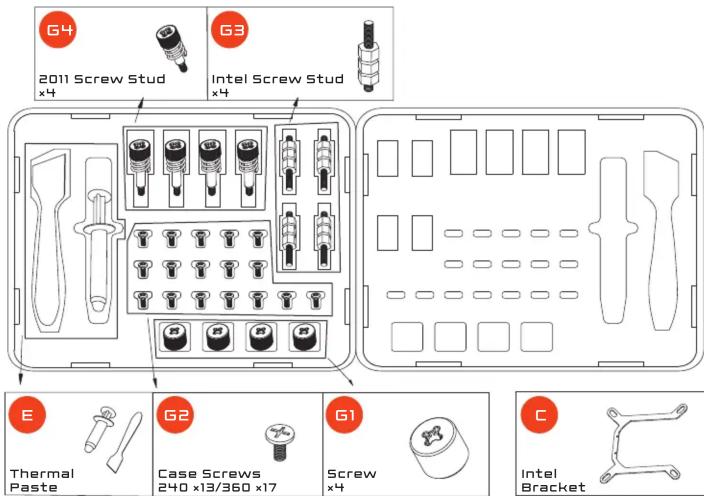
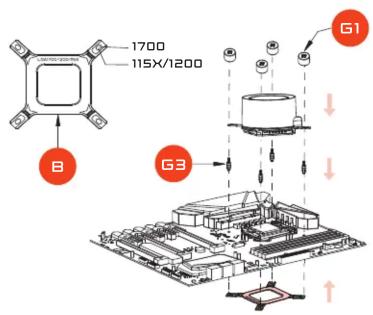
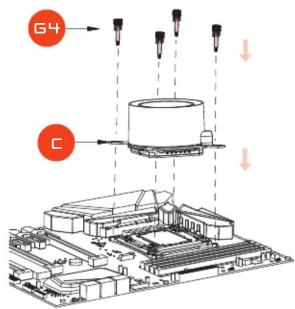
G4 2011 Screw Stud x4 G3 Intel Screw Stud x4 E Thermal Paste G2 Case Screws 240 x13/360 x17 G1 Screw x4 C Intel Bracket
text_image
LGA1700-1200-115X Intel Backplate AMD Bracket
WWW.KRUX.TECH
text_image
Tung tabrel installation ECOMPATIBILITY / KOMPATYBILNOŚĆ:
INTEL LGA17XX/115X/1200/2011
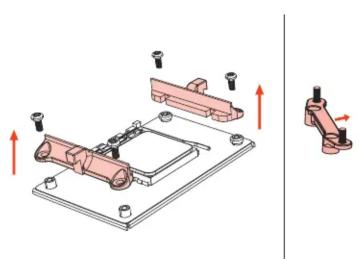
AMD AM4/AM5
WARNING:
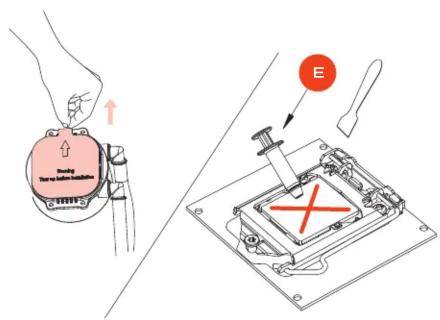
REMOVE THE PROTECTION FILM /
APPLYING THERMAL PASTE
UWAGA:
USUÑ FOLIE OCHRONNA /
NAKŁADANIE PASTY TERMOPRZEWOODOWEJ
INTEL LGA17XX/115X/1200
text_image
1700 115X/1200 G1 B G3INTEL LGA2011
text_image
G4 CAMD
natural_image
Mechanical assembly diagram showing a bracket mounted on a plate with mounting holes and a separate view of a bracket with red arrows indicating direction (no text or symbols present)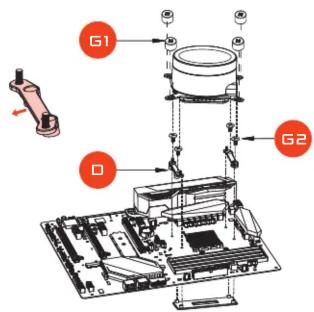
text_image
G1 D G2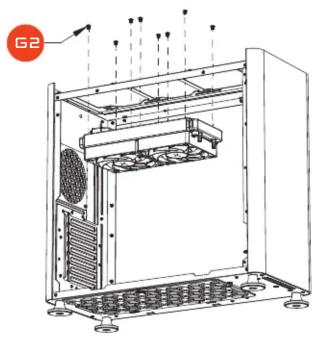
text_image
G2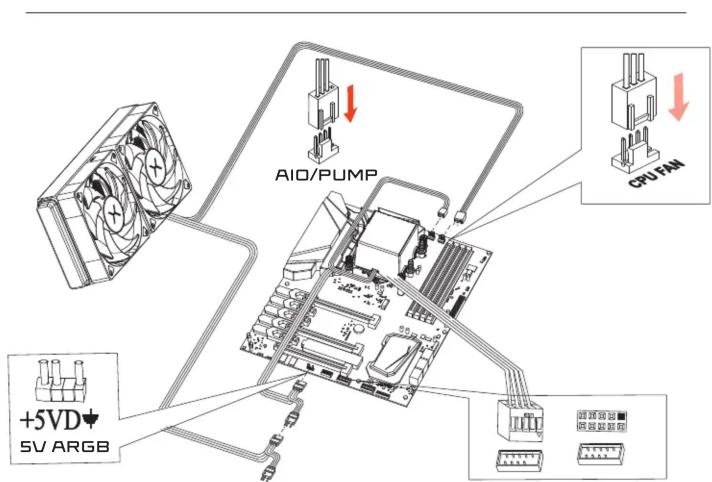
text_image
AIO/PUMP CPU/FAM +5VD 5V ARGBWARNING:
SVDC ADDRESSABLE RGB PRODUCTS WILL BE
COMPLETELY DAMAGED WHEN USED IN 12VDC RGB PLUG.
UWAGA:
PODŁACZANIE URZADZEŃ ARGB [5V] DO ZŁĄCZA RGB
[12V] GROZI USZKODZENIEM.