
OT-S211 - Téléphone mobile basique ALCATEL - Notice d'utilisation et mode d'emploi gratuit
Retrouvez gratuitement la notice de l'appareil OT-S211 ALCATEL au format PDF.

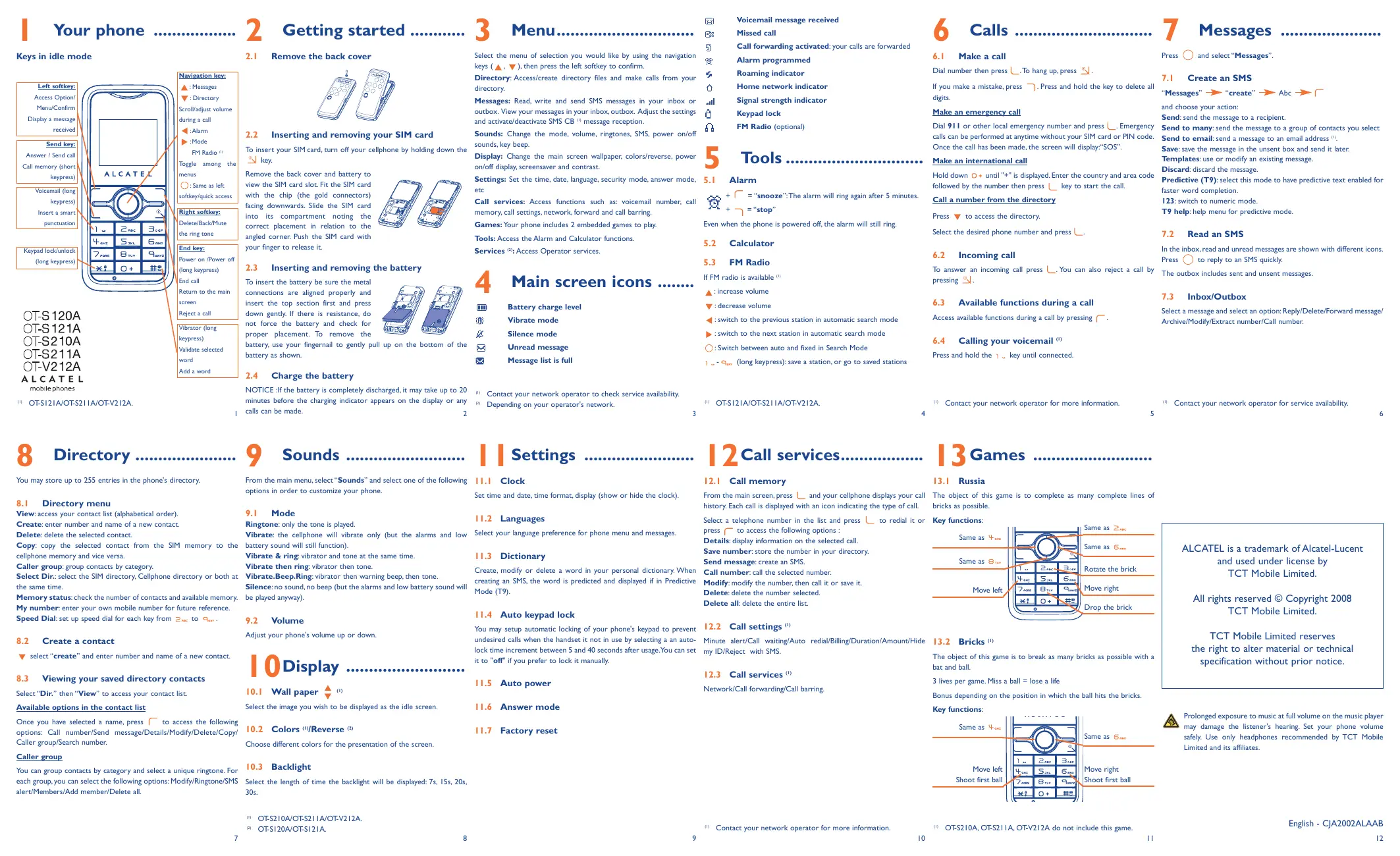
| Type de produit | Téléphone mobile basique |
| Marque | ALCATEL |
| Modèle | OT-S211 |
| Dimensions (H x L x P) | 105 x 45 x 15 mm (estimation) |
| Poids | 85 g (estimation) |
| Alimentation | Batterie Lithium 670 mAh, chargeur 4,5 V / 350 mA (entrée 100–240 V) |
| Écran | Couleur, résolution non spécifiée |
| Réseau | GSM 850/1900 MHz |
| Fonctions principales | Appels, SMS, répertoire (255 contacts), radio FM, jeux (Russie, Bricks), alarme, calculatrice, messagerie vocale |
| Connectivité | Aucune (pas de Bluetooth, Wi-Fi ou USB) |
| Entretien et nettoyage | Nettoyer avec un chiffon doux et sec. Éviter l’humidité, la poussière et les températures extrêmes. |
| Sécurité | Utiliser uniquement des accessoires agréés Alcatel. Ne pas ouvrir le téléphone. Respecter les consignes en voiture et dans les zones dangereuses. |
| Pièces détachées et accessoires | Batterie Lithium 670 mAh, chargeur, écouteurs (optionnels) |
| Réparabilité | Faire réparer par un centre agréé Alcatel. |
| Informations générales | Notice disponible en PDF sur notice-facile.com |
FOIRE AUX QUESTIONS - OT-S211 ALCATEL
Questions des utilisateurs sur OT-S211 ALCATEL
0 question sur cet appareil. Repondez a celles que vous connaissez ou posez la votre.
Poser une nouvelle question sur cet appareil
Téléchargez la notice de votre Téléphone mobile basique au format PDF gratuitement ! Retrouvez votre notice OT-S211 - ALCATEL et reprennez votre appareil électronique en main. Sur cette page sont publiés tous les documents nécessaires à l'utilisation de votre appareil OT-S211 de la marque ALCATEL.
MODE D'EMPLOI OT-S211 ALCATEL
Your phone
Keys in idle mode
Left softkey:
Access Option/
Menu/Confirm
Display a message
received
Send key:
Answer / Send call
Call memory (short
Call memory (short keypress)
Voicemail (long
keypress)
Insert a smart
punctuation
Keypad lock/unlock
(long keypress)
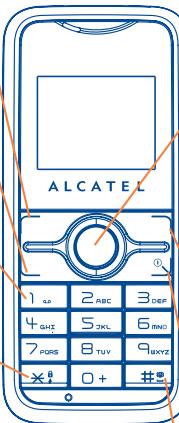
Navigation key:
▲ : Messages
: Directory
Scroll/adjust volume
during a call
:Alarm
:Mode
FM Radio
Toggle among the
eggs 2 2019 the menus
○.S
. Same as left softkey/quick acce
Bortkey/quick access
Right softkey:
Delete/Back/Mute
the ring tone
Endline
End Key:
Power on /Power off
(long keypress)
End call
Return to the main
screen
Reject a call
[Non-Text]
Vibrator (long
keypress)
Validate selected
word
Add a word
) OT-S121A/OT-S211A/OT-V212A.
[Non-Text]
2.1 Remove the back cover
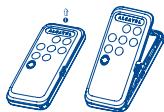
2.2 Inserting and removing your SIM card
To insert your SIM card, turn off your cellphone by holding down the
key.
Remove the back cover and battery to
view the SIM card slot. Fit the SIM card
with the chip (the gold connectors)
facing downwards. Slide the SIM card
into its compartment noting the
correct placement in relation to the
angled corner. Push the SIM card with
your finger to release it.
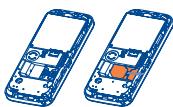
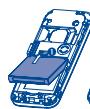
2.3 Inserting and removing the battery
To insert the battery be sure the metal
connections are aligned properly and
insert the top section first and press
down gently. If there is resistance, do
not force the battery and check for
proper placement. To remove the
battery, use your fingernail to gently pull up on the bottom of the
battery as shown.
2.4 Charge the battery
NOTICE : If the battery is completely discharged, it may take up to 20
minutes before the charging indicator appears on the display or any
calls can be made. 2
Select the menu of selection you would like by using the navigation keys (▲, ▼), then press the left softkey to confirm.
Directory: Access/create directory files and make calls from your directory.
Messages: Read, write and send SMS messages in your inbox or
outbox. View your messages in your inbox, outbox. Adjust the settings
and activate/deactivate SMS CB ^(1) message reception.
Sounds: Change the mode, volume, ringtones, SMS, power on/off
sounds, key beep.
Display: Change the main screen wallpaper, colors/reverse, power
on/off display, screensaver and contrast.
Settings: Set the time, date, language, security mode, answer mode,
etc
Call services: Access functions such as: voicemail number, call
memory, call settings, network, forward and call barring.
Games: Your phone includes 2 embedded games to play.
Tools: Access the Alarm and Calculator functions.
Services ^(2) : Access Operator services.
4
Main screen icons ......
Battery charge level
Vibrate mode
Silence mode
Unread message
Message list is full
(1) Contact your network operator to check service availability.
(2) Depending on your operator's network.
[Non-Text]
.
5 Call forwarding activated: your calls are forwarded
on
[Non-Text]
2.
or
gs
“
er
Voicemail message received
Missed call
5 Call forwarding activated: your calls are forwarded
Alarm programmed
Roaming indicator
Home network indicator
Signal strength indicator
Keypad lock
FM Radio (optional)
5
Tools
5.1 Alarm
+ = "snooze": The alarm will ring again after 5 minutes.
以 + - = "stop"
Even when the phone is powered off, the alarm will still ring.
5.2 Calculator
5.3 FM Radio
If FM radio is available (1)
▲: increase volume
▼: decrease volume
: switch to the previous station in automatic search mode
: switch to the next station in automatic search mode
○: Switch between auto and fixed in Search Mode
-
-
- (long keypress): save a station, or go to saved stations
-
6
Calls
6.1 Make a call
Dial number then press ⏚. To hang up, press 🔒.
If you make a mistake, press ↗. Press and hold the key to delete all digits.
Make an emergency call
Dial 911 or other local emergency number and press ⚣. Emergency
calls can be performed at anytime without your SIM card or PIN code.
Once the call has been made, the screen will display: "SOS".
Make an international call
Hold down □ + until "+" is displayed. Enter the country and area code
followed by the number then press key to start the call.
Call a number from the directory
Press ▼ to access the directory.
Select the desired phone number and press ∩.
6.2 Incoming call
To answer an incoming call press ⌉. You can also reject a call by pressing ⏻.
6.3 Available functions during a call
Access available functions during a call by pressing ☐.
6.4 Calling your voicemail (1)
Press and hold the 1.0 key until connected.
(1) Contact your network operator for more information.
7
Messages
Press
and select "Messages".
7.1 Create an SMS
"Messages


and choose your action:
Send: send the message to a recipient.
Send to many: send the message to a group of contacts you select
Send to email: send a message to an email address (1)
Save: save the message in the unsent box and send it later.
Templates: use or modify an existing message
Discard: discard the message.
Predictive (T9): select this mode to have predictive text enabled for
faster word completion.
123: switch to numeric mode.
T9 help: help menu for predictive mode.
7.2 Read an SMS
In the inbox, read and unread messages are shown with different icons.
Press ○ to reply to an SMS quickly.
The outbox includes sent and unsent messages.
7.3 Inbox/Outbox
Select a message and select an option: Reply/Delete/Forward message/
Archive/Modify/Extract number/Call number.
(1)
t your network operator for service availability.
5
6

Directory
You may store up to 255 entries in the phone's directory.
8.1 Directory menu
View: access your contact list (alphabetical order).
Create: enter number and name of a new contact.
Delete: delete the selected contact.
Copy: copy the selected contact from the SIM memory to the
cellphone memory and vice versa.
Caller group: group contacts by category.
Select Dir.: select the SIM directory, Cellphone directory or both at the same time.
Memory status: check the number of contacts and available memory.
My number: enter your own mobile number for future reference.
Speed Dial: set up speed dial for each key from 2 ABC to 9 kxy.
8.2 Create a contact
▼ select "create" and enter number and name of a new contact.
8.3 Viewing your saved directory contacts
Select "Dir." then "View" to access your contact list.
Available options in the contact list
Once you have selected a name, press to access the following options: Call number/Send message/Details/Modify/Delete/Copy/Caller group/Search number.
Caller group
You can group contacts by category and select a unique ringtone. For each group, you can select the following options: Modify/Ringtone/SMS alert/Members/Add member/Delete all.

Sounds
From the main menu, select "Sounds" and select one of the following options in order to customize your phone.
9.1 Mode
Ringtone: only the tone is played.
Vibrate: the cellphone will vibrate only (but the alarms and low battery sound will still function).
Vibrate & ring: vibrator and tone at the same time.
Vibrate then ring: vibrator then tone.
Vibrate.Beep.Ring: vibrator then warning beep, then tone.
Silence: no sound, no beep (but the alarms and low battery sound will be played anyway).
9.2 Volume
Adjust your phone's volume up or down.
10 Display
10.1 Wall paper (1)
Select the image you wish to be displayed as the idle screen.
10.2 Colors ^(1) /Reverse ^(2)
Choose different colors for the presentation of the screen.
10.3 Backlight
Select the length of time the backlight will be displayed: 7s, 15s, 20s, 30s.
(1) OT-S210A/OT-S211A/OT-V212A.
(2) OT-S120A/OT-S121A.

Settings
11.1 Clock
Set time and date, time format, display (show or hide the clock).
11.2 Languages
Select your language preference for phone menu and messages.
11.3 Dictionary
Create, modify or delete a word in your personal dictionary. When creating an SMS, the word is predicted and displayed if in Predictive Mode (T9).
11.4 Auto keypad lock
You may setup automatic locking of your phone's keypad to prevent undesired calls when the handset it not in use by selecting a an auto-lock time increment between 5 and 40 seconds after usage. You can set it to "off" if you prefer to lock it manually.
11.5 Auto power
11.6 Answer mode
11.7 Factory reset

2 Call services
12.1 Call memory
From the main screen, press and your cellphone displays your call history. Each call is displayed with an icon indicating the type of call.
Select a telephone number in the list and press to redial it or press to access the following options:
Details: display information on the selected call.
Save number: store the number in your directory.
Send message: create an SMS.
Call number: call the selected number.
Modify: modify the number, then call it or save it.
Delete: delete the number selected.
Delete all: delete the entire list.
12.2 Call settings (1)
Minute alert/Call waiting/Auto redial/Billing/Duration/Amount/Hide my ID/Reject with SMS.
12.3 Call services (1)
Network/Call forwarding/Call barring.
(1) Contact your network operator for more information.
[Non-Text]

3 Games
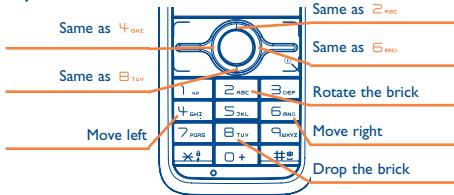
13.1 Russia
The object of this game is to complete as many complete lines of bricks as possible.
Key functions:
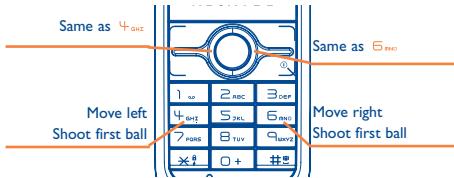
13.2 Bricks ^(1)
The object of this game is to break as many bricks as possible with a bat and ball.
3 lives per game. Miss a ball = lose a life
Bonus depending on the position in which the ball hits the bricks.
Key functions:
(1) OT-S210A, OT-S211A, OT-V212A do not include this game.
10
Same as 2
(No text)
Same as 6 inc
[Non-Text]
Rotate the brick
(No text)
Move right
- 2016年
Drop the brick
ALCATEL is a trademark of Alcatel-Lucent
and used under license by
TCT Mobile Limited.
All rights reserved © Copyright 2008
TCT Mobile Limited.
TCT Mobile Limited reserves
the right to alter material or technical
specification without prior notice.

Prolonged exposure to music at full volume on the music player
may damage the listener's hearing. Set your phone volume
safely. Use only headphones recommended by TCT Mobile
Limited and its affiliates.
English - CJA2002ALAAB
12
We recommend that you read this chapter carefully before using your cellphone. The manufacturer disclaims any liability for damage, which may result as a consequence of improper use or use contrary to the instructions contained in this manual.
• TRAFFIC SAFETY:
Recent studies show that using a cellphone while driving a vehicle constitutes a real risk, even when the hands-free kit is used (headset...), drivers are requested to refrain from using their cellphone when the vehicle is not parked. Check the laws and regulations on the use of wireless telephones and their accessories in the areas where you drive. Always obey them. The use of these devices may be prohibited or restricted in certain areas.
When switched on, your cellphone emits electromagnetic waves that can interfere with the vehicle's electronic systems such as ABS anti-lock brakes or airbags. To ensure that there is no problem:
- do not place your cellphone on top of the dashboard or within an airbag deployment area.
- check with your dealer or car manufacturer to make sure that the car's electronics devices are well shielded.
• CONDITIONS OF USE:
You are advised to switch off your cellphone from time to time to optimize performance.
Switch the cellphone off before boarding aircraft.
Switch the cellphone off when you are in health care facilities, except in designated areas. As with many other types of equipment now in regular use, cellphones can interfere with other electrical or electronic devices, or equipment using radio frequency.
Switch the cellphone off when you are near gas or flammable liquids. Strictly obey all signs and instructions posted in a fuel depot, gas station, or chemical plant, or in any potentially explosive atmosphere.
When the cellphone is switched on, it should be kept at least 15 cm from any medical device such as a pacemaker, a hearing aid or insulin pump. When using the cellphone you should hold it against the ear on the opposite side to the device, if any. To avoid hearing impairment, press to answer the call before holding your cellphone to your ear. Also move the handset away from your ear while using the "hands-free" option because the amplified volume might cause hearing damage.
Do not let small children use the cellphone without supervision.
When replacing the cover please note that your cellphone may contain substances that could create an allergic reaction.
Always handle your cellphone with care and keep it in a clean and dust-free place. Do not allow your cellphone to be exposed to unfavorable environmental conditions (moisture, humidity, rain, infiltration of liquids, dust, sea air, etc). The manufacturer's recommended operating temperature range is -20^ to +55^ . Over 55^ the legibility of the cellphone's display may be impaired, though this is temporary and not serious.
Emergency call numbers may not be reachable on all cellular networks. You should never rely only on your cellphone for emergency calls.
Do not open, dismantle or attempt to repair your cellphone yourself. Do not drop, throw or try to bend your cellphone.
Do not paint it.
Use only Alcatel batteries, battery chargers, and accessories that are compatible with your cellphone model. TCT Mobile Limited or its affiliates disclaim any liability for damage caused by the use of non approved batteries or accessories.
Your cellphone should not be disposed of in a municipal dump. Please check local regulations for disposal of electronic products.
Remember to make back-up copies or keep a written record of all important information stored in your cellphone.
Some people may suffer epileptic seizures or blackouts when exposed to flashing lights, or when playing video games. These seizures or blackouts may occur even if a person never had a previous seizure or blackout. If you have experienced seizures or blackouts, or if you have a family history of such occurrences, please consult your
doctor before playing videos games on your cellphone or enabling a flashing-lights feature on your cellphone. Parents should monitor their children's use of video games or other features that incorporate flashing lights on the cellphones. All persons should discontinue use and consult a doctor if any of the following symptoms occur: convulsion, eye or muscle twitching, loss of awareness, involuntary movements, or disorientation. To limit the likelihood of such symptoms, please take the following safety precautions:
- Do not play or use a flashing-lights feature if you are tired or need sleep. - Take a minimum of a 15 minute break hourly.
- Play in a well lit room.
- Play at the farthest distance possible from the screen.
When you play games on your cellphone, you may experience occasional discomfort in your hands, arms, shoulders, neck, or other parts of your body. Follow these instructions to avoid problems such as tendonitis, carpal tunnel syndrome, or other musculoskeletal disorders:
- Take a minimum of a 15 minute-break every hour of game playing.
- If your hands, wrists, or arms become tired or sore while playing, stop and rest for several hours before playing again.
- If you continue to have sore hands, wrists, or arms during or after playing, stop the game and see a doctor.

Prolonged exposure to music at full volume on the music player may damage the listener's hearing. Set your phone volume safely. Use only headphones recommended by TCT Mobile Limited and its affiliates.
• PRIVACY:
Please note that you must respect the laws and regulations in force in your country regarding taking photographs and recording sounds with your cellphone. Pursuant to such laws and regulations, it may be strictly forbidden to take photographs and/or to record the voices of other people or any of their personal attributes, and duplicate or distribute them, as this may be considered to be an invasion of privacy. It is the user's sole responsibility to ensure that prior authorization be obtained, if necessary, in order to record private or confidential conversations or take a photograph of another person; the manufacturer, the seller or vendor of your cellphone (including the operator) disclaim any liability which may result from the improper use of the cellphone.
• BATTERY:
Before removing the battery from your cellphone, please make sure that the cellphone is switched off.
Take precautions with the battery and do not attempt to open the battery (chemical substances may cause burns).
Do not pierce, disassemble nor cause a short-circuit in a battery.
Do not burn or dispose of a used battery in household waste or store it at temperatures above 60 °C. Batteries must be disposed of in accordance with locally applicable environmental legislation.
Batteries should not be used for any other purpose than the one intended. Never use damaged batteries or not recommended by TCT Mobile Limited and/or its affiliates.

This symbol found on your cellphone, battery and accessories means that these products must be taken to collection points at the end of their life:
- Municipal waste disposal centers with specific bins for these items of equipment
- Collection bins at points of sale.
They will then be recycled, preventing substances being disposed of in the environment, so that their components can be reused.
In European Union countries:
These collection points are accessible free of charge. All products with this sign must be brought to these collection points.
In non European Union countries:
Items of equipment with this symbol are not to be thrown into ordinary bins if your country or your region has suitable recycling and collection facilities; instead they are to be taken to collection points for them to be recycled.
In the United States you may learn more about CTIA's Recycling Program at www.recyclewirelessphones.com
age • CHARGERS:
Home chargers will operate within the temperature range of: 0 °C to 40 °C. The chargers designed for your cellphone meet with the standard for safety of information technology equipment and office equipment use. They should be used for this purpose only.
The charger in this package shall ONLY be used with Alcatel OT-S120A/OT-S121A/OT-S210A/OT-S211A/OT-V212A. The use on any other product or equipment including Alcatel products is strictly prohibited.
TCT Mobile Limited cannot be held liable for any damages due to use contrary to the above mentioned stipulation.
NOTICE: Your cellphone is not designed for chargers connected through USB cable to a computer. Please use dedicated charger to charge your cellphone.
Electrical characteristic of power supply (depending on the country):
110V charger (Used in Mexico / USA):
Input: 100-127 V, 50/60 Hz, 0.30 A
Output: 4.5 V, 350 mA
220 V charger:
Input: 220-240 V, 50/60 Hz, 0.30 A
Output: 4.5 V, 350 mA
Battery: Lithium 670 mAh
• RADIO WAVES:
THIS CELLPHONE MEETS THE GOVERNMENT'S REQUIREMENTS FOR EXPOSURE TO RADIO WAVES.
Your cellphone is a radio transmitter and receiver. It is designed and manufactured not to exceed the emission limits for exposure to radio-frequency (RF) energy. These limits are part of comprehensive guidelines and establish permitted levels of RF energy for the general population. The guidelines are based on standards that were developed by independent scientific organizations through periodic and thorough evaluation of scientific studies. These guidelines include a substantial safety margin designed to ensure the safety of all persons, regardless of age and health.
The exposure standard for cellphones employs a unit of measurement known as the Specific Absorption Rate, or SAR. The SAR limit set by public authorities such as the Federal Communications Commission of the US Government (FCC) or by Industry Canada, is 1.6 W/kg averaged over 1 gram of body tissue. Tests for SAR are conducted using standard operating positions with the cellphone transmitting at its highest certified power level in all tested frequency bands.
Although the SAR is determined at the highest certified power level, the actual SAR level of the cellphone while operating can be well below the maximum value. This is because the cellphone is designed to operate at multiple power levels so as to use only the power required to reach the network. In general, the closer you are to a wireless base station antenna, the lower the power output of the cellphone. Before a cellphone model is available for sale to the public, compliance with national regulations and standards must be shown.
The highest SAR value for this cellphone when tested is:
OT-S120A: 1.26 W/kg for use at the ear and 0.74 W/kg for use close to the body OT-S121A: 1.24 W/kg for use at the ear and 0.70 W/kg for use close to the body OT-S210A: 1.27 W/kg for use at the ear and 0.97 W/kg for use close to the body. OT-S211A: 1.32 W/kg for use at the ear and 0.87 W/kg for use close to the body OT-V212A: XXX W/kg for use at the ear and XXX W/kg for use close to the body While there may be differences between the SAR levels of various cellphones and at various positions, they all meet the government requirement for RF exposure. For body-worn operation, the cellphone meets FCC RF exposure guidelines provided that it is used with a non-metallic accessory with the handset at least 2.0 cm from the body. Use of other accessories may not ensure compliance with FCC RF exposure guidelines.
The World Health Organization (WHO) considers that present scientific information does not indicate the need for any special precautions for use of cellphones. If individuals are concerned, they might choose to limit their own or their children's RF exposure by limiting the length of calls, or using "hands-free" devices to keep cellphones away from the head and body (fact sheet n°193). Additional WHO information about electromagnetic fields and public health are available on the following website: http://www.who.int/peh-emf.
NOTE: This equipment has been tested and found to comply with the limits for a Class B digital device, pursuant to part 15 of the FCC Rules. These limits are designed to provide reasonable protection against harmful interference in a residential installation. This equipment generates, uses and can radiate radio frequency energy and, if not in-stalled and used in accordance with the instructions, may cause harmful interference to radio communications. However, there is no guarantee that interference will not occur in a particular installation. If this equipment does cause harmful interference to radio or television reception, which can be determined by turning the equipment off and on, the user is encouraged to try to correct the interference by one or more of the following measures:
- Reorient or relocate the receiving antenna.
- Increase the separation between the equipment and receiver.
- Connect the equipment into an outlet on a circuit different from that to which the receiver is connected.
- Consult the dealer or an experienced radio/TV technician for help.
This device complies with Part 15 of FCC rules. Operation is subject to the following two conditions:
I) this device may not cause harmful interference and,
2) this device must accept any interference received, including interference that may cause undesired operation.
Changes or modifications not expressly approved by the party responsible for compliance could void the user's authority to operate the equipment.
Your cellphone is equipped with a built-in antenna. For optimal operation, you should avoid touching it or degrading it.
Website: www.alcatel-mobilephones.com
- Hot Line Number: see the “TCT Mobile Services” leaflet or go to our Internet site.
On our Internet site, you will find our FAQ (Frequently Asked Questions) section. You can also contact us by e-mail to ask any questions you may have.
Your cellphone is a transceiver that operates on GSM networks with 850 and 1900 MHz bands.
We, TCT Mobile Limited declare that this handset and battery are separated in packaging as an industry standard and the FCC ID label has been placed clearly on the outside of the packaging at the time of purchase.
Protection against theft (1)
Your cellphone is identified by an IMEI (cellphone serial number) shown on the packaging label and in the product's memory. We recommend that you note the number the first time you use your cellphone by entering *,#, 0, 6, # and keep it in a safe place. It may be requested by the police or your operator if your cellphone is stolen. This number allows your cellphone to be blocked preventing a third person from using it, even with a different SIM card.
Disclaimer
There may be certain differences between the user manual description and the cellphone's operation, depending on the software release of your cellphone or specific operator services.

TEXT
INPUT
T9 Text Input is licensed under one or more of the following: U.S. Pat. Nos. 5,187,480, 5,818,437, 5,945,928, 5,953,541, 6,011,554, 6,286,064, 6,307,548, 6,307,549, and 6,636,162, 6,646,573; European Pat. Nos. 0 842 463 (96927260.8), 1 010 057 (98903671.0), 1 018 069 (98950708.2); and additional patents are pending worldwide
(1) Contact your network operator for service availability.
13
14
15
16
17
18
Telephone warranty ......
Congratulations on choosing this cellphone - we hope that you will be completely satisfied with it.
Your cellphone is guaranteed against any deviation from technical specifications for a period of twelve (12) months from the date specified on your original invoice ^(1) . The warranty terms defined in the manual also apply to the battery and accessories sold with the cellphone but for a period of six (6) months ^(2) from the date of purchase shown on your original invoice.
Under the terms of this warranty, you must immediately inform your vendor (or any repair center approved by TCT Mobile Limited or its affiliates, which are listed on our website www.alcatel-mobilephones.com) in case of a conformity defect on your cellphone, you must present the invoice given to you at the time of purchase. The vendor or maintenance center will decide whether to replace or repair, as appropriate, all or any part of the cellphone or accessory found to be defective; this warranty covers the cost of parts and labor but excludes any other costs. Repair or replacement may be carried out using reconditioned components offering equivalent functionality.
Servicing under the terms of this warranty, especially repair, modification or replacement of products, shall entitle to a ONE (1) month ^(1) warranty unless there are statutory provisions to the contrary.
This warranty shall not apply to damage or defects to your cellphone and/or accessory caused by:
I) failure to follow the instructions for use or installation,
2) failure to comply with technical and safety standards applicable in the geographical area where the equipment is used,
(1) The mandatory period may vary if overriding statutory provisions are applicable in your country.
(2) The life of a rechargeable Alcatel cellphone battery in terms of conversation time, standby time, and total service life, will depend on the conditions of use and network configuration. Batteries being considered expendable supplies, the specifications state that you should obtain optimal performance for your Alcatel cellphone during the first six months after purchase and for approximately 200 more recharges.
3) improper maintenance of batteries and other sources of energy, and of the overall electric installation,
4) accidents or consequences of theft of the vehicle in which the cellphone is transported, acts of vandalism, lightning, fire, humidity, infiltration of liquids, inclement weather;
5) connecting or integrating the cellphone into equipment not supplied or not recommended by TCT Mobile Limited or its affiliates, without their express written consent for such,
6) any servicing, modification or repair performed by individuals not authorized by TCT Mobile Limited or its affiliates, the vendor or the approved maintenance center,
7) use of the equipment for a purpose other than that for which it was designed,
8) normal wear,
9) malfunctions caused by external causes (e.g., radio interference from other equipment, power or cellphone line voltage fluctuations),
10) modifications made to the equipment even if required by changes in regulations and/or modification of network parameters,
II) faulty connections resulting from unsatisfactory radio transmission or caused by the absence of radio relay coverage.
12) equipment on which markings or serial numbers have been removed or altered, and handsets on which labels have been removed or deteriorated shall be excluded from the warranty.
In accordance with the applicable law, your product is warranted against hidden defects (defects inherent in the design, manufacture, etc.).
There are no express warranties, whether written or oral, other than this printed limited warranty, express or implied, of any nature whatsoever.
In no event shall TCT Mobile Limited or its affiliates be liable for incidental or consequential damages of any nature whatsoever, including but not limited to trading loss, commercial loss, to the full extent those damages can be disclaimed by law. Some countries/states do not allow the exclusion or limitation of incidental or consequential damages, or limitation of the duration of implied warranties, so the preceding limitations or exclusions may not apply to you.
Troubleshooting......
Before contacting your service provider or repair center, you are advised to follow the instructions below:
- You are advised to switch off the cellphone from time to time to optimize its performance.
- You are advised to fully charge the battery (☐) for optimal operation.
- Avoid storing large amounts of data in your cellphone as this may affect the performance of your cellphone.
and carry out the following checks:
My cellphone does not switch on
- Press Ⓞ until the screen comes on
• Check the battery charge level
- Check the battery contacts, remove and reinstall your battery, then turn your cellphone back on
My cellphone has not responded for several minutes
- Press the Ⓞ key
- Remove the battery and re-insert it, then switch the cellphone back on
My screen is difficult to read
- Clean your screen
- Use your cellphone in accordance with the recommended conditions of use
My cellphone turns off by itself
- Check that your keypad is locked when you are not using your cellphone
- Check the battery charge level
- Check that the function "Auto OFF" is not activated.
My cellphone does not charge properly
- Make sure that your battery is not completely discharged; the battery charge indicator can take several minutes and may be accompanied by a quiet hissing sound.
- Make sure charging is carried out under normal conditions (0°C +40°C)
- Make sure your battery is inserted. It must be inserted before plugging in the charger
• Make sure you are using an Alcatel battery and charger
- When abroad, check that the electrical current is compatible
- NOTICE: Your cellphone is not designed for chargers connected through USB cable to a computer. Please use dedicated charger to charge your cellphone.
My cellphone does not connect to a network
• Try connecting in another location
- Verify the network coverage with your operator
- Check with your operator that your SIM card is valid
• Try selecting the available network(s) manually
- Try connecting at a later time if the network is overloaded
SIM card error
• Make sure the SIM card was correctly inserted
- Verify with your operator that your SIM card is 3V compatible; the old 5V SIM cards cannot be used
• Make sure the chip on your SIM card is not damaged or scratched
Unable to make outgoing calls
- Make sure you have dialed a valid number and pressed the key - For international calls, make sure you have entered the country and area codes
- Make sure your cellphone is connected to a network, and that the network is not overloaded or unavailable
- Check your subscription with your operator (credit, SIM card valid, etc.)
• Make sure you have not barred outgoing calls
Unable to receive incoming calls
- Make sure your cellphone is switched on and connected to a network (check for overloaded or unavailable network)
- Check your subscription with your operator (credit, SIM card valid, etc.)
• Make sure you have not forwarded incoming calls
• Make sure that you have not barred certain calls
The caller's name does not appear when a call is received
- Check that you have subscribed to this service with your operator
- Your caller has concealed his/her number
The sound quality of the calls is not optimal
- You can adjust the volume during a call by means of the key - Check the radio reception icon
I am unable to use the features described in the manual
- Check with your operator to make sure that your subscription includes this service
- Check to be sure this feature does not require an Alcatel accessory.
When I select a number from my directory, the number is not dialed
• Make sure that you have correctly recorded the number in your file
- Make sure that you have selected the country prefix when calling a foreign country
I am unable to create a file in my directory
- Make sure that your directory is not full; delete some files or save the files in the product directory
My callers are unable to leave messages on my voicemail
- Contact your network operator to check service availability
I can't access my voicemail
- Make sure your operator's voicemail number is correctly entered in "Call services/Voicemail"
• Try later if the network is busy
I am unable to send and receive messages
- Check your cellphone memory as it might be full, if necessary, delete some messages
- Contact your network operator to check service availability, see the messages settings
- Verify the server center number with your operator
• The server center may be saturated; try again later
The << - >> icon is displayed
• You are outside the network coverage area
I have already entered 3 incorrect PIN codes
- Contact your network operator to obtain the PUK code (Personal Unblocking Key)
19
20
21
22
23
24
- Your phone
- Left softkey:
- Send key:
- Navigation key:
- Right softkey:
- Endline
- End Key:
- Inserting and removing your SIM card
- Inserting and removing the battery
- Charge the battery
- 4
- Main screen icons ......
- er
- 5
- Tools
- 6
- Calls
- Make an emergency call
- Make an international call
- Call a number from the directory
- Incoming call
- Available functions during a call
- Calling your voicemail (1)
- 7
- Messages
- Create an SMS
- "Messages
- Read an SMS
- Inbox/Outbox
- Directory
- Directory menu
- Create a contact
- Viewing your saved directory contacts
- Available options in the contact list
- Caller group
- Sounds
- Mode
- Volume
- Display
- Colors (1) /Reverse (2)
- Backlight
- Settings
- Clock
- Languages
- Dictionary
- Auto keypad lock
- Auto power
- Call services
- Call memory
- Call settings (1)
- Call services (1)
- Games
- Russia
- Key functions:
- Bricks (1)
- • TRAFFIC SAFETY:
- • CONDITIONS OF USE:
- • PRIVACY:
- • BATTERY:
- age • CHARGERS:
- • RADIO WAVES:
- Protection against theft (1)
- Disclaimer
- Telephone warranty ......
- Troubleshooting......
- My cellphone does not switch on
- My cellphone has not responded for several minutes
- My screen is difficult to read
- My cellphone turns off by itself
- My cellphone does not charge properly
- My cellphone does not connect to a network
- SIM card error
- Unable to make outgoing calls
- Unable to receive incoming calls
- The caller's name does not appear when a call is received
- The sound quality of the calls is not optimal
- I am unable to use the features described in the manual
- When I select a number from my directory, the number is not dialed
- I am unable to create a file in my directory
- My callers are unable to leave messages on my voicemail
- I can't access my voicemail
- I am unable to send and receive messages
- The > icon is displayed
- I have already entered 3 incorrect PIN codes
Marque : ALCATEL
Modèle : OT-S211
Catégorie : Téléphone mobile basique