S6500-48GP6XF - Commutateur TP-LINK - Notice d'utilisation et mode d'emploi gratuit
Retrouvez gratuitement la notice de l'appareil S6500-48GP6XF TP-LINK au format PDF.


| Type de produit | Commutateur L3 managé PoE+ |
| Marque | TP-Link |
| Modèle | S6500-48GP6XF |
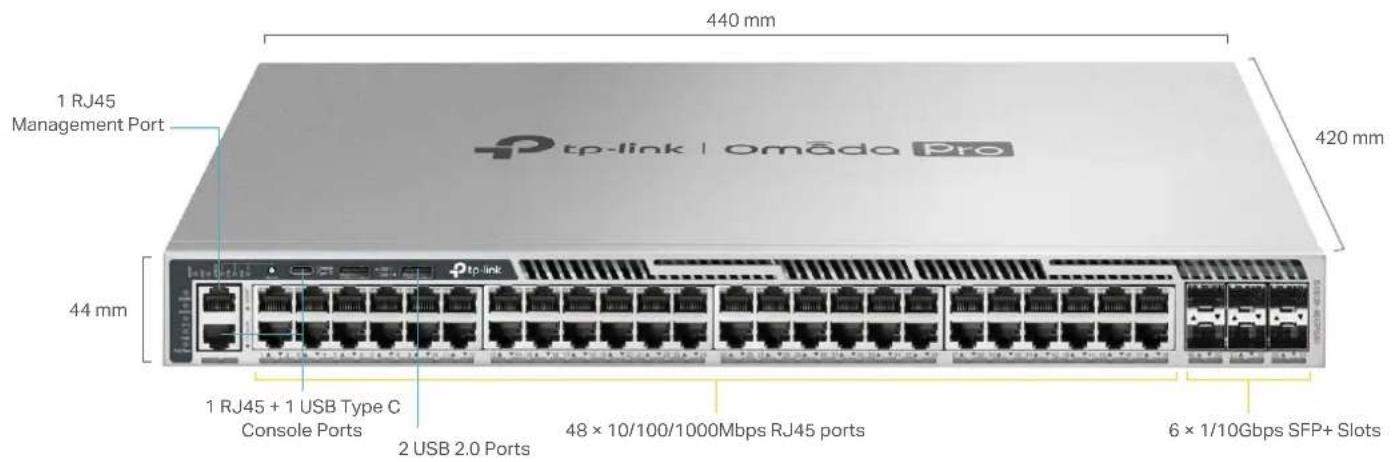
| Ports RJ45 | 48 × 10/100/1000 Mbps (PoE+) |
| Ports SFP+ | 6 × 1/10 Gbps |
| Ports console | 1 × RJ45 + 1 × USB Type-C |
| Port de gestion | 1 × RJ45 |
| Ports USB | 2 × USB 2.0 |
| Alimentation PoE | IEEE 802.3af/at |
| Budget PoE max | 1440 W (avec 2 × PSM900-AC) |
| Capacité de commutation | 216 Gbps |
| Taux de transfert | 160,7 Mpps |
| Méthode de transmission | Store and Forward |
| Taille de trame max | 9 Ko |
| Mémoire tampon | 3 Mo |
| Table d'adresses MAC | 32 K |
| Alimentation redondante | 2 alimentations modulaires hot-swap (1 incluse) |
| Consommation max | 1767,7 W (avec PD connectés) |
| Ventilateurs | 4 modules hot-swap (N+1 redondance) |
| Dimensions (L × P × H) | 440 × 420 × 44 mm |
| Poids | Environ 6 kg (estimation) |
| Température de fonctionnement | -5 °C à 45 °C |
| Humidité de fonctionnement | 10% à 90% HR (sans condensation) |
| Certifications | CE, FCC, RoHS |
| Sécurité | MACsec, Secure Boot, RADSEC, 802.1X, ACL |
| Pièces détachées | Modules d'alimentation (PSM500-AC, PSM900-AC), modules ventilateurs, modules SFP/SFP+ |
| Entretien et nettoyage | Dépoussiérer avec un chiffon sec ; éviter les liquides ; vérifier la ventilation |
FOIRE AUX QUESTIONS - S6500-48GP6XF TP-LINK
Questions des utilisateurs sur S6500-48GP6XF TP-LINK
0 question sur cet appareil. Repondez a celles que vous connaissez ou posez la votre.
Poser une nouvelle question sur cet appareil
Téléchargez la notice de votre Commutateur au format PDF gratuitement ! Retrouvez votre notice S6500-48GP6XF - TP-LINK et reprennez votre appareil électronique en main. Sur cette page sont publiés tous les documents nécessaires à l'utilisation de votre appareil S6500-48GP6XF de la marque TP-LINK.
MODE D'EMPLOI S6500-48GP6XF TP-LINK
Omada Pro L3 Managed Switch Datasheet
S6500-48GP6XF
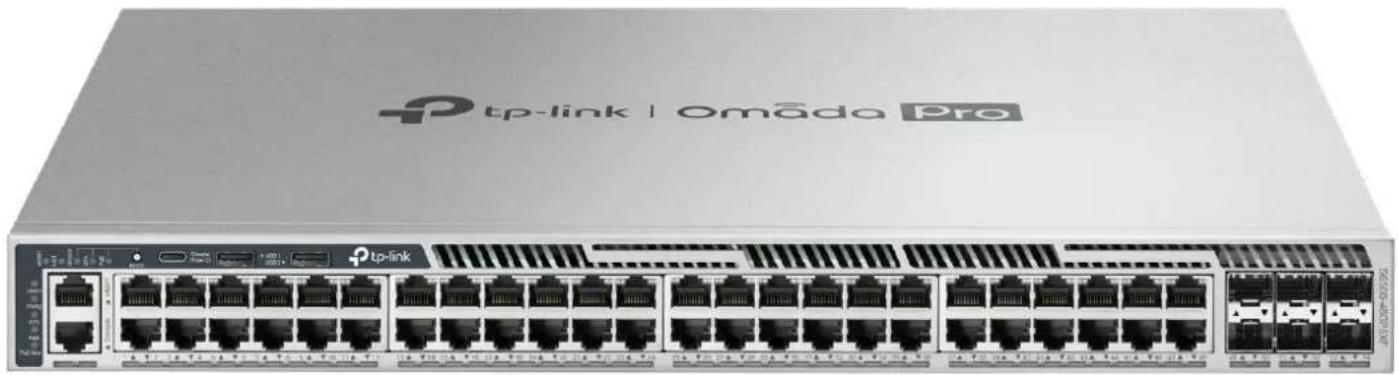
Omada Pro 48-Port Gigabit Stackable L3 Managed PoE+ Switch with 6 10G Slots
natural_image
Front view of a network switch device labeled 'tp-link | Omāda Pro' with multiple Ethernet ports (no readable text beyond branding)Highlights
- 48× Gigabit PoE+ RJ45 ports and 6× 10 Gbps SFP+ slots
- Up to 1440 W total PoE budget*
• Physical stacking for built-in redundancy and performance
• L3 Features: OSPF, BGP, IS-IS, VRRP, PIM-SM/PIM-DM/PIM-SSM, ECMP, PBR
• Security Strategies: MACsec, Secure Boot, RADSEC, IMPB, SFTP, 802.1X
• Highly available with two field-replaceable power supplies,** VRRP, ERPS, and BFD - Easy O&M: NETCONF, Configuration Rollback, Hot Patching, and RSPAN
- Centralized cloud management via the web or the Omada app †
Product Pictures
text_image
440 mm 1 RJ45 Management Port 420 mm 44 mm 1 RJ45 + 1 USB Type C Console Ports 2 USB 2.0 Ports 48 × 10/100/1000Mbps RJ45 ports 6 × 1/10Gbps SFP+ SlotsOmada Pro Solution
Omada Pro is an intelligent cloud solution for enterprise networking, offering enterprise-grade product line designed to meet the high-capacity, security, and management needs of various industries, such as MDUs, hospitality, K-12 education, public works, and more.
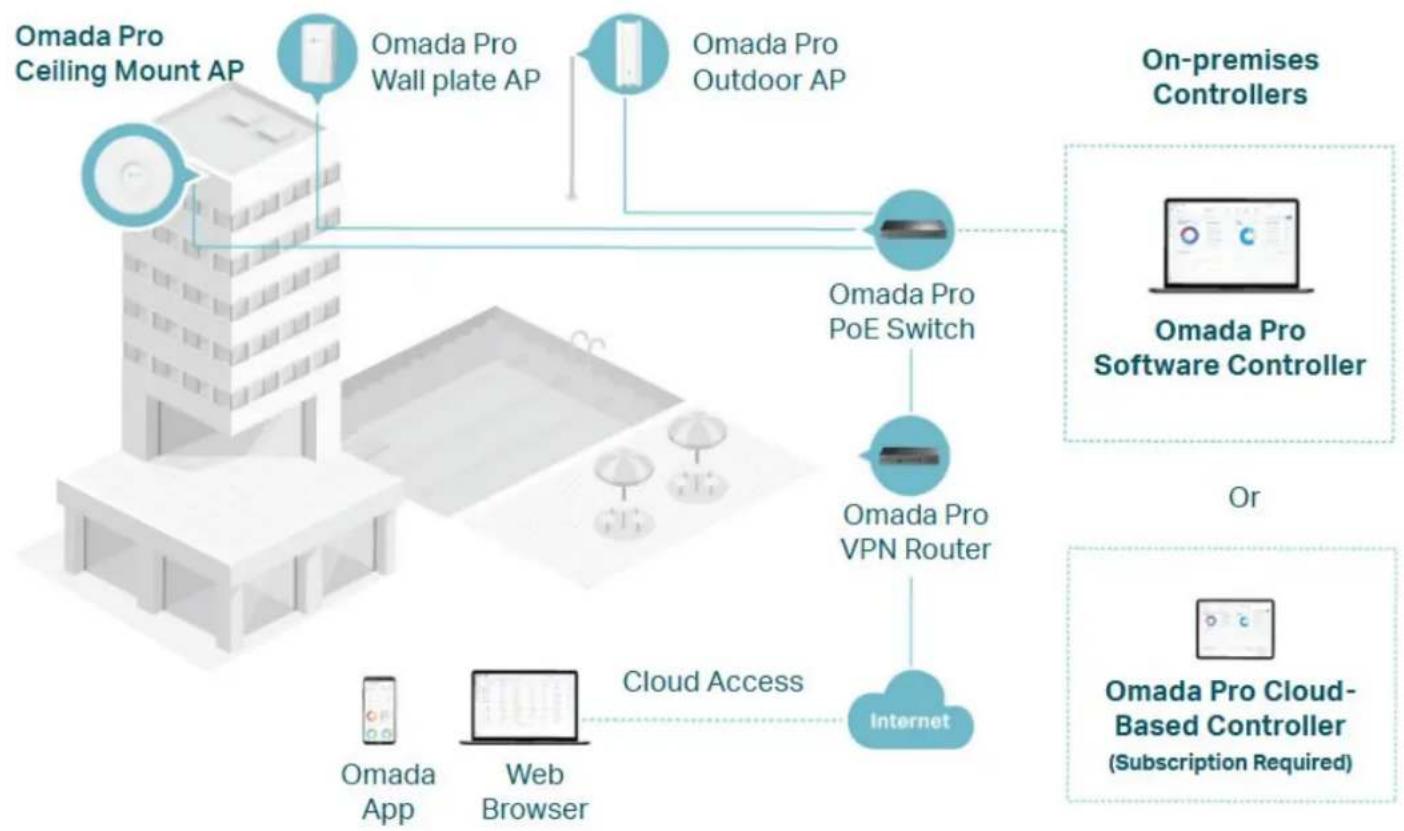
flowchart
graph TD
    A["Omada Pro Ceiling Mount AP"] --> B["Omada Pro Wall plate AP"]
    A --> C["Omada Pro Outdoor AP"]
    B --> D["Omada Pro PoE Switch"]
    C --> D
    D --> E["Omada Pro VPN Router"]
    E --> F["Internet"]
    G["Omada Pro Software Controller"] --> H["On-premises Controllers"]
    I["Omada Pro Cloud-Based Controller (Subscription Required)"] --> J["Or"]
    K["Omada App"] --> L["Web Browser"]
    M["Cloud Access"] --> L

MDUs

Hospitality

Public Works

Catering

Manufacturing

Retail
| Hardware Features & Performance | ||
| Model S6500-48GP6XF | ||
| Intertaco | 48 × 10'100/1000Mbps RJ45 ports6 × 1/10Gbps SFP - Slots* | |
| Console Ports 1 × RJ45 + 1 × USB Type C | ||
| General | Management Port 1 × RJ45 | |
| USB Ports 2 × USB 2.0 | ||
| Flash 2×4 MB Nor 18 GB EMMC | ||
| DRAM 4GB DDR4 | ||
| Processor Dual-Core ARM @1.5GHz CPU | ||
| PoE | PoE Standard 802.3ef/at | |
| PoE Ports 48 | ||
| PoE Power Budget | 764W (with 1*PSM900-AC, by default)384W (with 1*PSM500-AC)812W (with 2*PSM500-AC)1176W (with 1*PSM500-AC and 1*PSM300-AC)1440W (with 2*PSM900-AC) | |
| Fast PoE Yes | ||
| Perpetual PoE Yes | ||
| Performance | Switching Capacity 216 Gbps | |
| Forwarding Bandwidth 108 Gbps | ||
| Packet Forwarding Rate | 160.7 Mpps | |
| MAC Address Table | 32 K | |
| Pocket Buffer | 3 MB | |
| Stacking Port | 10G SFP - slot (all uplink ports can be used as stacking port.s)* | |
| Stacking Bandwidth | Up to 120 Gops (6 stacking ports) | |
| Max Stacking Number | 12 in standarone mode, 4 in Omada controller mode | |
| Compatible Models for Stacking | S6500-24G4XF, S6500-4BG6XF, S6500-24GP4XF, S6500-48GP6XF | |
| Transmission Method | Store and Forward | |
| Jumbo Frame 9 KB | ||
| Power Supply 100-240 V ~50/60 Hz | ||
| Redundant Power Supply | Max 2 hot swappable power supply module (shipping with one PSM900-AC module by default)** | |
| Suitable Power Supply Module | P5M500 AC, PSM900-AC | |
| Max Power Consumption | 41.9 W (110 V/60 Hz) (With no PD connected)1767.7 W (110 V/60 Hz) (With 1440W PD connected and powered by 2×PSM900-AC) | |
| Max Heat Dissipation | 142.88 BTU/hr (110 V/60 Hz) (With no PD connected)6,027.86 BTU/hr (110 V/60 Hz) (With 1440W PD connected and powered by 2×PSM900-AC) | |
| Standby Power Consumption | 31.95 W (220 V/50 Hz) | |
| Physical & Environment | Noise | 1× PSM900-AC power supply module:Min: 38.2 dBA @1m 25 °CMax: 60.6 dBA @1m 25 °C2× PSM900-AC power supply modules:Min: 39.9 dBA @1m 25 °CMax: 62.3 dBA @1m 25 °C |
| Fan Quantity | 4 hot swappable fan modules.N=1 redundant | |
| Airflow | Front-to-back | |
| Surge Protection | Service port: ±6 kV in common modePower port: ±6 kV in differential mode; ±6 kV in common mode | |
| ESD Protection | Air: ±15 kV, Contact: ±8 kV | |
| MTBF | 648,538 h @ 25 °C | |
| Dimensions (W x D x H) | 17.3 × 16.5 × 1.7 in (440 × 420 × 44 mm) | |
| Installation | Rockmount | |
| Operating Temperature & Altitude | -5 °C to 45 °C (23 °F to 113 °F) @ 2,000 meters-5 °C to 40 °C (23 °F to 104 °F) @ 3,000 meters | |
| Storage Temperature | -40 °C to 70 °C (-40 °F to 158 °F) | |
| Operation Humidity | 10% to 90% RH, non-condensing | |
| Storage Humidity | 5% to 90% RH, non-condensing | |
| Certification | CE, FCC, RoHS | |
| Software Features* | |||
| Model S6500-48GP6XF | |||
| System | System Info | • Device Description- Name- Location- System Contact• System Time- Manual- Synchronize with PC's Clock- SNTP Client• DST- Predefined Mode- Recurring Mode- Date Mode | • LED- LED on/off• System IP- Static IP/DHCP/BOOTP• System IPv6- Link-local Address Config- Global Address Autoconfig via RA Message- Global Address Autoconfig via DHCPv6 Server- Add a Global Address Manually |
| User Management | • User Settings• Access Level: 4 levels | • Password Recovery Settings | |
| System Tools | • Config Restore/Backup- Web: HTTP- CLI: TFTP/Flash/USB• Firmware Upgrade- Web: HTTP- CLI: TFTP/Flash/USB | • System Reboot• System Reset• Boot Config (Dual Image)• Reboot Schedule• Config Rollback• Hot Patch | |
| Access Security | • Access Control Config- IP-based- MAC-based- Port-based- IPv6-based• HTTP Config- Enable/Disable- Session Config- Access User Number- Port Setting• SSL Config- SSLv3/TLSv1 Enable/Disable- CipherSuite Config- IPv6 SSL | • SSH Config- Enable/Disable- v2- Encryption Algorithm- Data Integrity Algorithm- Port Setting- IPv6 SSH• Telnet Config- Enable/Disable- Port Setting- IPv6 Telnet• Console Port- Baud Rate setting | |
| Stack | • Stack Setting• Stack-port LAG: up to 6 groups, each group supports a maximum of all stackable-ports | • Stackable Devices: up to 12 devices• Stack MAC Address Switching Delay | |
| SDM Template | • Default Template- IPv4 ACL Rules: 300 entries- MAC ACL Rules: 300 entries- Combined ACL: 300 entries- IPv4 Source Guard: 299 entries• IPv4 Access- IPv4 ACL Rules: 0 entries- MAC ACL Rules: 300 entries- Combined ACL: 500 entries- IPv4 Source Guard: 499 entries | • IPv6 Access- IPv4 ACL Rules: 0 entries- MAC ACL Rules: 200 entries- IPv6 ACL: 250 entries- IPv6 Source Guard: 249 entries• Omada- IPv4 ACL Rules: 0 entries- MAC ACL Rules: 0 entries- Combined ACL: 600 entries- IPv6 ACL: 150 entries- IPv4 Source Guard: 0 entries | |
| Time Range | • Time Range Config | • Holiday Config | |
| File System | • File Operation• FTP• SFTP | • SCP• TFTP• USB Storage | |
Software Features
| Model S6500-48GP6XF | |||
| L2 Features | Port | • Auto Negotiation/Auto MDI/MDIX• Port config- Status- Speed and Duplex- Flow Control(802.3x)- Jumbo Frame: 1518-9216 KB• Port Mirror- Ingress (Many to One)- Egress (Many to One)- RSPAN | • Port Security- Learn mode: Dynamic/Static/Permanent/Sticky- Port Max Learned MAC: 64- Current Learned Number- Status- Exceed Max Learned Trap• Port Isolation• Loopback Detection- Alert- Port Based- VLAN Based |
| DDM | |||
| LAG | • Hash Algorithm: SRC MAC/DST MAC/SRC MAC +DST MAC/SRC IP/DST IP/SRC IP +DST IP | • Static LAG: Up to 64 groups, up to 8 ports per group• LACP(802.3ad) | |
| Traffic Monitor | • TX Packets/Bytes• RX Packets/Bytes• TX Unicast/Multicast/Broadcast• RX Unicast/Multicast/Broadcast | • TX Errors• RX Errors• RX Packet Size Analysis | |
| MAC Address | • MAC Address Table: 32K entries• IVL/SVL: IVL• Create Static Unicast Address | • Bind Dynamic Address• Create Filtering Address• MAC Notification Settings | |
| VLAN | • 802.1Q VLAN(802.1q): 4K VLANs• MAC VLAN: 200 entries• Protocol VLAN- 16 Protocol VLAN Template- 12 Protocol VLAN Group | • QinQ(VLAN VPN): 256 entries• Private VLAN• CVRP | |
| Multicast | • Max Multicast Groups: 4K (IPv4,IPv6)• IGMP Snooping- IGMP V1/V2/V3- Report Message Suppression- Fast Leave- Unknown Multicast Discard- Static Multicast Groups- IGMP Snooping Querier- IGMP Packet Statistics- IGMP Authentication- Multicast Filtering: 256 profiles and 16 entries per profile- Router Port Setting: Static Router Port/Forbidden Router Port• MVR | • MLD Snooping- MLD V1/V2- Report Message Suppression- Unknown Multicast Discard- Fast Leave- Static Multicast Groups- MLD Snooping Querier- MLD Packet Statistics- Multicast Filtering: 256 profiles and 16 entries per profile- Router Port Setting: Static Router Port/Forbidden Router Port• Multicast Table- IPv4 Multicast Table- IPv6 Multicast Table | |
| STP | • STP(802.1d)• RSTP(802.1w)• MSTP(802.1s)• MSTI entries: 16 | • STP Security- Loop Protect- Root Protect- TC Protect- BPDU Protect- BPDU Filter | |
| LLDP (802.1ab) | • Enbalo/Disable• Local Info• Neighbor Info• Statistic Info | • LLDP-MED- Local Info- Neighbor Info | |
| L2PT • Layer 2 Protocol Tunneling | |||
| PPPoE ID Insertion | • Circuit-ID Type- IP- MAC- UDF- UDF-ONLY | • Remote-ID | |
| PoE | • PoE Power Budget (Max): 1140W• Port Config- PoE Status: Enabled/Disabled- PoE Priority: Low/Middle/High- Power Limit- Time Range- PoE Profile | • PoE Profile Config• PoE Auto Recovery | |
| ERPS • Ring: 16 | |||
| Virtual MAC | |||
| Sticky MAC | |||
Software Features
| Model S6500-48GP6XF | ||
| L3 INTERFACE: 256(IPv4,IPv6) | ||
| STATIC ROUTE: 1024 IPv4, 512 IPv6 | ||
| IPv4 Host Router entries: + IPv6 Host Router entries: 6100 | ||
| IPv4 Network Router entries: 10240 (shared with IPv6 Network Router entries)IPv6 Network Router entries: 5120 (shared with IPv4 Network Router entries) | ||
| ECMP | • ECMP entries: 256• MAX-PATH: 32 | |
| ARP | • Static ARP: 512• Dynamic ARP: 7680 | |
| ND: 7680 | ||
| DHCP | • DHCP Server - IP Pool: 64 - IP MAX entries: 8000 - Manual Binding: 1000 - Excluded IP Range: 100 • VRRP V2/V3 • VRRP Instance: 64 • VRRP Virtual IP: 32 per instance • OSPFv2 - OSPF Instance: 16 - Network entries: 256 entries - Area entries For Stub Or NSSA: 16 per instance - AreaRange entries: 16 per instance - Virtual-link entries: 16 per instance - Redistribute: conneted/static/RIP/OSPF/IS-IS/BGP - Graceful Restart - OSPFv2 BFD • RIPv1/V2 - Network entries: 256 - Redistribute entries: 20 - Redistribute: BGP/connected/OSPF/IS-IS/static • IS-IS Interfaces: 128 • IS-IS Area Numbors: 3 • Redistribute: BGP/connected/OSPF/OSPFv3/RIP/static/RIPng • RIPng - Redistribute: connected/OSPFv3/IS-IS/static • Max Redistribute Con. gs: 10 • IS-IS IPv6 • IS-IS BFD • Redistribute: IS-IS/connected/OSPF/RIP/static • Max Redistribute Con. gs: 20 • PIM DM • PIM SM • PIM SSM • IP Multicast Route entries: 1K • PIM Neighbors: 256 • Max PIM Interfaces: 128 • Priority Schedule Mode: SIP/WRR per Queue • Queue Weight Con. g: For WRR/SP+WRR Mode • Storm Control - Control Mode: kbps/ratio - Broadcast - Multicast - Unknown Unicast • POM | |
| L3 Features | RIP | • RIPv1/V2 - Network entries: 256 - Redistribute entries: 20 - Redistribute: BGP/connected/OSPF/IS-IS/static • Max Redistribute Con. gs: 10 • IS-IS IPv6 • IS-IS BFD • Max Redistribute Con. gs: 20 • PIM DM • PIM SM • PIM SSM • IP Multicast Route entries: 1K • PIM Neighbors: 256 • Max PIM Interfaces: 128 • Priority Schedule Mode: SIP/WRR per Queue • Queue Weight Con. g: For WRR/SP+WRR Mode • Storm Control - Control Mode: kbps/ratio - Broadcast - Multicast - Unknown Unicast |
| IS-IS | • IS-IS Interfaces: 128 • IS-IS Area Numbors: 3 • Redistribute: BGP/connected/OSPF/OSPFv3/RIP/static/RIPng • Max Redistribute Con. gs: 10 • IS-IS IPv6 • IS-IS BFD • Max Redistribute Con. gs: 20 • PIM DM • PIM SM • PIM SSM • IP Multicast Route entries: 1K • PIM Neighbors: 256 • Max PIM Interfaces: 128 • Priority Schedule Mode: SIP/WRR per Queue • Queue Weight Con. g: For WRR/SP+WRR Model | |
| BGP | • Redistribute: IS-IS/connected/OSPF/RIP/static • IP Multicast Route entries: 1K • PIM Neighbors: 256 • Max PIM Interfaces: 128 • Priority Schedule Mode: SIP/WRR per Queue • Queue Weight Con. g: For WRR/SP+WRR Model | |
| PIM | • IP Multicast Route entries: 1K • PIM Neighbors: 256 • Max PIM Interfaces: 128 • Priority Schedule Mode: SIP/WRR per Queue • Queue Weight Con. g: For WRR/SP+WRR Model | |
| IGMP • Version: v1/V2/V3 • IGMP Multicast Groups: 2K | ||
| BFD • Template Numbers: 16 • Session Numbers: 8 | ||
| PER | ||
| uRPF | ||
| QoS | Class of Service | • Priority Queues: 8 Queues • Port Priority • B02.1P Priority • DSCP/ToS Priority • Priority Schedule Mode: SIP/WRR per Queue • Queue Weight Con. g: For WRR/SP+WRR Model |
| Bandwidth Control | • Rate Limit - Ingress Rate Limit - Egress Rate Limit - Rate Limit Grade: 64kbps • Storm Control - Control Mode: kbps/ratio - Broadcast - Multicast - Unknown Unicast | |
| Voice VLAN • Supported OUI Numbers: 64 | ||
| WRED • WRED profile: 16 | ||
| Software Features^ | |||
| Model S6500-48GP6XF | |||
| Network Security | IP-MAC Binding | • Binding entries: 1024 entries• Manual Binding | • ARP Scanning• DHCP Snooping |
| IPv6-MAC Binding | • Binding entries: 1024 entries• Manual Binding | • DHCPv6 Snooping• ND Snooping | |
| ARP Inspection | • ARP Detect entries: 1024 entries• ARP Detect | • ARP Defend• ARP Statistics | |
| ND Detection | • ND Detection entries: 1024 entries• ND Detect | • ND Statistics | |
| IP Source Guard | • IP Source Guard entries- Default SDM Template: 299- IPv4 SDM Template: 499- IPv4 SDM Template: 0 | • Security Type- Source IP- Source IP + Source MAC | |
| IPv6 Source Guard | • IPv6 Source Guard entries- Default SDM Template: 0- IPv4 SDM Template: 0- IPv4 SDM Template: 249 | • Security Type- Source IPv6- Source IPv6 + Source MAC | |
| RA Guard: 30 entries | |||
| DoS Defend | • Scan SYNFIN• Xmascan• NULL Scan | • SYN sPort less 1024• Ping Flooding• SYNSYN-ACK Flooding | |
| DHCP Filter | • DHCPv4 Filter- Legal Server entries: 200 | • DHCPv6 Filter- Legal Server entries: 200 | |
| 802.1x | • Control Type- Port Based- MAC Based• Auth Method: PAP/EAP-MD5/EAP-TLS/EAP-TTLS/EAP-PEAP | • Radius Authentication• Radius Accounting• Radius Server Load Balancing• RADSEC• Guest VLAN | |
| AAA | |||
| ACL | • Time-Range- Time Slice- Week Time-Range- Absolute Time-Range- Holiday• MAC ACL- Source MAC- Destination MAC- VLAN ID- EtherType- User Priority• IP ACL- Source IP- Destination IP- IP Protocol- TCP Flag- TCP/UDP Source Port- TCP/UDP Destination Port- DSCP/IP ToS• Combined ACL• IPv6 ACL• Rule Operation- Permit- Deny• Policy Action- Mirror- Rate Limit- Redirect- QoS Remark• Binding- Port Binding- VLAN Binding | • Default Template- IPv4 ACL Rules: 300 entries- MAC ACL Rules: 300 entries- Combined ACL: 300 entries• IPv4 Access- IPv6 ACL Rules: 0 entries- MAC ACL Rules: 300 entries- Combined ACL: 500 entries• IPv6 Access- IPv4 ACL Rules: 0 entries- MAC ACL Rules: 200 entries- IPv6 ACL: 250 entries• Omada- IPv4 ACL Rules: 0 entries- MAC ACL Rules: 0 entries- Combined ACL: 600 entries- IPv4 Source Guard: 0 entries | |
| MACSec (-128, -256) | |||
| Secure boot | |||
| Virtualization IP Tunnel | • IPv6 over IPv4• IPv6 over IPv4 GRE | • IPv4 over IPv4 GRE• Tunnel entries: 100 | |
| Software Features* | ||
| Model S6500-48GP6XF | ||
| Maintenance | System Monitor | CPU MonitorMemory Monitor |
| sFlow | ||
| QAM | EFM- Link Monitoring- Remote Failure Indication Config- Statistics | |
| DLDP | ||
| SNMP | SNMP Version: v1/v2c/v3SNMP Config- Global Config-SNMP View-SNMP Group-SNMP User-SNMP CommunityNotification- Trap: IPv4/IPv6-Inform: IPv4/IPv6-RMON v1/v2Public MIBsPrivate MIBs | |
| MIBs | MIB II (RFC1213)Interface MIB (RFC2233)Ethernet Interface MIB (RFC1643)Bridge MIB (RFC1493)P/Q-Bridge MIB (RFC2674)RMON MIB (RFC2819)RMON2 MIB (RFC2021)RADIUS Accounting Client MIB (RFC2620)RADIUS Authentication Client MIB (RFC2618)Remote Ping, Traceroute MIB (RFC2925)Support TP-Link Private MIB | |
| NETCONF | ||
| IEEE802.3az Energy Efficient Ethernet (EEE) | ||
| DHCP Auto Install | ||
| Log | Display/FilteringSeverity LevelSave to FlashRemote HostBackup Log | |
| Device Diagnostics • Cable Test | ||
| Network Diagnostics | PingIPv6 PingTracertIPv6 Tracert | |
| Others | Index | |
| Show running config | Use the show running config command to view device's running status via telnet.Configuration File: Import/Export/Edit | |
| Omada SDN Controller | Omada Pro SDN controller | |
Ordering Information
Host Switch
| Model Description |
| S6500-48GP6XF Omada Pro 48-Port Gigabit Stackable L3 Managed PoE+ Switch with 6 10G Slots |
Power Supply Module
| Model Description | |
| PSM500-AC | 500 W AC Power Supply Module |
| PSM900-AC | 900 W AC Power Supply Module |
SFP/SFP+ Modules
| Model Description | |
| SM311LS Gigabit | SFP module, Single-mode, LC interface, Up to 20km distance |
| SM311LM Gigabit | SFP module, Multi-mode, LC interface, Up to 550m distance |
| SM321A Gigabit | WDM Bi-Directional SFP Module, single-mode, LC connector, TX: 1550 nm/RX: 1310 nm, 20 km |
| SM321A-2 Gigabit | WDM Bi-Directional SFP Module, single-mode, LC connector, TX: 1550 nm/RX: 1310 nm, 2 km |
| SM321B Gigabit | WDM Bi-Directional SFP Module, single-mode, LC connector, TX: 1310 nm/RX: 1550 nm, 20 km |
| SM321B-2 Gigabit | WDM Bi-Directional SFP Module, single-mode, LC connector, TX: 1310 nm/RX: 1550 nm, 2 km |
| SM5110-LR 10GBase-LR SFP+ LC Transceiver, single-mode, LC connector, 1310nm, 10 km | |
| SM5110-SR 10GBase-SR SFP+ LC Transceiver, multi-mode, LC connector, 850nm, 300 m | |
Direct Attach Cable
| Model Description | |
| SM5220-1M | 1 Meter 10G SFP+ Direct Attach Cable |
| SM5220-3M | 3 Meter 10G SFP+ Direct Attach Cable |
RJ45 SFP/SFP+ Modules
| Model Description |
| SM331T 1000BASE-T RJ45 SFP Module |
| SM5310-T 10CBASE-T RJ45 SFP+ Module |
MC Series Media Converter
| Model Description | |
| MC210CS Gigabit | Single-Mode Media Converter, up to 20 km, chassis mountable |
| MC200CM Gigabit | multi-mode SC SFP Transceiver, up to 550 m, chassis mountable |
| MC200L Gigabit | SFP slot supporting mini-GBIC modules, chassis mountable |
| MC1400 14-slot | power supply chassis for TP-LINK MC Series Media Converter, 19-inch rack-mountable |
FC Series Media Converter
| Model Description | |
| FC111A-20 100Mbps Single-Mode WDM Media Converter, up to 20 km, TX:1550nm, RX:1310nm, chassis mountable | |
| FC111B-20 | 100Mbps Single-Mode WDM Media Converter, up to 20 km, TX:1310nm, RX:1550nm, chassis mountable |
| FC311A-2 | Gigabit Single-Mode WDM Media Converter, up to 2 km, TX:1550nm, RX:1310nm, chassis mountable |
| FC311B-2 | Gigabit Single-Mode WDM Media Converter, up to 2 km, TX:1310nm, RX:1550nm, chassis mountable |
| FC311A-20 | Gigabit Single-Mode WDM Media Converter, up to 20 km, TX:1550nm, RX:1310nm, chassis mountable |
| FC311B-20 | Gigabit Single-Mode WDM Media Converter, up to 20 km, TX:1310nm, RX:1550nm, chassis mountable |
| FC1400 | 14-slot power supply chassis for TP-LINK FC Series Media Converter, 19-inch rack-mountable |
†These functions require the use of the Omada Pro SDN Controller. Zero-Touch Provisioning requires the use of the Omada Pro Cloud-Based Controller.
Some models featured in this guide may be unavailable in your country or region. Visit TP-Link website for local sales information: www.tp-link.com.
PoE budget calculations are based on laboratory testing. Actual PoE power budget is not guaranteed and will vary as a result of client limitations and environmental factors.
Specifications are subject to change without notice. All the brands and product names are trademarks or registered trademarks of their respective holders. © 2024 TP-Link