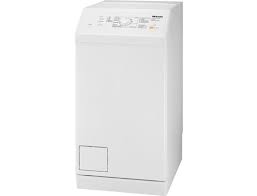
MODE D'EMPLOI W 196 MIELE
Instructions d'utilisation pour machines à laver
Pour éviter tout risque d'accident ou d'endommagement de la machine, il est essentiel de lire ces instructions avant son installation et sa première utilisation.
Sommaire
Protection de l'environnement 6 Avertissements et consignes de sécurité 7 Utilisation de la machine à laver 14 Bandeau de commande 14 Exemples d'utilisation de la machine 16 Avant la première utilisation 17 Insertion des cartouches de détergent 17 Réglage de la langue 19 Retrait des barres de transport 19 Démarrage du programme d'étalonnage 20 TwinDos 21 Laver de manière écologique et économique 22 EcoFeedback 23 1. Préparer le linge 24 2. Sélectionner un programme 25 3. Charger la machine à laver 26 4. Sélectionner les réglages du programme 27 5. Ajouter du détergent 29 TwinDos 29 Tiroir à détergent 30 CapDosing 31 6. Démarrer le programme - fin d'un programme 33 Essorage 34 Départ différé 36 Sélection du départ différé 36 Modification du départ différé 36 Annulation du départ différé et démarrage immédiat du programme 36
Tableau des programmes 37
Options 42
Court 42 Eau plus 42 Taches 42
Déroulement du programme 44
Symboles d'entretien des vêtements 46
Modification du déroulement du programme 47
Annulation d'un programme 47 Interruption d'un programme 47 Modification d'un programme 47 Ajout ou retrait de linge après le démarrage du programme 48 Verrouillage de sécurité 49
Détergent 50
Le détergent approprié 50 Adoucisseurs d'eau 50 Aides au dosage 50 Assouplissant et amidon liquide 50 Détergents recommandés par Miele 51 Détergents recommandés conformément à la directive (UE) n° 1015/2010...... 52
Nettoyage et entretien 55
Nettoyage du tambour (info hygiène) 55 Coque extérieure et bandeau de commande 55 Nettoyage du tiroir à détergent 55 Nettoyage du système TwinDos 57
Démarrage du programme d'entretien 57 Nettoyage des compartiments 58
Nettoyage des filtres d'arrivée d'eau 59
Sommaire
Guide de résolution des problèmes 60
Le programme ne démarre pas 60
Les messages d'erreur suivants s'affichent et le programme s'arrête... 61
Un message s'affiche à la fin du programme 62
Un message s'affiche à la fin du programme 63
Problèmes avec TwinDos 64
Problèmes généraux avec la machine à laver 65
Résultat de lavage insatisfaisant 67
La porte ne s'ouvre pas 68
Ouverture de la porte en cas de blocage de la vidange et/ou de panne de courant .... 69
Service après-vente 71
Réparations 71
Accessoires en option 71
Garantie : Royaume-Uni 71
Garantie : Autres pays 71
Installation et raccordement 72
Vue de face 72
Vue arrière 73
Surface d'installation 74
Transport de la machine à laver jusqu'à son lieu d'installation 74
Retrait des barres de transport 74
Remise en place des barres de transport 76
Mise à niveau de la machine 77
Dévissage et réglage des pieds 77
Installation sous un plan de travail continu / dans une cuisine intégrée 78
Empilage lave-linge séchant 78
Le système de protection contre les fuites d'eau 79
Raccordement à l'alimentation en eau 80
Raccordement au système d'évacuation 81
Branchement électrique Royaume-Uni 82
Données techniques 83
Données de consommation 84
Remarque pour les instituts de test 85
Réglages 86
Langue 87
TwinDos 87
Degré de salissure 89
Volume du buzzer 89
Tonalité du clavier 89
Consommation 89
Code 90
Unité de température 90
Luminosité de l'affichage 90
Affichage sombre 90
Extinction de la machine 91
Affichage de la charge maximale 91
Affichage du nom du programme 91
Mémoire 91
Prélavage Coton 92
Durée de trempage 92
Action douce 92
Réduire la température 92
Eau plus 93
Niveau d'eau plus 93
Niveau de rinçage maximal 93
Refroidissement de la mousse 93
Pression d'eau faible 94
Anti-froissage 94
Accessoires en option 95
Détergent 95
Détergents spécialisés 95
Entretien du linge 96
Additifs 96
Élimination de l'emballage
L'emballage est conçu pour protéger le lave-linge des dommages pendant le transport. Les matériaux d'emballage utilisés sont choisis parmi des matériaux respectueux de l'environnement pour leur élimination et doivent être recyclés.
Le recyclage de l'emballage réduit l'utilisation de matières premières dans le processus de fabrication et réduit également la quantité de déchets dans les décharges. Assurez-vous que les emballages en plastique, sacs, etc. sont éliminés en toute sécurité et tenus hors de portée des bébés et des jeunes enfants. Danger de suffocation.
Élimination de votre ancien appareil
Les machines électriques et électroniques contiennent souvent des matériaux précieux. Elles contiennent également des matériaux qui, s'ils sont manipulés ou éliminés incorrectement, pourraient être potentiellement dangereux pour la santé humaine et l'environnement. Ils sont cependant essentiels au bon fonctionnement de votre machine. Veuillez donc ne pas la jeter avec vos déchets ménagers.
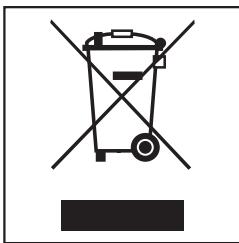
Veuillez la déposer dans votre centre de collecte / recyclage communautaire local ou contacter votre revendeur pour obtenir des conseils.
Assurez-vous qu'elle ne présente aucun danger pour les enfants pendant son stockage en vue de son élimination.
Ce lave-linge est conforme aux exigences de sécurité en vigueur. Une utilisation inappropriée peut cependant entraîner des blessures et des dommages matériels.
Pour éviter tout risque d'accident et de dommage à la machine, veuillez lire attentivement ces instructions avant de l'utiliser pour la première fois.
Ils contiennent des informations importantes concernant la sécurité, l'utilisation et l'entretien.
Conservez ces instructions dans un endroit sûr et assurez-vous que les nouveaux utilisateurs en connaissent le contenu. Transmettez-les à tout futur utilisateur.
Utilisation correcte
Cette machine à laver est destinée à un usage domestique et dans des environnements de travail et résidentiels similaires. La machine à laver n'est pas destinée à une utilisation en extérieur. Elle doit être utilisée uniquement comme appareil domestique pour laver les articles que le fabricant a spécifiés comme lavables sur l'étiquette d'entretien. Miele ne peut être tenu responsable des dommages résultant d'une utilisation incorrecte ou inappropriée. La machine à laver ne peut être utilisée par des personnes ayant des capacités physiques, sensorielles ou mentales réduites, ou manquant d'expérience ou de connaissances, que si elles sont supervisées pendant son utilisation ou si elles ont reçu des instructions sur la façon de l'utiliser en toute sécurité et de reconnaître et comprendre les conséquences d'une mauvaise utilisation.
Sécurité des enfants
Les enfants de moins de 8 ans doivent être tenus à l'écart de la machine à laver, sauf s'ils sont constamment surveillés. Les enfants de 8 ans et plus ne peuvent utiliser la machine à laver sans surveillance que s'ils ont reçu des instructions sur la façon de l'utiliser en toute sécurité et de reconnaître et comprendre les conséquences d'une mauvaise utilisation. Les enfants ne doivent pas être autorisés à nettoyer ou entretenir la machine à laver sans surveillance. Veuillez surveiller les enfants à proximité de la machine à laver et ne les laissez pas jouer avec.
Sécurité technique
Veuillez respecter les instructions dans "Installation et raccordement" et "Caractéristiques techniques". Avant d'installer la machine à laver, vérifiez qu'elle ne présente aucun dommage visible de l'extérieur. N'installez pas et n'utilisez pas une machine endommagée. Avant de connecter le module de communication, assurez-vous que les données de connexion sur la plaque signalétique (calibre du fusible, tension et fréquence) correspondent à l'alimentation électrique du secteur. En cas de doute, consultez un électricien qualifié.
Un fonctionnement fiable et sûr de cette machine à laver ne peut être assuré que si elle est connectée à l'alimentation électrique du secteur.
La sécurité électrique de cette machine à laver ne peut être garantie que si elle est correctement mise à la terre. Il est essentiel que cette exigence de sécurité standard soit respectée. En cas de doute, faites vérifier le système de câblage du bâtiment par un électricien qualifié. Miele ne peut être tenu responsable des conséquences d'un système de mise à la terre inadéquat (par exemple, choc électrique). - Ne branchez pas la machine à laver sur le secteur à l'aide d'une multiprise, d'une rallonge ou d'un dispositif similaire. Ceux-ci ne garantissent pas la sécurité requise de la machine (risque d'incendie dû à une surchauffe). Les composants défectueux doivent être remplacés uniquement par des pièces de rechange d'origine Miele. Ce n'est que lorsque ces pièces sont installées que Miele peut garantir les normes de sécurité de la machine. La prise électrique doit être facilement accessible après l'installation afin que la machine puisse être débranchée de l'alimentation électrique si nécessaire. Des réparations non autorisées pourraient entraîner des dangers imprévus pour l'utilisateur, dont le fabricant ne peut être tenu responsable. Les réparations ne doivent être effectuées que par un technicien agréé Miele, sinon les dommages ultérieurs ne seront pas couverts par la garantie. Si le câble de connexion électrique est défectueux, il doit être remplacé uniquement par un technicien agréé Miele pour protéger l'utilisateur du danger.
La machine doit être isolée de l'alimentation électrique lors du nettoyage et de l'entretien, ainsi qu'en cas de panne. La machine ne doit être raccordée à l'alimentation en eau du site qu'à l'aide d'un nouveau kit de tuyaux. Les anciens kits de tuyaux ne doivent pas être réutilisés. Vérifiez régulièrement l'état des tuyaux afin de pouvoir les remplacer à temps et d'éviter tout risque de dégât des eaux. La pression de l'eau doit être d'au moins 100 kPa et ne doit pas dépasser 1000 kPa. Dans les zones susceptibles d'être infestées par des cafards ou d'autres vermines, veillez à maintenir la machine et son environnement dans un état de propreté constant. Les dommages causés par les cafards ou autres vermines ne seront pas couverts par la garantie. La machine ne doit pas être utilisée dans un lieu non stationnaire (par exemple, sur un bateau). Ne modifiez pas la machine, sauf autorisation de Miele.
Utilisation correcte
N'installez pas la machine à laver dans une pièce où il y a un risque de gel. Les tuyaux gelés peuvent éclater ou se fendre. La fiabilité de l'unité de commande électronique peut être altérée à des températures inférieures au point de congélation. Avant la première utilisation, vérifiez que les barres de transport à l'arrière de la machine ont été retirées (voir "Installation et raccordement - Retrait des barres de transport"). Pendant l'essorage, une barre de transport encore en place peut endommager la machine et les meubles ou appareils adjacents. Fermez le robinet d'arrêt si la machine doit rester inutilisée pendant une longue période (par exemple, pendant les vacances), surtout s'il n'y a pas de drain de sol (avaloir) à proximité immédiate. Danger d'inondation.
Si vous raccordez le tuyau d'évacuation à un évier, vérifiez que l'eau s'écoule assez rapidement pour éviter que l'évier ne déborde. Assurez-vous que le tuyau d'évacuation est bien fixé, afin que la force de l'eau qui s'écoule du tuyau ne le déloge pas.
Veillez à ce que des objets étrangers (par exemple, clous, épingles, pièces de monnaie, trombones) ne pénètrent pas dans la machine avec le linge. Ils pourraient endommager des composants de la machine (par exemple, le bac à eau de lavage, le tambour), ce qui pourrait à son tour endommager le linge.
Soyez prudent lors de l'ouverture de la porte du tambour après avoir utilisé la fonction vapeur. Risque de brûlure dû à la vapeur qui s'échappe et à la température élevée de la surface du tambour ainsi que du hublot. Reculez-vous de la machine et attendez que la vapeur se soit dissipée. La charge maximale pour cette machine à laver est de 8 kg (poids sec). Consultez le "Tableau des programmes" pour les charges maximales recommandées pour chaque programme. Si la quantité de détergent est correcte, la machine ne devrait pas nécessiter de détartrage. Si vous souhaitez toutefois la détartrer, utilisez uniquement un détartrant à base d'acide citrique naturel. Miele recommande d'utiliser le détartrant Miele, disponible en ligne sur www.miele-shop.com ou auprès de Miele. Respectez strictement les instructions figurant sur l'emballage. ▶ Les textiles qui ont été prétraités avec des agents de nettoyage à base de solvants doivent être soigneusement rincés à l'eau claire avant d'être lavés dans la machine. ▷ N'utilisez pas d'agents de nettoyage à base de solvants, par exemple ceux contenant de la benzine, dans cette machine, car cela pourrait endommager les composants et créer des fumées toxiques. Ces agents présentent également un risque d'incendie et d'explosion. ▷ N'utilisez pas d'agents de nettoyage à base de solvants, par exemple ceux contenant de la benzine, pour nettoyer les surfaces de la machine. Ils peuvent endommager les surfaces en plastique. Utilisez uniquement des teintures spécifiées par le fabricant comme étant adaptées à une utilisation dans une machine à laver domestique. Respectez toujours attentivement les instructions du fabricant.
Les produits antitaches et décolorants contiennent des composés soufrés qui peuvent provoquer des dommages tels que la corrosion. N'utilisez pas ces produits dans cette machine. Si du détergent entre en contact avec les yeux, rincez-les immédiatement et abondamment à l'eau tiède. En cas d'ingestion, consultez immédiatement un médecin et conservez l'emballage ou l'étiquette pour référence. Les personnes ayant des problèmes de peau ou une peau sensible doivent éviter tout contact cutané avec le détergent.
Accessoires
Les pièces accessoires ne peuvent être montées que si elles sont expressément approuvées par Miele. Si d'autres pièces sont utilisées, la garantie, les performances et la responsabilité du produit seront annulées. Un sèche-linge Miele peut être empilé sur un lave-linge Miele à l'aide du kit d'empilage approprié (disponible en option). Veuillez vous assurer de commander le bon kit pour votre lave-linge et votre sèche-linge Miele. Si vous installez la machine sur un socle Miele (disponible en option, selon le pays), veuillez vous assurer de commander le socle adapté à ce lave-linge.
Miele ne peut être tenu responsable des dommages causés par le non-respect de ces consignes de sécurité et d'avertissement.
Panneau de commande
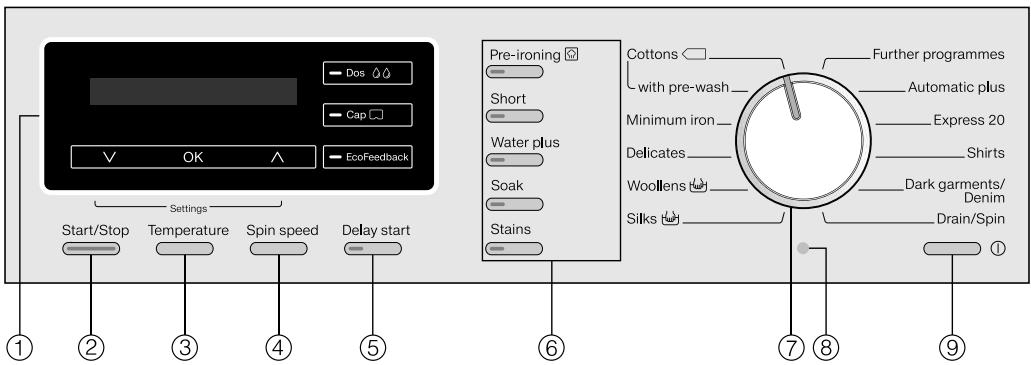
① Écran avec capteurs
Voir la page suivante pour plus d'informations.
Pour démarrer le programme sélectionné et annuler un programme une fois qu'il a démarré.
Pour sélectionner la température.
Pour sélectionner la vitesse d'essorage.
Pour sélectionner le départ différé.
Diverses options peuvent être ajoutées au programme de lavage.
⑦ Sélecteur de programme
Pour sélectionner le programme de lavage.
⑧ Interface optique PC
Pour les techniciens de service.
Pour allumer et éteindre la machine à laver.
Pour économiser l'énergie, la machine à laver s'éteindra automatiquement 15 minutes après la fin du programme/phase anti-froissage ou après avoir été allumée si aucune autre sélection n'est effectuée.
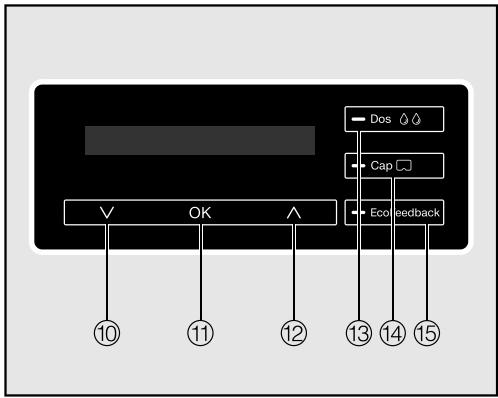
10 V capteur
Fait défiler la liste jusqu'à l'option suivante ou diminue une valeur.
Confirme le programme sélectionné, une valeur définie ou ouvre un sous-menu.
12 capteur
Fait défiler la liste jusqu'à l'option suivante ou augmente une valeur.
Capteur Dos
Active le distributeur automatique de détergent.
14 Capteur de capsule
Active le dosage des capsules via le tiroir de détergent.
Capteur EcoFeedback
Fournit des informations sur la consommation d'énergie et d'eau du programme. Veuillez également vous référer à « Laver de manière écologique et économique - EcoFeedback ».
Les capteurs 10 à 12 s'allument lorsque l'affichage peut être utilisé via les capteurs.
Durée du programme
Après le démarrage du programme, la durée du programme s'affiche en heures et minutes.
Si un départ différé a été sélectionné, la durée du programme s'affiche à la fin du temps de départ différé.
Départ différé
Le temps de départ différé sélectionné s'affiche.
Après le démarrage du programme, le temps de départ différé commence à décompter.
Une fois le temps de départ différé écoulé, la durée estimée du programme s'affiche.
Affichage standard
L'affichage standard montre, de gauche à droite :
2:59

1600
- la durée du programme
- la température de lavage sélectionnée
- la vitesse d'essorage sélectionnée
Exemples d'utilisation de la machine
Les flèches vers le bas dans l'affichage indiquent qu'une liste est disponible.
Langue


Toucher le capteur ∨ fait défiler la liste vers le bas jusqu'à l'option suivante, et toucher le capteur ∧ fait défiler la liste vers le haut jusqu'à l'option précédente. Le capteur OK permet d'activer l'option actuellement affichée.
Identification des options sélectionnées

Cap


Si une option a été activée, cela est indiqué par une coche √ à côté.
Réglage des valeurs numériques
Départ dans
00
Une valeur numérique est mise en évidence en blanc. Toucher le capteur diminue la valeur et toucher le capteur l'augmente. Le capteur OK sert à activer la valeur actuellement affichée.
Sélectionnez Retour ← pour sortir d'un sous-menu.
Retrait des cartouches de détergent du tambour
Il y a deux cartouches contenant UltraPhase1 et UltraPhase2 pour le dosage automatique du détergent dans le tambour.
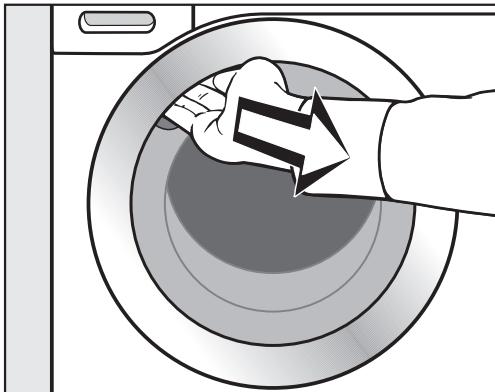
Passez la main sous la poignée de la porte et tirez pour ouvrir. Sortez les deux cartouches du tambour.
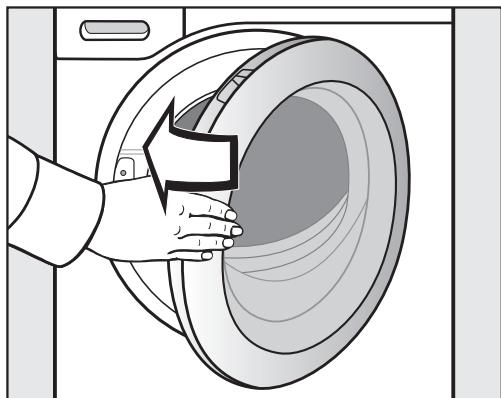
Fermez la porte en la poussant doucement.
Insertion des cartouches de détergent
Les cartouches de détergent retirées du tambour font partie du système Miele à deux phases, composé de :
- UltraPhase 1 (détergent de base)
- UltraPhase 2 (activateur de détergent)
Ces cartouches de détergent sont à usage unique. Des cartouches de rechange peuvent être commandées auprès de Miele ou via Internet sur www.miele-shop.com (voir la fin de ce livret pour plus de détails). Les cartouches vides doivent être éliminées via votre système de recyclage local.
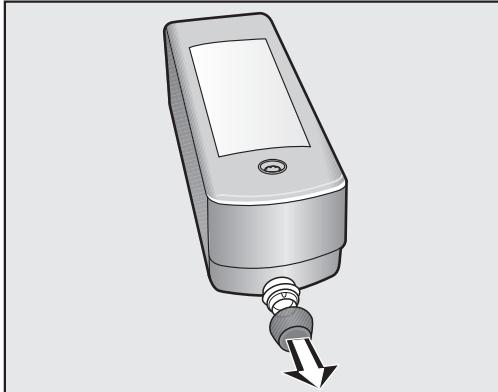
Retirez les bouchons des cartouches de détergent.
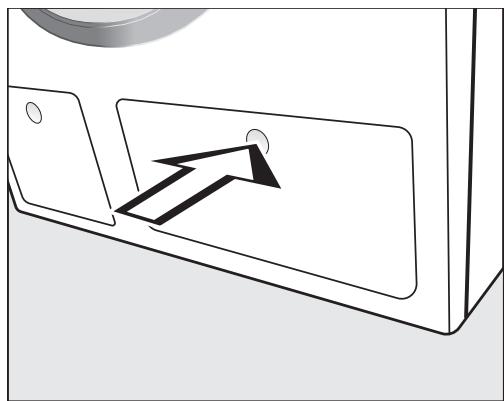
Appuyez sur le panneau d'accès TwinDos.
Le panneau s'ouvrira en ressortant.
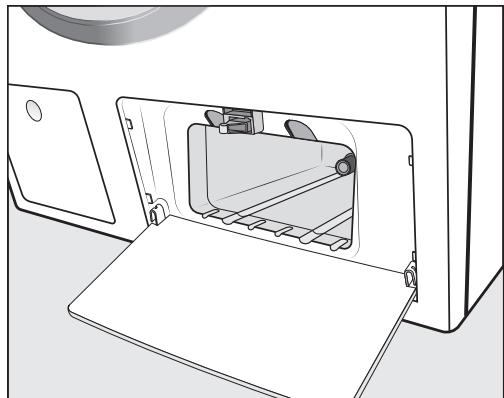
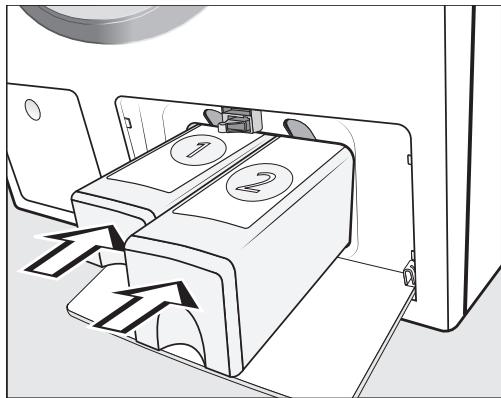
Poussez la cartouche UltraPhase 1 dans le compartiment 1 et la cartouche UltraPhase 2 dans le compartiment 2, jusqu'à ce qu'elles s'enclenchent.
Le système TwinDos est maintenant prêt à l'emploi.
Retrait du film protecteur et des autocollants
Retirez
- le film protecteur de la porte.
- tous les autocollants de l'avant et du couvercle.
Veuillez ne pas retirer les étiquettes (par exemple la plaque signalétique) visibles lorsque vous ouvrez la porte.
Cette machine à laver a subi un test fonctionnel complet en usine et il peut rester de l'eau résiduelle dans le tambour.
Avant la première utilisation, assurez-vous que la machine est correctement installée et raccordée. Voir "Installation et raccordement". Vérifiez également que les filtres de vidange sont bien serrés pour éviter tout risque de fuite d'eau pendant l'utilisation.
Mise en marche de la machine à laver
Appuyez sur la touche ①.
L'écran d'accueil s'allume.
Réglage de la langue
Il vous sera demandé de sélectionner la langue souhaitée pour l'affichage. Il est possible de changer la langue à tout moment via « Réglages ».
allemand

- Touchez le capteur ou jusqu'à ce que la langue souhaitée apparaisse à l'écran.
- Confirmez votre choix de langue en touchant le capteur OK.
Retrait des barres de transport
Un rappel pour retirer les barres de transport apparaîtra à l'écran.
Le non-retrait des barres de transport peut entraîner des dommages à la machine à laver et aux armoires ou appareils adjacents.
Retirez les barres de transport comme décrit dans « Installation et raccordement ».
- Confirmez le retrait des barres de transport avec le capteur OK.
Démarrage du programme de calibrage
Le message suivant apparaît à l'écran :
i Ouvrez et lancez Coton 90°C sans linge - Touchez le capteur à plusieurs reprises jusqu'à avoir lu toutes les lignes de texte.
Le capteur OK s'allume.
- Confirmez le message avec le capteur OK.
Pour une consommation d'eau et d'énergie optimale et d'excellents résultats de lavage, il est important de calibrer la machine à laver.
Pour ce faire, le programme Coton à 90 °C doit être démarré sans linge et sans détergent.
Aucun autre programme ne peut être démarré tant que le calibrage n'a pas été effectué.
Ouvrez le robinet d'arrivée d'eau. Tournez le sélecteur de programme sur Coton.
1:55
90 °C
1600
Appuyez sur la touche Départ/Arrêt.
Le programme de calibrage a démarré. Cela prendra environ 2 heures.
À la fin du programme, le message suivant s'affichera :
i Configuration terminée
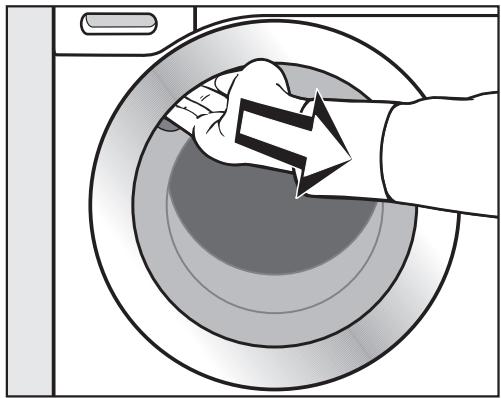
Passez la main sous la poignée de la porte et tirez pour l'ouvrir. Conseil : laissez la porte entrouverte pour permettre au tambour de sécher. - Éteignez le lave-linge avec la touche ①.
Le lave-linge est équipé d'un système de dosage de détergent intégré.
Le système TwinDos peut être utilisé de deux manières :
- avec le système Miele 2 Phase ou
- avec tout autre détergent liquide et/ou assouplissant.
Le système Miele 2 Phase
Le système Miele 2 Phase utilise un détergent de base (UltraPhase 1) et un activateur de détergent (UltraPhase 2). Pour obtenir des résultats optimaux, les agents sont distribués séparément pendant le processus de lavage. Le système 2 Phase nettoie en profondeur les textiles blancs et colorés. Les cartouches à usage unique UltraPhase 1 et UltraPhase 2 peuvent être commandées auprès de Miele ou via Internet sur www.miele-shop.com (voir les coordonnées à la fin de ce livret).
Détergent liquide / Assouplissant
Des conteneurs TwinDos rechargeables sont nécessaires pour le détergent liquide et/ou l'assouplissant. Ils peuvent être commandés auprès de Miele ou via Internet sur www.miele-shop.com (voir les détails à la fin de ce livret).
Comment fonctionne TwinDos
Le dosage automatique du détergent pour un cycle de lavage est activé via le capteur Dos.
Conseil : La machine à laver est livrée préconfigurée pour le système Miele 2 Phase pour la plage de dureté II (F).
Les réglages ne doivent être modifiés que si vous souhaitez utiliser un détergent différent ou si la dureté de l'eau est différente.
Voir « Réglages - TwinDos » pour plus d'informations.
Le dosage automatique ne peut pas être sélectionné avec certains programmes, selon le détergent présent dans le système TwinDos. Par exemple, le dosage automatique ne peut pas être activé pour le programme Laine si le système Miele 2 Phase est utilisé. Cela évite d'endommager les vêtements en laine avec un détergent non adapté au lavage de la laine.
Laver de manière écologique et économique
Consommation d'énergie et d'eau
La consommation d'eau et d'énergie dépend de la taille de la charge. Pour tirer le meilleur parti de votre machine, chargez la charge sèche maximale pour le programme utilisé. - Lorsque de plus petites quantités de linge sont lavées, le système de reconnaissance automatique de charge réduit la quantité d'eau et d'énergie utilisée. - Utilisez le programme Express 20 pour les petites charges légèrement sales. - Les détergents modernes permettent de laver à des températures plus basses (par exemple 20 °C). Laver à des températures plus basses permet d'économiser de l'énergie. - Pour maintenir l'hygiène de la machine, effectuez un lavage à chaud (60 °C ou plus) avec de la lessive en poudre à intervalles réguliers. L'info Hygiène s'affiche à l'écran pour vous rappeler d'effectuer un lavage à chaud.
Détergent
- Pour un dosage précis, utilisez le dosage automatique du détergent.
- Ajustez le dosage en fonction du degré de salissure du linge.
- Ne dépassez pas les quantités de détergent recommandées par le fabricant sur l'emballage.
Lors du séchage dans un sèche-linge
Choisir la vitesse d'essorage la plus élevée possible pour le programme de lavage permettra d'économiser de l'énergie lors du séchage ultérieur dans un sèche-linge.
EcoFeedback
Vous pouvez consulter des informations sur la consommation d'énergie et d'eau de votre machine à laver grâce au capteur EcoFeedback.
Les informations suivantes apparaissent à l'écran :
- une estimation de la consommation d'énergie et d'eau avant le début du programme.
- la consommation réelle d'énergie et d'eau pendant le programme ou à la fin du programme.
1. Estimation
Après avoir sélectionné un programme, touchez le capteur EcoFeedback.
Les niveaux de consommation d'énergie estimés s'affichent sous forme de graphique à barres.
Énergie

- Touchez le capteur ou pour passer aux niveaux de consommation d'eau estimés.
Eau

Plus il y a de barres (■) visibles, plus la consommation d'énergie ou d'eau est élevée.
L'estimation varie selon le programme de lavage, la température et les options sélectionnées.
L'affichage change automatiquement ou vous pouvez revenir à l'affichage standard en touchant le capteur OK.
2. Consommation réelle
Vous pouvez consulter la quantité réelle d'énergie et d'eau utilisée par le programme qui vient de s'exécuter, pendant et à la fin du programme.
Touchez le capteur EcoFeedback.
Énergie
0,9 kWh
- Touchez ou pour passer à l'affichage de la consommation d'eau.
La consommation change au fur et à mesure que le programme progresse.
Si la porte est ouverte ou si le lave-linge s'est éteint automatiquement à la fin du programme, les données reviennent à la consommation estimée.
Astuce : Vous pouvez consulter les données de consommation du dernier programme de lavage dans Réglages sous Consommation.
1. Préparer le linge
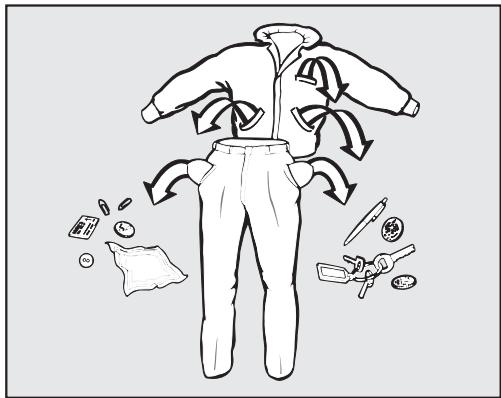
Videz toutes les poches.
Les objets étrangers (par exemple, clous, pièces de monnaie, trombones, etc.) peuvent endommager les vêtements et les composants de la machine.
Vérifiez le linge avant de le laver et retirez tout corps étranger.
Triez le linge
- Triez le linge par couleur et par étiquette d'entretien. La plupart des vêtements portent une étiquette d'entretien textile dans le col ou la couture latérale.
Conseil : Les textiles foncés contiennent souvent un excès de teinture et doivent être lavés séparément plusieurs fois avant d'être inclus dans une charge mixte. Lavez toujours les blancs et les couleurs séparément.
Prétraitez les taches
Les zones très sales, les taches, etc. doivent être nettoyées dès que possible, de préférence encore fraîches. Les renversements doivent être soigneusement tamponnés avec un chiffon doux et grand teint. Ne frottez pas.
Conseil : Les zones très sales peuvent être prétraitées avec du détergent liquide, des détachants, etc. en suivant les instructions du fabricant. Pour les taches particulièrement tenaces, demandez conseil à votre teinturier.
Les nettoyants à base de solvants (par exemple, le benzène) peuvent endommager les pièces en plastique. Lors du prétraitement des vêtements, assurez-vous que les pièces en plastique (par exemple, les boutons) sont protégées du produit de nettoyage.
Les agents de nettoyage chimiques (à base de solvants) peuvent causer de graves dommages à la machine à laver.
N'utilisez pas d'agents de nettoyage à base de solvants dans cette machine.
Conseils généraux
- Rideaux : Retirez d'abord les poids de plomb ou placez-les dans un sac à linge.
- Armatures et renforts de col : Tout fil métallique lâche dans les soutiens-gorge, les renforts de col de chemise, etc. doit être retiré ou cousu.
- Fermez les fermetures éclair, fixez les bandes auto-agrippantes, attachez les crochets et les œillets, etc. avant le lavage.
- Fermez les housses de couette, les taies d'oreiller, etc. pour empêcher les petits articles de s'y enrouler.
Ne lavez pas dans cette machine à laver les articles que le fabricant indique comme non lavables sur l'étiquette d'entretien (symbole).
Mettez la machine à laver en marche
Appuyez sur la touche ①.
Sélection du programme
A. Sélection d'un programme via le sélecteur de programme :
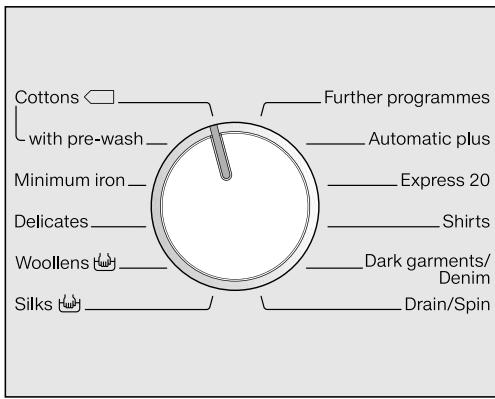
Tournez le sélecteur de programme sur le programme souhaité.
La charge pour le programme sélectionné s'affiche à l'écran. Elle est ensuite remplacée par l'affichage standard.
B. Sélection d'un programme à l'aide du sélecteur de programme sur la position « Programmes supplémentaires » :
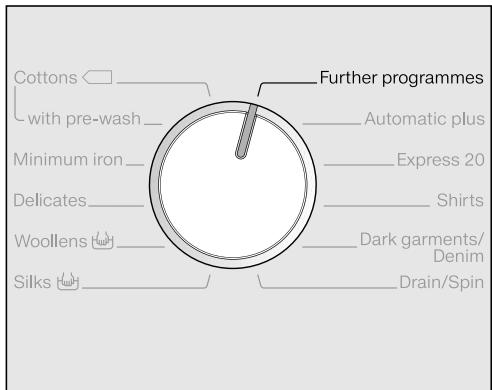
Tournez le sélecteur de programme sur Programmes supplémentaires.
Ce qui suit s'affiche à l'écran :
Couettes en duvet

- Touchez la touche ou jusqu'à ce que le programme souhaité s'affiche à l'écran.
- Confirmez le programme avec la touche OK.
La charge maximale pour le programme concerné s'affiche à l'écran. Les paramètres de programme prédéfinis s'affichent en fonction du programme sélectionné.
3. Chargez la machine à laver
Ouvrez la porte.
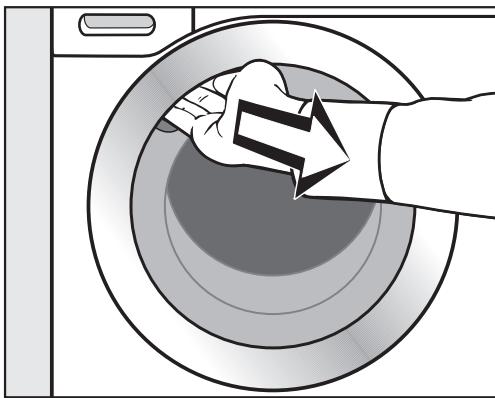
Attrapez la poignée de la porte et tirez pour l'ouvrir.
Avant de charger le linge, vérifiez que le tambour ne contient ni animaux ni objets étrangers.
- Dépliez le linge et chargez-le en vrac dans le tambour.
Mélanger des articles de grande et de petite taille donne de meilleurs résultats de lavage et aide à répartir la charge uniformément pendant l'essorage.
Veuillez noter la charge maximale pour les différents programmes de lavage. La charge correspondant au programme sélectionné est toujours affichée à l'écran lorsque vous choisissez un programme.
L'utilisation la plus efficace de l'énergie et de l'eau est obtenue en lavant une charge complète. Cependant, ne surchargez pas, car cela réduit l'efficacité du nettoyage et provoque des plis.
Fermez la porte.
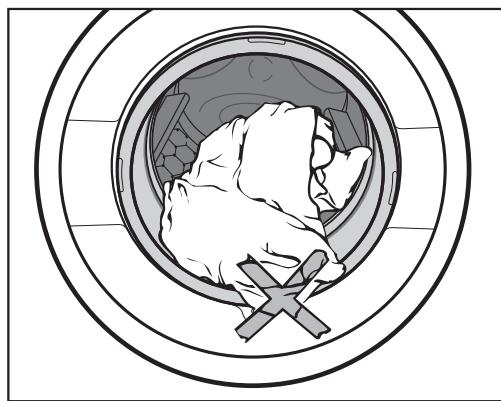
Assurez-vous qu'aucun article n'est coincé entre la porte et le joint.
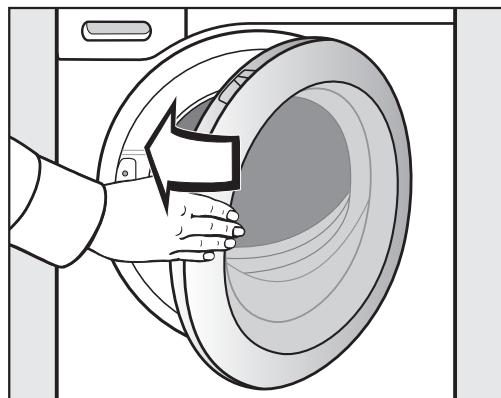
Fermez la porte en la poussant doucement.
4. Sélectionnez les réglages du programme
Degré de salissure
Légèrement sale
Pas de saleté visible ni de taches. Peut-être une légère odeur corporelle.
Normalement sale
Visiblement sale et/ou quelques légères taches.
Très sale
Salissures et/ou taches clairement visibles.
Ce qui suit s'affichera à l'écran :
Degré de salissure
L'affichage passera automatiquement à la demande de degré de salissure :
Normal

Réglez le degré de salissure avec les capteurs et et confirmez votre sélection avec le capteur OK.
Les paramètres suivants changeront en fonction du degré de salissure sélectionné :
- la quantité de détergent avec le dosage automatique ; avec le réglage Très sale, un prélavage sera effectué automatiquement pour certains programmes (voir "Options").
- le niveau d'eau de rinçage sera ajusté
- les durées de programme (avec une salissure légère, la durée du programme sera plus courte)
Dans le programme Express 20, le degré de salissure ne peut pas être sélectionné. Express 20 est conçu pour un linge légèrement sale.
Conseil : Vous pouvez modifier le réglage par défaut du degré de salissure ou désactiver la demande de degré de salissure dans les Réglages (voir "Réglages - Degré de salissure").
Sélectionnez une température
Vous pouvez modifier la température préréglée d'un programme de lavage.
Appuyez sur la touche Température.
L'affichage suivant apparaît :
Température

Réglez la température souhaitée avec les capteurs et et confirmez votre sélection avec le capteur OK.
4. Sélectionner les réglages du programme
Sélection de la vitesse d'essorage
Vous pouvez modifier la vitesse d'essorage préréglée d'un programme de lavage.
Appuyez sur la touche Vitesse d'essorage.
L'affichage suivant apparaît :
Vitesse d'essorage
1600
tr/min
Réglez la vitesse d'essorage souhaitée avec les capteurs et et confirmez votre sélection avec le capteur OK.
Sélectionner des options
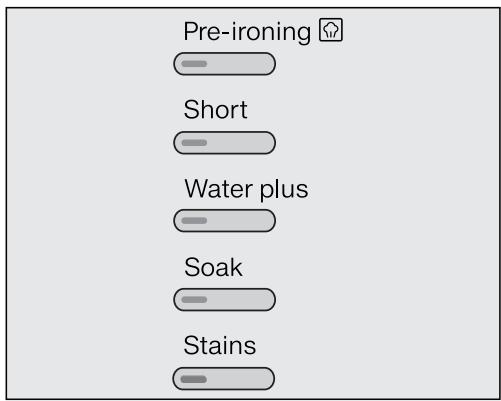
Appuyez sur la touche de l'option souhaitée.
Le voyant de la touche s'allume.
Toutes les options ne conviennent pas à tous les programmes. Vous ne pouvez sélectionner que les options compatibles avec le programme utilisé.
Voir « Options ».
Activer le départ différé (si nécessaire)
Le démarrage d'un programme peut être différé de 15 minutes à 24 heures, ce qui permet par exemple de profiter des tarifs d'électricité de nuit.
Voir « Départ différé ».
Il existe plusieurs options pour ajouter du détergent.
TwinDos
Avant la première utilisation de TwinDos, l'écran affiche des informations sur les réglages d'usine par défaut de TwinDos. L'écran affiche : UltraPhase 1+2 réglé pour un niveau de dureté d'eau moyen. Modifier dans « Réglages »/« TwinDos »
- Touchez le capteur à plusieurs reprises jusqu'à avoir lu toutes les lignes de texte. Le capteur OK s'allume. Touchez le capteur OK pour confirmer.
Système Miele 2 phases
UltraPhase 1 et UltraPhase 2 doivent être dosés dans des proportions différentes selon la composition des couleurs du linge.
Touchez le capteur Dos.
Pour le blanc
Utilisez les capteurs et pour sélectionner le mélange de couleurs du linge et confirmez avec le capteur OK.
UltraPhase 1 et UltraPhase 2 seront distribués en conséquence.
Détergent liquide / Assouplissant
Il est possible d'utiliser d'autres types de détergent liquide / assouplissant. Des conteneurs TwinDos rechargeables (accessoires en option) sont nécessaires pour cela.
Les réglages électroniques de la machine à laver doivent être ajustés en conséquence. Voir "Réglages - TwinDos".
Touchez le capteur Dos.
Les deux agents

- Confirmez l'option affichée avec le bouton OK ou sélectionnez un autre détergent ou assouplissant avec les capteurs et .
Astuce : Le(s) détergent(s) recommandé(s) est affiché à l'écran et marqué d'une coche (√).
La quantité appropriée de détergent et/ou d'assouplissant pour le programme sera maintenant distribuée.
Ajout de détachant
Il y a deux options pour ajouter du détachant en plus de l'utilisation du système de distribution automatique :
- Utilisez le bouchon Booster
- Ajoutez du détachant dans le compartiment .
5. Ajoutez du détergent
Tiroir distributeur de détergent
Une quantité insuffisante de détergent entraîne :
- Un linge mal lavé qui, avec le temps, peut devenir gris et dur au toucher. Des particules graisseuses adhèrent au linge.
- Des dépôts de calcaire sur les éléments chauffants.
Une quantité excessive de détergent entraîne :
- Une mousse excessive qui provoque une faible agitation et de mauvais résultats de lavage, de rinçage et d'essorage.
- Une consommation d'eau élevée (un cycle de rinçage supplémentaire s'active automatiquement).
- Une charge pour l'environnement.
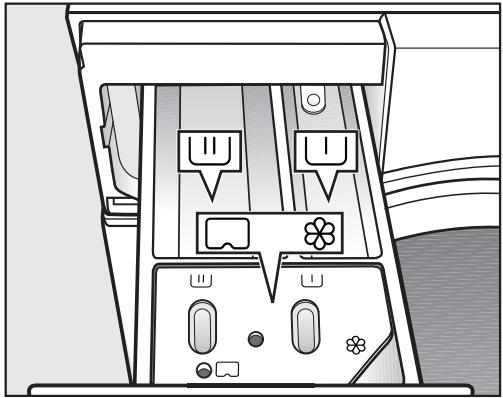
Tirez le tiroir distributeur de détergent et ajoutez le détergent dans les compartiments comme suit :
U
Détergent pour le prélavage (répartissez la quantité totale recommandée comme suit : ajoutez 1/3 dans le compartiment U et 1/3 dans le compartiment U)
U
Détergent pour le lavage principal, y compris le trempage, s'il est sélectionné
/
Assouplissant, amidon liquide ou capsules.
Voir « Détergent » pour plus d'informations.
CapDosing
Trois types de capsules sont disponibles :
= Entretien du linge (par ex. assouplissant, agent d'imperméabilisation) Additifs (par ex. activateurs de lessive) Détergent (pour le lavage principal uniquement)
Chaque capsule contient la quantité correcte pour un cycle de lavage.
Vous pouvez commander les capsules en ligne sur www.miele-shop.com ou auprès de Miele (voir les coordonnées à la fin de cette brochure).
Gardez les capsules hors de portée des enfants.
Activation de CapDosing
Touchez le capteur Cap.
Le premier type de capsule pouvant être sélectionné pour le programme apparaît à l'écran.

Cap
- Sélectionnez le type de capsule souhaité avec les capteurs et et confirmez votre sélection avec le capteur OK.
Insertion d'une capsule
- Ouvrez le tiroir du distributeur de détergent.
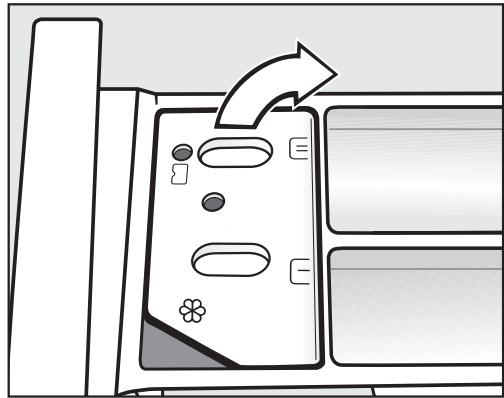
Ouvrez le couvercle du compartiment 8.
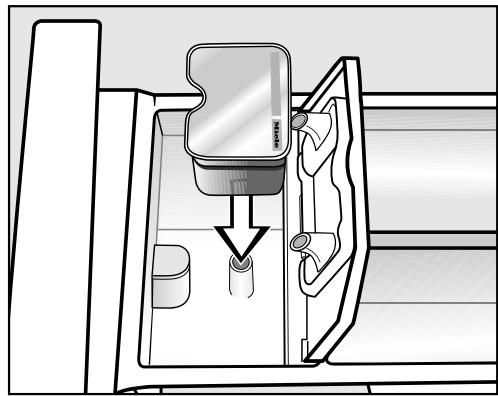
Enfoncez fermement la capsule.
5. Ajoutez le détergent
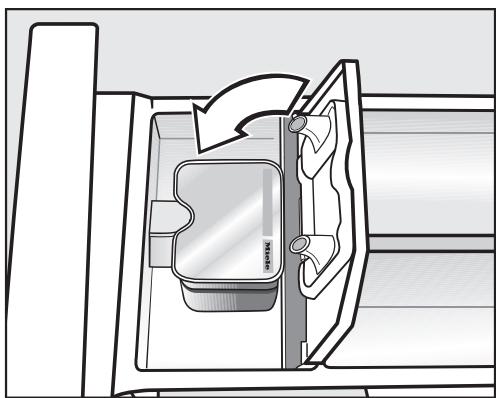
Fermez le couvercle et appuyez fermement pour le fermer. - Fermez le tiroir du distributeur de détergent.
La capsule s'ouvre lorsqu'on l'insère dans le tiroir du distributeur de détergent. Le contenu peut s'écouler de la capsule si vous la retirez du tiroir avant son utilisation. Dans ce cas, jetez la capsule et ne la réutilisez pas.
Le programme de lavage distribuera le contenu de la capsule au moment approprié.
L'arrivée d'eau dans le compartiment 88 se fait uniquement par la capsule.
Aucun assouplissant supplémentaire ne doit être ajouté dans le compartiment lors de l'utilisation d'une capsule.
- Retirez la capsule vide à la fin du programme.
Pour des raisons techniques, une petite quantité d'eau restera dans la capsule.
Désactivation/modification du Cap-Dosing
- Touchez le capteur Cap et suivez les instructions à l'écran.
Démarrage du programme
Touchez le capteur Start/Stop clignotant.
La porte se verrouille (le apparaît à l'écran pour l'indiquer) et le programme démarre.
Si un départ différé a été sélectionné, le compte à rebours s'affiche à l'écran. À la fin du départ différé ou immédiatement après le démarrage du programme (si aucun départ différé n'a été sélectionné), la durée du programme s'affiche à l'écran.
La séquence du programme est également affichée à l'écran. La machine à laver vous indique quelle étape du programme a été atteinte.
À la fin d'un programme
La porte reste verrouillée pendant la phase d'anti-froissage et les messages suivants s'affichent en alternance à l'écran :
Anti-froissage / Terminé
et
i Appuyez sur Départ/Arrêt
Appuyez sur la touche Départ/Arrêt. Cela déverrouillera la porte. Ouvrez la porte. Retirez le linge.
Les articles laissés dans le tambour pourraient décolorer d'autres articles lors du prochain lavage ou se décolorer eux-mêmes.
Vérifiez que tous les articles ont été retirés du tambour.
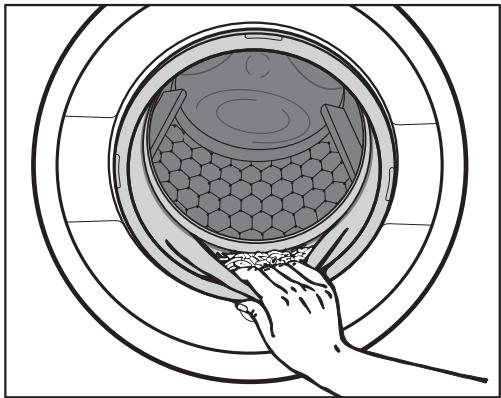
- Vérifiez les plis du joint de porte pour détecter tout petit article, par exemple des boutons, qui pourrait y être coincé.
Astuce : Laissez la porte légèrement entrouverte pour permettre au tambour de sécher.
- Éteignez la machine à laver avec la touche ①. Si applicable, retirez la capsule usagée du tiroir de distribution de détergent.
Astuce : Laissez le tiroir de distribution de détergent légèrement entrouvert pour lui permettre de sécher.
Vitesse d'essorage finale
| Programme | rpm |
| Cottons | 1600 |
| Minimum iron | 1200 |
| Delicates | 900 |
| Woollens h@h | 1200* |
| Silks h@h | 600* |
| Down duvets | 1200 |
| Outerwear | 800 |
| Proofing | 1000 |
| Sportswear | 1200 |
| Separate rinse / Starch | 1600* |
| Maintenance wash | 900 |
| Automatic plus | 1400 |
| Express 20 | 1200 |
| Shirts | 900 |
| Dark garments / Denim | 900 |
| Drain / Spin | 1600 |
Vitesse d'essorage finale dans le programme
Lorsqu'un programme est sélectionné, la vitesse d'essorage optimale pour ce programme s'affiche à l'écran. Pour les programmes marqués d'un * dans le tableau, la vitesse d'essorage optimale n'est pas la vitesse maximale.
Vous pouvez réduire la vitesse d'essorage finale.
Cependant, vous ne pouvez pas sélectionner une vitesse d'essorage finale supérieure à celle indiquée dans le tableau.
Rinçage et essorage intermédiaire
Un essorage a lieu après le lavage principal et entre les rinçages. Une réduction de la vitesse d'essorage finale réduit également la vitesse d'essorage intermédiaire. Si une vitesse d'essorage inférieure à 700 tr/min est sélectionnée pour le programme Coton, un rinçage supplémentaire est introduit.
Pour supprimer l'essorage final (Arrêt cuve pleine)
- Utilisez le bouton Vitesse d'essorage pour sélectionner le réglage (Arrêt cuve pleine). Le linge n'est pas essoré après le dernier rinçage et reste dans l'eau de rinçage finale. Cela aide à éviter le froissage si le linge n'est pas retiré du tambour immédiatement après la fin du programme.
- Pour démarrer l'essorage final : Le lave-linge affichera la vitesse d'essorage maximale possible. Vous pouvez sélectionner une vitesse inférieure. Démarrez l'essorage final en appuyant sur le bouton Départ/Arrêt.
- Pour terminer le programme : Utilisez le bouton Vitesse d'essorage pour sélectionner le réglage 0 tr/min (Sans essorage) et appuyez sur le bouton Départ/Arrêt.
L'eau sera évacuée.
Pour supprimer le rinçage, l'essorage intermédiaire et l'essorage final
Appuyez sur le bouton Vitesse d'essorage. Sélectionnez le réglage 0 tr/min.
Après le dernier rinçage, l'eau sera pompée et la phase anti-froissage s'activera.
Dans certains programmes, un rinçage supplémentaire est introduit avec ce réglage.
Avec le départ différé, vous pouvez choisir quand vous souhaitez que le programme démarre. Vous pouvez retarder le démarrage du programme de 15 minutes jusqu'à un maximum de 24 heures, ce qui vous permet, par exemple, de profiter des tarifs d'électricité de nuit.
Pour sélectionner le départ différé
Appuyez sur la touche Départ différé.
Ce qui suit s'affiche à l'écran :
Départ dans
00:00h
Utilisez les capteurs et pour saisir l'heure et confirmez votre saisie avec le capteur OK.
L'affichage change :
Départ dans
05:00h
Utilisez les capteurs et pour saisir les minutes et confirmez votre saisie avec le capteur OK.
Astuce : Les valeurs défilent automatiquement vers le haut ou vers le bas si vous touchez le capteur ou en continu.
Pour démarrer le départ différé
Appuyez sur la touche Marche/Arrêt pour démarrer le départ différé et le programme de lavage.
Ce qui suit s'affiche à l'écran :
Départ dans
05:00h
Lorsque le délai de départ est écoulé, le programme démarre et l'affichage indique la durée du programme et le déroulement du programme.
Pour modifier le départ différé
Vous pouvez modifier le départ différé à tout moment.
Appuyez sur la touche Départ différé.
Modifiez l'heure

Touchez le capteur OK.
Départ dans
05:29 h
Saisissez maintenant l'heure souhaitée.
Pour annuler le départ différé et démarrer immédiatement le programme
Appuyez sur la touche Départ différé.
Modifiez l'heure

Touchez le capteur .
Démarrer maintenant

- Touchez le capteur OK. Le programme de lavage démarre immédiatement.
| Cottons cold to 90 °C Max. load 8.0 kg |
| Use for | Cotton, linen or cotton mix fabric, e.g. table linen, towelling, under-wear, T-shirts etc. |
| Note | The settings 60 °/40 °C differ from <60°C/40°C as follows:
- Shorter programme durations
- Longer temperature holding times
- Higher energy consumption
Where particularly high levels of hygiene are required please select a temperature of 60 °C or higher. |
| Cottons <60°C/40°C Max. load 8.0 kg |
| Use for | Normally soiled cotton garments. |
| Notes | - These settings are the most efficient in terms of energy and water consumption for washing cottons.
- With <60°C the actual wash temperature reached will be lower than 60 °C although the wash performance is the same as with the standard Cottons 60 °C programme. |
| Note for test institutes:
The test programme conforms to EN 60456 and the energy label to Directive 1061/2010. |
| Minimum iron cold to 60 °C Max. load 4.0 kg |
| Use for | Synthetic, mixed fibre and easy care cotton. |
| Note | Reduce the spin speed for fabric which creases easily. |
Tableau des programmes
| Delicates | cold to 60 °C | Max. load 3.0 kg |
| Use for | Delicate garments made from synthetic fibre, mixed fibre, rayon and viscose.Curtains, including net curtains, specified as machine-washable by the manufacturer. |
| Notes | - Dust in curtains usually makes a programme with pre-wash advisable. Select the Heavy setting for the degree of soiling so that a pre-wash will be carried out.- Deselect the spin for items which crease easily. |
| Woollens | cold to 40 °C | Max. load 2.0 kg |
| Use for | Machine-washable or hand-washable wool or wool blend fabric. If the care label does not specify a temperature, wash using the cold setting. |
| Note | Reduce the spin speed for items which crease easily. |
| Silks | cold to 30 °C | Max. load 1.0 kg |
| Use for | Silks and other handwashable fabric with no wool content. |
| Note | Place tights, bras etc. in a laundry bag. |
| Down duvets | cold to 60 °C | Max. load 2.5 kg1 down duvet 2.20 m x 2.00 m |
| Use for | Quilts, duvets and pillows with feather or down filling. |
| Notes | - Remove air from the items before washing to prevent an excessive build-up of foam. To do this either push the items into a narrow laundry bag to compress them or tie the items together with a washable strap.- Observe the instructions on the wash care label. |
| Outerwear | cold to 40 °C | Max. load 2.5 kg |
| Use for | Performance outerwear (e.g. jackets and trousers) made from membrane fabric such as Gore-Tex®, SYMPATEX®, WINDSTOPPER® etc. |
| Notes | - Zip up or close jackets before washing.
- Do not use fabric conditioner.
- If wished, these garments can also be re-proofed using the Proofing programme. Proofing should not be done every time the garment is washed. |
| Proofing | 40 °C | Max. load 2.5 kg |
| Use for | Treating microfibre fabric, skiwear and table linen made from mainly synthetic fibres to provide a water and dirt resistant finish. |
| Notes | - The items should be freshly laundered and spun or dried before proofing.
- For best results, the items should be heat-treated afterwards either in a tumble dryer or by ironing. |
| Sportswear | cold to 60 °C | Max. load 3.0 kg |
| Use for | Sportswear such as singlets and leggings as well as microfibre and fleece garments. |
| Notes | - Do not use fabric conditioner.
- Observe the manufacturer's care label. |
Tableau des programmes
| Separate rinse / Starch Max. load 8.0 kg |
| Use for | - Rinsing handwashed items.- Starching table cloths, serviettes and workwear. |
| Notes | - Reduce the spin speed for items which crease easily.- The laundry should be washed but not treated with fabric condi-tioner.- Items will be rinsed very effectively using two rinse cycles by ac-
tivating the Water plus option. |
| Maintenance wash 75 °C Empty |
| With frequent washing at low temperatures there is a danger of a build-up of bacteria in the washing machine.Cleaning the washing machine will significantly reduce bacteria, mould and biofilm and prevent the build-up of unpleasant odours. |
| Notes | - Optimum results can be achieved by using Miele machine cleaner. Alternatively, a universal powder detergent can be used.- Dispense the machine cleaner or universal detergent directly into the drum.- Do not load any laundry. The drum must be empty for the main-
tenance wash. |
| Automatic plus cold to 40 °C Max. 6.0 kg |
| Use for | Mixed loads of garments suitable for the Cottons and Minimum iron programmes. |
| Note | The wash parameters (e.g. water level, wash rhythm and spin speed) are adjusted automatically in this programme to ensure the best possible care and wash result for each item. |
| Express 20 cold to 40 °C Max. load 3.5 kg |
| Use for | Cotton garments that have hardly been worn or are only very lightly soiled. |
| Note | The Short option is activated automatically. |
| Shirts cold to 60 °C Max. load 2.0 kg |
| Use for | Shirts and blouses made of cotton and mixed fibre. |
| Notes | - Pre-treat soiled cuffs and collars if necessary.
- Wash silk shirts and blouses in the Silks programme. |
| Dark garments / Denim cold to 60 °C Max. load 3.0 kg |
| Use for | Black and dark items made of cotton, mixed fibre or denim. |
| Notes | - Wash inside out.
- Denim often contains excess dye and may run during the first few washes. Wash light and dark coloured items separately. |
| Drain / Spin Max. load 8.0 kg |
| Notes | - Drain only: Select 0 rpm for the spin speed.
- Make sure you select the appropriate spin speed. |
Les options sont sélectionnées et désélectionnées via les boutons correspondants et l'affichage.
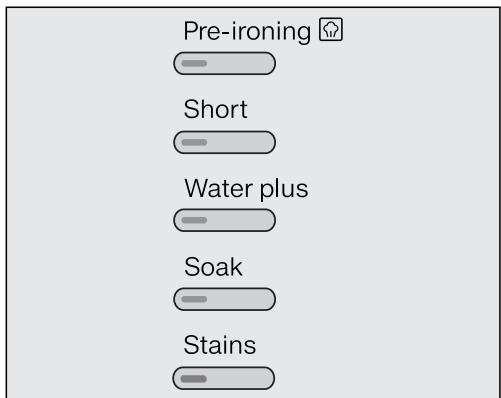
Appuyez sur le bouton de l'option souhaitée.
Le bouton correspondant s'allume.
Toutes les options ne conviennent pas à tous les programmes.
Vous ne pouvez sélectionner que les options compatibles avec le programme utilisé.
Pré-repassage
Afin de réduire le froissage, le linge subit un processus de lissage à la fin du programme. Réduire la charge maximale de 50 % donnera un meilleur résultat. Veuillez noter les informations de charge sur l'affichage. Les petites charges donnent un meilleur résultat.
Les vêtements doivent être adaptés au séchage en sèche-linge et au repassage.
Court
Utilisez cette option pour une saleté légère sans taches visibles.
La durée de lavage est réduite.
Eau plus
Le niveau d'eau dans les étapes de lavage et de rinçage est augmenté et un deuxième rinçage est effectué dans le programme "Rinçage séparé / Amidon".
Vous pouvez sélectionner d'autres fonctions pour le bouton Eau plus. Celles-ci sont décrites dans "Réglages".
Trempage
Pour les articles très sales et tachés avec des taches de protéines.
Une durée comprise entre 30 minutes et 5 heures, par incréments de 30 minutes, peut être choisie pour le processus de trempage. Voir "Réglages" pour plus d'informations.
Le réglage par défaut est de 30 minutes.
Taches
Afin de nettoyer plus efficacement le linge taché, vous pouvez choisir parmi 7 types de taches différents. Le programme de lavage s'adaptera alors au type de tache sélectionné. Vous pouvez sélectionner une tache par cycle de lavage.
Les options suivantes peuvent être sélectionnées en plus du programme :
Aucune des options ne peut être sélectionnée avec des programmes qui ne sont pas répertoriés dans le tableau ci-dessous.
| Pre-wash1) | Pre-ironing | Short | Water plus | Soak | Stains |
| Cottons | X | X | X | X | X | X |
| Minimum iron | X | X | X | X | X | X |
| Delicates | X | X | X | X | X | X |
| Down duvets | X | - | - | X | - | - |
| Outerwear | X | - | X | X | X | X |
| Sportswear | X | - | X | X | X | X |
| Separate rinse / Starch | - | - | - | X | - | - |
| Automatic plus | X | X | - | - | X | X |
| Express 20 | - | X | X2) | - | - | - |
| Shirts | X | X2) | X | X | X | X |
| Dark garments / Denim | X | X | X | X | X | X |
X = Peut être sélectionné - = Ne peut pas être sélectionné 1) = Activé automatiquement lorsque le réglage Degré de saleté élevé est sélectionné 2) Peut être désélectionné
Déroulement du programme
| Main wash | Rinses | Spinning |
| Water level | Wash rhythm | Water level | Rinses |
| Cottons | A | A | 2-51)2)3) | ✓ | |
| Minimum iron | B | B | 2-42)3) | ✓ | |
| Delicates | C | C | 2-42)3) | ✓ | |
| Woollens | E | E | 2 | ✓ | |
| Silks | E | E | 2 | ✓ | |
| Down duvets | C | C | 3-43) | ✓ | |
| Outerwear | C | C | 3-43) | ✓ | |
| Proofing | - | B | 1 | ✓ | |
| Sportswear | C | C | 2-33) | ✓ | |
| Separate rinse / Starch | B | B | 0-15) | ✓ | |
| Maintenance wash | A | A | 3 | ✓ | |
| Automatic plus | A(B) | A | 2-42)3) | ✓ | |
| Express 20 | A | A | 1 | ✓ | |
| Shirts | C | C | 3-43) | ✓ | |
| Dark garments / Denim | B | B | 3-52)3) | ✓ | |
| Drain / Spin | - | - | - | - | ✓ |
Veuillez consulter la page suivante pour une description des symboles.
Niveau d'eau bas Niveau d'eau moyen = Niveau d'eau élevé A = Rythme intensif B = Rythme normal = Rythme sensible = Rythme ultra sensible E = Rythme lavage à la main = Effectué Non effectué
La machine à laver dispose de commandes entièrement électroniques avec reconnaissance automatique de la charge. Elle prend la quantité d'eau appropriée requise pour le programme en fonction de la quantité de linge et de son taux d'absorption.
Les séquences de programme indiquées dans le tableau sont basées sur le programme standard avec une charge complète.
L'affichage de la séquence du programme de la machine à laver indique l'étape du programme en cours.
Particularités dans le déroulement du programme
Anti-froissage :
À la fin du programme, le tambour continue de tourner par intermittence pendant 30 minutes maximum pour aider à prévenir le froissage.
Exception : Il n'y a pas de phase anti-froissage dans les programmes Laine et Soie.
La porte peut être ouverte à tout moment pendant la phase anti-froissage.
1) Si une température de 60 °C ou plus est sélectionnée, ou avec des températures de 40 °C et 60 °C, 2 rinçages sont effectués. Si une température inférieure à 60 °C est sélectionnée, 3 rinçages sont effectués. 2) Un rinçage supplémentaire est effectué si : - il y a trop de mousse dans le tambour - une vitesse d'essorage inférieure à 700 tr/min a été sélectionnée 3) Un rinçage supplémentaire est effectué si : - l'option Eau plus est sélectionnée et le réglage Rinçage supplémentaire ou Eau + et Rinçage supplémentaire a été activé pour l'option Eau plus dans les réglages. 4) Montée en vitesse avant essorage : Une montée en vitesse avant essorage est effectuée avant le début du lavage pour dégonfler les articles remplis. L'arrivée d'eau suivante pour le lavage principal se fait par le compartiment □. 5) Un rinçage supplémentaire est effectué si : l'option Eau plus est sélectionnée.
Symboles des étiquettes d'entretien des vêtements
| Washing |
| The figure quoted in the bucket is the maximum temperature the garment can be washed at. The number of bars under the symbol indicates the level of agitation permitted. |
| 95 | No bar under the symbol: = normal agitation |
| 60 | One bar under the symbol: = reduced agitation |
| 30 | Two bars under the symbol: = much reduced agitation |
| 10 | Hand wash (if no temperature is specified, use the lowest temperature or cold) |
| × | Do not wash |
Exemples de sélection de programme
| Programme | Garment care label symbols |
| Cottons | 95 70 60 50 40
30 |
| Minimum iron | 95 60 50 40 30 |
| Delicates | 40 30 |
| Woollens | |
| Silks | |
| Express 20 | 40 30 |
| Automatic plus | 40 30 40 30 |
| Drying |
| The number of dots indicates the drying temperature |
| ○ | Normal temperature |
| ○ | Low temperature |
| ○ | Do not tumble dry |
| Ironing |
| The number of dots indicates the iron-ing temperature |
| △ | Hot iron (max. sole plate temp. approx. 200 °C) |
| △ | Medium hot iron (max. sole plate temp. approx. 150 °C) |
| △ | Cool iron (max. sole plate temp. approx. 110 °C). Do not steam iron garments carrying this symbol as this could cause irreversible damage. |
| △ | Do not iron |
| Professional cleaning |
| F | Dry clean only. The letters indicate the type of cleaning agent required. |
| P |
| W | Professional Wet Clean only |
| ⊗ | Do not dry clean |
| Bleaching |
| △ | Any oxidising bleaching agent can be used |
| △ | Only use an oxygen based bleach or a non-chlorine bleach |
| ☆ | Do not bleach |
Annulation d'un programme
Vous pouvez annuler un programme à tout moment après son démarrage :
Appuyez sur le bouton Démarrer/Arrêt.
Ce qui suit s'affiche à l'écran :
Annuler le programme

Touchez le capteur OK.
L'eau sera évacuée. Le message suivant s'affichera :
Programme annulé
Ouvrez la porte. Retirez le linge.
Si vous souhaitez sélectionner un autre programme
Fermez la porte. Sélectionnez le programme souhaité. - Ajoutez de la lessive dans le tiroir à lessive, si nécessaire. Appuyez sur la touche Marche/Arrêt.
Le nouveau programme démarrera.
Interruption d'un programme
- Éteignez le lave-linge avec la touche ①.
- Rallumez le lave-linge avec la touche ① pour continuer le même programme.
Changement de programme
Après le démarrage d'un programme, il n'est plus possible d'en sélectionner un autre.
Température
À l'exception du programme Coton, il est possible de sélectionner une température différente jusqu'à 5 minutes après le démarrage du programme.
Appuyez sur la touche Température. Utilisez les capteurs ∨, ∧ et OK pour modifier la température.
Vitesse d'essorage
Il est possible de modifier la vitesse d'essorage jusqu'au début de l'essorage final.
Appuyez sur la touche Vitesse d'essorage. Utilisez les capteurs , et OK pour modifier la vitesse d'essorage.
Options
Il est possible de sélectionner ou de désélectionner les options Court et Eau plus jusqu'à 5 minutes après le démarrage du programme.
Conseil : Il n'est pas possible de modifier le programme ou de l'annuler si la sécurité enfants est activée.
Ajout ou retrait de linge après le démarrage du programme
Appuyez sur la touche Départ/Arrêt.
Le message suivant s'affiche :
Annuler le programme

Faites défiler la liste avec le capteur ou jusqu'à :
Ajouter du linge

Touchez le capteur OK.
Si ce message ne s'affiche pas, il n'est plus possible d'ajouter ou de retirer du linge.
Le programme s'arrête et la porte se déverrouille.
Tirez la porte. Ajoutez ou retirez des articles. Fermez la porte. Appuyez sur le bouton Départ/Pause.
Le programme continuera.
Veuillez noter :
Une fois qu'un programme a démarré, la machine à laver ne peut pas reconnaître un ajustement de la charge.
Pour cette raison, si du linge est ajouté ou retiré après le début d'un programme, la machine terminera toujours le cycle de programme en supposant une charge complète.
La porte ne peut pas être ouverte si :
- la température de l'eau de lavage est supérieure à 55 °C.
- l'eau est au-dessus d'un certain niveau.
- le programme a atteint l'étape d'essorage.
Si vous souhaitez ouvrir la porte lorsque les conditions ci-dessus sont présentes, vous devrez annuler le programme.
La sécurité de verrouillage restera activée si la température dans le tambour est supérieure à 55 °C. Le verrou ne se désactivera que lorsque la température aura baissé en dessous de 55 °C.
Sécurité de verrouillage
La sécurité de verrouillage empêche de modifier la température, la vitesse d'essorage ou les options pendant un programme de lavage.
Pour activer la sécurité de verrouillage
Appuyez sur le bouton Départ/Pause.
Ce qui suit s'affichera à l'écran :
Annuler le programme
Faites défiler la liste vers le haut avec la touche ou jusqu'à :
Activer le verrouillage
Touchez la touche OK.
Pour désactiver le verrouillage de sécurité
■ Procédez comme pour l'activation du verrouillage de sécurité.
Ce qui suit s'affichera à l'écran :
Désactiver le verrouillage
Touchez la touche OK.
Le verrouillage de sécurité est maintenant désactivé.
Le détergent approprié
Tous les détergents produits pour les machines à laver automatiques conviennent. Suivez les instructions du fabricant et les recommandations de dosage sur l'emballage.
Pour les utilisateurs en Asie :
veuillez utiliser un détergent à faible mousse adapté aux machines à chargement frontal.
La quantité à distribuer dépendra des éléments suivants :
- le niveau d'encrassement de la charge
- la quantité de linge
- le niveau de dureté de l'eau.
Renseignez-vous auprès de votre fournisseur d'eau local si vous ne connaissez pas le niveau de dureté de votre région.
Adoucisseurs d'eau
Un adoucisseur d'eau peut être utilisé pour réduire l'utilisation de détergents dans les zones où la dureté de l'eau est de niveau II et III. Distribuez selon la quantité indiquée sur l'emballage. Ajoutez d'abord le détergent, puis l'adoucisseur d'eau.
Vous pouvez ensuite utiliser la quantité de détergent recommandée pour le niveau de dureté de l'eau I.
Niveaux de dureté de l'eau
| Hardness scale | Hardness level in mmol/l | German scale °d |
| I (soft) | 0 – 1.5 | 0 – 8.4 |
| II (medium) | 1.5 – 2.5 | 8.4 – 14 |
| III (hard) | above 2.5 | above 14 |
Accessoires de distribution
Utilisez des accessoires de distribution (par exemple, des boules) si ceux-ci sont fournis avec le détergent, en particulier lors de l'utilisation de détergent liquide.
Recharges de détergent
Lors de l'achat de détergent, privilégiez les recharges dans la mesure du possible. Cela contribue à réduire la quantité d'emballages.
Assouplissant et amidon liquide
Assouplissant
rend les vêtements doux au toucher et aide à éviter l'électricité statique lors du séchage en tambour.
Amidon
raidit et donne du corps aux articles de linge, par exemple les chemises, les nappes et le linge de lit.
Lessives recommandées par Miele
Les lessives et produits d'entretien Miele ont été spécialement conçus pour les machines à laver Miele. Ils peuvent être commandés sur Internet à l'adresse www.miele-shop.com ou auprès de Miele.
| Miele UltraPhase 1 / 2 | Miele Cap | Miele Cap | Miele Cap |
| Cottons | ✓ | - | F | H |
| Minimum iron | ✓ | - | F | H |
| Delicates | ✓ | - | F | - |
| Woollens | - | D | - | - |
| Silks | - | E | - | - |
| Down duvets | - | B | - | - |
| Outerwear | - | C | - | - |
| Proofing | - | - | G | - |
| Sportswear | - | A | - | - |
| Separate rinse / Starch | -/- | -/- | F/- | -/- |
| Automatic plus | ✓ | - | F | H |
| Express 20 | ✓ | - | F | - |
| Shirts | ✓ | - | F | H |
| Dark garments / Denim | ✓ | - | F | - |
Recommandé
A Sport
E SilkCare
Non recommandé
B Down
Assouplissant
Outdoor
Reproofing
WoolCare
Booster
Lessives recommandées conformément à la directive (UE) n° 1015/2010
Les recommandations s'appliquent aux plages de température indiquées dans le tableau des programmes.
| Universal | Coloureds | Delicates and woollens | Specialist |
| detergent |
| Cottons | ✓ | ✓ | - | - |
| Minimum iron | - | ✓ | - | - |
| Delicates | - | - | ✓ | - |
| Woollens | - | - | ✓ | ✓ |
| Silks | - | - | ✓ | ✓ |
| Down duvets | - | - | ✓ | ✓ |
| Outerwear | - | - | ✓ | ✓ |
| Sportswear | - | - | ✓ | ✓ |
| Maintenance wash | ✓(2) | - | - | ✓ |
| Automatic plus | - | ✓ | - | - |
| Express 20 | - | ✓(1) | - | - |
| Shirts | ✓ | ✓ | - | - |
| Dark garments / Denim | - | ✓(1) | - | ✓ |
Recommandé 1) Lessive liquide Non recommandé 2) Lessive en poudre
Assouplissant et amidon liquide en fin de programme
Vous pouvez distribuer l'assouplissant soit par distribution automatique, soit via le compartiment du distributeur de détergent.
Distribution automatique
Un des conteneurs de distribution automatique doit être rempli d'assouplissant.
Touchez le capteur Dos. Activez le conteneur approprié.
L'assouplissant sera distribué lors du dernier rinçage.
Distribution manuelle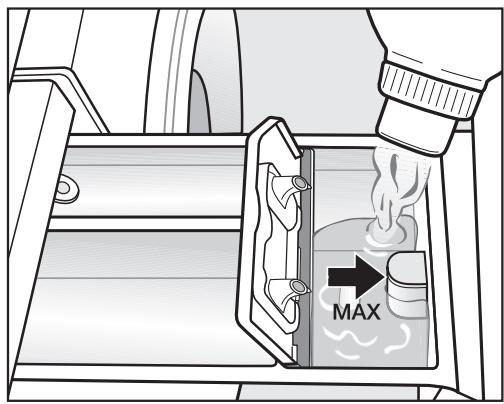
- Ajoutez l'assouplissant ou l'amidon liquide dans le compartiment ou insérez la capsule appropriée. Ne dépassez pas le repère de niveau maximal.
L'agent sera automatiquement distribué lors du dernier rinçage. À la fin du programme, une petite quantité d'eau restera dans le compartiment.
Si vous amidonnez fréquemment, nettoyez soigneusement le compartiment du distributeur, en particulier le tube siphon, régulièrement.
Détachants anti-couleur et décolorants/colorants
N'utilisez pas de détachants anti-couleur ou de décolorants dans cette machine à laver. Ils peuvent provoquer de la corrosion dans la machine.
Des colorants adaptés à une utilisation dans les machines à laver domestiques peuvent être utilisés. Cependant, veuillez noter que le sel utilisé lors du processus de teinture peut provoquer de la corrosion sur les composants en acier inoxydable de la machine si vous teignez fréquemment. Respectez toujours attentivement les instructions du fabricant.
Ajout séparé d'assouplissant ou d'amidon liquide
Préparez l'amidon conformément aux instructions du fabricant sur l'emballage.
Astuce : lors de l'ajout séparé d'assouplissant, activez l'option Eau plus.
- Ajoutez l'assouplissant dans le compartiment ⑧ ou insérez la capsule appropriée.
- Ajoutez l'amidon liquide dans le compartiment et l'amidon en poudre ou visqueux dans le compartiment .
- Sélectionnez le programme Rinçage séparé / Amidon. Modifiez la vitesse d'essorage si nécessaire. Activez le capteur Cap si vous utilisez une capsule. Appuyez sur le bouton Marche/Arrêt.
Nettoyage du tambour (Info hygiène)
Laver à basse température et/ou utiliser de la lessive liquide peut provoquer l'accumulation de bactéries et d'odeurs désagréables dans la machine à laver. Utilisez le programme d'entretien pour nettoyer la machine. Exécutez ce programme régulièrement ou au plus tard lorsque l'info hygiène apparaît à l'écran.
Boîtier externe et panneau de commande
! Débranchez la machine de l'alimentation électrique avant le nettoyage ou l'entretien.
La machine à laver ne doit pas être arrosée au jet.
Nettoyez le boîtier et le panneau de commande avec un nettoyant doux non abrasif ou de l'eau savonneuse à l'aide d'un chiffon bien essoré. Essuyez avec un chiffon doux. Le tambour peut être nettoyé avec un nettoyant pour acier inoxydable du commerce, en suivant les instructions du fabricant sur l'emballage.
N'utilisez pas de solvants, de nettoyants abrasifs, de nettoyants pour vitres ou de nettoyants multi-usages. Ceux-ci pourraient endommager les surfaces en plastique et d'autres pièces.
Nettoyage du tiroir à lessive
Un lavage à basse température et l'utilisation de lessive liquide peuvent entraîner une accumulation de moisissures et de bactéries dans le tiroir distributeur de lessive.
Nettoyez régulièrement l'ensemble du tiroir pour des raisons d'hygiène, même si vous utilisez exclusivement le système TwinDos.
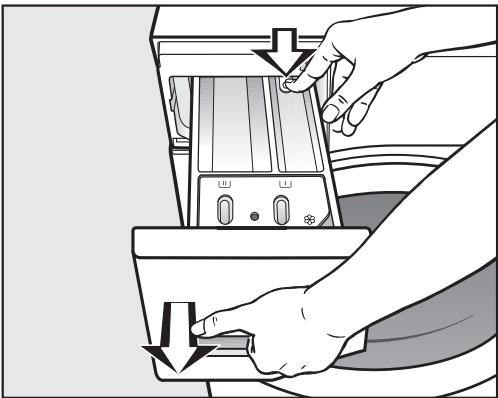
Tirez le tiroir distributeur de lessive jusqu'à ce qu'une résistance se fasse sentir. Appuyez sur le bouton de déverrouillage et, en même temps, retirez complètement le tiroir de la machine. Nettoyez le tiroir à l'eau chaude.
Nettoyage du tube siphon et du canal
L'amidon liquide peut obstruer le siphon. Assurez-vous de nettoyer le siphon et le tube siphon particulièrement soigneusement après avoir utilisé de l'amidon liquide plusieurs fois.
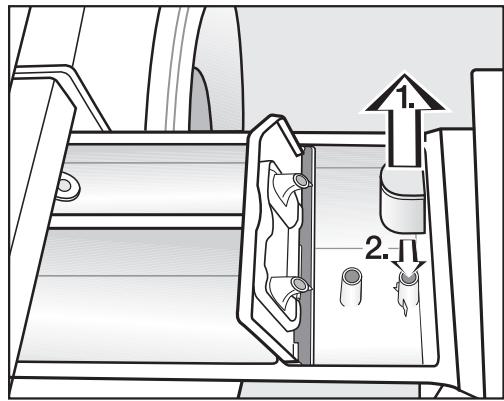
Nettoyez le siphon.
- Retirez le siphon du compartiment et rincez-le sous l'eau chaude courante. Nettoyez également le tube siphon.
- Replacez le siphon.
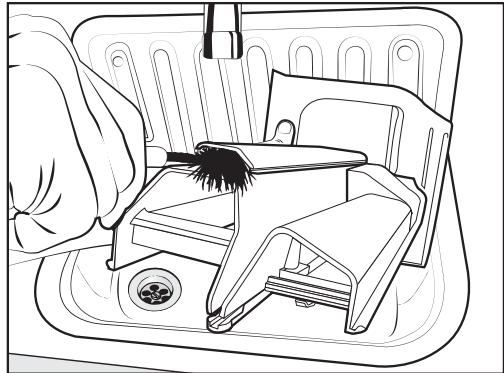
Nettoyez le canal d'assouplissant avec une brosse et de l'eau chaude.
Nettoyage du logement du tiroir distributeur de lessive
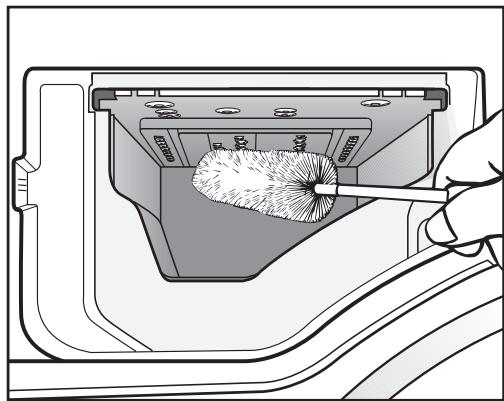
Utilisez une brosse à goulot pour éliminer les résidus de lessive et le calcaire des buses à l'intérieur du logement du tiroir distributeur de lessive. - Replacez le tiroir distributeur de lessive.
Astuce : Laissez le tiroir distributeur de lessive légèrement ouvert pour qu'il puisse sécher.
Nettoyage du système TwinDos
Si le système n'a pas été utilisé pendant une longue période (plus de deux mois), la lessive dans les tuyaux peut devenir visqueuse.
Les tuyaux pourraient se boucher et devraient alors être nettoyés par un technicien de service.
Nettoyez le système TwinDos à chaque fois que vous changez de marque de détergent liquide ou d'assouplissant, ou si le système n'a pas été utilisé pendant une longue période.
La machine à laver dispose d'un programme de nettoyage pour nettoyer les réservoirs du système TwinDos et les tuyaux à l'intérieur de la machine à laver.
Les réservoirs TwinDos (accessoire en option) sont nécessaires pour effectuer le nettoyage.
Démarrage du programme de maintenance
- Allumez la machine à laver et attendez que l'affichage standard s'allume.
- Touchez simultanément les capteurs et jusqu'à ce que ce qui suit apparaisse à l'écran :
Langue


Le menu Réglages est activé. Touchez le capteur jusqu'à ce que ce qui suit apparaisse à l'écran :
TwinDos

- Confirmez le réglage avec le capteur OK. Touchez le capteur jusqu'à ce que ce qui suit apparaisse à l'écran :
Maintenance

- Confirmez le réglage avec le capteur OK.
Réservoir 1

- Touchez le capteur ou jusqu'à ce que le réservoir (ou les réservoirs) souhaité(s) apparaisse(nt) à l'écran et confirmez avec le capteur OK.
Démarrer le rinçage
Oui

Confirmez avec le capteur OK.
Ce qui suit s'affichera à l'écran :
i Remplir d'eau jusqu'au repère
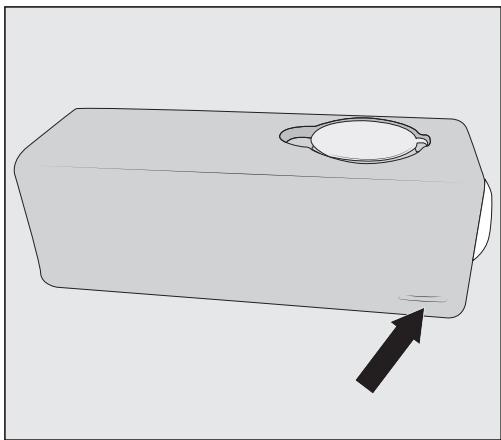
Remplissez un ou les deux réservoirs TwinDos jusqu'au repère avec de l'eau et poussez-le(s) dans le compartiment.
Ce qui suit s'affichera à l'écran :
i Fermez la porte et appuyez sur Démarrer - Fermez la porte et appuyez sur le bouton Démarrer/Arrêt clignotant.
Le nettoyage va commencer.
Après le nettoyage, vous pouvez remplir un ou les deux réservoirs avec du détergent liquide et/ou de l'assouplissant neufs.
Nettoyage des compartiments
Les résidus de détergent peuvent provoquer des obstructions.
Utilisez un chiffon humide pour nettoyer l'intérieur du compartiment lorsque vous changez la cartouche ou le réservoir.
Nettoyage des filtres d'arrivée d'eau
La machine à laver possède deux filtres pour protéger la vanne d'arrivée d'eau. Ces filtres doivent être vérifiés environ tous les six mois, ou plus souvent en cas d'interruptions fréquentes de l'alimentation en eau.
Pour nettoyer le filtre dans le raccord à l'extrémité ouverte du tuyau d'arrivée :
Coupez d'abord le robinet d'arrêt. ■ Dévissez le tuyau d'arrivée d'eau du robinet.
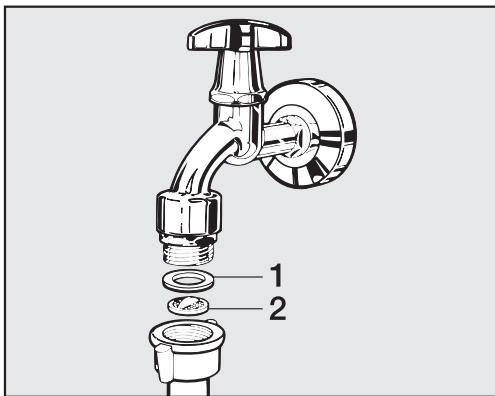
- Retirez le joint en caoutchouc 1 de son logement. À l'aide d'une pince à becs pointus, saisissez la barrette du filtre en plastique 2 et retirez-la. Nettoyez le filtre.
- Replacez le filtre et le joint dans l'ordre inverse et rebranchez le tuyau.
Pour nettoyer le filtre dans le robinet d'arrivée d'eau :
À l'aide d'une pince, desserrez soigneusement l'écrou en plastique nervuré sur le robinet d'arrivée et dévissez-le.
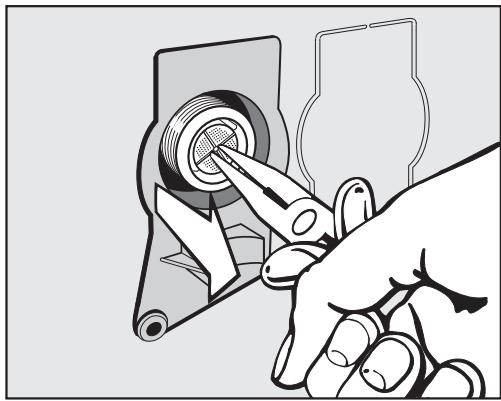
Utilisez une pince à becs pointus pour retirer le filtre en plastique par la barrette (voir illustration). Nettoyez le filtre. Replacez le filtre dans l'ordre inverse.
Après avoir nettoyé les filtres, ouvrez le robinet d'arrêt et vérifiez que le raccord est étanche. Si de l'eau s'écoule, resserrez le raccord.
Les deux filtres doivent être remis en place après le nettoyage.
Guide de dépannage
Les défauts mineurs de fonctionnement de la machine à laver, dont certains peuvent résulter d'une mauvaise utilisation, peuvent être corrigés sans contacter le service après-vente.
Le guide suivant peut vous aider à trouver la cause d'un défaut et à le corriger. Vous devez toutefois noter ce qui suit :
Les travaux de réparation sur les appareils électriques ne doivent être effectués que par une personne qualifiée, conformément aux réglementations de sécurité locales et nationales en vigueur. Les réparations et autres travaux effectués par des personnes non qualifiées peuvent être dangereux. Le fabricant ne peut être tenu responsable des travaux non autorisés.
Certains messages à l'écran comportent plusieurs lignes. Touchez la touche ou pour les lire en entier.
Le programme ne démarre pas
| Problem | Cause and remedy |
| The display remains dark, and the Start/Stop button indicator light does not come on. | There is no power to the machine.
■ Check whether the mains plug is plugged in and switched on.
■ Check whether the fuse or circuit breaker has tripped. |
| The washing machine has switched off automatically to save energy.
■ Switch it back on with the ① button. |
| The display prompts you to enter a code. | Access via a code has been activated.
■ Enter the code and confirm the entry. Deactivate the code if you do not wish this message to appear in the display the next time the machine is switched on. |
| The following appears in the display:
▲ Service Door lock | The door is not closed properly. The door lock could not engage.
■ Close the door again.
■ Start the programme again.
If the fault message appears again, contact the Service Department. |
Les messages d'erreur suivants s'affichent à l'écran et le programme s'arrête
| Problem | Cause and remedy |
| Water intake See | The water inlet is blocked or restricted. Check whether the stopcock is opened properly. Check whether the inlet hose is kinked. Check whether the water pressure is too low. |
| The filter in the water inlet is blocked. Clean the filter. |
| Drainage See | The water outlet is blocked or restricted. The drain hose has been fixed too high. Clean the drain filters and the drain pumps. The maximum delivery head is 1 m. |
| Service Water-proof syst. | The water protection system has reacted. Close the stopcock. Call the Service Department. |
| Service Fault F | There is a fault. Start the programme again. If the fault message appears again, contact the Service Department. |
Pour désactiver les messages d'erreur : éteignez le lave-linge avec le bouton ①.
Un message s'affiche à la fin du programme.
| Message | Cause and remedy |
| i | Check dosage | Excessive foam has built up during washing.
■ Check the amount of detergent dispensed.
■ With automatic detergent dispensing check the dosage amount set.
■ Observe the instructions on the detergent packaging and the degree of soiling of the laundry.
■ If necessary, reduce the dosage amount by increments of 10%. |
| i | Hygiene info | A programme using a temperature above 60 °C has not been run for a long time.
■ In order to prevent bacteria and unpleasant odours building up in the machine, run the Maintenance wash programme using Miele machine cleaner or powder detergent. |
| i | Cartridge 1 low or
Cartridge 2 low or
Cartridges 1 and 2 low | The detergent in the cartridges is running low. There are between 4 and 8 wash cycles remaining.
■ Order new cartridges. |
| i | Container 1 empty or
Container 2 empty or
Cont. 1 + 2 empty | The cartridges or TwinDos containers are empty.
■ Replace the cartridge(s) or fill the TwinDos container(s) with liquid detergent or fabric conditioner.
■ Check if the laundry is clean. There may not have been enough detergent.
If necessary, wash the items again. |
Les messages apparaissent à la fin du programme et lors de la mise en marche du lave-linge et doivent être confirmés avec la touche OK.
Un message s'affiche à la fin du programme.
| Message | Cause and remedy |
| Align the machine | The smoothing process which the laundry undergoes at the end of the programme could not be carried out properly.
■ Check whether the washing machine is aligned correctly as described in "Installation and connection - Levelling the machine".
■ Check whether the maximum delivery height of 1 m has been exceeded. |
| If the fault message appears again, contact the Service Department. The washing machine can still be used but with reduced functionality. |
Les messages apparaissent à la fin du programme et lors de la mise en marche du lave-linge et doivent être confirmés avec la touche OK.
Problèmes avec TwinDos
| Problem | Cause and remedy |
| No detergent and/or fabric conditioner was dispensed. | Automatic dispensing has not been activated.
■ Touch the Dos ™ sensor before running the next programme.
Automatic dispensing will be activated. |
| No detergent/fabric conditioner was dispensed even though automatic dispensing was activated.
■ Try again.
■ If detergent is still not dispensed, call the Service Department. |
| There are dark specks in the liquid detergent. | Mould has developed in the detergent.
■ Pour the liquid detergent out of the container and then clean the container thoroughly. |
Problèmes généraux avec le lave-linge
| Problem | Cause and remedy |
| The machine shakes during the spin cycle. | The machine feet are not level.
■ Level the machine and adjust the feet correctly. |
| The laundry has not been spun properly and is still wet. | The machine detected an imbalance during the final spin cycle and reduced the spin speed automatically.
■ Include both large and small items in the load as this will give better distribution during spinning. |
| Strange pump noises can be heard. | This is not a fault.
These slurping noises occur at the end of the pump sequence as a normal part of operation. |
| Large amounts of detergent residue remain in the detergent dispenser drawer. | The water pressure is too low.
■ Clean the water inlet filter.
■ It may be useful to select the Water plus option. |
| Powder detergent used in conjunction with water softeners tends to become sticky.
■ In future, add washing powder into the dispenser drawer first, and then add the water softener. |
| Fabric conditioner is not completely dispensed or too much water remains in the Ⓒ compartment. | The siphon tube is not correctly positioned or is clogged.
■ Clean the siphon, see "Cleaning and care - Cleaning the detergent dispenser drawer". |
| The display is dark. | The display has switched off automatically to save energy (Standby mode).
■ Press a button. Standby comes to an end. |
Problèmes généraux avec le lave-linge
| Problem | Cause and remedy |
| At the end of the pro-
gramme there is still li-
quid in the capsule. | The small pipe in the detergent dispenser drawer onto which the capsule is placed is blocked.
■ Clean the small pipe. |
| This is not a fault.
For technical reasons a small amount of water will re-
main in the capsule. |
| There is water next to
the capsule in the fabric
conditioner compa-
ment. | The Cap □ sensor was not activated or an empty capsule was not removed at the end of the last pro-
gramme.
■ Make sure that you remember to activate the Cap □ sensor the next time you insert a capsule.
■ Remove and then dispose of the empty capsule at the end of each programme. |
| The small pipe in the detergent dispenser drawer onto which the capsule is placed is blocked.
■ Clean the small pipe. |
| The display is in a dif-
ferent language. | A different language has been selected in "Settings, Language □".
■ Set the language you want. The flag symbol will guide you. |
Un résultat de lavage insatisfaisant
| Problem | Cause and remedy |
| Liquid detergent does not give the required result. | Liquid detergents usually contain no bleaching agents. They do not remove fruit, coffee and tea stains.
■ Use the Miele 2 Phase System. The targeted addition of UltraPhase 2 during the wash process removes stains effectively.
■ Use a general purpose powder detergent containing a bleaching agent. |
| Grey, greasy particles cling to washed laundry. | Insufficient amounts of detergent were used to break down the particles of grease in heavily soiled laundry.
■ Use more detergent.
■ Before washing the next load, run the Maintenance wash using Miele machine cleaner or a powder de-tergent. |
| White residues which look like powder detergent are seen on dark textiles after washing. | The detergent contained compounds (zeolites) to aid water softening which are not soluble in water. These have ended up on the laundry.
■ Try and brush off the residues with a soft brush once the laundry is dry.
■ Wash dark textiles using a detergent which contains no zeolites. Liquid detergents usually contain no zeolites.
■ Use the Dark garments / Denim programme for dark coloured laundry. |
La porte ne s'ouvre pas
| Problem | Cause and remedy |
| The door cannot be pulled open during a programme. | The drum is locked during a programme.
■ Press the Start/Stop button.
■ Use the √ sensor to select Cancel programme or Add laundry.
The door will unlock and you will be able to pull it open. |
| There is still water in the drum and the machine is un-able to drain.
■ Clean the drain filter and the drain pump as described in "Opening the door in the event of a blocked drain outlet and/or power failure". |
| The water level in the drum is too high.
■ Cancel the programme. The water will be pumped away. |
| Comfort cooling appears in the display after a programme has been cancelled. | For safety reasons the drum door cannot be opened if the suds temperature is higher than 55 °C.
■ Wait until the temperature in the drum has decreased and the message has gone out in the display. |
| The following appears in the display:
▲ Service Door release | The door lock has jammed.
■ Call the Service Department. |
Ouverture de la porte en cas de vidange bloquée et/ou de panne de courant
Éteignez le lave-linge.
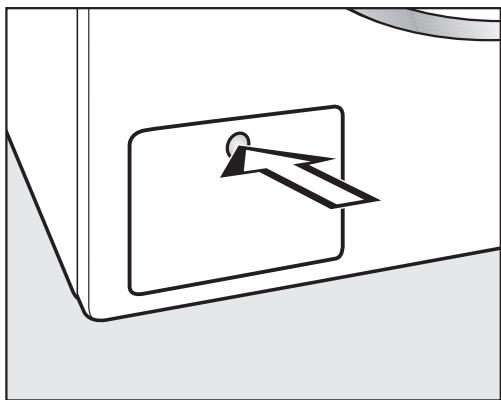
Appuyez sur le panneau d'accès à la pompe de vidange.
Le panneau s'ouvre en ressort.
Vidange bloquée
Si la sortie d'évacuation est obstruée, une grande quantité d'eau peut rester dans la machine à laver.
Si le linge a été lavé à haute température, l'eau qui s'écoule de la machine sera encore chaude. Risque de brûlure ! Soyez prudent lors de la vidange de la machine.
Procédure de vidange de la machine à laver
Lors de la vidange de l'eau de la machine, ne dévissez pas complètement le filtre de vidange et ne le retirez pas entièrement.
- Placez un récipient adapté, par exemple un plat universel Miele, sous le panneau d'accès.
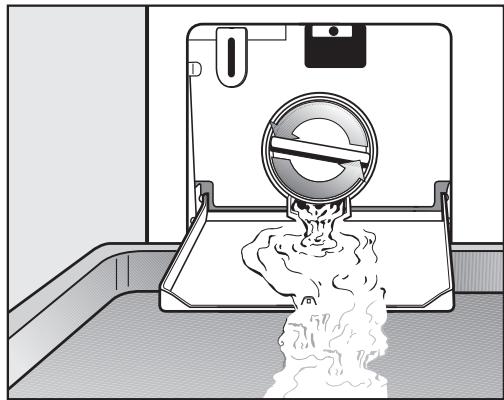
Dévissez lentement et soigneusement le filtre pour laisser l'eau s'écouler. Veillez à ne pas libérer trop d'eau d'un coup. Si le débit d'eau est trop fort, de l'eau peut s'infiltrer dans la base de la machine à laver et activer l'interrupteur à flotteur de protection contre l'eau. Cela empêchera la machine à laver de fonctionner. - Resserrez le filtre de vidange si vous devez interrompre le flux d'eau.
Une fois que le flux d'eau cesse :
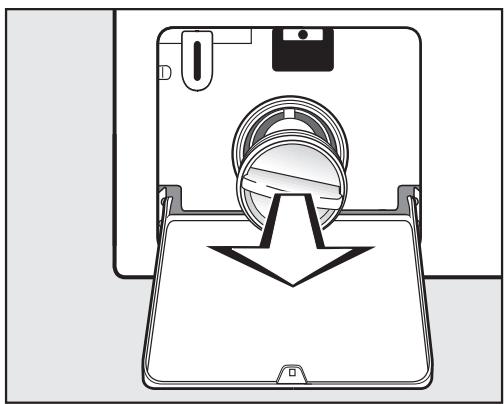
Retirez complètement le filtre de vidange. Nettoyez-le soigneusement.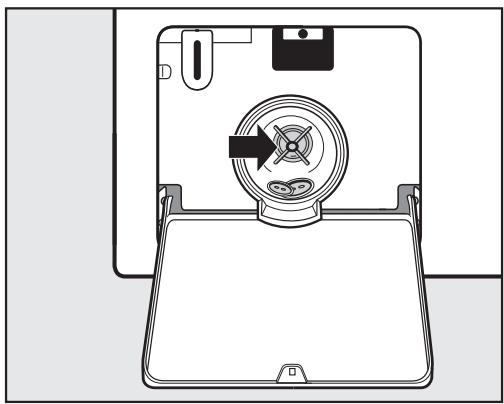
- Retirez tout corps étranger (par exemple, boutons, pièces de monnaie, etc.) et peluches du logement du filtre. Tournez la turbine à la main pour vérifier qu'elle tourne librement.
- Replacez correctement le filtre de vidange et serrez-le fermement.
Assurez-vous que le filtre de vidange est bien serré. Sinon, il y a un risque de fuite d'eau pendant l'utilisation.
Ouverture de la porte
Assurez-vous toujours que le tambour est immobile avant de passer la main pour retirer le linge. Mettre la main dans un tambour en mouvement est extrêmement dangereux.
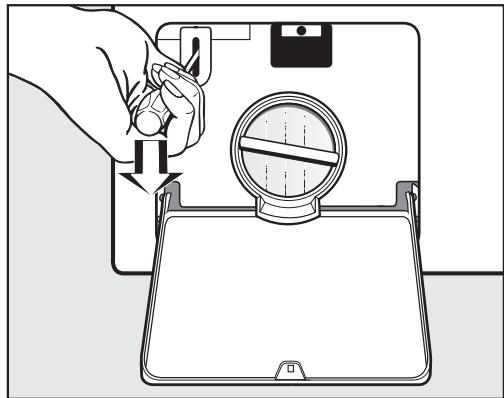
Utilisez un tournevis pour déverrouiller la porte. Tirez la porte pour l'ouvrir.
Réparations
En cas de panne que vous ne pouvez pas résoudre vous-même, veuillez contacter :
- votre revendeur Miele, ou
- Miele (les coordonnées de Miele figurent à la fin de cette notice).
Lorsque vous contactez votre revendeur ou Miele, veuillez indiquer le modèle et le numéro de série de votre appareil, tous deux indiqués sur la plaque signalétique visible au-dessus du hublot lorsque la porte est ouverte.
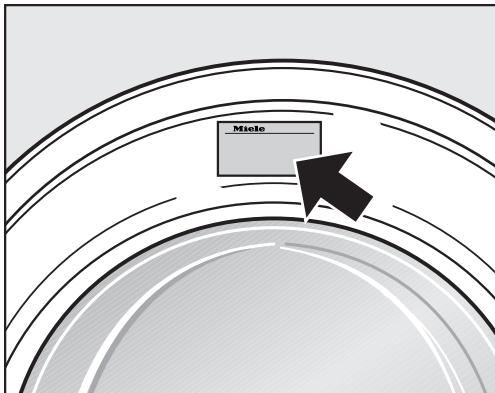
N.B. Des frais de déplacement seront facturés pour les interventions où le problème aurait pu être résolu comme décrit dans ces instructions.
Accessoires en option
Des pièces de rechange et accessoires en option pour ce lave-linge sont disponibles auprès de votre revendeur Miele, du service des pièces détachées Miele ou sur Internet à l'adresse www.miele-shop.com.
Veuillez noter que les appels téléphoniques peuvent être écoutés et enregistrés à des fins de formation.
Garantie : Royaume-Uni
Au Royaume-Uni, le lave-linge est garanti 2 ans à compter de la date d'achat.
Au Royaume-Uni, vous devez activer votre couverture en appelant le 0330 160 6640 ou en vous inscrivant en ligne sur www.miele.co.uk.
Garantie : autres pays
Pour des informations sur la garantie de l'appareil spécifique à votre pays, veuillez contacter Miele. Voir la fin de cette notice pour les coordonnées.
Vue de face
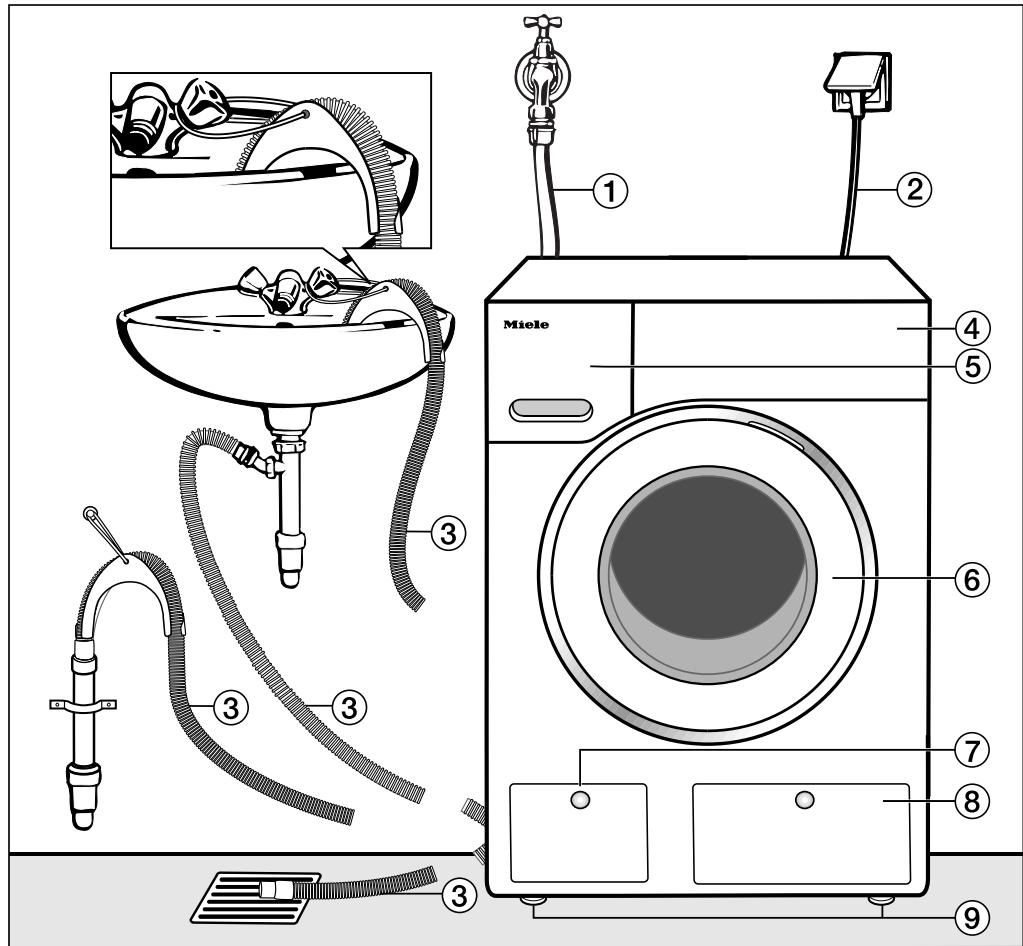
(1) Tuyau d'arrivée d'eau (testé pour résister à une pression d'au moins 7 000 kPa) (2) Câble d'alimentation électrique (3) Tuyau de vidange flexible (avec coude pivotant amovible) (4) Panneau de commande
⑤ Tiroir distributeur de détergent ⑥ Porte (7) Accès au filtre de vidange, à la pompe de vidange et au déverrouillage d'urgence Panneau d'accès aux réservoirs TwinDos ⑨ Quatre pieds réglables en hauteur
Vue arrière
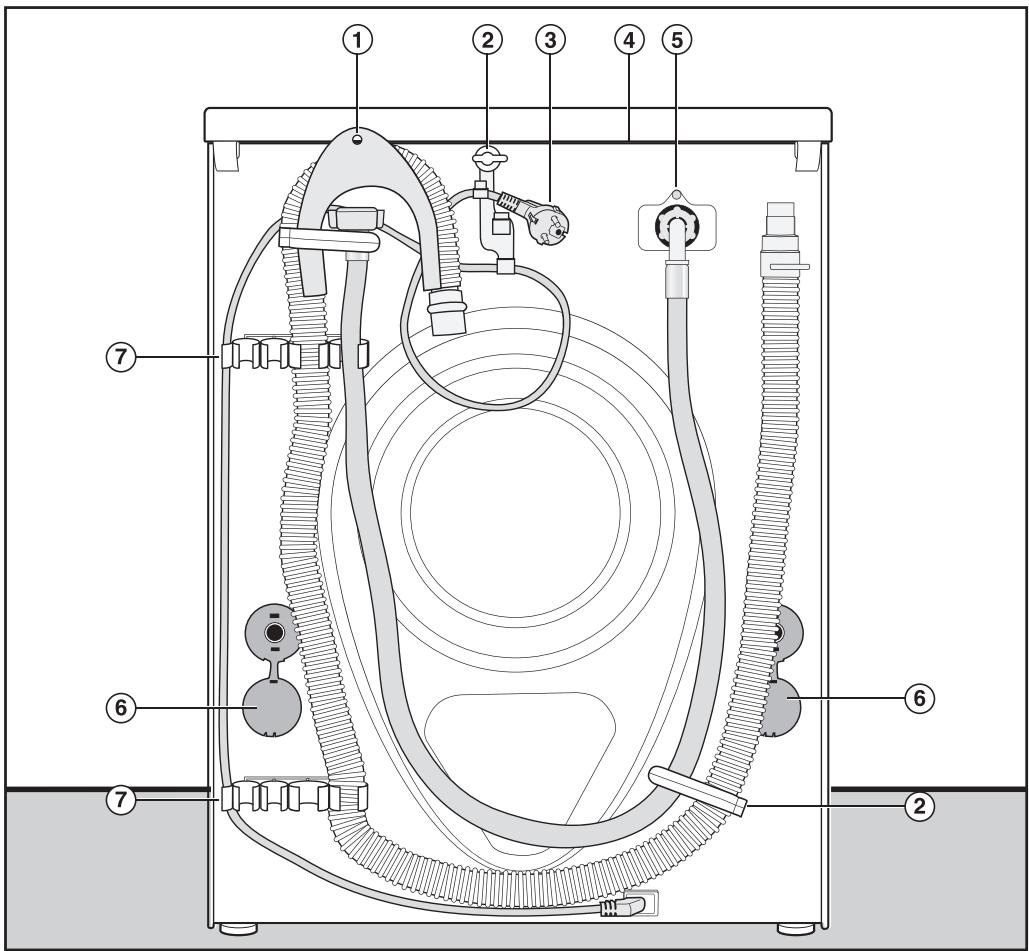
① Tuyau de vidange ② Clips de transport pour le câble d'alimentation électrique, les tuyaux d'arrivée et de vidange ③ Câble d'alimentation électrique (4) Rebord du couvercle pour tenir lors du déplacement de la machine
(5) Tuyau d'arrivée (testé pour résister à une pression d'au moins 7 000 kPa ) ⑥ Capuchons de sécurité pour les barres de transport ⑦ Clips de transport pour les tuyaux d'arrivée et de vidange et pour ranger les barres de transport lorsqu'elles ne sont pas utilisées
Surface d'installation
Un sol en béton est la surface d'installation la plus adaptée pour une machine à laver, car il est beaucoup moins sujet aux vibrations pendant l'essorage qu'un plancher en bois ou une moquette.
Veuillez noter :
La machine doit être de niveau et solidement positionnée. Pour éviter les vibrations pendant l'essorage, la machine ne doit pas être installée sur des revêtements de sol souples.
Si vous installez sur un plancher à solives en bois : Nous recommandons une base en contreplaqué d'au moins 59 × 52 × 3 cm . La base doit s'étendre sur plusieurs solives et être boulonnée aux solives et non seulement aux planches du plancher. Vérifiez d'abord la présence de tuyaux et de câbles.
Astuce : Si possible, installez la machine dans un coin, car c'est généralement la partie la plus stable du sol.
Il y a un risque que la machine à laver se déplace pendant l'essorage et tombe d'un socle. Pour cette raison, si la machine est installée sur un socle surélevé (en béton ou en brique), elle doit être fixée contre le glissement à l'aide d'un kit de montage au sol/socle MTS (disponible chez Miele).
Transport de la machine à laver jusqu'à son lieu d'installation
Pour manœuvrer la machine à laver hors de son emballage jusqu'à son lieu d'installation, tenez-la par les pieds avant ainsi que par le bord du couvercle qui dépasse à l'arrière de la machine.
Assurez-vous que les pieds de la machine et le sol sont secs pour éviter que la machine ne glisse pendant l'essorage.
Retrait des barres de transport
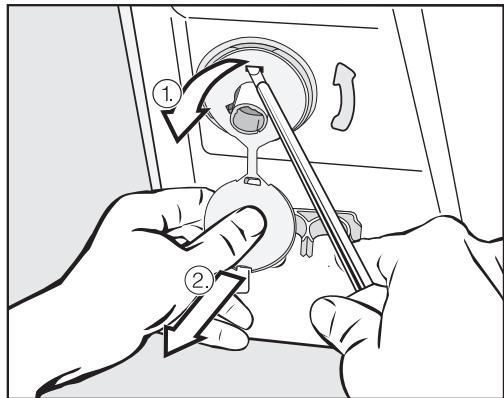
Pour retirer les panneaux latéraux
- Tirez sur le bouchon fixé,
- puis utilisez un tournevis pour libérer les clips en haut et en bas.
À l'aide de la clé fournie, tournez la barre de transport gauche de 90°, puis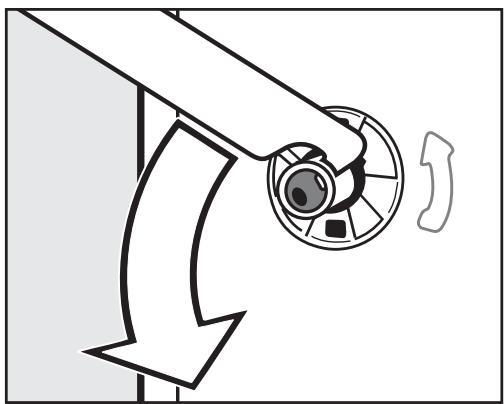
tournez la barre de transport droite de 90°, puis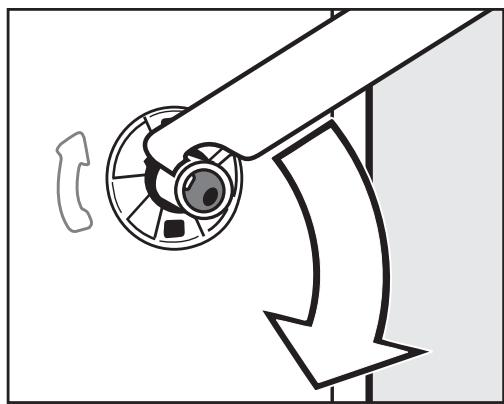
tirez la barre de transport vers l'extérieur.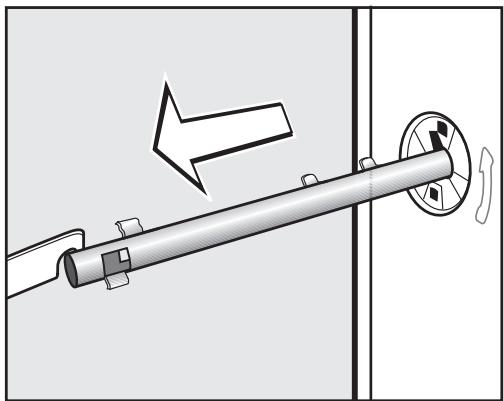
tirez la barre de transport vers l'extérieur.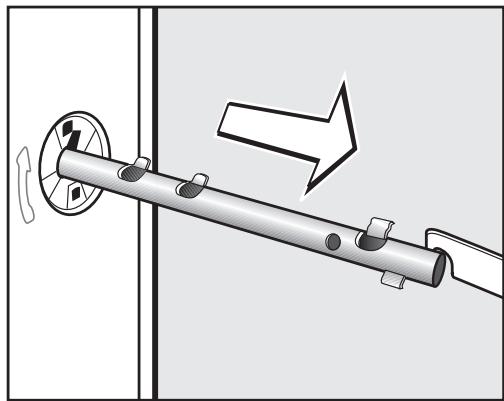
Pour éviter tout risque de blessure, les trous des barres de transport doivent être obturés après leur retrait.
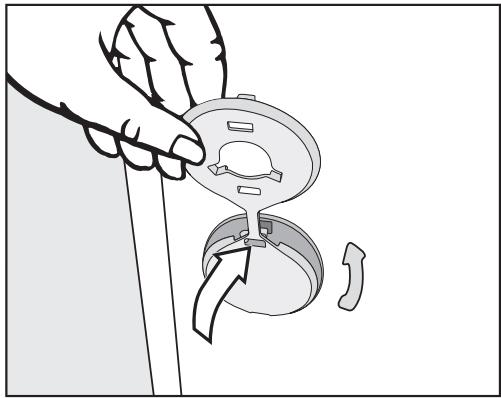
Bouchez les trous avec les capuchons en plastique comme illustré.
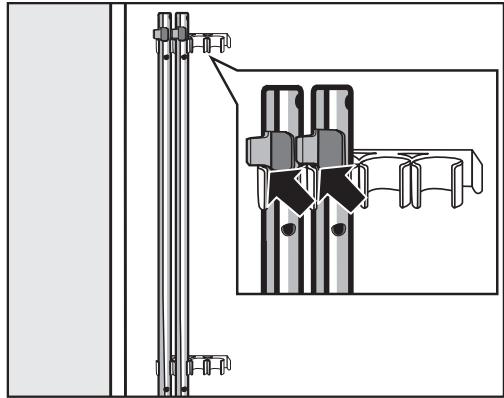
- Fixez les barres de transport à l'arrière de la machine à laver. Assurez-vous que le clip supérieur est positionné au-dessus du support.
La machine à laver ne doit pas être déplacée sans les barres de transport en place. Rangez-les comme indiqué ou conservez-les dans un endroit sûr pour une utilisation future. Elles doivent être réinstallées si la machine doit être déplacée à nouveau (par exemple lors d'un déménagement).
Réinstallation des barres de transport
La réinstallation s'effectue en inversant la procédure.
Mise à niveau de la machine
La machine à laver doit reposer parfaitement à plat sur ses quatre pieds pour garantir un fonctionnement sûr et correct.
Une installation incorrecte peut augmenter la consommation d'électricité et d'eau et peut faire bouger la machine.
Dévissage et réglage des pieds
Les quatre pieds à vis réglables servent à mettre la machine de niveau. Les quatre pieds sont vissés à la livraison.
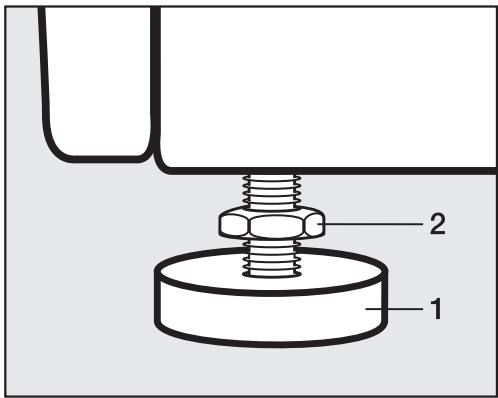
À l'aide de la clé fournie, tournez le contre-écrou 2 dans le sens des aiguilles d'une montre. Ensuite, tournez le contre-écrou 2 avec le pied 1 pour le dévisser.
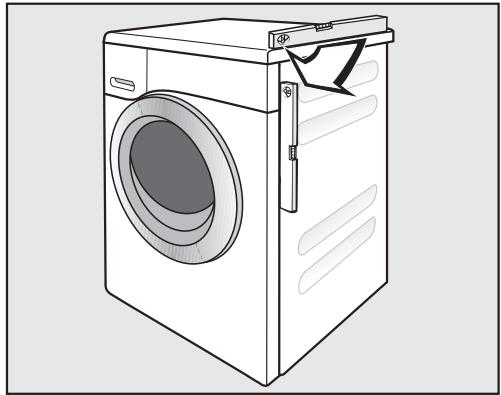
Utilisez un niveau à bulle pour vérifier que le lave-linge est bien de niveau. Maintenez fermement le pied 1 avec une clé à pipe. Tournez à nouveau le contre-écrou 2 avec la clé fournie jusqu'à ce qu'il soit bien serré contre le boîtier.
Les quatre contre-écrous doivent être bien serrés contre le boîtier. Vérifiez également cela pour les pieds qui n'ont pas nécessité de réglage. Sinon, il y a un risque que la machine bouge.
Installation sous un plan de travail continu / dans une cuisine intégrée
Les kits d'encastrement* ne doivent être installés/démontés que par un installateur qualifié, conformément aux instructions fournies.
- Un kit d'encastrement spécial* avec une plaque de recouvrement pour remplacer le couvercle de la machine est requis. Il doit être installé par un installateur qualifié pour garantir la sécurité électrique. N.B. S'il y a de la place pour glisser le lave-linge sous le plan de travail sans retirer le couvercle, le kit d'encastrement n'est pas nécessaire. Sinon, il est indispensable.
- Les raccordements électriques, d'eau et d'évacuation doivent être installés de manière à rester accessibles lorsque la machine est en position finale.
Les instructions de montage sont fournies avec le kit de conversion.
Empilage lave-linge/sèche-linge
Le lave-linge peut être combiné avec un sèche-linge Miele dans un empilage. Le kit d'empilage "WTV"* correspondant à votre sèche-linge est requis.
Toutes les pièces marquées* sont disponibles auprès de votre revendeur ou de Miele.
Veuillez noter :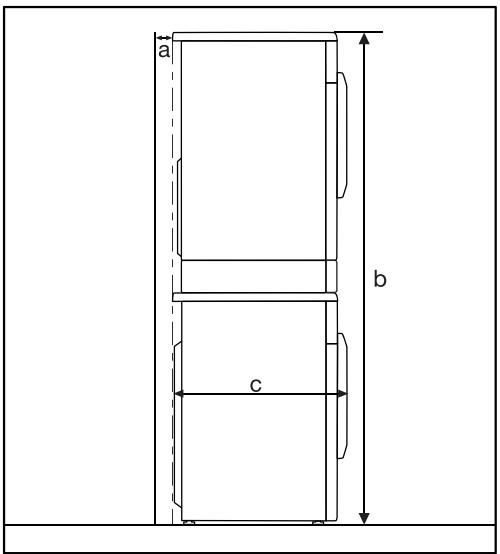
a = au moins 2 cm b = WTV sans tiroir : 172 cm WTV avec tiroir : 181 cm c = 64 cm
Le système de protection contre l'eau
Le système de protection contre l'eau Miele protège toutes les parties de la machine à laver contre les dégâts des eaux.
Le système se compose de trois éléments principaux :
- le tuyau d'arrivée d'eau
- l'unité électronique et la protection contre les débordements et les fuites
- le tuyau d'évacuation
Tuyau d'arrivée d'eau
- Protection contre l'éclatement
Le tuyau d'arrivée d'eau est testé pour résister à une pression d'au moins 7 000 kPa.
Unité électronique et carter de la machine à laver
Toute fuite d'eau est recueillie dans un bac situé à la base de la machine. Un flotteur coupe les vannes d'arrivée d'eau, empêchant ainsi toute nouvelle entrée d'eau dans la machine, et l'eau contenue dans le bac est évacuée par pompage.
- Protection contre les débordements
Cela empêche la machine à laver de prendre trop d'eau. Si le niveau d'eau dépasse un certain seuil, la pompe de vidange s'active et évacue l'excès d'eau.
Tuyau d'évacuation
Le tuyau d'évacuation est protégé par un système de ventilation qui empêche la machine à laver de se vider complètement.
Raccordement à l'arrivée d'eau
La machine à laver doit être raccordée à une arrivée d'eau du réseau conformément aux réglementations de sécurité locales et nationales en vigueur. Les autorités allemandes n'exigent pas de clapet anti-retour car la machine à laver a été conçue pour se conformer aux normes DIN.
La machine est conçue pour fonctionner avec une pression d'écoulement comprise entre 100 et 1 000 kPa. Si elle est supérieure à 1 000 kPa, il est essentiel d'installer un réducteur de pression.
Le raccordement à l'arrivée d'eau du réseau doit comporter un robinet d'arrêt avec un raccord fileté de 3/4 de pouce. Le robinet d'arrêt doit être installé par un plombier qualifié.
Le point de raccordement est soumis à la pression de l'eau du réseau. Ouvrez le robinet d'arrêt lentement et vérifiez qu'il n'y a pas de fuites. Corrigez la position du joint et du raccord si nécessaire.
La machine à laver ne convient pas au raccordement à une alimentation en eau chaude.
Entretien
N'utilisez qu'un tuyau Miele d'origine si vous devez le remplacer ou le prolonger. Ils sont testés pour résister à une pression d'au moins 7 000 kPa.
Afin de protéger la vanne d'arrivée d'eau, les deux filtres à impuretés (l'un dans l'extrémité ouverte du tuyau d'arrivée, l'autre au point d'arrivée dans la machine) ne doivent pas être retirés.
Rallonge de tuyau
Des tuyaux plus longs de 2,5 ou 4,0 m sont disponibles auprès de votre revendeur Miele ou de Miele en option.
Raccordement au système d'évacuation
La machine évacue l'eau via une pompe de vidange avec une hauteur de refoulement de 1 mètre*. Le tuyau d'évacuation ne doit pas être plié car cela restreint l'évacuation. Le coude pivotant à l'extrémité du tuyau peut être tourné dans les deux sens, ou peut être détaché si nécessaire, avec une torsion et une traction nettes. Si nécessaire, le tuyau d'évacuation peut être prolongé jusqu'à une longueur de 5 m. Les pièces nécessaires peuvent être achetées auprès de votre revendeur Miele ou de Miele.
- Pour une hauteur de refoulement supérieure à 1 m (jusqu'à 1,8 m max.), il faudra installer une pompe de vidange de remplacement. Veuillez contacter Miele ou votre revendeur Miele pour obtenir des conseils. Si nécessaire, le tuyau de vidange peut être rallongé jusqu'à 2,5 m. Les pièces nécessaires peuvent être achetées auprès de votre revendeur Miele ou de Miele.
Raccordement du tuyau de vidange :
- Directement dans un évier ou un lavabo.
Veuillez noter ce qui suit :
- Accrochez le tuyau sur le bord et fixez-le.
- Assurez-vous que l'eau peut s'écouler librement sans obstruction. Sinon, il y a un risque de débordement d'eau ou que de l'eau vidangée soit aspirée en retour dans la machine.
- Raccordé solidement à un tuyau d'évacuation en plastique avec un manchon en caoutchouc. Il n'est pas nécessaire d'utiliser un clapet anti-retour.
- Raccordé solidement à un siphon de sol.
- Raccordé solidement à un tuyau de descente.
Veuillez noter :
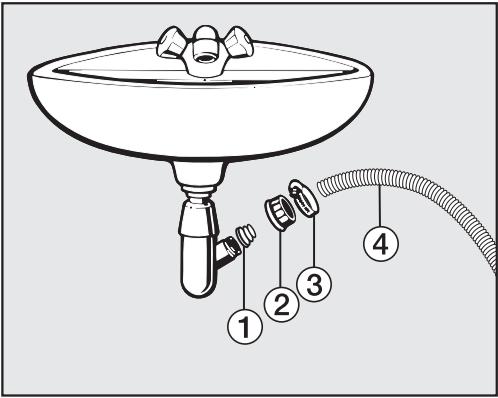
① Adaptateur ② Écrou ③ Collier de serrage ④ Extrémité du tuyau
Fixez l'adaptateur ① à la sortie de vidange de l'évier à l'aide de l'écrou ②. - Raccordez l'extrémité du tuyau ④ à l'adaptateur ①. Utilisez un tournevis pour serrer le collier de serrage près de l'écrou.
Connexion électrique au Royaume-Uni
Tous les travaux électriques doivent être effectués par une personne dûment qualifiée et compétente, conformément aux réglementations de sécurité nationales et locales en vigueur (BS 7671 au Royaume-Uni).
Assurez-vous que l'alimentation électrique n'est pas fournie à l'appareil avant la fin des travaux d'installation.
L'appareil est fourni avec un câble d'alimentation muni d'une fiche moulée, prêt à être connecté à une alimentation secteur de 230-240 V.
Veuillez vous assurer que les données de connexion indiquées sur la plaque signalétique correspondent à l'alimentation secteur du domicile.
La connexion doit être effectuée via une prise de courant commutée appropriée, facilement accessible après l'installation.
Pour une sécurité supplémentaire, il est conseillé de protéger la machine avec un dispositif à courant résiduel (RCD) approprié. Contactez un électricien qualifié pour obtenir des conseils.
Ne connectez pas via une rallonge. Les rallonges ne garantissent pas la sécurité requise de l'appareil (par exemple, risque de surchauffe).
Fiches non recâblables BS 1363
Le couvercle du fusible doit être remis en place lors du remplacement du fusible. Si le couvercle du fusible est perdu, la fiche ne doit pas être utilisée jusqu'à ce qu'un remplacement approprié soit obtenu. La couleur du couvercle de remplacement correct est celle de l'insert coloré à la base de la fiche, ou la couleur qui est gravée en mots sur la base de la fiche (selon le modèle de fiche installé).
Les fusibles de remplacement doivent être approuvés ASTA conformément à la norme BS 1362 et avoir le calibre correct. Les fusibles et couvercles de fusibles de remplacement peuvent être achetés auprès de votre fournisseur électrique local.
AVERTISSEMENT : CET APPAREIL DOIT ÊTRE RELIÉ À LA TERRE
| Height | 850 mm |
| Width | 596 mm |
| Depth | 636 mm |
| Depth with door open | 1054 mm |
| Height for building under | 820 (+8/-2) mm |
| Width for building under | 600 mm |
| Weight | Approx. 100 kg |
| Capacity | 8 kg dry laundry |
| Voltage | See data plate |
| Connected load | See data plate |
| Fuse rating | See data plate |
| Consumption data | See "Consumption data" |
| Minimum flow pressure | 100 kPa |
| Maximum flow pressure | 1000 kPa |
| Inlet hose length | 1.60 m |
| Drain hose length | 1.50 m |
| Mains connection cable length | 2.00 m |
| Delivery head max. | 1.00 m |
| Maximum drainage length | 5.00 m |
| LEDs | Class 1 |
| Test certificates awarded | See data plate |
| Power consumption when switched off | 0.1 W |
| Power consumption when not switched off | 3.0 W |
Données de consommation
| Load | Consumption data |
| Energy in kWh | Water in I | Duration | Residual moisture |
| Cottons | 90 °C | 8.0 kg | 2.30 | 58 | 2 h 29 min | 50% |
| 60 °C | 8.0 kg | 1.35 | 58 | 2 h 29 min | 50% |
| 60 °C | 4.0 kg | 1.15 | 49 | 2 h 19 min | 50% |
| 60°C* | 8.0 kg | 0.92 | 48 | 2 h 59 min | 44% |
| 60°C* | 4.0 kg | 0.80 | 46 | 2 h 59 min | 44% |
| 40 °C | 8.0 kg | 1.10 | 54 | 2 h 39 min | 50% |
| 40°C* | 4.0 kg | 0.60 | 39 | 2 h 59 min | 44% |
| 20 °C | 8.0 kg | 0.42 | 54 | 2 h 39 min | 46% |
| Minimum iron | 30 °C | 4.0 kg | 0.50 | 52 | 1 h 59 min | 30% |
| Delicates | 30 °C | 3.0 kg | 0.40 | 40 | 1 h 09 min | - |
| Woollens (w) | 30 °C | 2.0 kg | 0.23 | 35 | 38 min | - |
| Automatic plus | 40 °C | 6.0 kg | 0.77 | 55 | 2 h 00 min | - |
| Express 201) | 40 °C | 3.5 kg | 0.34 | 30 | 20 min | - |
| Shirts2) | 60 °C | 2.0 kg | 0.77 | 40 | 1 h 31 min | - |
1) Option courte activée 2) Option pré-repassage désactivée
Note pour les instituts de test
Programme de test conformément à la norme EN 60456 et étiquette énergétique conformément à la directive 1061/2010.
Les données de consommation peuvent varier par rapport aux valeurs nominales indiquées en fonction de la pression de l'eau, de la dureté de l'eau, de la température de l'eau à l'arrivée, de la température ambiante, du type et du volume de la charge, des fluctuations de l'alimentation électrique et des options sélectionnées.
Les données de consommation affichées dans l'écran EcoFeedback peuvent varier par rapport aux données de consommation indiquées ici. Ces variations proviennent des tolérances des composants et des conditions sur site, par exemple les fluctuations de la pression de l'alimentation en eau, de la tension du secteur et les fluctuations de la tension du secteur.
Vous pouvez utiliser le menu des réglages pour modifier l'électronique de la machine afin de l'adapter à vos besoins.
Les réglages peuvent être modifiés à tout moment.
Pour accéder aux réglages
Avant de commencer, assurez-vous que :
- Le lave-linge est allumé.
- L'affichage standard est visible.
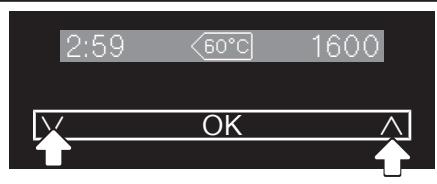
- Touchez simultanément les capteurs et .
Langue

Vous êtes maintenant dans le menu des réglages.
Sélection d'un réglage
- Touchez le capteur ou jusqu'à ce que le réglage souhaité apparaisse à l'écran.
- Le capteur fait défiler la liste vers le bas.
- Le capteur fait défiler la liste vers le haut.
- Touchez le capteur OK pour sélectionner le réglage affiché.
Modification d'un réglage
- Toucher le capteur fera apparaître les différentes options pour le réglage.
L'option sélectionnée sera marquée d'une coche √ à côté.
- Lorsque l'option souhaitée s'affiche, touchez le capteur OK pour l'activer.
Quitter un réglage
Touchez le capteur ou à plusieurs reprises jusqu'à ce que Retour apparaisse à l'écran. Touchez le capteur OK.
Langue

L'écran peut être réglé pour afficher l'une des plusieurs langues différentes.
Le drapeau après le mot Langue sert de guide pour éviter de régler une langue qui ne sera pas comprise.
La langue sélectionnée sera mémorisée.
TwinDos
Vous pouvez régler le type et la quantité de détergent et également démarrer un programme de nettoyage pour le système TwinDos.
Détergent/quantité
La machine à laver est préréglée en usine pour UltraPhase 1 et UltraPhase 2 pour la plage de dureté II (F).
Les réglages doivent être modifiés dans l'électronique :
- pour la plage de dureté I (B) et la plage de dureté II (B).
- lors du changement de détergent ou d'assouplissant. Les conteneurs TwinDos (accessoires en option) sont nécessaires pour cela.
Quantités de dosage pour UltraPhase 1 et UltraPhase 2
| | | |
| UltraPhase 1 | 48 ml | 60 ml | 72 ml |
| UltraPhase 2 | 36 ml | 45 ml | 54 ml |
Réglage de la quantité de dosage
Détergent / quantité

Touchez le capteur OK.
Compartiment 1
Touchez le capteur OK.
Miele UltraPhase 1

Touchez le capteur OK.
Dosage - C, 1
60 ml
Utilisez les capteurs et pour ajuster la quantité de dosage selon vos besoins et confirmez cette valeur avec le capteur OK. i Réglez le dosage pour UltraPhase 2 - Confirmez le message avec le capteur OK.
Dosage - C. 2
45 ml
Utilisez les capteurs et pour ajuster la quantité de dosage requise et confirmez cette valeur avec le capteur OK.
La quantité de dosage a été ajustée.
Changement du type de détergent
Les quantités de dosage pour les produits Miele (par exemple UltraColor, assouplissant Miele) sont préréglées pour la plage de dureté de l'eau II
Détergent / quantité

Touchez le capteur OK.
Compartiment 1
Touchez le capteur OK.
Miele UltraPhase 1

- Sélectionnez le détergent souhaité à l'aide des capteurs et et confirmez votre sélection avec le capteur OK.
Miele UltraColor

Dosage - C.1
105 ml
- Confirmez la quantité de détergent avec le capteur OK ou modifiez-la à l'aide des capteurs et . Paramètres pour le compartiment 2 rejetés
- Confirmez le message avec le capteur OK.
Compartiment 2
Touchez le capteur OK.
Non défini

- Sélectionnez le détergent souhaité à l'aide des capteurs et et confirmez votre sélection avec le capteur OK.
Assouplissant Miele

Dosage-C.2
70 ml
- Confirmez la quantité de détergent avec le capteur OK ou modifiez-la à l'aide des capteurs et .
L'électronique est réglée pour le nouveau détergent.
Entretien
La machine à laver dispose d'un programme de nettoyage pour nettoyer les réservoirs du système TwinDos et les tuyaux à l'intérieur de la machine à laver.
Le système TwinDos doit être nettoyé si le système n'a pas été utilisé pendant une longue période ou si vous changez de marque de détergent liquide ou d'assouplissant. Pour plus de détails, voir "Nettoyage et entretien - Nettoyage du système TwinDos".
Degré de salissure
Vous pouvez sélectionner le réglage par défaut pour le degré de salissure ou désactiver la demande de degré de salissure.
Options
Vous pouvez choisir entre les réglages de degré de salissure Léger, Normal ou Intense.
Réglage d'usine par défaut : Normal.
Vous pouvez activer ou désactiver la demande de degré de salissure.
Réglage d'usine par défaut : Activé
Volume du buzzer
Vous pouvez sélectionner l'un des sept réglages différents pour le volume du buzzer.
Les réglages sont représentés par un diagramme à barres. Au réglage le plus bas, le buzzer est désactivé.
Touche sonore
Chaque contact avec un capteur ou pression sur une touche est confirmé par un son.
Réglage d'usine par défaut : la touche sonore est activée.
Consommation
Dans ce réglage, vous pouvez consulter les valeurs de consommation d'énergie et d'eau enregistrées.
Options
Affiche la consommation du dernier programme de lavage effectué.
-Affichage
Affiche la somme de l'énergie et la somme de l'eau utilisées par les programmes précédents.
- Fonction de réinitialisation
Les totaux de consommation d'énergie et d'eau sont remis à zéro.
Code
Le code empêche l'utilisation de la machine à laver à votre insu.
Options
- Activer
Le code est 125 et peut être activé.
Lorsque le code a été activé, vous devez saisir le code après avoir allumé la machine à laver.
Sinon, la machine à laver ne peut pas être utilisée.
- Désactiver
Pour utiliser la machine à laver sans saisir le code. Cette option n'apparaît que si le code a été activé précédemment.
- Modifier
Vous pouvez saisir un code personnel.
Important : notez votre nouveau code. Si vous oubliez le code, la machine à laver devra être déverrouillée par le service Miele.
Unité de température
La température peut être affichée en degrés Celsius (°C) ou en degrés Fahrenheit (°F) .
Réglage d'usine par défaut : Celsius (°C)
Luminosité de l'affichage
Il existe sept réglages de luminosité différents pour l'affichage.
La luminosité change dès que vous sélectionnez un autre réglage.
Affichage sombre
Pour économiser l'énergie, l'affichage s'éteint et le bouton Démarrer/Arrêter clignote lentement.
Options
- Activé
L'affichage s'éteint après 10 minutes.
- Activé (pas dans le programme en cours)
L'affichage reste allumé pendant le déroulement du programme, mais s'éteint 10 minutes après la fin du programme.
- Désactivé
L'affichage reste allumé.
Réglage d'usine : l'option Activé (pas dans le programme en cours) est sélectionnée.
Mise hors tension de la machine
Le lave-linge s'éteint automatiquement après la fin du programme/phase anti-froissage ou après sa mise en marche si aucune autre sélection n'est effectuée.
Options
- 15 minutes (réglage d'usine) : le lave-linge s'éteint automatiquement après 15 minutes.
- 20 minutes : le lave-linge s'éteint automatiquement après 20 minutes.
- 30 minutes : le lave-linge s'éteint automatiquement après 30 minutes.
Affichage de la charge maximale
Après la sélection d'un programme, la charge maximale apparaît brièvement à l'écran.
Vous pouvez choisir d'afficher ou non la capacité de chargement maximale.
Réglage d'usine : l'affichage de la charge maximale est activé.
Afficher le nom du programme
Le nom du programme sélectionné s'affiche brièvement à l'écran.
Vous pouvez choisir d'afficher ou non le nom du programme.
Réglage d'usine : l'affichage du nom du programme est désactivé.
Mémoire
La machine à laver enregistre les réglages (température, vitesse d'essorage et certaines options) sélectionnés pour un programme après le démarrage de celui-ci.
Lorsque ce programme est sélectionné à nouveau, ces réglages enregistrés s'affichent à l'écran.
Réglage d'usine : la fonction Mémoire est désactivée.
Prélavage Coton
Si vous avez besoin d'un prélavage plus long, vous pouvez prolonger la durée standard de prélavage de 25 minutes du programme Coton.
Options
- Aucune augmentation (réglage d'usine) Prélavage de 25 minutes
- +6 min Prélavage de 31 minutes
- +9 min Prélavage de 34 minutes
- Prélavage de 12 minutes
Durée de trempage
Vous pouvez régler la durée du trempage entre 30 minutes et 5 heures.
Vous pouvez sélectionner la durée par incréments de 30 minutes. Lorsque l'option Trempage est sélectionnée, le linge est trempé pendant la durée choisie.
Action douce
L'activation de l'action douce réduit le mouvement du tambour et convient pour laver plus délicatement les articles légèrement sales.
L'action douce peut être activée pour les programmes Coton et Minuteur.
Réglage d'usine : l'action douce est désactivée.
Réduire la température
Le point d'ébullition de l'eau est plus bas en haute altitude. Pour éviter que l'eau ne bout, Miele recommande d'activer le réglage de réduction de température à des altitudes supérieures à 2000 m au-dessus du niveau de la mer. La température maximale est réduite à 80 °C même si une température plus élevée est sélectionnée.
Réglage d'usine : le réglage de réduction de température est désactivé.
Eau plus
Vous pouvez augmenter la quantité d'eau définie dans les programmes de lavage.
Options
- Eau +
Le niveau d'eau est augmenté dans les étapes de lavage et de rinçage.
- Rinçage supplémentaire
Un rinçage supplémentaire est effectué.
- Eau + et Rinçage supplémentaire : le niveau d'eau est augmenté dans les phases de lavage et de rinçage, et un rinçage supplémentaire est effectué.
Niveau d'eau plus
Le niveau d'eau peut être augmenté en 4 étapes en activant l'option Eau plus.
Étapes :
Normal (réglage d'usine par défaut) - Plus - Plus Plus 000
Niveau de rinçage maximal
Le niveau d'eau dans le cycle de rinçage peut être réglé en permanence à la valeur la plus élevée.
Cette fonction est utile pour les personnes allergiques car elle permet d'obtenir un excellent résultat de rinçage. La consommation d'eau augmentera.
Réglage d'usine par défaut : le réglage du niveau de rinçage maximal est désactivé.
Refroidissement de l'eau de lavage
Lorsque cette option est activée, de l'eau supplémentaire s'écoule dans le tambour à la fin du lavage principal pour refroidir l'eau de lavage. Une eau de lavage chaude peut endommager les tuyaux d'évacuation en plastique.
Le refroidissement de l'eau de lavage a lieu lorsqu'une température de 70 °C ou plus est sélectionnée pour le programme Coton.
Le refroidissement de l'eau de lavage doit être activé :
- pour éviter tout risque de brûlure si le tuyau d'évacuation est accroché sur le bord d'un évier ou d'un lavabo.
- où les canalisations d'évacuation ne sont pas conformes à la norme DIN 1986.
Réglage d'usine : le refroidissement de l'eau de rinçage est désactivé.
Pression d'eau faible
Si la pression d'eau est inférieure à 1 bar (100 kPa), le programme est annulé et le message d'erreur « Arrivée d'eau » s'affiche (voir ).
Si la pression d'eau sur site ne peut pas être augmentée, l'activation de cette fonction empêche l'annulation du programme.
Réglage d'usine : la fonction « Pression d'eau faible » est désactivée.
Anti-froissage
La fonction anti-froissage aide à éviter le froissage si le linge n'est pas retiré immédiatement après la fin du programme.
Le tambour continue de tourner par intermittence jusqu'à 30 minutes après la fin du programme. La porte peut être ouverte à tout moment.
Réglage d'usine : la fonction anti-froissage est activée.
Des détergents, des produits d'entretien du linge, des additifs et des produits d'entretien de la machine sont disponibles pour cette machine à laver. Tous ces produits ont été conçus pour les machines à laver Miele.
Ces produits et bien d'autres encore peuvent être commandés en ligne sur www.miele-shop.com ou auprès de Miele (voir les coordonnées à la fin de cette brochure).
www.miele-shop.com
Détergent
UltraPhase 1 et UltraPhase 2
Lessive liquide universelle et activateur de lessive distribués en deux composants. - Convient au linge blanc et de couleur - pas besoin de recharger car les composants du système TwinDos sont fournis dans des cartouches à usage unique.
UltraWhite
Lessive en poudre - convient au linge blanc et de couleur claire ainsi qu'aux articles en coton très sales - élimine efficacement les taches même à basse température
UltraColor
- Lessive liquide pour couleurs
- Convient aux vêtements de couleur et foncés/noirs
- Protège les couleurs vives de la décoloration
- Élimine efficacement les taches même à basse température
Lessive pour laine et textiles délicats
- Lessive liquide pour textiles délicats
- Particulièrement adaptée aux vêtements en laine et en soie
- Nettoie à des températures aussi basses que 20 °C, aide à conserver la forme des vêtements délicats et protège les couleurs
Lessives spéciales
Les lessives spéciales sont disponibles en capsules dans des doses uniques pratiques ou en flacon pratique.
Vêtements d'extérieur
- lessive liquide pour vêtements d'extérieur et vêtements techniques
- nettoie en douceur et respecte les couleurs, avec de la lanoline pour prendre soin et conditionner les tissus à membrane
Sports
- lessive liquide pour vêtements de sport et polaires - neutralise les odeurs désagréables, conserve la forme des textiles
Articles en duvet
- lessive liquide adaptée aux oreillers, sacs de couchage et articles garnis de duvet
- préserve l'élasticité des articles garnis de duvet et de plumes
- préserve la respirabilité des articles garnis de duvet
- évite que le duvet ne s'agglomère
WoolCare
- lessive liquide pour lainages et textiles délicats avec une formule spéciale de soin à base de protéines de blé
- aide à prévenir le boulochage
- doux pour les couleurs
- disponible uniquement en capsules
SilkCare
- lessive liquide pour soie avec une formule spéciale à base de protéine de soie
- doux pour les couleurs
- disponible uniquement en capsules
Entretien du linge
Les produits d'entretien du linge sont disponibles en capsules, en doses individuelles pratiques, ou en flacon pratique.
Agent de déperlance
- pour redonner le déperlant aux vêtements en microfibre, par exemple les imperméables, etc.
- préserve la respirabilité des vêtements
Assouplissant
- parfum frais et naturel
- rend le linge doux au toucher
Additifs
Détachant
- pour éliminer les taches
- convient au linge blanc et de couleur
- disponibles en capsules en doses individuelles pratiques
Produits d'entretien de la machine
Nettoyant pour machine
- pour nettoyer le lave-linge en profondeur et efficacement
- élimine les graisses, les bactéries et les odeurs désagréables
Détartrant
- élimine les dépôts de calcaire importants
- doux et délicat avec de l'acide citrique naturel
Royaume-Uni
Miele Co. Ltd.
Fairacres, Marcham Road
Abingdon, Oxon, OX14 1TW
Centre de contact client Tél. : 0330 160 6600
E-mail : mielecare@miele.co.uk
Internet : www.miele.co.uk
Australie
Miele Australia Pty. Ltd.
ACN 005 635 398
ABN 96005635398
1 Gilbert Park Drive, Knoxfield, VIC 3180
Tél : 1300 464 353
Internet : www.miele.com.au
Chine
Miele (Shanghai) Trading Ltd.
1-3 Floor, No. 82 Shi Men Yi Road
District de Jing'an
200040 Shanghai, RPChine
Tél : +86 21 6157 3500, Fax : +86 21 6157 3511
E-mail : info@miele.cn, Internet : www.miele.cn
Miele (Hong Kong) Limited
41/F - 4101, Manhattan Place
23 Wang Tai Road
Kowloon Bay, Hong Kong
Tél : (852) 2610 1331, Fax : (852) 2610 1013
E-mail : mielehk@miele.com.hk
Inde
Miele India Pvt. Ltd.
Ground Floor, Copia Corporate Suites
Plot No. 9, Jasola
New Delhi - 110025
Tél : 011-46 900 000, Fax : 011-46 900 001
E-mail : customercare@miele.in, Internet : www.miele.in
Irlande
Miele Ireland Ltd.
2024 Bianconi Avenue
Citywest Business Campus, Dublin 24
Tél. : (01) 461 07 10, Fax : (01) 461 07 97
E-mail : info@miele.ie, Internet : www.miele.ie
Fabricant : Miele & Cie. KG
Carl-Miele-Straße 29, 33332 Gütersloh, Allemagne

Malaisie
Miele Sdn Bhd
Suite 12-2, Niveau 12
Menara Sapura Kencana Petroleum
Solaris Dutamas No. 1, Jalan Dutamas 1
50480 Kuala Lumpur, Malaisie
Téléphone : +603-6209-0288
Fax : +603-6205-3768
Nouvelle-Zélande
Miele New Zealand Limited
IRD 98463631
Level 2, 10 College Hill
Freemans Bay, Auckland 1011, NZ
Tel: 0800 464 353
Internet: www.miele.co.nz
Singapour
Miele Pte. Ltd.
163 Penang Road
04-03 Winsland House II
Singapour 238463
Tél : +65 6735 1191, Fax : +65 6735 1161
E-mail : info@miele.com.sg
Internet : www.miele.sg
Afrique du Sud
Miele (Pty) Ltd
63 Peter Place, Bryanston 2194
B.P. 69434, Bryanston 2021
Tél. : (011) 875 9000, Fax : (011) 875 9035
E-mail : info@miele.co.za
Internet : www.miele.co.za
Émirats arabes unis
Miele Appliances Ltd.
B.P. 114782
Gold & Diamond Park, Sheikh Zayed Road
Bâtiment 6 / Bureaux n° 6-214 à 6-220
Dubaï
Tél. : +971-4-341 84 44
Fax : +971-4-341 88 52
E-mail : info@miele.ae
Internet : www.miele.ae
WKG 120