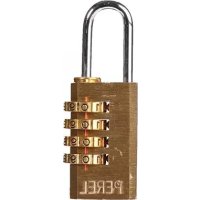
SLKCSET - Cadenas Perel - Notice d'utilisation et mode d'emploi gratuit
Retrouvez gratuitement la notice de l'appareil SLKCSET Perel au format PDF.


| Type de produit | Cadenas à combinaison |
| Marque | Perel |
| Modèle | SLKCSET |
| Dimensions du corps | Environ 50 x 30 x 15 mm |
| Hauteur de l'anse | Environ 25 mm |
| Diamètre de l'anse | Environ 6 mm |
| Matériau principal | Acier trempé |
| Poids | Environ 80 g |
| Combinaison d'usine | 0000 |
| Nombre de chiffres | 4 chiffres |
| Nombre de combinaisons possibles | 10 000 |
| Fonctions principales | Verrouillage, déverrouillage, réglage de la combinaison |
| Réglage de la combinaison | Possible via les étapes : ouvrir, tourner l'anse, enfoncer, régler, remonter |
| Entretien et nettoyage | Nettoyer avec un chiffon sec et non abrasif, éviter l'eau |
| Sécurité | Combinaison à 4 chiffres réglable par l'utilisateur |
| Pieces detachées et reparabilité | Non réparable, aucune pièce détachée disponible |
| Utilisation recommandée | Bagages, casiers, tiroirs |
| Informations générales | Notice téléchargeable gratuitement sur notice-facile.com |
FOIRE AUX QUESTIONS - SLKCSET Perel
Questions des utilisateurs sur SLKCSET Perel
0 question sur cet appareil. Repondez a celles que vous connaissez ou posez la votre.
Poser une nouvelle question sur cet appareil
Téléchargez la notice de votre Cadenas au format PDF gratuitement ! Retrouvez votre notice SLKCSET - Perel et reprennez votre appareil électronique en main. Sur cette page sont publiés tous les documents nécessaires à l'utilisation de votre appareil SLKCSET de la marque Perel.
MODE D'EMPLOI SLKCSET Perel
natural_image
Two padlocks with keys and an upward arrow, no text or symbols present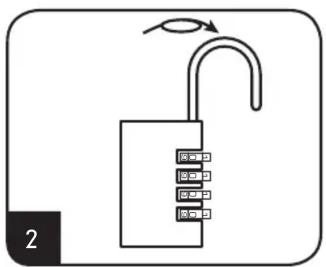
text_image
2
natural_image
Simple line drawing of a padlock with an open shaper and downward arrow indicating motion (no text or symbols)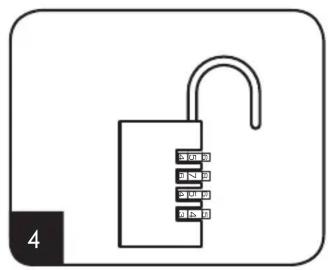
natural_image
Simple line drawing of a padlock with keys and a handle, no text or symbols present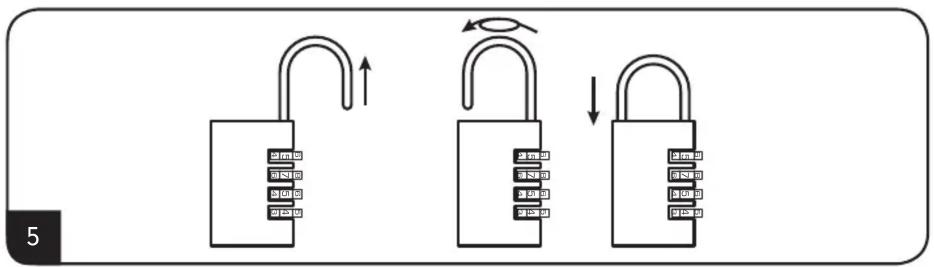
flowchart
graph TD
    A["Lock State"] --> B["Upward Rotation Arrow"]
    B --> C["Left Side Closed"]
    C --> D["Right Side Closed"]
    D --> E["Downward Rotation Arrow"]
-
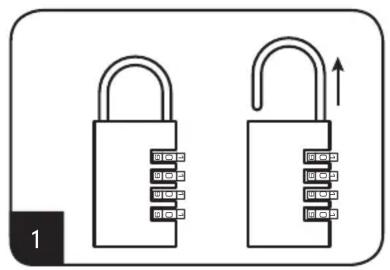
Open the padlock with the factory combination 0000 and pull the shackle up
-
Spin the shackle 180 degrees
- Push the shackle down
- Set the combination you want
-
Pull the shackle up, spin it 180 degrees and push the shackle back in the lock
-
Ouvrir le cadenas avec la combinaison d'usine "0000" et tirer sur l'anse
-
Tourner l'anse de 180 degrés
- Enfoncer l'anse
- Régler la combinaison souhaitée
-
Tirer sur l'anse, tourner l'anse de 180 degrés et enfoncer l'anse dans le cadenas
-
Open het slot op de bestaande code 0000: trek de beugel naar boven
-
Draai de beugel 180°
- Duw de beugel naar beneden
- Stel de gewenste code in
-
Trek de beugel terug omhoog, draai 180° en duw de beugel terug in het slot
-
Abra el candado con el código estándar (0000) y tire del gancho hacia arriba
-
Gire el gancho unos 180°
- Presione el gancho hacia abajo
- Introduzca el código deseado
-
Tire del gancho hacia arriba, gírela unos 180° y vuelva a presionarlo hacia abajo para cerrar el candado
-
Öffnen Sie das Schloss mit der Standardkombination 0000 und ziehen Sie den Bügel hoch
-
Drehen Sie den Bügel um 180°
- Drücken Sie den Bügel herunter
- Stellen Sie den gewünschten Code ein
-
Ziehen Sie den Bügel hoch, drehen Sie ihn um 180° und schließen Sie ihn
-
Abra o cadeado usando a combinação de fábrica 0000 e puxe a argola
-
Rode a argola 180 graus
- Empurre a argola para baixo
- Introduza a combinação desejada
- Empurre a argola para cima, faça-a roda 180 graus e coloque a argola de novo no cadeado.