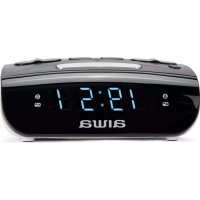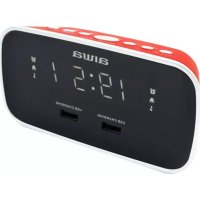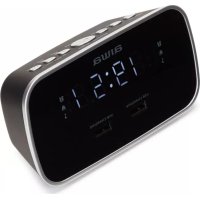
CRU19BK - Radio-réveil AIWA - Notice d'utilisation et mode d'emploi gratuit
Retrouvez gratuitement la notice de l'appareil CRU19BK AIWA au format PDF.


| Caractéristiques | Détails |
|---|---|
| Type d'appareil | Radio-réveil |
| Alimentation | Secteur |
| Fonctionnalités radio | FM/AM |
| Affichage | Écran LED |
| Réveil | Fonction de réveil avec alarme réglable |
| Volume réglable | Oui |
| Fonction snooze | Oui |
| Dimensions | Compact, facile à placer sur une table de nuit |
| Maintenance | Nettoyage régulier avec un chiffon doux |
| Sécurité | Certifié conforme aux normes de sécurité électrique |
| Informations supplémentaires | Garantie limitée, consulter le manuel pour plus de détails |
FOIRE AUX QUESTIONS - CRU19BK AIWA
Questions des utilisateurs sur CRU19BK AIWA
0 question sur cet appareil. Repondez a celles que vous connaissez ou posez la votre.
Poser une nouvelle question sur cet appareil
Téléchargez la notice de votre Radio-réveil au format PDF gratuitement ! Retrouvez votre notice CRU19BK - AIWA et reprennez votre appareil électronique en main. Sur cette page sont publiés tous les documents nécessaires à l'utilisation de votre appareil CRU19BK de la marque AIWA.
MODE D'EMPLOI CRU19BK AIWA
aiwa
CRU-19BK CRU-19RD
USER MANUAL EN
MANUAL DE USUARIO ES
MODE D'EMPLOI FR

BEDIENUNO- SANLEITUNG DE
MANUALE IT
DELL'UTENTE
MANUAL DO USUÁRIO PT
DUAL ALARM CLOCK RADIO
[Non-Text]
[Non-Text]
[Non-Text]
[Non-Text]
1a
G SINCE 1951
广力云智慧零售收银系统
[Non-Text]
[Non-Text]
[Non-Text]
[Non-Text]
vaEU
)
(1)
D.
N 10m
。
。
[Non-Text]
[Non-Text]
ll socket.
k screen will
[Non-Text]
dup system oe: CR2032)
move the pla ompartment
automatically keeps the c
the LED scre
start the battle d make sure b
s of the better terminals in
ngourtment
at disconnect
ck and alarm
[Non-Text]
the SET but
set the hour
outes. each setting
The Ground Truth image displays a single, solid horizontal line. According to Rule 2 (UNDERSCORE & LINE RULES), this is a stylistic or background line, not a placeholder underscore. Therefore, the OCR result must ignore it and output nothing or only meaningful text. The provided OCR content is "____", which consists of four underscores. This is an incorrect interpretation of the line as a placeholder, violating the rule that stylistic lines must be ignored. The OCR has hallucinated underscores where none should exist based on the GT's visual context. Hence, the OCR result is inconsistent with the Ground Truth.
[Non-Text]
[Non-Text]
itch on the re WARD button
A or FORWARD
et available F
itch off the ra
ations.
utton until PC
hows on the WARD button
er (P01-P10)
the pred natorly while
st a preset sta
FORWARD
[Non-Text]
[Non-Text]
[Non-Text]
[Non-Text]
[Non-Text]
[Non-Text]
[Non-Text]
[Non-Text]
[Non-Text]
[Non-Text]
[Non-Text]
[Non-Text]
[Non-Text]
[Non-Text]
[Non-Text]
[Non-Text]
[Non-Text]
[Non-Text]
[Non-Text]
[Non-Text]
[Non-Text]
[Non-Text]
[Non-Text]
[Non-Text]
[Non-Text]
[Non-Text]
[Non-Text]
[Non-Text]
[Non-Text]
[Non-Text]
[Non-Text]
[Non-Text]
[Non-Text]
[Non-Text]
[Non-Text]
[Non-Text]
[Non-Text]
[Non-Text]
[Non-Text]
[Non-Text]
[Non-Text]
[Non-Text]
[Non-Text]
[Non-Text]
[Non-Text]
[Non-Text]
[Non-Text]
[Non-Text]
[Non-Text]
[Non-Text]
[Non-Text]
[Non-Text]
[Non-Text]
[Non-Text]
[Non-Text]
[Non-Text]
[Non-Text]
[Non-Text]
[Non-Text]
[Non-Text]
[Non-Text]
[Non-Text]
[Non-Text]
[Non-Text]
[Non-Text]
[Non-Text]
[Non-Text]
[Non-Text]
[Non-Text]
[Non-Text]
[Non-Text]
[Non-Text]
[Non-Text]
INSTRUCTIONS
Getting started
Connect the power cord to a wall socket.
Once connected, the alarm clock screen will flash showing the time 00:00.
Backup system
The radio is equipped with a backup system and includes a 3V lithium battery (type: CR2032) already
installed. To make it work just remove the plastic strip that shows outside the battery compartment.
If a power cut occurs, the radio automatically swaps to the battery power supply and imports the alarm.
to the battery power supply and keeps the clock and timer settings, nonetheless the LED screen won't show anything.
If battery needs to be replaced, insert the battery into
the BATTERY COMPARTMENT and make sure the positive and negative (+ or -) sides of the battery are
in contact with the corresponding terminals in the compartment.
In order to open
When replacing the battery, do not disconnect the
power adapter. Otherwise, all clock and alarm settings will be lost.
Setting the clock
In standby mode, press and hold the SET button to enter the clock setting mode.
Press the BACKWARD button to set the hour and
FORWARD button to set the minutes. Press the SET button to confirm each setting option.
(二) 2017年1月1日至2018年1月1日(含)的公司股票交易均价为4.56元/股,与前一交易日收盘价相比,涨幅为-0.97%。
RADIO FM
-
- 3.
Listening to radio 1. Press the POWI
-
Press the BACKWARD or FORWARD button to
-
Press and hold the BACKWARD or FORWARD b
to automatically tune to the next available FM station.
- Press the POWER button to switch off the radio.
Setting preset stations You can store up to 10
You can store up to 10 preset stations. % Tune in to a station.
-
Press and hold the MEH/M+ button until POI (or the post-available preprint frame) shows on the display.
-
Press the BACKWARD or FORWARD button to
select a preset memory number (P01-P10).
-
Press the SET button to confirm. The preset station has been saved.
-
Press the MEH/M+ button listening to the radio to
listening to the radio to select a preset station. Alternatively, press the MEH/M+ button once
then press the BACKWARD or FORWARD button to select a preset station.
[Non-Text]
[Non-Text]
[Non-Text]
[Non-Text]
[Non-Text]
[Non-Text]
[Non-Text]
[Non-Text]
[Non-Text]
[Non-Text]
[Non-Text]
[Non-Text]
[Non-Text]
[Non-Text]
[Non-Text]
[Non-Text]
[Non-Text]
[Non-Text]
[Non-Text]
[Non-Text]
[Non-Text]
[Non-Text]
[Non-Text]
[Non-Text]
[Non-Text]
[Non-Text]
[Non-Text]
[Non-Text]
[Non-Text]
[Non-Text]
[Non-Text]
[Non-Text]
[Non-Text]
[Non-Text]
[Non-Text]
[Non-Text]
[Non-Text]
[Non-Text]
[Non-Text]
[Non-Text]
[Non-Text]
[Non-Text]
[Non-Text]
[Non-Text]
[Non-Text]
[Non-Text]
[Non-Text]
[Non-Text]
[Non-Text]
[Non-Text]
[Non-Text]
[Non-Text]
[Non-Text]
[Non-Text]
[Non-Text]
[Non-Text]
[Non-Text]
[Non-Text]
[Non-Text]
[Non-Text]
[Non-Text]
[Non-Text]
[Non-Text]
[Non-Text]
[Non-Text]
bar
| Technology | Usage Frequency (Hz) | | :--- | :--- | | ALARM | 10 | | BIDLCHIRM | 10 | | SVEGLA | 10 | | SVERLA | 10 | | Other | 10 |





[Non-Text]
[Non-Text]
[Non-Text]
[Non-Text]
[Non-Text]
[Non-Text]
[Non-Text]
[Non-Text]
[Non-Text]
[Non-Text]
[Non-Text]
[Non-Text]
[Non-Text]
[Non-Text]
[Non-Text]
[Non-Text]
[Non-Text]
[Non-Text]
[Non-Text]
[Non-Text]
[Non-Text]
[Non-Text]
[Non-Text]
[Non-Text]
[Non-Text]
[Non-Text]
[Non-Text]
[Non-Text]
[Non-Text]
[Non-Text]
[Non-Text]
[Non-Text]
[Non-Text]
[Non-Text]
[Non-Text]
[Non-Text]
[Non-Text]
[Non-Text]
[Non-Text]
[Non-Text]
[Non-Text]
[Non-Text]
[Non-Text]
[Non-Text]
[Non-Text]
[Non-Text]
[Non-Text]
[Non-Text]
[Non-Text]