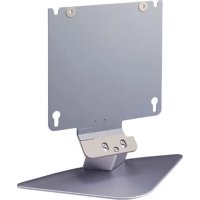
SUP32C - Support d'écran SONY - Notice d'utilisation et mode d'emploi gratuit
Retrouvez gratuitement la notice de l'appareil SUP32C SONY au format PDF.

| Type de produit | Support d'écran mural |
| Marque | Sony |
| Modèle | SUP32C |
| Compatibilité | Moniteur Sony PFM-32C1 / PFM-32C1E |
| Fixation | Murale (câble ou chaîne de sécurité requis, non fourni) |
| Matériau | Métal |
| Couleur | Argent (cadre), noir (vis) |
| Vis fournies | 5 vis argent M5-12, 2 vis noires M5-16 avec rondelles |
| Attache-fils fournis | 2 |
| Pièces de sûreté métalliques fournies | 2 |
| Installation requise | Deux personnes |
| Sécurité | Fixation au mur via câble/chaîne pour éviter basculement |
| Numéro de pièce (vis) | X-4039-885-1 |
| Numéro de pièce (attache-fils) | 4-087-524-01 |
| Numéro de pièce (pièces de sûreté) | 4-087-329-01 |
| Type de support | Fixe (non inclinable, non rotatif) |
| Poids maximal de l'écran | Adapté au moniteur PFM-32C1 (environ 15 kg) |
| Fonction principale | Maintenir et sécuriser un moniteur à écran plat |
| Accessoires inclus | Vis, attache-fils, pièces de sûreté |
| Instructions | Assembler le cadre, insérer les vis, fixer le moniteur, attacher le câble de sécurité |
| Avertissement | Utiliser un câble/chaîne résistant fixé solidement au mur |
FOIRE AUX QUESTIONS - SUP32C SONY
Questions des utilisateurs sur SUP32C SONY
0 question sur cet appareil. Repondez a celles que vous connaissez ou posez la votre.
Poser une nouvelle question sur cet appareil
Téléchargez la notice de votre Support d'écran au format PDF gratuitement ! Retrouvez votre notice SUP32C - SONY et reprennez votre appareil électronique en main. Sur cette page sont publiés tous les documents nécessaires à l'utilisation de votre appareil SUP32C de la marque SONY.
MODE D'EMPLOI SUP32C SONY
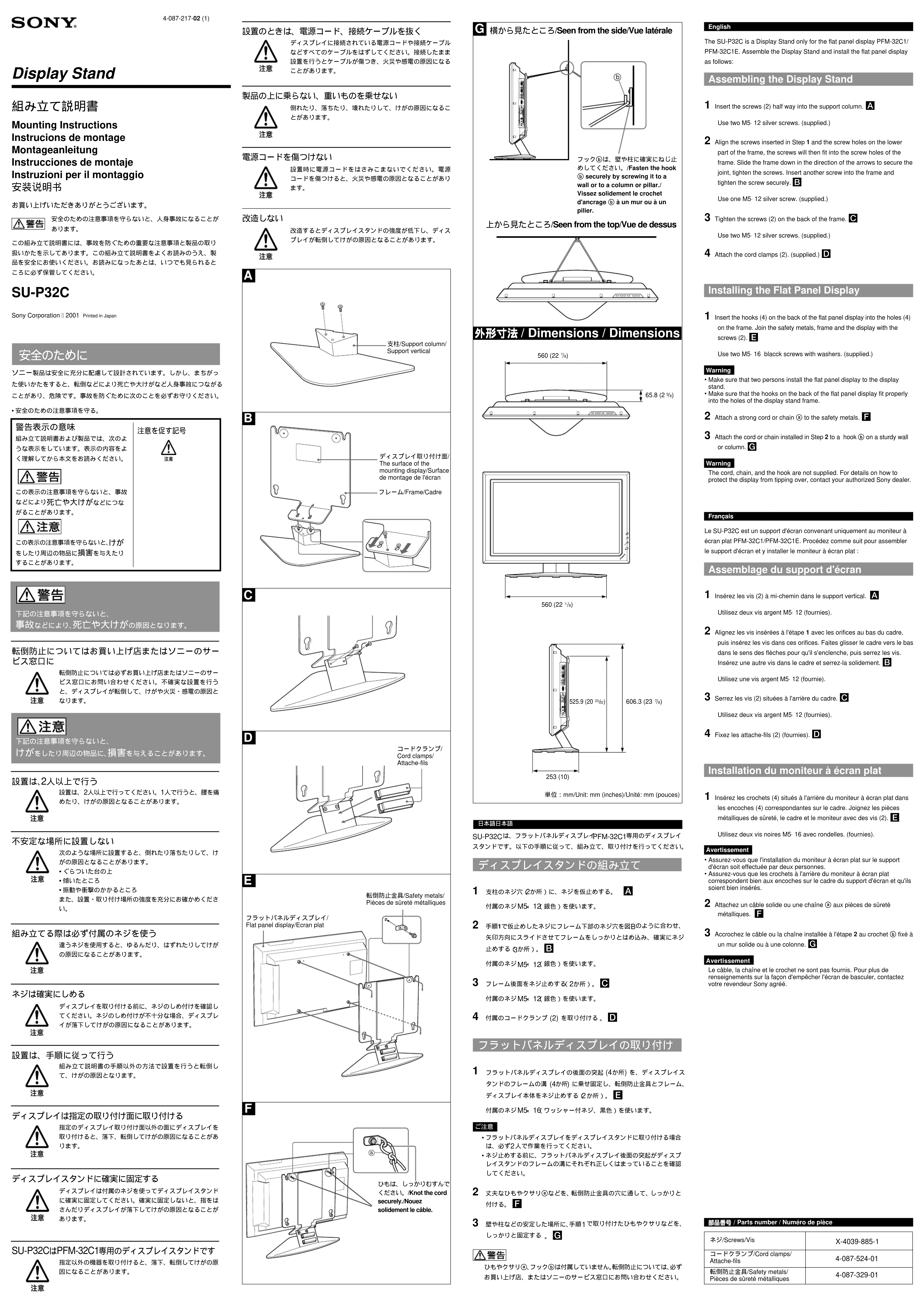
Le SU-P32C est un support d'écran convenant uniquement au moniteur à écran plat PFM-32C1/PFM-32C1E. Procédez comme suit pour assembler le support d'écran et y installer le moniteur à écran plat :
Assemblage du support d'écran
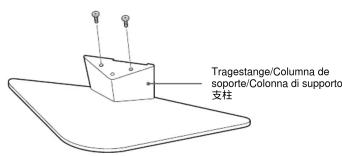
1 Insérez les vis (2) à mi-chemin dans le support vertical. A
Utilisez deux vis argent M5-12 (fournies).
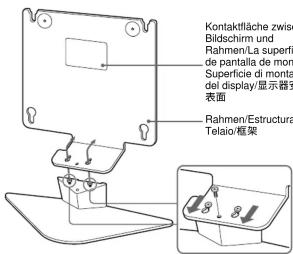
2 Alignez les vis insérées à l'étape 1 avec les orifices au bas du cadre, puis insérez les vis dans ces orifices. Faites glisser le cadre vers le bas dans le sens des flèches pour qu'il s'enclenche, puis serrez les vis. Insérez une autre vis dans le cadre et serrez-la solidement. B
Utilisez une vis argent M5-12 (fournie).
3 Serrez les vis (2) situées à l'arrière du cadre. C
Utilisez deux vis argent M5-12 (fournies).
4 Fixez les attache-fils (2) (fournies). D
Installation du moniteur à écran plat
1 Insérez les crochets (4) situés à l'arrière du moniteur à écran plat dans les encoches (4) correspondantes sur le cadre. Joignez les pièces métalliques de sûreté, le cadre et le moniteur avec des vis (2).
Utilisez deux vis noires M5- 16 avec rondelles. (fournies).
Avertissement
- Assurez-vous que l'installation du moniteur à écran plat sur le support d'écran soit effectuée par deux personnes. - Assurez-vous que les crochets à l'arrière du moniteur à écran plat correspondent bien aux encoches sur le cadre du support d'écran et qu'ils soient bien insérés.
2 Attachez un câble solide ou une chaîne ⓐ aux pièces de sûreté métalliques. F
3 Accrochez le câble ou la chaîne installée à l'étape 2 au crochet Ⓑ fixé à un mur solide ou à une colonne. G
Avertissement
Le câble, la chaîne et le crochet ne sont pas fournis. Pour plus de renseignements sur la façon d'empêcher l'écran de basculer, contactez votre revendeur Sony agréé.
部品番号 / Parts number / Numéro de pièce
| ネジ/Screws/Vis | X-4039-885-1 |
| コードクランプ/Cord clamps/Attache-fils | 4-087-524-01 |
| 転倒防止金具/Safety metals/Pièces de sûreté métalliques | 4-087-329-01 |
A
B

Marque : SONY
Modèle : SUP32C
Catégorie : Support d'écran