GS1008PS2 - Commutateur Cudy - Notice d'utilisation et mode d'emploi gratuit
Retrouvez gratuitement la notice de l'appareil GS1008PS2 Cudy au format PDF.

| Type de produit | Commutateur PoE Gigabit avec 8 ports |
| Marque | Cudy |
| Modèle | GS1008PS2 |
| Nombre de ports PoE | 8 ports (tous compatibles PoE) |
| Norme PoE | IEEE 802.3af (15,4 W) et IEEE 802.3at (30 W) |
| Puissance totale PoE | 120 W |
| Puissance maximale par port PoE | 30 W (IEEE 802.3at) |
| Débit de commutation | 20 Gbps |
| Taux de transfert de paquets | 14,88 Mpps |
| Mémoire tampon | 448 Ko |
| Adresses MAC | 2 Ko |
| Trame Jumbo | 9216 octets |
| Alimentation | AC 100-240 V, 50-60 Hz |
| Consommation électrique | 120 W (max) |
| Dimensions (L × P × H) | 220 mm × 161 mm × 44 mm |
| Poids | Environ 1,5 kg |
| Température de fonctionnement | -10 °C à 50 °C |
| Température de stockage | -40 °C à 70 °C |
| Humidité de fonctionnement | 10 % à 90 % (sans condensation) |
| Mode Extension | Active sur les ports 7-8, force 10 M, distance jusqu'à 250 m, avec PoE watchdog |
| Indicateurs LED | 1 LED d'alimentation (PWR), 8 LED de liaison/données (vert) |
| Commutateur DIP | Standard (mode normal) / Extend (mode extension) |
| Contenu de l'emballage | Commutateur, adaptateur secteur, guide d'installation rapide |
| Nettoyage et entretien | Utiliser un chiffon doux et sec. Ne pas utiliser de liquides ni de produits abrasifs. |
| Sécurité | Utiliser uniquement l'adaptateur fourni. Ne pas exposer à l'humidité ou à des températures extrêmes. |
| Garantie | 2 ans |
FOIRE AUX QUESTIONS - GS1008PS2 Cudy
Questions des utilisateurs sur GS1008PS2 Cudy
0 question sur cet appareil. Repondez a celles que vous connaissez ou posez la votre.
Poser une nouvelle question sur cet appareil
Téléchargez la notice de votre Commutateur au format PDF gratuitement ! Retrouvez votre notice GS1008PS2 - Cudy et reprennez votre appareil électronique en main. Sur cette page sont publiés tous les documents nécessaires à l'utilisation de votre appareil GS1008PS2 de la marque Cudy.
MODE D'EMPLOI GS1008PS2 Cudy
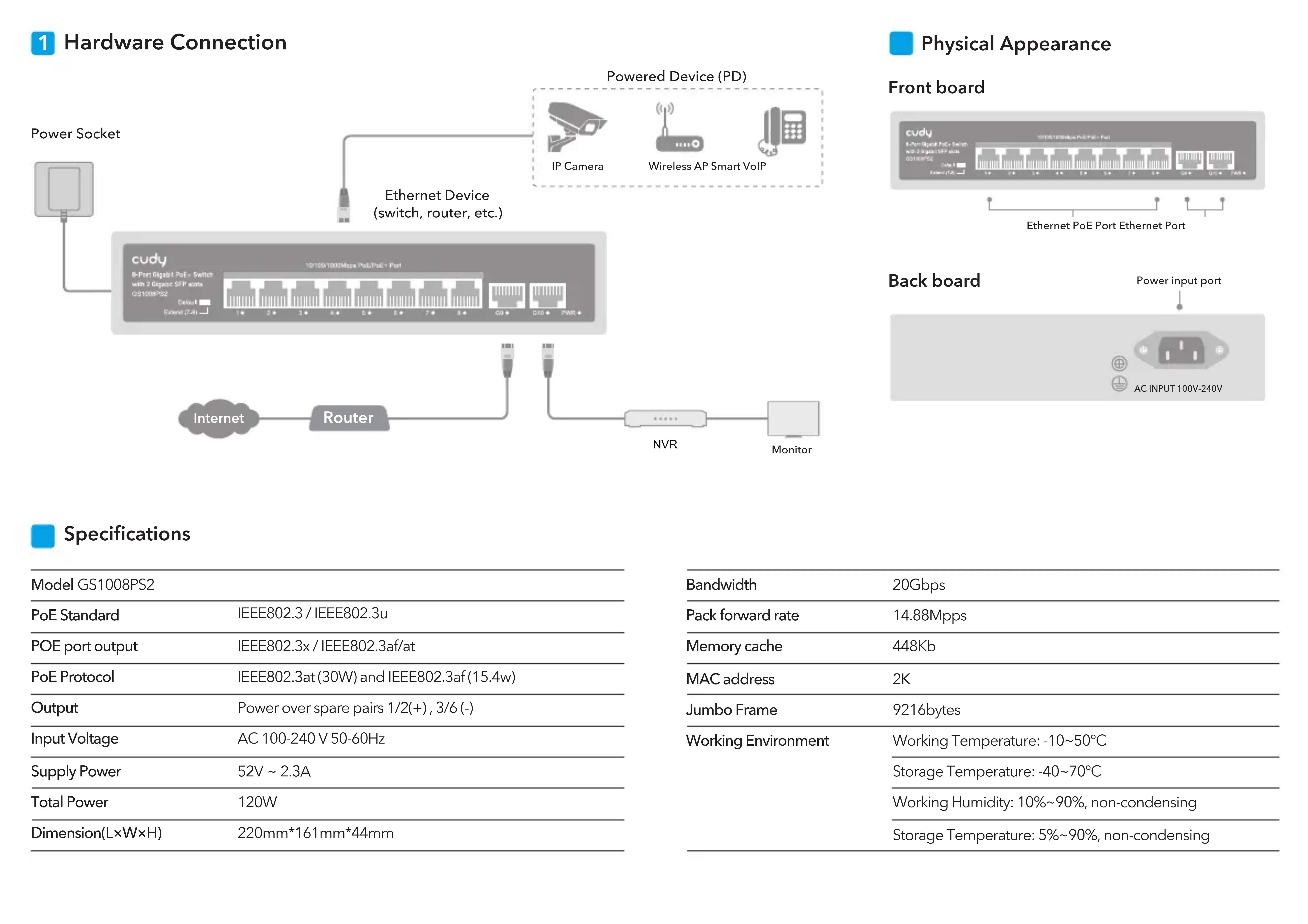
1 Hardware Connection
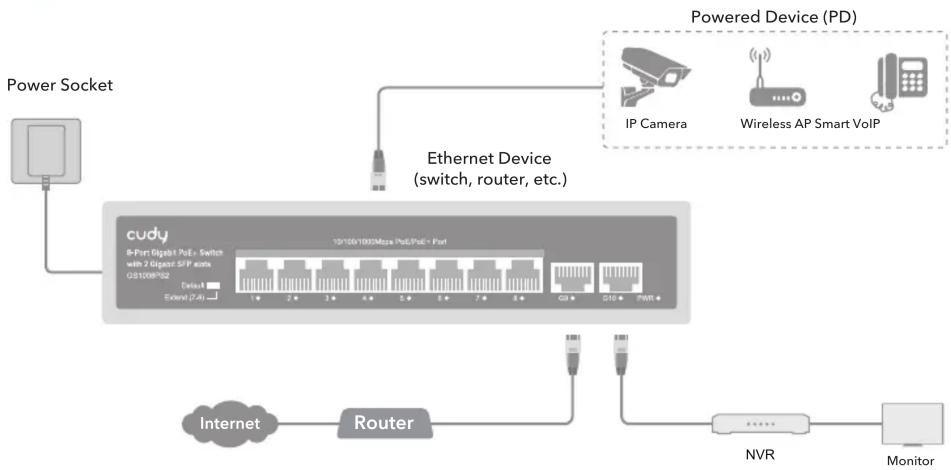
flowchart
graph TD
    A["Power Socket"] --> B["cudy 8-Port Gigat PGE Switch"]
    B --> C["Ethernet Device (switch, router, etc.)"]
    C --> D["IP Camera"]
    C --> E["Wireless AP Smart VoIP"]
    C --> F["NVR"]
    C --> G["Monitor"]
    B --> H["Router"]
    H --> I["Internet"]
    I --> J["External 7.4"]
    B --> K["10100/1000MHz PGE/PGE - Port"]
    K --> L["1 2 3 4 5 6 7 8 9 10 11 12 13 14 15 16 17 18 19 20 21 22 23 24 25 26 27 28 29 30 31 32 33 34 35 36 37 38 39 40 41 42 43 44 45 46 47 48 49 50 51 52 53 54 55 56 57 58 59 60 61 62 63 64 65 66 67 68 69 70 71 72 73 74 75 76 77 78 79 80"]
    style A fill:#f9f,stroke:#333
    style B fill:#ccf,stroke:#333
    style C fill:#cfc,stroke:#333
    style D fill:#fcc,stroke:#333
    style E fill:#fcc,stroke:#333
    style F fill:#cff,stroke:#333
    style G fill:#ffc,stroke:#333
    style H fill:#ffc,stroke:#333
    style I fill:#cfc,stroke:#333
    style J fill:#cfc,stroke:#333
    style K fill:#cfc,stroke:#333
    style L fill:#cfc,stroke:#333
    style M fill:#cfc,stroke:#333
    style N fill:#cfc,stroke:#333
    style O fill:#cfc,stroke:#333
    style P fill:#cfc,stroke:#333
    style Q fill:#cfc,stroke:#333
    style R fill:#cfc,stroke:#333
    style S fill:#cfc,stroke:#333
    style T fill:#cfc,stroke:#333
    style U fill:#cfc,stroke:#333
    style V fill:#cfc,stroke:#333
    style W fill:#cfc,stroke:#333
    style X fill:#cfc,stroke:#333
    style Y fill:#cfc,stroke:#333
    style Z fill:#cfc,stroke:#333
    style AA fill:#cfc,stroke:#333
    style AB fill:#cfc,stroke:#333
    style AC fill:#cfc,stroke:#333
    style AD fill:#cfc,stroke:#333
    style AE fill:#cfc,stroke:#333
    style AF fill:#cfc,stroke:#333
    style AG fill:#cfc,stroke:#333
    style AH fill:#cfc,stroke:#333
    style AI fill:#cfc,stroke:#333
    style AJ fill:#cfc,stroke:#333
    style AK fill:#cfc,stroke:#333
    style AL fill:#cfc,stroke:#333
    style AM fill:#cfc,stroke:#333
    style AN fill:#cfc,stroke:#333
    style AO fill:#cfc,stroke:#333
    style AP fill:#fcc,stroke:#333
    style AQ fill:#fcc,stroke:#333
    style AR fill:#fcc,stroke:#333
    style AS fill:#fcc,stroke:#333
    style AT fill:#fcc,stroke:#333
Physical Appearance
Front board
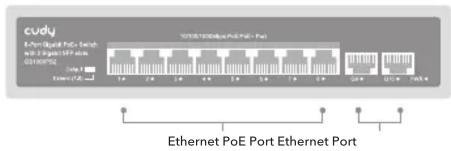
text_image
cudy Download PoE Tech with 20 percent data Ethernet PoE 16/16/2016 Ethernet PoE Port Ethernet Port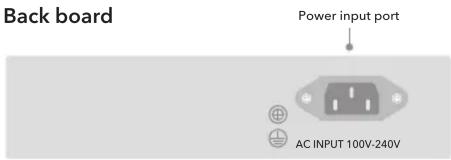
text_image
Back board Power input port AC INPUT 100V-240VSpecifications
| Model GS1008PS2 | |
| PoE Standard | IEEE802.3 / IEEE802.3u |
| POE port output | IEEE802.3x / IEEE802.3af/at |
| PoE Protocol | IEEE802.3at (30W) and IEEE802.3af (15.4w) |
| Output | Power over spare pairs 1/2(+), 3/6 (-) |
| Input Voltage | AC 100-240 V 50-60Hz |
| Supply Power | 52V ~ 2.3A |
| Total Power | 120W |
| Dimension(L×W×H) | 220mm*161mm*44mm |
| Bandwidth | 20Gbps |
| Pack forward rate | 14.88Mpps |
| Memory cache | 448Kb |
| MAC address | 2K |
| Jumbo Frame | 9216bytes |
| Working Environment | Working Temperature: -10~50°C |
| Storage Temperature: -40~70°C | |
| Working Humidity: 10%~90%, non-condensing | |
| Storage Temperature: 5%~90%, non-condensing |
4 DIP Explanation
| Default | Standard Switch | Common mode, all interfaces can communicate with each other, the transmission distance is less than 100 meters, the transmission rate is 10/100/1000M adaptive; The port AI mode is disabled. |
| Extend | Link Extension | Link extension mode, 7-8 ports force 10M, link 250M (enable POE watchdog) |
5 LED and Interface Explanation
| PWR | Power LED | ON | Powered |
| OFF | No power | ||
| 1-10 Green Light (Link&Data) | ON | On: Link normal | |
| OFF | Off: Link blocked | ||
| Flashing | Flashing: Data transmitting | ||
EU declaration of conformity
Cudy hereby declares that the device is in compliance with the essential requirements and other relevant provisions of directives 2014/30/EU, 2014/35/EU, 2009/125/EC and 2011/65/EU. The original EU declaration of conformity may be found at http://www.cudy.com/
Email: support@cudy.com



Quick Installation Guide
Model: GS1008PS2
www.cudy.com