
ICD-50 - Dictaphone SONY - Notice d'utilisation et mode d'emploi gratuit
Retrouvez gratuitement la notice de l'appareil ICD-50 SONY au format PDF.


| Type de produit | Dictaphone numérique |
| Marque | Sony |
| Modèle | ICD-50 |
| Dimensions (L x H x P) | 56 x 85,9 x 22,5 mm |
| Poids (sans pile) | Environ 50 g |
| Alimentation | 1 pile alcaline AAA (LR03) 1,5 V DC |
| Type de mémoire | Mémoire flash intégrée |
| Temps d'enregistrement (SP) | 8 minutes |
| Temps d'enregistrement (LP) | 16 minutes |
| Nombre maximum de notes par fichier | 99 |
| Nombre de fichiers | 2 (A et B) |
| Réponse en fréquence (SP) | 200 Hz - 3 400 Hz |
| Réponse en fréquence (LP) | 200 Hz - 1 700 Hz |
| Haut-parleur | Diamètre env. 3,6 cm |
| Puissance de sortie | 70 mW |
| Prise écouteurs | Mini-jack pour écouteurs 8 - 300 ohms |
| Fonctions principales | Enregistrement, lecture, alarme, horodatage, répétition, insertion, marquage d'index, verrouillage HOLD |
| Écran | LCD avec rétroéclairage |
| Accessoires fournis | 1 dragonne, 1 pile alcaline AAA |
| Entretien et nettoyage | Chiffon doux légèrement humidifié. Ne pas utiliser d'alcool, benzine ou diluant. |
| Sécurité | Ne pas exposer à la chaleur, à la lumière directe du soleil ou à la poussière. Éloigner des cartes magnétiques et montres à ressort. |
| Réparabilité | Bouton de réinitialisation accessible avec un stylo. Consulter un revendeur Sony pour tout problème. |
FOIRE AUX QUESTIONS - ICD-50 SONY
Questions des utilisateurs sur ICD-50 SONY
0 question sur cet appareil. Repondez a celles que vous connaissez ou posez la votre.
Poser une nouvelle question sur cet appareil
Téléchargez la notice de votre Dictaphone au format PDF gratuitement ! Retrouvez votre notice ICD-50 - SONY et reprennez votre appareil électronique en main. Sur cette page sont publiés tous les documents nécessaires à l'utilisation de votre appareil ICD-50 de la marque SONY.
MODE D'EMPLOI ICD-50 SONY
IC Recorder
Operating Instructions
ICD-50 VOICE FILE
©1996 by Sony Corporation Printed in Japan
Owner's Record
The model number is located at the bottom and the serial number is located inside the battery compartment. Record the serial number in the space provided below. Refer to them whenever you call upon your Sony dealer regarding this product.
Model No. ICD-50 Serial No.
WARNING
This device complies with Part 15 of the FCC Rules. Operation is subject to the following two conditions: (1) This device may not cause harmful interference, and (2) this device must accept any interference received, including interference that may cause undesired operation.
You are cautioned that any changes or modifications not expressly approved in this manual could void your authority to operate this equipment.
Welcome!
Thank you for purchasing the Sony IC Recorder.
Some features are:
- 8 minutes (SP) / 16 minutes (LP) recording time
- Up to 99 notes in each file
- Two note files -- The ratio of the recording time for these files is adjustable within the maximum recordable time of this unit.
Note date stamp
- Alarm with message
- Informative LCD with backlight
- Flash memory to keep notes recorded even without a battery
Installing the Battery
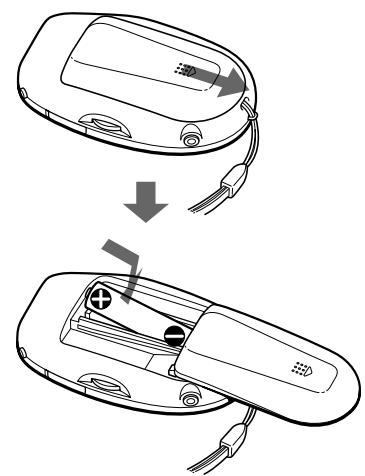
1 Slide open the battery compartment lid.
2 Insert a size AAA (LR03) alkaline battery with correct polarity, and close the lid.
Clock setting display appears when you insert a battery for the first time, and when you insert a battery after the unit has been without a battery for a certain period of time. For more details, please refer to Setting the Clock, from step 2.
Note
Make sure to close the lid completely. Otherwise the unit will not operate.
Replacing the battery
"..." appears on the display when the battery becomes weak and it flashes when the battery is exhausted.
Replace the battery with a new one.
Battery life
Sony alkaline battery LR03 (SG) approx. 2 months*
- When recording for 2 minutes and playing back for 3 minutes every day
Notes
- When you replace the battery, insert a new battery within 3 minutes after you removed the exhausted one, otherwise all the settings you have made will be reset to the initial settings. The recorded notes, however, will remain.
- Do not charge a dry battery.
- When you will not use the unit for a long time, remove the battery to avoid any damage caused by battery leakage and subsequent corrosion.
Basic Operations
Recording Notes
This IC recorder automatically records notes after the last recorded note so that you can start recording quickly without searching for the end of the last recording.
You can record up to 99 notes in each file, A and B. When you record all notes in SP (standard play) mode, you can record for 8 minutes and in LP (long play) mode for 16 minutes. If you record notes in a mixture of SP and LP modes, the recordable time varies from 8 to 16 minutes.
Each recorded note has an index number, and a newly recorded note will have the last index number.
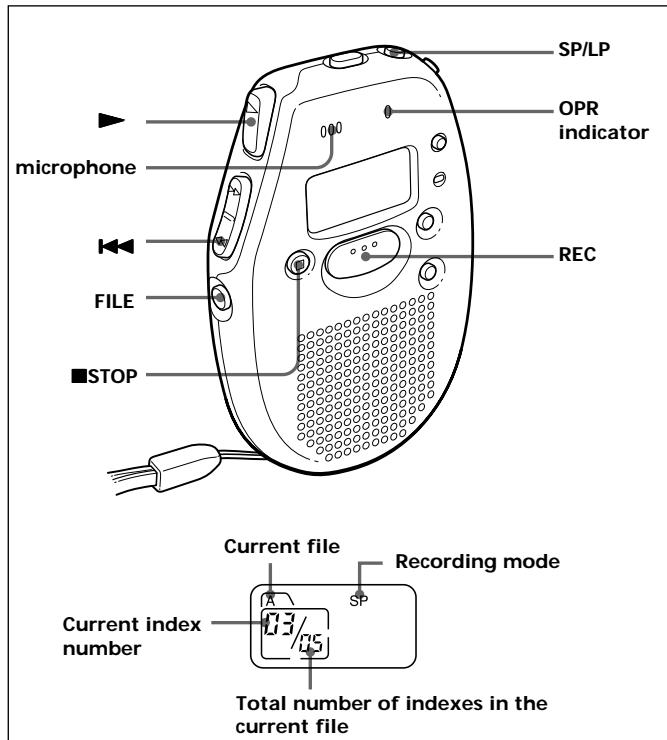
1 Press SP/LP to select SP or LP mode. "SP" or "LP" is displayed.
2 Press FILE to select file A or B. "A" or "B" is displayed.
3 Press REC and speak into the microphone. The OPR indicator lights in red and recording starts.
4 Press STOP to stop recording.
For the next time you record, if the displays of SP/LP mode and the file are what you want, just follow steps 3 and 4.
When you have recorded up to 99 notes or the maximum recording time, "FULL" appears in the display. If you want to record more notes in the same file, first erase some old notes.
To listen to the last recording
Press right after recording.
To review the current recording instantly
Press during recording.
Playing Back Notes
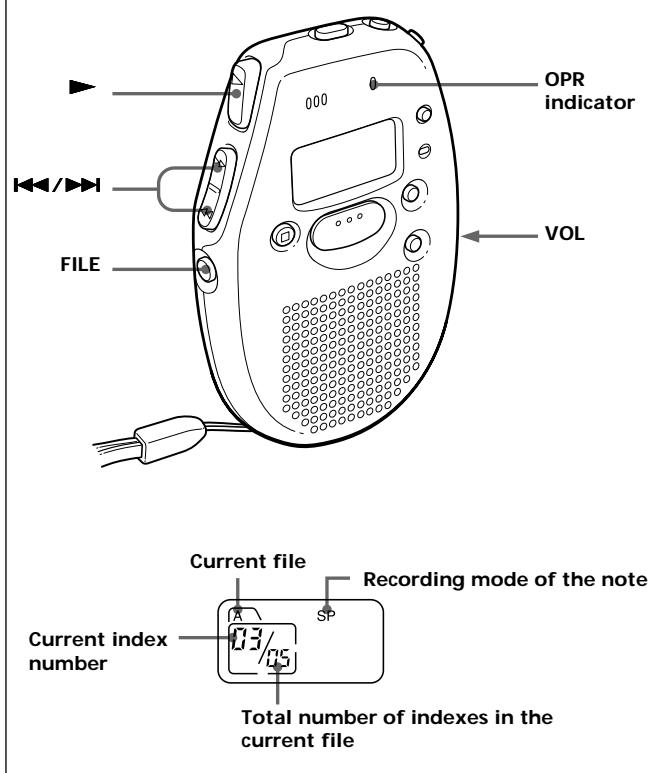
1 Press FILE to select a file, A or B.
2 Press or to select an index number you want to play.
3 Press
The OPR indicator lights in green and playback starts.
4 Adjust the volume with the VOL control.
| To | Press |
| Skip to the next index number | Press▶ repeatedly until you find the index number you want to play. |
| Skip to the previous index number | Press �▶ repeatedly until you find the index number you want to play. |
| Search forward for an index number | Keep pressing▶ and release it at the index number you want during stop mode. |
| Search backward for an index number | Keep pressing �▶ and release it at the index number you want during stop mode. |
| Search forward during playback | Keep pressing▶ and release it at the point you want during playback. |
| Search backward during playback | Keep pressing �▶ and release it at the point you want during playback. |
If you stop playing back halfway through a note
When you press next time, the playback starts from the point where you stopped previously.
For private listening
Connect an earphone (not supplied) to the ② jack.
The built-in speaker will be automatically disconnected.
Setting the Clock
You need to set the clock to use the following features:
- alarm
- date stamp
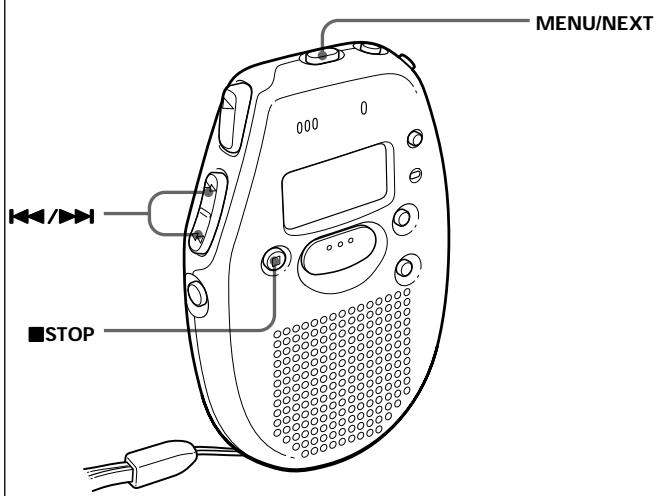
1 Press MENU/NEXT repeatedly until the date display appears.
2 Press or to set the date.
Keep pressing the button, to change the date successively.
3 Press MENU/NEXT again.
The time display appears.
4 Press or to set the time.
Keep pressing the button to change the time successively.
5 Press STOP.
The unit returns to normal mode.
The clock starts from 0 second.
Erasing Notes
You can delete the recorded notes one by one or all notes in a file at a time.
Note that once a recording has been erased, you cannot retrieve it.
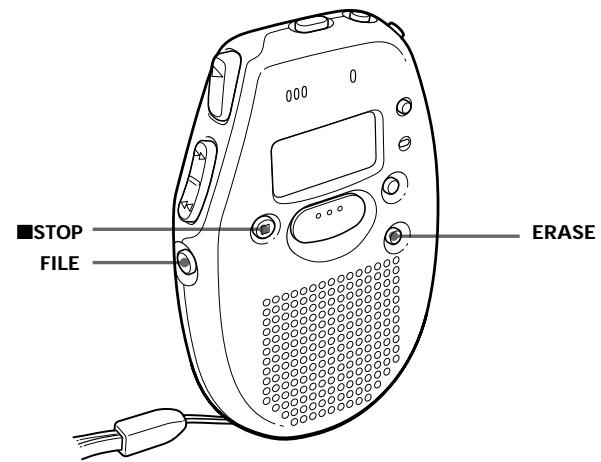
Erasing a note
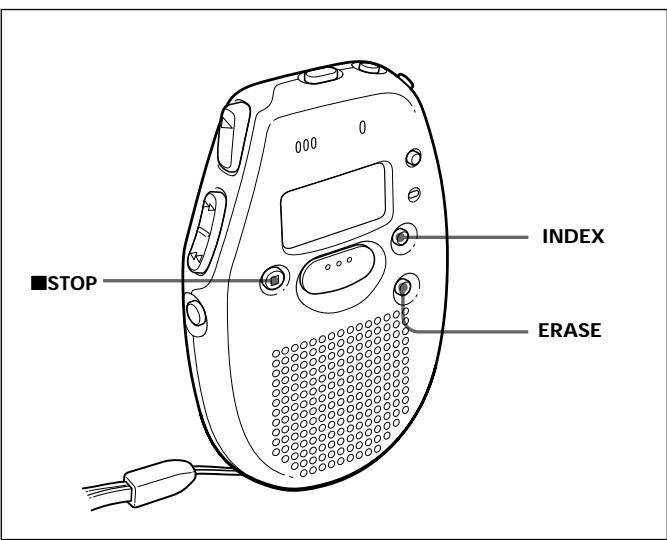
1 Press ERASE while playing back the note you want to erase.
The index number and "ErASE" flash, and the first and the last 5 seconds of the note are played back 10 times.
2 Press ERASE again while the note is played back.
The note is erased and the remaining tracks are renumbered.
To cancel erasing
Press STOP before step 2.
To erase other tracks
Repeat steps 1 and 2.
To erase a note partially
Before you do steps 1 and 2, divide the note into the part to erase and the part not to erase by adding an index mark. (For details, refer to Adding/Erasing Index Marks.)
Erasing all notes in a file
1 Press FILE to select the desired file, A or B.
2 Press STOP and ERASE at the same time for about a second during stop mode.
"All ErASE" flashes.
3 Press ERASE to erase the notes.
All the notes in the file are erased.
To cancel erasing
Press STOP before step 3.
Various Ways of Recording
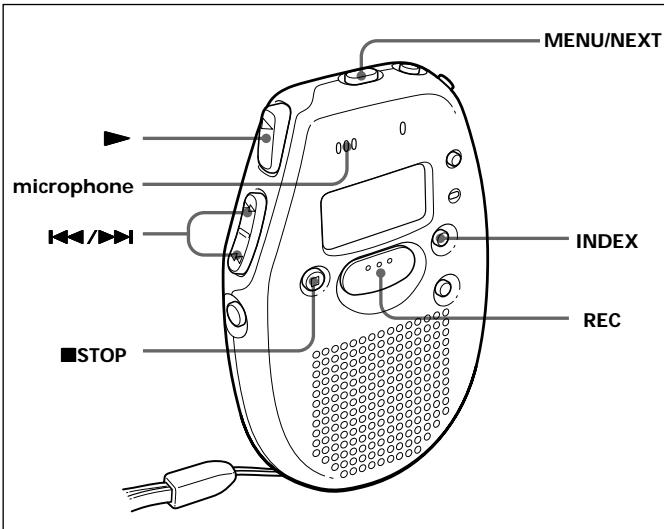
Adding index numbers while recording
You can add index marks while recording a note at the point you like so that you can quickly find and play from the marked position.
While the unit is recording a note, press INDEX, and the new index number flashes.
An index mark is added and the following index numbers will increase by one.
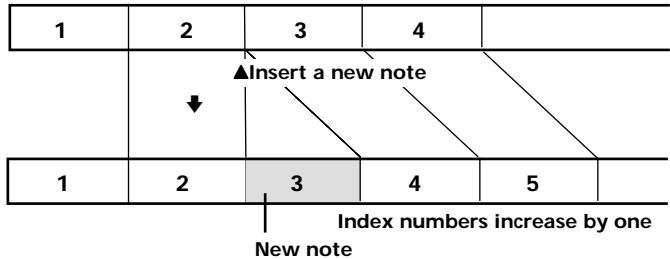
Inserting a new note between two notes
1 Press MENU/NEXT repeatedly until "InS" appears.
2 Press or to select "On".
3 Press STOP. The display returns to the normal mode.
4 Press or to select the index number before which you want to insert a new note.
5 Press and hold REC for more than a second until "InS" appears and flashes, and then speak into the microphone.
The new note is added and the notes after that are renumbered as follows.
To stop recording
Press STOP.
To insert more notes
Repeat steps 4 and 5.
To record normally (not inserting)
Briefly press REC.
To return to the normal mode
Select "OFF" in step 2.
Inserting a new note in the middle of a previously recorded note
1 Press MENU/NEXT repeatedly until "InS" appears.
2 Press or to select "On".
3 Press STOP.
The display returns to the normal mode.
4 Press or to select the index number to which you want to add a note.
5 Press to play the note and press STOP at the point you want to add a new note.
6 Press and hold REC for more than a second until "InS" appears and flashes, and then speak into the microphone.
The new note is added and the previous note is divided into two index numbers. Remaining notes after that are renumbered.
| 1 | 2 | 3 | |
| ▲ Insert a new note | |||
| 1 | 2 | 3 | 4 |
| Index numbers increase by two New note | |||
To stop recording
Press STOP.
To insert more notes
Repeat steps 4 to 6.
To record normally (not inserting)
Briefly press REC.
To return to the normal mode
Select "OFF" in step 2.
Note
- When there are already 98 notes recorded in the file, you cannot insert a new recording.
Various ways of playing
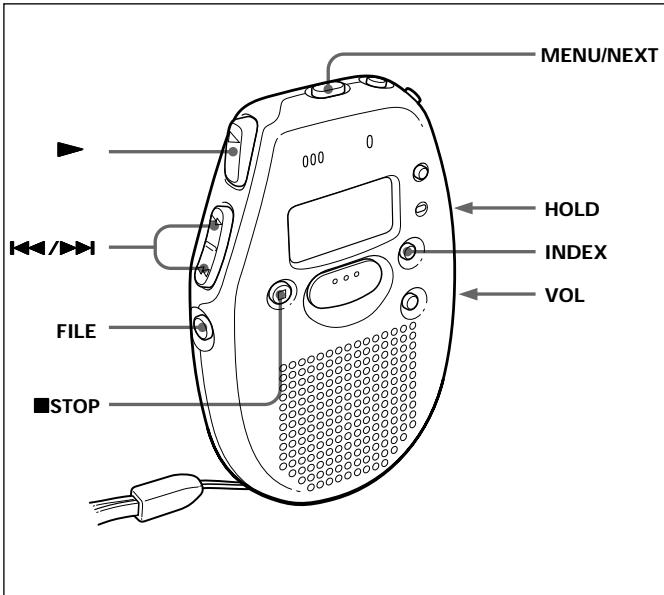
Playing a note repeatedly (Repeat play)
Press for more than a second until " " appears while the unit is playing the desired note. The unit will play the note over and over again.
To stop Repeat play
Press STOP.
To return to the normal play
Briefly press
Playing all notes in a file continuously
You can play back all notes in a file continuously without pressing
for each note.
1 Press MENU/NEXT repeatedly until "cont" appears.
2 Press or to select "On".
3 Press STOP.
The display returns to the normal mode.
4 Press.
To play back the notes one by one
Select "OFF" on step 2.
Playing the beginning of each note (Scanning Play)
When you press for more than a second while the unit is in the stop mode, the unit plays the first five seconds of all notes. This makes it easy to find the desired note.
If you press when you find the desired note, you can listen to the complete note.
After playing the last note, the unit returns to the first note and stops.
To stop Scanning play
Press STOP.
Playing a note using timer
You can set the unit to play a note automatically on a chosen day and time with the alarm.
You cannot set the alarm if you have not set the clock on the unit.
Also, you cannot use the alarm if you have not recorded any note.
1 Select the file and the index number you want to play with an alarm by pressing FILE and 口 / 口
2 Press MENU/NEXT repeatedly until "AL" appears.
3 Press or to select "On".
4 Press MENU/NEXT.
The day flashes.
5 Press or to select a day you want.
If you select:
"mon" to "Sun", the note is played back only on that day within a week.
- "ALL", the note is played back every day.
6 Press MENU/NEXT.
The time flashes.
7 Press or to select the desired time.
8 Press STOP to return to the normal mode.
() appears and the alarm is set.
When the set day and time come, the alarm rings for 10 seconds and then the note is played.
To stop the note from playing
Press STOP while the alarm sounds, otherwise the note starts playback.
Even if the HOLD switch is on, you can stop the note.
To play the note before alarm sound finishes
Press STOP and
To select an other index number
1 Press MENU/NEXT repeatedly until "AL" appears.
2 Press or to select "OFF".
3 Press STOP.
4 Repeat steps 1 to 8 of "Playing a note using the timer".
Notes
- The note plays back at the set volume, so make sure to set the volume at a comfortable level.
- If the set alarm time comes during recording, the alarm sounds and the note plays right after the recording finishes. () , however, flashes at the set time.
- The alarm does not sound during menu mode. It will sound when you return to the normal mode.
- If you erase the note to be played by timer, the alarm and timer play will be cancelled.
Preventing accidental operation
Slide the HOLD switch in the direction of the arrow. "O-n" is displayed, indicating that all the functions of the buttons are locked, except STOP to stop an alarm.
When the unit is in the MENU mode, the HOLD function is ignored even if you have set the HOLD switch to work.
To release the key protection, slide the HOLD switch in the opposite direction.
Adding/Erasing Index Marks
You can add or erase index marks after recording.
Dividing a note
You can divide a note by adding index marks.
The index numbers will increase as follows.
Index numbers increase
| 1 | 2 | 3 | 4 | ||
| ▲ Index marking | |||||
| 1 | 2 | 3 | 4 | 5 | |
While the unit is playing a note, press INDEX at the point you want to mark. The index number flashes.
An index mark is added and the following index numbers will increase by one.
Combining notes
You can erase an index mark to combine the notes before and after the index mark.
The index numbers will change as follows.
Index numbers decrease
| 1 | 2 | 3 | 4 | 5 | |
| ▲ Index mark erasing | |||||
| 1 | 2 | 3 | 4 | ||
1 Find the index number you want to erase.
2 Press INDEX and ERASE at the same time for more than a second.
The index number and "ErASE" flashes for 10 seconds.
3 While the display is flashing, press ERASE.
The notes are then combined and unit returns to the normal mode.
To cancel Erasing
Press STOP before step 3.
Changing the Display
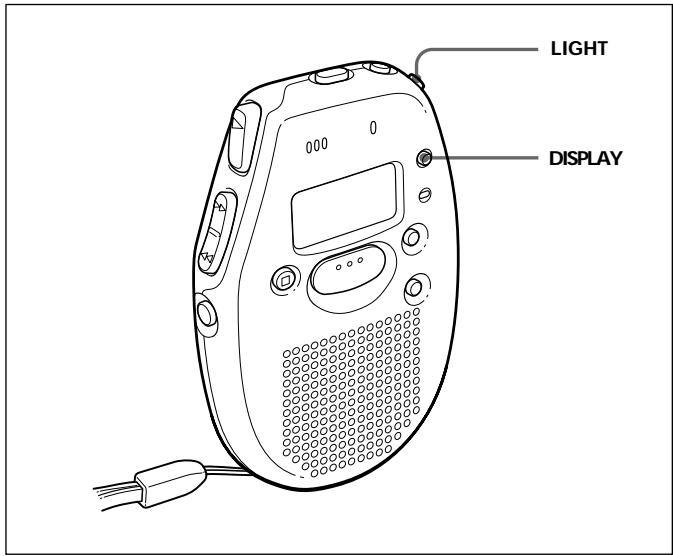
The display changes as follows every time you press DISPLAY.
After 10 seconds without pressing any button, the unit returns to clock display.
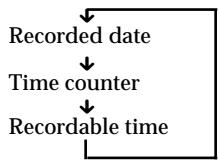
Notes
- Recordable time varies depending on if SP or LP is selected.
- " -- -- " is displayed instead of:
-- the clock display when you have not set the clock.
-- the recorded date of the note when you have not set the clock.
-- the recorded date when you have not recorded any note.
To see the display in a dark place
Press LIGHT and the display is lit.
To turn off the light, press LIGHT again.
If you do not operate the unit for 10 seconds while the light is on, the light turns off automatically.
Cutting off the Beep Sound
You can cut off the beep sound by following the steps below.
The alarm still sounds even if you set the beep sound off.
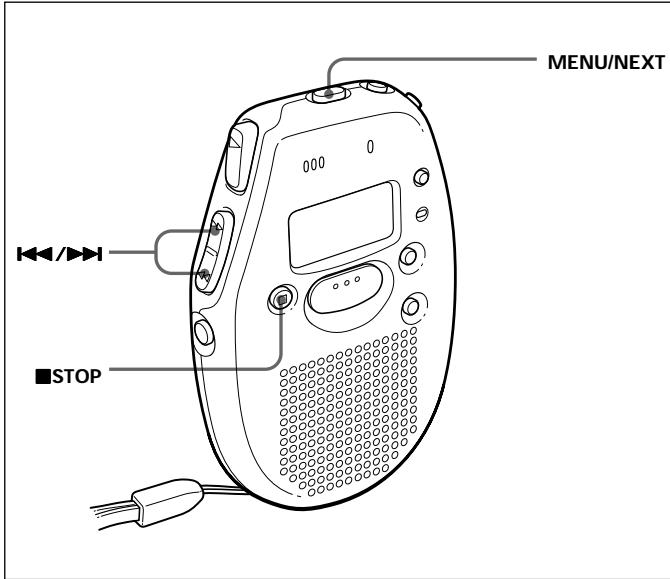
1 Press MENU/NEXT repeatedly until "bEEP" appears.
2 Press or to select "OFF".
3 Press STOP to return to the normal display.
What beep sound means
| Beep Patterns | Means |
| - (single tone) | Usual mode |
| - - (double tone) | Enter/exit special mode |
| - - - (triple tone) | Notice* |
- This pattern lets you know the procedure is wrong or informs you of some messages, such as:
-- you are trying to record a note when you have already recorded up to the maximum recordable time.
-- the unit has stopped functioning due to lack of battery power.
To retrieve the beep sound
Select "On" on step 2.
Additional Information
Precautions
On power
Operate the unit only on 1.5VDC . Use a size AAA (LR03) alkaline battery.
On the unit
- Do not leave the unit in a location near heat sources, or in a place subject to direct sunlight, excessive dust or mechanical shock.
- Should any solid object or liquid fall into the unit, remove the batteries and have the unit checked by qualified personnel before operating it any further.
Keep personal credit cards using magnetic coding or spring-wound watches, etc., away from the unit to prevent possible damage from the magnet used in the speaker.
If you have any questions or problems concerning your unit, please consult your nearest Sony dealer.
Troubleshooting
Should any problem persist after you have made these checks, consult your nearest Sony dealer.
The unit does not operate.
The battery has been inserted with incorrect polarity.
The battery is weak.
The battery compartment lid is not closed completely.
The buttons are locked with the HOLD switch.
No sound comes from the speaker.
The earphone is plugged in.
The volume is turned down completely.
"FULL" appears even before the unit has reached the maximum recording time and you cannot record.
When you have recorded 99 notes in a file, "FULL" appears regardless of the total recorded time. To continue recording, erase unnecessary notes or index marks.
"FULL" appears even before the unit records 99 notes in a file and you cannot record.
When you have recorded for the maximum recording time, "FULL" appears regardless of the total number of recorded indexes. To continue recording, erase unnecessary notes.
" -- -- " is displayed.
You have not set the clock.
The recorded date is not displayed if you recorded the note when the clock was not set.
The unit does not operate correctly
Press the reset button with a pen point. The unit will be reset to the initial setting. The recorded notes, however, will not be erased.
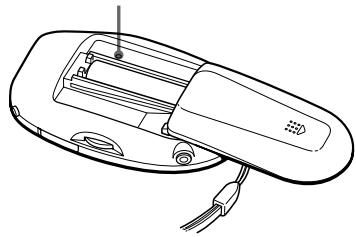
The reset button
Limitation of the System
| Symptom | Cause |
| You cannot add an index mark while recording/playing a note. | •You cannot add an index mark or insert a note in the first or the last 2.5 seconds of a note. |
| You cannot do Insert recording. | •If you erase notes or add/erase index marks frequently, the unit may become unable to add index marks or insert notes. |
Maintenance
To clean the exterior
Use a soft cloth slightly moistened in water. Do not use alcohol, benzine or thinner.
Specifications
Recording media
Built-in flash memory
Recording time
SP: 8 minutes
LP: 16 minutes
Frequency response
SP: 200Hz - 3,400Hz
LP: 200Hz - 1,700Hz
Speaker
Approx. 3.6cm (1^7 / _16 in.) dia.
Power output
70 mW
Output
Earphone jack (mini jack) for 8 - 300 ohms earphone
Power requirements
Size AAA (LR03) alkaline battery: 1.5 V DC
Dimensions (w/h/d) (incl. projecting parts and controls)
Approx. 56× 85.9× 22.5mm
(2^1 / 4× 3^1 / 2× 29 / 32 in.)
Mass (not including battery)
Approx. 50g (1.8 oz.)
Supplied accessories
Hand strap × 1
Size AAA (LR03) alkaline battery × 1
Design and specifications are subject to change without notice.