HM876GDW6S - Téléviseur SIEMENS - Notice d'utilisation et mode d'emploi gratuit
Retrouvez gratuitement la notice de l'appareil HM876GDW6S SIEMENS au format PDF.


| Type de produit | Four micro-ondes combiné encastrable Siemens |
| Modèle | HM876GDW6S |
| Marque | Siemens |
| Couleur | Inox (estimation) |
| Dimensions (L x H x P) | 595 x 455 x 560 mm (estimation d'après notice) |
| Volume du four | 45 L (estimation) |
| Puissance micro-ondes | 900 W (estimation) |
| Puissance de chauffe (four) | 3,2 kW (estimation) |
| Alimentation | 220-240 V, 50/60 Hz, 16 A (estimation) |
| Classe de protection | Classe I (mise à la terre obligatoire) |
| Type d'installation | Encastrable sous plan de travail ou dans colonne |
| Matériau de la porte | Verre trempé |
| Fonctions | Micro-ondes, gril, chaleur tournante, combiné, décongélation |
| Nettoyage | Par pyrolyse (estimation) ou nettoyage humide |
| Sécurité enfants | Verrouillage de porte et sécurité enfants (estimation) |
| Ventilation | Ouverture de ventilation minimale 50 cm² sur le devant du meuble |
| Distance de sécurité | 10 cm pour porteurs d'implants électroniques |
| Poids net | Environ 35 kg (estimation) |
| Pièces détachées | Disponibles via service après-vente Siemens |
| Réparabilité | Indice de réparabilité non spécifié, mais conception modulaire |
FOIRE AUX QUESTIONS - HM876GDW6S SIEMENS
Questions des utilisateurs sur HM876GDW6S SIEMENS
0 question sur cet appareil. Repondez a celles que vous connaissez ou posez la votre.
Poser une nouvelle question sur cet appareil
Téléchargez la notice de votre Téléviseur au format PDF gratuitement ! Retrouvez votre notice HM876GDW6S - SIEMENS et reprennez votre appareil électronique en main. Sur cette page sont publiés tous les documents nécessaires à l'utilisation de votre appareil HM876GDW6S de la marque SIEMENS.
MODE D'EMPLOI HM876GDW6S SIEMENS
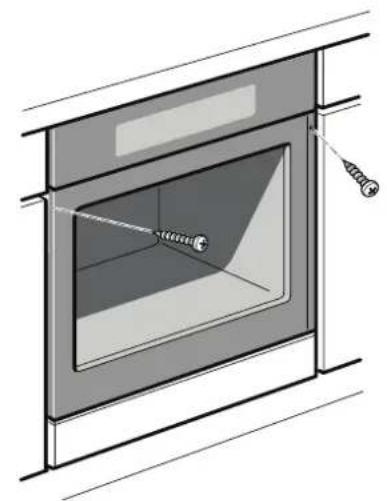
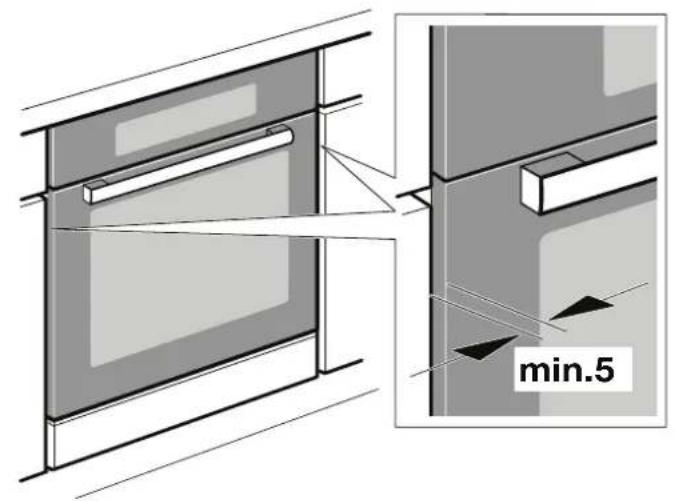
Securing the appliance - Fig. 5
- Fully insert the appliance and centre it.
- Screw the appliance into place.
The gap between the worktop and appliance must not be sealed by additional strips.
Thermal insulation strips must not be fitted to the side panels of the surround unit.
Removal
- Disconnect the appliance from the power supply.
- Undo the securing screws.
- Lift the appliance slightly and then pull it out completely.
en
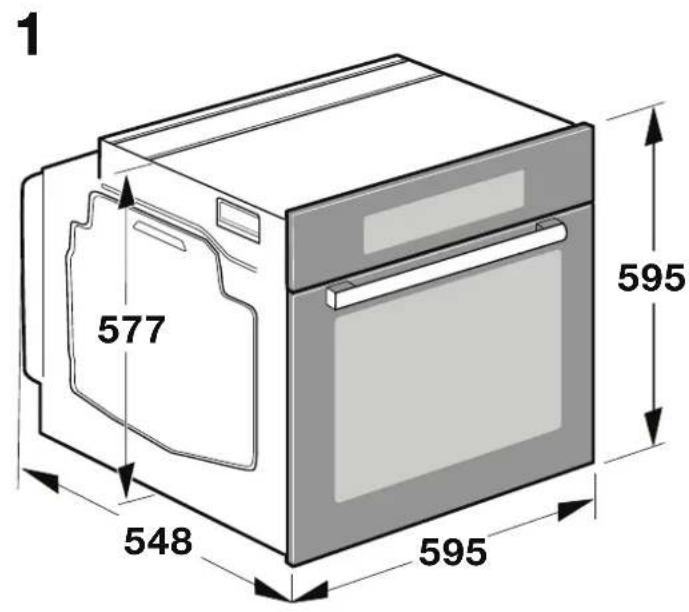
Important information - Fig. 1
Hob type a
a
Fixed
Flush with surrounding surfaces
Induction hob 37 mm 38 mm 5 mm
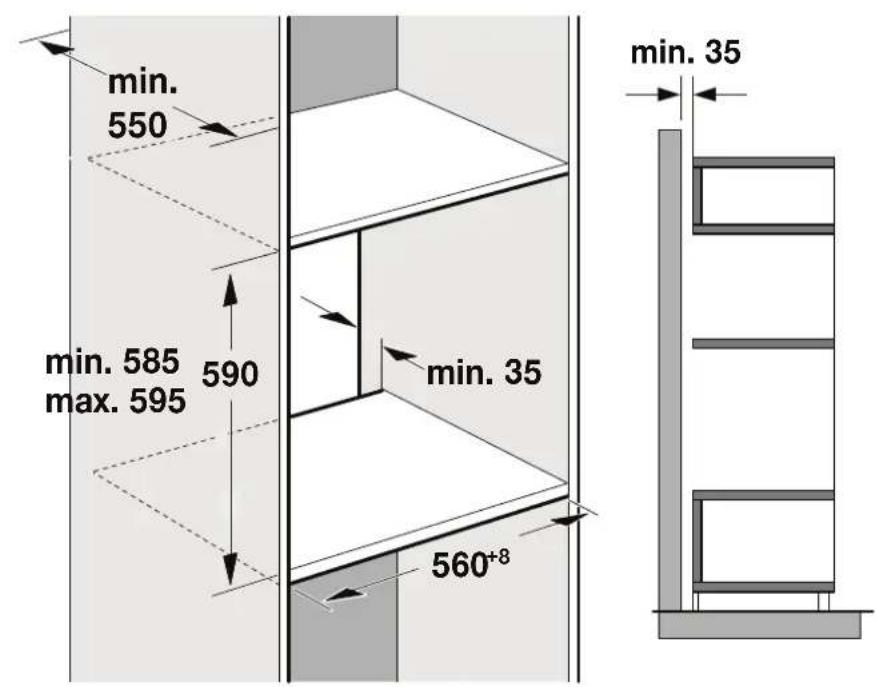
The fitted cabinet must not have a back panel behind the appliance. There should be a gap of at least 35 mm wall and the cabinet base as well as the rear panel that is situated above.
The fitted cabinet must have a ventilation opening of 50~cm^2 on the front. On conversion units without a ventilation must be a ventilation opening of 200~cm^2 towards side panels. To do this, trim the base panel or fit a ventilation grille.
Ventilation slots and intakes must not be covered.
Check the appliance for damage after unpacking it. Do not connect the appliance if it has been damaged in transit.
Before starting up the appliance, remove any packa and adhesive film from the cooking compartment and the door.
Fitted units must be heat-resistant up to 90^ and adjacent unit fronts up to 70^ .
- Do not install the appliance behind a decorative panel. There is a risk of overheating.
Any cut-outs that need to be made in the units should be made before the appliance is installed. Remove any shavings as they may prevent the electrical components from working properly.
Wear protective gloves so that you do not cut you are accessible during installation may have sharp edges.
For appliances that have a hinged switch panel, make sure that the switch panel does not hit adjacent kitchen units when you open it.
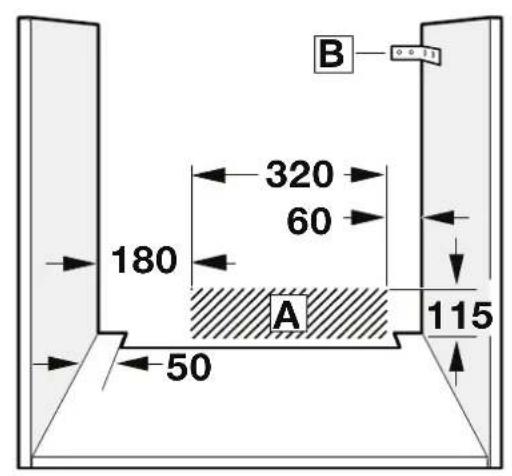
The power socket for the appliance must either be hatched area A or outside of the area where the appliance is installed.
- Secure any unsecured units to the wall using a st B.
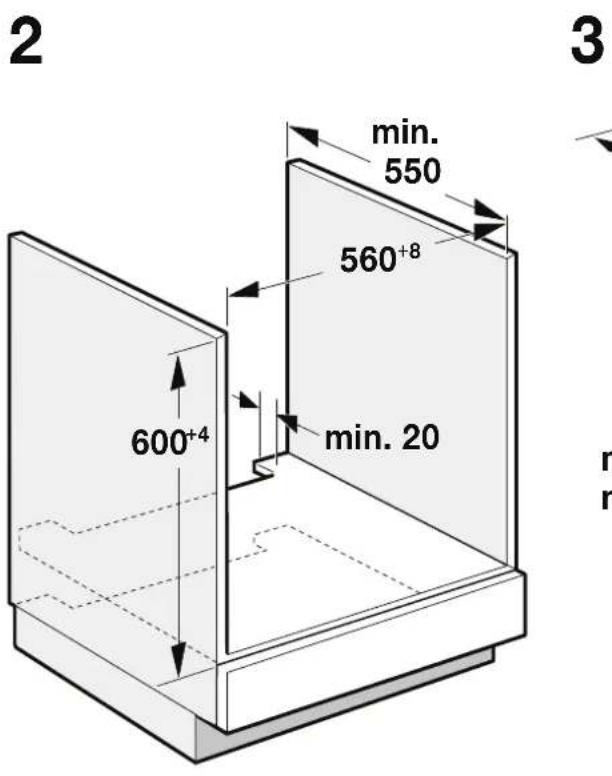
The dimensions in the figures are in mm.
Wearers of electronic implants!
The appliance may contain permanent magnets which may affect electronic implants, e.g. heart pacemakers or insulin pumps. Therefore, during installation, wearers of electronic implants must maintain a minimum distance of 10cm from the appliance.
Appliance under worktop - Fig. 2
To ventilate the appliance, the intermediate floor must have a ventilation cut-out.
Secure the worktop to the fitted units.
If the appliance is installed under a hob, the following minimum dimensions must be adhered to (including substructure, if applicable):
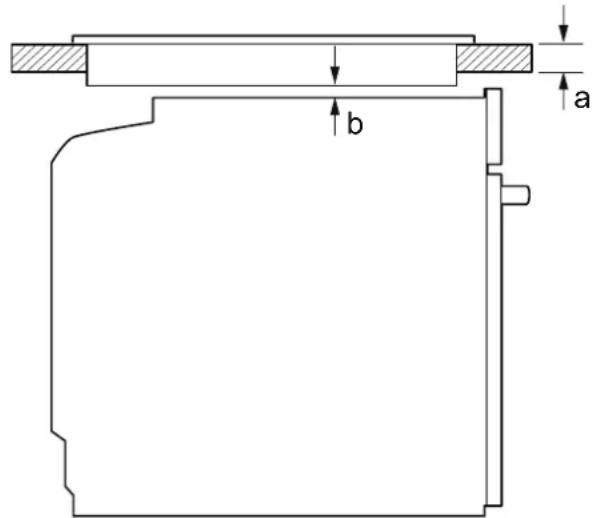
Ftcehnduction43 mm 48 mm 5 mm bbb the cabinet
Gas hob 32 mm 42 mm 5 mm
the Elearicofothe2mm 24 mm 2mm
The minimum worktop thickness a results from the minimum required dimension b.
Observe the installation instructions for the hob.
Appliance in a tall unit - Fig. 3
To ventilate the appliance, the intermediate floors must have a ventilation cut-out.
If the tall unit has another back panel in addition to the element back panels, this must be removed.
Only fit the appliance up to a height which allows access easily removed.
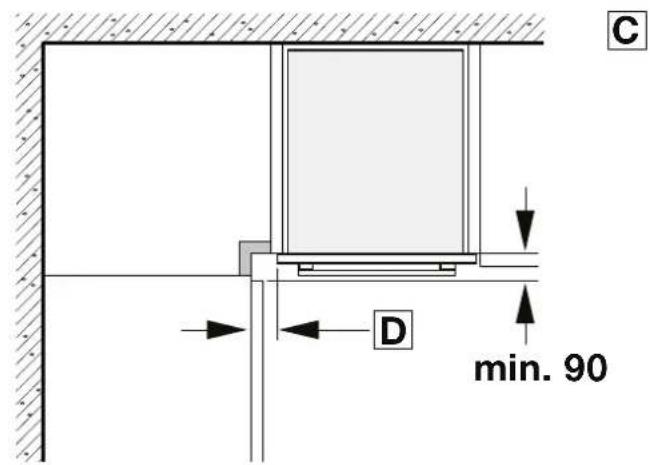
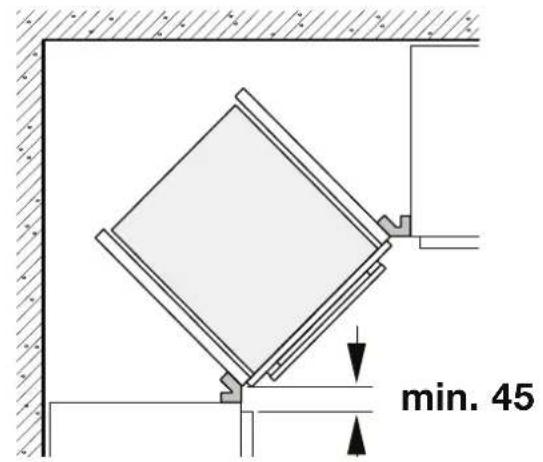
Corner installation - Fig. 4
To ensure that the appliance door can be opened in a corner installation, take account of dimension C. Dimension D is
Independent batthe thickness of the unit front under the handle.
Connecting the appliance
The appliance corresponds to protection class 1 and must operate with a protective earth connection.
loated fuse the protection must correspond to the power rating s on the appliance's rating plate and to local regulations.
The appliance must be disconnected from the power supply gardenbarestablishation work is being carried out.
The appliance must only be connected with the power cable provided. Connect the power cable to the back of the appliance (listen for the click).
A 3m power cable can be obtained from the after-sales service.
The power cable must only be replaced with a cable from the original manufacturer, which can be obtained from the after-sales service.
When the appliance is installed, protection must be provided against accidental contact in the future.
Power cable with a plug with earthing contact
The appliance must only be connected to a properly installed protective contact socket.
If the plug is no longer accessible following installation, an isolating switch must be present on the installation side with a contact gap of at least 3 mm.
Power cable without a three-pin earthed plug
The appliance must only be connected by a licensed professional.
The installation must have an all-pole isolating switch with a contact gap of at least 3mm . Identify the live and neutral conductors in the mains socket. The appliance may be dated it is not connected correctly.
Only connect the hob as shown in the connection diagram. See the rating plate for the voltage. Connect the wires of the mains power cable according to the colour coding: Green/yellow = PE conductor < , blue = neutral conductor, brown = live (external conductor).
Only in Sweden, Finland and Norway
The appliance can also be connected using the plug provided which has an earthing contact system. This must still be accessible after installation. If this is not the case, an all-pole isolating switch must be used on the installation side with gap of at least 3 mm.
| b | a | üd gäll e gia | |
| üd gäll e gäll e gäll e gäll e gäll e gäll e gäll e gäll e gäll e gäll e gäll e gäll e gäll e gäll e gäll e gäll e gäll e gäll e gäll e gäll e gäll e gäll e gäll e gäll e gäll e gäll e gäll e gäll e gäll e gäll e gäll e gäll e gäll e gäll e | üd gäll e gäll e gäll e gäll e gäll e gäll e gäll e gäll e gäll e gäll e gäll e gäll e gäll e gäll e gäll e gäll e gäll e gäll e gäll e gäll e gäll e gäll e gäll e gäll e gäll e gäll e gäll e gäll e gäll e gäll e gäll e gäll e | üd yä gäll yä gäll yä gäll yä gäll yä gäll yä gäll yä gäll yä gäll yä gäll yä gäll yä gäll yä gäll yä gäll yä gäll yä gäll yä gäll yä gäll yä gäll yä gäll yä gäll yä gäll yä gäll yä gäll yä gäll yä gäll yä galla | |
| p0 5 | p0 38 | p0 37 | yä yä yä yä yä yä yä yä yä yä yä yä yä yä yä yä yä yä yä yä yä yä yä yä yä yä yä yä yä yä yä yä yä yä yä yä yä yä yä yä yä yä yä yä yä yä yä yä yä yä yä |
| p0 5 | p0 48 | p0 43 | yä yä yä yä yä yä yä yä yä yä yä yä yä yä yä yä yä yä yä yä yä yä yä yä yä yä yä yä yä yä yä yä yä yä yä yä yä yä yä yä yä yä yä yä yä yä yä yä yä |
a aal 1
3J-aaiajyaagjg jll
a 1234567890
1234567890
4j-
C 1500000000000000000000000000000000000000000000000000000
jL
i 1
e i 1000000000000000000000000000000000000000000000000
J 1 J 1 1 1 1 1 1 1 1 1 1 1 1 1 1 1 1 1 1 1 1 1 1 1
J 1000000000000000000000000000000000000000000000000000000000000000
J 1 J 1 J 1 J 1 J 1 J 1 J 1 J 1 J 1 J 1 J 1 J 1 J 1 J 1 J 1 J 1 J 1 J 1 J 1 J 1 J 1 J 1 J 1 J 1 J 1 J 1 J 1 J 1 J 1 J 1 J 1 J 1 J 1 J 1 J
gssll 133
a
3 3 3 3 3 3 3 3 3 3 3 3 3 3 3 3 3 3 3 3 3 3 3 3 3 3 3 3 3 3 3 3 3 3 3 3 3 3 3 3 3 3 3 3 3 3 3 3 3 3 3
g j 1i iig g gaa
Jusj gai bgi Jaaalallg aagai jaiy jay Jiai jai jai jai jai jai jai jai jai jai jai jai jai jai jai jai jai jai jai jai jai jai jai jai jai jai jai jai jai jai jai jai jai jai jai jai jai jai jai jai jai jai jai jai jai jai jai jai jai jai jai jali jali jali jali jali jali jali jali jali jali jali jali jali jali jali jali jali
5j- jg-1nai
i j k l m n o p q r s t
a00g 2
21 21 21 21 21 21 21 21 21 21 21 21 21 21 21 21 21 21 21 21 21 21 21 21 21 21 21 21 21 21 21 21 21 21
#
jlll jlll 1
jI 2
Jolal 111111111111111111.3
1Js-aa
J 1 1 1 1 1 1 1 1 1 1 1 1 1 1 1 1 1 1 1 1 1 1 1 1 1 1 1 1 1
50 50
a 1
a 200 24
A
y 1 1 1 1 1 1 1 1 1 1 1 1 1 1 1 1 1
a 1
8 90 88 88 88 88 88 88 88 88 88 88 88 88 88 88 88 88 88 88 88 88 88 88 88 88 88 88 88 88
Aaiaaa aaii iiaaiii
a j 111111111111111111111111111
Lg 111111111111111111111
pIbI pie no 51, aLae eaiies aayle aalll syyll
jA 111111111111111111111111
B 2aall yjll piai yao yao jyao jyao jyao jyao jyao jyao jyao jyao jyao jyao jyao jyao jyao jyao jyao jyao jyao jyao jyao jyao jyao jyao jyao jyao jyao jyao jyao jyao jyao jyao jyao jyao jyao jyae yoo
aegjg jgjck! ojzol
a jyjki 11 a jy jia aai y aai bili xie jgll g jy jy j
ii i jy jai 11 11 11 11 11 11 11 11 11 11 11 11 11 11 11 11 11 11 11 11 11 11 11 11 11 11 11 11 11 11 11 11 1
2JsJ-JaJIeBwJJdJI
a 2222222222
aasall lalg yall pabn jolni
ailll lalll 1j jil1 jai jai jai jai jai jai jai jai jai jai jai jai jai jai jai jai jai jai jai jai jai jai jai jai jai jai jai jai jai jai jai jai jai jai jai jai jai jai jai jai jai jai jai jai jai jai jai jai jai jai jali
4
5