MODE D'EMPLOI 32HFL7406D PHILIPS
Signature 32HFL7406D/10 42HFL7406D/10
HotelTV User Manual
Philips Hospitality – Dec. 2011
1 Notice
2011 © Koninklijke Philips Electronics N.V. All rights reserved.
Specifications are subject to change without notice. Trademarks are the property of Koninklijke Philips Electronics N.V or their respective owners. Philips reserves the right to change products at any time without being obliged to adjust earlier supplies accordingly.
The material in this manual is believed adequate for the intended use of the system. If the product, or its individual modules or procedures, are used for purposes other than those specified herein, confirmation of their validity and suitability must be obtained. Philips warrants that the material itself does not infringe any United States patents. No further warranty is expressed or implied.
Warranty
- Risk of injury, damage to TV or void of warranty! Never attempt to repair the TV yourself.
- Use the TV and accessories only as intended by the manufacturer.
- The caution sign printed on the back of the TV indicates risk of electric shock. Never remove the TV cover. Always contact Philips Customer Support for service or repairs.
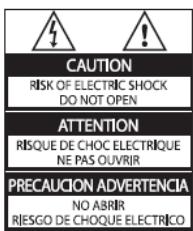
Any operation expressly prohibited in this manual, or any adjustments and assembly procedures not recommended or authorised in this manual shall void the warranty.
Pixel characteristics
This LCD product has a high number of colour pixels. Although it has effective pixels of 99.999% or more, black dots or bright points of light (red, green or blue) may appear constantly on the screen. This is a structural property of the display (within common industry standards) and is not a malfunction.
Open source software
This television contains open source software. Philips hereby offers to deliver or make available, upon request, for a charge no more than the cost of physically performing source distribution, a complete machine-readable copy of the corresponding source code on a medium customarily used for software interchange. This offer is valid for a period of 3 years after the date of purchase of this product. To obtain the source code, write to:
Customer Care department
GBU Hospitality
Hurksestraat 2e
5652 AJ Eindhoven
The Netherlands
Compliance with EMF
Koninklijke Philips Electronics N.V. manufactures and sells many products targeted at consumers which, like any electronic apparatus, in general have the ability to emit and receive electromagnetic signals.
One of Philips' leading Business Principles is to take all necessary health and safety measures for our products, to comply with all applicable legal requirements and to stay well within the EMF standards applicable at the time of producing the products.
Philips is committed to develop, produce and market products that cause no adverse health effects. Philips confirms that if its products are handled properly for their intended use, they are safe to use according to scientific evidence available today.
Philips plays an active role in the development of international EMF and safety standards, enabling Philips to anticipate further developments in standardisation for early integration in its products
Mains fuse (UK only)
This TV is fitted with an approved plug. Should it become necessary to replace the mains fuse, this must be replaced with a fuse of the same value as indicated on the plug (example 10A).
- Remove fuse cover and fuse.
- The replacement fuse must comply with BS 1362 and have the ASTA approval mark. If the fuse is lost, contact your dealer in order to verify the correct type.
- Refit the fuse cover.
In order to maintain conformity to the EMC directive, the mains plug on this product must not be detached from the mains cord cable.
Copyright

VESA, FDMI and the VESA Mounting Compliant logo are trademarks of the Video Electronics Standards Association.
Kensington and Micro Saver are registered US trademarks of ACCO World Corporation with issued registrations and pending applications in other countries throughout the world.
DOLBY.
DIGITAL PLUS
Manufactured under license from Dolby Laboratories. Dolby and the double-D symbol are trademarks of Dolby Laboratories.
All other registered and unregistered trademarks are the property of their respective owners.
2 Important
Read and understand all instructions before you use your TV. If damage is caused by failure to follow instructions, the warranty does not apply.
Safety
-
Risk of electric shock or fire!
-
Never expose the TV to rain or water. Never place liquid containers, such as vases, near the TV. If liquids are spilt on or into the TV, disconnect the TV from the power outlet immediately. Contact Philips Consumer Care to have the TV checked before use.
- Never place the TV, remote control or batteries near naked flames or other heat sources, including direct sunlight. To prevent the spread of fire, keep candles or other flames away from the TV, remote control and batteries at all times.
- Never insert objects into the ventilation slots or other openings on the TV.
-
When the TV is swivelled ensure that no strain is exerted on the power cord. Strain on the power cord can loosen connections and cause arcing.
-
Risk of short circuit or fire!
-
Never expose the remote control or batteries to rain, water or excessive heat.
-
Avoid force coming onto power plugs. Loose power plugs can cause arcing or fire.
-
Risk of injury or damage to the TV!
-
Two people are required to lift and carry a TV that weighs more than 25kg .
- When stand mounting the TV, use only the supplied stand. Secure the stand to the TV tightly. Place the TV on a flat, level surface that can support the combined weight of the TV and the stand.
-
When wall mounting the TV, use only a wall mount that can support the weight of the TV. Secure the wall mount to a wall that can support the combined weight of the TV and wall mount. Koninklijke Philips Electronics N.V. bears no responsibility for improper wall mounting that result in accident, injury or damage.
-
Risk of injury to children!
Follow these precautions to prevent the TV from toppling over and causing injury to children:
- Never place the TV on a surface covered by a cloth or other material that can be pulled away.
- Ensure that no part of the TV hangs over the edge of the surface.
-
Never place the TV on tall furniture (such as a bookcase) without anchoring both the furniture and TV to the wall or a suitable support.
-
Educate children about the dangers of climbing on furniture to reach the TV.
-
Risk of overheating!
Never install the TV in a confined space. Always leave a space of at least 4 inches or 10~cm around the TV for ventilation. Ensure curtains or other objects never cover the ventilation slots on the TV.
- Risk of damage to the TV!
Before you connect the TV to the power outlet, ensure that the power voltage matches the value printed on the back of the TV. Never connect the TV to the power outlet if the voltage is different.
- Risk of injury, fire or power cord damage!
Never place the TV or any objects on the power cord.
- To easily disconnect the TV power cord from the power outlet, ensure that you have full access to the power cord at all times.
- When you disconnect the power cord, always pull the plug, never the cable.
- Disconnect the TV from the power outlet and aerial before lightning storms. During lightning storms, never touch any part of the TV, power cord or aerial cable.
- Risk of hearing damage! Avoid using earphones or headphones at high volumes or for prolonged periods of time.
- If the TV is transported in temperatures below 5^ , unpack the TV and wait until the TV temperature matches room temperature before connecting the TV to the power outlet.
Screen care
- Avoid stationary images as much as possible. Stationary images are images that remain on-screen for extended periods of time. Examples include: on-screen menus, black bars and time displays. If you must use stationary images, reduce screen contrast and brightness to avoid screen damage.
- Unplug the TV before cleaning.
- Clean the TV and frame with a soft, damp cloth. Never use substances such as alcohol, chemicals or household cleaners on the TV.
-
Risk of damage to the TV screen! Never touch, push, rub or strike the screen with any object.
-
To avoid deformations and colour fading, wipe off water drops as soon as possible.
Disposal of your old product and batteries

Your product is designed and manufactured with high quality materials and components, which can be recycled and reused.
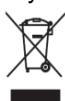
When this crossed-out wheeled bin symbol is attached to a product it means that the product is covered by the European Directive 2002/96/EC. Please inform yourself about the
local separate collection system for electrical and electronic products.
Please act according to your local rules and do not dispose of your old products with your normal household waste.

Your product contains batteries covered by the European Directive 2006/66/EC, which cannot be disposed with normal household waste.
1. Professional Mode instruction
Introduction
Included in this TV is a special functional mode that allows the TV to be configured for commercial application. This feature is called Professional mode.
This section has been designed to help install and operate this TV in Professional mode. Before reading this section, please also read section 3 to set the basic functionality of this TV.
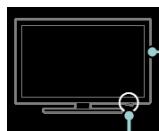
If the TV is not switched on, use the mains switch to switch the TV on.
Benefits of Professional mode
This TV is specially designed to operate in Professional Mode. Professional Mode offers the following benefits:
Access to the [TV Setup Menu] can be blocked. This prevents users (e.g. guests) from deleting or changing channel settings and / or modifying picture and sound settings. This ensures that TVs are always set up correctly.
- A switch-on volume and channel can be selected. After switching on, the TV will always start on the specified volume level and channel.
- The maximum volume level of the TV can be limited in order to prevent disturbance to other guest.
Channels can be blanked (Video only).
- The TV local buttons VOLUME +/-, P/CH+/- and (Home) can be locked.
- Screen information can be suppressed.
Professional Setup Remote control (22AV8573 optional)
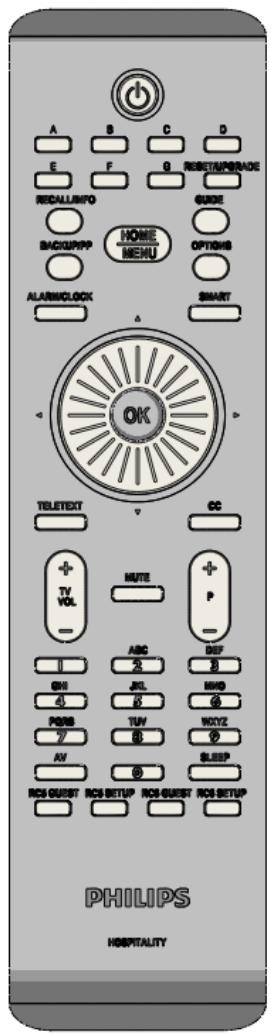
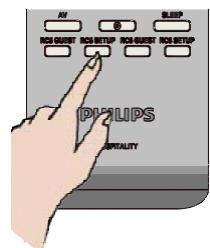
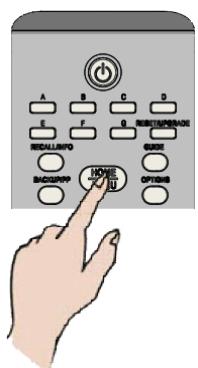
- press RC5 Setup
- press Home/Menu
On a Guest remote: press [3, 1, 9, 7, 5, 3, (MUTE)]
Note
- SETUP mode should be selected for hotel installer.
Professional mode options
This paragraph describes the functionality of each item in the Professional mode setup menu.
Enter the next layer by pressing [OK], or [>] . Return to a previous level by pressing [<] . Navigate in the current layer by pressing [^] , or [v] .
| Layer 1 | Layer 2 | Layer 3 |
| BDS Mode Setting | BDS Mode | Off / On |
| Local Keyboard Locked | Off / On |
| Remote Control Locked | Off / On |
| OSD Display | Off / On |
| Switch on volume | [0..60] Slider [50] |
| Maximum volume | [0..60] Slider [60] |
| Switch on channel | [List] |
| High security mode | Off / On |
| Power on | On / Standby |
| Display message | Off / On |
| When Display Message is On | |
| Welcome Message Line 1 | Up to 20 characters |
| Welcome Message Line 2 | Up to 20 characters |
| Home Menu Settings | Browse USB | Off / On |
| Feature Settings | Auto SCART | Off / On |
| Easylink break-in | Off / On |
| Easylink control | Off / On |
| Auto USB | Off / On |
| Channel settings | Blank channels | None, [List] |
| Blank extensions | HDMI 1, 2, Side
Ext 1
YPbPr
VGA |
| Store Settings | | |
| Smartloader | Smartloader to TV | |
| TV to Smartloader | |
BDS Mode Settings
[BDS mode]
Enables / disables the Professional mode.
[On]: All settings in the Professional mode Setup menu are in effect.
[Off]: The TV operates as a normal (consumer) TV.
[Local Keyboard lock]
[Off]: The TV local buttons will function normally.
[On]: The TV local buttons except [POWER] are locked.
[RC lock]
Disables the operation of the Guest remote control.
[Off]: All buttons on Guest remote control will function normally.
[On]: All buttons on the Guest remote control are disabled. (It is still possible to enter the Professional setup menu by pressing [3, 1, 9, 7, 5, 3, (MUTE)]).
[OSD display]
Set this function to show or hide screen information.
[Off]: Screen information is suppressed.
[On]: Normal screen information is displayed.
[Switch on volume]
When the guest switches the TV on, it will play at the specified volume level.
[Maximum volume]
This option specifies the maximum allowable volume level of the TV.
[Switch on channel]
When the guest switches the TV on, it will play at the specified channel.
[High security]
[Off]: Professional mode setup menu can be accessed by both Guest remote control (Press [3, 1, 9, 7, 5, 3 + MUTE]) and the Professional setup remote control)
[On]: Professional mode setup menu can only be accessed by the Professional setup remote control
[Power on]
The power on function allows the TV to enter a specific mode ([On], [Standby], or [Last status]) of operation after the mains power is activated.
[On]: When set, the TV will always turn on after the mains power is activated.
[Standby]: When set, the TV will always turn to standby after the mains power is activated.
Welcome message
The Welcome message function allows the TV to show a customized greeting message to the hotel guest whenever the TV is switched on. This helps to personalize the hotel experience for guests. The Welcome message can consist of 2 lines of text, with each line containing a maximum of 20 alphanumeric characters. Use Navigation buttons on the remote control to compose the Welcome message.
Note: Welcome message is always disabled if you select [BDS Mode Setting] > [OSD display] > [Off.]
[Display message]:
Selects [On] to activate the welcome message.
Selects [Off] to disable the welcome message.
[Welcome message line 1]:
[Line 1]: Sets the characters of the first line message.
[Welcome message line 2]:
[Line 2]: Sets the characters of the second line message.
[Browse USB]
Enables / disables the USB Browse icon in the Guest Menu.
[On]: When set to On, the TV will show the USB icon in the Home menu.
[Off]: When set to Off, the TV will hide the USB icon in the Home menu.
Feature Settings
[Auto scart]
Enables auto scart switching (or break-in) in Professional mode.
[Off]: Disables auto scart switching or break-in.
[On]: Enables auto scart switching or break-in.
[Easylink break-in / Easylink control]
Philips Easylink (HDMI-CEC) enables one-touch play and one touch standby between HDMI-CEC devices.
[Easylink break-in]
[Off]: Disables HDMI-CEC one touch stand-by feature in Professional mode.
[On]: Enables HDMI-CEC one touch stand-by feature in Professional mode.
[Easylink control]
[Off]: Disables HDMI-CEC one touch play feature in Professional mode.
[On]: Enables HDMI-CEC one touch play feature in Professional mode.
[Auto USB]
Enables or disables USB break-in feature in Professional mode.
[Off]: When USB is plugged in, the [Multimedia] menu will not appear automatically, but users can access [Multimedia] menu from the Guest menu.
[On]: When USB is plugged in, the [Multimedia] menu appears automatically.
Channel Settings
[Blank channels]
The Blank channels function disables the display of video on the TV, but does not affect the audio output. This function can be used for audio applications (example: music-only channels, and so on) which do not necessarily require the display of video.
- Enter [Blank channels], the list of all channels appear.
- Select a channel and press OK to mark. The channels marked with [X] will not display video on the TV.
- Navigate with [^] and [v]
- Exit with [<].
[Blank extensions]
The Blank extensions function disables the display of video on the TV, but does not affect the audio output. This function can be used for audio applications (example: music-only channels, and so on) which do not necessarily require the display of video.
- Enter [Blank extensions], the list of all channels appear.
- Select a channel and press OK to mark. The channels marked with [X] will not display video on the TV.
- Navigate with [^] and [v]
- Exit with [<].
Store Settings
To confirm the changes the settings has to be stored.
select [Store] > [Confirm] to save the changes.
Smartloader
Place a USB Memory stick in the side USB connector
| Layer 1 | Layer 2 | Layer 3 |
| Smartloader | Smartloader to TV | OK |
TV will read and store Cloning data from USB stick
| Layer 1 | Layer 2 | Layer 3 |
| Smartloader | TV to Smartloader | OK |
TV will store Cloning data to USB stick
2. TV Functionality Setup Mode instruction
To select specific TV functionality settings (i.e. Channel settings, picture settings .etc) this can be done in TV Setup Mode only.
To enter the TV Setup mode, it is necessary to disable the Professional mode. To do this, change the setting of BDS Mode in the BDS Mode Setting menu to 'off', and store this setting.
| Layer 1 | Layer 2 | Layer 3 |
| BDS Mode Setting | BDS Mode | Off |
| Store Settings | [OK] | |
After this the TV initiates a restart and will switch to TV Setup mode.
Now the Professional Setup Remote Control in RC6 Guest mode (press on the Professional Setup RC the RC6 Guest button) and the TV Remote control can be used to make the required setting.
The available options are described in the TV Functionality Set reference DFU.
The TV Functionality Set reference to match a hospitality TV is the following:
| Hospitality Set reference | TV Functionality Set reference |
| 32HFL7406D/10 | 32PFL7406H/12 |
| 40HFL7406D/10 | 40PFL7406H/12 |
The TV Functionality Set reference DFU is available via the Philips Hospitality Website: www.philips.com/hotelTV
After making the proper settings, activate the Professional Setup Remote Control mode (press the RC5 Setup button) and pressing Home/Menu to active the BDS Setup Menu.
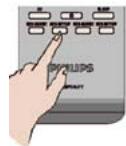
| Layer 1 | Layer 2 | Layer 3 |
| BDS Mode Setting | BDS Mode | On |
| Store Settings | [OK] | |
After this the TV initiates a restart and will switch to Standby.
Remote Control Alignment
| Professional Setup RC
Home [RC6 Guest] | TV RC |
| HOME
MENU | ↑ |
| BACK/PP | ← |
| OPTIONS | ::= |
| GUIDE | Q |
| + | CH+ |
| P | CH- |
3. Guest mode instruction
Introduction
When this television is configured as a professional television, the guest is having no access to TV functionality that can alter TVs expected behavior.
The guest will not have access to menus that can change the channel configuration, nor can he as example put the TV in a louder audio level then is permitted in the BDS Mode setting.
This section describes the functionality available to the guest.
Signature Remote Control
The functionality of the Remote Control is limited, there where the interaction could lead to an unpredicted behavior of the television for the next guest.
Therefore it is not possible to store specific changed settings in the television by the guest.
Activate the television

[Standby]: Switches the TV to standby if it is on. Switches on the TV if it is in standby.
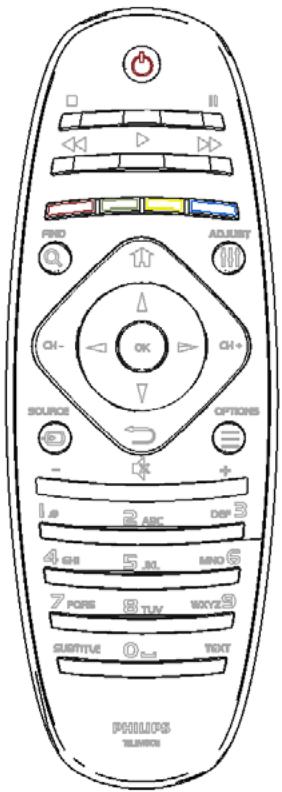
home): Accesses the home menu.
The home menu gives you easy access to connected devices, picture and sound settings, and other useful features.
[Find]:
Accesses the browse menu to select TV channel list, the Electronic Program Guide and teletext.
[Back]:
Returns to a previous menu screen. Press and hold to return to watch TV.
*Not supported in MHEG mode.
[Options]:
Accesses options for the current activity or selection.
Watch TV and press [Options] will bring up a menu to select: What's on, Subtitles, Audio language, Dual I-II, Status
![PHILIPS 32HFL7406D - [Options]: - 1](/content/2019/10/44302/images/ee1c8e3268551abfc1b27a295553581c0a481d883b3db6cf1b2201d0f63c743a.jpg)
[Source]: Key button to select external AV signals (i.e. HDMI, EXT1, ..)
![PHILIPS 32HFL7406D - [Options]: - 2](/content/2019/10/44302/images/61118a774a1af9c6eb74011e289b642dc7c3d773801c11d2373992bedc11049e.jpg)
[OK]: Confirms an entry or selection.



