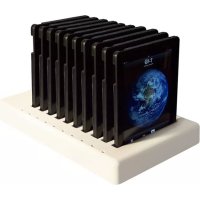
PARASYNC for iPad 2 - Station d'acceuil Parat - Notice d'utilisation et mode d'emploi gratuit
Retrouvez gratuitement la notice de l'appareil PARASYNC for iPad 2 Parat au format PDF.


| Type de produit | Station d'accueil et de synchronisation |
| Marque | Parat |
| Modèle | PARASYNC pour iPad 2 |
| Nombre d'emplacements | 10 |
| Compatibilité | Apple iPad 2 (avec étui approuvé Parat A990161) |
| Alimentation | 100-240 VAC, 47-63 Hz, 1,7 A |
| Poids maximal en charge | Jusqu'à 30 lb (13,6 kg) |
| Dimensions approximatives | Hauteur : 26 cm (10,23 po), Largeur : 49,5 cm (19,47 po), Profondeur : 28 cm (11,06 po) |
| Ports | 2 ports USB auxiliaires, 1 port USB pour connexion à l'ordinateur |
| Indicateurs lumineux | Rouge fixe : charge ; Vert fixe : chargé ; Blanc fixe : emplacement disponible ; Violet clignotant : connexion/déconnexion ; Bleu clignotant : connexion active ; Éteint avec alimentation : iPad non engagé |
| Fonctions principales | Charge et synchronisation simultanée de 10 iPads |
| Sécurité | Nécessite un étui approuvé Parat pour éviter les dommages |
| Montage | Fixation possible avec 4 vis 10-32 (non incluses) |
| Entretien et nettoyage | Nettoyer avec un chiffon doux et sec |
| Pièces détachées et réparabilité | Étui de remplacement : Parat A990161 ; réparation par un représentant agréé |
| Garantie | 12 mois pour l'utilisateur final |
| Informations générales | Fabriqué par PARAT Solutions, LLC |
FOIRE AUX QUESTIONS - PARASYNC for iPad 2 Parat
Questions des utilisateurs sur PARASYNC for iPad 2 Parat
0 question sur cet appareil. Repondez a celles que vous connaissez ou posez la votre.
Poser une nouvelle question sur cet appareil
Téléchargez la notice de votre Station d'acceuil au format PDF gratuitement ! Retrouvez votre notice PARASYNC for iPad 2 - Parat et reprennez votre appareil électronique en main. Sur cette page sont publiés tous les documents nécessaires à l'utilisation de votre appareil PARASYNC for iPad 2 de la marque Parat.
MODE D'EMPLOI PARASYNC for iPad 2 Parat
USER GUIDE
PARASYNC for iPad®
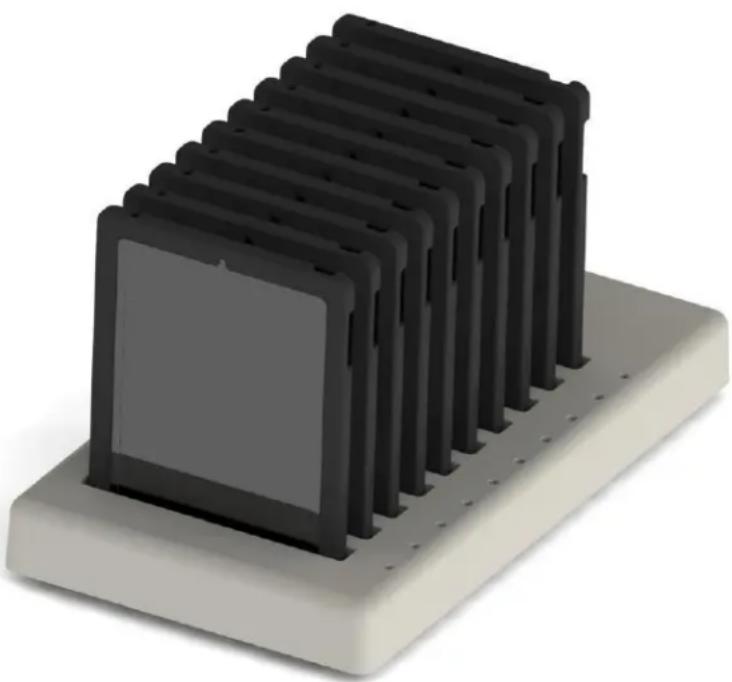
10-unit Charging and Synchronization Dock
natural_image
3D rendering of a black microchip mounted on a beige base (no text or symbols visible)For assistance, please contact PARAT Solutions
Toll free: 866-647-5976
Email: support@paratsolutions.com
PARASYNC for iPad®
10-unit Charging and Synchronization Dock
Product description:
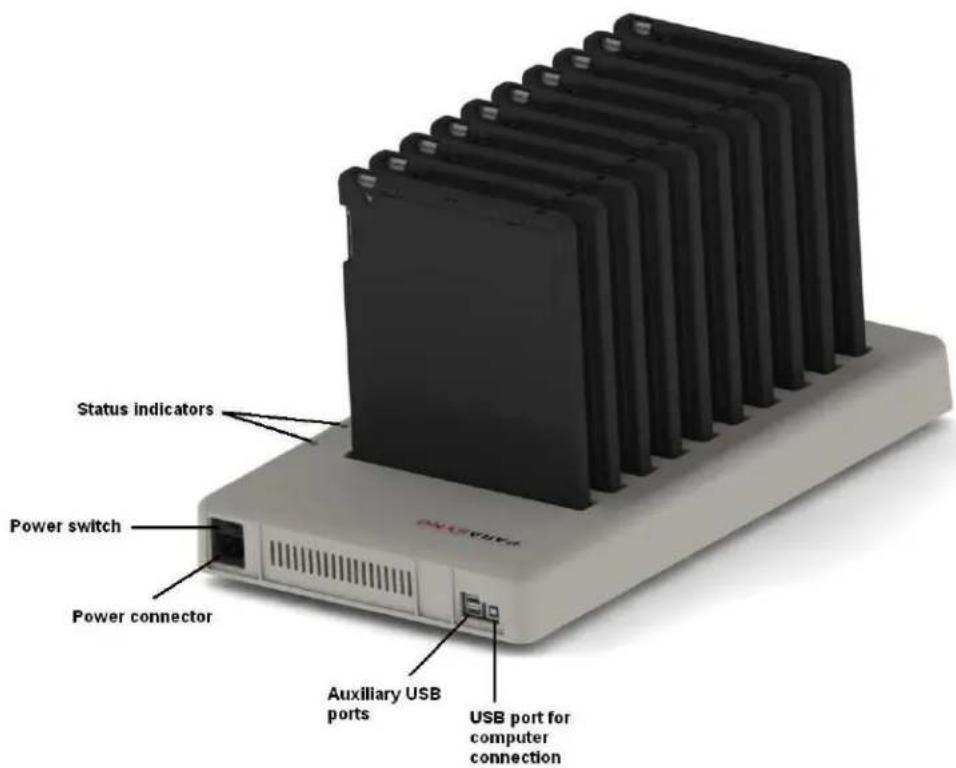
Charge and sync up to 10 Apple iPad devices. Two auxiliary USB ports may be used to attach USB peripherals.
text_image
Status indicators Power switch Power connector Auxiliary USB ports USB port for computer connectionIMPORTANT: Each iPad must be inserted into an approved PARASYNC iPad case before use with the PARASYNC dock. Use of an improper case or no case can result in damage to the iPad and/or dock. Refer to the table below for approved case part numbers:
Model
Approved PARASYNC case
iPad 2
Parat Solutions A990161 (11 included with dock purchase)
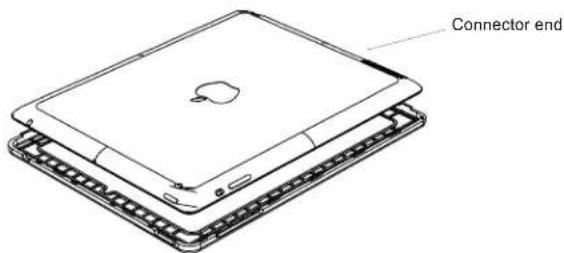
CASE ASSEMBLY
1
text_image
Connector endPlace case front piece on flat surface face down. Insert iPad 2.
2
natural_image
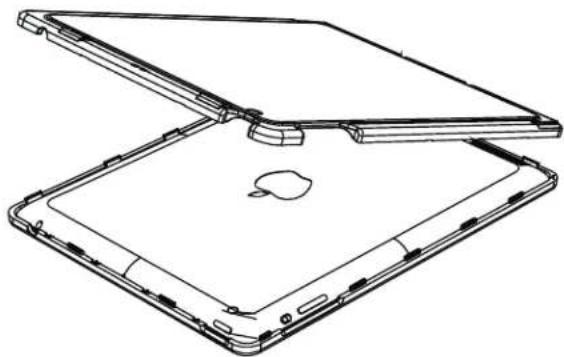
Line drawing of a foldable electronic device with open and closed panels, showing internal components (no text or symbols)Align back piece and engage connector end snaps first.
3
natural_image
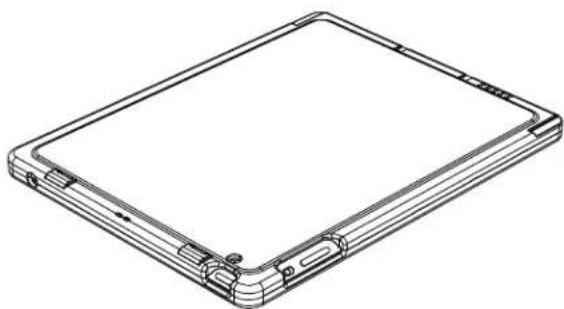
Line drawing of a rectangular electronic device with mounting holes and a flat top surface (no text or symbols)Push down back piece all around edges to engage the snaps.
INITIALIZATION
The following device settings are recommended when syncing with PARASYNC:
Model
iPad 2
Recommended settings
Set "Open iTunes when this iPad is connected" option listed in iTunes on the Summary tab
OPERATION
CAUTION:A PARASYNC dock loaded with ten encased iPads can weigh up to 30 pounds. Ensure that the surface holding the dock(s) can safely support 30 pounds per dock.
To charge devices:
- Connect the AC power cord to the dock and plug into a wall outlet providing 100-240VAC, 47-63Hz, 1.7A minimum.
- Turn Power switch to the "ON" position.
- Verify that each iPad has been inserted into an approved PARASYNC iPad case. Use of an improper case or no case can result in damage to the iPad and/or dock.
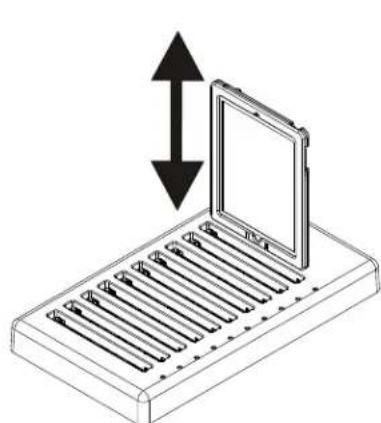
- Turn off each encased iPad and then insert into a slot:
natural_image
Diagram of a device with a screen and vertical arrows indicating direction (no text or symbols)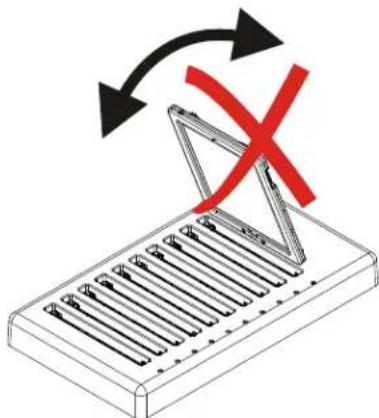
natural_image
Diagram showing a mechanical component with arrows indicating rotation and a red X mark, no text or symbols present.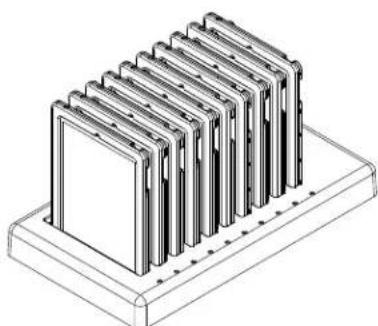
natural_image
Isometric line drawing of a rack-mounted storage unit with multiple metal sheets (no text or symbols)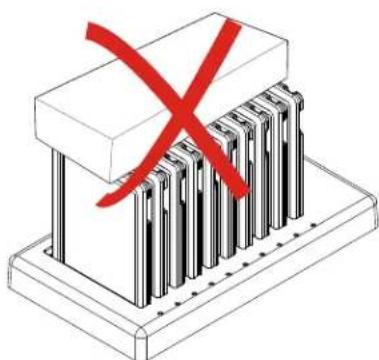
natural_image
Isometric illustration of a mechanical assembly with a red X mark and multiple vertical bars (no text or symbols)Note: Each socket has a status indicator. Refer to section “Status Indications” on the following page for more information.
OPERATION (CONTINUED)
To sync devices:
- If the dock is already charging devices without a computer connection, skip to step 3.
- Follow steps 1 through 4 from section "To charge devices".
- Connect the included USB cable from an Apple computer USB port to the USB port for computer connection on the dock.
- Use Apple iTunes ^® to sync devices.
Note: The devices will not charge while a computer is connected to the dock. You can charge the units without a computer by simply unplugging the USB cable to the computer after syncing completes.
Each socket has a status indicator. Refer to section “Status Indications” below for more information.
To turn the dock off:
- If the dock is connected to a computer: verify that syncing operations are complete and then disconnect the dock from the computer.
- Turn Power switch to the "OFF" position.
Status Indications:
| Status Display | Function |
| Steady RedCharging | |
| Steady GreenCharged | |
| Steady WhiteSocket available | |
| Blinking Violet | Computer connection/disconnection detected |
| Blinking BlueComputer connection active | |
| LED off with power onEncased iPad not engaged |
SECURE MOUNTING
To securely mount the dock:
- Verify that the mounting surface can safely support 30 pounds per mounted dock.
- Drill four holes in the mounting surface that line up with the four 10-32 threaded inserts on the bottom of the dock (see below for locations and dimensions):
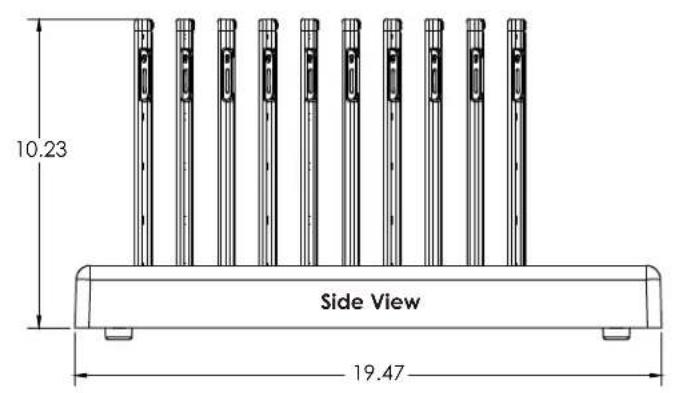
text_image
10.23 Side View 19.47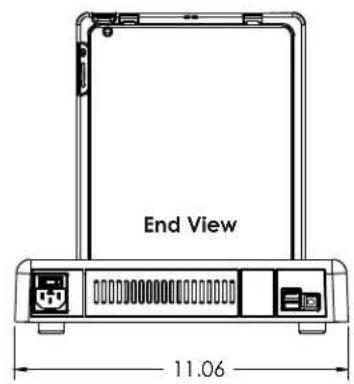
text_image
End View 11.06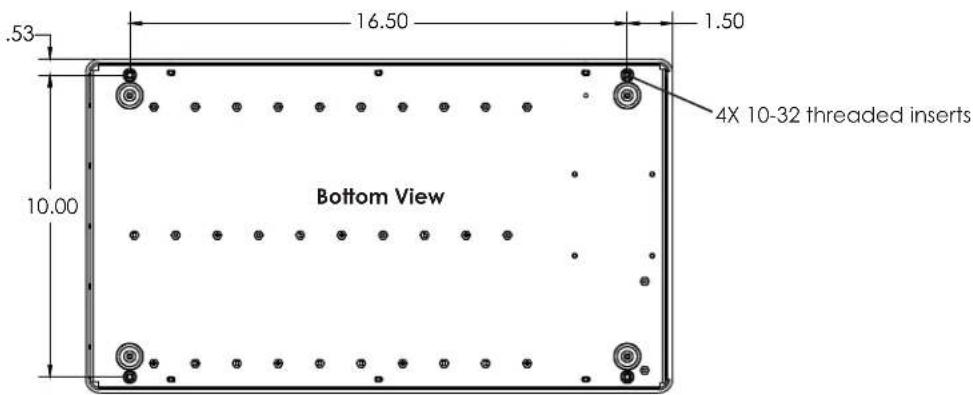
text_image
.53 16.50 1.50 10.00 Bottom View 4X 10-32 threaded inserts- To secure the dock to the mounting surface, insert four 10-32 bolts through the holes drilled in the mounting surface from step 1 and screw into the threaded inserts on the bottom of the dock. Recommended bolt length is equal to the mounting surface thickness plus 1 inch.
Warranty and Return Policy
PARAT Solutions warrants that the PARASYNC for iPad (the product) will be free from defects in material and workmanship and will conform to the original equipment manufacturer's specifications for the computing devices for and with which it was configured.
This warranty is extended to the original end user for a period of 12 months. Your sole and exclusive remedy and PARAT Solutions' sole obligation under this warranty is to correct any failure by means of repair, replacement or adjustment.
This warranty covers only normal customer use of the product. PARAT Solutions shall not be liable under this warranty if any damage or defect results from (i) alteration, modification, misuse, abuse, neglect, improper shipping or installation, (ii) disasters such as fire, flood, lightning or improper electrical current, (iii) service or alteration by anyone other than an authorized PARAT Solutions representative, or (iv) attachments, features or devices employed on the product which are not supplied or previously approved in writing by PARAT Solutions.
PARAT Solutions makes no other warranty, either express or implied, including but not limited to any implied warranties of merchantability, fitness for a particular purpose, or conformity to any representation or description, with respect to its products other than as set forth above. PARAT Solutions makes no warranty or representation, either express or implied, with respect to any other manufacturer's product or documentation, its quality, performance, merchantability, fitness for a particular purpose, or conformity to any representation or description.
Except as provided above, PARAT Solutions is not liable for any loss, cost, expense, inconvenience or damage, including direct, indirect, special, incidental, exemplary, punitive or consequential damages, that may result from the use or inability to use the product.
The warranty and remedies set forth above are exclusive and in lieu of all others, oral or written, expressed or implied. No PARAT Solutions distributor, reseller, agent or employee is authorized to make any modification, extension or addition to this warranty.
PARASYNC Warranty Registration
Thank you for your purchase! PARAT Solutions offers a 1-year warranty on your new PARASYNC Charging and Synchronization Dock.
To submit your product's warranty registration please visit: www.paratsolutions.com/warrantyform.
You may also complete the form below and email to support@paratsolutions.com or return via fax to +1-610-296-2504.
| Last Name: First Name: |
| Organization: | |||
| Street address: | |||
| City: State/Province: | |||
| Postal Code: Country: | |||
| Telephone: | Fax: | Email: | |
| Date of purchase: |
| What company did you purchase your PARASYNC from? |
| What is your organization?School / UniversityDeveloperMuseum/Tourist DestinationOther (type): |
PARASYNC 10
MODEL: PARAi10-02NA
INPUT: 100 - 240VAC 47-63Hz 1.7A
SERIAL: 12062

www.paratsolutions.com
Viewing the label on the bottom of the PARASYNC, please provide the following information:
| Model number: | serial number: |
TERMS AND CONDITIONS OF SALE
ACCEPTANCE/GOVERNING TERMS:
These Terms and Conditions of Sale (“Agreement”) shall apply to all sales of products by PARAT Solutions, LLC, a Corporation of the State of Delaware. As used in these Terms and Conditions of Sale, “we”, “factory”, and “our” shall refer to PARAT Solutions, LLC. Unless specifically agreed in writing by an authorized representative of PARAT Solutions, any different or additional terms and or conditions proposed by any customer in a purchase order, response to quotation, or other proposal are hereby rejected by PARAT Solutions, and shall not be incorporated into the agreement for sale of PARAT Solutions products. Customer’s assent to these Terms and Conditions of Sale shall be conclusively presumed from customer’s ordering products quoted by PARAT Solutions, customer’s failure to object in writing to these Terms and Conditions of Sale, and or customer’s acceptance of all or part of any products ordered. If PARAT Solutions is found to have acknowledged customer’s order or proposal, and such acknowledgment constitutes an acceptance of an offer, such acceptance is expressly made conditional on customer’s assent solely to these Terms and Conditions of Sale, which shall form part of the acknowledgment, and acceptance by customer of any products shall be deemed to constitute such assent. If any quotation or other document of PARAT Solutions is deemed to constitute an offer to customer, customer’s acceptance of such an offer is limited to these Terms and Conditions of Sale.
TERMS OF PAYMENT:
Terms of payment for PARAT Solutions shall be NET 30 days. No discounts are allowed without prior approval in writing by an authorized representative of PARAT Solutions. A service charge of 1.5% per month will be charged by PARAT Solutions or its authorized collection agency on any customer balance due at the end of the month following the month of billing. Should it become necessary for PARAT Solutions to institute formal collection proceedings to collect any past due amounts from the customer; PARAT Solutions shall be entitled to recover its attorney's fees and other costs associated with the proceedings. Notwithstanding the acceptance of any order by PARAT Solutions, we reserve the right not to ship material to any customer not paying in accordance with our terms or who in the sole opinion of PARAT Solutions, may be unable to meet its payment obligations to PARAT Solutions.
FREIGHT TERMS:
Orders shall be shipped with transportation charges prepaid by PARAT Solutions, and added to customers' account. Partial shipments will be made at the direction of the customer, provided the customer pays excess freight. When PARAT Solutions bears the cost of the shipment, we reserve the right to ship all orders in one complete shipment. Partial shipments may be made at our discretion. PARAT Solutions will not be held responsible for storage charges or cartage charges beyond the destination address acknowledged by PARAT Solutions. All shipments will be made by carrier selected by shipper; normally UPS surface. If customer requires carrier or service other than UPS Ground, invoice will reflect any additional difference in freight charges.
DIRECT SHIPMENTS:
PARAT Solutions reserves the right to refuse the request of any reseller or distributor to make direct shipments of products to any destination inside or outside the regular or assigned sales and service area of the distributor, as determined by PARAT Solutions, LLC.
MERCHANDISE AND CLAIMS TERMS:
Unless otherwise noted, sales of PARAT Solutions products will be FOB factory. Title to all products shall pass from PARAT Solutions to our customers upon execution of a bill of lading or tender of freight to carrier's agent or customer's agent, whichever shall first occur. All claims for loss or damage in transit must be made by consignee to carrier within 30 days.
DATE OF SHIPMENT:
Shipping dates are approximate and are based on conditions existing at time of PARAT Solutions' receipt of customer firm order and full information. PARAT Solutions will in good faith endeavor to ship by the estimated shipping date but shall not be responsible for any delay or any damage resulting there from.
RETURN MERCHANDISE TERMS:
No merchandise may be returned by customer for credit without prior written authorization in the form of a Return Material Authorization (RMA), which has been issued by PARAT Solutions, LLC expressly for the merchandise to be returned. This RMA will be issued at the sole discretion of PARAT Solutions, LLC and must be requested by the customer within 30 days of the original purchase order. Except with respect to defective items, returned merchandise must be in its original sealed cartons. Nonstocking products, special order products, custom made products, and/or outdated or modified versions of cataloged factory stocking items are sold only on a non-cancelable and non-returnable basis, and will not be accepted for return. Damages due to alterations, abuse, modifications, improper installation, or improper operating conditions or Environmental damage are not covered by warranty. Merchandise accepted for return must be shipped pre-paid to the factory or other destination as specified by PARAT Solutions. All returned material must be packaged with proper and sufficient packing material as to prevent damage in transit. Any damage caused as a result of insufficient packaging and not covered by carrier shall be charged back to the sender. Material found to be damaged in transit: A claim form must be filed with the driver on receipt of damaged cartons. Follow directions of carrier as to retention of shipping boxes, etc. and notify PARAT Solutions immediately. A \$50 service charge shall apply to incorrectly ordered product or exchanges. Our customers' satisfaction is ensured. There shall be no charge for returns if our product does not fully meet our product description or satisfy our customer's expectations.
ORDER CANCELLATION TERMS:
PARAT Solutions will accept order cancellations from customers only if the cancellations are sent to PARAT Solutions in writing, and received prior to shipment of orders affected. Verbal order cancellations will not be accepted. Cancellation charges to be applied shall not be less than 10% of the order, and shall be subject to increase based on costs incurred by PARAT Solutions including but not limited to labor, material, set up and transportation charges. All costs for warehousing and freight on orders cancelled after shipment