ESRT64 - Rasoir PANASONIC - Notice d'utilisation et mode d'emploi gratuit
Retrouvez gratuitement la notice de l'appareil ESRT64 PANASONIC au format PDF.

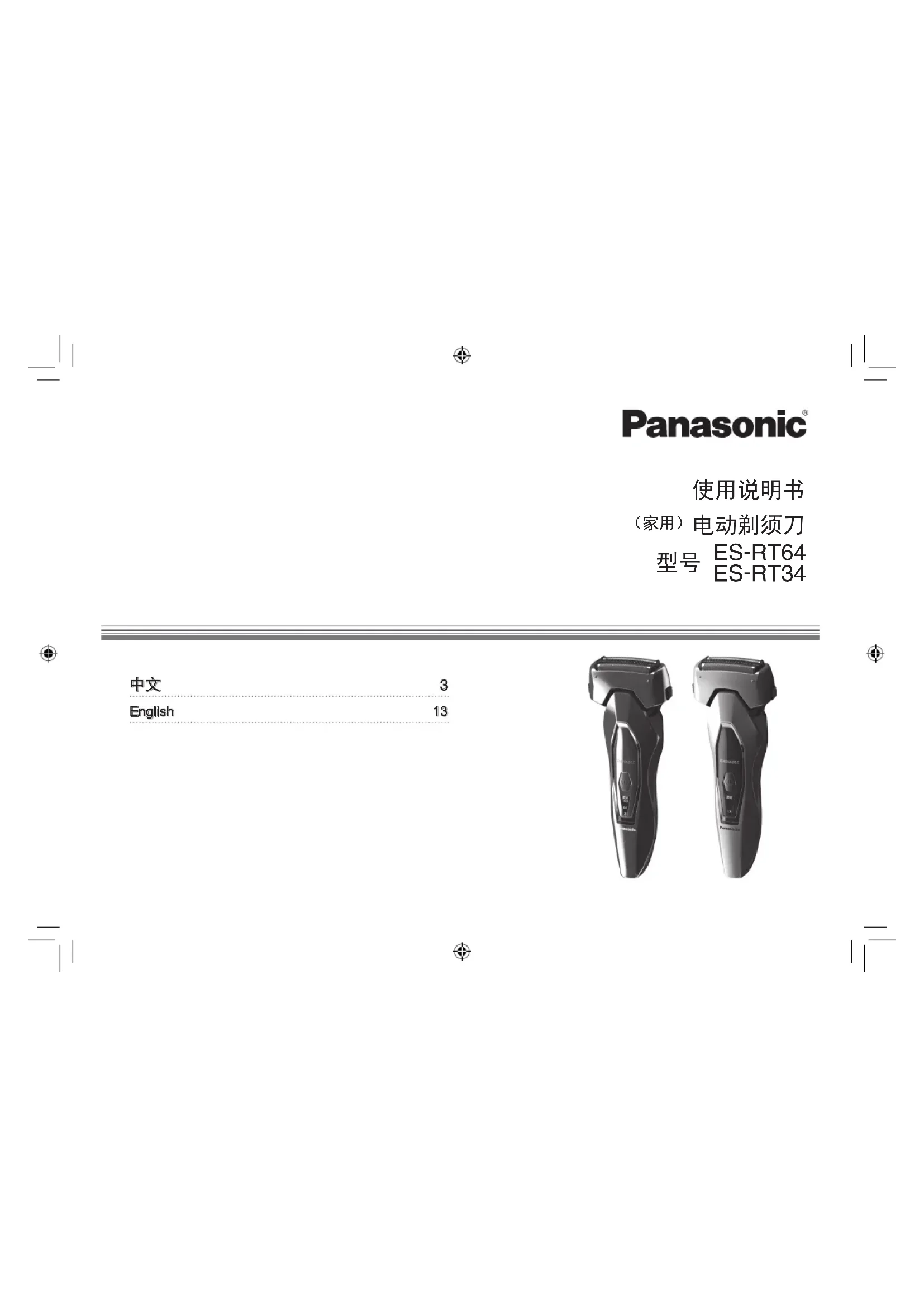

| Caractéristiques techniques | Rasoir électrique à grille, 3 lames, moteur linéaire, étanchéité IPX7 |
|---|---|
| Utilisation | Utilisation à sec ou sous l'eau, charge rapide, autonomie de 50 minutes |
| Maintenance et réparation | Nettoyage à l'eau, tête de rasage amovible, lames remplaçables |
| Sécurité | Système de verrouillage de sécurité, protection contre les surcharges |
| Informations générales | Garantie de 2 ans, poids léger, design ergonomique |
FOIRE AUX QUESTIONS - ESRT64 PANASONIC
Questions des utilisateurs sur ESRT64 PANASONIC
0 question sur cet appareil. Repondez a celles que vous connaissez ou posez la votre.
Poser une nouvelle question sur cet appareil
Téléchargez la notice de votre Rasoir au format PDF gratuitement ! Retrouvez votre notice ESRT64 - PANASONIC et reprennez votre appareil électronique en main. Sur cette page sont publiés tous les documents nécessaires à l'utilisation de votre appareil ESRT64 de la marque PANASONIC.
MODE D'EMPLOI ESRT64 PANASONIC
Panasonic
使用说明书
(家用)电动剃须刀
型号 ES-RT64 ES-RT34
中文 3
English 13
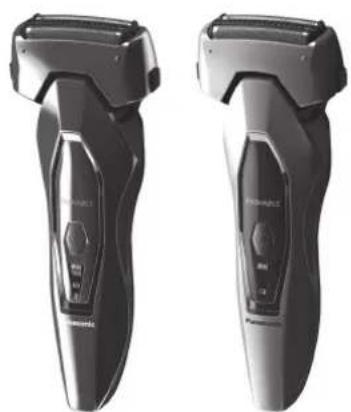

Panasonic
使用说明书
(家用)电动剃须刀
型号 ES-RT64
ES-RT34
目录
安全注意事项 4 清洁剃须刀
使用须知 6 故障排除 100
部件名称 6 电池寿命 111
使用保护盖 7 内置式充电电池的取出方式 111
给剃须刀充电 7 规格 122
剃须. 8
感谢您购买这款 Panasonic产品。
在使用本产品前,请仔细阅读本说明书并妥善保管,以备将来参考。
安全注意事项
为减少故障、触电、受伤、火灾、死亡以及设备或财产损坏的危险,请务必遵守以下安全注意事项。
标志说明
以下标志用于对因无视标志说明和使用不当而导致的危险、伤害和财产损失的程度进行分类和描述。
表示将会导致重伤或死亡的潜在危险。
表示可能会导致重伤或死亡的潜在危险。
表示可能会导致轻伤的危险。
以下标志用于对需要遵循的说明的种类进行分类和描述。

此标志用于提醒用户注意禁止采取的操作步骤。

此标志用于提醒用户注意为了安全操作本产品而必须遵循的操作步骤。
危险

本产品含有内置充电电池。请勿将其投入火中或加热。请勿在高温条件下充电、使用或放置。
否则可能导致过热、点燃或爆炸。
警告

进行清洁时,请务必从家用电源插座上拔出适配器。
否则可能导致触电或受伤。

请务必使用 100 - 240V 电压。
请充分插入适配器或电源线插头。
否则可能导致触电、受伤或火灾。

请定期清洁电源插头和电源线插头,防止灰尘积聚。
否则可能因潮湿造成绝缘故障,从而引发火灾。
如果发生异常和故障,请立即停止使用并拔下适配器。
- 在这种情况下使用本产品可能会导致触电、受伤或火灾。
<异常或故障情况>
·本体、适配器或电源线变形或异常变热。
·本体、适配器电源线发出烧焦的气味。
。本体、适配器或电源线的使用或充电过程中发出异常声音。
- 请立即咨询购买的销售店或联系 Panasonic授权的维修中心进行维修。

本产品不宜供肢体、感官或精神上有残疾者、或缺乏经验和知识者(包括聋童使用使用须必须有监护者从旁监督并对本产品的使用加以指导,且对使用者的安全能承担责任。
否则可能导致意外的发生或受伤。

电源线不能更换,如果电源线损坏,此电源适配器应废弃。
否则可能导致意外的发生或受伤。
警告

请妥善处理本产品的包装袋,使其远离婴幼儿。否则可能导致儿童窒息等意外发生。

请勿用湿手将适配器连接到家用电源插座中,或从家用电源插座中拔出适配器。否则可能发生触电或由于短路引发火灾。

请勿将电源适配器浸入水中或用水清洗。否则可能发生触电或由于短路引发火灾

切勿在浴室或淋浴房使用电源适配器。否则可能发生触电或由于短路引发火灾

请勿使用除附带的电源适配器以外的其它设备。此外,请勿使用附带的电源适配器对其它产品充电。否则可能发生触电或由于短路导致灼伤或火灾

请勿自行改装或维修。

否则可能导致触电、受伤或火灾。请咨询购买的销售店或联系 Panasonic授权的维修中心进行维修(如更换电池)。

请勿存放在儿童和婴幼儿的接触范围之内。请勿让儿童和婴幼儿使用。
否则可能会因其意外吞入内刀头、清洁刷等部件而引发事故和伤害。

当电源适配器损坏时,或者插头没有在家用电源插座上插紧时,切勿使用本产品。否则可能发生触电或由于短路引发火灾。

请勿损坏或改装、或用力弯曲、拉拔或扭曲电源线。另外,请勿在电源线上面放置重物或挤压电源线。否则可能发生触电或由于短路引发火灾。

使用时,请勿超过家用电源插座或接线的额定值。如果在一个家用电源插座上连接过多插头而使其超过额定值,可能会因过热而引发火灾。

除废弃本产品时以外,切勿进行拆解。否则可能导致触电、受伤或火灾。

利用交流电时,切勿进行泡沫剃须或用水清洁剃须刀。否则可能发生触电或由于短路引发火灾。
注意

不充电时,请从家用电源插座上断开适配器。否则可能因绝缘性能下降而导致漏电,从而引发触电或火灾。

使用前请确认外刀网没有破损或变形。否则可能导致皮肤受伤。

外出携带或保管时,请装上保护盖。否则可能导致皮肤受伤或外刀网寿命的缩短

拔出适配器或电源线插头时,应握住适配器或电源线插头而不要仅握住电源线。否则可能导致电源线断线,发生烫伤、触电,或由于短路而导致火灾。

请勿让针或异物附着到适配器、电源线插头及本体电源线插孔上。否则可能导致触电或因短路引发火灾。

请勿在皮肤或嘴唇上过度按压外刀网。当脸部长有小疙瘩或皮肤受伤的情况下,请避免将外刀网直接接触该处。否则可能导致皮肤受伤。

请勿过度用力按压外刀网。使用时,请勿将外刀网直接接触到手指或指甲。否则可能导致皮肤受伤或外刀网寿命的缩短。5

注意

请勿直接用手接触内刀头的刀刃部分(金属部分)否则可能导致受伤。

请勿用于刮剃胡须以外的其它毛发。否则可能导致皮肤受伤或外刀网寿命缩短

请勿和家人或其他人员共用。否则可能导致皮肤感染或发炎

请避免本产品跌落或受到冲击。否则可能导致受伤。

请勿在存放时将电源线紧紧地缠绕在适配器上。否则可能导致电源线断线,并可能发生触电或由于短路引发火灾。

卸除外刃架后请勿使用。否则可能导致皮肤受伤
使用须知
注意
·请确认剃须刀装有两个内刀头。若仅装有一个内刀头的话,此剃须刀可能已损坏。
·请勿使用盐水或热水清洗剃须刀。不要将剃须刀长时间浸泡在水中。可用清水清洗剃须刀。
·请勿使用涂料稀释剂、苯、酒精或其它化学物品清洁本产品。否则可能导致本体发生破裂或褪色。可使用稍稍蘸有自来水或肥皂水的软布清洁外壳。
·本产品使用后应放置在远离水池、浴室或其它暴露于水或湿气下的高湿度区域附近。
·本产品应放置在远离高温或阳光直射的地方。
·存放剃须刀时,请务必装上保护盖中以免刮擦外刀网。
部件名称
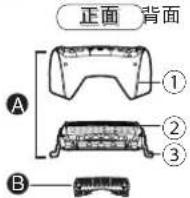


A 外刀部
① 外刃架
② 外刀网
③ 外刀网释放按钮
B 内刀头
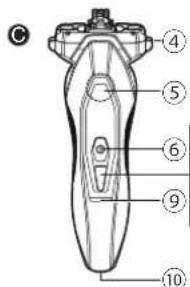
机身
④ 外刃架释放按钮
⑤ 指握位置
⑥ 电源开关[0/1]
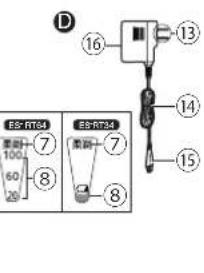
⑦ 柔剃模式指示灯
⑧ 电池电量指示灯
ES-RT34仅充电催促
⑨ 充电状态指示灯
⑩ 电源线插孔
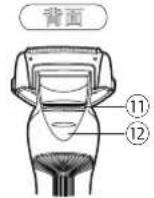
① 修剪刀
② 修剪刀操纵杆
D 电源适配器(RE7-59)
⑬ 电源插头
⑭ 电源线
⑮ 电源线插头
⑥ 适配器
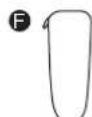
E 保护盖
旅行携带小包
(ES-RT64附带)
清洁刷
使用保护盖
携带剃须刀时,可用保护盖保护外刀网并防止开关误操作。
携带剃须刀时,请务必在安装保护盖前清除胡须碎屑。
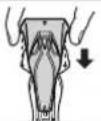
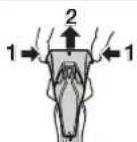
安装保护盖
如图所示安装保护盖。
·确保剃须刀上的所有四个凸起均已稳妥插入。
拆卸保护盖
按下两侧的同时向上拆卸保护盖。
给剃须刀充电
如果感觉剃须刀速度下降,请按下列步骤给剃须刀充电为了获得最佳性能,请在使用前给本产品完全充电。
充电时间约1小时
充足电后大约可提供21次剃须所需的电量(以一次剃须3分钟计算)
(根据胡须浓密程度的不同或温度的不同而有所变化。)
-
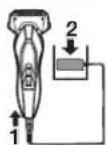
将电源线插头插入本体电源线插孔。
-
将电源插头插入家用电源插座里。
·充电前请关闭剃须刀电源。
- 如电池余有残量充电时间可能会缩短。
ES-RT64
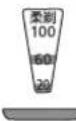
充电状态指示灯(红灯)点亮。随着充电的进行,电池电量指示灯的数字变亮。
充电时
ES-RT34

充电状态指示灯(红灯)点亮。
ES-RT64E
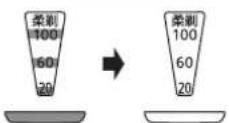
所有电池电量指示灯均会在5秒后熄灭。
-RT34
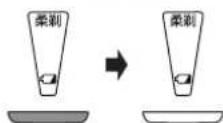
充电状态指示灯熄灭。
-
充电的推荐环境温度为 10 至 35 摄氏度。在温度过低或过高的条件下,电池性能可能会下降或无法充电。 充电故障时充电状态指示灯 (红灯) 将会闪烁。
购买后初次使用或半年以上未使用过,充电状态指示灯(红灯)可能不会立即亮,继续充电几分钟后即正常。 -
完成充电后应断开电源适配器。
·给电池充电1小时以上不会影响电池性能。
剃须
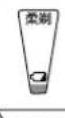
- 按下电源开关,选择所需的剃须模式。每次按下电源开关时,剃须模式按照“速剃模式” “柔剃模式” “停止”变化。
| 剃须模式 | 速剃模式柔 | 剃模式慢停止 | 停止 |
| 推荐用户 | 适合胡须浓密的用户 | 适合胡须较少或肌肤较为敏感的用户 | - |
| 操作方法 | |||
| 亮灯表示 | -无亮灯表示 | 柔剃柔剃模式亮灯 | -柔剃模式熄灭 |
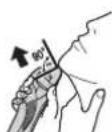
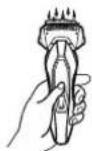
2. 如右图所示握住剃须刀剃须。
轻轻地压向面部开始剃须。用另一只手绷紧脸上皮肤,逆着胡须生长方向来回移动剃须刀。当皮肤适应剃须刀之后您可以稍稍加大压力,但施加压力过大就可能会造成皮肤伤害。
使用交流电剃须
当电池电量低时,您可将剃须刀通过电源适配器连接至家用电源插座,利用交流电进行剃须。
如果剃须刀不能正常使用,请充电约1分钟再使用。
使用修剪刀
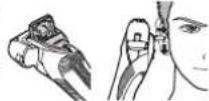
将修剪刀操纵杆往上推,以打开修剪刀。将修剪刀放置与皮肤成直角(90度)的位置,然后从上向下移动进行修剪。
注意
·在使用剃须刀时,请将大拇指放在指握位置。保证您在使用过程中可以随意切换模式或者关闭剃须刀。
·使用剃须刀的推荐环境温度范围为5至35摄氏度。如果使用时温度超出此范围,此剃须刀可能停止动作。
使用时指示灯提示
| 使用时 ES-RT64E | -RT34 |
| ·电池电量的近似值以20 100(%)进行显示。 | - |
| ·操作开关后约5秒种将会熄灭。 ·使用交流电刹须时充电状态指示灯(红灯) | 点亮 |
电池电量不足时
ES-RT64B
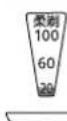
·操作剃须刀时“20”闪烁。
-RT34
- 操作剃须刀时电池电量指示灯闪烁。
·电量显示“20”后您还可以使用剃须刀2到3次。据使用时间长短的不同使用次数也会有所不同。)
电池电量指示灯闪烁后您可以使用剃须刀2到次。(根据使用时间长短的不同使用次数也会有所不同。)
·使用交流电剃须时充电状态指示灯(红灯)点亮。
清洁剃须刀
1 把电源线插头从剃须刀拔出。
2在外刀网上涂抹少量洗手液和水。
3 按下电源开关。
410至20秒后关闭剃须刀。
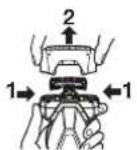
5取出外刀部并按下电源开关启动剃须刀。
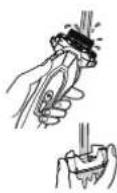
6 用流动的水清洗剃须刀和外刀部。
7 用干布拭去水珠。
8 将外刀部和剃须刀放置于通风处直至吹干。
9 将外刀部安装至剃须刀上。
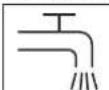
左侧符号表示适合用在打开的水龙头下进行清洗。
警告:用水清洗之前请将剃须刃与电源线分离。
使用清洁刷清洁
使用清洁刷长毛端清洁
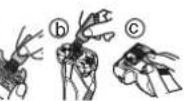
使用清洁刷长毛端清洁外刀网
(a),剃须刀机身 ⑥ 和修剪刀(C)。
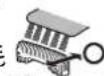
使用清洁刷短毛端清洁
使用清洁刷短毛端沿右图所示(A)的移动方向移动,清洁内刀头。
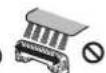
·请勿沿(B)方向移动清洁刷短毛端,因为这样将损坏内刀头而影响刀片的锋利度。
·请勿使用清洁刷短毛端清洁外刀网。
(A)
(B)
更换外刀网和内刀头
中
外刀网每年一次
内刀头 每两年一次
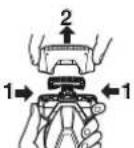
取出外刀部
按下外刃架释放按钮并向上提起取出外刀部。
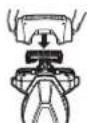
安装外刀部
如图所示,把外刀部稳固地安装到剃须刀直至其到位。
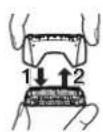
更换外刀网
- 按下外刀网释放按钮拉出外刀网。
2.对齐外刀网 )标识,然后稳固地安装在一起。
·外刀网不能反向安装。
·安装到剃须刀时,请确保外刀网插入到外刃架内。
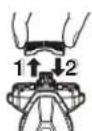
更换内刀头
1.取下内刀头,一次取一个。
- 不要触摸内刀头的边缘(金属部分)。以防止您的手受伤。
2. 安装内刀头时,一次插入一个内刀头,直至固定位置为止。
10
更换部件
更换部件在经销商或Panasonic授权的维修中心有售。
| ES-RT64 ES-RT34更换部件 | 外刀网 WES9087 |
| 内刀头 WES9068 |
故障排除
| 故障纠正措施纠正措施 | |
| 胡渣乱飞。 | 每次剃须后及时清洁。 |
| 用清洁刷清洁外刀部。 | |
| 外刀网发烫。 | 外刀网损坏或变形,请及时更换(参阅第10页)。 |
| 外刀网淋湿。 | 因温度原因刀头可能无法快速干燥。 |
| 取下外刀部可更快吹干。 | |
| 刀头有异味。 | 每次剃须后及时清洁。 |
| 剃须性能变差。 | 每次剃须后及时清洁。 |
| 更换外刀网或内刀头。 | |
| 外刀网:每年更换1次 内刀头:每两年更换1次 | |
| 剃须刀声音大。 | 正确安装外刀网。 |
| 无法关闭剃须刀。 | 使用速剃模式后连续按两下开关后可关闭剃须刀。 |
| 故障纠正措施 | 纠正措施 |
| 本产品不能进行充电。 | 推荐充电环境温度为10至35度。当室温超过或低于推荐充电环境温度时,有可能会发生本体充电时间变长或无法充电的情况。 |
| 充电后的使用时间短。 | 每次充电后的使用次数减少,到达电池的使用寿命。 |
| 本产品停止运转。 | 推荐使用环境温度为5至35摄氏度。当室温超过或低于推荐使用环境温度时,有可能会发生本体不运行的情况。到达电池的使用寿命。 |
电池寿命
如果3周充电一次左右,电池寿命约3年。本剃须刀所含电池不得由消费者自行更换。请委托Panasonic授权的维修中心进行更换。
内置式充电电池的取出方式
摄氏本产品内藏有充电电池,在消费者决定废弃本产品前,请务必将电池从本产品中取出。如有官方指定的电池处理场所,请务必在指定处对旧电池进行统一处理。下图仅在废弃产品时才可使用图示方法,切勿使用此方法进行维修。如果自行拆解本产品,产品可能将不再防水或引起功能故障。取出电池时,应切断电源。
鼓励消费者在决定废弃本产品前,事先征求经销商或Panasonic认定维修店的意见,尽量延长本产品的使用寿命。
·当消费者决定废弃本产品又不想自行分解本产品取出电池时,鼓励消费者将本产品送往Panasonic认定维修中心,由维修中心对电池进行分解和回收。
·电池务必废弃于政府规定的地方或回收处理单位。
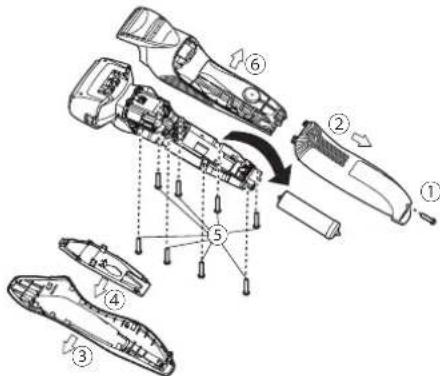
·按下图所示的 ① ⑥ 的顺序拆开本产品,卸下电池。
·分解过程中切勿将电池短路。
规格
| 产品名称 电动剃须刀 | ||
| 产品型号 | ES-RT64, ES-RT34 | |
| 电源适配器额定输入 | 100-240 V~50-60 Hz180 mA | |
| 电源适配器额定输出 | 5.4 V=4.2 A | |
| 充电时间 约1小时 | ||
| 原产地 中国 | ||
| 生产日期 请见商品上刻印 | ||
| 执行标准 | 中国国家标准 | GB4706.1附录GB4706.9 |
| 企业标准 | Q/SXWBMJ 6 | |
本产品仅适合家庭使用。
Panasonic
Operating Instructions
(Household) AC/Rechargeable Shaver
Model No. ES-RT64
ES-RT34
Contents
Safety precautions. 14 Cleaning the shaver. 22
Intended use 17 Troubleshooting 24
Parts identification. 18 Battery life.. 25
Using the protective cap. 18 Removing the built-in rechargeable
Charging the shaver.. 19 battery. 25
Using the shaver.. 20 Specifications 26
Thank you for purchasing this Panasonic product.
Before operating this unit, please read these instructions completely and save them for future use.
Safety precautions
To reduce the risk of injury, loss of life, electric shock, fire, malfunction, and damage to equipment or property, always observe the following safety precautions.
Explanation of symbols
The following symbols are used to classify and describe the level of hazard, injury, and property damage caused when the denotation is disregarded and improper use is performed.
| DANGER | Denotes a potential hazard that will result in serious injury or death. |
| WARNING | Denotes a potential hazard that could result in serious injury or death. |
| CAUTION | Denotes a hazard that could result in minor injury. |
The following symbols are used to classify and describe the type of instructions to be observed.

This symbol is used to alert users to a specific operating procedure that must not be performed.

This symbol is used to alert users to a specific operating procedure that must be followed in order to operate the unit safely.

DANGER
This shaver has a built-in rechargeable battery. Do not throw into fire, apply heat, or charge, use, or leave in a high temperature environment.
- Doing so may cause overheating, ignition, or explosion.

WARNING

Always unplug the adaptor from a household outlet when cleaning.
-Failure to do so may cause electric shock or injury.
Always ensure the appliance is operated on an electric power source matched to the rated voltage indicated on the AC adaptor.
Fully insert the adaptor or appliance plug.
-Failure to do so may cause fire, electric shock, or burn.


WARNING

Regularly clean the power plug and the appliance plug to prevent dust from accumulating.
- Failure to do so may cause fire due to insulation failure caused by humidity.
Disconnect the adaptor and wipe with a dry cloth.
Immediately stop using and remove the adaptor if there is an abnormality or failure.
-Using it in such conditions may cause fire, electric shock, or injury.
The main unit, adaptor, or cord is deformed or abnormally hot.
The main unit, adaptor, or cord smells of burning.
- There is abnormal sound during use or charging of the main unit, adaptor, or cord.
- Immediately contact the store where you purchased the unit or contact a service center authorized by Panasonic for repair.
This appliance is not intended for use by persons (including children) with reduced physical, sensory or mental capabilities, or lack of experience and knowledge, unless

they have been given supervision or instruction concerning use of the appliance by a person responsible for their safety. Children should be supervised to ensure that they do not play with the appliance.
-Failure to do so may cause an accident or injury.

The supply cord cannot be replaced. If the cord is damaged, the AC adaptor should be scrapped.
- Failure to do so may cause an accident or injury.

Properly dispose the package of the appliance, keep the package away from infants.
- Failure to do so may cause suffocation of infants from happening.

Do not connect or disconnect the adaptor to a household outlet with a wet hand.
- Doing so may cause electric shock or injury.

Do not immerse the AC adaptor in water or wash with water.
- Doing so may cause electric shock or fire due to a short circuit.

Never use the AC adaptor in the bathroom or shower room.
- Doing so may cause electric shock or fire due to a short circuit.

WARNING

Do not use anything other than the supplied AC adaptor. Also, do not charge any other product with the supplied AC adaptor.
- Doing so may cause burn or fire due to a short circuit.
Do not modify or repair.

- Doing so may cause fire, electric shock, or injury. Contact the store where you purchased the unit or contact a service center authorized by Panasonic for repair (battery change, etc.).
Do not store within the reach of children or infants. Do not let them use it.
- Putting the inner blades and/or the cleaning brush in the mouth may cause accidents and injury.

Never use the appliance if the AC adaptor is damaged or if the power plug fits loosely in a household outlet.
-Doing so may cause electric shock or fire due to a short circuit.
Do not damage, break, modify, or forcibly bend, pull, or twist the cord.

Also, do not place anything heavy on or pinch the cord.
-Doing so may cause electric shock or fire due to a short circuit.
Do not use in a way exceeding the rating of the household outlet or the wiring.
- Exceeding the rating by connecting too many plugs to one household outlet may cause fire due to overheating.

over disassemble except when disposing of a product.
- Doing so may cause fire, electric shock, or injury.
Do not shave with soap or clean it with water, when operating with the AC adaptor.
-Doing so may cause electric shock or fire due to a short circuit.

AUTION
Disconnect the adaptor from the household outlet when not using.
- Failure to do so may cause electric shock or fire due to electrical leakage resulting from insulation deterioration.
Check the system outer foil for cracks or any deformations before use.
7 - Cracks or deformations of the system outer foils may result in injury to the skin.
Be sure to place the shaver in its protective cap when carrying around or storing.
- Failure to do so may cause injury to skin or reduce the life of the system outer foil.

CAUTION

Disconnect the adaptor or the appliance plug by holding onto the adaptor or the appliance plug instead of the cord.
- Disconnecting by holding onto the cord may cause electric shock or injury.

Do not allow pins or trash to adhere to the power plug or the appliance plug.
-Doing so may cause electric shock or fire due to a short circuit.

Do not use excessive pressure to apply the system outer foil to your lip or other part of your face. Do not apply the system outer foil directly to blemishes or injured skin.
- Doing so may cause injury to the skin.

Do not forcefully press the blades. Also, do not touch the system outer foil with fingers or nails when in use.
- Doing so may cause injury to skin or reduce the life of the system outer foil.

Do not touch the blade section (metallic section) of the inner blade.
- Doing so may cause injury to your hands.

Do not use this product for hair on head or any other part of the body.
- Doing so may cause injury to skin or reduce the life of the system outer foil.

Do not share your shaver with your family or other people.
- Doing so may result in infection or inflammation.

Do not drop or subject to shock. -Doing so may cause injury.

Do not wrap the cord around the adaptor when storing.
- Doing so may cause the wire in the cord to break with the load, and may cause fire due to a short circuit.

Do not use the shaver with the foil frame removed.
- Doing so may cause injury to skin
Intended use
Notes
- Keep both the inner blades inserted. If only one of the inner blades is inserted, the shaver may be damaged.
- If you clean the shaver with water, do not use salt water or hot water. Do not soak the shaver in water for a long period of time.
- Clean the housing only with a soft cloth slightly dampened with tap water or soapy tap water. Do not use thinner, benzine, alcohol or other chemicals.
- Store the shaver in a place with low humidity after use.
- Do not store the shaver where it will be exposed to direct sunlight or other heat sources.


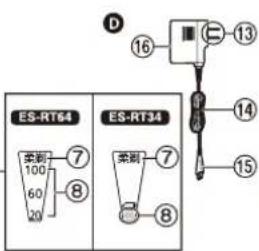
Parts identification
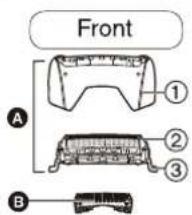
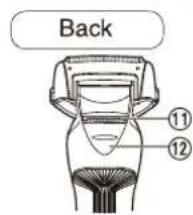
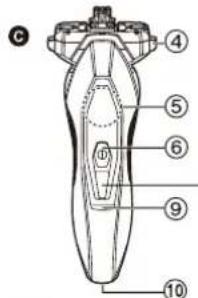
A Outer foil section
① Foil frame
② System outer foil
③ System outer foil release buttons
3Inner blades
Main body
④ Foil frame release buttons
⑤Finger rest
⑥Power switch
⑦ Soft shaving mode lamp
⑧ Battery capacity lamp
Charge status lamp
⑩ Appliance socket
⑪ Trimmer
⑫Trimmer handle
AC adaptor (RE7-59)
⑬ Power plug
④ Cord
⑤ Appliance plug
Adaptor
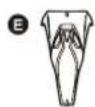
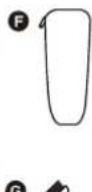
Protective cap
Travel case ES-RT64
Accessory
⑥ Cleaning brush
Using the protective cap
When carrying the shaver, the protective cap may be used to protect the outer foil and prevent switch misoperation. Clean the beard debris before installing the protective cap.
Attaching the protective cap
Attach the protective cap as illustrated.
- Securely attach the protective cap to the main unit.

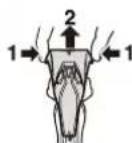
Removing the protective cap
Remove the protective cap by pressing the both sides.
Charging the shaver
- Perform the following steps to charge the shaver if it seems to lose the speed.
- To gain the best performance, please fully charge the appliance before use.
The charging time is approx. 1 hour. A full charge will supply enough power for approx. 21 shaves of 3 minutes each. (This will differ depending on usage.)
Insert the appliance plug into the shaver.
2 Plug in the adaptor into a household outlet.
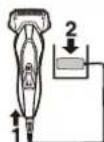
- Turn the shaver off before inserting.
The charging time may decrease depending on the charging capacity.

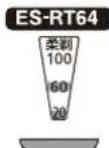
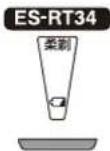
While charging
The charge status lamp (red) glows. The number of the battery capacity lamp will increase as charging progresses.
The charge status lamp (red) glows.
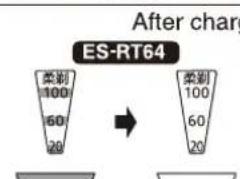
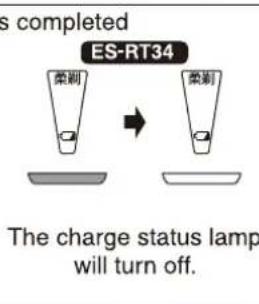
The battery capacity lamp "100" will light up and then turn off after 5 seconds.
temperature for charging is not charge properly or for high temperatures. 1) will blink when there is
-
Recommended ambient temperature for charging is 10 - 35^ . The battery may not charge properly or not at all under extreme low or high temperatures. The charge status lamp (red) will blink when there is a problem with charging.
-
When charging the shaver for the first time or when it has not been in use for more than 6 months, the charge status lamp (red) may not glow. It will eventually glow if kept connected for several minutes.
3 Disconnect the adaptor after charging is completed. -
Charging the battery for more than 1 hour will not affect battery performance.
Using the shaver
Press the power switch to select the desired shaving mode.
Each time you press the power switch, the shaving mode changes from "Fast shaving mode" "Soft shaving mode" "OFF."
| Shaving mode | Fast shaving mode | Soft shaving mode | OFF |
| Description | Suitable for users with thick beard | Suitable for users with thin beard or more sensitive skin | - |
| Operation | |||
| Soft shaving mode lamp | - No lighting indication | 柔剃 Soft shaving mode lamp turns on. | - Soft shaving mode lamp turns off. |
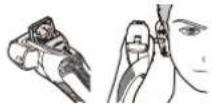
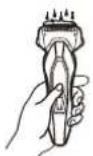
2 Hold the shaver as illustrated and shave.
- Start shaving by applying gentle pressure to your face. Stretch your skin with your free hand and move the shaver back and forth in the direction of your beard. You may gently increase the amount of pressure as your skin becomes accustomed to this shaver. Applying excessive pressure does not provide a closer shave.
Using alternating current for shaving
If you insert the appliance plug to the shaver and power plug in the adaptor into a household outlet, you can use it even if the battery capacity is low.
If the shaver can not be normally used, please use after charging it for about 1 minute.
Using the trimmer
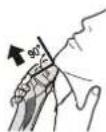
Slide the trimmer handle up to open the trimmer. Place the trimmer at a right angle (90 degree) to your skin and move downwards to trim your sideburn
Notes
-
Place your finger on the finger rest while in use. Keeping your finger placed on the power switch during use may switch the mode or turn the shaver OFF.
-
Do not use shaving creams or face cleansers containing scrubbing compounds as these may cause the outer foil to clog.
- We recommend using the shaver in an ambient temperature range of 5 - 35^ . If used outside this range, the appliance may stop operating.
Reading lamps when using
While using

ES-RT64

ES-RT34
proximate amount of battery charge is played as 20 - 100.
- It will turn off approximately 5 seconds after operating the switch.
The charge status lamp (red) will glow when using the alternating current for shaving.
When the battery capacity is low
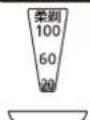
ES-RT64
"20" blinks when operating the shaver.
- You can shave 2 to 3 times after "20" blinks. (This will differ depending on time of usage.)
The charge status lamp (red) will glow when using the alternating current for shaving.
- You can shave 2 to 3 times after the battery capacity blinks. (This will differ depending on time of usage.)
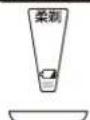
ES-RT34
The battery capacity lamp blinks when operating the shaver.
Cleaning the shaver
- Disconnect the cord from the shaver.
- Apply some hand soap and some water to the system outer foil.
-
Turn the shaver on.
-
Turn off the shaver after 10 to 20 seconds.
- Remove the outer foil section.
- Clean the shaver and the outer foil section with running water.
-
Wipe off any drops of water with a dry cloth.
-
Dry the outer foil section and the shaver completely.
- Attach the outer foil section to the shaver.
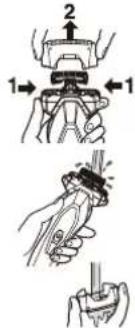
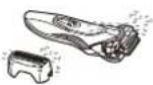

The mark on the left is for a washable shaver and indicates it can be cleaned with water.
Warning
Disconnect the cord from the shaver before cleaning it in water to prevent electric shock.

22
Cleaning with the brush
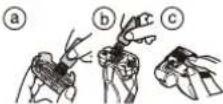
Cleaning with the long brush
Clean the system outer foil (a), the shaver body (b) and the trimmer (c) using the long brush.
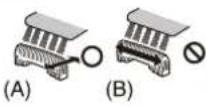
Cleaning with the short brush
Clean the inner blades using the short brush by moving it in direction (A).
- Do not move the short brush in direction (B) as it will damage the inner blades and affect their sharpness.
- Do not use the short brush to clean the outer foils.
Replacing the system outer foil and the inner blades
| system outer foil | once every year |
| inner blades | once every two years |
- Removing the outer foil section
Press the foil frame release buttons and lift the outer foil section upwards.
Attaching the outer foil section Securely attach the outer foil section to the shaver until it clicks.
Replacing the system outer foil
- Press the system outer foil release buttons and pull down the system outer foil.
- Align the front side of the foil frame with the system outer foil mark () and insert them firmly together.
The system outer foil cannot be reversely attached.
Always insert the system outer foil to the foil frame when attaching to the shaver.
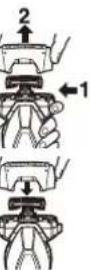
Replacing the inner blades
- Remove the inner blades one at a time.
- Do not touch the edges (metal parts) of the inner blades to prevent injury to your hand.
2.Insert the inner blades one at a time until they click.
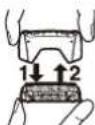
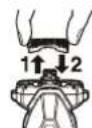

4s16u3
23

Replacement parts
Replacement parts are available at your dealer or Service Center.
| Replacement parts for ES-RT64/ES-RT34 | System outer foil | WES9087 |
| Inner blades | WES9068 |
Troubleshooting
| Problem | Action |
| Trimmed hairs fly all over. | This can be improved by cleaning every time after shaving. |
| Clean the inner blades with the brush. | |
| System outer foil gets hot. | Replace the system outer foil if it is damaged or deformed. (See page 23.) |
| The blades do not dry. | The blades may not dry quickly due to temperature conditions. |
| The blades can be dried more easily by removing for drying. | |
| The odor is getting stronger. | This can be improved by cleaning every time after shaving. |
Problem
You do not get as close a shave as before.
Makes a loud sound.
The power will not switch to OFF.
The shaver cannot be charged.
Action
This can be improved by cleaning every time after shaving.
Replace the system outer foil and/or inner blades. Expected life of system outer foil and inner blades
System outer foil:
Approximately 1 year Inner blades:
Approximately 2 years
Confirm that the blades are properly attached.
Press the power switch twice while using in the fast shaving mode.
The recommended temperature for charging is 10 - 35^. If charged at a temperature other than the recommended temperature, the shaver may take longer to charge or may not charge at all.
| Problem | Action |
| Operating time is short even after charging. | When the number of operations per charge starts to decrease, the battery is nearing the end of its life. |
| Shaver stopped functioning. | Recommended ambient temperature for operation is 5 - 35 °C. The shaver may stop functioning when out of recommended ambient temperature range. |
| The battery has reached the end of its life. |
If the problems still cannot be solved, contact the store where you purchased the unit or a service center authorised by Panasonic for repair.
Battery life
The life of the battery is 3 years if charged approximately once every three weeks. The battery in this shaver is not intended to be replaced by consumers. Have the battery replaced by a service center authorized by Panasonic for repair.
Removing the built-in rechargeable battery
Remove the built-in rechargeable battery before disposing the appliance.
Please make sure that the battery is disposed of at an officially designated location if there is one.
This figure must only be used when disposing the appliance, and must not be used to repair it. If you dismantle the shaver yourself, it will no longer be waterproof, which may cause it to malfunction.
- Remove the shaver from the AC adaptor.
- Press the power switch to turn on the power and then keep the power on until the battery is completely discharged.
- Perform steps ① to ⑥ and lift the battery, and then remove it.
- Please take care not to short-circuit the battery.
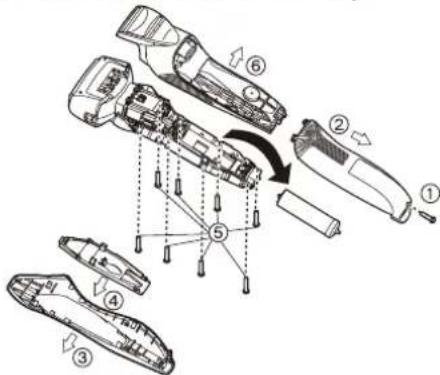
English
25
For environmental protection and recycling of materials This shaver contains a Lithium-ion battery. Please make sure that the battery is disposed of at an officially assigned location, if there is one in your country.
Specifications
| Product name | Rechargeable Shaver | |
| Product model | ES-RT64, ES-RT34 | |
| Rated input | 100-240 V~ 50-60 Hz 180 mA | |
| Rated output | 5.4 V---- 1.2 A | |
| Charging time | Approx. 1 hour | |
| Place of origin | China | |
| Date of production | See engraving on the commodity. | |
| Execution standard | Chinese standard | GB4706.1 Annex B GB4706.9 |
| Company standard | Q/SXWBMJ 6 | |
This product is intended for household use only.


26
MEMO

MEMO
Panasonic
保修证
保修条款
有关保修期内Panasonic商品的保修(无偿修理),从购入之日起开始实施。
1.保修期内的商品只可在Panasonic认定维修店进行保修:保修时,请出示本保修证及购机发票。
以下两点需特别注意:
a.本保债证遗失后不再补发,请妥善保管。
b.本保释证仅限于中华人民共和国国内有效(香港、澳门、台湾三地区暂不可使用)。2.自购入之日起在以下期间内,在正常使用中发生故障的情况下进行保修。
·内刀头、外刀网、辅助装置、附件·····有偿提供
整机(上述部件除外)·2年内无偿
3.属下列情况之一者,即使在保修期内,也不能以保修对待,但是可以实行收费修理:
a. 未按商品使用说明书要求使用、维护、保管而造成损坏的;
b.因不正确操作、电源不正常、破损(如:摔落等)而造成损坏的;
c.不经Panasonic认定维修店维修人员拆动造成损坏的;
d.不能出示本保修证及有效购机发票的;
e. 保修证上记录的信息与商品实物标识不符或者涂改的;
f.因不可抗力因素(如雷电、地震、火灾、水灾等)造成
4.本保修条款只适用于消费者个人为生活消费需要而购买
(重要内容)
中动到须卫
| 商品名称: | 电动剃须刀 | 产地: | 中国 |
| 商品型号: | ES-RT64, ES-RT34 | 制造编号: |
[保修回执] 以下回执是保修的重要依据,请勿自行撕下
商品型号:ES-RT64, ES-RT34 制造编号: 保修结算4
商品型号:ES-BT64、ES-BT34制造编号:
S木弟形 COBD = S COD + S BDO = S COD + S_ BDO
商品型号:ES-RT64,ES-RT34 制造编号:
商品型号: ES-RT64,ES-RT34 制造编号:
商品型号:ES-RT64,ES-RT34 制造编号:
m - 1 0 ;
![PANASONIC ESRT64 - [保修回执] 以下回执是保修的重要依据,请勿自行撕下 - 1](/content/2026/02/406347/images/fa69edff9beb11138c856e3e55b4e91cd3ed524baa780628ece5a7cc3e5b963b.jpg)
![PANASONIC ESRT64 - [保修回执] 以下回执是保修的重要依据,请勿自行撕下 - 2](/content/2026/02/406347/images/76f90ccbbbd1eb8c7bae0906e74761305cbac6acd8ff860e9dcd2621373d7ccb.jpg)
但习制与(国中)器审土
| :鍵日號譜 | :鍵日號譜 | ||
| :鍵日號譜 | :鍵日號譜 | ||
| :鍵師 | :鍵師 | ||
| :日剝業 | :鍵師 | ||
| :鍵日號譜 | :鍵日號譜 | ||
| :鍵師 | :鍵師 | ||
| :鍵師 | :鍵師 | ||
| :鍵師 | :鍵師 | ||
| :鍵師 | :鍵師 | ||
| :鍵師 | :鍵師 | ||
| :鍵師 | :鍵師 | ||
| :鍵師 | :鍵師 | ||
| :鍵師 | :鍵師 | ||
| :鍵師 | |||
| :鍵師 | |||
| :鍵師 | |||
| :鍵師 | |||
| :鍵師 | |||
| :鍵師 | |||
| :鍵師 | |||
| :鍵師 | |||
| :鍵師 | |||
| :鍵師 | |||
| :鍵師 | |||
| :鍵師 | |||
| :鍵師 | |||
| :鍵師 | |||
| :鍵師 | |||
| :鍵師 | |||
| :鍵師 | |||
| :鍵師 | |||
| :鍵師 | |||
| :鍵師 | |||
| :鍵師 | |||
| :鍵師 | :鍵師 | ||
| :鍵師 | :鍵師 | ||
| :鍵師 | :鍵師 | ||
| :鍵師 | :鍵師 | ||
| :鍵師 | :鍵師 | ||
| :鍵師 | :鍵師 | ||
| :鍵師 | :鍵師 | ||
| :鍵師 | |||
![PANASONIC ESRT64 - [保修回执] 以下回执是保修的重要依据,请勿自行撕下 - 3](/content/2026/02/406347/images/40a211b6ddf164417a1c3d6ac981987e0d70c408f707d4b6bc25998cda988657.jpg)
MEMO
松下万宝美健生活电器(广州)有限公司(PWAPBLGZ)
Panasonic Wanbao Appliances Beauty and Living (Guangzhou) Co., Ltd.
工厂地址: 广州市番禺区钟村万宝基地万宝北街33号
(Address): 33, Wanbao North Street, Wanbao Industry Zone, Zhongcun,
Panyu District, Guangzhou City, Guangdong Province, China
电话(Tel): (020)84770333
传真(Fax): (020)84773033
邮政编码(PostCode):511495
原产地:中国
Panasonic 客户咨询服务中心:400-810-0781
Panasonic官方网站:http://panasonic.cn
中国印刷
Printed in China
ES9210RT341405 Y0513-0
发行:2013年5月
